GFMC330IX - Oven Glem Gas - Free user manual and instructions
Find the device manual for free GFMC330IX Glem Gas in PDF.


| Brand | Glem Gas |
| Model | GFMC330IX |
| Category | Built-in oven |
| Cooking type | Fan heat, grill, maxi grill, maxi grill fan, bottom heat, defrost |
| Dimensions (W x H x D) | 595 x 595 x 550 mm |
| Weight | Approximately 32 kg |
| Power supply | 220-240 V / 50-60 Hz |
| Power | Approximately 2700 W |
| Controls | Temperature selector, function selector, electronic timer |
| Electronic programmer | Alarm, cooking duration, end of cooking, duration and end of cooking |
| Programmer functions | Timer, timed cooking, delayed cooking |
| Interior lighting | Yes, on during all functions |
| Door | Closed during grill use |
| Material | Stainless steel |
| Cleaning | Clean with a damp cloth and mild detergent |
| Included accessories | Wire rack, drip tray, rotisserie spit (depending on model) |
| Safety | Grill function with door closed, programmed automatic shut-off |
| Repairability | Spare parts available through after-sales service |
Frequently Asked Questions - GFMC330IX Glem Gas
User questions about GFMC330IX Glem Gas
0 question about this device. Answer the ones you know or ask your own.
Ask a new question about this device
Download the instructions for your Oven in PDF format for free! Find your manual GFMC330IX - Glem Gas and take your electronic device back in hand. On this page are published all the documents necessary for the use of your device. GFMC330IX by Glem Gas.
USER MANUAL GFMC330IX Glem Gas
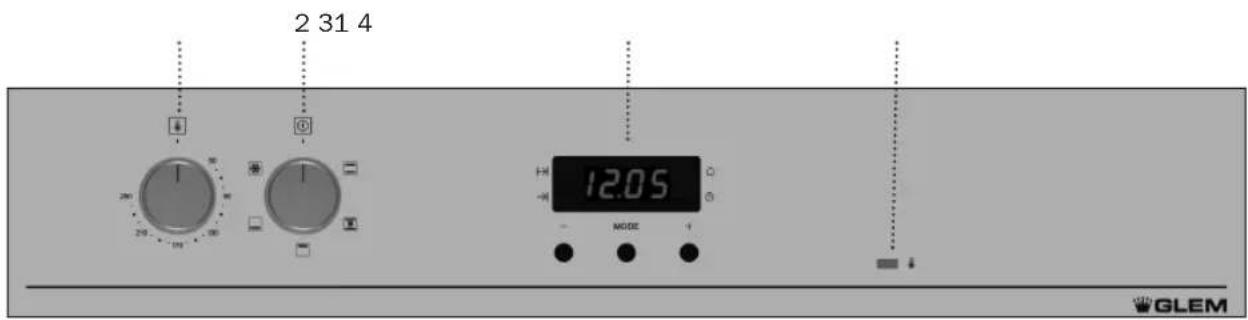
1 Temperature selector.
2 Function selector.
3 Electronic clock.
4 Heating indicator light. Indicates that heat is being passed to the food and it goes out when the set temperature is reached.
Oven Functions
Model GFMC33:
Model GFMC53:
Switch off oven

Conventional
It is used for sponges and cakes where the heat received must be uniform to achieve a spongy texture.

Conventional with fan
Appropriate for roasts and cakes. The fan spreads the heat uniformly inside the oven.

For preparing dishes with superficial roasting. It allows the outer layer to be browned without affecting the inside of the food. Ideal for flat food, such as steaks, ribs, fish, toast.
The grill can also be used in combination with the turnspit for meat items of greater volume, such as whole chickens or joints of beef or lamb.
Caution
While using the Grill, MaxiGrill or MaxiGrill with fan, the door must be kept closed.

Lower element
Heats only from beneath. Suitable for heating dishes and raising pastry and similar.

Defrosting
This cooking mode is suitable for gently defrosting of food. In special food to be consumed unwarmed, e.g.: cream, custard, pastry, tarts, cakes, fruit, etc.
NB
The light remains on through all cooking functions.
Use of the Oven
Setting the time on the clock
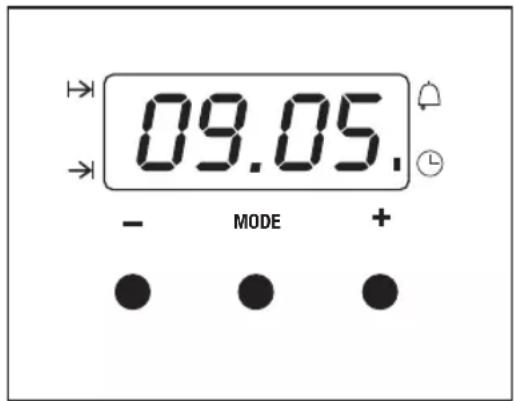
On connecting the oven, you will notice that 12:00 appears on the clock and that a light begins to flash above the symbol. Pressing the "+" and "-" buttons the correct time can be set on the clock, which is subsequently stored and the flashing light goes out.
Manual use
After setting the correct time, the oven is ready for use. Select a temperature and a cooking function.
To switch off the oven, set the controls to the position
Functions of the Electronic Clock Programmer
Warning function: This function generates a warning tone at a specified time.
Cooking time: This function allows to programme the oven to cook for a specified time, after which it will switch itself off.
End of cooking time: This function allows to establish the exact hour, after which the oven will switch itself off.
Duration and automatic stop: This function is used to control the duration and the time at which the oven will turn itself off. This function allows the oven to start and stop automatically.
Warning function
1 Press the MODE button until the signal above the symbol begins to flash.
2 Choose the time when you want the alarm to sound, pressing the ^ 十 + ^ 一 or - buttons.
3 Subsequently, the light will remain on indicating that the alarm is programmed.
4 At the end of the programmed time, an alarm will sound and the light will begin to flash.
5 Press any button to turn off the alarm and the screen shows the current time again.
Programming the cooking time
1 Press the MODE button until the indicator above the symbol begins to flash.
2 Select the length of time, pressing the "+" or "-" buttons.
3 Subsequently, the indicator that was flashing will light, indicating that the oven will switch itself off automatically.
4 The clock will then show the current time.
5 Select a temperature and cooking function.
6 When the set time has elapsed, the oven will disconnect, an alarm will sound and the indicator will begin to flash.
7 Press any button to switch off the alarm, reconnecting the oven.
8 Set the controls in the position switch off the oven.
Programming the end of cooking time for the oven
1 Press the MODE button until the indicator above the symbol begins to flash.
2 Select the time that cooking is to finish, pressing the ^ 十 + ^ 一 or - buttons.
3 Subsequently, the indicator that was flashing is lit, indicating that the oven will switch itself off automatically.
4 The clock will then show the current time.
5 Select a temperature and a cooking function.
6 When the programmed time is reached, the oven will disconnect, an alarm will sound and the indicator will begin to flash.
7 Press any button to switch off the alarm and the oven will reconnect.
8 Set the controls to the position to switch off the oven.
This function may be used even though you are already cooking in your oven. To do so, follow the instructions given except N^5 .
Programming the duration and automatic stop
1 Press the MODE button until the indicator above the symbol begins to flash.
2 Select the length of cooking time pressing the ^ 十 + ^ 一 or - buttons.
3 Subsequently, the indicator that was flashing will remain lit.
4 Press the mode button until the indicator above the symbol begins to flash.
5 Select the time that cooking should finish pressing the +^ or - buttons.
6 Subsequently, the indicator that was flashing will remain lit.
7 Select a function and cooking temperature.
8 The oven will remain disconnected with the indicators above the and symbols lit. Your oven is programmed.
9 When the time to begin cooking is reached, the oven will switch itself on and will continue cooking during the programmed time.
10 When the programmed finishing time is reached, the oven will disconnect, an alarm will sound and the light above the symbol will begin to flash.
11 Press any button to switch off the alarm and the oven will reconnect.
12 Set the controls to the position to switch of the oven.
Caution
Pressing the MODE button the display on the screen shows any function programmed. It can be changed by pressing the +^ or - buttons. On selecting the desired function, the indicator above the corresponding signal will light.
In the event of a power cut, all the programming of the electronic clock will be erased. The correct time has to be reset and the watch reprogrammed.
Bandeau de commande