
Zenpower Pro PD ABTU016 - Power bank ASUS - Free user manual and instructions
Find the device manual for free Zenpower Pro PD ABTU016 ASUS in PDF.



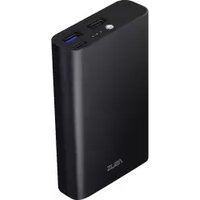
| Product type | Portable battery |
| Brand | ASUS |
| Model | Zenpower Pro PD ABTU016 |
| Dimensions | 110 mm x 78.4 mm x 22 mm |
| Weight | 315 ± 5 g |
| Cell capacity | 13600 mAh (14.4 V) |
| Rated power (USB Type-C) | 5V/8200mAh, 9V/4700mAh, 15V/2600mAh, 20V/1900mAh |
| Rated power (USB Type-A) | 5V/7900mAh |
| Input | 5V=3A / 9V~15V=2A / 20V=1.5A (Max) |
| USB Type-C output | 5V=3A / 9V=3A / 15V=3A / 20V=2.25A |
| USB Type-A output | 5V=2.4A |
| Max total output | 45 W |
| Charging time | < 4.5 h (20V=1.5A) / < 6 h (9V=2A) / < 8 h (5V=2A) |
| Operating temperature | 0°C to 35°C (charging) / up to 60°C (storage) |
| Housing material | Aluminum |
| Available colors | Multiple choices |
| Fast charging technologies | USB Power Delivery 3.0 bidirectional |
| Safety | ASUS PowerSafe (protection against overvoltage, overheating, etc.) |
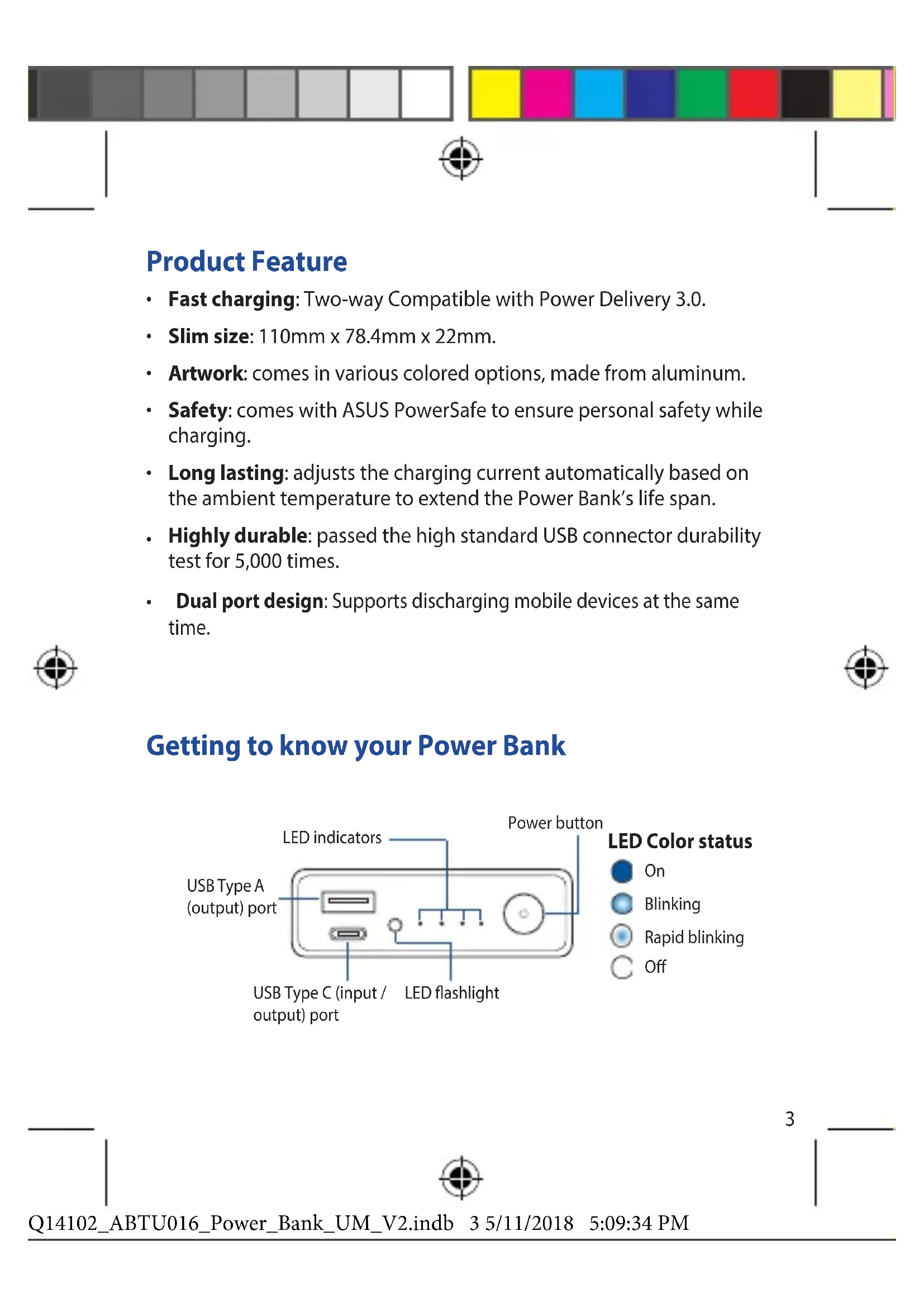
| Additional functions | Integrated LED flashlight, battery level LED indicators |
| Connectors | 1 x USB Type-C, 1 x USB Type-A |
| USB connector lifespan | Tested to 5000 plug/unplug cycles |
| Box contents | Power bank, USB Type-C cable, quick start guide |
| Maintenance | Clean with a soft, dry cloth. Do not immerse in water. |
| Recycling | Call 1-800-822-8837 (United States and Canada) for battery recycling |
Frequently Asked Questions - Zenpower Pro PD ABTU016 ASUS
User questions about Zenpower Pro PD ABTU016 ASUS
0 question about this device. Answer the ones you know or ask your own.
Ask a new question about this device
Download the instructions for your Power bank in PDF format for free! Find your manual Zenpower Pro PD ABTU016 - ASUS and take your electronic device back in hand. On this page are published all the documents necessary for the use of your device. Zenpower Pro PD ABTU016 by ASUS.
USER MANUAL Zenpower Pro PD ABTU016 ASUS
- Fast charging: Two-way Compatible with Power Delivery 3.0.
- Slim size: 110 mm × 78.4 mm × 22 mm .
- Artwork: comes in various colored options, made from aluminum.
- Safety: comes with ASUS PowerSafe to ensure personal safety while charging.
- Long lasting: adjusts the charging current automatically based on the ambient temperature to extend the Power Bank's life span.
- Highly durable: passed the high standard USB connector durability test for 5,000 times.
- Dual port design: Supports discharging mobile devices at the same time.


Getting to know your Power Bank

LED indications
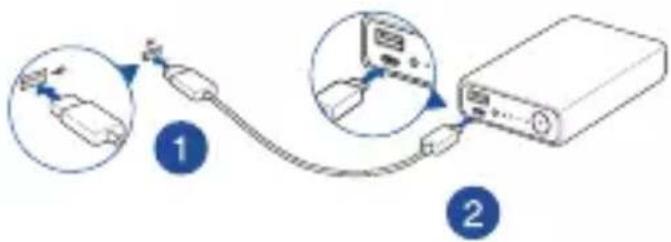
Charging the Power Bank
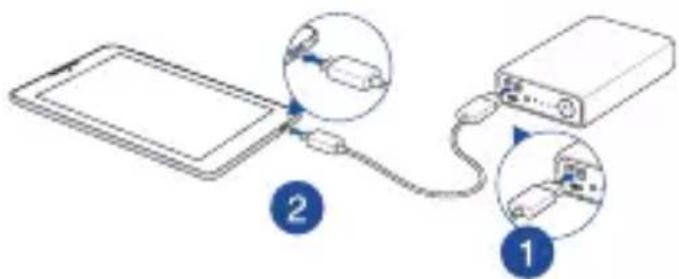
Charging devices using the Power Bank
| Charge status | LED 1 LED 2 LED 3 LED 4 | |||
| 0 - 25% | * | ○ | ○ | ○ |
| 26% - 50% | * | ○ | ○ | |
| 51% - 75% | * | ○ | ||
| 76% - 99% | * | |||
| Finished | ||||
| Error detected** | ||||
| Discharge status | LED 1 LED 2 LED 3 LED 4 | |||
| 86% - 100% | ||||
| 56% - 85% | ||||
| 26% - 55% | ||||
| 6% - 25% | ||||
| < 6% | ||||
| 0% | ||||
| Error detected** | ||||
- When the Power Bank is charged, the LED indicators will blink.
** To stop the Power Bank from blinking when an error is detected, replug the cable from the Power Bank.
NOTES:
Press and hold the power button for 2 seconds to turn on or turn off the LED flashlight.
- When you press the power button of the Power Bank without charging a device on it, the LED indicators light up for 5 seconds to display its power status.
Press the power button to charge your devices.

Specifications
| Cell type | Rechargeable lithium-ion cell |
| Cell capacity | DC 14.4 V / 13600 mAh |
| Rate capacity | Type C: 5V/8200 mAh, 9V/4700 mAh, 15V/2600 mAh, 20V/1900 mAh |
| Type A: 5V/7900 mAh | |
| Charging temperature | 0°C - 35°C |
| Size | 110mm x 78.4mm x 22mm |
| Weight | 315 ± 5g |
| Charging time | < 4.5 hrs with DC 20V=1.5A standard cable |
| < 6 hrs with DC 9V=2A standard cable | |
| < 8 hrs with DC 5V=2A standard cable | |
| Input | 5V=3A / 9V~15V 2A / 20V 1.5A (Max) |
| Type C Output (Compatible with Power Delivery 3.0) | 5V=3A |
| 9V=3A | |
| 15V=3A | |
| 20V=2.25A | |
| Type A Output | 5V=2.4A |
| Output 1+2 | 45W (MAX) |
NOTES:
- Fast charging performance applies to the device which is compatible with USB Power Delivery.
- When charging a device that doesn't comply Power Delivery, the output voltage will be 5V (typ).

Charging the Power Bank
Using the Power Bank
Safety Notices
- Fully charge the Power Bank before using it for the first time.
- Use the bundled cable when charging the Power Bank or when using the product to charge your device.
- Disconnect your device from the Power Bank once it becomes fully charged.
- Never attempt to disassemble and reassemble the Power Bank.
- Do not operate the Power Bank beyond 60ircC (140°F) environment, nor subject it to water or fire, or any attempt to break the casing.
Rechargeable Battery Recycling Service in North America
For US and Canada customers, you can call 1-800-822-8837 (toll-free) for recycling information of your ASUS products' rechargeable batteries.

eaiiie
3.0 1
x22x78.4110:
.
ASUS PowerSafe - 1
.
yae allby a bnnnll jnrll aeg g g g n nn nnnn nnnn
aalil sijg
J Jlll USB Jgag aia Jaaill g jilj 1
5.000
OE BC
| الج寧 4 | الج寧 3 | الج寧 2 | الج寧 1 | الج寧 الج寧 الج寧 |
| 100% - 86% | ||||
| 85% - 56% | ||||
| 55% - 26% | ||||
| 25% - 6% | ||||
| 6% > | ||||
| 0% | ||||
| **الج寧 الج寧 الج寧 |
| 4 | 3 | 2 | 1 | all |
| * | 25% - 0% | |||
| * | 50% - 26% | |||
| * | 75% - 51% | |||
| * | 99% - 76% | |||
| ### | ||||
| ** ### |

LED 100000000000000000000000000000000000000000000000

AE1 = 2AE
LED 2 aol jraaal gao bll jle biaol . 5 LED 1e jn nn nnnn nnnn nnnn nnnn nnnn nnnn nnnn nnnn nnnn nnnn nnnn nnnn nnnn nnnn nnnn nnnn nnnn nnnn nnnn nnnn nnnn nnnn nnnn nnnn nnnn nnnn nnnn nnnn nnnn nnnn nnnn nnnn nnnn nnnn
| الترجمة الحرفية الحرفية الحرفية الحرفية الحرفية الحرفية الحرفية الحرفية الحرفية الحرفية الحرفية الحرفية الحرفية الحرفية الحرفية الحرفية الحرفية الحرفية الحرفية الحرفية الحرفية الحرفية الحرفية الحرفية الحرفية الحرفية الحulty الحرفية الحرفية الحulty الحرفية الحulty الحulty الحulty الحulty الحulty الحulty الحulty الحulty الحulty الحulty الحulty الحulty الحulty الحulty الحulty�隶 الترجمة الحرفية الحرفية الحرفية الحرفية الحرفية الحرفية الحرفية الحرفية الحرفية الحرفية الحرفية الحرفية الحرفية الحرفية الحرفية الحرفية الحرفية الحرفية الحرفية الحرفية الحرفية الحرفية الحرفية الحulty الحرفية الحulty الحulty الحulty الحulty الحulty�隶 الترجمة الحرفية الحرفية الحرفية الحرفية الحرفية الحyps الترجمة الحرفية الحرفية الحرفية الحرفية الحرفية الحyps الترجمة الحرفية الحرفية الحyps الترجمة الحرفية الحyps الترجمة الحyps (الترجمة) (الترجمة) (الترجمة) (الترجمة) (الترجمة) (الترجمة) (الترجمة) (الترجمة) (الترجمة) (الترجمة) (الTRL) (الTRL) (الTRL) (الTRL) (الTRL) (الTRL) (الTRL) (الTRL) (الTRL) (الTRL) (الTRL) (الTRL) (الTRL) (الTRL) (الTRL) (الTRL) (الTRL) (الTRL) (الTRL) (الTRL) (الTRL) (الTRL) (الTRL) (الTRL) (الTRL) (الtram) (الtram) (الtram) (الtram) (الtram) (الtram) (الtram) (الtram) (الtram) (الtram) (الtram) (الtram) (الtram) (الtram) (الtram) (الtram) (الtram) (الtram) (الtram) (الtram) (الtram) (الtram) (الtram) (الtram) (الtram) (الtran) (الtran) (الtran) (الtran) (الtran) (الtran) (الtran) (الtran) (الtran) (الtran) (الtran) (الtran) (الtran) (الtran) (الtran) (الtran) (الtran) (الtran) (الtran) (الtran) (الtran) (الtran) (الtran) (الtran) (الtran) (الtram) (الtram) (الtram) (الtram) (الtram) (الtram) (الtram) (الtram) (الtram) (الtram) (الtram) (الtram) (الtram) (الtram) (الtram) (الtram) (الtram) (الtram) (الtram) (الtram) (الtram) (الtram) (الtram) (الtram) (ال tran) (الtram) (الtram) (الtram) (الtram) (الtram) (الtram) (الtram) (الtram) (الtram) (الtram) (الtram) (الtram) (الtram) (الtram) (الtram) (الtram) (الtram) (الtram) (الtram) (الtram) (الtram) (الtram) (الtram) (الtram) (الTRAN) (الtram) (الtram) (الtram) (الtram) (الtram) (الtram) (الtram) (الtram) (الtram) (الtram) (الtram) (الtram) (الtram) (الtram) (الtram) (الtram) (الtram) (الtram) (الtram) (الtram) (الtram) (الtram) (الtram) (الtram) (ال tram) (الtram) (الtram) (الtram) (الtram) (الtram) (الtram) (الtram) (الtram) (الtram) (الtram) (الtram) (الtram) (الtram) (الtram) (الtram) (الtram) (الtram) (الtram) (الtram) (الtram) (الtram) (الtram) (الtram) (الtram) (الbeam) (الtram) (الtram) (الtram) (الtram) (الtram) (الtram) (الtram) (الtram) (الtram) (الtram) (الtram) (الtram) (الtram) (الtram) (الtram) (الtram) (الtram) (الtram) (الtram) (الtram) (الtram) (الtram) (الtram) (الtram) (الfram) (الtram) (الtram) (الtram) (الtram) (الtram) (الtram) (الtram) (الtram) (الtram) (الtram) (الtram) (الtram) (الtram) (الtram) (الtram) (الtram) (الtram) (الtram) (الtram) (الtram) (الtram) (الtram) (الtram) (الtram) (الtrak) (الtrak) (الtrak) (الtrak) (الtrak) (الtrak) (الtrak) (الtrak) (الtrak) (الtrak) (الtrak) (الtrak) (الtrak) (الtrak) (الtrak) (الtrak) (الtrak) (الtrak) (الtrak) (الtrak) (الtrak) (الtrak) (الtrak) (الtrak) (الtrak) (الtram) (الtram) (الtram) (الtram) (الtram) (الtram) (الtram) (الtram) (الtram) (الtram) (الtram) (الtram) (الtram) (الtram) (الtram) (الtram) (الtram) (الtram) (الtram) (الtram) (الtram) (الtram) (الtram) (الtram) (ال trat) (الtram) (الtram) (الtram) (الtram) (الtram) (الtram) (الtram) (الtram) (الtram) (الtram) (الtram) (الtram) (الtram) (الtram) (الtram) (الtram) (الtram) (الtram) (الtram) (الtram) (الtram) (الtram) (الtram) (الtram) (الrams) (الtram) (الtram) (الtram) (الtram) (الtram) (الtram) (الtram) (الtram) (الtram) (الtram) (الtram) (الtram) (الtram) (الtram) (الtram) (الtram) (الtram) (الtram) (الtram) (الtram) (الtram) (الtram) (الtram) (الtram) (ال trab) (الtram) (الtram) (الtram) (الtram) (الtram) (الtram) (الtram) (الtram) (الtram) (الtram) (الtram) (الtram) (الtram) (الtram) (الtram) (الtram) (الtram) (الtram) (الtram) (الtram) (الtram) (الtram) (الtram) (الtram) (الfic) (الfic) (الfic) (الfic) (الfic) (الfic) (الfic) (الfic) (الfic) (الfic) (الfic) (الfic) (الfic) (الfic) (الfic) (الfic) (الfic) (الfic) (الfic) (الfic) (الfic) (الfic) (الfic) (الfic) (الfic) (الtram) (الtram) (الtram) (الtram) (الtram) (الtram) (الtram) (الtram) (الtram) (الtram) (الtram) (الtram) (الtram) (الtram) (الtram) (الtram) (الtram) (الtram) (الtram) (الtram) (الtram) (الtram) (الtram) (الtram) (ال Tran) (الtram) (الtram) (الtram) (الtram) (الtram) (الtram) (الtram) (الtram) (الtram) (الtram) (الtram) (الtram) (الtram) (الtram) (الtram) (الtram) (الtram) (الtram) (الtram) (الtram) (الtram) (الtram) (الtram) (الtram) (ال tantr) (ال tantr) (ال tantr) (ال tantr) (ال tantr) (ال tantr) (ال tantr) (ال tantr) (ال tantr) (ال tantr) (ال tantr) (ال tantr) (ال tantr) (ال tantr) (ال tantr) (ال tantr) (ال tantr) (ال tantr) (ال tantr) (ال tantr) (ال tantr) (ال tantr) (ال tantr) (ال tantr) (ال tantr) (الtram) (الtram) (الtram) (الtram) (الtram) (الtram) (الtram) (الtram) (الtram) (الtram) (الtram) (الtram) (الtram) (الtram) (الtram) (الtram) (الtram) (الtram) (الtram) (الtram) (الtram) (الtram) (الtram) (الtram) (الatism) (الatism) (الatism) (الatism) (الatism) (الatism) (الatism) (الatism) (الatism) (الatism) (الatism) (الatism) (الatism) (الatism) (الatism) (الatism) (الatism) (الatism) (الatism) (الatism) (الatism) (الatism) (الatism) (الatism) (الatism) (الtram) (الtram) (الtram) (الtram) (الtram) (الtram) (الtram) (الtram) (الtram) (الtram) (الtram) (الtram) (الtram) (الtram) (الtram) (الtram) (الtram) (الtram) (الtram) (الtram) (الtram) (الtram) (الtram) (الtram) (الetrain) (الetrain) (الetrain) (الetrain) (الetrain) (الetrain) (الetrain) (الetrain) (الetrain) (الetrain) (الetrain) (الtram) (الtram) (الtram) (الtram) (الtram) (الtram) (الtram) (الtram) (الtram) (الtram) (الtram) (الtram) (الtram) (الtram) (الtram) (الtram) (الtram) (الtram) (الtram) (الtram) (الtram) (الtram) (الtram) (الtram) (ال tren) (ال tren) (ال tren) (ال tren) (ال tren) (ال tren) (ال tren) (ال tren) (ال tren) (ال tren) (ال tren) (ال tren) (ال tren) (ال tren) (ال tren) (ال tren) (ال tren) (ال tren) (ال tren) (ال tren) (ال tren) (ال tren) (ال tren) (ال tren) (ال tren) (الtram) (الtram) (الtram) (الtram) (الtram) (الtram) (الtram) (الtram) (الtram) (الtram) (الtram) (الtram) (الtram) (الtram) (الtram) (الtram) (الtram) (الtram) (الtram) (الtram) (الtram) (الtram) (الtram) (الtram) (ال Trot) (ال Trot) (ال Trot) (ال Trot) (ال Trot) (ال Trot) (ال Trot) (ال Trot) (ال Trot) (ال Trot) (ال Trot) (ال Trot) (ال Trot) (ال Trot) (ال Trot) (ال Trot) (ال Trot) (ال Trot) (ال Trot) (ال Trot) (ال Trot) (ال Trot) (ال Trot) (ال Trot) (ال Trot) (ال trot) (ال Trot) (ال Trot) (ال Trot) (ال Trot) (ال Trot) (ال Trot) (ال Trot) (ال Trot) (ال Trot) (ال Trot) (ال Trot) (ال Trot) (ال Trot) (ال Trot) (ال Trot) (ال Trot) (ال Trot) (ال Trot) (ال Trot) (ال Trot) (ال Trot) (ال Trot) (ال Trot) (ال Trot) (الtram) (الtram) (الtram) (الtram) (الtram) (الtram) (الtram) (الtram) (الtram) (الtram) (الtram) (الtram) (الtram) (الtram) (الtram) (الtram) (الtram) (الtram) (الtram) (الtram) (الtram) (الtram) (الtram) (الtram) (ال trek) (ال trek) (ال trek) (ال trek) (ال trek) (ال trek) (ال trek) (الtram) (الtram) (الtram) (الtram) (الtram) (الtram) (الtram) (الtram) (الtram) (الtram) (الtram) (الtram) (الtram) (الtram) (الtram) (الtram) (الtram) (الtram) (الtram) (الtram) (الtram) (الtram) (الtram) (الtram) (ال琨) (ال琨) (ال琨) (ال琨) (ال琨) (ال琨) (の)) (の) (の) (の) (の) (の) (の) (の) (の) (の) (の) (の) (の) (の) (の) (の) (の) (の) (の) (の) (の) (の) (の) (の) (の) (の) (の) (の) (の) (の) (の) (の) (の) (の) (の) - (の) - (の) - (の) - (の) - (の) - (の) - (の) - (の) - (の) - (の) - (の) - (の) - (の) - (の) - (の) - (の) - (の) - (の) - (の) - (の) - (の) - (の) - (の) - (の) - (の) - - (の) - (の) - (の) - (の) - (の) - (の) - (の) - (の) - (の) - (の) - (の) - (の) - (の) - (の) - (の) - (の) - (の) - (の) - (の) - (の) - (の) - (の) - (の) - (の) - (の) (の) - (の) (の) - (の) (の) - (の) (の) - (の) (の) - (の) (の) - (の) (の) - (の) (の) - (の) (の) - (の) (の) - (の) (の) - (の) (の) - (の) (の) - (の) (の) - (の) (之) - (の) (之) - (の) (之) - (の) (之) - (の) (之) - (の) (之) - (の) (之) - (の) (之) - (の) (之) - (の) (之) - (の) (之) - (の) (之) - (の) (之) - (の) (之) - (の) (之) - - (の) (之) - (の) (之) - (の) (之) - (の) (之) - (の) (之) - (の) (之) - (の) (之) - (の) (之) - (の) (之) - (の) (之) - (の) (之) - (の) (之) - (の) (之) - (の) (之) - 100% 100% 100% 100% 100% 100% 100% 100% 100% 100% 100% 100% 100% 100% 100% 100% 100% 100% 100% 100% 100% 100% 100% 100% 100% 100% |
ASΔOBC = SΔBOC
.USB 50000000000000000000000000000000000000000000000000

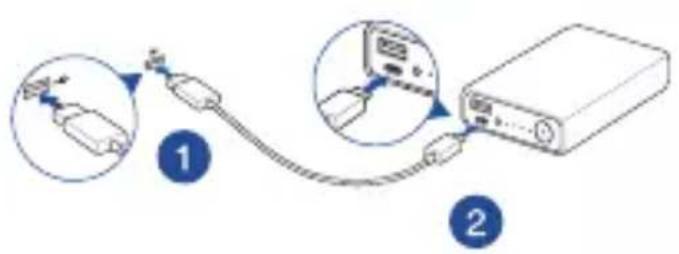
aalil 1
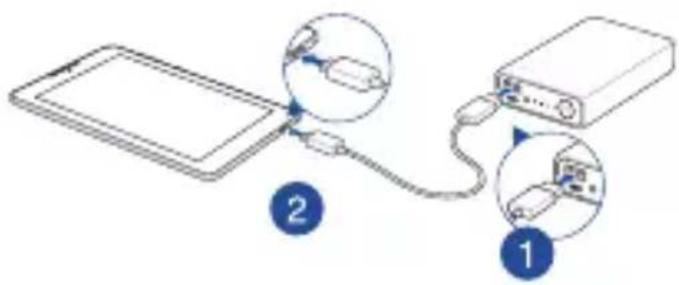
aalil siy adg pial

aXuululgol

1
2
Aaai Jui 12 jay aill ay d jgJauai .3
Specifications techniques
| Stato scarica | LED 1 | LED 2 | LED 3 | LED 4 |
| 86% - 100% | ||||
| 56% - 85% | ||||
| 26% - 55% | ||||
| 6% - 25% | ||||
| < 6% | ||||
| 0% | ||||
| Errore rilevato** |
Nyala
Berkedip
Berkedip cepat
Mati
Indikasi LED
| Roz花朵panie (stan) | LED 1 | LED 2 | LED 3 | LED 4 |
| 86% - 100% | ||||
| 56% - 85% | ||||
| 26% - 55% | ||||
| 6% - 25% | ||||
| < 6% | ||||
| 0% | ||||
| Wykryto będ** |
| LED 1 LED 2 LED 3 LED 4 | ||||
| 86% - 100% | ||||
| 56% - 85% | ||||
| 26% - 55% | ||||
| 6% - 25% | ||||
| < 6% | ||||
| 0% | ||||
| ### | ||||

- 电灯电源的开关Power Bank ① W LED ② 红色灯
- ยงรีรีรีรีรีรีรีรีรีรีรีรixa ยงยงยicesยicesยicesยicesยicesยicesยicesยicesยicesยicesยicesยicesยices

n
nauu/1nn72 wannwauuWuLED
WuWuWuLED 5 WnWnWnWnWnWnWnWnWnWnWnWnWnWnWnWnWnWnWnWnWnWnWnWnWnWnWnWnWnWnWnWnWnWnWnWnWnWnWnWnWnWnWnWnWnWnWnWnWnWnWn
·
60

#
| ### | ### |
| ### | DC 14.4V / 13600 mAh |
| ### | Type C: 5V/8200 mAh, 9V/4700mAh, 15V/2600mAh, 20V/1900 mAh |
| ### | Type A: 5V/7900mAh |
| ### | 0°C - 35°C |
| ### | 110 mm. x 78.4 mm. x 22 mm. |
| ### | 315 ± 5 n. |
| ### | < 4.5 mm. ### DC 20V = 1.5A ### |
| ### | < 6 mm. ### DC 9V = 2A ### |
| ### | < 8 mm. ### DC 5V = 2A ### |
| ### | 5Vdc = 3A / 9Vdc~15Vdc = 2A / 20Vdc = 1.5A(###) |
| ### Type C (### Power Delivery 3.0) | 5Vdc = 3A 9Vdc = 3A 15Vdc = 3A 20Vdc = 2.25A |
### Type A
1+2 | 5.1Vdc = 2.4A |
| ### 1+2 | 45W (###) |
M
USB Power Delivery
5V (n)

n
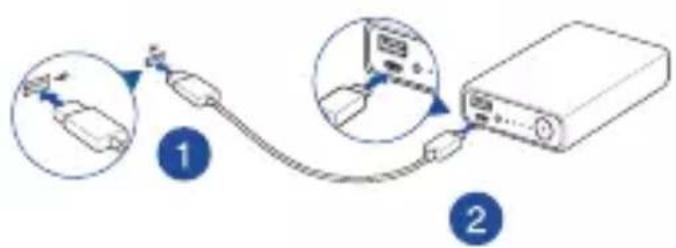
nss
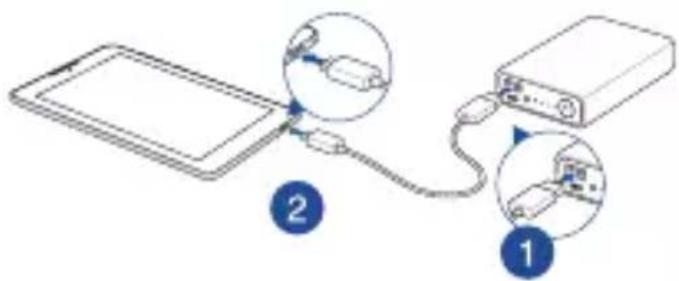

Jnnaaannnnnaa
- 2700w7700w7nwnnnae?2uwa
- ?
- 4
- 60°C (140°F) n
62
Функци виробу
- WbUdKe 3apJxKeHHa: IBo6iHa cymichicb i3 Power Delivery 3.0.
ToHKn: 110MM x 78,4MM x 22 MM (po3mip KpeDHTHOi KapTKn). - EcTeTuKa: 6araTo KoIbOpiB Ha Bn6ip. 3po6JIeHn 3 aIIOMiHiO.
- Be3neka: ochaeni ASUS PowerSafe严禁6e3nekn oci6 niq yac 3apjxkeHH.
- Dobro clykntime: aBTOMaTNUHO peyrIIOE CTpym 3apJxKeHH 3riIDHO Tempepatypn OTOueHH, 0o6 noOBxHTN CTpOK po6OTn 3OBHIshbOrO aKymyIaTopa.
-ДужБВТРУВАПИ:5000pa3IBBNTPIMABnepeBIPKy BNTPUBaIOCTI cTahdApTHOrOUSB-cnoNuyBaaya.
-ДиЗан 3 поВійні поТамn:Одноуасно підтуМуЕ розряжЕнгЯ MOБільнIXnpИСТpoIB.
3haioMCTBO 3 3OBHiushim akymyIaTOPOM

3наченя LED
3apdxeHHa 3OBHbOro akymyITopa
3apdxeHn npictpoB 3a donomoroIO 3OBHIshboro akymyITopa
| 3аразджени статус | LED 1 | LED 2 | LED 3 | LED 4 |
| 0 - 25% * | ||||
| 26% - 50% * | ||||
| 51% - 75% * | ||||
| 76% - 99% * | ||||
| Зakінчedo | ||||
| Помілka Визнayец** |
| Розревенаястус | LED 1 | LED 2 | LED 3 | LED 4 |
| 86% - 100% | ||||
| 56% - 85% | ||||
| 26% - 55% | ||||
| 6% - 25% | ||||
| < 6% | ||||
| 0% | ||||
| Помпльka ВИЗ国有资产** |
- Konn 30BhiHni akymyIaTOp 3apJxKeHo, cBITIOIOHi iHdkaTOpn MepexTiTMyTb.
** 3OBHIHnAkyMnyTop nepctab MepextiTn nicra Bn3HaueHHa NOMIKN, BNIMtB i 3HOBy niKIOUITb Ka6eNb 3OBHIHbOro akyMnyTopa.
ПРИMITKA:
HaTnCHiB i yTpmyTe KhoNky XNBHeHHa 2 cekyHd, 06 yBIMKHyTN a6o BnMKHyTN cbIIOJIOHN liXTapNK.
KoIN Bn HATNCKaTe KHOKNy XNBHeHna 3OBHiUHbOro aKymyIaTopa, 0o He 3apJxye JxOndoro npncToPO, CbiTIOiOHi iHnKaTOpn 3acBiYtbcra Ha 5 cekyH, 0o6 NOKa3aTN CTAtyc XNBHeHHa.
- Hatncitb KhoNk Ky KnuBneHH, 0o6 3apAunn npucTpoi.
TexhiHi xapaKTepeNCTnKn
- Getting to know your Power Bank
- LED indications
- Charging the Power Bank
- Charging devices using the Power Bank
- NOTES:
- Specifications
- Using the Power Bank
- Safety Notices
- Rechargeable Battery Recycling Service in North America
- eaiiie
- Specifications techniques
- Indikasi LED
- n
- #
- M
- Jnnaaannnnnaa
- Функци виробу
- 3haioMCTBO 3 3OBHiushim akymyIaTOPOM
- 3наченя LED
- 3apdxeHHa 3OBHbOro akymyITopa
- 3apdxeHn npictpoB 3a donomoroIO 3OBHIshboro akymyITopa
- ПРИMITKA:
- TexhiHi xapaKTepeNCTnKn
Brand : ASUS
Model : Zenpower Pro PD ABTU016
Category : Power bank