USER MANUAL SFMP70 SIGNATURE
natural_image
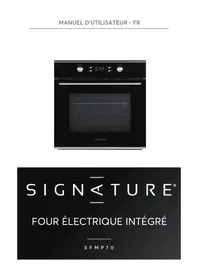
Front view of a black oven with digital gauges and a blank screen (no visible text or symbols)
SIGNATURE®
FOUR ÉLECTRIQUE INTÉGRÉ
SFMP70
TABLE DES MATIÈRES
CONSIGNES DE SÉCURITÉ IMPORTANTES 3
DESCRIPTION GÉNÉRALE 6
DESCRIPTION DU PRODUIT 7
INSTRUCTIONS D'OPÉRATION 8
ACCESSOIRES 11
AVERTISSEMENT SUR LE PLACEMENT DES ÉTAGÈRES 12
REEMPLACEMENT DES AMPOULES 12
FIXATION DU FOUR DANS L'ARMOIRE 12
O13 VERTURES DE VENTILATION
CONNEXION DU FOUR
INSTALLATION 13
RETIRER LA PORTE DU FOUR (EN OPTION) 14
NETTOYAGE ET ENTRETIEN 15
SPÉCIFICATIONS TECHNIQUES 15


natural_image
Pure geometric diagram of a rectangular grid with vertical lines, no text or symbols present
natural_image
Pure diagram of a container with horizontal lines and a side gap, no text or symbols present
natural_image
Technical line drawing of a rectangular tray or container with internal grid pattern (no text or symbols)
natural_image
Technical line drawing of a multi-tiered metal frame structure (no text or symbols)
6. AVERTISSEMENT SUR LE PLACEMENT DES ÉTAGÈRES
natural_image
Simple line drawing of a mechanical component with a circular arrow indicating rotation (no text or symbols)
8. FIXATION DU FOUR DANS L'ARMOIRE
natural_image
Technical diagram showing a door opening and a screw with a hole, both without any text or symbols.
9. OUVERTURES DE VENTILATION
11. INSTALLATION
Remarque :
natural_image
Diagram of a mechanical device with a black arrow indicating rotation or movement (no text or symbols)
Figure 1
natural_image
Diagram of a door frame with an 15-degree angle indicator and directional arrows (no text or symbols)
Figure 2
natural_image
Illustration of two hands exchanging a tray with arrows indicating direction (no text or symbols)
Figure 3
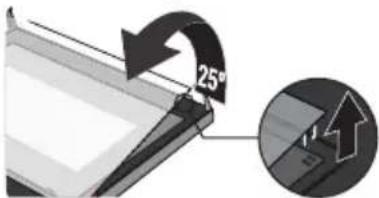
Figure 4
natural_image
Abstract 3D diagram of layered rectangular blocks with a black arrow pointing upward (no text or symbols)
Figure 5
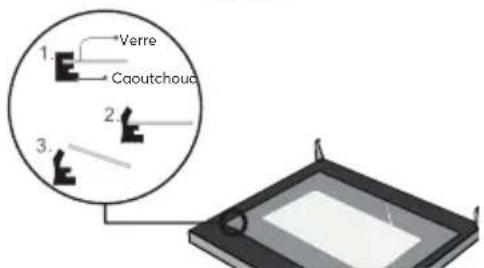
Figure 6
13. NETTOYAGE ET ENTRETIEN
natural_image
Front view of a standard black oven with digital gauges and a blank screen (no visible text or symbols)
SIGNATURE®
BUILT-IN ELECTRIC OVEN
SFMP70
CONTENTS
IMPORTANT SAFETY INSTRUCTIONS -3-
GENERAL DESCRIPTION -6-
PRODUCT DESCRIPTION -7-
OPERATION INSTRUCTIONS -8-
ACCESSORIES -11-
SHELF PLACEMENT WARNING -12-
BULB REPLACEMENT -12-
SECURING THE OVEN TO THE CABINET -12-
VENTILATING OPENINGS -13-
CONNECTION OF THE OVEN -13-
INSTALLATION -13-
REMOVING THE DOOR FROM OVEN (OPTIONAL) -14-
CLEANING AND MAINTENANCE -15-
TECHNICAL SPECIFICATION -15-
ACKNOWLEDGMENT
Thank you for purchasing our product. We hope you enjoy using the many features and benefits it provides. Before using this product please study this entire Instruction Manual carefully. Keep this manual in a safe place for future reference. Ensure that other people using the product are familiar with these instructions as well.
1. IMPORTANT SAFETY INSTRUCTIONS
WARNING
- When the oven is first switched on, it may give off an unpleasant smell. This is due to the bonding agent used for the insulating panels within the oven. Please run up the new empty product with the conventional cooking function, 250°C, 90 minutes to clean oil impurities inside the cavity.
- During the first use, it is completely normal that there will be a slight smoke and odors. If it does occur, you merely have to wait for the smell to clear before putting food into the oven.
- Please use the product under the open environment.
- The appliance and its accessible parts become hot during use. Care should be taken to avoid touching heating elements. Children less than 8 years of age shall be kept away unless continuously supervised.
- If the surface is cracked, switch off the appliance to avoid the possibility of electric shock.
- This appliance can be used by children aged from 8 years and above and persons with reduced physical, sensory or mental capabilities or lack
of experience and knowledge if they have been given supervision or instruction concerning use of the appliance in a safe way and understand the hazards involved. Children shall not play with the appliance. Cleaning and user maintenance shall not be made by children without supervision.
- During use, the appliance becomes very hot. Care should be taken to avoid touching heating elements inside the oven.
- Do not allow children to go near the oven when it is operating, especially when the grill is on.
- Ensure that the appliance is switched off before replacing the oven lamp to avoid the possibility of electric shock.
- The means for disconnection must be incorporated in the fixed wiring in accordance with the wiring specifications.
- Children should be supervised to ensure that they do not play with the appliance.
- Accessible parts may become hot during use. Young children should be kept away.
- An all-pole disconnection means must be incorporated in the fixed wiring in accordance with the wiring rules.
- If the supply cord is damaged, it must be replaced by the manufacturer, its service agent or similarly qualified persons in order to avoid a hazard.
- Do not use harsh abrasive cleaners or sharp metal scrapers to clean the oven door glass since they can scratch the surface, which may result in shattering of the glass.
- Excess spillage must be removed before cleaning.
- During pyrolytic cleaning, accessible parts may become hotter than normal. Young children should be kept away.
- During pyrolytic cleaning, the probe is to be removed.
- A steam cleaner is not to be used.
- The appliances are not intended to be operated by means of an external timer or separate remote-control system.
- See page 11-12 for how to correct installation of the shelves.
- The appliance must not be installed behind a decorative door in order to avoid overheating.
- See page 12-13 for all installation dimensions, fixing methods and electrical connections of the appliance.
- This appliance is intended to be used in household and similar applications such as:
- staff kitchen areas in shops, offices and other working environments;
- farm houses;
- by clients in hotels, motels and other residential type environments;
- bed and breakfast type environments.
- During use the appliance becomes hot. Care should be taken to avoid touching heating elements inside the oven.
- This product contains a light source of energy efficiency class < .
2. GENERAL DESCRIPTION
SAFETY HINTS
- Do not use the oven unless you are wearing something on your feet. Do not touch the oven with wet or damp hands or feet.
- For oven: Oven door should not be opened often during the cooking period.
- The appliance must be installed by an authorized technician and put into use. The producer is not responsible for any damage that might be caused by defective placement, and installation by unauthorized personnel.
- When the door or drawer of oven is open do not leave anything on it, you may unbalance your appliance or break the door.
- Some parts of appliance may keep its heat for a long time; it is required to wait for it to cool down before touching onto the points that are exposed to the heat directly.
- If you will not use the appliance for a long time, it is advised to plug it off.
FITTING THE OVEN INTO THE KITCHEN UNIT
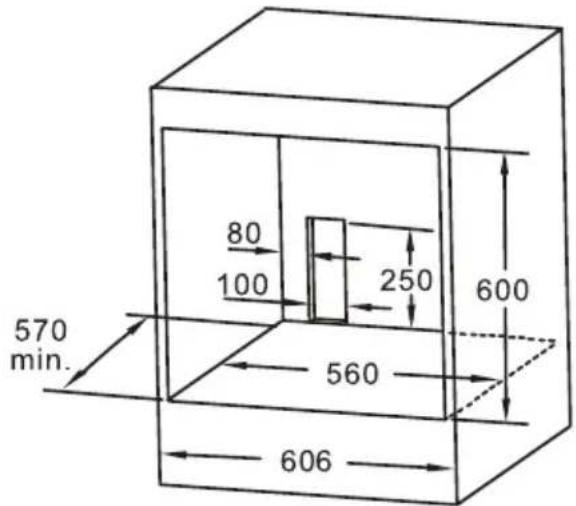
Fit the oven into the space provided in the kitchen unit; it may be fitted underneath a work top or into an upright cupboard. Fix the oven in position by screwing into place, using the two fixing holes in the frame. To locate the fixing holes, open the oven door and look inside. To allow adequate ventilation, the measurements and distances adhered to when fixing the oven.
IMPORTANT
If the oven is to work properly, the kitchen housing must be suitable. The panels of the kitchen unit that are next to the oven must be made of a heat resistant material. Ensure that the glues of units that are made of veneered wood can withstand temperatures of at least 120 °C. Plastics or glues that cannot withstand such temperatures will melt and deform the unit, once the oven has been lodged inside the units, electrical parts must be completely insulated. This is a legal safety requirement. All guards must be firmly fixed into place so that it is impossible to remove them without using special tools. Remove the back of the kitchen unit to ensure an adequate current of air circulates around the oven. The hob must have a rear gap of at least 45 mm.
DECLARATION OF COMPLIANCE
When you have unpacked the oven, make sure that it has not been damaged in any way. If you have any doubts at all, do not use it: contact a professionally qualified person. Keep packing materials such as plastic bags, polystyrene, or nails out of the reach of children because these are dangerous to children.
CE
3. PRODUCT DESCRIPTION
| Symbol Function description |
 | Lamp: The cooking process can be observed under illuminated conditions. Except ECO and pyrolytic function. |
 | Defrost: The circulation of air at room temperature enables quicker thawing of frozen food (without the use of any heat). |
 | Double grill with fan: The radiant heating element and top heating element are working with fan. |
 | Single grill: The inner grill element switches on and off to maintain temperature. Can be used to grill a small number of food. |
 | Convention+fan: The combination of fan and bottom heating element provides a more uniform heat penetration. This function is suitable for baking large pieces of meat. |
 | Conventional: The top and bottom heating elements work together to provide convectional cooking. |
| Pyrolytic | Pyrolytic: When the function set to prolytic mode, LED display " PyR ". The default temperature is 450°C . The timer can be set 1:30 or 2:00 hours. |
 | ECO: For energy-saving cooking. Cooking the selected ingredients in a gentle manner, and the heat comes from the top and the bottom. |
4. OPERATION INSTRUCTIONS
1. Clock Setting
After connecting the unit to the power, the symbols "0:00" will be visible on the display.
a. Press "the hour figures flashes.
b. Rotate "K2" to adjust the hour figures, (time should be within 0--23).
c. Press "☐", the minutes flashes.
d. Rotate "K2" to adjust the minutes setting, (time should be within 0--59).
e. Press "☐" to finish the clock settings. ":" flashes, and the time will be illuminated.
NOTE: The clock is 24 hours. After power on, if not set, the clock will show "0:00".
2. Function Setting
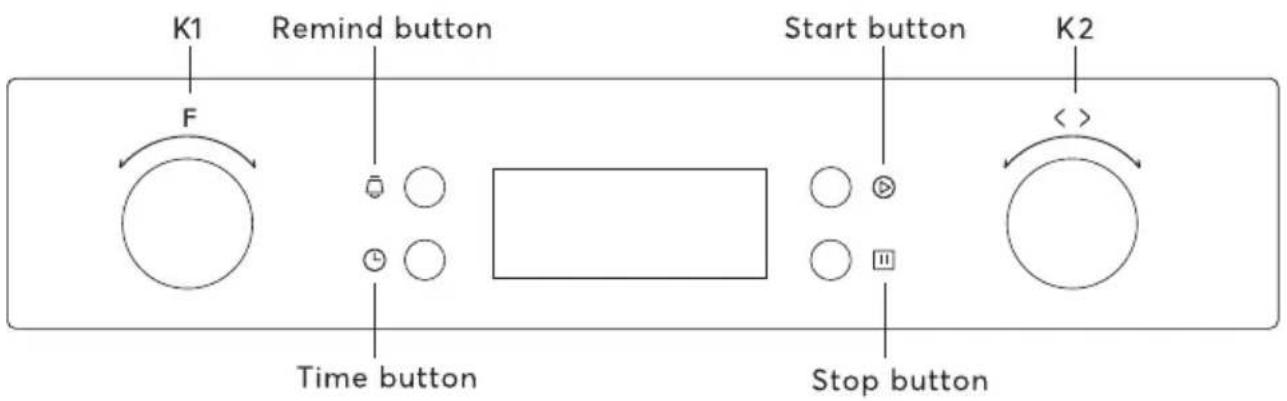
a. Rotate "K1" to choose the cooking function you require. The related symbol will illuminated.
b. Rotate "K2" to adjust the temperature.
c. Press "播放" to confirm the start of cooking.
d. If step 2 is ignored, Press "▶" to confirm the start of cooking and the default time is 9 hours, the default temperature will display on the LED.
NOTE:
a. The step quantities for the adjustment time of the knobs are as follow: 0--0:30min: step 1 minute 0:30--9:00hour: step 5 minutes
b. Rotate "K1" to adjust the cooking time when cooking begins. Then press "☐" to confirm. If "☐" not pressed within 3 seconds, the oven will revert back to the previous time to continue cooking.
c. Rotate "K2" to adjust the temperature when cooking begins. The related indicator will be illuminated. Then press "▶" to start cooking. If "▶" not pressed in 3 seconds, the oven will revert back to the previous temperatrue to continue cooking.
3. Lamp Setting
a. Rotate "K1" to select the relevant function, then the corresponding icon will be on.
b. Press "▶" button to start, "0:00 "and lamp icon "💡" will light up, ": "will flash.
4. Inquiring Function
In the following states, you can use inquiring function, after 3 seconds return to the current state.
a. During working state, if the clock was set, press "💡" button to see the current time; if the reminder function was set, press "💡" button to see the time of reminder.
b. In reminding state, if the clock was set, press "☐" button to see the current time.
5. Child lock Function
To Lock: press "and" simultaneously for 3 seconds, there will be a long "beeping" sound and the "will be illuminated.
Lock quitting : press "▶" and "☐" simultaneously for 3 seconds, there will be a long "beeping " sound indicating the child-lock is released.
NOTE: During working state, if you want to stop cooking, press stop button quickly. Do not need to long pressing on stop button, it is invalid.
6. Reminder Function
This function will help to remind you to start cooking in a certain time from 0:01 to 9:59. Only when oven in standby state, the reminder can be set. Follow below to set the reminder:
a. Press reminder setting button "☐";
b. Rotate "K2" to set the hour time of reminder. (Time should be within 0--9).
c. Press reminder setting button "☐" again;
d. Rotate "K2" to set minute time of reminder. (Time should be within 0--59).
e. Press "播放" to confirm setting. The time will count down.
NOTE: The oven buzzer will sound for 10 times after the time back to the zero hour. You can cancel the reminder during setting by pressing the stop button; After the reminder has been set, you can cancel it by pressing stop button twice.
7. Start/Pause/Cancel Function
a. If the cooking time has been set, press " Ⓑ to start cooking. If the cooking is paused, press " ▶" to resume cooking.
b. During cooking process, press "☐" once to pause the cooking. Press "☐" twice to cancel the cooking.
8. Energy-Saving Function
a. In waiting state and reminding state, press " Ⓐfor three seconds, the LED display will go off and set to energy-saving mode.
b. If no operation in 10 minutes under waiting state, the LED display will go off and go into energy-saving mode.
c. Under the energy-saving mode, press any key or rotate any knob can quit the energy-saving mode.
9. Pyrolytic Function
This function allows you to clean thoroughly the oven cavity.
a. Rotate "K1" to select the pyrolytic function. LED will display "PyR".
b. Press "▶" to confirm the cooking. And the default time is 2 hours, "PyR" will display on the LED.
c. Rotate "K1" to change the pyrolytic time. The timer can be set 1:30 or 2:00 hours.
NOTE:
a. When the oven door was not closed, pressing start button will be invalid. The LED will display "door" and "PyR".
b. When the oven's center temperature is higher than 320°C, pressing start button will be invalid. The LED will display "CooL" and "PyR". When the oven's center temperature is lower than 200°C, press cancel button once, it will pause; press again, it will return to waiting state. If higher than 200°C, press cancel button once, it will return to waiting state directly.
c. Open the door when the oven is working, the LED will display "door" and the buzzer will sound continuously until the door was closed or press cancel button.
d. Before activating the pyrolytic cleaning function, remove any excessive spillage and make sure that oven is empty. Do not leave anything inside it (e.g. pans, baking tray, dripping pan, slider bracket etc.) as this could heavily damage them.
e. When finished pyrolytic cleaning, don't interrupt the power in an hour.
10. NOTE
a. The oven lamp will be on for all functions. (except pyrolytic function and ECO function)
b. Once the cooking programme has been set and the "▶" button is not pressed within 5 minutes, the current time will be displayed or turn back to waiting state. The setting program will be invalid.
c. The buzzer will sound once when effectively pressed, if not effectively pressed there will be no response.
d. The buzzer will sound five times to remind you when cooking has finished.
11. Recipes for ECO mode
| Recipes Temperature (C) Level Time (min) Pre-heat | |
| Potato Cheese Gratin | 180 1 90-100 | No | | |
| Cheese Cake | 160 1 100-150 | No | | |
| Meatloaf | 190 1 | 110-130 | No | |
5. ACCESSORIES
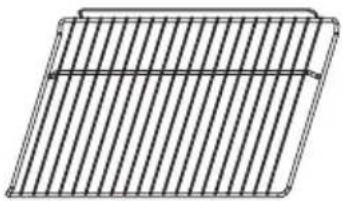
Wire shelf : For grill, dishes, cake pan with items for roasting and grilling.
natural_image
Pure geometric diagram of a rectangular plate with vertical lines, no text or symbols present
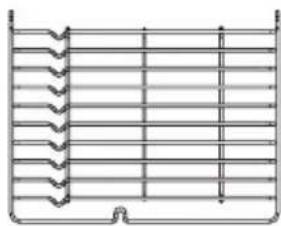
Slider bracket: For cooking larger size food, these shelf support rails on the right and left sides of the oven can be removed, dishes and tray can be put on the oven floor, using functions as Radiant grilling, Double grilling, Double grill with fan.
natural_image
Pure diagram of a container with horizontal lines and a small arrow at the bottom (no text or symbols)
NOTE: When placing dishes on the oven floor, please DO NOT use functions with bottom heater to prevent heat gathering at bottom.(only for specific models)
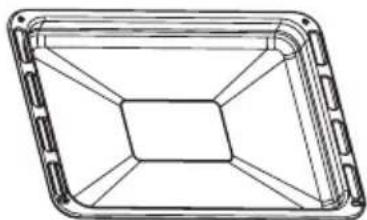
Universal pan: For cooking large quantities of food such as moist cakes, pastries, frozen food etc, or for collecting fat/spillage and meat juices.
natural_image
Technical line drawing of a rectangular frame with internal hexagonal structure (no text or symbols)
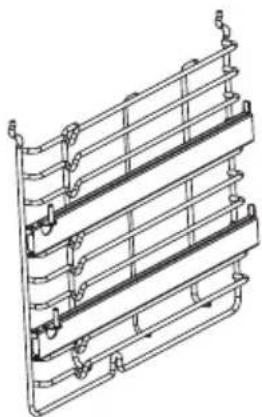
Telescopic runner: Some models might with telescopic runners to facilitate the use of oven. These telescopic runners and slider brackets could be disassembled by unscrewing the screws used to fix it. After disassembled, dishes and tray can be put on the oven floor, using functions as Radiant grilling, Double grilling, Double grill with fan.
natural_image
Technical line drawing of a multi-tiered structural panel or rack structure (no text or symbols)
NOTE: When placing dishes on the oven floor, please DO NOT use functions with bottom heater to prevent heat gathering at bottom.(only for specific models)
6. SHELF PLACEMENT WARNING:
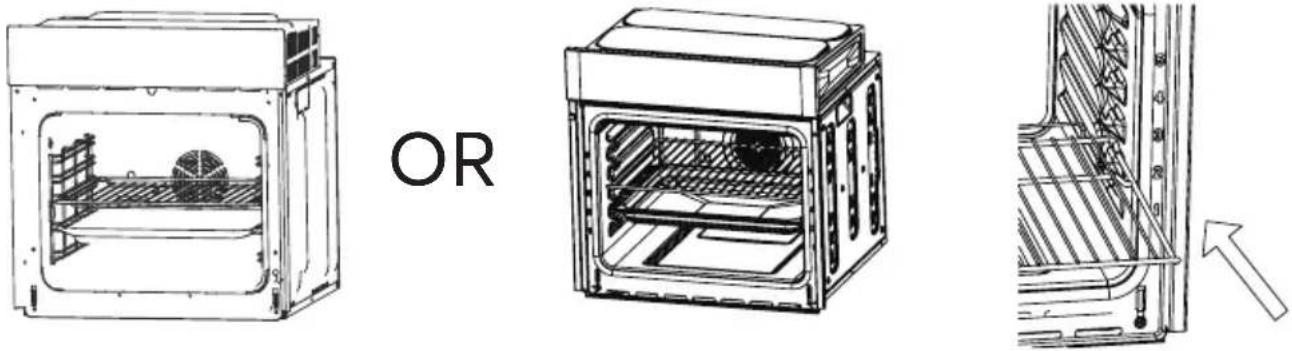
To ensure the oven shelves operate safely, correct placement of the shelves between the side rail is imperative. Shelves and the pan only can be used between the first and fifth layers.
The shelves should be used with the right direction, it will ensure that during careful removal of the shelf or tray, hot food items should not slide out.
7. BULB REPLACEMENT
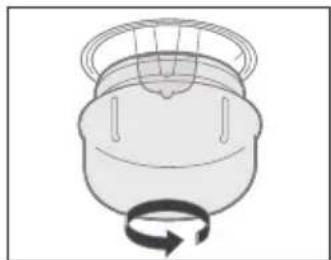
For replacement, process as follows:
a. Disconnect power from the mains outlet or switch off the circuit breaker of the unit's mains outlet.
b. Unscrew the glass lamp cover by turning it counterclockwise (note, it may be stiff) and replace the bulb with a new one of the same type.
c. Screw the glass lamp cover back in place.
NOTE: Only use 25W/230V, T300°C halogen lamps.
natural_image
Simple line drawing of a mechanical component with a circular arrow indicating rotation (no text or symbols)
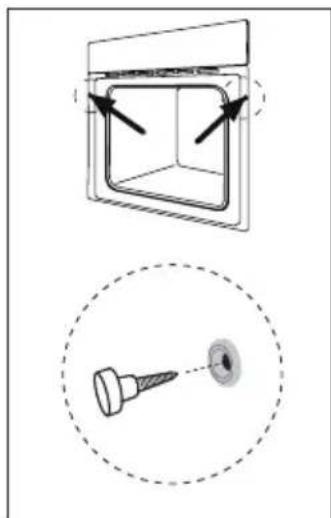
8. SECURING THE OVEN TO THE CABINET
a. Fit oven into the cabinet recess.
b. Open the oven door and determine the location of the mounting screw holes.
c. Fix the oven to the cabinet with two screws.
natural_image
Technical diagram showing a square component with arrows indicating direction and a close-up of a screw with a hole (no text or symbols)
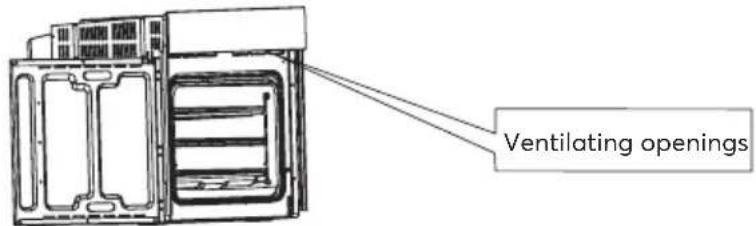
9. VENTILATING OPENINGS
When cooking is finished or in pause state or in waiting state, if the oven's center temperature is over 75 degree, the cooling fan will continue working for 15 minutes. Or when the oven's center temperature becomes lower than 75 degree, the cooling fan will stop in advance.
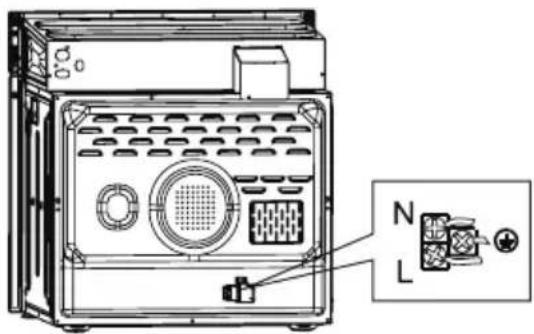
10. CONNECTION OF THE OVEN
11. INSTALLATION
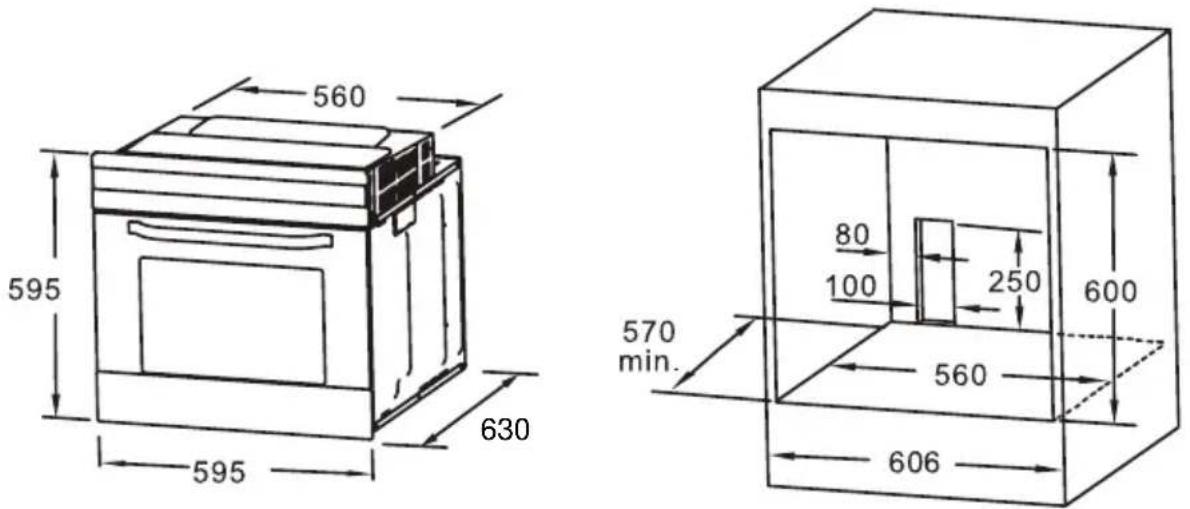
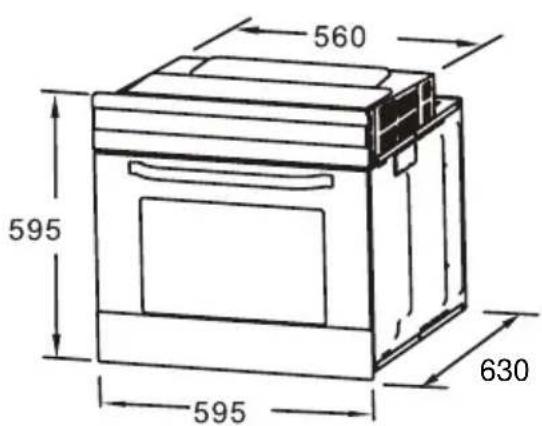
a. Only plus deviations are admissible for all dimension.
b. The cabinet is not include the power switch or socket.
c. The cabinet dimension is in mm.
NOTE: The number of accessories included depends on the particular appliance purchased.
12. REMOVING THE DOOR FROM OVEN (OPTIONAL)
Removable door allows full access to entire interior of the oven for easier and quicker maintenance.
-
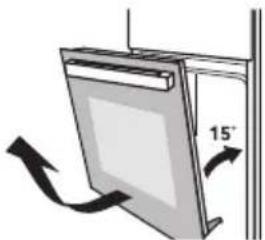
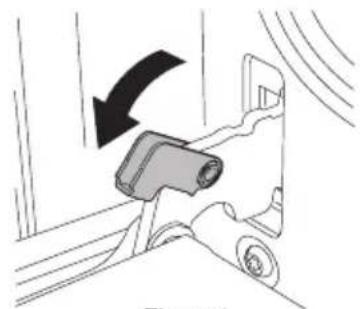
To remove the door, open the door to the maximum angle. Then pull the buckle at the door hinge backward.
(Figure 1)
-
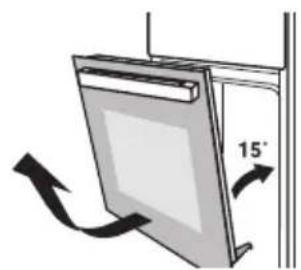
Close the door to an angle approximately 15^ . Lift up and slowly pull the door out from the oven. (Figure 2)
-
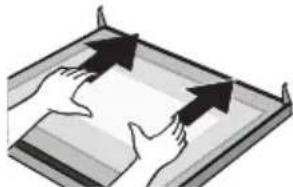
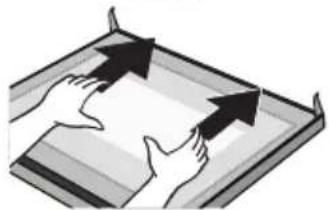
Place the door flatwise with door top cover towards yourself, put your hands on the glass and pull it towards the oven.
(Figure 3)
-
Seperate the glass carefully by lifting it approximately 25°.(Figure 4)
-
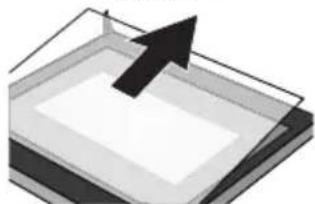
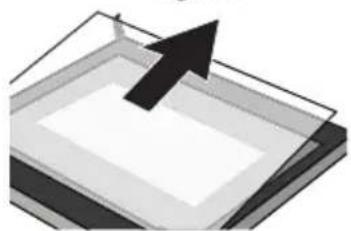
Push the glass into the position indicated by the arrow in Figure 5. Gently pull the glass out of the socket.
-
After pulling out the inner glass, please take out the middle layer glass as shown in Figure 6.
-
When cleaning is completed, reverse the above procedures to return the door to its original position.
natural_image
Diagram of a car seatbelt mechanism with a black arrow indicating clockwise motion (no text or symbols)
Figure 1
natural_image
Diagram of a door frame with an 15° angle indicator and directional arrows (no text or symbols)
Figure 2
natural_image
Illustration of two hands exchanging a document with arrows indicating direction (no text or symbols)
Figure 3
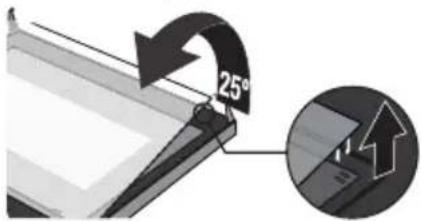
Figure 4
natural_image
Abstract 3D diagram of layered rectangular blocks with a black arrow pointing upward (no text or symbols)
Figure 5
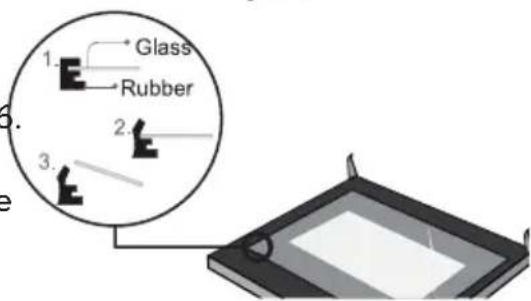
Figure 6
13. CLEANING AND MAINTENANCE
For the sake of a good appearance and reliability, keep the unit clean. The modern design of the unit facilitates maintenance to a minimum. The parts of the unit which come into contact with food have to be cleaned regularly.
- Before any maintenance and cleaning, disconnect the power.
- Set all controls in the OFF position.
- Wait until the inside of the unit is not hot but only slightly warm-cleaning is easier than when warm.
- Clean the surface of the unit with a damp cloth, soft brush or fine sponge and then wipe dry. In case of heavy soiling, use hot water with non-abrasive cleaning product.
- For cleaning the glass of the oven door, do not use abrasive cleaners or sharp metal scrapers, these can scratch the surface or lead to the glass being damaged.
- Never leave acidic substances (lemon juice, vinegar) on stainless steel parts.
- Do not use a high pressure cleaner for cleaning the unit. The baking pans may be washed in mild detergent.
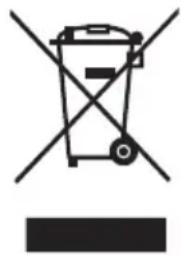
European directive 2012/19/EU on Waste from Electrical and Electronic Equipment (WEEE), requires that used household appliances are not thrown into the normal municipal waste stream. Used appliances must be collected separately in order to optimize the rate of recovery and recycling of materials that compose them, and to reduce the impact on human health and on the environment. The crossed bin symbol is affixed to all the products to remind you of the obligations of separated collection
natural_image
Symbol of a trash bin crossed with a diagonal line, no text or numbers present
We decline liability for any damage or accident derived from any use of this product which is not in conformity with the instructions contained in this booklet.
In accordance with Article L. 217 of the Consumer Code, your product benefits from a legal guarantee of of conformity of 2 years.
Duration of availability of spare parts: 2 years.
To contact our After-
Sales Service, before going to your BUT store, call 09 78 97 97 97,
From Monday to Saturday from 8:00 am to 8:00 pm (local call price).
14. TECHNICAL SPECIFICATION
| Model: | SFMP70 |
| Rated Voltage: | 220-240V~ |
| Rated Frequency: | 50Hz-60Hz |
| Electric Power: 3.2 kW | |

LE TRI

FACILE