
Reflex Wheel PRO 3 - Radio remote control Carson - Free user manual and instructions
Find the device manual for free Reflex Wheel PRO 3 Carson in PDF.


| Brand | Carson |
| Model | Reflex Wheel PRO 3 |
| Category | Radio remote control for model vehicles |
| Product type | 2.4 GHz radio transmitter |
| Frequency | 2.4 GHz |
| Technology | FHSS (Frequency Hopping Spread Spectrum) |
| Range | Approximately 200 meters in open area |
| Power supply | 4 AA 1.5V batteries (LR6) or 4 NiMH rechargeable batteries |
| Main functions | Steering wheel, throttle/brake trigger, steering and throttle trim, servo reverse, failsafe function |
| Secondary functions | Battery indicator, bind button, battery voltage adjustment, on/off switch |
| Safety | Integrated failsafe function, safety warning in manual, use for ages 14+ |
| Warranty | 24 months, covers manufacturing and material defects |
| Spare parts and repairability | Original parts available at authorized dealer, repairs by authorized service center |
| Maintenance and cleaning | Clean with a dry cloth, avoid moisture, check connections regularly |
| Dimensions (approx.) | 180 × 120 × 80 mm (unofficial) |
| Weight (approx.) | 350 g (batteries included, unofficial) |
Frequently Asked Questions - Reflex Wheel PRO 3 Carson
User questions about Reflex Wheel PRO 3 Carson
0 question about this device. Answer the ones you know or ask your own.
Ask a new question about this device
Download the instructions for your Radio remote control in PDF format for free! Find your manual Reflex Wheel PRO 3 - Carson and take your electronic device back in hand. On this page are published all the documents necessary for the use of your device. Reflex Wheel PRO 3 by Carson.
USER MANUAL Reflex Wheel PRO 3 Carson
Before using your product for the first time or ordering any spare parts, check that your manual is fully up-to-date. This manual contains the technical appendices, important instructions for correct start-up and use and product information, all fully up-to-
date before going to press. The contents of this manual and the technical data of the product can change without prior notice.
For the latest version of your manual, see: www.carson-modelsport.com
FR // Remarque importante
natural_image
Technical line drawing of a robotic arm with labeled components (no text or symbols present)TECHNISCHE DATEN
LADEVORGANG NIMH AKKU IM SENDER
natural_image
Technical line drawing of a mechanical component with no visible text or symbolsTrimmung Gas:
natural_image
Two black battery cells with white markings, one larger and one smaller, against a white background (no text or symbols)natural_image
Pure electrical circuit lines without any symbolsnatural_image
Two black-and-white icons: a battery and a fork with crossed blades (no text or symbols)natural_image
Abstract black-and-white graphic with three vertical bars and cloud-like shapes (no text or symbols)natural_image
Symbolic icons showing a water drop and a cross with a shield, no text or numbers presentnatural_image
Simple line drawing of a battery with two smiling faces and a battery pack (no text or symbols)natural_image
Abstract black-and-white icon depicting a document with horizontal lines and a triangular symbol above it, no text or symbols present.We congratulate you for buying this CARSON product, which is designed and manufactured using state of the art technology.
According to our policy of continued development and product improvement we reserve the right to make changes in specifications regarding equipment, material and design at any time without notice.
Specifications or designs of the actual product may vary from those shown in this manual or on the box.
The manual forms part of this product. Should you ignore the operating and safety instructions, the warranty will be void.
Keep this guide for future reference.
Limited Warranty
This product is warranted by CARSON against manufacturing defects in materials and workmanship under normal use for 24 months from the date of purchase from authorised franchisees and dealers. In the event of a product defect during the warranty period, return the product along with your receipt as proof of purchase to any CARSON store.
CARSON will, at its option, unless otherwise provided by law:
(a) Correct the defect by repairing the product without charging for parts and labour;
(b) Replace the product with one of the same or similar design.
All replacement parts and products, and products on which a refund is made, become the property of CARSON. New or reconditioned parts and products may be used in the performance of warranty services.
Repaired or replaced parts and products are warranted for the remainder of the original warranty period. You will be charged for repair or replacement of the product made after the expiration of the warranty period.
The Warranty does not cover:
- Damage or failure caused by or attributable to acts of God, abuse, accident, misuse, improper or abnormal usage, failure to follow instructions, improper installation or maintenance, alteration, lightning or other incidence of excess voltage or current;
- Damage caused by losing control of your model;
- Any repairs other than those provided by a CARSON authorised service facility;
- Consumables such as fuses or batteries;
- Cosmetic damage;
- Transportation, shipping or insurance costs; or
- Costs of product removal, installation, set-up service adjustment or reinstallation;
- Any changes to plugs and cables, open the housing and damage the sticker.
This warranty gives you specific legal rights, and you may also have other rights which may vary according to the country of purchase.
Declaration of conformity
TAMIYA-CARSON Modellbau GmbH & Co. KG hereby declares that the radio equipment type 500500052-56 conforms to Directive 2014/53/EU. The complete text for the EU declaration of conformity is available at the following Internet address.
The explanation of the symbol on the product, packaging or instructions: Electronic devices are valuable products and should not be disposed of with the household waste when they reach the end of their service life! Help us to protect the environment and respect our resources by delivering this appliance to the relevant recycling point.

We wish you a lots of fun using your CARSON product!
Before use, read this manual carefully!
CONTENTS
Preface 18
Included Items....19
Technical data....19
Safety Precautions....20
Caution 21
Operating Procedure 21
Features of the 2.4 GHz Remote Control....21
Advantages of the 2.4 GHz Technology....21
Worth Noting 21
Connections to Receiver....22
Equipment for combustion engine....23
Install the Transmitter Batteries 24
Charging procedure for NiMh rechargeable batteries 24
Adjusting the steering wheel position....24
Functions Version REFLEX WHEEL Pro3 LCD 25
Transmitter Handling....26
Functions/Settings 27
Functions Version REFLEX WHEEL Pro3....29
Transmitter Handling....30
Fail Safe function setting.... 31
Binding the transmitter and receiver 31
Attention – Troubleshooting! 31
Battery Safety Guidelines 32
Spare Parts 41
INCLUDED ITEMS
Receiver Transmitter
natural_image
Technical line drawing of a mechanical device with no visible text or symbolsTECHNICAL DATA
• Transmitter battery voltage: 2.4 GHz
• Transmitter operating voltage: 4.8-6V
• Max. transmitter power: 100 mW (20db) Modulation FHSS
- Receiver operating voltage:
- Receiver HV: 6 - 11V
- Receiver BEC: 6 - 8.4V
Safety Instructions and Intended Use
This product is designed exclusively for hobby use and may only be used on tracks and areas intended for this purpose.
No persons or animals may be transported with this model.
To avoid operator errors, it is mandatory that the user manual is read before use!
These models may only be used with bodywork that is correctly fitted.
When removing the bodywork, please note that, during operation, certain parts can become very hot.
Please note that various models can generate very high noise levels and should, therefore, not be operated in your immediate proximity.
Please make sure, before every driving session, that the tank is correctly closed or the power pack is correctly inserted.
To avoid faulty operation of the control system causing the model to run out of control, it must be checked that the transmitter and model batteries are in good condition.
It is essential to check that the model is correctly assembled both before and after use; if need be, tighten nuts and bolts.
This model is not a toy!
- This product is not a toy, its operation must be learned step by step.
- Children under 14 years of age should operate the model only if supervised by an adult.
Operating RC models is a fascinating hobby that, however, must only be exercised with proper precautions and care. Since the weight of this model is considerable and it can reach a very high speed it can, if it runs out of control, cause significant damage and injury for which you, as the operator, are liable.
R/C models can be dangerous and could cause personal injury or damage to property. The appeal of driving an RC model depends on assembling the model accurately and operating it with due care and attention.
- Follow all the warnings, and instructions in this manual.
- Be „Safety Conscious“ and use your common sense at all times.
- Remember that operating any R/C model demands skills developed through proper instruction and training – they are not acquired immediately.
- Don't run risks, such as operating your model in adverse weather or when there is a malfunction of which you are aware.
- The remote control's special technology makes the 2.4 GHz transmitter and receiver a single unit and coordinates them together. Therefore, the receiver is not influenced by any other transmitter or radio signal. It is no longer necessary to check whether other models nearby are running on the same frequency channel, as was the case with previous frequencies (27/35/40 MHz).
- Respect the rules of the R/C track on which you operate your model.
Only a correctly assembled model will work and react as expected.
Never improvise with unsuitable materials but, when the need arises, use only original spare parts. Even if the model is pre-assembled, all joints and fastenings should be checked for correct seating and tightness.
- Running your model in the street is very dangerous to both automobile drivers and your model. Avoid running your model in the street.
- Never aim or direct your model car at any person or animal. These model cars accelerate very quickly and can cause serious physical injury.
- At any time during the operation of your model, should you sense, feel, or observe any erratic operation or abnormality, end your operation. Do not operate it again until you are certain that the problems have been fixed. RC models are not “toys” – safety precautions and forward thinking are essential when operating a remote controlled model!
- Take advantage of the failsafe setting. During a breakdown in signal transmission (such was when transmission voltage is too weak), this setting shifts the model into a control mode that prevents it from taking off uncontrolled.
Take your time to read all the way through the pages of this booklet before starting the installation.
CAUTION
Control of models is impossible with insufficient or no voltage in the transmitter or receiver. A receiver battery, that is too weak will move the servo(s) very slowly, and that may cause erratic operation of your model. When using a car that operates both the electric
motor and receiver on the same battery, such as a BEC system, you should discontinue operating the car, when the top speed becomes sharply reduced, otherwise loss of control will result soon afterwards.
OPERATING PROCEDURE
Many publications say that the setup sequence for the transmitter and receiver don't play a role anymore with 2.4 GHz sets. However, we recommend sticking to the sequence typical for previous sets.
- Before operation: Connect the drive battery to the control unit. First turn on the transmitter, then the receiver.
• After operation: Disconnect the battery from the control unit. Turn the receiver off, and then the transmitter.
- Before and after operating the transmitter, make sure that trim is in the desired place and that all checks have been made.
FEATURES OF THE 2.4 GHZ REMOTE CONTROL
The transmitter technology at 2.4 GHz is fundamentally different in some aspects from the technology in the 27.35 and 40 MHz frequency ranges, which up to now have been conventional with remote control models. The previous style of location using a channel determined by plug-in crystals is gone, and the transmitter and receiver work with encoding. The receiver accepts only signals with the coding from its own transmitter. Each signal from the transmitter lasts just milliseconds. Before the next signal, a pause is inserted, which lasts longer than the transmission signal.
Nonetheless, within each second countless signals are received and evaluated by the receiver. Signals that the receiver recognizes as defective (false encoding, strings that don't fit the signal schema, etc.) are suppressed and are not passed on as control commands.
And as the frequency gets higher, the antennas get shorter.
Remote controls using this transmitter technology or model construction are not subject to fees.
ADVANTAGES OF THE 2.4 GHZ TECHNOLOGY
Although the frequency range used is also divided into channels, the user doesn't have to worry about their configuration and has no influence on it anyway.
Because the same encoding is used by the transmitter and receiver, interruption by another receiver or a different transmitter will not occur.
Plug-in crystals are not needed, because the transmitter creates the currently appropriate frequency using a synthesizer circuit, as does the receiver, which determines the right frequency for ist encoding.
The old fear of double occupancy of a channel (as when a second transmitter overreaches and interrupts a receiver) is a thing of the past. An operator can go ahead and switch on a transmitter and receiver, without negotiating with other model users.
The data transfer capacity is considerably larger than that of previous remote controls, which has a positive effect on control of the digital servo, for example.
Best of all, at events with a lot of participants, you can always use your own equipment for settings, tests and conversions, because the number of active transmitters is almost unlimited.
WORTH NOTING
At very low wavelengths, obstacles can weaken or interrupt the spread of radio waves. That means there should be as few obstacles as possible in the line between the transmission and reception antennas.
The model's receiver antenna must be as far away as possible from electrically conductive parts and very visibly arranged (protruding from the model) to prevent loss of range.
CONNECTIONS TO RECEIVER
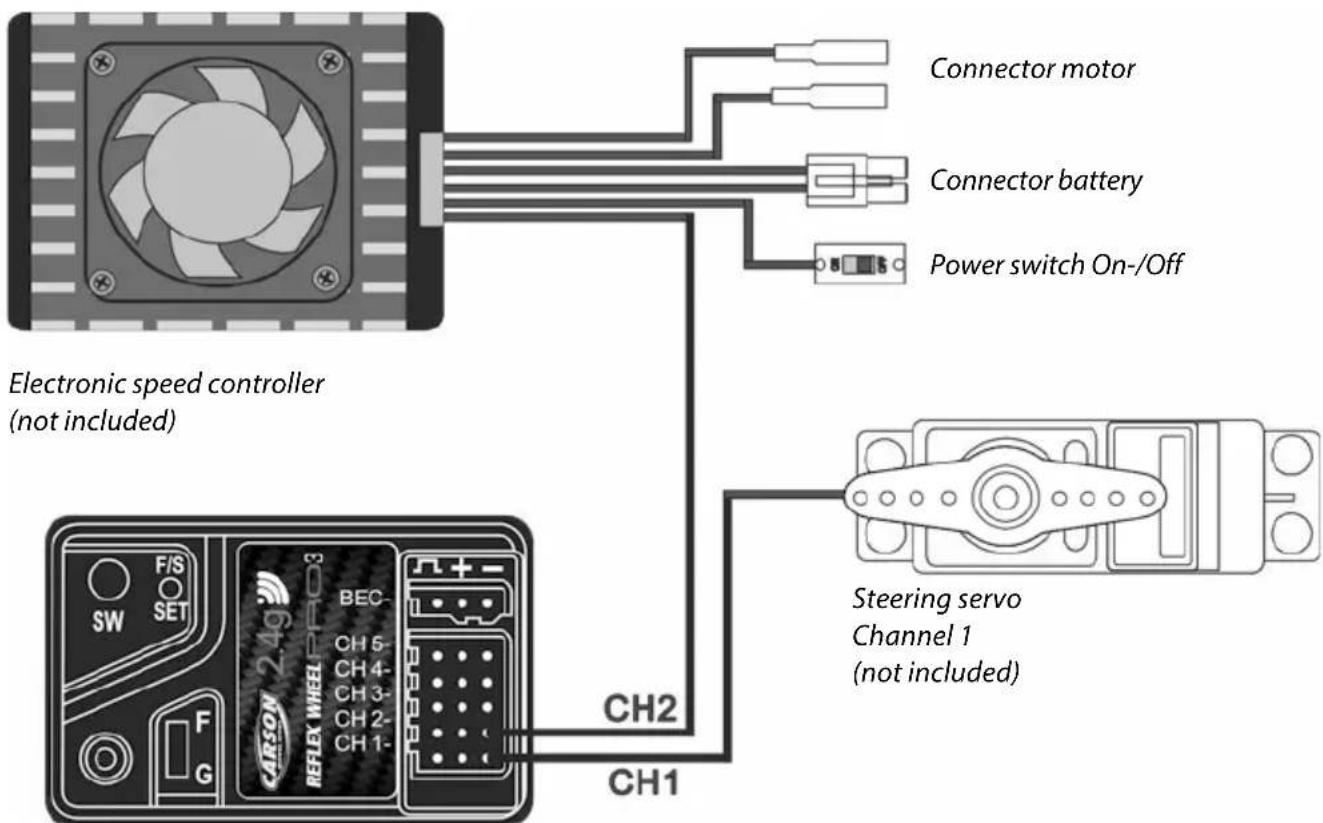
BEC-receiver:
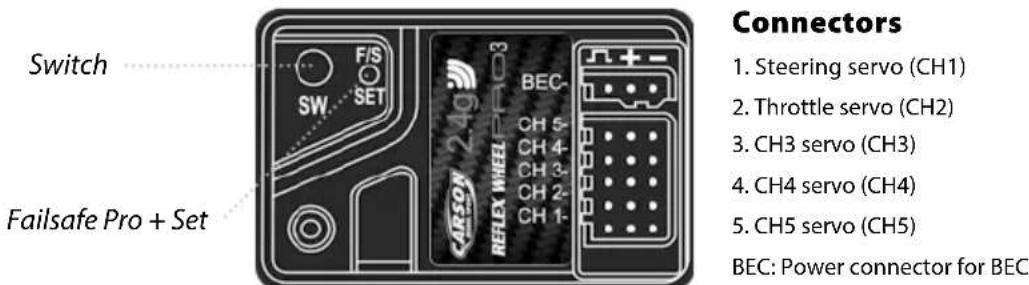
Battery eliminator is installed in the receiver circuitry. The receiver gets supplied with current through the drive battery that runs the engine. NiMH battery from 6 V to 8.4 V can be used for the receiver. Batteries of higher voltage may damage the receiver and servos.
Use only a speed controller which has the exclusive connector for the BEC system.
Receiver
Do not connect a separate power supply to the receiver!
ATTENTION
Make sure that male and female connectors have the correct polarity!
EQUIPMENT FOR COMBUSTION ENGINE
Receiver Batteries and two servos are not included in the kit.
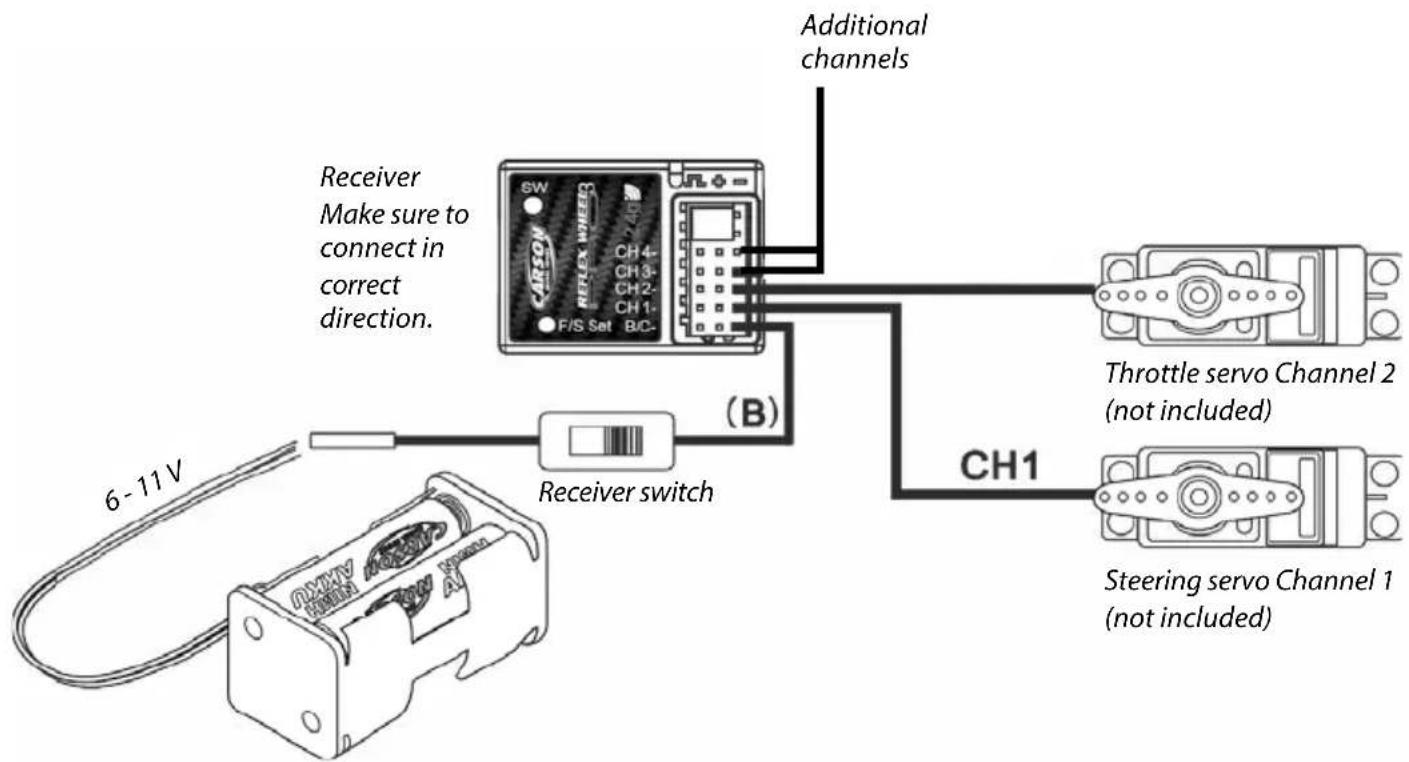
Receiver battery case No. 500503033
Receiver battery No. 500608104
ATTENTION
When connecting servo leads to the receiver always ensure that the yellow lead/wire is facing inwards (towards the crystal).
INSTALL THE TRANSMITTER BATTERIES
Insert new batteries if the LED display flashes or the buzzer sounds.
- Remove the transmitter battery cover.
- Insert new AA Mignon batteries / rechargeable batteries. Pay attention to the correct polarity.
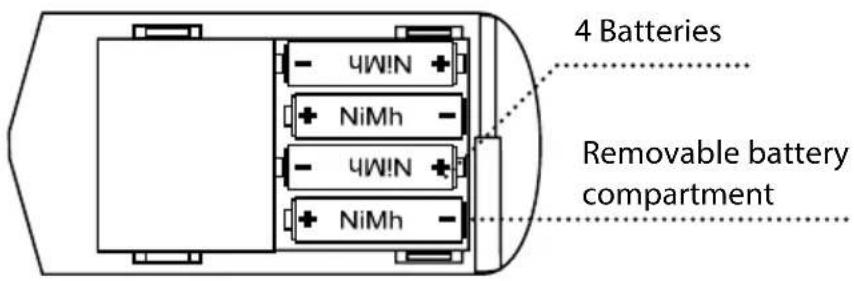
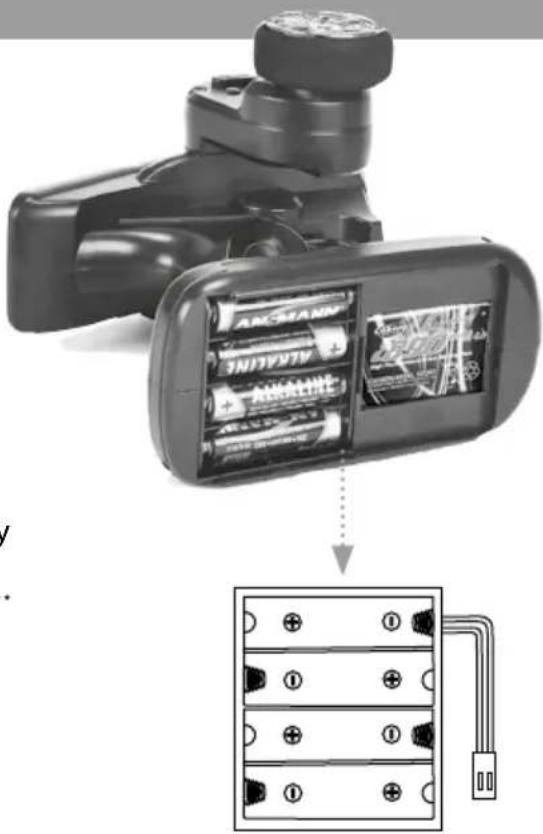
CHARGING PROCEDURE FOR NIMH RECHARGEABLE BATTERIES IN THE TRANSMITTER
The optionally available rechargeable batteries 500609042 (NiMh) can both be charged via the charging socket on the transmitter. These batteries can be charged with a normal 4-cell NiMh charger (e.g. 500606073).
Option: The removable battery compartment provides the added option of charging the NiMh batteries without a charging socket. You will require a separate charger for this.
Please observe the instructions for the charger and the rechargeable batteries!!!
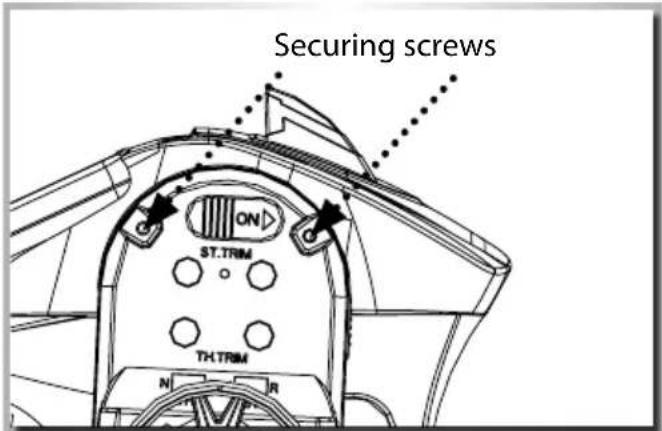
ADJUSTING THE STEERING WHEEL POSITION
The steering wheel can be set to any desired position. To adjust it, the two securing screws must be removed. The steering unit can then be moved forwards or backwards to the desired position. Finally re-insert and tighten the two securing screws.
ATTENTION!!!
Tighten the securing screws carefully and do not over-tighten.
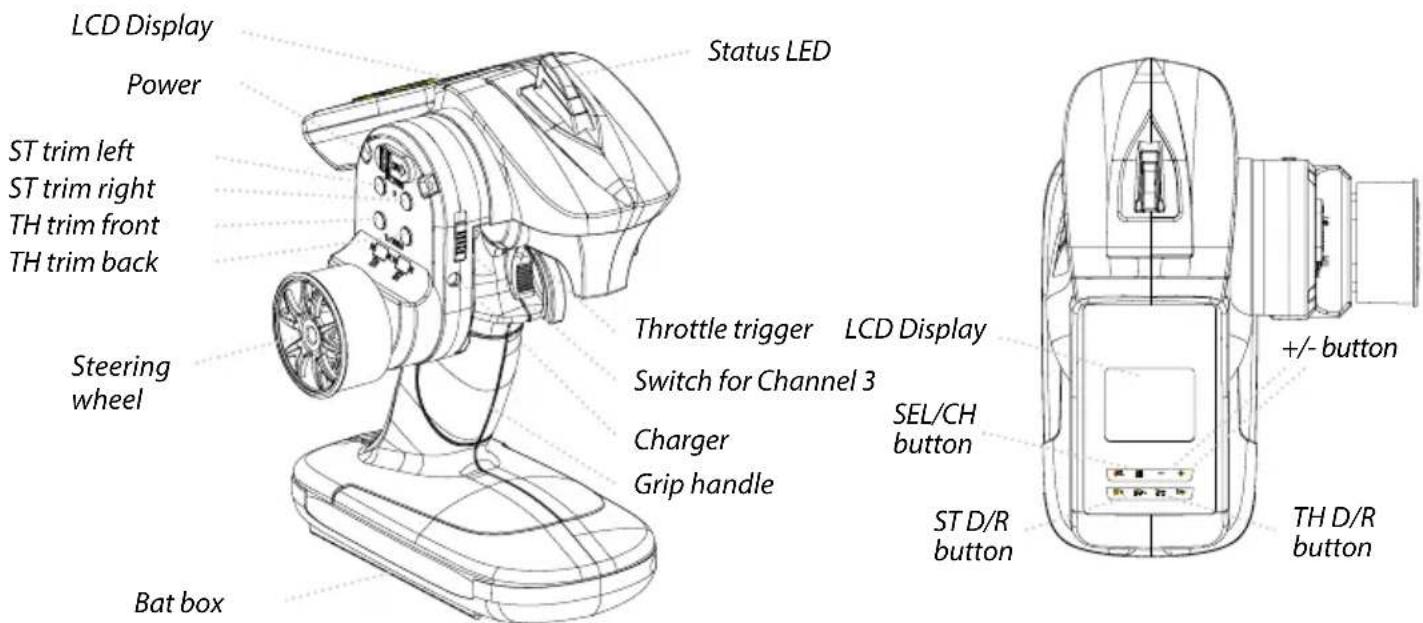
FUNCTIONS VERSION REFLEX WHEEL PRO3 LCD
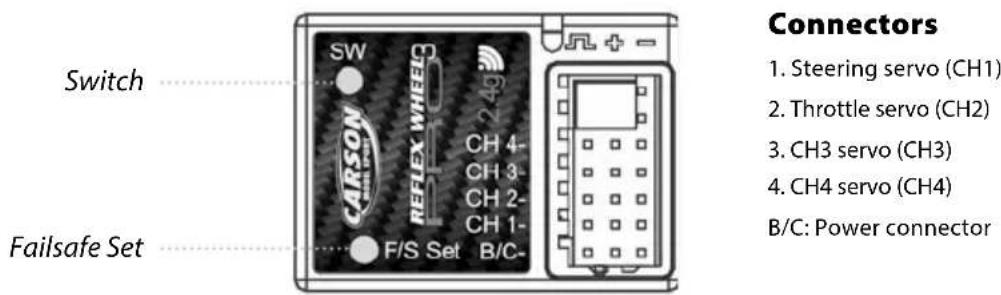
REFLEX WHEEL PRO3 VERSION
WITHOUT BEC
REFLEX WHEEL PRO3 VERSION
WITH BEC
TRANSMITTER HANDLING
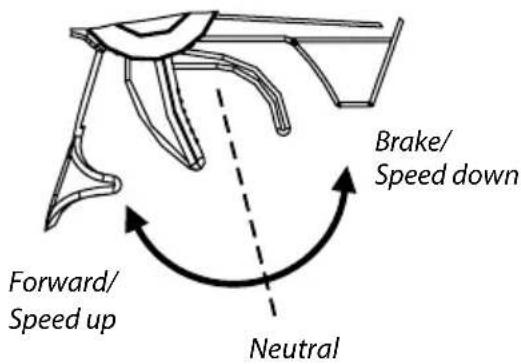
A. THROTTLE TRIGGER
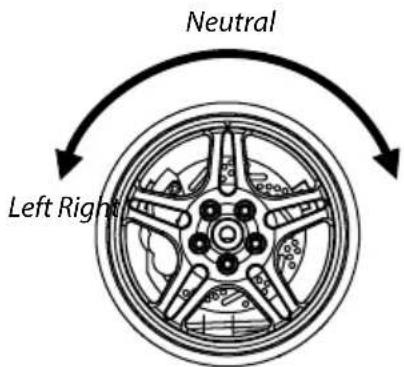
B. STEERING WHEEL
- Push the trigger forward to slow down or brake.
- Pull the trigger backward to accelerate.
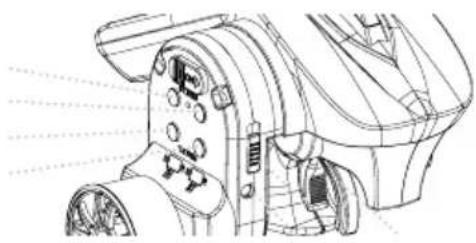
C. TRIM
ST trim left ST trim right TH trim front TH trim back
natural_image
Technical line drawing of a mechanical device with no visible text or symbolsThrottle Trim:
Trim the throttle servo slightly when the trigger is at the neutral position.
Steering Trim:
If the front wheels do not align straight, use the steering trim to adjust.
FUNCTIONS/SETTINGS
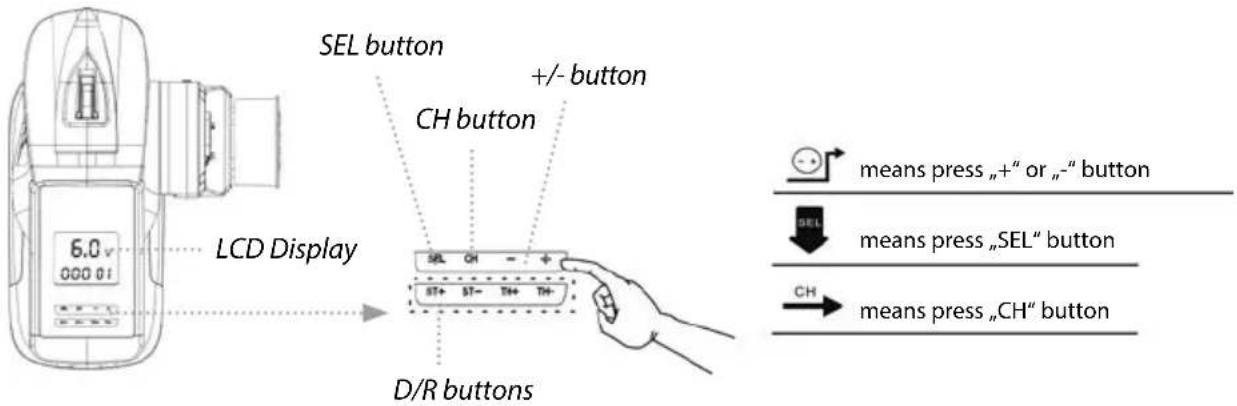
LED FUNCTION DISPLAY
flowchart
graph TD
    A["MODEL SELECT: 6.0 v 000 01"] --> B["+"]
    B --> C["6.0 v 000 02"]
    C --> D["+"]
    D --> E["6.0 v 000 03"]
    E --> F["+"]
    F --> G["6.0 v 000 04"]
    G --> H["+"]
    H --> I["6.0 v 000 15"]

    J["REV: OFF REV-ST"] --> K["+"]
    K --> L["ON REV-ST"]
    L --> M["+"]
    M --> N["ON REV-TH"]
    N --> O["+"]
    O --> P["ON REV-3C"]

    Q["SPA: 100% +EPA-ST"] --> R["+"]
    R --> S["OFF EPS-ST"]
    S --> T["+"]
    T --> U["99% +EPA-ST"]
    U --> V["+"]
    V --> W["99% +EPA-TH"]

    X["ABS: SEL"] --> Y["+"]
    Y --> Z["ON ABS-TH"]

    AA["EXP: EXP-5T"] --> AB["+"]
    AB --> AC["-01% EXP-ST"]
    AC --> AD["-01% EXP-FW"]
    AD --> AE["-01% EXP-BK"]

    AF["TRIM: SEL"] --> AG["+"]
    AG --> AH["-01% TRM-5T"]
    AH --> AI["-01% TRM-3T"]
    AI --> AJ["-01% TRM-4T"]
    AJ --> AK["-01% TRM-3C"]

    AL["MODEL NAME: OO O1"] --> AM["+"]
    AM --> AN["-ZOO 01"]
    AN --> AO["-OZO 01"]
    AO --> AP["-OOZ 01"]

    style A fill:#f9f,stroke:#333
    style J fill:#f9f,stroke:#333
    style Q fill:#f9f,stroke:#333
    style X fill:#f9f,stroke:#333
    style AF fill:#f9f,stroke:#333
    style AL fill:#f9f,stroke:#333
For operation, the transmitter requires 4 AA batteries or rechargeable batteries or the appropriate LiPo power pack.
Once you switch on the On/Off switch, the transmitter is ready for use.
After the transmitter has been switched on, the battery voltage will appear in "V" on the LCD display and, below it, the model name/number last selected will be displayed.
Settings are changed by means of the "SEL", "CH", "+" and "-" buttons.
-
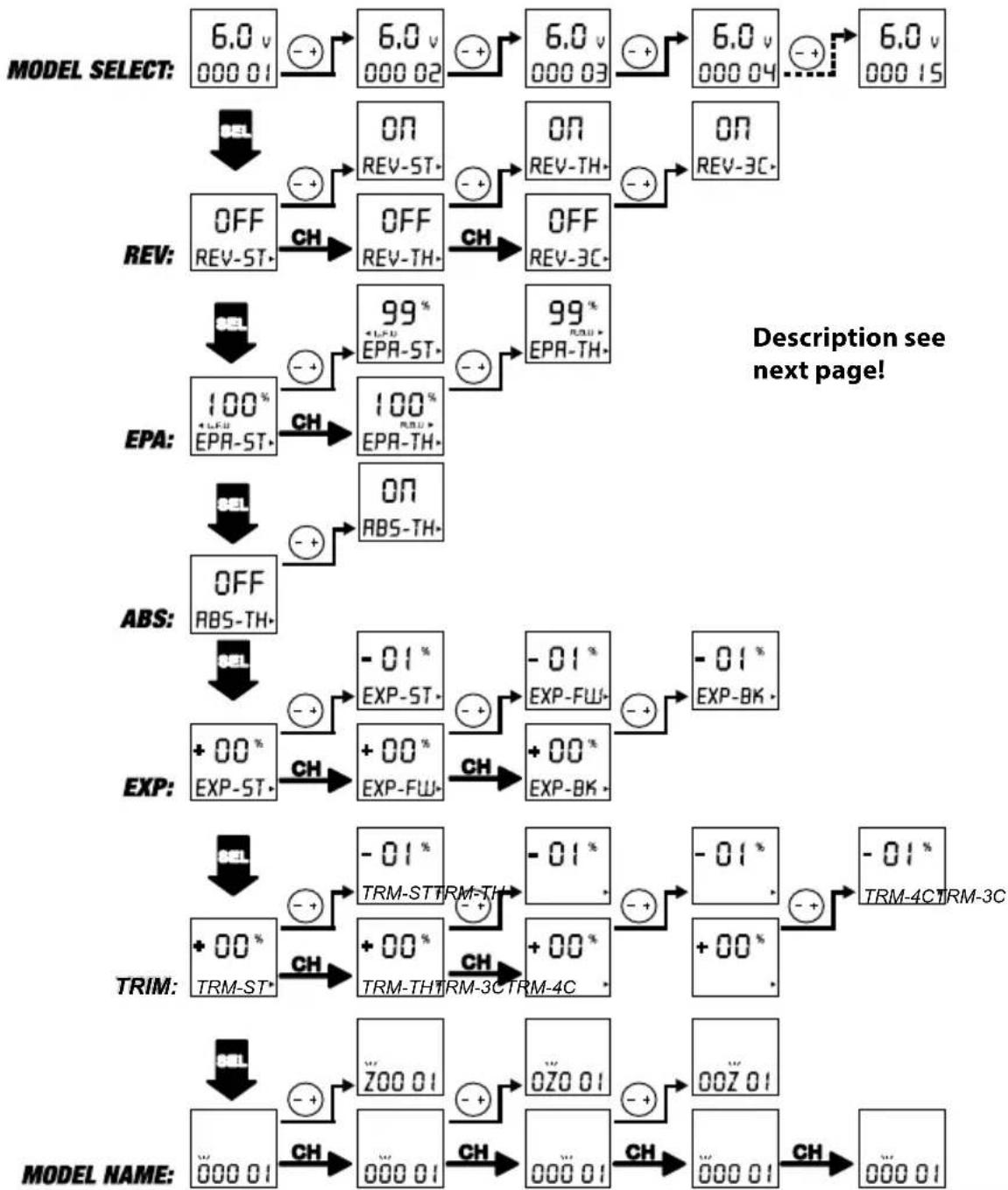
Press +/- to select the desired model. You have the choice of 15 memory spaces. The model number and model name are indicated on the LCD display.
-
Press "SET" to take you to the desired setting. The following functions are available for selection:
a) "REV" setting (reverse direction of servo rotation)
Press the "CH" button and choose between ST, TH or 3CH. Press +/- for normal or reverse.
b) "EPA" setting (servo travel limiter)
Press the "CH" button and choose between TH or ST. To select the direction of rotation, the throttle must be to the front or back with TH, and the steering wheel must be moved left or right with ST. The display shows LFU for left and forwards and RBU for right and brake. The desired value can be set between 0 and 120% by means of +/-
c) ABS setting (anti-blocking system)
Press +/- for ABS on or ABS off.
d) EXP setting (exponential)
Press the "CH" button and choose between ST (steering), FW (forwards) and BK (brake). The desired exponential value can be set between -100% and 100% by means of +/-.
e) MODEL NAME (enter name of model)
Press the CH button until you come to the model name setting. The characters 0 - 9 and A - Z can be entered by means of +/-
- ST-TRIM (trimming the steering)
Press TRIM-ST+ or TRIM-ST- to change the neutral position of the steering servo. It may be adjusted from 0 - 100% right to 0 - 100% left.
- TH-TRIMM (trimming the throttle)
Press TRIM-TH+ or TRIM-TH- to change the neutral position of the throttle servo.
It may be adjusted from 0 - 100% throttle to 0 - 100% brake.
TRIM 3C + 4C for channels 3 and 4.
- D/R ST setting (dual rate steering)
Dual rate increases or reduces the servo travel in relation to the travel of the steering wheel/ throttle proportionally over the entire servo path.
Press D/R ST+ or D/R ST- to change the dual rate setting of the steering.
A value between 0 and 100% may be set.
- D/R TH setting (dual rate throttle)
Press D/R TH+ or D/R TH- to change the dual rate setting of the throttle.
A value between 0 and 100% may be set.
- To close the settings, press the SEL button until the battery display reappears.
Then the newly entered values are automatically saved.
FUNCTIONS VERSION REFLEX WHEEL PRO3
REFLEX WHEEL PRO3 VERSION
WITHOUT BEC
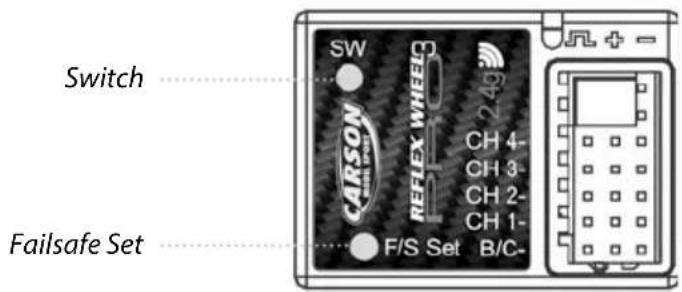
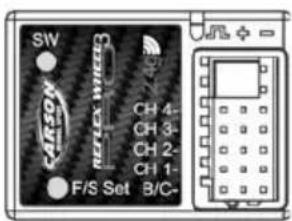
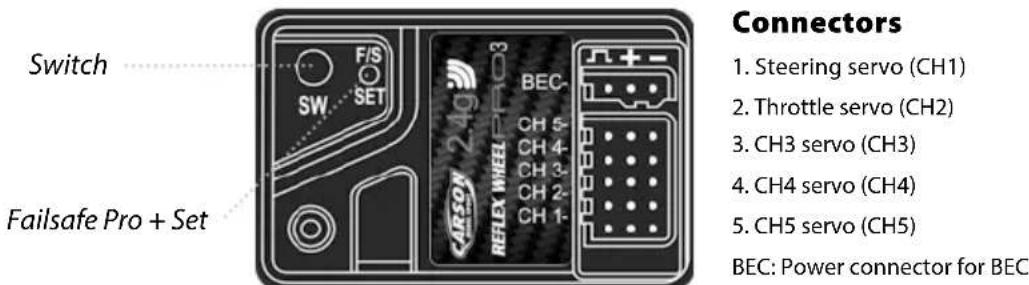
Connectors
- Steering servo (CH1)
- Throttle servo (CH2)
- CH3 servo (CH3)
- CH4 servo (CH4)
B/C: Power connector
REFLEX WHEEL PRO3 VERSION
WITH BEC
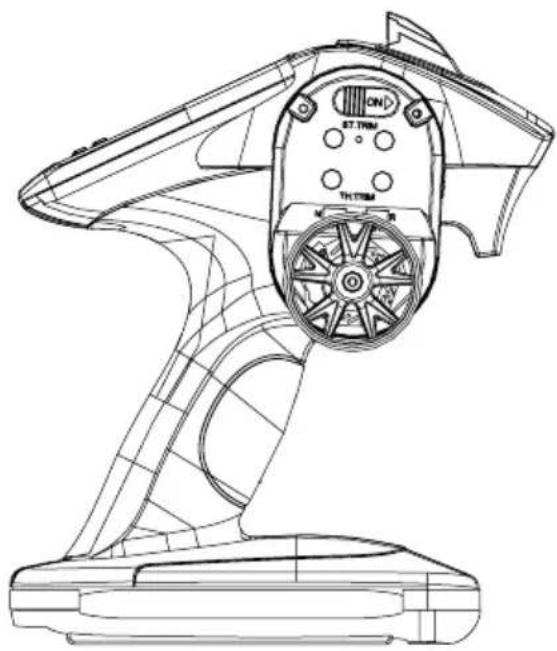
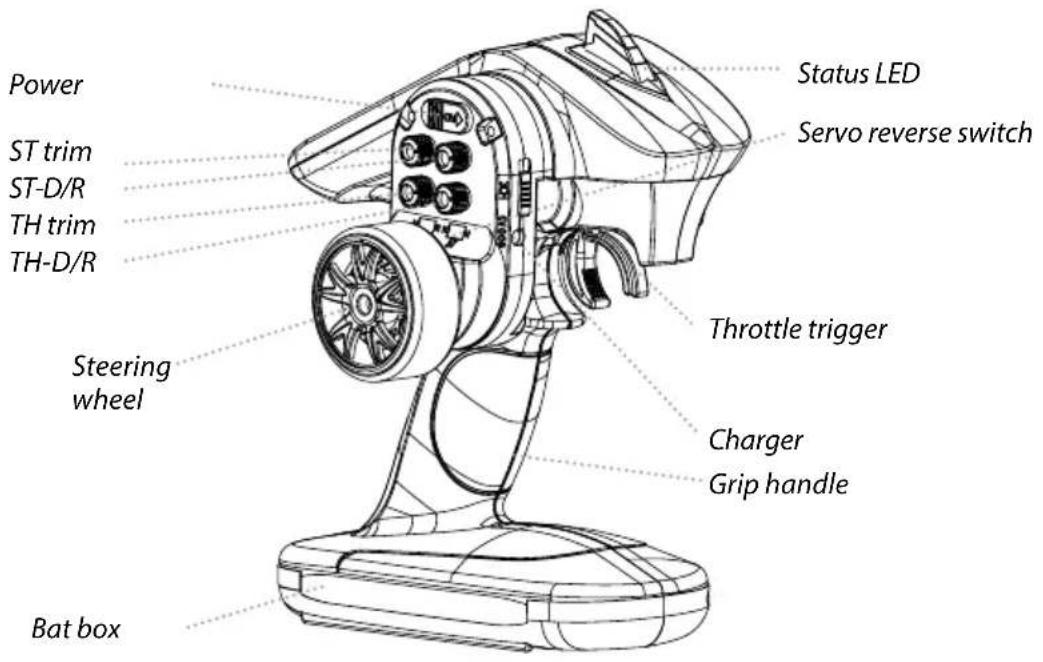
TRANSMITTER HANDLING
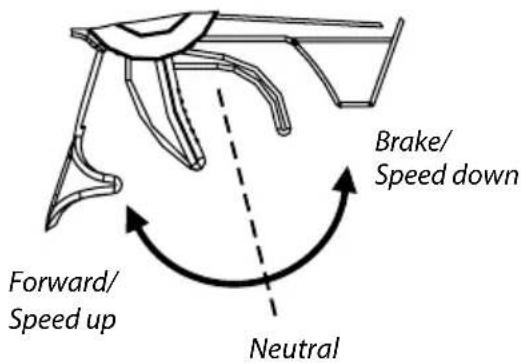
A. THROTTLE TRIGGER
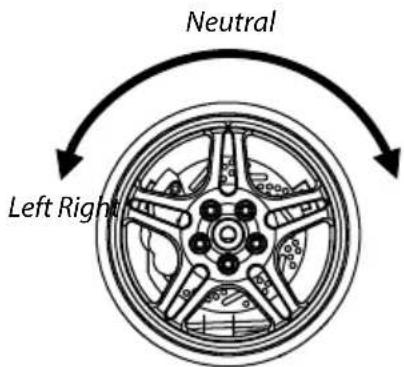
B. STEERING WHEEL
- Push the trigger forward to slow down or brake.
- Pull the trigger backward to accelerate.
C. TRIM/SERVO REVERSE
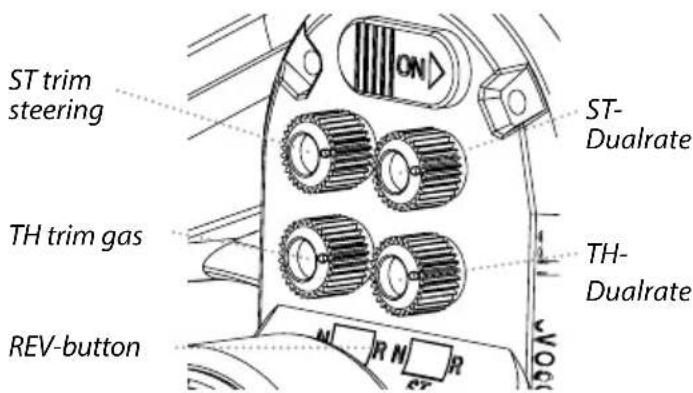
Throttle Trim:
Trim the throttle servo slightly when the trigger is at the neutral position.
Steering Trim:
If the front wheels do not align straight, use the steering trim to adjust.
ST dual rate / TH dual rate:
Dual rate proportionally increases or decreases the servo travel relative to the travel of the steering wheel / accelerator lever over the complete servo travel.
Turn the potentiometers D/R ST or D/R TH to change the dual rate setting of the steering or throttle.
REV switch / servo reverse:
Use the REV switches (TH REV + ST REV) to reverse the direction of rotation of the servos.
FAIL SAFE FUNCTION SETTING
- Set the TH, ST switches to the normal position.
- Turn on the transmitter and receiver.
- Press the F/S SET button, the LED on the receiver should start flashing rapidly.
- Put the throttle trigger at the brake position, press the F/S SET button, the LED should become solid.
- For electric model, put the throttle trigger at the stop position when you are making the setting.
Reflex Wheel Pro3:
As soon as the receiver/transmitter signal is interrupted, the receiver switches to the default throttle failsafe setting.
Reflex Wheel Pro3 BEC:
The Reflex Wheel Pro2 is fitted with the „Failsafe pro +” system. This system also has integrated low voltage protection. As soon as the voltage is too low for safe operation, the receiver also switches to the default throttle failsafe setting.
BINDING THE TRANSMITTER AND RECEIVER
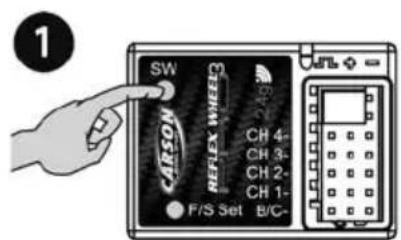
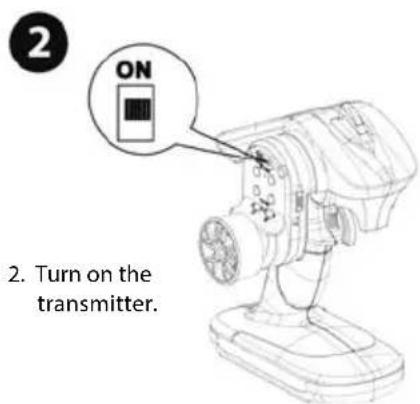
- Turn on the receiver power. Press the SW switch. The receiver's LED should start flashing.
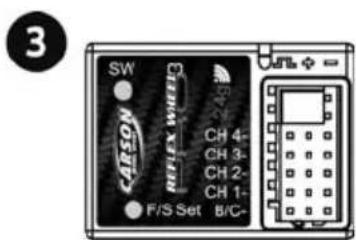
- When the LED on the receiver becomes solid, the binding process is completed.
ATTENTION
Keep the transmitter and receiver not over 40 cm apart when setting and binding.
During the binding process no other transmitter should be operated in the vicinity at the same time!
BATTERY SAFETY GUIDELINES
Used correctly, domestic batteries are a safe and dependable source of portable power. Problems can occur if they are misused or abused – resulting in leakage or, in extreme cases, fire or explosion. Here are some simple guidelines to safe battery use designed to eliminate any such problems.
natural_image
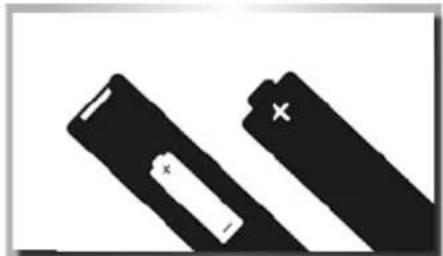
Two black battery cells with white markings, one larger and one smaller, against a white background (no text or symbols)Take care to fit your batteries correctly, observing the plus and minus marks on the battery and appliance. Incorrect fitting can cause leakage or, in extreme cases, fire or even an explosion.
natural_image
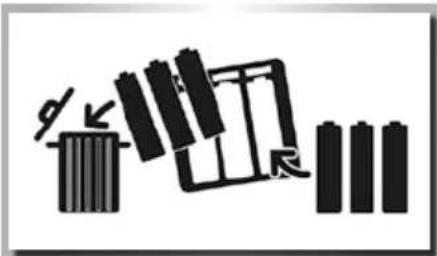
Pure electrical circuit lines without any symbolsReplace the whole set of batteries at one time, taking care not to mix old and new batteries or batteries of different types, since this can result in leakage or, in extreme cases, fire or even an explosion.
natural_image
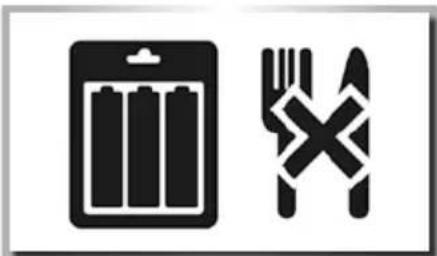
Two black-and-white icons: a battery and a fork crossed over it, both without any text or symbols.Store unused batteries in their packaging and away from metal objects which may cause a short-circuit resulting in leakage or, in extreme cases, fire or even an explosion.
natural_image
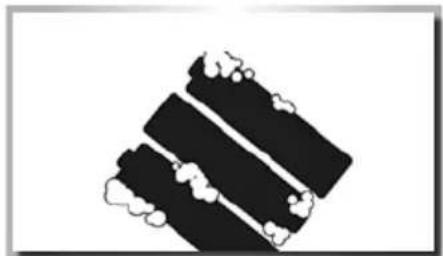
Abstract black-and-white graphic with three vertical bands and cloud-like shapes (no text or symbols)Remove dead batteries from equipment and all batteries from equipment you know you are not going to use for a long time. Otherwise the batteries may leak and cause damage.
natural_image
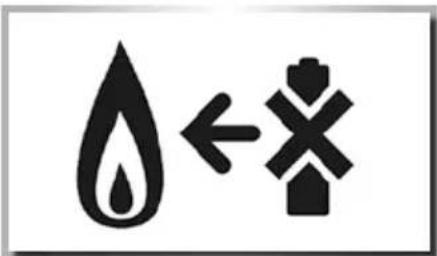
Symbolic illustration of a water drop with an arrow and cross symbol (no text or numbers)Never throw batteries in a fire, this can cause an explosion. Do not put dead batteries with the normal household waste. Deliver them at special collecting institutions.
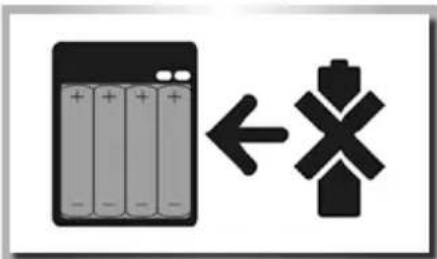
Never attempt to recharge ordinary batteries, either in a charger or by applying heat to them. They may leak, cause fire or even explode. There are special rechargeable batteries which are clearly marked as such.
natural_image
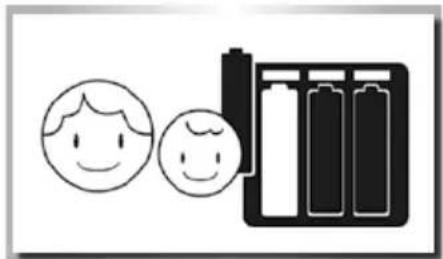
Simple line drawing of a battery cell with two smiling faces and a battery pack (no text or symbols)Supervise children if they are replacing batteries themselves in order to ensure these guidelines are followed.
natural_image
Abstract black-and-white graphic with a triangular shape and horizontal lines, no text or symbols present.Make sure battery compartments are secure.
Cher client
natural_image
Line drawing of a connected electrical component with a USB cable (no text or symbols)