Evnia 25M2N3200W - Monitor PHILIPS - Free user manual and instructions
Find the device manual for free Evnia 25M2N3200W PHILIPS in PDF.


User questions about Evnia 25M2N3200W PHILIPS
0 question about this device. Answer the ones you know or ask your own.
Ask a new question about this device
Download the instructions for your Monitor in PDF format for free! Find your manual Evnia 25M2N3200W - PHILIPS and take your electronic device back in hand. On this page are published all the documents necessary for the use of your device. Evnia 25M2N3200W by PHILIPS.
USER MANUAL Evnia 25M2N3200W PHILIPS
Important Information Manual
Register your product and get support at www.philips.com/welcome
Table of Contents
- Important Safety Instruction .....3
1.1 Safety precautions and maintenance 3
1.2 Prevent Tipping ......68
1.3 HDMI 70
2. TCO Certified....73
3. Regulatory Information .....75
4. Warranty Statement 88
5. Spare Parts Service......106
6. Service Contact Information ..... 113
1. Important Safety Instruction
1.1 Safety precautions and maintenance
Safety precautions and maintenance(English)
Warnings
Use of controls, adjustments or procedures other than those specified in this documentation may result in exposure to shock, electrical hazards and/or mechanical hazards.
Read and follow these instructions when connecting and using your computer monitor.
Excessive sound pressure from earphones and headphones can cause hearing loss. Adjustment of the equalizer to maximum increases the earphones and headphones output voltage and therefore the sound pressure level.
For models without AC switches:
The power outlet should be installed near the equipment, if it is pluggable, for easy access.
Note
- To prevent possible hearing damage, do not listen at high volume levels for long periods.
• We recommend you switch off the monitor when it is not in use for a long time.
Operation
- Remove any object that could fall into ventilation holes or prevent proper cooling of the monitor's electronics.
-
Do not block the ventilation holes on the cabinet.
-
Operate under the specified power supply. Be sure to operate the monitor only with the specified power supply. Use of an incorrect voltage will cause malfunction and may cause fire or electric shock.
- The USB Type-C port could only be connected to specify equipment with fire enclosure in compliance with IEC 62368-1 or IEC 60950-1.
Maintenance
- To avoid the risk of shock or permanent damage to the set, do not expose the monitor to dust, rain, water, or excessive moisture environment. - In order to maintain the best performance of your monitor and use it for a longer lifetime, please use the monitor in a location that falls within the following temperature and humidity ranges. (In case of any conflict between the information and the manual, please refer to the manual.)
- Temperature: 0 °C\~40 °C 32 °F\~104 °F
• Humidity: 20% RH\~80% RH - Altitude : 0 m\~5000 m(0 ft\~16404 ft)
- Please confirm the distribution system in building installation shall provide the circuit breaker rated 120/240V, 20A (maximum).
- If provided with a 3-pin attachment plug on the power cord, plug the cord into a grounded (earthed) 3-pin outlet. Do not disable the power cord grounding pin, for example, by attaching a 2-pin adapter. The grounding pin is an important safety feature.
Caution(Applicable models with battery)
- Replacement of a battery with an incorrect type that can defeat a safeguard;
- Disposal of a battery into fire or a hot oven, or mechanically crushing or cutting of a battery, that can result in an explosion;
• Leaving a battery in an extremely high temperature surrounding environment that can result in an explosion or the leakage of flammable liquid or gas; - A battery subjected to extremely low air pressure that may result in an explosion or the leakage of flammable liquid or gas.
- Risk of fire or explosion if the battery is replaced by an incorrect type


Caution(Applicable models with coin/button cell batteries)
- Do not ingest battery, Chemical Burn Hazard.
- This product contains a coin / button cell battery. If the coin / button cell battery is swallowed, it can cause severe internal burns in just 2 hours and can lead to death.
- Keep new and used batteries away from children.
- If the battery compartment does not close securely, stop using the product and keep it away from children.
• If you think batteries might have been swallowed or placed inside any part of the body, seek immediate medical attention.

Stability Hazard.
The product may fall, causing serious personal injury or death. To prevent injury, this product must be securely attached to the floor/wall in accordance with the installation instructions.
A product set may fall, causing serious personal injury or death. Many injuries, particularly to children, can be avoided by taking simple precautions such as:
- ALWAYS use cabinets or stands or installation methods recommended by the manufacturer of the product set.
- ALWAYS use furniture that can safely support the product.
- ALWAYS ensure the product is not overhanging the edge of the supporting furniture.
• ALWAYS educate children about the dangers of climbing on furniture to reach the product or its controls. - ALWAYS route cords and cables connected to your product so they cannot be tripped over, pulled or grabbed.
- NEVER place a product in an unstable location.
- NEVER place the product on tall furniture (for example, cupboards or bookcases) without anchoring both the furniture and the product to a suitable support.
- NEVER place the product on cloth or other materials that may be located between the product and supporting furniture.
- NEVER place items that might tempt children to climb, such as toys and remote controls, on the top of the product or furniture on which the product is placed.
- If the existing product is going to be retained and relocated, the same considerations as above should be applied.

Note
For models with wall mounting function, 4pcs of screw is accepted for the mounting holes, the length and size of the screw (M4 or M6) may be varied different, according to different model and different mounting environment. In order to keep safety, always contact manufacturer for wall-mount installation.
EU Battery Regulation

For EU: The crossed-out wheeled bin implies that used batteries should not be put to the general household waste! There is a separate collection system for used batteries, to allow proper treatment and recycling in accordance with legislation.
Please contact your local authority for details on the collection and recycling schemes.
For Switzerland: The used battery is to be returned to the selling point.
For other non-EU countries: Please contact your local authority for correct method of disposal of the used battery.
According to Regulation (EU) 2023/1542, the battery can't be disposed improperly. The battery shall be separated to collect by local service.
The chemical symbol for lead (Pb) is added under this symbol if the battery(ies) contains more than 0.004 % lead.
- Keep the remote control and the battery out of reach of children.
- The remote control supplied with this product contains a coin / button cell battery. If the coin / button cell battery is swallowed, it can cause severe internal burns in just 2 hours and can lead to death.
- If the remote control will not be used for an extended period of time, remove the battery.
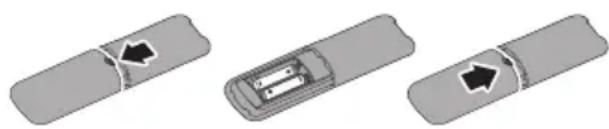
To install or replace batteries:
- Press and then slide the cover to open it.
- Align the batteries according to the (+) and (−) indications inside the battery compartment.
- Replace the cover.
natural_image
Three grayscale diagrams showing a rectangular object with a black arrow pointing to its side, and two internal compartments with arrows indicating movement or force (no text or symbols)
Note
The incorrect use of batteries can result in leaks or bursting. Be sure to follow these instructions:
- Place “AAA” batteries matching the (+) and (−) signs on each battery to the (+) and (−) signs of the battery compartment.
- Do not mix battery types.
- Do not combine new batteries with used ones. It causes shorter life or leakage of batteries.
- Remove the dead batteries immediately to prevent them from liquid leaking in the battery compartment. Don't touch exposed battery acid, as it can damage your skin.
- If you do not intend to use the remote control for a long period, remove the batteries.
natural_image
Three-step diagram showing a device with a rectangular component and an arrow indicating direction (no text or symbols)
Nota
natural_image
Three gray rectangular objects with arrow indicators, showing internal components (no text or symbols)
Забележка
- ผู้ยงกําแพร่ รุคบ์รู้เชิงเตอร์สุขภาพะ, ภําลังิจุบการมหอก เหล่งเบรดการเดศศิริย
- Cambodia Cambodia Cambodia Cambodia Cambodia Cambodia Cambodia Cambodia Cambodia Cambodia Cambodia Cambodia Cambodia Cambodia Cambodia Cambodia Cambodia Cambodia Cambodia Cambodia Cambodia Cambodia Cambodia Cambodia Cambodia Cambodia Cambodia Cambodia Cambodia Cambodia Cambodia Cambodia Cambodia Cambodia Cambodia Cambodia Cambodia Cambodia Cambodia Cambodia Cambodia Cambodia Cambodia Cambodia Cambodia Cambodia Cambodia Cambodia Cambodia Cambodia Cambodia Cambodia Cambodia Cambodia Cambodia Cambodia Cambodia Cambodia Cambodia Cambodia Cambodia Cambodia Cambodia Cambodia Cambodia Cambodia Cambodia Cambodia Cambodia Cambodia Cambodia Cambodia Cambodia Cambodia Cambodia Cambodia Cambodia Cambodia Cambodia Cambodia Cambodia Cambodia Cambodia Cambodia Cambodia Cambodia Cambodia Cambodia Cambodia Cambodia Cambodia Cambodia Cambodia Cambodia Cambodia Cambodia Cambodia Cambodia Cambodia CambodiaCambodia, Bangladesh, Bangladesh, Bangladesh, Bangladesh, Bangladesh, Bangladesh, Bangladesh, Bangladesh, Bangladesh, Bangladesh, Bangladesh, Bangladesh, Bangladesh, Bangladesh, Bangladesh, Bangladesh, Bangladesh, Bangladesh, Bangladesh, Bangladesh, Bangladesh, Bangladesh, Bangladesh, Bangladesh, Bangladesh, Bangladesh, Bangladesh, Bangladesh, Bangladesh, Bangladesh, Bangladesh, Bangladesh, Bangladesh, Bangladesh, Bangladesh, Bangladesh, Bangladesh, Bangladesh, Bangladesh, Bangladesh, Bangladesh, Bangladesh, Bangladesh, Bangladesh, Bangladesh, Bangladesh, Bangladesh, Bangladesh, Bangladesh, Bangladesh, Bulgaria, Bulgaria, Bulgaria, Bulgaria, Bulgaria, Bulgaria, Bulgaria, Bulgaria, Bulgaria, Bulgaria, Bulgaria, Bulgaria, Bulgaria, Bulgaria, Bulgaria, Bulgaria, Bulgaria, Bulgaria, Bulgaria, Bulgaria, Bulgaria, Bulgaria, Bulgaria, Bulgaria, Bulgaria, Bulgaria, Bulgaria, Bulgaria, Bulgaria, Bulgaria, Bulgaria, Bulgaria, Bulgaria, Bulgaria, Bulgaria, Bulgaria, Bulgaria, Bulgaria, Bulgaria, Bulgaria, Bulgaria, Bulgaria, Bulgaria, Bulgaria, Bulgaria, Bulgaria, Bulgaria, Bulgaria, Bulgaria, Bulgaria, Libya and other countries in the United States of the United Kingdom or its constituent countries of the United Kingdom or its constituent countries of the United Kingdom or its constituent countries of the United Kingdom or its constituent countries of the United Kingdom or its constituent countries of the United Kingdom or its constituent countries of the United Kingdom or its constituent countries of the United Kingdom or its constituent countries of the United Kingdom or its constituent countries of the United Kingdom or its constituent countries of the United Kingdom or its constituent countries of the United Kingdom or its constituent countries of the United Kingdom or its constituent countries of the United Republic of Australia or its constituent countries of Australia or its constituent countries of Australia or its constituent countries of Australia or its constituent countries of Australia or its constituent countries of Australia or its constituent countries of Australia or its constituent countries of Australia or its constituent countries of Australia or its constituent countries of Australia or its constituent countries of Australia or its constituent countries of Australia or its constituent countries of Australia or its constituent countries of Australia or its constituent countries of Australia or its constituent countries of Australia or its constituent countries of Australia or its constituent countries of Australia or their constituent countries of Australia or its constituent countries of Australia or its constituent countries of Australia or its constituent countries of Australia or its constituent countries of Australia or its constituent countries of Australia or its constituent countries of Australia or its constituent countries of Australia or its constituent countries of Australia or its constituent countries of Australia or its constituent countries of Australia or its constituent countries of Australia or its constituent countries of Australia or its constituent countries of Australia or its constituent countries of Australia or its constituent countries of Australia or its constituent countries of Australian or its constituent countries of Australia or its constituent countries of Australia or its constituent countries of Australia or its constituent countries of Australia or its constituent countries of Australia or its constituent countries of Australia or its constituent countries of Australia or its constituent countries of Australia or its constituent countries of Australia or its constituent countries of Australia or its constituent countries of Australia or its constituent countries of Australia or its constituent countries of Australia or its constituent countries of Australia or its constituent countries of Australia or its constituent countries of Australia or its constituent country
natural_image
Three-step diagram showing a device with a rectangular component, a cross-section view, and a rounded rectangle (no text or symbols)
ขั้งแก่
natural_image
Three-step diagram showing a device with internal components and directional arrows (no text or symbols)註
natural_image
Three gray rectangular objects with arrow indicators, showing different interior states (no text or symbols)Napomena
natural_image
Three-step diagram showing a device with a rectangular component, a internal box, and a rounded rectangle (no text or symbols)
Poznámka
natural_image
Three schematic diagrams showing a rectangular object with an arrow pointing to its side, and two internal compartments with arrows indicating movement (no text or symbols present)Bemærk
natural_image
Three grayscale diagrams showing a device with internal components and directional arrows, no text or symbols present.Opmerking
natural_image
Three gray rectangular objects with arrow indicators, showing internal compartments or components (no text or symbols)Huomautus
natural_image
Three schematic diagrams showing a device with internal components and directional arrows, no text or symbols present.Remarque
natural_image
Three gray rectangular objects with arrow indicators, showing different states of movement or assembly (no text or symbols)
Anmerkung
natural_image
Three-step diagram showing a vehicle inside a vehicle chassis with directional arrows indicating movement (no text or symbols)Σημείωση
natural_image
Three schematic diagrams showing a device with internal components and directional arrows, no text or symbols present.
ध्यान दें
natural_image
Three grayscale diagrams showing a device with internal components and directional arrows, no text or symbols present.Megjegyzés
natural_image
Three grayscale images showing a device with internal components and directional arrows, no text or symbols present.Catatan
natural_image
Three-step diagram showing a rectangular object with an arrow pointing to its side, and a segmented container with internal components (no text or symbols)Nota
natural_image
Three schematic diagrams showing a rectangular object with an arrow pointing to its side, and two internal components with arrows indicating direction (no text or symbols present)Merk
natural_image
Three-step diagram showing a device with a rectangular component and an arrow indicating direction (no text or symbols)
Uwaga
natural_image
Three-step diagram showing a rectangular object with an arrow pointing to its side, inside a container, and finally a separate rectangular object with an arrow pointing to it (no text or symbols present)
Nota
natural_image
Three grayscale diagrams showing a rectangular object with a black arrow pointing to its side, and two internal compartments with arrows indicating movement or force (no text or symbols)
Notă
natural_image
Three gray rectangular objects with arrow indicators, showing different states of movement or assembly (no text or symbols present)
Beleška
Nepravilno korišćenje baterija može da dovede do curenja ili pucanja. Obavezno pratite ova uputstva:
- Postavite „AAA“ baterije, uklapajući (+) i (−) znakove na svakoj bateriji sa (+) i (−) znakovima odeljka za baterije.
• Nemojte da mešate vrste baterija. - Ne kombinujte nove baterije sa korišćenim. To dovodi do kraćeg životnog veka baterija ili curenja.
- Izvadite potrošene baterije odmah, da biste sprečili da iscure u odeljak za baterije. Ne dodirujte izloženu kiselinu baterije jer može da ošteti vašu kožu.
- Ako ne planirate da koristite daljinski upravljač tokom dužeg vremenskog perioda, uklonite baterije.
natural_image
Three grayscale diagrams showing a device with a central component and directional arrows, no text or symbols present.
Poznámka
natural_image
Three schematic diagrams showing a device with internal components and directional arrows, no text or symbols present.
Opomba
natural_image
Three gray rectangular objects with arrow indicators, showing internal compartments or components (no text or symbols)
Nota
natural_image
Three gray 3D-rendered diagrams showing a rectangular object with internal components and directional arrows, no text or symbols present.
Obs
natural_image
Three gray rectangular objects with arrow indicators, showing internal compartments or components (no text or symbols)หมายเหตุ
natural_image
Three-step diagram showing a rectangular object with an arrow pointing to it, inside a container, and finally a rounded rectangle with an arrow pointing to it (no text or symbols present)
Not
natural_image
Three gray rectangular objects with arrow indicators, showing internal compartments or connectors (no text or symbols)
Примітка
natural_image
Three gray rectangular objects with arrow indicators, showing internal compartments or components (no text or symbols)
Lưu ý
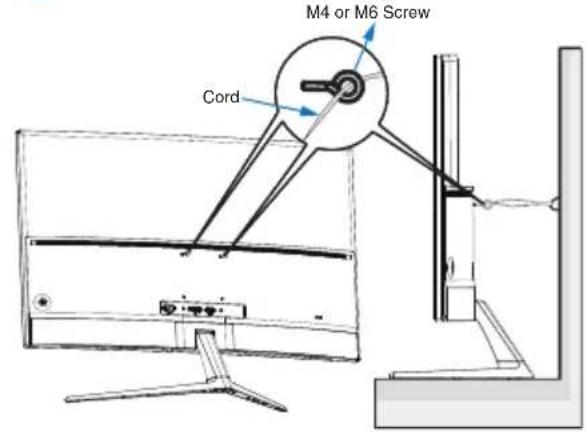
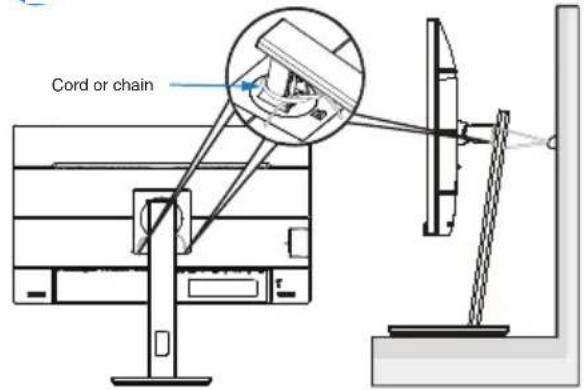
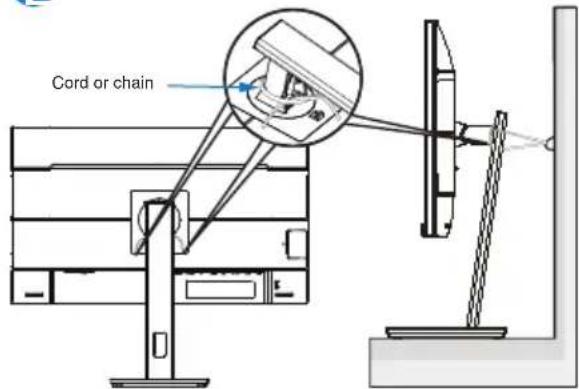
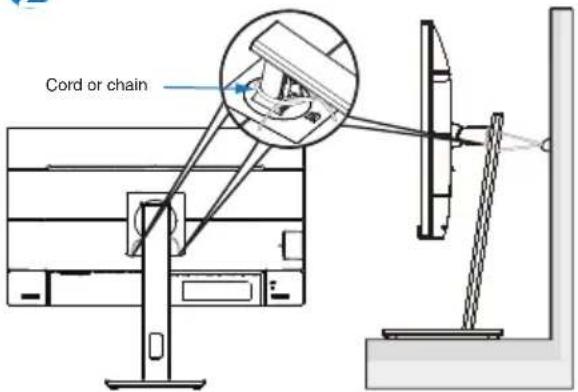
When using the display, fasten the LCD to a wall using a cord or chain that can support the weight of the monitor in order to prevent the monitor from falling.
1
text_image
M4 or M6 Screw Cord2
text_image
Cord or chain
Note
• Display design may differ from those illustrated.
• Installing must be done by a qualified technician, and please contact your supplier for more information.
- For the Models with net weight >=7kg. Please select the suitable way to Prevent Tipping.
- For the models with VESA Mount, please use method ①, install the screws with ring to the VESA Mount hole, then tie the cord or chain to the wall. Otherwise, please use method ② to tie the cord or chain to the stand and then fix it to the wall.
Russian
text_image
M4 or M6 Screw Cord2
text_image
Cord or chain
Примечание
text_image
M4 or M6 Screw Cord2
text_image
Cord or chain
Not
(Only applicable to the model of application)
English (original)
The terms HDMI, HDMI High-Definition Multimedia Interface, HDMI Trade Dress and the HDMI Logos are trademarks or registered trademarks of HDMI Licensing Administrator, Inc.
Arabic
Brazilian Portuguese
Chinese (Simplified)
Chinese (Traditional)
Spanish (Latin America)
A third-party certification according to ISO 14024

text_image
TCO CERTIFIED Toward sustainable IT products
natural_image
Illustration of various electronic devices including desktops, laptops, headphones, and a monitor (no text or symbols)Say hello
to a more sustainable product
IT products are associated with a wide range of sustainability risks throughout their life cycle. Human rights violations are common in the factories. Harmful substances are used both in products and their manufacture. Products can often have a short lifespan because of poor ergonomics, low quality and when they are not able to be repaired or upgraded.
This product is a better choice. It meets all the criteria in TCO Certified, the world's most comprehensive sustainability certification for IT products. Thank you for making a responsible product choice, that help drive progress towards a more sustainable future!
Criteria in TCO Certified have a life-cycle perspective and balance environmental and social responsibility. Conformity is verified by independent and approved verifiers that specialize in IT products, social responsibility or other sustainability issues. Verification is done both before and after the certificate is issued, covering the entire validity period. The process also includes ensuring that corrective actions are implemented in all cases of factory non-conformities. And last but not least, to make sure that the certification and independent verification is accurate, both TCO Certified and the verifiers are reviewed regularly.
Want to know more?
Read information about TCO Certified, full criteria documents, news and updates at tcocertified.com. On the website you'll also find our Product Finder, which presents a complete, searchable listing of certified products.
User define mode is used for TCO Certified compliance. (DUT Reset firstly, if information appears, please select “Proceed”, otherwise, go ahead.) (Only applicable to the model of application)
natural_image
Illustration of various electronic devices including smartphone, desktop, laptop, headphones, monitor, and camera (no text or symbols)Say hello
to a more sustainable product
IT products are associated with a wide range of sustainability risks throughout their life cycle. Human rights violations occur in the supply chain. Harmful substances are used both in products and their manufacture. Products can often have a short lifespan because of poor ergonomics, low quality and when they are not able to be repaired or upgraded.
This product is a better choice. It meets all the criteria in TCO Certified, the world's most comprehensive sustainability certification for IT products. Additionally, it fulfills the requirements of TCO Certified Edge, the supplemental certification that recognizes leading-edge products that exceed typical performance in a particular sustainability attribute. At our Product Finder (tcocertified.com/product-finder) you can find out which TCO Certified Edge criterion or criteria this product meets.
Criteria in TCO Certified have a life-cycle perspective and balance environmental and social responsibility. Compliance is verified by independent verification organizations that specialize in IT products, social responsibility or other sustainability issues. Verification is done both before and after the certificate is issued, covering the entire validity period. The process also includes ensuring that corrective actions are implemented in all cases of factory non-conformities.
Thank you for making a responsible product choice, that help drive progress towards a more sustainable future!
Want to know more?
Read information about TCO Certified, full criteria documents, news and updates at tcocertified.com. On the website you'll also find our Product Finder, which presents a complete, searchable listing of certified products.
User define mode is used for TCO Certified compliance. (DUT Reset firstly, if information appears, please select "Proceed", otherwise, go ahead.) (Only applicable to the model of application)
3. Regulatory Information
EPEAT (Only applicable to the model of application)
(www.epeat.net)

The EPEAT (Electronic Product Environmental Assessment Tool) program evaluates
computer desktops, laptops, and monitors based on environmental criteria developed through an extensive stakeholder consensus process supported by US EPA.
EPEAT system helps purchasers in the public and private sectors evaluate, compare and select desktop computers, notebooks and monitors based on their environmental attributes. EPEAT also provides a clear and consistent set of performance criteria for the design of products, and provides an opportunity for manufacturers to secure market recognition for efforts to reduce the environmental impact of its products.
Benefits of EPEAT (Only applicable to EPEAT registered model)
Reduce use of primary materials.
Reduce use of toxic materials.
Avoid the disposal of hazardous waste.
EPEAT'S requirement that all registered products meet ENERGY STAR's energy efficiency specifications, means that these products will consume less energy throughout their life.
Note: For EPEAT related information please refer to
Energy Star Declaration (Only applicable to EPA certified model)
(www.energystar.gov)

ENERGY STAR is a program run by the U.S. Environmental Protection Agency (EPA) and U.S. Department of Energy (DOE) that promotes energy
efficiency.
This product qualifies for ENERGY STAR in the “default” settings and this is the setting in which power savings will be achieved.
Changing the factory default picture settings or enabling other features will increase power consumption that could exceed the limits necessary to qualify for ENERGY STAR rating.
For more information on the ENERGY STAR program, refer to energystar.gov.
Note
(CE Only applicable to the model of application)
CE Declaration of Conformity (English)
This device complies with the requirements set out in the Council Directive on the Approximation of the Laws of the Member States relating to Electromagnetic Compatibility Directive (2014/30/EU), Low-voltage Directive (2014/35/EU), ErP Directive (2009/125/EC), RoHS directive (2011/65/EU) and Radio Equipment Directive (2014/53/EU)(for Radio Equipment)
This product has been tested and found to comply with the harmonized standards for Information Technology Equipment, these harmonized standards published under Directives of Official Journal of the European Union.
CE 符合性声明 (Chinese Simplified)
CE-samsvarserklæring (Norwegian)
Denne enheten er i samsvar med kravene fastsatt i rådsdirektiv om tilnærming av lover i medlemslandene relatert til direktivene om Elektromagnetisk kompatibilitet (2014/30/EU), Lavspenning (2014/35/EU), ∅kodesign (2009/125/EF), Farlige stoffer i elektrisk og elektronisk utstyr (2011/65/EU) og Radioutstyr (2014/53/EU).
Federal Communications Commission (FCC) Notice (U.S. Only)
This equipment has been tested and found to comply with the limits for a Class B digital device, pursuant to Part 15 of the FCC Rules. These limits are designed to provide reasonable protection against harmful interference in a residential installation. This equipment generates, uses and can radiate radio frequency energy and, if not installed and used in accordance with the instructions, may cause harmful interference to radio communications.
However, there is no guarantee that interference will not occur in a particular installation. If this equipment does cause harmful interference to radio or television reception, which can be determined by turning the equipment off and on, the user is encouraged to try to correct the interference by one or more of the following measures:
- Reorient or relocate the receiving antenna.
- Increase the separation between the equipment and receiver.
- Connect the equipment into an outlet on a circuit different from that to which the receiver is connected.
- Consult the dealer or an experienced radio/TV technician for help.
Changes or modifications not expressly approved by the party responsible for compliance could void the user's authority to operate the equipment.
Use only RF shielded cable that was supplied with the monitor when connecting this monitor to a computer device.
To prevent damage which may result in fire or shock hazard, do not expose this appliance to rain or excessive moisture.
THIS CLASS B DIGITAL APPARATUS MEETS ALL REQUIREMENTS OF THE CANADIAN INTERFERENCE-CAUSING EQUIPMENT REGULATIONS.
FCC Compliance Statement
This device complies with Part 15 of the FCC Rules. Operation is subject to the following two conditions: (1) this device may not cause harmful interference, and (2) this device must accept any interference received, including interference that may cause undesired operation.
Commission Federale de la Communication (FCC Declaration)
EN55022 or EN55032 Compliance (Czech Republic Only)
This device belongs to category B devices as described in EN55022 or EN55032, unless it is specifically stated that it is a Class A device on the specification label. The following applies to devices in Class A of EN55022 or EN55032 (radius of protection up to 30 meters). The user of the device is obliged to take all steps necessary to remove sources of interference to telecommunication or other devices.
Restriction on Hazardous Substances statement (India)
This product complies with the “E-Waste (Management) Rules, 2016” CHAPTER V, rule 16, sub-rule (1). Whereas New Electrical and Electronic Equipment and their components or consumables or parts or spares do not contain Lead, Mercury, Cadmium, Hexavalent Chromium, polybrominated biphenyls and polybrominated diphenyl ethers beyond a maximum concentration value of 0.1% by weight in homogenous materials for lead, mercury, hexavalent chromium, polybrominated biphenyls and polybrominated diphenyl ethers and of 0.01% by weight in homogenous materials
for cadmium. except of exemptions set in Schedule 2 of the Rule.
E-Waste Declaration for India
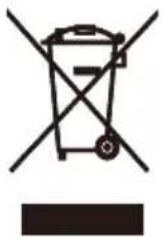
This symbol on the product or on its packaging indicates that this product must not be disposed of with your other household waste. Instead it is your responsibility to dispose of your waste equipment by handing it over to a designated collection point for the recycling of waste electrical and electronic equipment. The separate collection and recycling of your waste equipment at the time of disposal will help to conserve natural resources and ensure that it is recycled in a manner that protects human health and the environment. For more information about E -waste please visit http://www.india.philips.com/about/sustainability/recycling/index.page and to know where you can drop off your waste equipment for recycling in India please contact on below given contact details.
Helpline number: 1800-425-6396 (Monday to Saturday, 9 a.m. to 5:30 pm)
Centralized E-waste collection center
Address:
TPV Technology India Private Limited,
59, Maheswari Nagar, 1st Main Road, Mahadevapura Post, Whitefield Road,
Bangalore, Karnataka, PIN: 560048, Tel: 080-3023-1000
E-mail: india.callcentre@tpv-tech.com
Information for U.K. only
WARNING - THIS APPLIANCE MUST BE EARTHED.
Important:
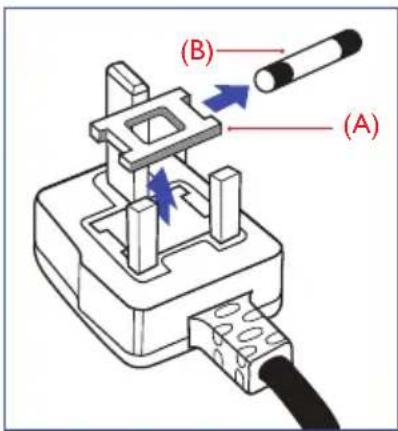
This apparatus is supplied with an approved moulded 13A plug. To change a fuse in this type of plug proceed as follows:
- Remove fuse cover and fuse.
-
Fit new fuse which should be a BS 1362 5A,A.S.T.A. or BSI approved type.
-
Retit the fuse cover.
If the fitted plug is not suitable for your socket outlets, it should be cut off and an appropriate 3-pin plug fitted in its place.
If the mains plug contains a fuse, this should have a value of 5A. If a plug without a fuse is used, the fuse at the distribution board should not be greater than 5A.
NOTE: The severed plug must be destroyed to avoid a possible shock hazard should it be inserted into a 13A socket elsewhere.
text_image
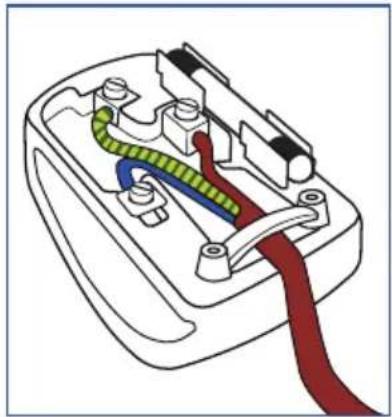
(B) (A)How to connect a plug
The wires in the mains lead are coloured in accordance with the following code:
BLUE - "NEUTRAL" ("N")
BROWN - "LIVE" ("L")
GREEN&YELLOW - "EARTH" ("E")
- The GREEN&YELLOW wire must be connected to the terminal in the plug which is marked with the letter "E" or by the Earth symbol or coloured GREEN or GREEN&YELLOW.
- The BLUE wire must be connected to the terminal which is marked with the letter "N" or coloured BLACK.
- The BROWN wire must be connected to the terminal which is marked with the letter "L" or coloured RED.
Before replacing the plug cover, make certain that the cord grip is clamped over the sheath of the lead – not simply over the three wires.
natural_image
Diagram of a fuse or socket with colored wires (green, blue, red) and connectors, no text or symbols present.4. Warranty Statement
Warranty Statement(English)
PHILIPS Monitor's warranty period listed as below, for areas not covered in this table, please follow their warranty statement.
| Region Product Category Warranty Period | ||
| USA, Canada All Monitors 4 years | ||
| USA, Canada Refurbished monitor 90 days | ||
| Mexico All Monitors 3 years | ||
| Chile All Monitors 3 years | ||
| Peru All Monitors 3 years | ||
| Brazil EPEAT registered models as in www.epeat.net 3 year | ||
| China All Monitors 3 years | ||
| Asia Pacific All Monitors 3 years | ||
| MEA All Monitors 3 years | ||
| Europe | Monitors C, E lines 24 months | |
| Monitors B, M, S, X, P, V lines | 36 months | |
保修声明 (Chinese Simplified)
Izjava o jamstvu(Croatian)
Jamstveni period za PHILIPS monitore za područja koja nisu navedena u ovoj tablici, pogledajte izjavu o jamstvu za njih.
| Regija Kategorija | proizvoda Jamstveni period | |
| SAD, Kanada Svi | monitori | 4 godina |
| SAD, Kanada Obn | novljeni monitor | 90 dana |
| Meksiko | Svi monitori | 3 godina |
| Čile | Svi monitori | 3 godina |
| Peru | Svi monitori | 3 godina |
| Brazil | EPEAT registered models as in www.epeat.net 3 godina | |
| Kina Svi monitori | 3 godina | |
| Pacifička Azija Svi | monitori | 3 godina |
| MEA | Svi monitori | 3 godina |
| Europa | Monitori linije C, E | 24 mjeseci |
| Monitori linije B, M, S, X, P, V | 36 mjeseci | |
Garantibevis(Norwegian)
Spare Parts Service (English)
Extending the lifetime of IT products is the most effective way to reduce their environmental impact.
Spare parts are not upgradeable, but repairable and/or replaceable.
Spare parts are available for use in the repair of EPEAT registered products (refer to www.epeat.net) for minimum 5 years after the point of sale or 2 years after the end of production, whichever is later.
Spare parts are available for use in the repair of non-EPEAT registered products for minimum 3 years after the point of sales or 1 year after the end of production, whichever is later.
Please refer to “Service Contact Information” section or www.philips.com/support for further information.
Key Spare Parts List
| Components or Assemblies | Replaceable | Repairable | How to Replace or Repair |
| Connectivity cables Yes No | By hand without tool, but please contact your dealer or your local service center (via www.philips.com/support) for confirming the cables specification when necessary. | ||
| Power cables Yes No | |||
| External power supply(1) | Yes Yes | For replacing, please follow above action. For repairing, please just contact your local service center (via www.philips.com/support) for help when necessary to avoid any risk. | |
| Display panel or display assembly | Yes Yes | Please just contact your local service center (via www.philips.com/support) for help when necessary to avoid any risk. | |
| Internal power supply(2) | Yes Yes | ||
| System board(3)/motherboard | Yes Yes |

Note
(1): only applicable for the models with external power supply.
(2): Internal power supply includes power circuit board assembly.
(3): System board includes keyboard, USB board etc., only applicable for the models with related function.
Extending the lifetime of IT products is the most effective way to reduce their environmental impact.
Spare parts are not upgradeable, but repairable and/or replaceable.
Spare parts are available for use in the repair of EPEAT registered products (refer to www.epeat.net ) for minimum 5 years after the point of sale or 2 years after the end of production, whichever is later.
Spare parts are available for use in the repair of non-EPEAT registered products for minimum 3 years after the point of sales or 1 year after the end of production, whichever is later.
Please refer to “Service Contact Information” section or www.philips.com/support for further information.
Key Spare Parts List
(1): only applicable for the models with external power supply.
(2): Internal power supply includes power circuit board assembly.
(3): System board includes keyboard, USB board etc., only applicable for the models with related function.
Service van reserveonderdelen (Dutch)
Extending the lifetime of IT products is the most effective way to reduce their environmental impact.
Spare parts are not upgradeable, but repairable and/or replaceable.
Spare parts are available for use in the repair of EPEAT registered products (refer to www.epeat.net) for minimum 5 years after the point of sale or 2 years after the end of production, whichever is later.
Spare parts are available for use in the repair of non-EPEAT registered products for minimum 3 years after the point of sales or 1 year after the end of production, whichever is later.
Please refer to “Service Contact Information” section or www.philips.com/support for further information.
Key Spare Parts List
(1): only applicable for the models with external power supply.
(2): Internal power supply includes power circuit board assembly.
(3): System board includes keyboard, USB board etc., only applicable for the models with related function.
Extending the lifetime of IT products is the most effective way to reduce their environmental impact.
Spare parts are not upgradeable, but repairable and/or replaceable.
Spare parts are available for use in the repair of EPEAT registered products (refer to www.epeat.net) for minimum 5 years after the point of sale or 2 years after the end of production, whichever is later.
Spare parts are available for use in the repair of non-EPEAT registered products for minimum 3 years after the point of sales or 1 year after the end of production, whichever is later.
Please refer to “Service Contact Information” section or www.philips.com/support for further information.
Key Spare Parts List
(1): only applicable for the models with external power supply.
(2): Internal power supply includes power circuit board assembly.
(3): System board includes keyboard, USB board etc., only applicable for the models with related function.
Extending the lifetime of IT products is the most effective way to reduce their environmental impact.
Spare parts are not upgradeable, but repairable and/or replaceable.
Spare parts are available for use in the repair of EPEAT registered products (refer to www.epeat.net) for minimum 5 years after the point of sale or 2 years after the end of production, whichever is later.
Spare parts are available for use in the repair of non-EPEAT registered products for minimum 3 years after the point of sales or 1 year after the end of production, whichever is later.
Please refer to “Service Contact Information” section or www.philips.com/support for further information.
Key Spare Parts List
(1): only applicable for the models with external power supply.
(2): Internal power supply includes power circuit board assembly.
(3): System board includes keyboard, USB board etc., only applicable for the models with related function.
Extending the lifetime of IT products is the most effective way to reduce their environmental impact.
Spare parts are not upgradeable, but repairable and/or replaceable.
Spare parts are available for use in the repair of EPEAT registered products (refer to www.epeat.net) for minimum 5 years after the point of sale or 2 years after the end of production, whichever is later.
Spare parts are available for use in the repair of non-EPEAT registered products for minimum 3 years after the point of sales or 1 year after the end of production, whichever is later.
Please refer to “Service Contact Information” section or www.philips.com/support for further information.
Key Spare Parts List
(1): only applicable for the models with external power supply.
(2): Internal power supply includes power circuit board assembly.
(3): System board includes keyboard, USB board etc., only applicable for the models with related function.
6. Service Contact Information
English
Contact Information for Europe region:
Bulgarian (Български)
Информация за контакт за регион ЕВРОПА:
Croatian (Hrvatski)
Contact Information for America region:
| Country | Consumer care number | Country | Consumer care number |
| Argentina | (+54) 0810-444-7782 | Mexico | (+52) 800 087 5888ext 120 |
| Brazil (Brasil) | (+55) 0800-7254101 | Peru | (+51) 0800-00-688 |
| Canada (+1) 800 479-6696 U.S.A. | (+1) 877 835-1838 | ||
| Chile | (+56) 800 384 300 | ||
Contact Information for China:
| Country | Consumer care number |
| China(中国) | (+86) 4009 555 666 |
Contact Information for AP region:
| Country Consumer care number Country Consumer care number | |||
| Australia (+61) 1300 360 386 Philippines (Pilipinas) (+63) 9175990545 | |||
| Hong Kong(香港) Macau(澳門) | Hong Kong: Tel: (+852) 2619 9639 Macau: Tel: (+853) 0800-987 | Singapore (+65) 6286-7333 | |
| Indonesia (+62) | 1500155 Taiwan ( | 臺灣)(+886) 0800-231-099 | |
| Korea (한국) (+82) 1661-5003 Thailand ( | ประเทศไทย) | (+66) 086-3787751 hot-Line (+66) 02-0622211 tech. support 076 553 3977 Ho Chi Minh | |
| Malaysia | (+60) 80022-0180 (+60) 3-7808-4000 | Vietnam (Việt Nam) | (+84) 28 7300 0911 Ho Chi Minh (+84) 292 3781 978 Can Tho (+84) 24 7300 0911 Ha Noi (+84) 236 356 2666 Da Nang |
| New Zealand (+64) 0800 657447 Japan ( | 日本) | (+81) 0120-060-530 | |
Contact Information for India/MEA region:
| Country Consumer care number Country | Consumer care number | |
| Bangladesh | (+880) 248113087 | (+20) 1000305629 / (+20) 1000305630 / (+20) 1000715313 |
| India (भारत) | (+91) 1 800 425 6396 | (+961) 1 514 003 |
| Saudi Arabia (السعودية) | (+966) 114614408 | (+92) 300-8271914 / 32270410 |
| South Africa (Suid-Afrika) | (+27) 11 201 8927 | (+971) 4 821 3832 / (+971) 4 8849074 |