WPO100 - Oven Waring Commercial - Free user manual and instructions
Find the device manual for free WPO100 Waring Commercial in PDF.


| Brand | Waring Commercial |
| Model | WPO100 |
| Category | Professional pizza oven |
| Product type | Single pizza oven (single chamber) |
| Dimensions (W x D x H) | Approximately 56 x 51 x 38 cm (estimated based on capacity and usage) |
| Weight | Approximately 27 kg (estimated) |
| Power supply | 120 V ~ 60 Hz, 15 A (single) / 240 V for double |
| Temperature range | 280 °F (65 °C) to 600 °F (425 °C) |
| Timer | Up to 15 minutes, audible signal |
| Ceramic pizza stone | 16 x 14 inches (40.5 x 35.5 cm), pre-drying required |
| Door | Tempered glass, with handle |
| Interior lighting | Halogen bulb G9 100-120V/25W (replaceable) |
| Included accessories | Cleaning brush, pizza stone(s), adjustable feet (double only) |
| Main functions | Cooking fresh or frozen pizzas, other foods on baking sheet |
| Maintenance and cleaning | Daily cleaning of stone with brush/scraper, damp interior, stainless steel exterior |
| Safety | Automatic shut-off in case of overheating, grounding required |
| Spare parts and repairability | Halogen bulb G9 available at hardware store, other parts via customer service |
| Warranty | 2 years against defects in material or workmanship |
| General information | Professional commercial use, required clearance (46 cm sides, 1 m above), stackable with kit |
Frequently Asked Questions - WPO100 Waring Commercial
User questions about WPO100 Waring Commercial
0 question about this device. Answer the ones you know or ask your own.
Ask a new question about this device
Download the instructions for your Oven in PDF format for free! Find your manual WPO100 - Waring Commercial and take your electronic device back in hand. On this page are published all the documents necessary for the use of your device. WPO100 by Waring Commercial.
USER MANUAL WPO100 Waring Commercial
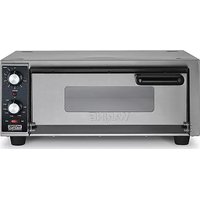
natural_image
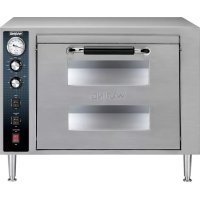
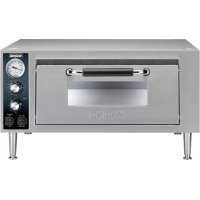
Exterior view of a modern kitchen toaster oven with control knobs and front-mounted door (no visible text or symbols)WPO100
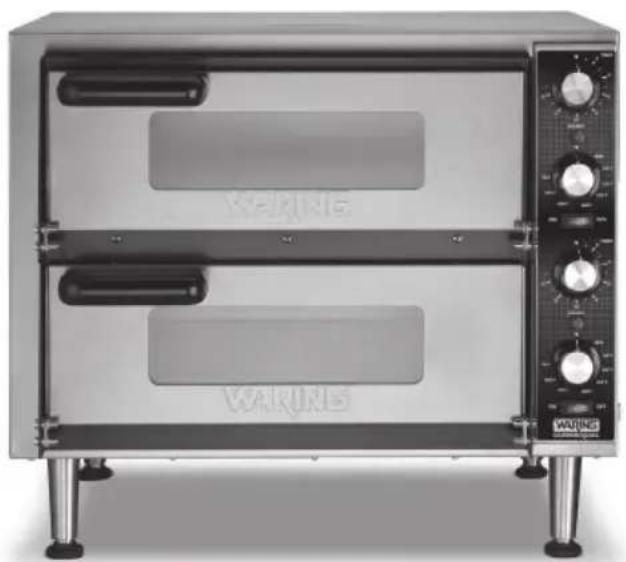
natural_image
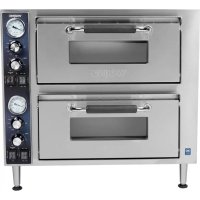
Exterior view of a two-tiered commercial kitchen oven with control knobs and a visible 'WALKING' branding (no text on main body)WPO350
For your safety and continued enjoyment of this product, always read the instruction book carefully before using.
When using electrical appliances, basic safety precautions should always be followed, including those listed below:
- To protect against electrical hazards, do not immerse oven in water or other liquids.
- NEVER clean with water jets, which can result in critical bodily injury or death.
- DO NOT USE if cord or plug is damaged or if machine has malfunctioned, been dropped or damaged. Return appliance to the nearest authorized service facility for examination, repair or electrical or mechanical adjustment.
- Do not use outdoors.
- Do not let cord hang over edge of table or counter, or touch hot surfaces.
- Improper installation or use can result in electric shock, injury, or damage to your oven or property.
- Your pizza oven is a heavy-duty appliance designed for commercial use, and is intended to be operated by trained professionals only.
- To prevent risk of fire, oven should be installed in a noncombustible environment. Any combustible materials must be at least 18 inches away from sides, front and back of oven and at least 40 inches from top.
- Oven must be thoroughly cleaned before first use and after all uses (see USE AND CARE).
- Always be sure to disconnect oven from power source when not in use and before cleaning or servicing.
- Always allow oven to cool before moving or servicing. Surfaces are hot during use and remain hot for a while, even after power is off.
- Do not allow insertion of any foreign object into any ventilation or exhaust opening; this can cause electric shock, fire or damage to the oven.
-
Never block air intakes or exhaust openings, or use on cushioned surfaces where blockage may occur.
-
This appliance is not intended for use by persons (including children) with reduced physical, sensory or mental capabilities, or lack of experience and knowledge, unless they have been given supervision or instruction concerning use of the appliance by a person responsible for their safety.
- Extreme caution should be exercised when using containers constructed of the following materials in the oven: paper, cardboard, plastic or similar products.
SAVE THESE INSTRUCTIONS
APPROVED FOR COMMERCIAL USE
CONTENTS
Important Safeguards 2
Grounding Instructions....4
Introduction 5
Features and Benefits 6
Parts and Accessories 7
Oven Installation....9
Pizza Ceramic Deck Installation & Conditioning 9
Before Using Your Pizza Oven 10
Baking Instructions.... 10
Tips and Hints ......11
Use and Care ....11
Installing and Replacing Oven Light.... 12
Safety Feature 13
Warranty 14
SINGLE PIZZA OVEN GROUNDING INSTRUCTIONS
For your protection, this appliance is equipped with a 3-conductor cord set.
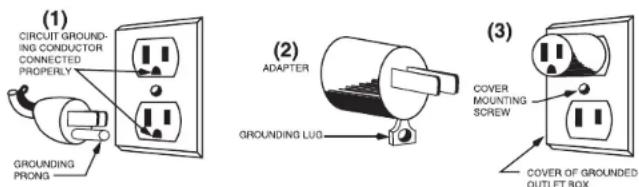
120 volt units are supplied with a molded 3-prong grounding-type plug (NEMA 5-15P) and should be used in combination with a properly connected grounding-type outlet as shown in Figure 1.
If a grounding-type outlet is not available, an adapter, shown in Figure 2, may be utilized to enable a 2-slot wall outlet to be used with a 3-prong plug (except in Canada and Europe).
Referring to Figure 3, the adapter must be grounded by attaching its grounding lug under the screw of the outlet cover plate.
Caution: Before using an adapter, it must be determined that the outlet cover plate screw is properly grounded. If in doubt, consult a licensed electrician. Never use an adapter unless you are sure it is properly grounded.
NOTE: Use of an adapter is not permitted in Canada and Europe.
DOUBLE PIZZA OVEN GROUNDING INSTRUCTIONS
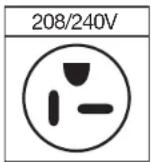
For your protection, this appliance is supplied with a molded 3-prong grounding-type plug and should be used in combination with a properly connected grounding-type outlet. Use of any other voltage or altering of the plug or cord may damage the unit, will void the warranty and may cause injury.
EXTENSION CORDS
Use only 3-wire extension cords that have 3-prong grounding-type plugs and 3-pole cord connectors that accept the plug from the appliance. Use only extension cords that are intended for indoor use. Use only extension cords having an electrical rating not less than the rating of the appliance. Do not use damaged extension cords. Examine extension cord before using and replace it if damaged. Do not abuse extension cord and do not yank on any cord to disconnect. Keep cord away from heat and sharp edges.
NOTE: Your Single Pizza Oven is for 120 volts only and should not be used with a converter. Your Double Pizza Oven is for 240 volts only and should not be used with a converter.
INTRODUCTION
The Waring® Single and Double Pizza Ovens have 16" x 14" ceramic deck(s) that can accommodate 14-inch pizzas. They maintain consistent temperatures to ensure that pizza cooks from the bottom as well as the top. A major benefit of a pizza stone over a pizza pan is the way that the ceramic stone drives moisture away from the crust, resulting in extra crispness.
Adjustable temperature control from 280irc F to 600irc F allows you to cook a wider variety of items, and bakes pizza fast whether using fresh, frozen or par-baked dough. Pizza oven controls are designed for simplicity, with quick-touch switches and indicator lights for Power, Interior Oven Light, and Heating Elements. Superior heat technology ensures quick heat-up and recovery, for consistent oven temperatures that guarantee great results.
FEATURES AND BENEFITS
- Temperature Control Knob
Mechanical dial to select temperature settings (280°F - 600°F). - Manual Timer
Timer range up to 15 minutes. An audible signal (single chime) indicates selected time has elapsed. NOTE: TIMER DOES NOT TURN OVEN ON OR OFF. - Power ON/OFF Switch with Indicator Light
Main power control for oven chamber/s. - Ceramic Pizza Deck
16" x 14" Pizza Deck fits into base of oven's interior - maintains temperature very well and ensures that pizza cooks from the bottom as well as the top - pizza or bread can be placed directly on deck. - DoorHandle
Heavy-duty, easy-to-grip design. - Tempered Glass Door
Clear view lets you monitor the cooking process. - Interior Light
Replaceable bulb; removable, heatproof glass-bulb cover. - Rear Exhaust Vent (not shown)
Directs any exhaust from cooking process to the side of unit and away from walls. - Deck Cleaning Brush
Features heavy-duty bristles and a scraper for cleaning the deck without damaging the ceramic. - Adjustable Legs (Double Oven only)
Set height to the proper level for your space.
PARTS AND ACCESSORIES
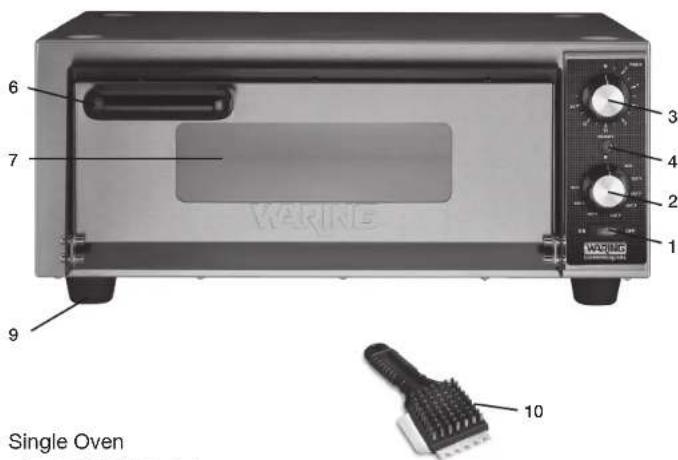
Single Oven
- ON/OFF Switch
- Temperature Control Knob
- Timer (15 minutes)
- Ready Light
- Ceramic Pizza Deck (packed separately, not shown)
- Door Handle
- Tempered Glass Door
- Interior Light (not shown)
- Legs (not adjustable or removable)
- Deck Cleaning Brush
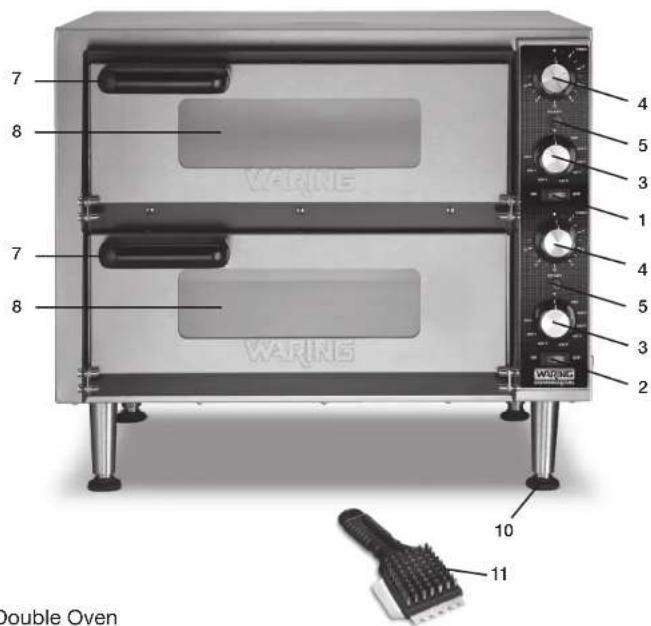
Double Oven
- Top Chamber ON/OFF Switch
- Bottom Chamber ON/OFF Switch
- Temperature Control Knobs
- Timer (15 minutes)
- Ready Lights
- Two Ceramic Pizza Decks (packed separately, not shown)
- Door Handles
- Tempered Glass Doors
- Interior Lights (not shown)
- Adjustable Legs (packed separately)
- Deck Cleaning Brush
OVEN INSTALLATION
- After removing the outer shipping carton and packaging material, place the oven on the floor or other flat surface.
- Open oven and remove any instructions or packaging material shipped inside the unit.
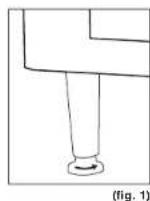
- For the Double Oven, lift up the front of the oven and attach the two front legs (packed separately in styrofoam), carefully twisting each one into a corner and hand-tightening. Lift the back of the oven and attach the two back legs and hand-tighten.
- Move the oven to its final location. For Double Oven, adjust the bottom portion of the legs to level the unit (fig. 1).
PIZZA CERAMIC DECK INSTALLATION & CONDITIONING
Read these instructions carefully before installing or conditioning the ceramic deck. New deck must be conditioned (pre-dried) prior to first use.
- Handling the Ceramic Deck: If deck is struck against hard surface before, during or after installation, it can develop a full or hairline crack which may expand over time and require you to replace it.
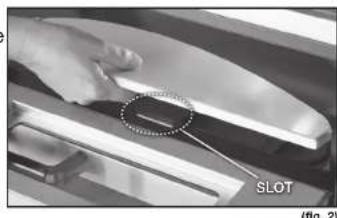
- Installing the Deck: Open the oven door and place ceramic pizza deck into the bottom with the slot on front of deck facing front of oven. Be sure the deck is firmly set in place. Do not force or wedge it (fig. 2).
- Conditioning the Deck: Pre-dry ceramic deck by carefully following instructions in the following section, BEFORE USING YOUR PIZZA OVEN. NOTE: Failure to follow conditioning instructions will cause deck to crack or warp and will void warranty.
natural_image
Close-up of a hand pressing a slot on a vehicle surface, with a magnified inset showing the slot (no text or symbols visible)- Place oven in a well-ventilated area to burn off any residual dust from manufacturing.
- Plug unit in, open door and set Temperature Control to 400°F (205°C). After one hour, close door and increase temperature to 500°F (260°C) for at least 1½ hours.
NOTE: The oven may emit an odor during this process; this is normal and not harmful, and should quickly dissipate. - Turn off the oven and allow it to cool completely. Remove any residue from the interior with a dry cloth.
- Place clean, cool oven in the area where it will be used. Be sure there is at least 6 inches' clearance between sides and top of oven and any wall or cabinet.
- Check to ensure nothing is blocking the exhaust vent on back of unit.
BAKING INSTRUCTIONS
NOTE: Only pizza and breads can be placed directly on the ceramic pizza deck. All other food items must be put onto a tray or into a container rated for high-temperature use.
Set the Temperature Control Knob to the desired temperature to preheat oven. When it reaches temperature, the ready light will illuminate.
The Pizza Oven can be used to bake both fresh and frozen products. Frozen items should go right from the freezer into the heated oven. Cooking time will vary depending on the consistency and weight of the product.
The temperature range for baking fresh pizza is usually between 500irc F ( 260irc C) and 575irc F ( 300irc C), depending on the individual product. Generally, frozen items are cooked at a lower temperature, but always follow recommended cooking instructions.
Bake pizza until the cheese bubbles and the bottom is evenly browned, rotating it during the baking process if necessary.
Open and close door quickly when putting pizza in oven to prevent heat from escaping, which can slow down cooking time.
TIPS AND HINTS
- Be sure ceramic pizza deck is dry. Wet spots or spills will cause food to stick.
- Never season the ceramic pizza deck with any type of baking oil.
- Increase temperature during heavy production times to maintain ideal baking temperature. Be sure to decrease it when rush slows to prevent burning.
- If toppings need more time to cook, a piece of screen placed under pizza can prevent bottom from overcooking.
- Pizza with heavy toppings requires a lower temperature and longer baking time.
- Scrape off burnt residue from pizza deck daily with deck brush provided. Buildup can cause an "off" flavor and increase bake time.
- Frozen items cannot be placed directly on hot deck to thaw. Place food onto a screen or into a pan.
USE AND CARE
Daily cleaning is suggested to keep oven performing at its best. ALLOW OVEN TO COOL COMPLETELY BEFORE CLEANING.
- Always unplug the oven from the power source.
- Do not use any sharp or hard kitchen utensils on the oven as this could damage the surface of the appliance.
- To clean ceramic pizza deck, remove deck from cool oven. With the provided deck brush, scrape off hardened spillage. To clean heavily soiled decks, return deck to oven and run at highest temperature in a well-ventilated area for 12 hour. When oven and deck are cool, remove deck and brush off residue. NOTE: Never use high-abrasion brushing or water to clean deck, or immerse or let any water or any other liquids come into contact with the ceramic deck. Any of these can cause deck to crack.
- Wipe interior of oven with damp cloth, avoiding heating elements.
-
When cleaning stainless steel exterior, use stainless steel cleaner and wipe in the direction of the grain.
-
To clean the glass door, use a glass cleaner or damp cloth and dry with a clean cloth.
- When opening oven door, be sure to guide the door while lowering it. Doing so will prevent possible damage to the door jamb after an extended period of time.
- For further information or to purchase additional accessories, call Waring Customer Service at 1-800-492-7464.
INSTALLING AND REPLACING OVEN LIGHT
WPO100 Bulb Type: G9 100-120V/25W Halogen
WPO350 Bulb Type: G9 220-240V/25W Halogen
Can be purchased at local retail/home improvement stores.
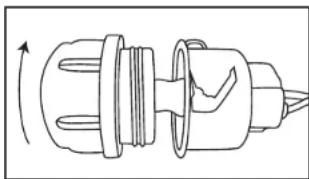
1. Be Sure Oven Is Completely Cool and Unplugged
-
Remove the Glass Bulb Cover Locate bulb cover in back right corner. Carefully twist counterclockwise and remove.
-
RemoveBulb Grasp bulb and gently pull straight out to remove.
-
Replace Bulb Without touching the bulb with bare hands (as this will reduce the lifespan), use a clean tissue or cloth glove to position new bulb carefully and push in to engage.
natural_image
Technical line drawing of a mechanical component with no visible text or symbols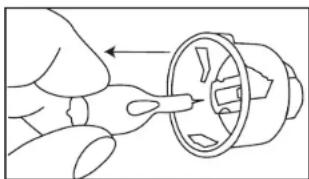
natural_image
Line drawing of a hand using a tool to adjust or install a mechanical component (no text or symbols present)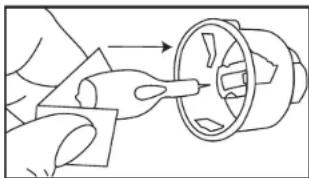
natural_image
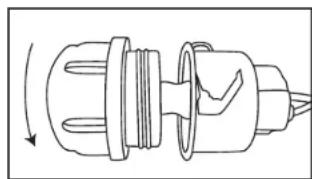
Line drawing of a hand holding a circular component with an arrow indicating direction (no text or symbols)- Reattach Glass Bulb Cover Twist bulb cover clockwise to secure.
natural_image
Technical line drawing of a mechanical component with no visible text or symbolsSTACKING INSTRUCTIONS
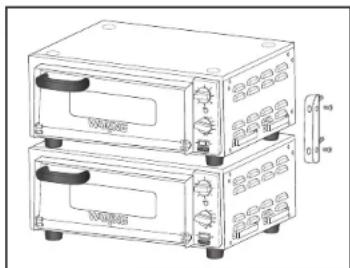
The Single Pizza Oven can be stacked using the custom stacking kit. To purchase a stacking kit, please contact customer service or visit the website. Contact information is located on the back of this booklet.
NOTE: Two ovens cannot be plugged into the same circuit.
natural_image
Line drawing of two stacked electronic devices with control knobs and a side arm (no text or symbols)Stacking Kit - Model WPO100KIT
SAFETY FEATURE
This Waring ® Commercial Pizza Ovens are equipped with the following feature to ensure safety:
Thermostat Overload Protection
If the unit heats up beyond the recommended temperature level, the oven will automatically turn off. To reset, turn main power switch to the OFF position, unplug the unit from the wall outlet and allow it to cool down. Once fully cooled down, plug the unit back into the wall outlet and turn main power on. If the unit will not turn back on, or continues to heat beyond the recommended temperature level, repeat steps above or call a Waring Certified Customer Service Center for assistance.
LIMITED ONE YEAR WARRANTY
(U.S. AND CANADA ONLY)
Waring warrants every new Waring ® Pizza Oven to be free from defects in materials and workmanship for a period of one year from the date of purchase when used with foodstuffs, nonabrasive liquids (other than detergents) and nonabrasive semi-liquids, providing it has not been subject to loads in excess of the indicated rating.
Under this warranty, Waring will repair or replace any part that, upon our examination, is defective in materials or workmanship, provided the product is delivered prepaid to any Factory Approved Service Center.
This warranty does not: a) apply to any product that has become worn, defective, damaged or broken due to use or due to repairs or servicing by other than the Waring Service Center or a Factory Approved Service Center, or due to abuse, misuse, overloading or tampering; or b) cover incidental or consequential damages of any kind. This warranty is void if appliance is used on Direct Current (DC).

asso Ave. 06790
natural_image
Close-up of a hand holding a flat object with a dotted circle highlighting a small feature, labeled 'MUESCA' in the corner (no other text or symbols visible)(FIG. 2)
natural_image
Diagram of a mechanical component with internal parts and directional arrow (no text or symbols)- Retire la bombilla
natural_image
Line drawing of a hand holding a mechanical component with a circular housing (no text or symbols)natural_image
Line drawing of hands holding a mechanical component with arrows indicating direction (no text or symbols)natural_image
Diagram of a mechanical component with internal parts and directional arrow (no text or symbols)natural_image
Line drawing of two stacked electronic devices with control knobs and a connector (no text or symbols)Kit de apilado (modelo WPO100KIT)
INSTALLATION DU FOUR
natural_image
Close-up of a hand holding a flat object with a magnified inset showing a small circular feature, labeled 'FENTE' (no other text or symbols visible)(Fig. 2)
AVANT LA PREMIÈRE UTILISATION
natural_image
Technical line drawing of a mechanical component with no visible text or symbols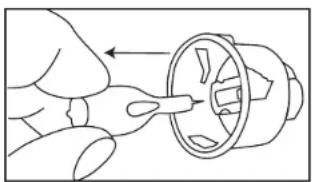
natural_image
Line drawing of a hand inserting a plug into a motor (no text or symbols)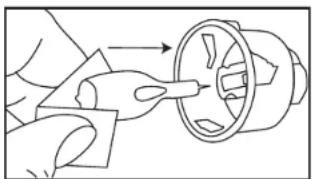
natural_image
Line drawing of a hand using a tool to adjust or install a mechanical component (no text or symbols present)natural_image
Technical line drawing of a mechanical component with a rotating arrow indicating rotation (no text or symbols)INSTRUCTIONS D'EMPILAGE
natural_image
Line drawing of two stacked electronic devices with control knobs and a side arm (no text or symbols)Protection anti-surchauffe
GARANTIE LIMITÉE D'UN AN
(VALABLE AUX É.U. ET AU CANADA UNIQUEMENT)
NOTES/NOTASNOTES/NOTAS
©2024 Waring
314 Ella T. Grasso Ave.
Torrington, CT 06790
1-800-4-WARING
waring.com
Printed in China
Impreso en China
Imprimé en Chine
WPO100/WPO350 IB
24WC93153
IB-15670A

- SAVE THESE INSTRUCTIONS
- APPROVED FOR COMMERCIAL USE
- CONTENTS
- SINGLE PIZZA OVEN GROUNDING INSTRUCTIONS
- DOUBLE PIZZA OVEN GROUNDING INSTRUCTIONS
- EXTENSION CORDS
- INTRODUCTION
- FEATURES AND BENEFITS
- PARTS AND ACCESSORIES
- Single Oven
- Double Oven
- OVEN INSTALLATION
- PIZZA CERAMIC DECK INSTALLATION & CONDITIONING
- BAKING INSTRUCTIONS
- TIPS AND HINTS
- USE AND CARE
- INSTALLING AND REPLACING OVEN LIGHT
- Be Sure Oven Is Completely Cool and Unplugged
- STACKING INSTRUCTIONS
- SAFETY FEATURE
- Thermostat Overload Protection
- LIMITED ONE YEAR WARRANTY
- (U.S. AND CANADA ONLY)
- INSTALLATION DU FOUR
- AVANT LA PREMIÈRE UTILISATION
- INSTRUCTIONS D'EMPILAGE
- Protection anti-surchauffe
- GARANTIE LIMITÉE D'UN AN
- (VALABLE AUX É.U. ET AU CANADA UNIQUEMENT)
- NOTES/NOTASNOTES/NOTAS
Brand : Waring Commercial
Model : WPO100
Category : Oven