DS-D4212FI-CWF/A/V2.0 - Monitor Hikvision - Free user manual and instructions
Find the device manual for free DS-D4212FI-CWF/A/V2.0 Hikvision in PDF.


| Product Type | Color LED Monitor |
| Brand | Hikvision |
| Model | DS-D4212FI-CWF/A/V2.0 |
| Category | Monitor |
| Power Supply | 220/230/240 V AC, 6 A |
| Display Technology | Color LED |
| Main Features | Clear and vivid images, wide color gamut, stable performance, long service life, good environmental adaptability, cost-effectiveness |
| Recommended Uses | Radio stations, meeting rooms, video surveillance, information display |
| Mounting | On floor or wall, according to instructions; 90° angle when moving; maximum distance to wall: 5 mm |
| Provided Bracket | Dedicated LED bracket, not interchangeable with other brackets |
| Electrical Safety | Mandatory grounding; disconnect before maintenance; accessible disconnection device (220/230/240 V AC, 6 A) |
| Liquid Protection | Do not expose to drips or splashes; do not place liquid containers on the device |
| Installation Precautions | Do not place objects that could encourage climbing (toys, remote controls); mount on concrete or non-combustible surface |
| EMC Classification | Class A product (may cause radio interference) |
| Regulatory Compliance | CE (Directives 2014/30/EU, 2014/35/EU, 2011/65/EU); WEEE (2012/19/EU); Batteries (2006/66/EC) |
| Maintenance | Disconnect before cleaning; use a soft, dry cloth |
| Spare Parts and Repairability | Contact Hikvision after-sales service for any repair or replacement |
| User Manual | Available in French and other languages (CS, DE, EN, HU, ID, IT, MY, NL, PL, PT, RO, RU, SK, TR, UK) |
| Version | V2.0 |
Frequently Asked Questions - DS-D4212FI-CWF/A/V2.0 Hikvision
User questions about DS-D4212FI-CWF/A/V2.0 Hikvision
0 question about this device. Answer the ones you know or ask your own.
Ask a new question about this device
Download the instructions for your Monitor in PDF format for free! Find your manual DS-D4212FI-CWF/A/V2.0 - Hikvision and take your electronic device back in hand. On this page are published all the documents necessary for the use of your device. DS-D4212FI-CWF/A/V2.0 by Hikvision.
USER MANUAL DS-D4212FI-CWF/A/V2.0 Hikvision
LED Full-Color Display Unit
Quick Start Guide
Contents
| English | 1 |
| Français | 4 |
| Deutsch | 7 |
| Español | 10 |
| Italiano | 13 |
| Português | 16 |
| Nederlands | 19 |
| Češna | 22 |
| Dansk | 25 |
| Magyar | 28 |
| Polski | 31 |
| Română | 34 |
| Slovenčina | 37 |
| Bahasa Indonesia | 40 |
| 43 | |
| Türkçe | 46 |
| Русский | 49 |
| Українська | 52 |
© 2020 Hangzhou Hikvision Digital Technology Co., Ltd. All rights reserved.
This Manual is the property of Hangzhou Hikvision Digital Technology Co., Ltd. or its aliases (hereinaer referred to as "Hikvision"), and it cannot be reproduced, changed, translated, or distributed, parally or wholly, by any means, without the prior written permission of Hikvision. Unless otherwise expressly stated herein, Hikvision does not make any warranties, guarantees or representations, express or implied, regarding to the Manual, any information contained herein.
About this Manual
The Manual includes instrucons for using and managing the Product. Pictures, charts, images and all other informaon hereinaer are for descripon and explanaon only. The informaon contained in the Manual is subject to change, without noce, due to rmware updates or other reasons. Please nd the latest version of this Manual at the Hikvision website (hps://www.hikvision.com).
Please use this Manual with the guidance and assistance of professionals trained in supporting the Product.
Trademarks
- HIKVISION and other Hikvision's trademarks and logos are the properes of Hikvision in various jurisdicons.
● Other trademarks and logos menoned are the properes of their respective owners.
Disclaimer
TO THE MAXIMUM EXTENT PERMITTED BY APPLICABLE LAW, THIS MANUAL AND THE PRODUCT DESCRIBED, WITH ITS HARDWARE, SOFTWARE AND FIRMWARE, ARE PROVIDED "AS IS" AND "WITH ALL FAULTS AND ERRORS". HIKVISION MAKES NO WARRANTIES, EXPRESS OR IMPLIED, INCLUDING WITHOUT LIMITATION, MERCHANTABILITY, SATISFACTORY QUALITY, OR FITNESS FOR A PARTICULAR PURPOSE. THE USE OF THE PRODUCT BY YOU IS AT YOUR OWN RISK. IN NO EVENT WILL HIKVISION BE LIABLE TO YOU FOR ANY SPECIAL, CONSEQUENTIAL, INCIDENTAL, OR INDIRECT DAMAGES, INCLUDING, AMONG OTHERS, DAMAGES FOR LOSS OF BUSINESS PROFITS, BUSINESS INTERRUPTION, OR LOSS OF DATA, CORRUPTION OF SYSTEMS, OR LOSS OF DOCUMENTATION, WHETHER BASED ON BREACH OF CONTRACT, TORT (INCLUDING NEGLIGENCE), PRODUCT LIABILITY, OR OTHERWISE, IN CONNECTION WITH THE USE OF THE PRODUCT, EVEN IF HIKVISION HAS BEEN ADVISED OF THE POSSIBILITY OF SUCH DAMAGES OR LOSS. YOU ACKNOWLEDGE THAT THE NATURE OF INTERNET PROVIDES FOR INHERENT SECURITY RISKS, AND HIKVISION SHALL NOT TAKE ANY RESPONSIBILITIES FOR ABNORMAL OPERATION, PRIVACY LEAKAGE OR OTHER DAMAGES RESULTING FROM CYBER-ATTACK, HACKER ATTACK, VIRUS INFECTION, OR OTHER INTERNET SECURITY RISKS; HOWEVER, HIKVISION WILL PROVIDE TIMELY TECHNICAL SUPPORT IF REQUIRED.
YOU AGREE TO USE THIS PRODUCT IN COMPLIANCE WITH ALL APPLICABLE LAWS, AND YOU ARE SOLELY RESPONSIBLE FOR ENSURING THAT YOUR USE CONFORMS TO THE APPLICABLE LAW. ESPECIALLY, YOU ARE RESPONSIBLE, FOR USING THIS PRODUCT IN A MANNER THAT DOES NOT INFRINGE ON THE RIGHTS OF THIRD PARTIES, INCLUDING WITHOUT LIMITATION, RIGHTS OF PUBLICITY, INTELLECTUAL PROPERTY RIGHTS, OR DATA PROTECTION AND OTHER PRIVACY RIGHTS. YOU SHALL NOT USE THIS PRODUCT FOR ANY PROHIBITED END-USES, INCLUDING THE DEVELOPMENT OR PRODUCTION OF WEAPONS OF MASS DESTRUCTION, THE DEVELOPMENT OR PRODUCTION OF CHEMICAL OR BIOLOGICAL WEAPONS, ANY ACTIVITIES IN THE CONTEXT RELATED TO ANY NUCLEAR EXPLOSIVE OR UNSAFE NUCLEAR FUEL-CYCLE, OR IN SUPPORT OF HUMAN RIGHTS ABUSES. IN THE EVENT OF ANY CONFLICTS BETWEEN THIS MANUAL AND THE APPLICABLE LAW, THE LATER PREVAILS.
Regulatory Informaon
FCC Informaon
Please take aenon that changes or modicaon not expressly approved by the party responsible for compliance could void the user's authority to operate the equipment.
FCC compliance: This equipment has been tested and found to comply with the limits for a Class B digital device, pursuant to part 15 of the FCC Rules. These limits are designed to provide reasonable protecon against harmful interference in a residential installaon. This equipment generates, uses and can radiate radio frequency energy and, if not installed and used in accordance with the instrucons, may cause harmful interference to radio communicaons. However, there is no guarantee that interference will not occur in a parcular installaon. If this equipment does cause harmful interference to radio or television recepon, which can be determined by turning the equipment o and on, the user is encouraged to try to correct the interference by one or more of the following measures:
— Reorient or relocate the receiving antenna.
— Increase the separaon between the equipment and receiver.
— Connect the equipment into an outlet on a circuit dierent from that to which the receiver is connected.
— Consult the dealer or an experienced radio/TV technician for help.
FCC Conditions
This device complies with part 15 of the FCC Rules. Operaon is subject to the following two conditions:
-
This device may not cause harmful interference.
-
This device must accept any interference received, including interference that may cause undesired operaon.
EU Conformity Statement

This product and - if applicable - the supplied accessories too are marked with "CE" and comply therefore with the applicable harmonized European standards listed under the EMC Directive 2014/30/EU, the LVD Directive 2014/35/EU, the RoHS Directive 2011/65/EU.

2012/19/EU (WEEE direcve): Products marked with this symbol cannot be disposed of as unsorted municipal waste in the European Union. For proper recycling, return this product to your local supplier upon the purchase of equivalent new equipment, or dispose of it at designated collecon points. For more informaon see: www.recyclethis.info

2006/66/EC (battery directive): This product contains a battery that cannot be disposed of as unsorted municipal waste in the European Union. See the product documentaon for speci baery informaon. The baery is marked with this symbol, which may include leering to indicate cadmium (Cd), lead (Pb), or mercury (Hg). For proper recycling, return the baery to your supplier or to a designated collecon point. For more informaon see: www.recyclethis.info
Industry Canada ICES-003 Compliance
This device meets the CAN ICES-3 (B)/NMB-3(B) standards requirements.
Safety Instrucon
You must carefully read the safety instrucons before using and installing the product.
Warnings & Cauons:
- This is a class A product and may cause radio interference in which case the user may be required to take adequate measures.
- In the use of the product, you must be in strict compliance with the electrical safety regulations of the naon and region.
- The equipment must be connected to an earthed mains socket-outlet.
- Shock hazard! Disconnect all power sources before maintenance.
- A readily accessible disconnect device shall be incorporated external to the equipment, rated 220/230/240 VAC, 6A for each device.
- High touch current! Connect to earth before connecng to the power supply.
- Ensure correct wiring of the terminals for conneccon to an AC mains supply.
- The equipment has been designed, when required, modified for conneccon to an IT power distribution system.
• Install the equipment according to the instrucons in this manual.
- To prevent injury, this equipment must be securely attached to the oor/wall in accordance with the installaon instrucons.
- NEVER place items that might tempt children to climb, such as toys and remote controls, on the top of the equipment.
- Install the device no more than 5 mm away from the wall or other metal racks.
- This equipment is suitable for mounting on concrete or other non-combusable surface only.
- Keep 90^ when moving or using the equipment.
- The equipment shall not be exposed to dripping or splashing and that no objects lled with liquids, such as vases, shall be placed on the equipment.
- CAUTION: This bracket is intended for use only with LED display unit. Use with other equipment may result in instability causing injury.
- CAUTION: This equipment is for use only with LED bracket. Use with other (carts, stands, or carriers) may result in instability causing injury.
Overview
Full-color LED display unit is a high precision product delivering clear and vivid images. It is featured by wide color gamut, stable performance, long service life, and strong environmental adapon, cost eecve and lile cost to use. The device is applicable to scenarios, such as radio and television staons, meeng room display, video security, informaon display, etc.
Typical Applicaon
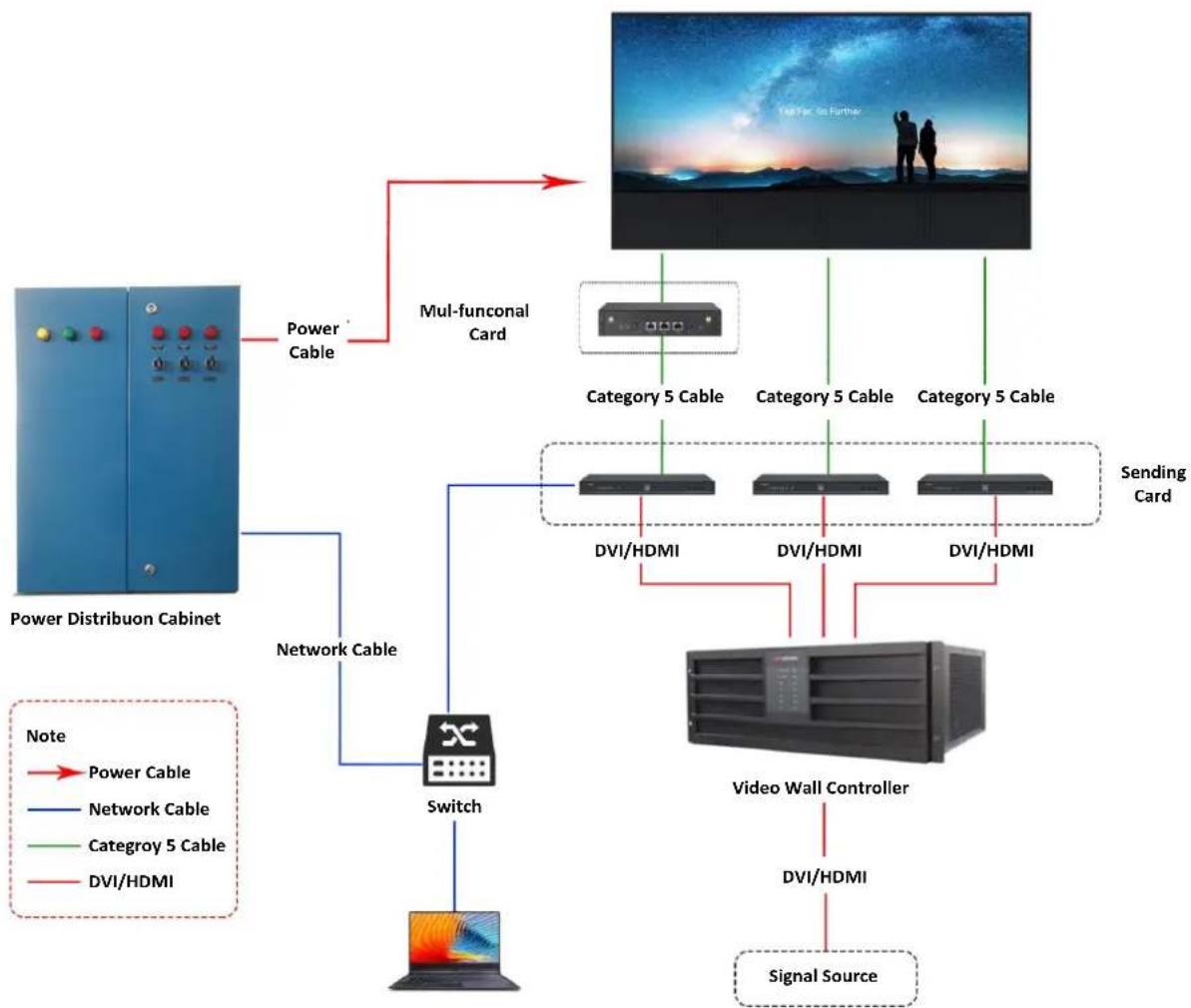
flowchart
graph TD
    A["Power Distribuon Cabinet"] -->|Power Cable| B["Mul-functional Card"]
    B --> C["Video Wall Controller"]
    C -->|DVI/HDMI| D["Sending Card"]
    C --> E["Switch"]
    E --> F["Computer"]
    style A fill:#333,stroke:#fff,color:#fff
    style B fill:#f9f,stroke:#333
    style C fill:#ccf,stroke:#333
    style D fill:#cfc,stroke:#333
    style E fill:#fcc,stroke:#333
    style F fill:#ffc,stroke:#333
© 2020 Hangzhou Hikvision Digital Technology
### Hangzhou Hikvision Digital Technology Co., Ltd. ### (Hikvision "Hikvision" or ###) ### Hikvision ### ### ### ### ### ### ### ### ### ### ### ### ### n
- LED Full-Color Display Unit
- Contents
- © 2020 Hangzhou Hikvision Digital Technology Co., Ltd. All rights reserved.
- About this Manual
- Trademarks
- Disclaimer
- Regulatory Informaon
- FCC Informaon
- FCC Conditions
- EU Conformity Statement
- Industry Canada ICES-003 Compliance
- Safety Instrucon
- Warnings & Cauons:
- Overview
Brand : Hikvision
Model : DS-D4212FI-CWF/A/V2.0
Category : Monitor