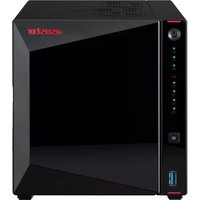
AS5404T - Server Asustor - Free user manual and instructions
Find the device manual for free AS5404T Asustor in PDF.


| Product Type | 4-bay network attached storage (NAS) server |
| Dimensions (W x D x H) | 185 x 170 x 230 mm |
| Weight | 3.5 kg |
| Power supply | 100-240 V AC, 50/60 Hz, external power adapter |
| Processor | Intel Celeron J4125 quad-core 2.0 GHz (turbo up to 2.7 GHz) |
| RAM | 4 GB DDR4 (expandable up to 8 GB) |
| Drive bays | 4 bays for 3.5" SATA III hard drives |
| Network connectivity | 2 x 2.5 GbE Ethernet ports (RJ-45) |
| USB ports | 3 x USB 3.2 Gen 1 ports (front + rear) |
| HDMI output | 1 x HDMI 2.0 |
| Supported RAID levels | Single, JBOD, RAID 0, RAID 1, RAID 5, RAID 6, RAID 10 |
| Operating system | ADM (ASUSTOR Data Master) |
| Pre-installed applications | Storage Manager, Backup Center, EZ Sync, Surveillance Center, Media Center, VPN Server, etc. |
| Sharing protocols | SMB, AFP, NFS, FTP, WebDAV, Rsync, SFTP |
| Security | AES 256-bit encryption, ADM Defender firewall, black/white list, SSL certificates |
| Typical power consumption | 35 W (depending on disk configuration and load) |
| Noise level | 19.5 dB(A) (idle) |
| Operating temperature | 0°C to 40°C |
| Warranty | 3 years |
Frequently Asked Questions - AS5404T Asustor
User questions about AS5404T Asustor
0 question about this device. Answer the ones you know or ask your own.
Ask a new question about this device
Download the instructions for your Server in PDF format for free! Find your manual AS5404T - Asustor and take your electronic device back in hand. On this page are published all the documents necessary for the use of your device. AS5404T by Asustor.
USER MANUAL AS5404T Asustor
Ver. 4.2.7.0307 (Pour ADM 4)
Introduction 5
EZ Sync Manager d' ADM....76
Connexion 80
Journal 80
Informations 81
Réglages 81
Corbeille 82
Download Center....118
MariaDB....121
Surveillance Center ....122
UPnP Media Server 2....122
SoundsGood 124
LooksGood 125
Photo Gallery 3....126
VPN Server....126
Takeasy....127
ASUSTOR Portal 128
Antivirus....130
Mail Server....130
Syslog Server....131
DataSync Center....132
HiDrive Backup....133
Cloud Backup Center....133
Utilitaires....135
ACC (ASUSTOR Control Center) (PC/Mac) 135
AEC (ASUSTOR EZ Connect) (PC) 135
ABP (ASUSTOR Backup Plan) (PC) 136
AES (ASUSTOR EZ Sync) (PC) 137
Applications Mobiles.... 138
AiData 138
AiMaster 139
AiRemote 139
AiDownload 140
AiMusic 140
AiFoto3 141
AiVideos....141
AiSecure 142
EULA 143
GNU General Public License 145
Introduction
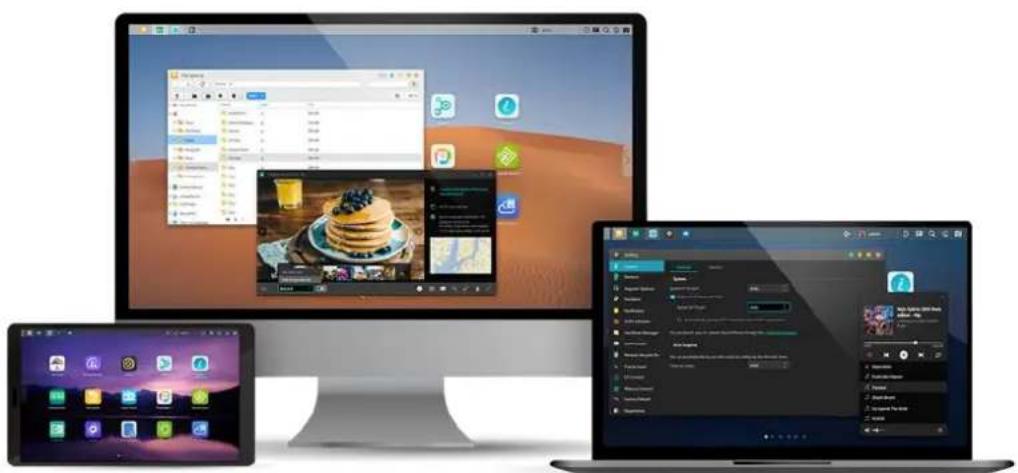
natural_image
Desktop setup with three desktops: Windows, macOS, and a laptop displaying app icons (no readable text or symbols on screens)Forum | ASUSTOR College
Conditions d' utilisation
Guide d' installation rapide https://www.asustor.com/service/downloads
text_image
Settings General Network Regional Options Hardware Notification ADM Defender Certificate Manager ADM Update Network Recycle Bin Scheduling EZ-Connect Manual Connect Factory Default Registration EZ-Connect ASUSTOR makes it easy for you to connect to your NAS anytime, anywhere, simply by enabling the EZConnect service below and signing up for a Cloud ID. Enable EZ-Connect Service Please name a set of easy-to-remember Cloud IDs. This set of IDs can be used to access to the NAS anytime, anywhere. Cloud ID: AS1104T Rename ApplyBarre des tâches
text_image
Screenshot of a software toolbar with icons and labels, including 'admin' and various function buttons.text_image
Personal Settings Volume Usage Theme Password: .......... Confirm password: .......... E-mail: Description: Admin ADM language: English Enable 2-step verification Show Welcome Screen at startup Desktop settings: 7x4 OK Canceltext_image
Personal Settings Volume Usage Theme Theme Appearance: Dark Title Bar theme: ✓ More themes Customization Fit: Fill Window color: Desktop text color: Wallpaper: + My images Default Images ✓ ADM Public OK Cancel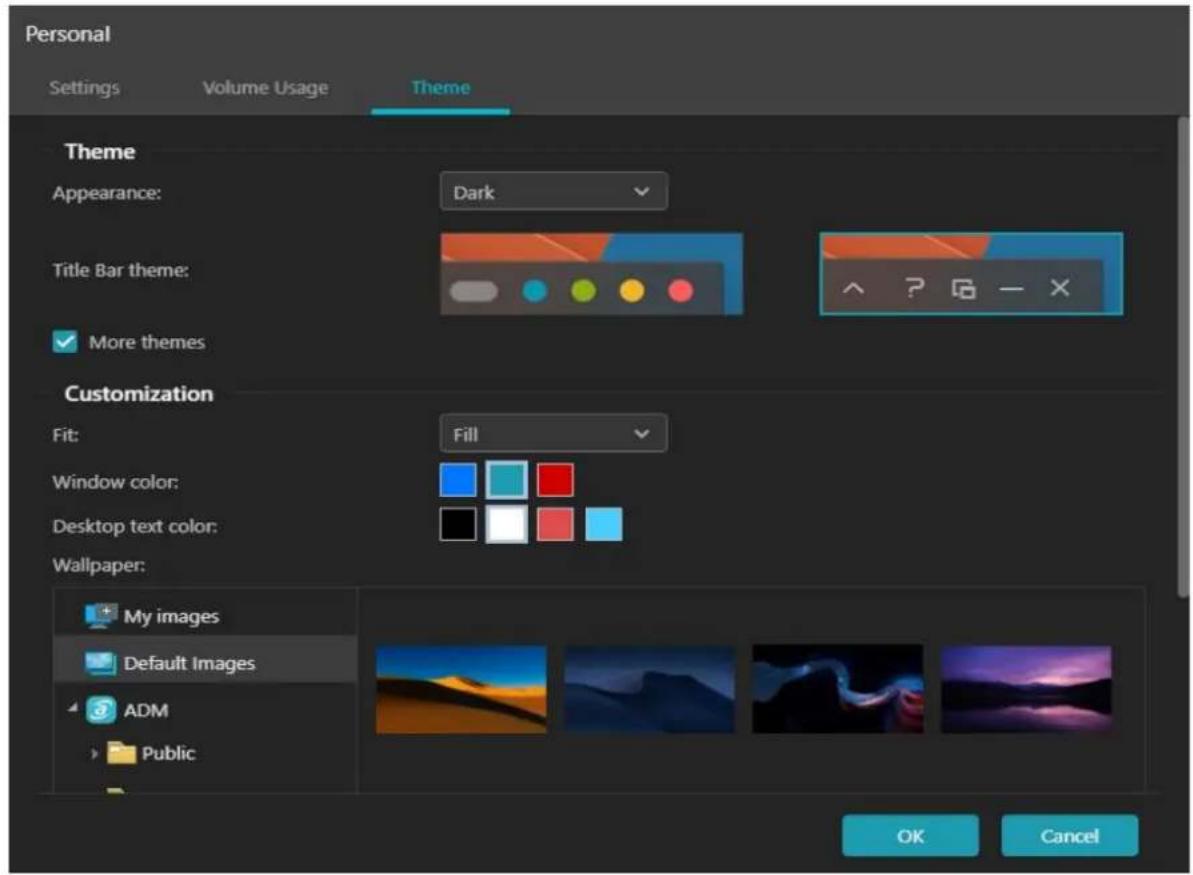
text_image
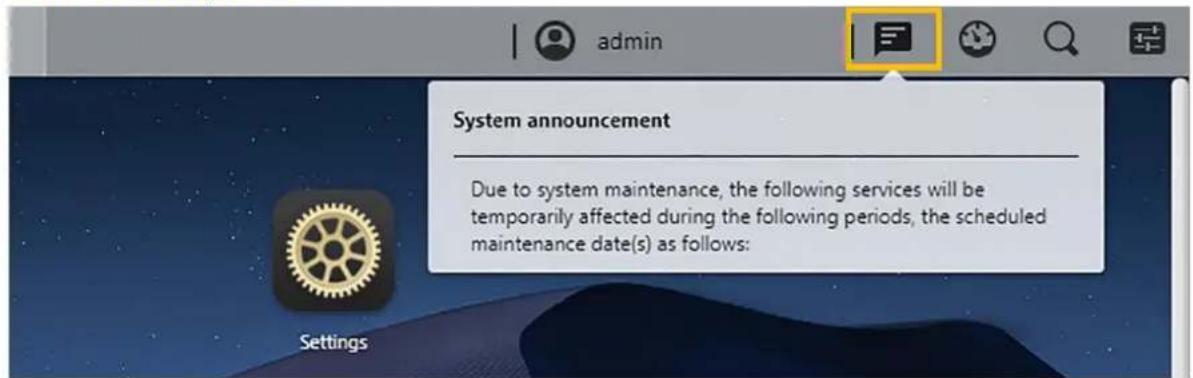
Personal Settings Volume Usage Theme Theme Appearance: Dark Title Bar theme: ✓ More themes Customization Fit: Fill Window color: Desktop text color: Wallpaper: + My images Default Images ✓ ADM Public OK Cancel6. Annonce Système:
text_image
admin System announcement Due to system maintenance, the following services will be temporarily affected during the following periods, the scheduled maintenance date(s) as follows:text_image
Settings Storage Manager Volume 1 Free 853.46 GB Used 21.42 GB Good Activity Monitor 2% 81% CPU Memory Lan1 0.00 KB/s 22.00 KB/s Online Users admin HTTP/HTTPS 00:12:48 admin HTTP/HTTPS 00:18:11 admin HTTP/HTTPS 00:20:55 admin HTTP/HTTPS 00:45:06 Important logs (EZ-Connect) Failed to start service. (R...text_image
admin Preferences Settings General Network Regional Options Hardware Notification ADM Defender Certificate Manager ADM Update Network Recycle Bin Scheduling EZ Connect Manual Connect Factory Default Registration Access Control Local Users Local Groups AD / LDAP AD / LDAP' Users AD / LDAP' Groups Shared Folders App Privileges Services SMB AFP NFS FTP Server WebDAV Terminal Rysec Server TFTP Server SNMP SFTP Reverse Proxytext_image
Settings General Network Regional Options Hardware Notification ADM Defender Certificate Manager ADM Update Network Recycle Bin Scheduling EZ-Connect Manual Connect Factory Default Registration Management Media Mode Sign In Page Style Video System System HTTP port: 8000 Enable HTTP Secure (HTTPS) System HTTPS port: 8001 Minimum security protocol: TLS 1.0 Automatically change HTTP connections to HTTPS connections. You can import your SSL private key/certificate through the Certificate Manager. Auto Logout You can automatically log out idle user(s) by setting up the time-out timer. Time-out timer: 1 Hour ApplyPort système HTTP :
text_image
Settings General Network Regional Options Hardware Notification ADM Defender Certificate Manager ADM Update Network Recycle Bin Scheduling EZ-Connect Manual Connect Factory Default Registration Management Media Mode Sign In Page Style Video Improve multimedia streaming and transcoding performance by enabling Media Mode on your NAS. Media Mode reserves a portion of RAM for multimedia playback. Enable Media Mode Note: If you exit Media Mode, certain Apps or a portion of their functions will become disabled. Applytext_image
Settings General Network Regional Options Hardware Notification ADM Defender Certificate Manager ADM Update Network Recycle Bin Scheduling EZ-Connect Manual Connect Factory Default Registration Management Media Mode Sign In Page Style Video Login Page Appearance Background Image: Browse Fit: Fill Customized Image: Circular Browse Appearance: Auto Layout: Middle Restore ^Display Settings Show time MM/DD/YYYY, 12-hour clock Please click here to configure. Show hostname AS1104T-Jackie Please click here to configure. Show NAS App shortcuts ? ^System announcement Show: ADM Applytext_image
Settings General Network Regional Options Hardware Notification ADM Defender Certificate Manager ADM Update Network Recycle Bin Scheduling EZ-Connect Manual Connect Factory Default Registration Management Media Mode Sign In Page Style Video Appearance: Browse Auto Layout: Middle Restore ^Display Settings Show time MM/DD/YYYY, 12-hour clock Please click here to configure. Show hostname AS1104T-Jackie Please click here to configure. Show NAS App shortcuts ? ^System announcement Show: ADM Announcement period: Forever Start: 03/23/2021 03:30 PM End: 03/24/2021 03:30 PM Title: System announcement ApplyAnnonce système:
text_image
Settings General Network Regional Options Hardware Notification ADM Defender Certificate Manager ADM Update Network Recycle Bin Scheduling EZ-Connect Manual Connect Factory Default Registration Management Media Mode Sign In Page Style Video ~ Display Settings Show time MM/DD/YYYY, 12-hour clock Please click here to configure. Show hostname AS1104T-Jackie Please click here to configure. Show NAS App shortcuts ? ~ System announcement Show: ADM Announcement period: Forever Start: 03/23/2021 03:30 PM End: 03/24/2021 03:30 PM Title: System announcement Content: Due to system maintenance, the following services will be temporarily affected during the following periods, the scheduled maintenance date(s) as follows: Apply(4)Vidéos
text_image
Settings General Network Regional Options Hardware Notification ADM Defender Certificate Manager ADM Update Network Recycle Bin Scheduling EZ-Connect Manual Connect Factory Default Registration Management Media Mode Sign In Page Style Video Media Conversion Some browsers do not support certain types of video formats when playing back in ADM. ADM is able to automatically convert and create a compatible copy of one or more videos stored on the NAS to a playable format for easier viewing. When unsupported videos are found, what would you like ADM to do? Do not convert Automatically convert Always ask Note: Conversion times may vary depending on the video format, size and processor speed. Automatic conversion uses NAS resources during off-peak hours. ApplyRéseau
text_image
Settings General Network Regional Options Hardware Notification ADM Defender Certificate Manager ADM Update Network Recycle Bin Scheduling EZ-Connect Manual Connect Factory Default Registration General Network interface Proxy Global Settings Server name: AS1104T-Jackie Default gateway: LAN 1 DNS server: 168.95.1.1 Enable IPv6 DNS server: Apply(1)Général
text_image
Settings General Network Regional Options Hardware Notification ADM Defender Certificate Manager ADM Update Network Recycle Bin Scheduling EZ-Connect Manual Connect Factory Default Registration Network interface Proxy Add Configure Remove Action DHCP Server Settings LAN 1 / 172.16.2.9 1000Mb/s, Full-duplex PPPoE / -- --text_image
Settings General Network Regional Options Hardware Notification ADM Defender Certificate Manager ADM Update Network Recycle Bin Scheduling EZ-Connect Manual Connect Factory Default Registration General Network interface Proxy Proxy Use a Proxy Server Proxy Server: EX: http://10.7.23.5 or https://myasustor.com Port: 0 Authentication Username: Password: ApplyPlus d' informations
text_image
Settings General Network Regional Options Hardware Notification ADM Defender Certificate Manager ADM Update Network Recycle Bin Scheduling EZ-Connect Manual Connect Factory Default Registration Date & Time Time Zone Language Current Date & Time 03/23/2021, Tuesday, PM 03:56 GMT+08:00 Display Format Date: MM/DD/YYYY Time: 12-hour clock 24-hour clock Date & Time Settings Manually configure Date: 03/23/2021 Time: PM 03 : 56 : 14 Synchronize from a NTP server NTP server: pool.ntp.org ---- Worldwide Test Update frequency: Daily Synchronize with Active Directory server Applytext_image
Settings General Network Regional Options Hardware Notification ADM Defender Certificate Manager ADM Update System Energy Control Power Fan Control LCD Panel LED LED brightness: LED night mode setup: None Disable the following LED indicator(s) when night mode is not activated: Status LAN Disk Power Backup Buzzer Enable system buzzer: Power On Power Off Restart Warning Errortext_image
Settings General Network Regional Options Hardware Notification ADM Defender Certificate Manager ADM Update Network Recycle Bin Scheduling EZ-Connect Manual Connect Factory Default Registration System Energy Control Power Fan Control Disk Hibernation Hard disk(s) will enter hibernation mode if there is no access within the time period specified. Internal disk(s): 30 minutes External disk(s): 30 minutes The hard disk hibernation log includes information for internal hard disks, external SATA hard disks and USB hard disks. Starting from when they first wake from hibernation, activity for these hard disks are recorded in the system information log. Enable hard disk hibernation log Sleep Mode The system will enter sleep mode S3 (Suspend to RAM) if there is no data access within the time period specified. Note: The time period specified cannot be less than the configured hard disk hibernation time period. Time: Never Specify the time period during which the NAS is able to enter Sleep Mode Time Period: AM 12 00 4AM 01 00 Note: If you wish to enable the Wake-on-LAN (WOL) function, you can do so here: Power. Wake-on-LAN (WOL) can only be used from within your local area network. If the hard disk or system has not yet entered sleep mode during the specified time, you can click on "Diagnostic Tool" to find out which services and applications are still accessing the hard disk. Diagnostic tooltext_image
Settings General Network Regional Options Hardware Notification ADM Defender Certificate Manager ADM Update Network Recycle Bin Scheduling EZ-Connect Manual Connect Factory Default Registration System Energy Control Power Fan Control EuP Mode Configuration EuP (ErP) stands for Energy Using Product and is a provision created by the European Union to regulate power consumption. Enable Disable Settings ✓ In the event of a power outage, enable the NAS to return to its previous state once power has been restored ✓ Enable Wake on LAN (WOL), Wake on WAN (WOW) When the power button is held down for 1.5 seconds: Shut down NAS Power Scheduling Add Edit Remove Day Power On Power Off Restart Applytext_image
Settings General Network Regional Options Hardware Notification ADM Defender Certificate Manager ADM Update Network Recycle Bin Scheduling EZ-Connect Manual Connect Factory Default Registration System Energy Control Power Fan Control Fan Speed You can set the fan rotation speed by selecting one of the following modes. ● Auto ○ Low speed ○ Medium speed ○ High speed Applytext_image
Settings General Network Regional Options Hardware Notification System | Energy Control | Power | Fan Control | LCD Panel Display Enable customized text Personalized message Message: Asustor NAS.natural_image
Back view of a computer power drive showing hexagonal socket, drive button, and indicator lights (no text or symbols visible)text_image
Settings General Network Regional Options Hardware Notification ADM Defender Send Receive Push Notification You can configure the notification method and the sender accounts here. The maximum number of senders is 20. Add Edit Primary Sender Remove Type Sender Service ProviderRecevoir:
text_image
Settings General Network Regional Options Hardware Notification ADM Defender Certificate Manager ADM Update Network Recycle Bin Send Receive Push Notification You can assign the notification recipients here. NAS will send an e-mail or SMS message in the event of any system errors. The maximum number of receivers is 20. Add Edit Remove Type Receiver Notification You need to first configure a primary e-mail/SMS sender. After configuring a primary sender, you will then be able to configure the receivers for notifications.Notifs Push :

text_image
Settings General Network Regional Options Hardware Notification ADM Defender Send Receive Push Notification Add Edit Delete Test Account NotificationligesService Provider AS1104T-Jackie No Settings Asustortext_image
Settings General Network Regional Options Hardware Notification ADM Defender Send Receive Push Notification Add Edit Delete Test Account NotificationligesService Provider ASUSTOR No Settings Asustor
text_image
Available on the iPhone App Store
text_image
ANDROID APP ON Google playtext_image
Settings General Network Regional Options Hardware Notification ADM Defender Certificate Manager ADM Update Network Recycle Bin Scheduling EZ-Connect Manual Connect Factory Default Registration Network Defender Firewall - ^ Trusted List The IP(s) specified in the trusted list will not be blocked by the black list or after multiple failed login attempts. Add Remove IP address / IP range / Subnet mask K < | Page 1 of 1 | > | No data - Auto Black List - Black List - White List Applytext_image
Settings General Network Regional Options Hardware Notification ADM Defender Certificate Manager ADM Update Network Recycle Bin Scheduling EZ-Connect Manual Connect Factory Default Registration Network Defender Firewall Basic Policy Allow all connections Deny all connections Additional "Deny" Policies Add Edit Remove Name Action Client IP Port Protocol Applytext_image
Settings General Network Regional Options Hardware Notification ADM Defender Certificate Manager ADM Update Certificate Manager Add Remove Edit Export Certificate Support 11/28/2022 AM 06:44 asustor.com (Default)text_image
Settings General Network Regional Options Hardware Notification ADM Defender Certificate Manager ADM Update Network Recycle Bin Scheduling EZ-Connect Manual Connect Factory Default Registration ADM Update Update ADM version: 4.2.1.RGE2 Last update: 04/18/2023 Status: You are using the latest version. Enable update notifications Enabling this means ADM, upon logging in, will immediately notify you of available updates. If needed, the latest version of ADM for your NAS can be found on the ASUSTOR website support and downloads page. Set automatic scheduled updates (For the configured time period, check for the latest version and perform version upgrading.) Frequency: Daily Time AM 01 01 Manual Update ApplyMise à jour d' ADM:
text_image
Settings General Network Regional Options Hardware Notification ADM Defender Certificate Manager ADM Update Network Recycle Bin Scheduling EZ-Connect Manual Connect Factory Default Registration Recycle Bin Empty Recycle Bin Settings Recycle Bin supports SMB, AFP, FTP, File Explorer and WebDAV. Default access rights for the Network Recycle Bin are only accessible by administrators. Home folders are not included. Note: In order to enable the Network Recycle Bin for specific shared folders, please click here select desired shared folders and press edit to modify Recycle Bin settings for shared folders. Recycle Bin Rules If deleted files meet the rules configured below, they will be deleted immediately instead of being moved to the Recycle Bin. □ File size greater than 100 MB □ File size less than 1 Byte □ Files with the following extensions Add Quick add □ If a filename begins with these characters Add Quick add ApplyPlanification
(1) Miniatures:
text_image
Settings General Network Regional Options Hardware Notification ADM Defender Certificate Manager ADM Update Network Recycle Bin Scheduling EZ-Connect Manual Connect Factory Default Registration Thumbnails Automatic Drive Information Updates Peak Time Settings When scheduling peak hours, CPU load may be increased during off-peak hours as ADM resizes and converts photos and thumbnails. Quick setup: Please Select Peak Hours (Disables background processing) Off-peak Hours (Enables background processing) 0 1 2 3 4 5 6 7 8 9 10 11 12 13 14 15 16 17 18 19 20 21 22 23 Sun Mon Tue Wed Thu Fri Sat Applytext_image
Settings General Network Regional Options Hardware Notification ADM Defender Certificate Manager ADM Update Network Recycle Bin Scheduling EZ-Connect Manual Connect Factory Default Registration Thumbnails Automatic Drive Information Updates Automatic Drive Information Updates Regularly update usage information across volumes at specific intervals. Information concerning data use is found in Activity Monitor and in Access Control. Click Refresh to update drive information immediately. ✓ Update upon startup. ✓ Automatically update drive information Frequency: Daily Time: AM 12 : 00 Last update: 03/23/2021 AM 11:35 Time spent: 1 Seconds ApplyConnexion EZ
text_image
Settings General Network Regional Options Hardware Notification ADM Defender Certificate Manager ADM Update Network Recycle Bin Scheduling EZ-Connect EZ-Connect ASUSTOR makes it easy for you to connect to your NAS anytime, anywhere, simply by enabling the EZConnect service below and signing up for a Cloud ID. Enable EZ-Connect Service Please name a set of easy-to-remember Cloud IDs. This set of IDs can be used to access to the NAS anytime, anywhere. Cloud ID: AS Rename The settings below provide a different way access this NAS If using a web browser, please enter the following URL ADM: http:// ezconnect.to Please use an app on your mobile device to connect to your NAS. You may use AiFoto, AiMaster, AiData, AiMusic, AiDownload.Connexion Manuelle
DDNS:
text_image
Settings General Network Regional Options Hardware Notification ADM Defender Certificate Manager ADM Update Network Recycle Bin Scheduling EZ-Connect Manual Connect Factory Default DDNS EZ-Router DDNS You can create a unique hostname (e.g. mynas.asustor.org) for your NAS by subscribing for DDNS services. Enable DDNS service DDNS provider: _oray.com Sign.up.now Username: Password: ****** Hostname WAN IP checking interval: 30 minutes Network Status Current WAN IP: 114.. .99 Last checking IP: Last DDNS update: Refresh ApplyEZ-Routeur:
text_image
Settings General Network Regional Options Hardware Notification ADM Defender Certificate Manager ADM Update Network Recycle Bin Scheduling EZ-Connect Manual Connect Factory Default DDNS EZ-Router EZ-Router Setup This can help you to set up your network router automatically for direct NAS access from any device with Internet access. (e.g. laptop and mobile phone) Activate Status: -- Port Forwarding Edit Self define Reset Description NAS Port Router Port Protocol Status SSH service 22 22 TCP - SFTP service 2222 2222 TCP - Rsync service 873 873 TCP - ADM Web service 8000, 8001 8000, 8001 TCP - app#LooksGood 9900, 9901, 9902, ... 9900, 9901, 9902, 990... TCP -text_image
Settings Notification ADM Defender Certificate Manager ADM Update Network Recycle Bin Scheduling EZ-Connect Manual Connect Factory Default Registration Factory Default — System Initialization Re-initialize the NAS through the ASUSTOR Web-based installation wizard. Warning: After the system is restored to its factory default settings, all previous settings and files will be permanently deleted. You will not be able to recover these settings and files. Please ensure that you have backed up the data on your NAS before you begin this operation. Applytext_image
Settings Hardware Notification ADM Defender Certificate Manager ADM Update Network Recycle Bin Scheduling EZ-Connect Manual Connect Factory Default Registration Register Registration ASUSTOR ID (E-mail): jackie Sign out Edit
Services
text_image
Services SMB AFP NFS FTP Server WebDAV Web Server Terminal Rsync Server TFTP Server SNMP SFTP Reverse Proxy File Service SMB Enable SMB Workgroup: WORKGROUP WINS server: Highest SMB version: SMB3 Lowest SMB version: SMB1 SMB signing: Auto ? Note: Enabling SMB signing will affect SMB transfer speeds. Enable SMB Multichannel (Experimental) ? Enable Local Master Browser Enable only NTLMv2 authentication Enable Samba VFS modules to enhance macOS compatibility. Disable Opportunistic Locking Enable debug logging (may reduce system performance) Log Level: Normal Enable WS-Discovery ? ApplyGroupe de travail:
Activer Master Browser Local
Activer l' authentication NTLMv2:
Activer WS-Discovery
text_image
Services SMB AFP NFS FTP Server WebDAV Terminal Rsync Server TFTP Server SNMP SFTP Reverse Proxy File Service AFP Enable Mac file service (AFP) Advertise AFP service over Bonjour Service name: ASUSTOR Enable Time Machine support Save backup to: Public View Backup Time Machine usage limit: 0 GB (0 = No limit) Click here for options that enhance compatibility for macOS devices on Samba. ApplyUtiliser Apple Filing Protocol (AFP):
Activer support Time Machine:
text_image
Services SMB AFP NFS FTP Server File Service NFS Enable NFS servicePlus d' informations
text_image
Services SMB AFP NFS FTP Server WebDAV Terminal Rsync Server TFTP Server SNMP SFTP Reverse Proxy General Advanced Connection Enable SSL/TLS Enable FXP Max. number of all FTP connections: 30 Max. number of connections per IP: 5 Transfer Max. upload rate: 0 KB/s (0: No limitation) Max. download rate: 0 KB/s (0: No limitation) Passive FTP Use the default port range (55536-55565) Specify port range: 55536 55565 Respond with External IP for Passive FTP request ? External IP: Apply
A propos de FTP passif
text_image
Services SMB AFP NFS FTP Server WebDAV Terminal Rsync Server SSH SSH You can manage your NAS via SSH after enabling this option. Enable SSH service Port number: 22 Enable SFTP service Also enable EZ-Connect port forwarding This service and its port forwarding has been successfully enabled. You can connect to it via EZ-Router Note: Administrator group users and the [root] account can log into the NAS via SSH/SFTP.text_image
Services SMB AFP NFS FTP Server WebDAV Terminal Rsync Server TFTP Server SNMP SFTP Reverse Proxy Rsync Server Rsync By enabling this option, the NAS will become a backup server and will allow remote backup from any rsync-compatible servers. Enable Rsync server Port number: 873 Support encrypted transmission via SSH Also enable EZ-Connect port forwarding This service and its port forwarding has been successfully enabled. You can connect to it via EZ-Router Backup Modules Add Edit Remove Manage Users Name Path Authorized Users Applytext_image
Services SMB AFP NFS FTP Server WebDAV Terminal Rsync Server TFTP Server SNMP SFTP Reverse Proxy SNMP SNMP Enable SNMP to monitor the server with network management system. Enable SNMP service SNMP trap level: Critical Error Warning Information Trap Address: Also enable EZ-Connect port forwarding SNMP V1 / SNMP V2 service Community: SNMP V3 service Username: Password: Confirm password: To install the ASUSTOR MIB file to your network management system, please first download it here. ApplyNiveau de trap SNMP
text_image
Services SMB AFP NFS FTP Server WebDAV Terminal Rsync Server TFTP Server SNMP SFTP Reverse Proxy SFTP SFTP Enabling this function will allow all ADM users to access shared folders via SFTP along with providing support for connections by the ASUSTOR EZ-Connect App and other Apps. Enable SFTP service Port number: 2222 Also enable EZ-Connect port forwarding This service and its port forwarding has been successfully enabled. You can connect to it via EZ-Router ApplyReverse Proxy
text_image
Web Center Overview Web Server Virtual Host Implementation Web Server You can host your website and applications on the NAS by uploading it to the [Web] shared folder. Web server implementation: Apache Http Server Enable Web server Port number: 80 Enable secured Web server (SSL) Port number: 443 Also enable EZ-Connect port forwarding Enable personal website After enabling this, users on the NAS only need to create a www folder within the Home folder and upload their Web page to it in order to have their own dedicated URL. They can connect to their Web page using the following URL: http://NAS IP/~username. PHP implementation: PHP 7 Cache size: 32M ApplyVirtual Host
text_image
Storage Manager Overview Volume Drive iSCSI iSCSI LUN Create Management Spare Drive Remove Snapshot Center Volume 1 / Single / Good 3.57 TB free of 3.58 TB 0.2% MyArchive 3 / Mounted 8.63 TB free of 9.02 TB 4.41%Video - Presenting MyArchive
En lien:
text_image
Storage Manager Overview Volume Drive iSCSI iSCSI LUN Create Management Spare Drive Remove Snapshot Center RAID SSD Caching File system 3.57 TB free of 3.58 TB 0.2% MyArchive 3 / Mounted 8.63 TB free of 9.02 TB 4.41%A propos du RAID
text_image
Storage Manager Overview Volume Drive iSCSI iSCSI LUN Disk Doctor Bad Block Scan S.M.A.R.T. Scan Start Scan Schedule scan Frequency: Daily Time: AM 01 00 Drive: Drive 1 Last scan result: -- OK CancelIronWolf Health Management:
text_image
App Central Browse Top Apps Latest Apps ASUSTOR Apps Categories All Apps Beta Apps IronWolf Health Management Description Changelog Seagate's IronWolf Health Management app is designed for Seagate IronWolf hard drives. Installing the app enables access to hard drive management, health, warranty and data rescue information in Storage Manager. Developer: Seagate Technology... Maintainer: Storage Managertext_image
Storage Manager Overview Volume Drive iSCSI iSCSI LUN Create Action LUN Pool Preferences target001 Mount 1 / Connected successfully 0 iqn.2011-08.com.asustor:as1104t-83be03.target001IQN :
Authentication CHAP:
text_image
Storage Manager Overview Volume Drive iSCSI iSCSI LUN Create Action LUN Pool Preferences target001 Mount 1 / Connected successfully 0 Preferences iSCSI port: 3260 Enable iSNS iSNS server: OK CancelPlus d' informations:
NAS 308 - Introduction au service iSCSI
iSCSI LUN
pie
| Category | Volume | Frequency | | -------- | ------ | --------- | | Used | 0 | 1 | | iSCSI | 0 | 1 | | Volume Snapshot | 0 | 1 | | Free | 0 | 1 |Historique:
text_image
Snapshot Center Overview Volume iSCSI LUN Volume 2 Next Snapshot 03/23/2021 PM 05:15 Number of snapshots: 30 Management Restore Edit Remove Name Description Created Locked Status Preview 000000 空的 03/18/2021 AM 10:45 Yes Idle v20210318-1050 03/18/2021 AM 10:50 No Idle v20210318-1055 03/18/2021 AM 10:55 No IdleCréation manuelle:
text_image
Snapshot Center Overview Volume iSCSI LUN Restore You are preparing to restore v20210318-1055 to Volume 2. Before beginning the restoration, please configure the settings below according to your requirements Create a snapshot before restoring: Yes No Snapshot name: Description: Locked: Yes No Keep this snapshot after restoring: Yes No Note: This snapshot is locked. If you select "No", this snapshot will be deleted. Note: All services will be temporarily suspended when recovering snapshots, please DO NOT power off your NAS. Upon restoration, some apps may need to synchronize files or databases. Thank you for your patience. OK CancelEditor:
text_image
Snapshot Center Overview Volume iSCSI LUN Volume 2 Next Snapshot 03/23/2021 PM 05:15 Number of snapshots 30 Edit Snapshot name: v20210318-1055 Description: Snapshot locked: Yes No OK CancelSupprimer:
text_image
Snapshot Center Overview Volume iSCSI LUN 500 Next Snapshot 03/23/2021 PM 05:20 Number of snapshots: 30 Management Restore Edit Remove Name Description Created Locked Status s20210318-1054 000 03/18/2021 AM 10:54 Yes IdleCréation manuelle:
text_image
Snapshot Center Overview Volume iSCSI LUN Scheduled backup Scheduled backup Frequency: Daily Repeat: Every 5 minute(s) Started: AM : 11 : 00 Duration: 24 hourstext_image
Snapshot Center Overview Volume iSCSI LUN Restore You are preparing to restore s20210318-1100 to 500. Before beginning the restoration, please configure the settings below according to your requirements Create a snapshot before restoring: Yes No Snapshot name: Description: Locked: Yes No Keep this snapshot after restoring: Yes No Note: This snapshot is locked. If you select "No", this snapshot will be deleted. Locked Status Yes IdleEditor:
text_image
Snapshot Center Overview Volume iSCSI LUN Edit Snapshot name: s20210318-1100 Description: Snapshot locked: Yes No OK Cancel Locked Status Yes Idle No IdleSupprimer:
text_image
Storage Manager Online Help Backup & Restore External Devices File Explorer System Information EZ Sync Manager Snapshot Center Web Center LooksGoodASUSTOR EZ Sync (AES) – outil de synchronisation PC
text_image
EZ Sync Manager File Connection Log Information Settings Recycle Bin EZ Sync > To synchronize data between a computer and a NAS, please download and install ASUSTOR EZ Sync on your computer. To access EZ Sync files on your NAS using your mobile device, please download AiDATA. Desktop client Download AES Mobile Apps Google play App Store OK Do not show this againtext_image
EZ Sync Manager File Connection Log Information Settings Recycle Bin Name Type File Size Last Modified Version TEST Generation 68.PNG PNG 42.66 KB A4 Sort Ascending Z4 Sort Descending 1 Columns ✓ Name ✓ Type ✓ File Size ✓ Last Modified □ Created ✓ Version K < Page 1 of 1 > > | > Displaying 1 - 2 of 2text_image
File History Upload a new version Restore Download Delete Refresh Version File name Last Modified Created Device 2 Text1.txt 2018/09/14 11:16:21 2018/09/14 11:16:21 Windows NT 6.1 1 Text1.txt 2018/09/13 23:40:07 2018/09/13 15:40:13 Windows NT 6.1text_image
EZ Sync Manager File Connection Log Information Settings Recycle Bin Create Share Link You can share file(s) with others who do not have an ADM account on this NAS by creating Share Links. Anyone can download the file(s) directly through the link without logging in. Share to EZH-Connect WAN Local network Expiration Forever Date Timer Require password Yes No OK Cancel Displaying 1 - 2 of 2Connexion
text_image
EZ Sync Manager File Connection Log Information Settings Recycle Bin Unlink Refresh Device IP address Last connected Windows NT 10.0 172.16.2.246 0 second(s) agoJournal
text_image
EZ Sync Manager File Connection Log Information Settings Recycle Bin Event Device Time + Added folder [TEST] to [EZ Sync]. Windows NT 10.0 03/23/2021 PM 05:24 + Added file [68.PNG] to [EZ Sync]. Windows NT 10.0 03/23/2021 PM 05:24Informations
text_image
EZ Sync Manager File Connection Log Information Settings Recycle Bin — Connection information Cloud ID A$11 Connected devices: 1 — File Information Disk volume: Volume 1 File History Settings: 32 Used: 21.58 GB Free: 853.31 GB EZ Sync file: Contain: 1 files, 2 folders Contain: 0 files, 0 folders Size: 42.66 KB Size: 0.00 B Last synchronized on: 03/23/2021 PM 05:24 [68.PNG]Réglages
Général:
text_image
EZ Sync Manager File Connection Log Information Settings Recycle Bin General Recycle Bin Advanced File History Settings Number of file history backups: 32 File history age limit: No limitation Delete log if Log count exceeds: No limitation Log time is older than: No limitationtext_image
EZ Sync Manager File Connection Log Information Settings Recycle Bin General Recycle Bin Advanced Recycle Bin Rules Enable Recycle Bin Delete file if deleted time is older than: No limitationAvancé:
text_image
EZ Sync Manager File Connection Log Information Settings Recycle Bin General Recycle Bin Advanced File Location Select volume: Volume 1Corbeille
text_image
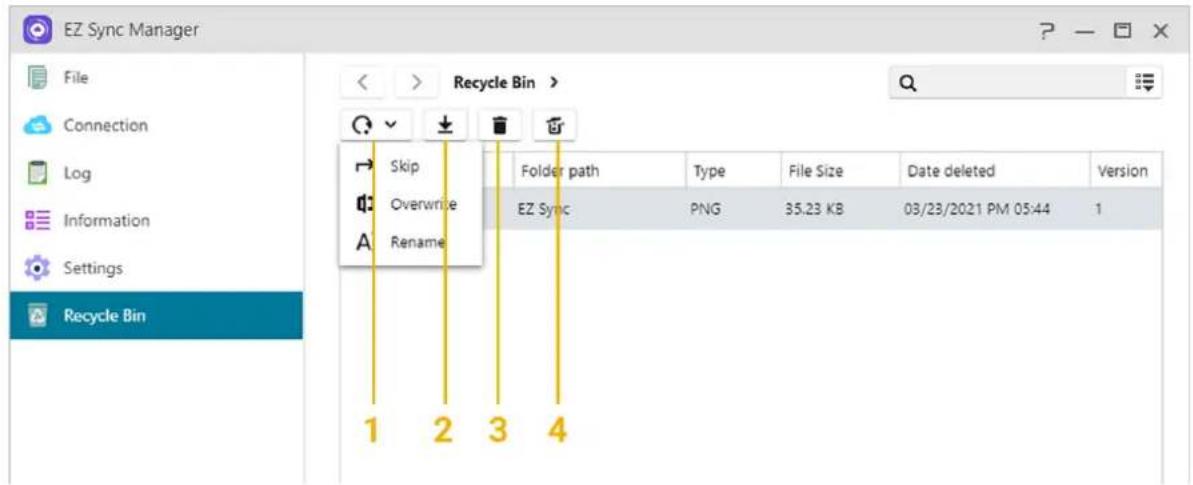
EZ Sync Manager File Connection Log Information Settings Recycle Bin Skip Overwrite Rename Folder path Type File Size Date deleted Version EZ Sync PNG 35.23 KB 03/23/2021 PM 05:44 1 1 2 3 4text_image
Access Control Local Users Local Groups AD / LDAP AD / LDAP Users AD / LDAP Groups Shared Folders App Privileges Add Edit Remove Quotas Name Description Quotas Status admin Admin -- Active guest guest -- Inactive | < | Page 1 of 1 | > | | Displaying 1 - 2 of 2 Current Number of Users: 2 Maximum Number of Users: 4096text_image
Access Control Local Users Local Groups AD / LDAP AD / LDAP Users AD / LDAP Groups Shared Folders App Privileges Add Edit Remove GID Name Description 999 administrators administrator group 100 usersITCH default user group |<< Page 1 of 1 | > > | | Displaying 1 - 2 of 2text_image
Access Control Local Users Local Groups AD / LDAP AD / LDAP Users AD / LDAP Groups Shared Folders App Privileges Active Directory LDAP Windows Active Directory Join Domain Settings Value Domain DNS server Domain NetBIOS name OUActive Directory
text_image
Access Control Local Users Local Groups AD / LDAP AD / LDAP Users AD / LDAP Groups Shared Folders App Privileges Edit Quotas Name Description Quotas |<< Page 1 of 1 | > | No data Last update: --En savoir plus:
text_image
Access Control Local Users Local Groups AD / LDAP AD / LDAP Users AD / LDAP Groups Shared Folders App Privileges Edit Name Description K < Page 1 of 1 > > | No data Last update: --Dossiers partagés
text_image
Access Control Local Users Local Groups AD / LDAP AD / LDAP Users AD / LDAP Groups Shared Folders App Privileges Shared Folders Virtual Drive CIFS Folder Add Edit Access Rights Remove Name Description Size Recycle Bin Size Volume Home Home directory 15.41 GB 0.00 B Volume 1 Public System default share 4.00 KB 0.00 B Volume 1 USB1 The USB device share 4.00 KB 0.00 B -- K < | Page 1 of 1 | > | | × Displaying 1 - 6 of 6text_image
Edit - Video Information Windows ACL Name: Video Description: LooksGood default shar Select volume: Volume1 ✓ Invisible in "Network" or "My Network Places" □ Enable Network Recycle Bin Empty Recycle Bin ✓ Only accessible by administrator group users □ Encrypt this shared folder Access Control Local Users Local Groups AD / LDAP AD / LDAP Users AD / LDAP Groups Shared Folders App Privileges cycle Bin Size Volume 0.00 B: Volume 1 0.00 B: Volume 1 0.00 B: Volume 1 Displaying 1 - 6 of 6Vider la Corbeille:
text_image
Access Control Local Users Local Groups AD / LDAP AD / LDAP Users AD / LDAP Groups Shared Folders App Privileges Edit - Video Information Windows ACL Name: Video Description: LooksGood default shar Select volume: Volume1 Invisible in "Network" or "My Network Places" Enable Network Recycle Bin Empty Recycle Bin Only accessible by administrator group users Encrypt this shared folderChiffrer ce dossier partagé:
text_image
Access Control Local Users Local Groups AD / LDAP AD / LDAP Users AD / LDAP Groups Shared Folders App Privileges Edit - Video Information Windows ACL Name: Video Description: LooksGood default shar Select volume: Volume1 Invisible in "Network" or "My Network Places" Enable Network Recycle Bin Empty Recycle Bin Only accessible by administrator group users Encrypt this shared folder Password:.......................... Confirm password:.......................... cycle Bin Size Volume 0.00 B Volume 1 0.00 B Volume 1 0.00 B Volume 1 Displaying 1 - 6 of 6text_image
Access Control Local Users Local Groups AD / LDAP AD / LDAP Users AD / LDAP Groups Shared Folders App Privileges Add New Shared Folder Please set the access rights for this shared folder: Read & Write for all users Read Only for all users, Read & Write for administrators By user By group Privileges for anonymous FTP/WebDAV: Deny Access Enable Windows ACL
A propos des dossiers partagés [Public]
text_image
Access Control Local Users Local Groups AD / LDAP AD / LDAP Users AD / LDAP Groups Shared Folders App Privileges Edit - Video Information Windows ACL Settings Please note the following: (1) You can modify permissions from File Explorer or through samba if ACL is enabled. But if ACL is disabled you will only be allowed to modify permissions from File Explorer. (2) If you disable ACL, All ACL permissions will be cleared and all files will be reset to full permissions. (3) Users will need both shared folder permissions and file permissions in order to access files under shared folders with or without Windows ACL enabled. □ Enable Windows ACL Size Volume 00 B Volume 1 00 B Volume 1 00 B Volume 1 Displaying 1 - 6 of 6text_image
Edit Shared Folder Privileges - Video Folders - Access Rights Local Users Name Preview Group DA RW RO admin Read & Write Read & Write guest Deny Access Displaying 1 - 2 of 2 Anonymous FTP/WebDAV: Deny Access Restart the SMB, AFP and FTP services after the new access rights have been applied to allow the access rights to take effect immediately. OK Canceltext_image
Access Control Local Users Local Groups AD / LDAP AD / LDAP Users AD / LDAP Groups Shared Folders App Privileges Shared Folders Virtual Drive CIFS Folder Mount Edit Unmount Name Description Size K < | Page 1 of 1 | > | No data This iso file will be mounted as a shared folder. You will be able to configure its access rights in the shared folders section.text_image
Access Control Local Users Local Groups AD / LDAP AD / LDAP Users AD / LDAP Groups Shared Folders App Privileges Shared Folders Virtual Drive CIFS Folder Mount Edit Access Rights Unmount Reconnect Name Description Remote folder Auto-Mount 123 //172.16.1.109/Video/MyArchive33 Yes 456 //172.16.1.109/Video/MyArchive36 Yes << < | Page 1 of 1 | > > | > Displaying 1 - 2 of 2text_image
Access Control Local Users Local Groups AD / LDAP AD / LDAP Users AD / LDAP Groups Shared Folders App Privileges Apps Users Edit Name Status Accessible Users LooksGood Enabled Photo Gallery 3 Enabled K < Page 1 of 1 > >| Displaying 1 - 2 of 2 Note: Privilege settings are only for non-administrators.text_image
Backup & Restore Remote Sync SMB Backup FTP Backup Internal Backup External Backup One Touch Backup System Settings Remote Sync Remote sync (rsync) supports the replication of data between your NAS and other rsync-compatible server(s). Create Back up now Edit Remove Info Namelas Last Backup Next Backup Statustext_image
Backup & Restore Remote Sync SMB Backup FTP Backup Internal Backup External Backup One Touch Backup System Settings SMB Backup Back up data to and from this NAS to an SMB-compatible device, server or NAS. Create Back up now Edit Remove Info Namelas Last Backup Next Backup Statustext_image
Backup & Restore Remote Sync SMB Backup FTP Backup FTP Backup Here you can back up the data from this NAS to an FTP server or vice versa. Create Back up now Edit Remove Info Namelas Last Backup Next Backup Status System Settingstext_image
Backup & Restore Remote Sync SMB Backup FTP Backup Internal Backup External Backup One Touch Backup System Settings Internal Backup Here you can back up the data from one folder to another folder on this NAS. Create Back up now Edit Remove Info Namelas Last Backup Next Backup Statustext_image
Backup & Restore Remote Sync SMB Backup FTP Backup Internal Backup External Backup One Touch Backup System Settings External Backup Here you can back up the data from this NAS to an external device or vice versa. Create Back up now Edit Remove Info Name Last Backup Next Backup Status ExternalBackup1 12/03/2022 AM 12:30 -- Finishedtext_image
Backup & Restore Remote Sync SMB Backup FTP Backup Internal Backup External Backup One Touch Backup System Settings One Touch Backup Settings Here you can configure the action of the USB button located on the front of the NAS. After configuration, you will be able to conveniently perform USB backup jobs at the push of a button. Eject USB device when backup completes Transfer mode: Disable From USB device to NAS From NAS to USB device Backup method: Copy Folder path: Browse Last Backup: -- Status: --Paramètres système
text_image
App Central Browse Top Apps Latest Apps ASUSTOR Apps Categories All Apps Beta Apps My Apps Update Installed Management Settings Log Manual Install When upgrading ADM, also upgrade active ASUSTOR Apps that become incompatible. Set automatic scheduled updates (For the configured time period, check for the latest version and perform version upgrading.) Frequency: Daily Time: AM 12 00 Applytext_image
External Devices Overview Hard Drives Printer Wi-Fi UPS Bluetooth Optical Drives ^Drive (1) USB1 USB 3.0 24.62 GB free of 57.78 GBDisque dur
text_image
External Devices Overview Hard Drives Printer Wi-Fi UPS Bluetooth Optical Drives Eject Release Settings Brother Model: HL-1110 series Mode: Network Printer Name IP address Content DataPlus d' informations:
Wi-Fi
text_image
External Devices Overview Hard Drives Printer Wi-Fi UPS Bluetooth Optical Drives Preferences American Model: Back-UPS Network UPS type: Network UPS server Network UPS support: Disable Wait period before NAS enters Safe Mode: Enter Safe Mode immediately Network UPS server address: -- Remaining battery time: 9 hours 20 minutes Remaining power (%): 83 % 83 %text_image
External Devices Overview Hard Drives Printer Wi-Fi UPS Bluetooth Optical Drives Eject Disc ASUS Shared folder name: OpticalDrive File system: iso9660Plus d' informations:
text_image
System Information About This NAS Network Log Online Users System ADM Version: 4.1.0.AG81 BIOS Version: 2.16 System time: 04/13/2022 AM 11:25 Time zone: (GMT+08:00) Taipei Uptime: 4 days, 17 hours, 51 minutes and 34 seconds ASUSTOR ID: @gmail.com Hardware Model: A56102T Processor::Intel® Celeron™ CPU @ 1.60GHz Memory: 4.00 GB Serial number: System temperature: 44 °C CPU temperature: 51 °C Fan speed: 713RPMRéseau
text_image
System Information About This NAS Network Log Online Users: System Log Refresh Save Clear Preferences Syslog Type Time User Event 04/13/2022 AM 11:33:28 SYSTEM [System] "ADM" login failure from IP "172.16.2.14" detected. 04/13/2022 AM 11:00:51 adminh [EZ-Connect] Service started. 04/13/2022 AM 11:00:40 adminh [Internet Passthrough] Service started. 04/13/2022 AM 10:58:57 adminh [Local User] The profile for user "adminharry" was updated.text_image
Dr. ASUSTOR Health Check Support Tools Diagnose Status Dr. ASUSTOR provides a diagnosis based on your settings and the status of your NAS. Follow suggested instructions posted to minimize potential risks. Details Attention Needed Click here to read more about how to protect your data from ransomware. Areas of Concern All Malware Detection
Moniteur d'Activité
text_image
Desktop setup with monitor displaying app icons, smartphone, and server rack showing network ports
ASUSTOR Live
text_image
MariaDB Port number: 3306 Enable MariaDB remote access Reset Password Reinitialize Database Change Password Also enable EZ-Connect port forwarding This service and its port forwarding has been successfully enabled. You can connect to it via EZ-Router Note: You can download the phpMyAdmin app from App Central to manage your MariaDB server. ApplyNuméro de port:
natural_image
Three computer monitors displaying a grid of surveillance camera feeds, including surveillance cameras and servers (no visible text or symbols on screens)text_image
UPnP Media Server General Advanced Information Status: Invalid bining interface Server name: A55304T-12C5M Rename Last Scan: 5/14/2020 15:36:53 Scan Now Interface: LAN 1+2 Media Source Add Edit Remove Name Way Media Media Music Music Page 1 of 1 | | Displaying 1 - 2 of 2text_image
All Songs Album Artist Genre Fulden Selected 1 item(s) 1758 albums, 19290 songs Recently Added Most played Random 330 Playoffs Favorite AA C-0-0 Repeat adding songs test Net Playlist A New Day at Mohn... David Chap A Cha - Vr. Simple... Super Huron A1 Unknown artist ALONE Sahar Abbey Road Anthe... Zyria Almerotis Abby Road Anthe... Daniel Karmstead Abby Road Anthe... Daniel Siban Abby Road Andhe... Dingh Olayn's & Wilt... Abby Road Andhe... Abby Road Andhe... Tina Jindemont Abby Road Andhe... Zhangy Chen Addictions, Vol. 1 Robert Rickett Adverlias Archer Shuguen AeroSmith Unknown Artist AeroSmith AeroSmith After Hours Dingh Freg Air Supply Unknown Artist Dimine Kyrakodee BON-JOVI Air Hunt - Single Dimine Kyrakodee Alison Unknown Artist Alive Irving All More Top All Saints Jell Sants American Anthem... Tranoo Arthie American Idol Green Day Dingh Freg American Tune Era Cansky... An Innocent Man Ally outhttps://www.asustor.com/admv2/Asustor_transcode
Plus d' informations
natural_image
Product display setup featuring smartphone, photo collage, and computer monitor (no visible text or symbols)
VPN Server
text_image
VPN Server Overview Log Privilege Settings Overview Connections PPTP OpenVPN L2TP/IPsec Current Connections Name Client IP Dynamic IP Protocol UptimeConfigurer le NAS ASUSTOR en tant que serveur VPN:
Video - ASUSTOR College Episode 3 - ASUSTOR Portal
text_image
ClamAV Task Quarantine Settings Update Task Report Add Edit Export Remove Name Status Time elapsed Scanned Infected Task_1030105356 Completed 00:12:53 163755 0 Task_103010545 Completed 00:18:35 0 0 Task_1030105439 Scanning 00:28:57 0 0
Mail Server
text_image
Mail-Server Overview | SMTP | IMAP/POP3 | Security | Alias | Queue | Mail Log | Backup | Personal Time Past 1 week SMTP Enabled SMTP Relay Disabled SPAM Disabled Queue 0 ReceivedPlus d' informations: NAS- 269- Introduction à Mail Server

Syslog Server
text_image
Syslog Server Overview Log Settings Archive Notification History Log Count View by Device View by Level Past 1 hour CountPlus d' informations
text_image
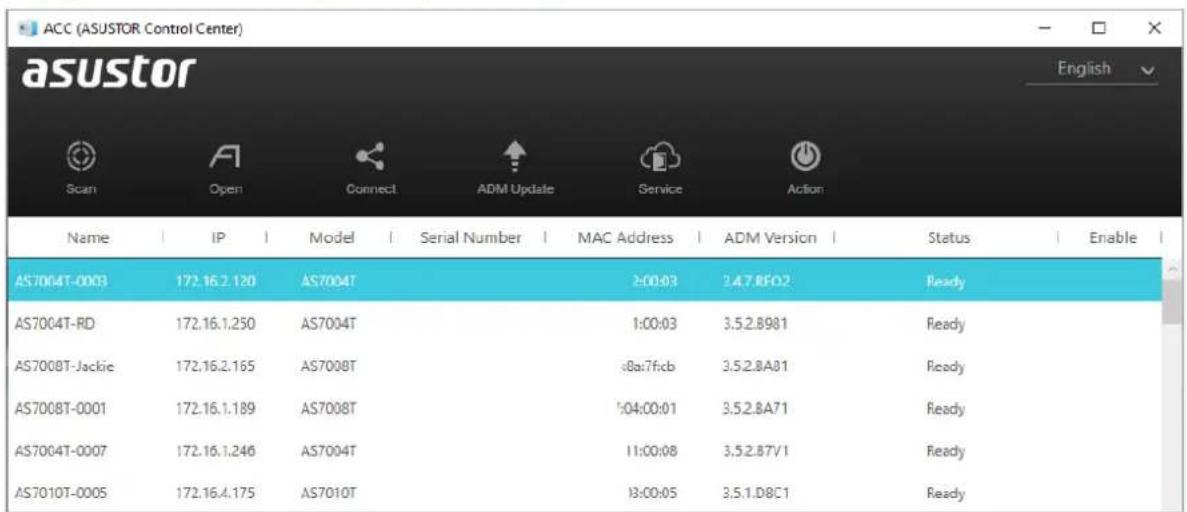
DataSync Center ASUSTOR Data Sync PI... Google Deive2019 Hello World One skr Zac One drive Zac One drive Status | Tasking List | Log Complete Preference setting Synchronized Information Task Name: Google Backup Folder User Name Sir Kim used storage Used 352GB /2TB (19%)ACC (ASUSTOR Control Center) (PC/Mac)
http://www.asustor.com/service/downloads
text_image
ACC (ASUSTOR Control Center) asustor Scan Open Connect ADM Update Service Action Name IP Model Serial Number MAC Address ADM Version Status Enable AS7004T-0003 172.16.2.120 AS7004T 2:00:03 3.4.7.RFO2 Ready AS7004T-RD 172.16.1.250 AS7004T 1:00:03 3.5.2.B981 Ready AS7008T-Jackie 172.16.2.165 AS7008T 8a:7f:cb 3.5.2.BA81 Ready AS7008T-0001 172.16.1.189 AS7008T 1:04:00:01 3.5.2.BA71 Ready AS7004T-0007 172.16.1.246 AS7004T 11:00:08 3.5.2.B7V1 Ready AS7010T-0005 172.16.4.175 AS7010T 13:00:05 3.5.1.D8C1 ReadyAEC (ASUSTOR EZ Connect) (PC)
text_image
AEC (ASUSTOR EZ Connect) asustor Add Map Drive Edit Reconnect Abort Unmount Open Remove Port Information admin (admin) AS6302T-ADM3 2.5Gtest ( Admin ) (E) Mapping to /2.5Gtest MountedABP (ASUSTOR Backup Plan) (PC)
AES (ASUSTOR EZ Sync) (PC)
text_image
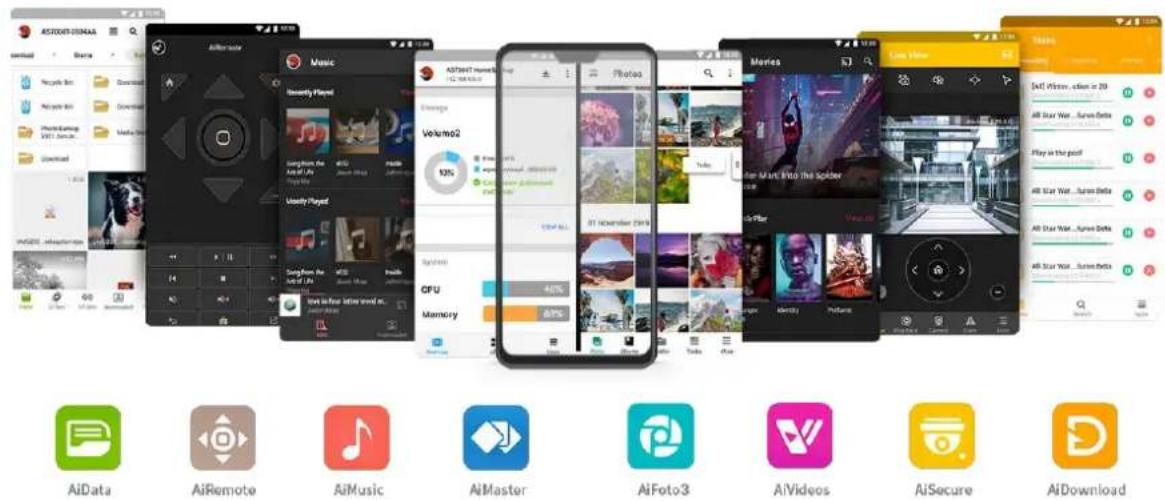
ASUSTOR EZ Sync HSU ID Name AS3102T ACDR2568 admin My Family Backup N.. admin Synchronizing Synchronization Settings: Synchronization (2-way) PC Path: C:\ PIC NAS Path: EZ Sync\PIC Select detail files and folders PC folder NAS Folder Sync Folder NAS Info Name of PC PIC <-> NAS PIC Files not in a folder. In MAS PIC Folder1Applications Mobiles
text_image
ASTOUER-SONAA Download Recycle Bin AIpsys Bin Home Earnings MINT Save... Download AVGSEE: info@sonaa.com Audio Player Music Audio Player Audio Player Audio Player Audio Player Audio Player Audio Player Audio Player Audio Player Audio Player Audio Player Audio Player Audio Player Audio Player Audio Player Audio Player Audio Player Audio Player Audio Player Audio Player Audio Player Audio Player Audio Player Audio Player Audio Player Audio Player Audio Player Audio Player Audio Player Audio Player Audio Player Audio Player Audio Player Audio Player Audio Playertext_image
QR code image containing encoded data, no visible human-readable text
text_image
QR code image containing encoded data, no visible human-readable textAiMaster
text_image
QR code image containing encoded data, no visible human-readable text
text_image
QR code image containing encoded data, no visible human-readable textPlus d' informations
text_image
QR code image containing encoded data, no visible human-readable textEn apprendre plus
NAS 136 – Controle l'ASUSTOR Portal
text_image
QR code image containing encoded data, no visible human-readable textAiDownload
text_image
QR code image containing encoded data, no visible human-readable textAiMusic
text_image
QR code image containing encoded data, no visible human-readable texttext_image
QR code image containing encoded data, no visible human-readable textAiFoto3
text_image
QR code image containing encoded data, no visible human-readable text
text_image
QR code image containing encoded data, no visible human-readable textAiVideos
text_image
QR code image containing encoded data, no visible human-readable text
text_image
QR code image containing encoded data, no visible human-readable textPlus d' informations
text_image
QR code image containing encoded data, no visible human-readable text
text_image
QR code image containing encoded data, no visible human-readable textEULA
END-USER LICENSE AGREEMENT FOR ASUSTOR DATA MASTER ("ADM") IMPORTANT PLEASE READ THE TERMS AND CONDITIONS OF THIS LICENSE AGREEMENT CAREFULLY BEFORE CONTINUING WITH THIS PROGRAM INSTALLATION: ASUSTOR End-User License Agreement ("EULA") is a legal agreement between you and ASUSTOR Inc. for the ASUSTOR software product(s) identified above which may include associated software components, media, printed materials, and "online" or electronic documentation ("SOFTWARE PRODUCT"). By installing, copying, or otherwise using the SOFTWARE PRODUCT, you agree to be bound by the terms of this EULA. This license agreement represents the entire agreement concerning the program between you and ASUSTOR Inc., (referred to as "licenser"), and it supersedes any prior proposal, representation, or understanding between the parties. If you do not agree to the terms of this EULA, do not install or use the SOFTWARE PRODUCT.
The SOFTWARE PRODUCT is protected by copyright laws and international copyright treaties, as well as other intellectual property laws and treaties. The SOFTWARE PRODUCT is licensed, not sold.
1. GRANT OF LICENSE.
The SOFTWARE PRODUCT is licensed as follows:
Installation and Use.
ASUSTOR Inc. grants you the right to install and use copies of the SOFTWARE PRODUCT on your computer running a validly licensed copy of the operating system for which the SOFTWARE PRODUCT was designed [e.g., Microsoft Windows 7 and Mac OS X].
2. DESCRIPTION OF OTHER RIGHTS AND LIMITATIONS.
(a) Maintenance of Copyright Notices.
You must not remove or alter any copyright notices on any and all copies of the SOFTWARE PRODUCT.
(b) Distribution.
You may not distribute registered copies of the SOFTWARE PRODUCT to third parties. Official versions available for download from ASUSTOR's websites may be freely distributed.
(c) Prohibition on Reverse Engineering, Decompilation, and Disassembly.
You may not reverse engineer, decompile, or disassemble the SOFTWARE PRODUCT, except and only to the extent that such activity is expressly permitted by applicable law notwithstanding this
limitation.
ASUSTOR may provide you with support services related to the SOFTWARE PRODUCT ("Support Services"). Any supplemental software code provided to you as part of the Support Services shall be considered part of the SOFTWARE PRODUCT and subject to the terms and conditions of this EULA.
(e) Compliance with Applicable Laws.
You must comply with all applicable laws regarding use of the SOFTWARE PRODUCT.
3. TERMINATION
Without prejudice to any other rights, ASUSTOR may terminate this EULA if you fail to comply with the terms and conditions of this EULA. In such event, you must destroy all copies of the SOFTWARE PRODUCT in your possession.
4. COPYRIGHT
All title, including but not limited to copyrights, in and to the SOFTWARE PRODUCT and any copies thereof are owned by ASUSTOR or its suppliers. All title and intellectual property rights in and to the content which may be accessed through use of the SOFTWARE PRODUCT is the property of the respective content owner and may be protected by applicable copyright or other intellectual property laws and treaties. This EULA grants you no rights to use such content. All rights not expressly granted are reserved by ASUSTOR.
5. LIMITED WARRANTY
ASUSTOR offers limited warranty for the SOFTWARE PRODUCT, and the warranty does not apply if the software (a) has been customized, modified, or altered by anyone other than ASUSTOR, (b) has not been installed, operated, or maintained in accordance with instructions provided by ASUSTOR, (c) is used in ultra-hazardous activities.
6. LIMITATION OF LIABILITY
In no event shall ASUSTOR be liable for any damages (including, without limitation, lost profits, business interruption, or lost information) rising out of 'Authorized Users' use of or inability to use the SOFTWARE PRODUCT, even if ASUSTOR has been advised of the possibility of such damages. In no event will ASUSTOR be liable for loss of data or for indirect, special, incidental, consequential (including lost profit), or other damages based in contract, tort or otherwise. ASUSTOR shall have no liability with respect to the content of the SOFTWARE PRODUCT or any part thereof, including but not limited to errors or omissions contained therein, libel, infringements of rights of publicity, privacy, trademark rights, business interruption, personal injury, loss of privacy, moral rights or the disclosure of confidential information.
GNU General Public License
GNU GENERAL PUBLIC LICENSE
Version 3, 29 June 2007
Copyright (C) 2007 Free Software Foundation, Inc. http://fsf.org/ Everyone is permitted to copy and distribute verbatim copies of this license document, but changing it is not allowed.
Preamble
The GNU General Public License is a free, copyleft license for software and other kinds of works.
The licenses for most software and other practical works are designed to take away your freedom to share and change the works. By contrast, the GNU General Public License is intended to guarantee your freedom to share and change all versions of a program--to make sure it remains free software for all its users. We, the Free Software Foundation, use the GNU General Public License for most of our software; it applies also to any other work released this way by its authors. You can apply it to your programs, too.
When we speak of free software, we are referring to freedom, not price. Our General Public Licenses are designed to make sure that you have the freedom to distribute copies of free software (and charge for them if you wish), that you receive source code or can get it if you want it, that you can change the software or use pieces of it in new free programs, and that you know you can do these things.
To protect your rights, we need to prevent others from denying you these rights or asking you to surrender the rights. Therefore, you have certain responsibilities if you distribute copies of the software, or if you modify it: responsibilities to respect the freedom of others.
For example, if you distribute copies of such a program, whether gratis or for a fee, you must pass on to the recipients the same freedoms that you received. You must make sure that they, too, receive or can get the source code. And you must show them these terms so they know their rights.
Developers that use the GNU GPL protect your rights with two steps:
(1) assert copyright on the software, and (2) offer you this License giving you legal permission to copy, distribute and/or modify it.
For the developers' and authors' protection, the GPL clearly explains that there is no warranty for this free software. For both users' and authors' sake, the GPL requires that modified versions be
marked as changed, so that their problems will not be attributed erroneously to authors of previous versions.
Some devices are designed to deny users access to install or run modified versions of the software inside them, although the manufacturer can do so. This is fundamentally incompatible with the aim of protecting users' freedom to change the software. The systematic pattern of such abuse occurs in the area of products for individuals to use, which is precisely where it is most unacceptable. Therefore, we have designed this version of the GPL to prohibit the practice for those products. If such problems arise substantially in other domains, we stand ready to extend this provision to those domains in future versions of the GPL, as needed to protect the freedom of users.
Finally, every program is threatened constantly by software patents. States should not allow patents to restrict development and use of software on general-purpose computers, but in those that do; we wish to avoid the special danger that patents applied to a free program could make it effectively proprietary. To prevent this, the GPL assures that patents cannot be used to render the program non-free.
The precise terms and conditions for copying, distribution and modification follow.
TERMS AND CONDITIONS
- Definitions.
"This License" refers to version 3 of the GNU General Public License.
"Copyright" also means copyright-like laws that apply to other kinds of works, such as semiconductor masks.
"The Program" refers to any copyrightable work licensed under this License. Each licensee is addressed as "you". "Licensees" and "recipients" may be individuals or organizations.
To "modify" a work means to copy from or adapt all or part of the work in a fashion requiring copyright permission, other than the making of an exact copy. The resulting work is called a "modified version" of the earlier work or a work "based on" the earlier work.
A "covered work" means either the unmodified Program or a work based on the Program.
To "propagate" a work means to do anything with it that, without permission, would make you directly or secondarily liable for infringement under applicable copyright law, except executing it on a computer or modifying a private copy. Propagation includes copying, distribution (with or without modification), making available to the public, and in some countries other activities as well.
To "convey" a work means any kind of propagation that enables other parties to make or receive copies. Mere interaction with a user through a computer network, with no transfer of a copy, is not conveying.
An interactive user interface displays "Appropriate Legal Notices" to the extent that it includes a convenient and prominently visible feature that (1) displays an appropriate copyright notice, and (2) tells the user that there is no warranty for the work (except to the extent that warranties are provided), that licensees may convey the work under this License, and how to view a copy of this License. If the interface presents a list of user commands or options, such as a menu, a prominent item in the list meets this criterion.
1. Source Code.
The "source code" for a work means the preferred form of the work for making modifications to it. "Object code" means any non-source form of a work.
A "Standard Interface" means an interface that either is an official standard defined by a recognized standards body, or, in the case of interfaces specified for a particular programming language, one that is widely used among developers working in that language.
The "System Libraries" of an executable work include anything, other than the work as a whole, that (a) is included in the normal form of packaging a Major Component, but which is not part of that Major Component, and (b) serves only to enable use of the work with that Major Component, or to implement a Standard Interface for which an implementation is available to the public in source code form. A "Major Component", in this context, means a major essential component (kernel, window system, and so on) of the specific operating system (if any) on which the executable work runs, or a compiler used to produce the work, or an object code interpreter used to run it.
The "Corresponding Source" for a work in object code form means all the source code needed to generate, install, and (for an executable work) run the object code and to modify the work, including scripts to control those activities. However, it does not include the work's System Libraries, or general-purpose tools or generally available free programs which are used unmodified in performing those activities but which are not part of the work. For example, Corresponding Source includes interface definition files associated with source files for the work, and the source code for shared libraries and dynamically linked subprograms that the work is specifically designed to require, such as by intimate data communication or control flow between those subprograms and other parts of the work.
The Corresponding Source need not include anything that users can regenerate automatically from other parts of the Corresponding Source.
The Corresponding Source for a work in source code form is that same work.
2. Basic Permissions.
All rights granted under this License are granted for the term of copyright on the Program, and are irrevocable provided the stated conditions are met. This License explicitly affirms your unlimited permission to run the unmodified Program. The output from running a covered work
is covered by this License only if the output, given its content, constitutes a covered work. This License acknowledges your rights of fair use or other equivalent, as provided by copyright law.
You may make, run and propagate covered works that you do not convey, without conditions so long as your license otherwise remains in force. You may convey covered works to others for the sole purpose of having them make modifications exclusively for you, or provide you with facilities for running those works, provided that you comply with the terms of this License in conveying all material for which you do not control copyright. Those thus making or running the covered works for you must do so exclusively on your behalf, under your direction and control, on terms that prohibit them from making any copies of your copyrighted material outside their relationship with you.
Conveying under any other circumstances is permitted solely under the conditions stated below. Sublicensing is not allowed; section 10 makes it unnecessary.
- Protecting Users' Legal Rights From Anti-Circumvention Law.
No covered work shall be deemed part of an effective technological measure under any applicable law fulfilling obligations under article 11 of the WIPO copyright treaty adopted on 20 December 1996, or similar laws prohibiting or restricting circumvention of such measures.
When you convey a covered work, you waive any legal power to forbid circumvention of technological measures to the extent such circumvention is effected by exercising rights under this License with respect to the covered work, and you disclaim any intention to limit operation or modification of the work as a means of enforcing, against the work's users, your or third parties' legal rights to forbid circumvention of technological measures.
- Conveying Verbatim Copies.
You may convey verbatim copies of the Program's source code as you receive it, in any medium, provided that you conspicuously and appropriately publish on each copy an appropriate copyright notice; keep intact all notices stating that this License and any non-permissive terms added in accord with section 7 apply to the code; keep intact all notices of the absence of any warranty; and give all recipients a copy of this License along with the Program.
You may charge any price or no price for each copy that you convey, and you may offer support or warranty protection for a fee.
- Conveying Modified Source Versions.
You may convey a work based on the Program, or the modifications to produce it from the Program, in the form of source code under the terms of section 4, provided that you also meet all of these conditions:
a) The work must carry prominent notices stating that you modified it, and giving a relevant date.
b) The work must carry prominent notices stating that it is released under this License and any conditions added under section 7. This requirement modifies the requirement in section 4 to "keep intact all notices".
c) You must license the entire work, as a whole, under this License to anyone who comes into possession of a copy. This License will therefore apply, along with any applicable section 7 additional terms, to the whole of the work, and all its parts, regardless of how they are packaged. This License gives no permission to license the work in any other way, but it does not invalidate such permission if you have separately received it.
d) If the work has interactive user interfaces, each must display Appropriate Legal Notices; however, if the Program has interactive interfaces that do not display Appropriate Legal Notices, your work need not make them do so.
A compilation of a covered work with other separate and independent works, which are not by their nature extensions of the covered work, and which are not combined with it such as to form a larger program, in or on a volume of a storage or distribution medium, is called an "aggregate" if the compilation and its resulting copyright are not used to limit the access or legal rights of the compilation's users beyond what the individual works permit. Inclusion of a covered work in an aggregate does not cause this License to apply to the other parts of the aggregate.
6. Conveying Non-Source Forms.
You may convey a covered work in object code form under the terms of sections 4 and 5, provided that you also convey the machine-readable Corresponding Source under the terms of this License, in one of these ways:
a) Convey the object code in, or embodied in, a physical product (including a physical distribution medium), accompanied by the Corresponding Source fixed on a durable physical medium customarily used for software interchange.
b) Convey the object code in, or embodied in, a physical product (including a physical distribution medium), accompanied by a written offer, valid for at least three years and valid for as long as you offer spare parts or customer support for that product model, to give anyone who possesses the object code either (1) a copy of the Corresponding Source for all the software in the product that is covered by this License, on a durable physical medium customarily used for software interchange, for a price no more than your reasonable cost of physically performing this conveying of source, or (2) access to copy the Corresponding Source from a network server at no charge.
c) Convey individual copies of the object code with a copy of the written offer to provide the Corresponding Source. This alternative is allowed only occasionally and noncommercially, and only if you received the object code with such an offer, in accord with subsection 6b.
d) Convey the object code by offering access from a designated place (gratis or for a charge), and offer equivalent access to the Corresponding Source in the same way through the same
place at no further charge. You need not require recipients to copy the Corresponding Source along with the object code. If the place to copy the object code is a network server, the Corresponding Source may be on a different server (operated by you or a third party) that supports equivalent copying facilities, provided you maintain clear directions next to the object code saying where to find the Corresponding Source. Regardless of what server hosts the Corresponding Source, you remain obligated to ensure that it is available for as long as needed to satisfy these requirements.
e) Convey the object code using peer-to-peer transmission, provided you inform other peers where the object code and Corresponding Source of the work are being offered to the general public at no charge under subsection 6d.
A separable portion of the object code, whose source code is excluded from the Corresponding Source as a System Library, need not be included in conveying the object code work.
A "User Product" is either (1) a "consumer product", which means any tangible personal property which is normally used for personal, family, or household purposes, or (2) anything designed or sold for incorporation into a dwelling. In determining whether a product is a consumer product, doubtful cases shall be resolved in favor of coverage. For a particular product received by a particular user, "normally used" refers to a typical or common use of that class of product, regardless of the status of the particular user or of the way in which the particular user actually uses, or expects or is expected to use, the product. A product is a consumer product regardless of whether the product has substantial commercial, industrial or non-consumer uses, unless such uses represent the only significant mode of use of the product.
"Installation Information" for a User Product means any methods, procedures, authorization keys, or other information required to install and execute modified versions of a covered work in that User Product from a modified version of its Corresponding Source. The information must suffice to ensure that the continued functioning of the modified object code is in no case prevented or interfered with solely because modification has been made.
If you convey an object code work under this section in, or with, or specifically for use in, a User Product, and the conveying occurs as part of a transaction in which the right of possession and use of the User Product is transferred to the recipient in perpetuity or for a fixed term (regardless of how the transaction is characterized), the Corresponding Source conveyed under this section must be accompanied by the Installation Information. But this requirement does not apply if neither you nor any third party retains the ability to install modified object code on the User Product (for example, the work has been installed in ROM).
The requirement to provide Installation Information does not include a requirement to continue to provide support service, warranty, or updates for a work that has been modified or installed by the recipient, or for the User Product in which it has been modified or installed. Access to a network may be denied when the modification itself materially and adversely affects the
operation of the network or violates the rules and protocols for communication across the network.
Corresponding Source conveyed, and Installation Information provided, in accord with this section must be in a format that is publicly documented (and with an implementation available to the public in source code form), and must require no special password or key for unpacking, reading or copying.
7. Additional Terms.
"Additional permissions" are terms that supplement the terms of this License by making exceptions from one or more of its conditions. Additional permissions that are applicable to the entire Program shall be treated as though they were included in this License, to the extent that they are valid under applicable law. If additional permissions apply only to part of the Program, that part may be used separately under those permissions, but the entire Program remains governed by this License without regard to the additional permissions.
When you convey a copy of a covered work, you may at your option remove any additional permissions from that copy, or from any part of it. (Additional permissions may be written to require their own removal in certain cases when you modify the work.) You may place additional permissions on material, added by you to a covered work, for which you have or can give appropriate copyright permission.
Notwithstanding any other provision of this License, for material you add to a covered work, you may (if authorized by the copyright holders of that material) supplement the terms of this License with terms:
a) Disclaiming warranty or limiting liability differently from the terms of sections 15 and 16 of this License; or
b) Requiring preservation of specified reasonable legal notices or author attributions in that material or in the Appropriate Legal Notices displayed by works containing it; or
c) Prohibiting misrepresentation of the origin of that material, or requiring that modified versions of such material be marked in reasonable ways as different from the original version; or
d) Limiting the use for publicity purposes of names of licensors or authors of the material; or
e) Declining to grant rights under trademark law for use of some trade names, trademarks, or service marks; or
f) Requiring indemnification of licensors and authors of that material by anyone who conveys the material (or modified versions of it) with contractual assumptions of liability to the recipient, for any liability that these contractual assumptions directly impose on those licensors and authors.
All other non-permissive additional terms are considered "further restrictions" within the meaning of section 10. If the Program as you received it, or any part of it, contains a notice stating that it is governed by this License along with a term that is a further restriction, you may
remove that term. If a license document contains a further restriction but permits relicensing or conveying under this License, you may add to a covered work material governed by the terms of that license document, provided that the further restriction does not survive such relicensing or conveying.
If you add terms to a covered work in accord with this section, you must place, in the relevant source files, a statement of the additional terms that apply to those files, or a notice indicating where to find the applicable terms. Additional terms, permissive or non-permissive, may be stated in the form of a separately written license, or stated as exceptions; the above requirements apply either way.
8. Termination.
You may not propagate or modify a covered work except as expressly provided under this License. Any attempt otherwise to propagate or modify it is void, and will automatically terminate your rights under this License (including any patent licenses granted under the third paragraph of section 11).
However, if you cease all violation of this License, then your license from a particular copyright holder is reinstated (a) provisionally, unless and until the copyright holder explicitly and finally terminates your license, and (b) permanently, if the copyright holder fails to notify you of the violation by some reasonable means prior to 60 days after the cessation.
Moreover, your license from a particular copyright holder is reinstated permanently if the copyright holder notifies you of the violation by some reasonable means, this is the first time you have received notice of violation of this License (for any work) from that copyright holder, and you cure the violation prior to 30 days after your receipt of the notice.
Termination of your rights under this section does not terminate the licenses of parties who have received copies or rights from you under this License. If your rights have been terminated and not permanently reinstated, you do not qualify to receive new licenses for the same material under section 10.
9. Acceptance Not Required for Having Copies.
You are not required to accept this License in order to receive or run a copy of the Program. Ancillary propagation of a covered work occurring solely as a consequence of using peer-to-peer transmission to receive a copy likewise does not require acceptance. However, nothing other than this License grants you permission to propagate or modify any covered work. These actions infringe copyright if you do not accept this License. Therefore, by modifying or propagating a covered work, you indicate your acceptance of this License to do so.
- Automatic Licensing of Downstream Recipients.
Each time you convey a covered work, the recipient automatically receives a license from the original licensors, to run, modify and propagate that work, subject to this License. You are not responsible for enforcing compliance by third parties with this License.
An "entity transaction" is a transaction transferring control of an organization, or substantially all assets of one, or subdividing an organization, or merging organizations. If propagation of a covered work results from an entity transaction, each party to that transaction who receives a copy of the work also receives whatever licenses to the work the party's predecessor in interest had or could give under the previous paragraph, plus a right to possession of the Corresponding Source of the work from the predecessor in interest, if the predecessor has it or can get it with reasonable efforts.
You may not impose any further restrictions on the exercise of the rights granted or affirmed under this License. For example, you may not impose a license fee, royalty, or other charge for exercise of rights granted under this License, and you may not initiate litigation (including a cross-claim or counterclaim in a lawsuit) alleging that any patent claim is infringed by making, using, selling, offering for sale, or importing the Program or any portion of it.
11. Patents.
A "contributor" is a copyright holder who authorizes use under this License of the Program or a work on which the Program is based. The work thus licensed is called the contributor's "contributor version".
A contributor's "essential patent claims" are all patent claims owned or controlled by the contributor, whether already acquired or hereafter acquired, that would be infringed by some manner, permitted by this License, of making, using, or selling its contributor version, but do not include claims that would be infringed only as a consequence of further modification of the contributor version. For purposes of this definition, "control" includes the right to grant patent sublicenses in a manner consistent with the requirements of this License.
Each contributor grants you a non-exclusive, worldwide, royalty-free patent license under the contributor's essential patent claims, to make, use, sell, offer for sale, import and otherwise run, modify and propagate the contents of its contributor version.
In the following three paragraphs, a "patent license" is any express agreement or commitment, however denominated, not to enforce a patent (such as an express permission to practice a patent or covenant not to sue for patent infringement). To "grant" such a patent license to a party means to make such an agreement or commitment not to enforce a patent against the party.
If you convey a covered work, knowingly relying on a patent license, and the Corresponding Source of the work is not available for anyone to copy, free of charge and under the terms of this License, through a publicly available network server or other readily accessible means, then you must either (1) cause the Corresponding Source to be so available, or (2) arrange to deprive
yourself of the benefit of the patent license for this particular work, or (3) arrange, in a manner consistent with the requirements of this License, to extend the patent license to downstream recipients. "Knowingly relying" means you have actual knowledge that, but for the patent license, your conveying the covered work in a country, or your recipient's use of the covered work in a country, would infringe one or more identifiable patents in that country that you have reason to believe are valid.
If, pursuant to or in connection with a single transaction or arrangement, you convey, or propagate by procuring conveyance of, a covered work, and grant a patent license to some of the parties receiving the covered work authorizing them to use, propagate, modify or convey a specific copy of the covered work, then the patent license you grant is automatically extended to all recipients of the covered work and works based on it.
A patent license is "discriminatory" if it does not include within the scope of its coverage, prohibits the exercise of, or is conditioned on the non-exercise of one or more of the rights that are specifically granted under this License. You may not convey a covered work if you are a party to an arrangement with a third party that is in the business of distributing software, under which you make payment to the third party based on the extent of your activity of conveying the work, and under which the third party grants, to any of the parties who would receive the covered work from you, a discriminatory patent license (a) in connection with copies of the covered work conveyed by you (or copies made from those copies), or (b) primarily for and in connection with specific products or compilations that contain the covered work, unless you entered into that arrangement, or that patent license was granted, prior to 28 March 2007.
Nothing in this License shall be construed as excluding or limiting any implied license or other defenses to infringement that may otherwise be available to you under applicable patent law.
- No Surrender of Others' Freedom.
If conditions are imposed on you (whether by court order, agreement or otherwise) that contradict the conditions of this License, they do not excuse you from the conditions of this License. If you cannot convey a covered work so as to satisfy simultaneously your obligations under this License and any other pertinent obligations, then as a consequence you may not convey it at all. For example, if you agree to terms that obligate you to collect a royalty for further conveying from those to whom you convey the Program, the only way you could satisfy both those terms and this License would be to refrain entirely from conveying the Program.
- Use with the GNU Affero General Public License.
Notwithstanding any other provision of this License, you have permission to link or combine any covered work with a work licensed under version 3 of the GNU Affero General Public License into a single combined work, and to convey the resulting work. The terms of this License will continue to apply to the part which is the covered work, but the special requirements of the GNU Affero General Public License, section 13, concerning interaction through a network will apply to the combination as such.
- Revised Versions of this License.
The Free Software Foundation may publish revised and/or new versions of the GNU General Public License from time to time. Such new versions will be similar in spirit to the present version, but may differ in detail to address new problems or concerns.
Each version is given a distinguishing version number. If the Program specifies that a certain numbered version of the GNU General Public License "or any later version" applies to it, you have the option of following the terms and conditions either of that numbered version or of any later version published by the Free Software Foundation. If the Program does not specify a version number of the GNU General Public License, you may choose any version ever published by the Free Software Foundation.
If the Program specifies that a proxy can decide which future versions of the GNU General Public License can be used, that proxy's public statement of acceptance of a version permanently authorizes you to choose that version for the Program.
Later license versions may give you additional or different permissions. However, no additional obligations are imposed on any author or copyright holder as a result of your choosing to follow a
later version.
- Disclaimer of Warranty.
THERE IS NO WARRANTY FOR THE PROGRAM, TO THE EXTENT PERMITTED BY APPLICABLE LAW. EXCEPT WHEN OTHERWISE STATED IN WRITING THE COPYRIGHT HOLDERS AND/OR OTHER PARTIES PROVIDE THE PROGRAM "AS IS" WITHOUT WARRANTY OF ANY KIND, EITHER EXPRESSED OR IMPLIED, INCLUDING, BUT NOT LIMITED TO, THE IMPLIED WARRANTIES OF MERCHANTABILITY AND FITNESS FOR A PARTICULAR PURPOSE. THE ENTIRE RISK AS TO THE QUALITY AND PERFORMANCE OF THE PROGRAM IS WITH YOU. SHOULD THE PROGRAM PROVE DEFECTIVE, YOU ASSUME THE COST OF ALL NECESSARY SERVICING, REPAIR OR CORRECTION.
- Limitation of Liability.
IN NO EVENT UNLESS REQUIRED BY APPLICABLE LAW OR AGREED TO IN WRITING WILL ANY COPYRIGHT HOLDER, OR ANY OTHER PARTY WHO MODIFIES AND/OR CONVEYS THE PROGRAM AS PERMITTED ABOVE, BE LIABLE TO YOU FOR DAMAGES, INCLUDING ANY GENERAL, SPECIAL, INCIDENTAL OR CONSEQUENTIAL DAMAGES ARISING OUT OF THE USE OR INABILITY TO USE THE PROGRAM (INCLUDING BUT NOT LIMITED TO LOSS OF DATA OR DATA BEING RENDERED INACCURATE OR LOSSES SUSTAINED BY YOU OR THIRD PARTIES OR A FAILURE OF THE PROGRAM TO OPERATE WITH ANY OTHER PROGRAMS), EVEN IF SUCH HOLDER OR OTHER PARTY HAS BEEN ADVISED OF THE POSSIBILITY OF SUCH DAMAGES.
- Interpretation of Sections 15 and 16.
If the disclaimer of warranty and limitation of liability provided above cannot be given local legal effect according to their terms, reviewing courts shall apply local law that most closely approximates an absolute waiver of all civil liability in connection with the Program, unless a warranty or assumption of liability accompanies a copy of the Program in return for a fee.
END OF TERMS AND CONDITIONS