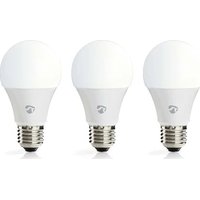
WIFILRW30E27 - Lighting NEDIS - Free user manual and instructions
Find the device manual for free WIFILRW30E27 NEDIS in PDF.



| Product type | Smart Wi-Fi bulb |
| Brand | Nedis |
| Model | WIFILRW30E27 |
| Dimensions | ∅ 60 x 108 mm |
| Weight | 52 g |
| Luminosity | 806 lm |
| Color temperature | 2700 - 6500 K (warm white to cool white) |
| Power supply | 220 - 240 V ~ 50/60 Hz |
| Power consumption | 9 W |
| Current | 43 mA |
| Wireless technology | Wi-Fi 2.4 GHz |
| Frequency range | 2412 - 2472 MHz |
| Max. radio transmission power | 16 dBm |
| Bulb base | E27 |
| Material | Plastic |
| Control app | Nedis SmartLife (iOS/Android) |
| Voice compatibility | Google Home, Amazon Alexa |
| Advanced connectivity | IFTTT |
| Intended use | Indoor and outdoor lighting (protected from water) |
| Safety instructions | Do not use if damaged, do not expose to water or moisture |
| Cleaning | Wipe with a dry, soft cloth |
| Spare parts | Not available |
| Repairability | Not repairable by user |
| General information | Made in China, compliance RED 2014/53/EU |
Frequently Asked Questions - WIFILRW30E27 NEDIS
User questions about WIFILRW30E27 NEDIS
0 question about this device. Answer the ones you know or ask your own.
Ask a new question about this device
Download the instructions for your Lighting in PDF format for free! Find your manual WIFILRW30E27 - NEDIS and take your electronic device back in hand. On this page are published all the documents necessary for the use of your device. WIFILRW30E27 by NEDIS.
USER MANUAL WIFILRW30E27 NEDIS
natural_image
Line drawing of a standard incandescent light bulb with a bulbous top and screw base (no text or symbols)
Quick start guide 4

Kurzanleitung 7

Wi-Fi Smart Bulb
WIFILRW10E27
WIFILRW30E27

For more information see the extended manual online: ned.is/wifilrw10e27 ned.is/wifilrw30e27
Intended use
The Nedis WIFILRW10E27 | WIFILRW30E27 is a bulb that allows you to wirelessly control the light.
The product is exclusively intended for lighting an indoor or outdoor environment.
The product is intended to be controlled exclusively via the Nedis SmartLife app.
Any modification of the product may have consequences for safety, warranty and proper functioning.
Specifications
| Product Wi-Fi Smart Bulb | |
| Article number WIFILRW10E27 | WIFILRW30E27 |
| Dimensions ∅ 60 x 108 mm | |
| Weight 52 g | |
| Brightness 806 lm | |
| Light colour 2700 - 6500 K | |
| Power supply 220 - 240 V ~ 50 | / 60 Hz |
| Wattage 9 W | |
| Current 43 mA | |
| Wireless technology Wi-Fi | |
| Frequency range 2412 - 2472 MHz | |
| Max. radio transmit power 16 dBm | |
| Fitting E27 | |
| Material Plastic | |
Main parts (image A)
1 Bulb
2 Electric contact
Safety instructions
WARNING
- Ensure you have fully read and understood the instructions in this document before you install or use the product. Keep the packaging and this document for future reference.
- Only use the product as described in this document.
- Do not use a damaged product.
- Do not expose the product to water or moisture.
- Do not drop the product and avoid bumping.
Installation of the Nedis SmartLife app
- Download the Nedis SmartLife app for Android or iOS on your phone via Google Play or the Apple App Store.
- Open the Nedis SmartLife app on your phone.
- Create an account with your mobile phone number or your e-mail address and tap Continue.
- Enter the received verification code.
- Create a password and tap Done.
- Tap Add Home to create a SmartLife Home.
- Set your location, choose the rooms you want to connect with and tap Done.
Installing the product (image B)
1 Control tile
2 Common functions
3 Add product
4 On / off button
-
Screw the lamp into an E27 fitting.
-
Turn on the lamp.
-
In the Nedis SmartLife app, tap + B3.
-
Under Search Device, select the lamp from the list of available devices.
-
Check if the lamp is blinking. If so, tap to confirm.
If the lamp does not blink, turn the lamp off and on 3 times and check again.
-
Enter the password of the 2,4 GHz Wi-Fi network to which your phone is connected and tap Confirm. The Nedis SmartLife app will now search for the lamp.
-
Rename the lamp after it has been found and added.
If the regular connection method fails, the lamp can be connected using AP mode:
a. Tap + B 3.
b. Select the lamp from the list of available devices.
c. Select AP Mode in the top right corner.
d. Turn the lamp off and on 3 times and check that the light starts blinking slowly.
e. Follow the steps in the application.
Using the product
The product can be controlled from any distance using the Nedis SmartLife app.
The home menu of the Nedis SmartLife app shows a control tile for each connected lamp and/or group.
The product can be connected to Google Home or Amazon Alexa to enable speech control.
The product can be connected to IFTTT to enable external conditions to trigger the lamp.
See our support webpage to discover all possibilities of this Nedis® product.
Declaration of Conformity
We, Nedis B.V. declare as manufacturer that the product WIFILRW10E27 | WIFILRW30E27 from our brand Nedis ^® , produced in China, has been tested according to all relevant CE standards and regulations and that all tests have been passed successfully. This includes, but is not limited to the RED 2014/53/EU regulation.
The complete Declaration of Conformity (and the safety datasheet if applicable) can be found and downloaded via:
nedis.com/wifilrw10e27#support
nedis.com/wifilrw30e27#support
For additional information regarding the compliance, contact the customer service:
Web: www.nedis.com
E-mail: service@nedis.com
Nedis B.V., de Tweeling 28
5215 MC 's-Hertogenbosch, the Netherlands

Kurzanleitung
WLAN-Smart- Glühbirne
WIFILRW10E27
WIFILRW30E27

5215 MC 's-Hertogenbosch, the Netherlands

ned.is/wifilrc10e27


ned.is/wifilrc20e27


Brand : NEDIS
Model : WIFILRW30E27
Category : Lighting