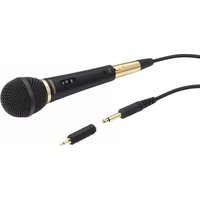
M152 - Microphone THOMSON - Free user manual and instructions
Find the device manual for free M152 THOMSON in PDF.


| Brand | Thomson |
| Model | M152 |
| Product type | Dynamic microphone |
| Weight | 391 g |
| Frequency response | 100 – 10,000 Hz |
| Sensitivity | -60 dB +/- 3 dB |
| Impedance | 600 Ω |
| Polar pattern | Omnidirectional |
| Connectivity | XLR female + 6.35mm jack (3.5mm adapter included) |
| Cable length | 3 m |
| Power supply | Not required (passive dynamic microphone) |
| Package contents | Microphone, XLR to 6.35mm jack cable (3 m), 6.35/3.5mm jack adapter, user manual |
| Maintenance and cleaning | Slightly damp non-abrasive cloth, without harsh detergent |
| Safety instructions | Protect from humidity, overheating, and shocks; keep out of reach of children; do not open or modify |
| Spare parts and repairability | Contains no user-repairable parts; contact customer service in case of problems |
Frequently Asked Questions - M152 THOMSON
User questions about M152 THOMSON
0 question about this device. Answer the ones you know or ask your own.
Ask a new question about this device
Download the instructions for your Microphone in PDF format for free! Find your manual M152 - THOMSON and take your electronic device back in hand. On this page are published all the documents necessary for the use of your device. M152 by THOMSON.
USER MANUAL M152 THOMSON
Operating Instruction
Mode d'emploi
Bedienungsanleitung


Thank you for choosing a Thomson product. Take your time and read the following instructions and information completely. Please keep these instructions in a safe place for future reference. If you sell the device, please pass these operating instructions on to the new owner.
1. Explanation of the Notes

Note
This symbol is used to indicate additional information or important notes.
2. Package Contents
• M 152 microphone
- 3 m XLR microphone cable – 6.3 mm mono jack
• 6.3 - 3.5 mm mono jack adapter
• T his operating instruction
3. Safety Notes
- The product is intended for private, non-commercial use only.
- P rotec the product from dirt, moisture and overheating and use it in dry rooms only.
- A switch all electrical devices, this device should be kept out of the reach of children.
- Don't drop the product and do not expose any major shocks.
- Do not open the device or continue to operate it becomes damaged.
- Do not modify the device in any way. Doing so voids the warranty.
4. Startup and Operation
- Ensure that the microphone is switched off.
- Insert the XLR connector into the microphone's XLR port and make sure that the socket protect clicks firmly into place (Pic. 1).
- Connect the 6.3 mm mono jack plug with your terminal device's microphone input (Pic. 2). If your terminal device has a 3.5 mm jack input for microphones, use the included 3.5 mm mono jack adapter (Pic. 3).
- Switch on the microphone (Pic. 4).

Note - A Few Tips
- A lways position your microphone so that it is a close to and as directly connected to the audio source as possible.
- Hold your microphone as still as possible to prevent interference and wind noise.
- Check the functionality and the transmitted volume (sound check) before using the microphone.
- In case of feedback (loud screeching) immediately switch off the microphone using the integrated on/off switch. Then eliminate the cause of the feedback, e.g. by reducing the volume of the speakers or the input sensitivity (gain or pad, where a plicable) of your microphone input, and/or moving somewhat behind your speaker(s) before switching the microphone back on.
5. Care and Maintenance
- Only clean this product with a slightly damp, lint-free cloth and do not use aggressive cleaning agents.
6. Warranty Disclaimer
itHama GmbH & Co KG assumes no liability and provides no warranty for damage resulting from improper installation/mounting, improper use of the product or from failure to observe the operating instructions and/or safety notes.
7. Service and Support
Please contact Hama Product Consulting if you have any questions about this product.
Hotline: +49 9091 502-115 (German/English) further support information can be found here: www.hama.com
- Technical Data
| Impedance 600 Ω | |
| Sensitivity -60 dB +/-3 dB | |
| Weight 391 g | |
| Frequency 100 -1 0.000 Hz | |
| Length of Cable 3 m | |
| Design Dynamic | |
| Connection 6,3 mm | |
| Connection XLR Socket | |
| Adapter 6,3 mm /3,5 mm | |
| Characteristic Omnidirectional |
9. Recycling Information
Note on environmental protection:

After the implementation of the European Directive 2002/96/EU and 2006/66/EU in the national legal system, the following applies: Electric and electronic devices as well as batteries must not be disposed of
with household waste. Consumers are obliged by law to return electrical and electronic devices as well as batteries at the end of their service lives to the public collecting points set up for this purpose or point of sale. Details to this are defined by the national law of the respective country. This symbol on the product, the instruction manual or the package indicates that a product is subject to these regulations. By recycling, reusing the materials or other forms of utilising old devices/Batteries, you are making an important contribution to protecting our environment.
Thomson is a trademark of Technicolor or its affiliates used under license to HAMA GmbH & Co KG
Hama GmbH & Co KG
86652 Monheim / Germany
Brand : THOMSON
Model : M152
Category : Microphone