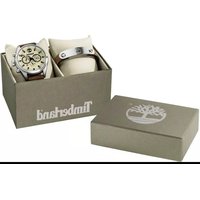
JP15 - Watch Timberland - Free user manual and instructions
Find the device manual for free JP15 Timberland in PDF.


| Product Type | Analog wristwatch |
| Brand | Timberland |
| Model | JP15 |
| Movement | Quartz |
| Display | Analog |
| Main Functions | Hour, minute, second, day of week, date, second time zone (24h) |
| Day of Week Setting | Crown in position 2, turn clockwise |
| Date Setting | Crown in position 1, turn clockwise |
| Time Setting | Crown in position 2, turn clockwise |
| Second Time Zone Setting | Buttons A (advance) and B (delay) in steps of 15 minutes |
| Dimensions | Approximately 44 mm diameter, 11 mm thickness |
| Weight | Approximately 100 g |
| Power | Button cell battery (type not specified) |
| Water Resistance | 50 m (estimate) |
| Case Material | Stainless steel |
| Strap | Leather or steel (depending on version) |
| Glass | Mineral |
| Care | Clean with a soft dry cloth; avoid water and chemicals |
| Repairability | Battery replacement by a professional; parts available (not specified) |
| Safety | Avoid violent shocks and magnetic fields |
Frequently Asked Questions - JP15 Timberland
User questions about JP15 Timberland
0 question about this device. Answer the ones you know or ask your own.
Ask a new question about this device
Download the instructions for your Watch in PDF format for free! Find your manual JP15 - Timberland and take your electronic device back in hand. On this page are published all the documents necessary for the use of your device. JP15 by Timberland.
USER MANUAL JP15 Timberland
B) SETTING THE DAY
I. Pull the crown out to the 2nd Click Position.
2. Turn the crown clockwise to set the day.
3. After the day has been set, push the crown back to the Normal position.
* The day is changed during the period from 0AM to 5AM.
C) SETTING THE DATE
I. Pull the crown out to the 1st Click Position.
2. Turn the crown clockwise to set the date.
* If the date is set between the hours of around 9:00 PM and 1:00 AM, the date may not change on the following day.
3. After the date has been set, push the crown back to the Normal position.
D) SETTING THE TIME
I. Pull the crown out to the 2nd Click Position.
2. Turn the crown clockwise to set hour and minute hands.
3. After the time has been set, push the crown back to the Normal position.
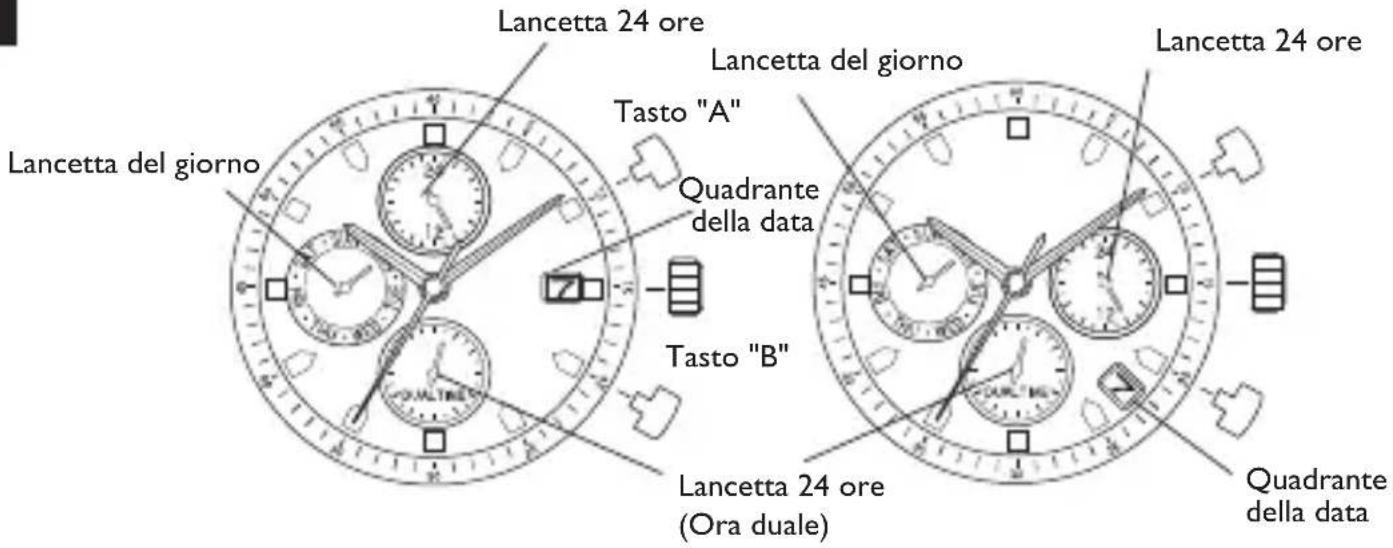
Press button "A" to set the dual time hand forward in units of 15 minutes.
Press button "B" to set the dual time hand back in units of 15 minutes.
*The dual time hand can be put rapidly by continuously pressing button "A" or "B".
A) DISPLAY E TASTI
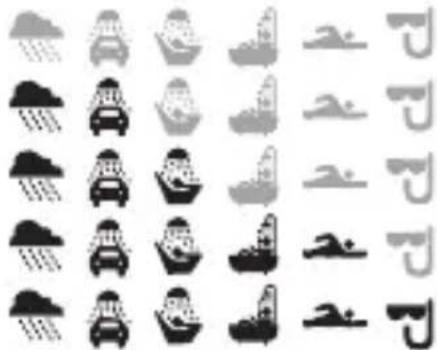
water resistance level
without any water resistant marking
3 ATM / 30m
S ATM / 50m
10 ATM / 100m
20 ATM / 200m
natural_image
Grid of grayscale icons representing various car and shoe categories (no text or symbols)• Always set the crown in the normal position / Tighten screw-lock crown completely.
- Riposizionare sempre la corona in posizione normale / Stringere completamente la corona a vite
• Die Krone nach Handhabungen immer auf die Normalposition zurückdrücken und niemals unter Wasser herausziehen. Schraubkronen: nach jeder Handhabung die Krone unbedingt wieder festschrauben.
• La couronne doit toujours être en position normale / Serrer à fond la vis de blocage de la couronne
• Coloque la corona en su posicion habitual / Apriete por completo el cierre de la corona
- Sempre ajuste a coroa na posição normal / Aperte a rosca da coroa completamente.
・リュウズは常に通常位置に設定してください。ネジ込み式リュウズは完全に開めた状態で着用してください。
·务必把表把设定在正常位置/完全扭紧螺丝锁入式表把。
• Всегда возвращайте заводную головку в исходное положение. / Затягивайте винтовой стопор до упора.
- When the watch is underwater or wet, never use the pushers/ bezels, or set the time. Watch cases and metal bracelets should be rinsed throughly in fresh water after being in salt water.
• Non utilizzare mai pulsanti/ corone né impostare l'ora quando l'orologio è sott'acqua a bagnato. Si consiglia di sciacquare con acqua di rubinetto cassa e bracciale dell'orologio nel caso in cui siano stati immersi in acqua salata - Betätigen Sie niemals die Druckknöpfe/ Einstellringe und stellen Sie niemals die Zeit ein, wenn sich die Uhr unter Wasser befindet oder naß ist. Uhrengehäuse und Metallambänder sollten, nachdem sie Salzwasser ausgesetzt waren, gründlich abgespült werden.
- Quand la montre est sous l'eau ou qu'elle est mouillée, n'actionnez jamais les boutons ou la couronne, ne réglez pas l'heure. Il est recommandé de rincer abondamment la montre à l'eau courante si les boîtiers et les bracelets métalliques ont été au contact de l'eau de mer.
- Cuando el reloj esté bajo el agua o se encuentre mojado, nunca oprima los botones ni ajuste la hora. Los relojes y brazaletes de metal deberán enjuagarse con abundante agua del grifo después de usarse en agua salada.
* Quando o relógio estiver submergido ou molhado, nunca utilize os puxadores / biséis, nem ajuste a hora. As caixas dos relógios e as correias de metal devem ser enxaguadas completamente em agua doce depois de terem estado em agua salgada. - 水中ではボタン操作、時刻合わせ、ベゼルを回転させるなどの動作は行わないでください。また時計が塩水に浸かった場合は使用後、必ず真水ですすいでください。
1-2: Pull crown stopper sideways off the crown.
3-4: Push crown inside to activate the watch


Timberland
and are trademarks of TBL Licensing LLC.
2020 © TBL Licensing LLC. All rights reserved.