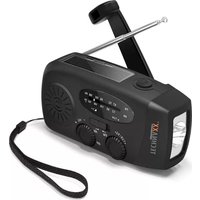
TX-238 - Radio TECHNAXX - Free user manual and instructions
Find the device manual for free TX-238 TECHNAXX in PDF.



| Product Type | AM/FM Solar Crank Radio |
| Brand | Technaxx |
| Model | TX-238 |
| Frequency Range | AM 520-1710 kHz, FM 87-108 MHz |
| Dimensions | 130 x 50 x 60 mm |
| Weight | 220 g |
| Material | ABS/PC/PVC |
| Power Supply | Li-ion battery 3.7 V / 2000 mAh (18650) |
| Maximum Power Consumption | 3 W |
| USB Output | 5 V / 900 mA |
| LED Lamp | 1 W / 30 lumens |
| Water Resistance Rating | IPX3 (splash resistant) |
| Charging Time (crank) | ~2.5 hours |
| Charging Time (solar) | ~50 hours |
| Battery Life | ~20-40 hours (depending on usage and volume) |
| Main Features | AM/FM radio, LED flashlight, USB charger, solar panel, crank handle, wrist strap, telescopic antenna |
| Package Contents | Radio, wrist strap, USB cable, user manual |
| Care and Cleaning | Wipe with a soft damp cloth; clean the lens with lens cleaner; do not immerse |
| Safety Instructions | Do not use in flammable environment, do not block ventilation, keep dry, disconnect if unused |
| Warranty | 2 years |
| Spare Parts and Repairability | Not provided; contact customer service |
| Customer Service | Tel. 01805 012643 (Germany, variable rates), email support@technaxx.de |
| Made in | China |
| Distributed by | 61137 Schöneck, Germany |
Frequently Asked Questions - TX-238 TECHNAXX
User questions about TX-238 TECHNAXX
0 question about this device. Answer the ones you know or ask your own.
Ask a new question about this device
Download the instructions for your Radio in PDF format for free! Find your manual TX-238 - TECHNAXX and take your electronic device back in hand. On this page are published all the documents necessary for the use of your device. TX-238 by TECHNAXX.
USER MANUAL TX-238 TECHNAXX
Technaxx® \* User Manual Hand Crank and Solar Radio TX-238
You can find a detailed manual under www.technaxx.de/products
Before using the appliance for the first time, please read the instructions for use and safety information carefully.
This appliance is not intended for use by persons (including children) with reduced physical, sensory or mental capacities, or by persons lacking in experience or knowledge, unless they are supervised or instructed on the use of this device by a person responsible for their safety. Children should be supervised to ensure they do not play with this device.
Keep this user manual for future reference or product sharing carefully. Do the same with the original accessories for this product. In case of warranty, please contact the dealer or the store where you bought this product.
Enjoy your product * Share your experience and opinion on one of the well-known internet portals.
Specifications are subject to change without notice - please be sure to use the latest manual available on the manufacturer's website.
Support
Service phone No. for technical support: 01805 012643* (14 cent/minute from German fixed-line and 42 cent/minute from mobile networks). Free Email: support@technaxx.de
The support hotline is available Mon-Fri from 9am to 1pm & 2pm to 5pm
Care and maintenance
- Wipe the outside of the device with a soft, damp cloth.
- Wipe with a soft, damp cloth.
- Clean the lens of the lamp with a standard lens cleaner or eyeglass cleaner.
- Do not use harsh, abrasive or solvent-based substances for cleaning.
- The radio is not completely waterproof but only according to IPX3 standard. PLEASE DO NOT submerge!
- If you have not used the radio for more than 60 days or use it for the first time or use it for the first time, please charge it with a crank or charge for 3-5 minutes in sunlight to activate the internal battery. internal battery is activated.
Warranty 2 years
Features
AM/FM radio
Super bright LED torch
USB-A output for charging mobile devices
Solar panel
Hand crank
Hand strap
Radio antenna for perfect reception
Technical specifications
| Frequency range | AM 520-1710KhzFM 87-108MHz |
| Dimensions | 130 x 50 x 60mm |
| Weight | 220g |
| Product material | ABS/PC/PVC |
| Power consumption | 3W (max) |
| Working voltage | 2.7V-4.2V |
| Output voltage/current | 5V/ 900mA |
| Water-resistand level | IPX – 3 |
| LED flashlight | 1W |
| Power source | 3.7V/ 2000mAh 18650 Li-on |
| Package Contents | Solar radio, hand strap, USB cable, manual |
| Charging: | ~2,5h by crank, ~50h by solar |
| Runtime: | ~20-40 h |
Operation
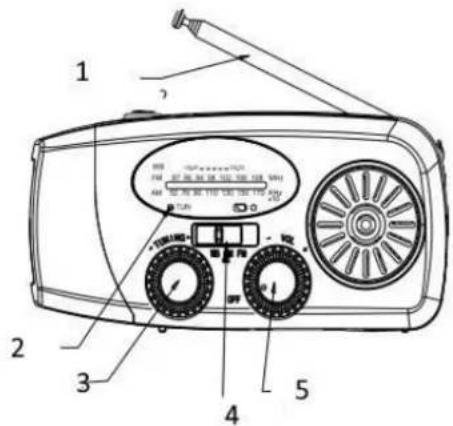
Turn the volume control clockwise to turn on the radio and adjust the volume. Select AM, FM for the different radio bands.
For better reception, please extend the radio antenna.
Turn the "Tuner" dial to tune in the station.
The green light (TUN) is on when you have good reception.
Use flashlight
Press the button on the top of the unit to turn the Flashlight on or off.
text_image
1 2 3 4 5| 1 | Antenna |
| 2 | Frequency range |
| 3 | Set Station |
| 4 | AM FM |
| 5 | On/ Off Volume |
Power generation
A. SOLAR Energy
Place the radio in medium sunlight for approximately 10-12 hours. The red "charging light" indicates when the unit is is charging.
B. Hand crank
For the following charges, turn the crank handle for approx. 1 minute (approximately 130 revolutions per minute). This will give you 15-20 minutes continuous light with all 3 LED lamps or also 15-20 minutes of radio function at medium volume.
If you charge a cell phone, this will give you approx.
3-4 minutes of talk time.
Unfold the crank
Turn the crank handle for 3-5 minutes (direction does not matter) to charge the internal battery initially or when the battery has not been has not been charged for more than 60 days.
The red light will be on while you operate the crank.
C. Charging via USB port
Insert one end of the charging cable into the Micro USB socket and the other end for example into a USB port of a computer. The red light will be on, while the NI-MH battery is charging.
Charge your mobile phone, MP3 player, etc:
This solar crank radio can charge USB devices by the Li-ion battery of the radio or by cranking at a speed of 130-150RMP/minute. Plug one end of the charging cable into the USB port and the other end
into the device to be charged.
Note:
- This feature is only for charging the USB devices during emergency. Do not use it as a normal power bank.
- The supplied charging cable is only for charging Micro USB/Iphone devices (with adaptor). Other USB devices should be charged using original charging cable.
CHARGING FUSE
The red light turns off when the radio is charged.
DISCHARGE FUSE:
When the battery overcharges or when a short circuit is detected, the USB output is automatically deactivated.
Warnings & Caution
- Use of the device in life support applications where failure of the device can reasonably be expected to cause the failure of the life support equipment or to significantly affect its safety or effectiveness is not recommended. ● Do not use the device in the presence of a flammable anesthetic mixture with air, oxygen or nitrous oxide, and also not near flammable materials, fumes or gases. ● Since the device requires adequate ventilation during operation, do not block fan or cooling vents and do not cover the device. Do not operate near car heating vents or in direct sunlight. ● Keep the device dry at all times and disconnect when not in use. ● Turn OFF connected equipment before (!) starting your engine. DO NOT plug a surge protector, line conditioner or UPS system into the device. If you attach AC extension cords, use the heaviest practical gauge. ● Before connecting a battery charger or adapter, check its manual to make sure that the technical specifications of the device fall within the recommendations of the external battery charger or adapter.
Declaration of Conformity
CE The EU Declaration of Conformity can be requested at the following address: www.technaxx.de/ (in the lower bar "Declaration of Conformity").
Disposal

Disposal of the packaging. Sort packaging materials by type upon disposal.
Dispose of cardboard and paperboard in the waste paper. Foils should be submitted for recyclables collection.
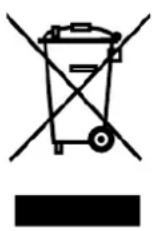
Disposing of old equipment (Applies in the European Union and other European countries with separate collection (collection of recyclable materials) Old equipment must not be disposed of with household waste! Every consumer is required by law to dispose of old devices that can no longer be used separately from household waste, e.g. at a collection point in his or her municipality or district. This ensures that the old devices are properly recycled and that negative effects on the environment are avoided. For this reason, electrical devices are marked with the symbol shown here.
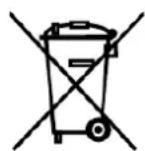
Batteries and rechargeable batteries must not be disposed of in household waste! As a consumer, you are required by law to dispose of all batteries and rechargeable batteries, whether they contain harmful substances* or not, at a collection point in your community/city or with a retailer, to ensure that the batteries can be disposed of in an environmentally friendly manner. * marked with: Cd = cadmium, Hg = mercury, Pb = lead. Return your product to your collection point with the fully discharged battery
Made in China
Distributed by:
61137 Schöneck, Germany
text_image
Diagram of a radio receiver with labeled parts including two main dials, two speakers, and a speaker tower.| 1 | Antenne |
| 2 | Frequentiebereik |
| 3 | Station instellen |
| 4 | AM FM |
| 5 | Aan/Uit Volume |