
MX350B - Blender INVENTUM - Free user manual and instructions
Find the device manual for free MX350B INVENTUM in PDF.


| Brand | Inventum |
| Model | MX350B |
| Product type | Immersion blender with chopper and whisk |
| Power supply | 220-240 V~, 50/60 Hz |
| Power | 800 W (approx.) |
| Dimensions (L x W x H) | Approx. 7 x 7 x 40 cm |
| Weight | Approx. 1.2 kg |
| Chopper bowl capacity | 500 ml (approx.) |
| Power cord length | Approx. 1.2 m |
| Main functions | Blend, chop, whisk, emulsify |
| Speeds | 2 speeds (positions I and II) |
| Immersion blender shaft | With removable stainless steel blade |
| Chopper | With sharp blade, lid, plastic bowl |
| Whisk | With attachment connector, for cream and eggs |
| Motor unit material | Plastic, cleanable with damp cloth |
| Care and cleaning | Blender shaft and chopper lid washable with hot water; whisk, bowl and chopper blade dishwasher safe; motor unit not immersible |
| Safety | Stops when button is released; very sharp blades; do not use continuously for more than 1 minute |
| Warranty | 2 years full manufacturer's warranty |
| After-sales service | Free replacement under warranty, paid repair after |
Frequently Asked Questions - MX350B INVENTUM
User questions about MX350B INVENTUM
0 question about this device. Answer the ones you know or ask your own.
Ask a new question about this device
Download the instructions for your Blender in PDF format for free! Find your manual MX350B - INVENTUM and take your electronic device back in hand. On this page are published all the documents necessary for the use of your device. MX350B by INVENTUM.
USER MANUAL MX350B INVENTUM
natural_image
Black Inventum blender with whisk and control panel (no visible text or symbols)- safety instructions page 10
- product description page 12
- before first use page 12
- use page 13
- cleaning and maintenance page 14
general terms and conditions of service and warranty page 28
Deutsch
natural_image
Line drawing of a handheld device with two circular buttons and a curved handle (no text or symbols)1
2
3
4
5
natural_image
Simple line drawing of a cup and a ring (no text or symbols)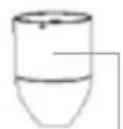
121110987
natural_image
Line drawing of a symmetrical object resembling a stylized flower or tool, with no text or symbols present.6
natural_image
Diagram showing two stages of a mechanical or anatomical assembly with arrows indicating motion (no text or symbols present)flowchart
graph TD
    A["Top bowl"] --> B["Arrow pointing inward"]
    B --> C["Arrow pointing left"]
    C --> D["Arrow pointing right"]
    D --> E["Arrow pointing right"]
    E --> F["Arrow pointing right"]
HAKMOLEN

natural_image
Diagram showing two mechanical components with arrows indicating motion, no text or symbols present8 • Nederlands
1 safety instructions
- First carefully read the instruction manual in full prior to using the appliance and store the manual in a safe place for future reference.
- Attention! Avoid contact with the blade when the appliance is switched on.
- Warning: the blades of the stick mixer foot and mincer are very sharp.
- Make sure the appliance is switched off and remove the plug from the socket prior to changing accessories or touching parts that could rotate during use.
- Only connect the appliance to alternate current, to an earthed wall socket, with a mains voltage that corresponds with the information provided on the information plate of the appliance.
- Never bend the power cord sharply or allow it to run across hot parts.
- Fully unwind the cord to prevent it from overheating.
- Never place the appliance near appliances that give off heat, such as ovens, gas cookers, hotplates, etc. Keep the appliance away from walls or other objects that may catch fire, such as curtains, towels (cotton or paper, etc.).
• Always make sure the appliance is placed on an even, flat surface and is only used indoors. - Do not leave the appliance unsupervised if the appliance is operational.
- Do not use the appliance if the plug, cord or appliance are damaged, or if the appliance no longer functions properly or if it is damaged in any other way. If this is the case, consult the retailer or our maintenance service.
- If the cord of the appliance is damaged, it should be replaced by the manufacturer, his customer service or a similarly qualified person in order to prevent hazardous situations.
- Do not pull the cord and/or appliance to remove the plug from the wall socket. Never touch the appliance with wet or damp hands. Keep the appliance out of reach of children.
Children do not see the dangers associated with handling electrical appliances. Therefore, never allow children to operate electrical appliances without supervision. Keep the appliance and cord out of reach of children younger than 8 years of age.
- The appliance can be used by children of 8 years and older and persons with a limited physical, sensory or mental capacity or lack of experience or knowledge, provided they use the appliance under supervision or have been instructed about its safe use and understand the hazards involved.
• Children must not play with the appliance. - The appliance may not be cleaned or maintained by children, unless this is done under supervision.
- If the appliance is not being used or is being cleaned, switch off the appliance and remove the plug from the socket.
- In case of a breakdown, never make repairs yourself; a tripped safety device in the appliance could indicate a defect that cannot be remedied by removing or replacing this safety device. Only original parts should be used.
- Never submerge the appliance, cord or plug in water.
- This appliance is intended for household and similar use, such as:
-in staff kitchens, shops, offices and other work environments.
-by guests of hotels, motels and other residential environments.
-in Bed&Breakfast type environments
-farms
- If the appliance is not used as intended, no compensation can be claimed in case of defects or accidents and the warranty will be invalidated.
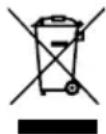
If you decide not to use the appliance any more due to a defect, we recommend cutting off the cord after removing the plug from the wall socket. Take the appliance to the waste processing department concerned of your municipality.
2 product description
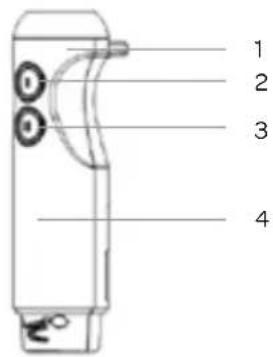
- Cord
- On/Off button - position I
- On/Off button - position II
- Motor unit
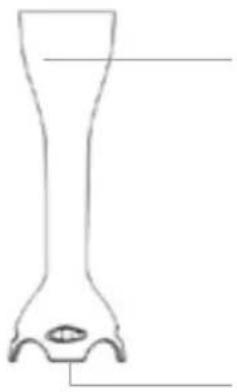
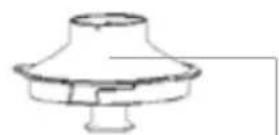
- Stick mixer foot
- Blade
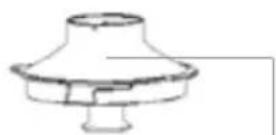
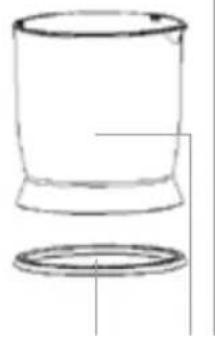
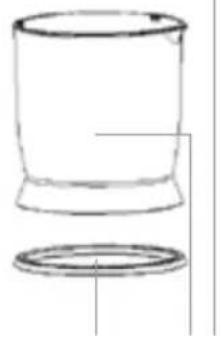
- Non slip ring
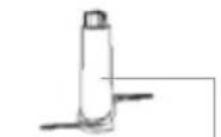
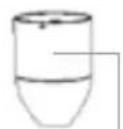
- Mincer
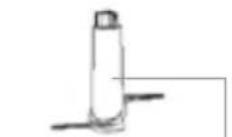
- Blade - mincer
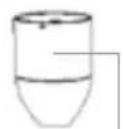
- Cover - mincer
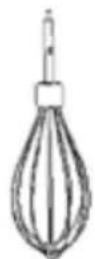
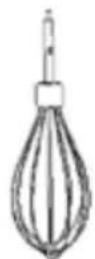
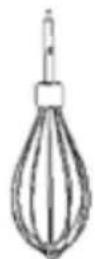
- Whisk
- Coupling piece
1
2
3
4
5
natural_image
Simple line drawing of a cup and a ring (no text or symbols)6
121110987
3 before first use
Follow these instructions when using the stick mixer for the first time: Carefully remove the stick mixer and accessories from the packaging and remove all packaging material.
Warning: the blades of the stick mixer foot and mincer are very sharp.
Keep the packaging (plastic bags and cardboard) out of reach of children. After unpacking the appliance, carefully check it for external damage that may have occurred during transport.
Clean all accessories with warm water and a mild cleaning agent. Then dry these accessories thoroughly.
- stick mixer foot
- whisk
- mincer
- mincer cover
- blade
The outside of the motor unit and the coupling piece can be wiped with a lightly damp cloth.
Do not use aggressive cleaning agents. These could affect the material.
Always fully unwind the cord. Ensure that all of the components are properly dry before you start using the appliance.
4
use
STICK MIXER

Attention: the blade of the stick mixer foot is very sharp.
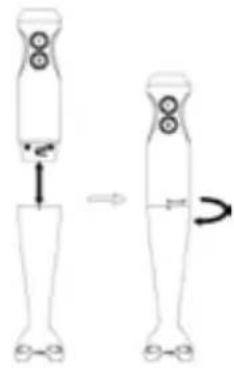
• Take the motor unit and stick mixer foot. Attach the stick mixer foot to the motor unit by turning it clockwise.
• To remove it, you must turn the stick mixer foot in the opposite direction.
- Insert the plug in the socket.
- Insert the stick mixer foot in the food to be mashed.
- Press the on/off button for position I or II.
- When you let go of the button, the stick mixer will stop.
- When you are ready mixing or mashing and have let go of the button, wait for the blade to stop rotating before touching the stick mixer foot.
natural_image
Diagram showing two stages of a human leg with foot and legs, connected by arrows indicating movement (no text or symbols)Caution: do not switch on the stick mixer constantly, this could cause problems with the motor.
Preferably use the stick mixer one minute each time and then allow the stick mixer to cool down for one or two minutes. If you want to mash large volumes, you should do this in several turns.
Switch on the appliance for a maximum of 15 seconds per time when it is not being used to mix or mash food.
Always remove the plug from the socket when you leave the appliance unsupervised and before you assemble, disassemble or clean the appliance.
The stick mixer can be used directly in a pan or bowl. Remove the pan from the hotplate to prevent the stick mixer from overheating.
WHISK
The whisk is intended for whipping cream or egg whites.
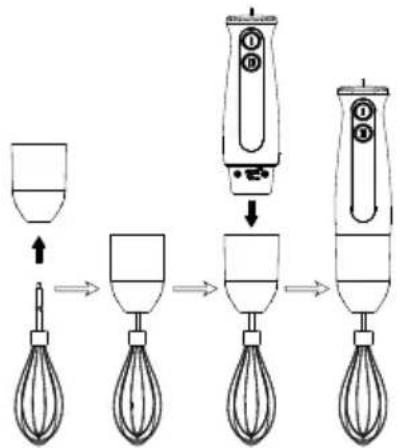
• Take the motor unit, coupling piece and whisk.
- Insert the whisk in the coupling piece.
- Attach the whisk to the motor unit by turning it clockwise.
- Insert the plug in the socket.
- Pour the ingredients to be whipped in a measuring cup.
Make sure there is not too much filling in the measuring cup.
- Place the whisk inside the measuring cup.
- Press the on/off button for position I or II.
- When you let go of the button, the whisk will stop.
Always remove the plug from the socket when you leave the appliance unsupervised and before you assemble, disassemble or clean the appliance.
To remove the whisk after use, turn the coupling piece counter-clockwise to remove it from the motor unit and pull the whisk out of the coupling piece.
flowchart
graph LR
    A["Input Hand Mixer"] --> B["Processing Step"]
    B --> C["Output Hand Mixer"]
    C --> D["Final Output"]
MINCER

Attention: the blade of the mincer is very sharp. Be careful when assembling, emptying the bowl and cleaning.
The mincer is suitable for mincing or grinding meat, cheese, onions, herbs, garlic, carrots, nuts, etc.
Attention: do not grind hard ingredients such as ice cubes.
- Place the ingredients in the mincer.
- Place the cover on the mincer and turn it clockwise until it snaps tight.
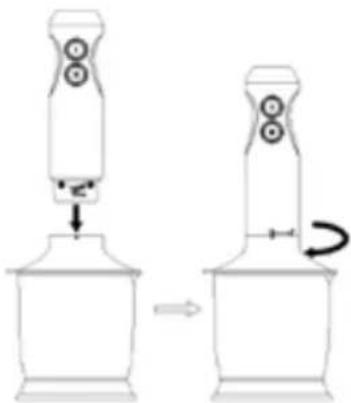
• Take the motor unit and turn it clockwise to attach it to the mincer's cover. - Insert the plug in the socket.
- Press the on/off button for position I or II.
- While mincing, hold the motor unit with one hand and the mincer with the other hand. Caution: do not switch on the mincer constantly, this could cause problems with the motor.
- Preferably use the mincer one minute each time and then allow the motor unit to cool down for one or two minutes.
- When you let go of the button, the mincer will stop. Wait until the blade stops rotating, before you unscrew the cover with motor unit from the mincer.
Always remove the plug from the socket when you leave the appliance unsupervised and before you assemble, disassemble or clean the appliance.
In order to remove the motor unit after use, unscrew it counter-clockwise from the cover.
natural_image
Diagram showing a device being processed from a base to a top, with no visible text or symbols.5 cleaning and maintenance
Always remove the plug from the socket when you leave the appliance unsupervised and before you assemble, disassemble or clean the appliance.
Unscrew the motor unit from the accessory that has been used.
- The outside of the motor unit and the coupling piece can be wiped with a lightly damp cloth.
- Clean the stick mixer foot and the mincer's cover under the tap, using warm flowing water. If necessary, use a mild washing-up liquid.
- The stick mixer foot should not be cleaned in the dishwasher.
Warning: be careful when washing up the stick mixer foot and the mincer's blade. The blades are extremely sharp.
- Do not use aggressive cleaning agents. These could affect the materials.
- Never submerge the motor unit in water or other liquids.
• These accessories may be cleaned in the dishwasher:
- whisk (without coupling piece)
- mincer
- mincer blade
natural_image
Diagram showing two stages of a human leg with foot and legs, illustrating movement or change (no text or symbols)natural_image
Diagram showing a mechanical device with a base and two connected components, no text or symbols present.natural_image
Simple line drawing of a cup and a ring (no text or symbols)6
121110987
natural_image
Diagram showing two mechanical or anatomical setups with arrows indicating motion, no text or symbols present.flowchart
graph TD
    A["Top Left: Top of Top"] --> B["Step 1: Insert an arrow"]
    B --> C["Step 2: Insert a bowl with liquid"]
    C --> D["Step 3: Insert a cup with liquid"]
    D --> E["Step 4: Insert a brush with liquid"]
    E --> F["Step 5: Insert a hand mixer with liquid"]
HACHOIR

natural_image
Diagram showing two mechanical devices with rotating heads and a curved arrow indicating motion (no text or symbols)general terms and conditions of service and warranty
We do not need to remind you of the importance of service. After all, we develop our products to a standard so that you can enjoy them for many years, without any concerns. If, nevertheless, there is a problem, we believe you are entitled to a solution straight away. Hence our products come with an exchange service, on top of the rights and claims you are entitled to by law. By exchanging a product or part, we save you time, effort and costs.
2-year full manufacturer's warranty
- Customers enjoy a 2-year full manufacturer's warranty on all Inventum products. Within this period, a faulty product or part will always be exchanged for a new model, free of charge. In order to claim under the 2-year full manufacturer's warranty, you can either return the product to the shop you bought it from or contact the Inventum costumer service department via the form at www.inventum.eu/service-aanvraag.
- The 2-year warranty period starts from the date the product is bought.
- In order to claim under the warranty, you must produce a copy of the original receipt.
- The warranty applies only to normal domestic use of Inventum products within the Netherlands.
Breakdowns or faults outside the warranty period
- Breakdowns or faults in small or large domestic appliances outside the warranty period, can be reported to the costumer services department via the form at www.inventum.eu/service-aanvraag or by calling the costumer services department.
- The costumer services department may ask you to send the product for inspection or repair. The costs of dispatch will be at your expense.
- The inspection to establish whether repair is possible involves a charge. You need to grant your permission for this, in advance.
- In the event of a large domestic appliance, Inventum, at your request, can send out a service engineer. In that case, you will be charged the call-out costs, as well as parts and labour.
- In the event of an instruction to repair, the repair costs must be paid in advance. In the event of a repair by a service engineer, the costs of the repair must be settled with the engineer onsite, preferably by means of PIN payment.
Warranty exclusions
- The following is excluded from the aforesaid warranties:
• normal wear and tear;
- improper use or misuse;
• insufficient maintenance;
- failure to comply with the operating and maintenance instructions;
- unprofessional installation or repairs by third parties or the customer himself;
• non-original parts used by the customer;
- use for commercial or business purposes;
- removal of the serial number and/or rating label.
-
In addition, the warranty does not apply to normal consumer goods, such as:
-
dough hooks, baking tins, (carbon) filters, etc.;
- batteries, bulbs, carbon filters, fat filters etc.;
• external connection cables; -
glass accessories and glass parts such as oven doors;
• and similar items. -
Transport damage not caused by Inventum is also excluded. Therefore, inspect your new device before starting to use it. If you detect any damage, you must report this to the store where you purchased the product within 5 working days, or to the Inventum customer service department via the form at www.inventum.eu/service-aanvraag. If transport damage is not reported within this period, Inventum does not accept any liability in this respect.
-
The following are excluded from warranty and/or replacement: faults, loss of and damage to the device as a result of an event that is normally insured under the home contents insurance.
Important to know
- The replacement or repair of a faulty product, or a part thereof, does not lead to an extension of the original warranty period.
- If a complaint is unfounded, all costs arising from it will be at the customer's expense.
- Following expiry of the warranty period, all costs of repair or replacement, including administration costs, dispatch and call-out charges, will be charged to the customer.
- Inventum cannot be held liable for damage caused by external events, unless this liability arises from mandatory statutory provisions.
- These warranty and service provisions are governed by Dutch law. Disputes will be settled exclusively by the competent Dutch court.
instagram.com/inventum1908

facebook.com/inventum1908

youtube.com/inventum1908

- Deutsch
- HAKMOLEN
- • Nederlands
- safety instructions
- product description
- before first use
- 4
- use
- STICK MIXER
- Attention: the blade of the stick mixer foot is very sharp.
- WHISK
- MINCER
- Attention: the blade of the mincer is very sharp. Be careful when assembling, emptying the bowl and cleaning.
- cleaning and maintenance
- HACHOIR
- general terms and conditions of service and warranty
- 2-year full manufacturer's warranty
- Breakdowns or faults outside the warranty period
- Warranty exclusions
- Important to know
Brand : INVENTUM
Model : MX350B
Category : Blender