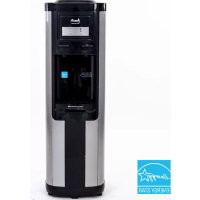
WDC760I3S - Water dispenser Avanti - Free user manual and instructions
Find the device manual for free WDC760I3S Avanti in PDF.


| Product Type | Water Dispenser |
| Brand | Avanti |
| Model | WDC760I3S |
| Power Supply | 115/120 V, 60 Hz, 3-prong grounded plug |
| Main Functions | Hot water (85–95 °C) and cold water (5–10 °C) |
| Bottle Capacity | 5 gallons (approx. 19 L) |
| Hot Water Temperature | 185–203 °F (85–95 °C) |
| Cold Water Temperature | 41–50 °F (5–10 °C) |
| Indicator Lights | Red (hot) and blue (cold) lights – turn off when temperature reached |
| Child Safety | Red safety button on hot water faucet (slide to unlock) |
| Dimensions (approx.) | Height: approx. 40 cm, width: 35 cm, depth: 38 cm |
| Weight (approx.) | Approx. 10 kg (empty) |
| Materials | Plastic, stainless steel (inner tank) |
| Maintenance and Cleaning | Clean with water and baking soda solution (2 tablespoons per liter). Clean rear coils with vacuum. |
| Drainage | Rear drain plug with sealing gasket (2 spare gaskets included) |
| Spare Parts | Extra cabinet plugs (4), drain plug gaskets (2) – available via Avanti |
| Repairability | 1-year warranty (parts and labor), compressor warranty 2 to 5 years. Repair by authorized center. |
| Installation | Let it stand upright for 2 hours before plugging in. Leave 5 inches (12.7 cm) of space at the rear for air circulation. |
| Precautions | Do not use outdoors, do not expose to frost, do not use extension cord or adapter. |
Frequently Asked Questions - WDC760I3S Avanti
User questions about WDC760I3S Avanti
0 question about this device. Answer the ones you know or ask your own.
Ask a new question about this device
Download the instructions for your Water dispenser in PDF format for free! Find your manual WDC760I3S - Avanti and take your electronic device back in hand. On this page are published all the documents necessary for the use of your device. WDC760I3S by Avanti.
USER MANUAL WDC760I3S Avanti
CAUTION:
BEFORE USE, PLEASE READ AND FOLLOW ALL SAFETY RULES AND OPERATING INSTRUCTIONS.
Avanti has a policy of continuous improvement on its products and reserves the right to change materials and specifications without notice.
| Help Us Help you | 4 |
| Parts and Features | 5 |
| Important Safety Instructions | 6 |
| Electrical Connection | 6 |
| Installation Guidelines | 6 |
| Operation Instructions | 7 |
| Before Using Your Water Dispenser | 7 |
| Operating Your Water Dispenser | 8 |
| Replacing the Water Bottle | 8 |
| Hot / Cold Water Indicator Lights | 8 |
| Child Safety Guard (Hot Water Faucet) | 8 |
| Cup Dispenser (Optional) | 9 |
| Care and Maintenance | 9 |
| Taking the dispenser out of service | 9 |
| Problems with Your Water Dispenser | 10 |
| Troubleshooting Guide | 10 |
| Service for Your Water Dispenser | 10 |
| Your Avanti Products Warranty | 11 |
| Instrucciones en Español | 12 – 13 |
| Instructions en Français | 14 - 22 |
| Registration Information and Registration Card | Last Page |
HELP US HELP YOU...
Read this guide carefully.
It is intended to help you operate and maintain your new water dispenser properly.
Keep it handy to answer your questions. If you don't understand something or you need more help, please call:
Avanti Customer Service 800-220-5570
Keep proof of original purchase date (such as your sales slip) with this guide to establish the warranty period.
Write down the model and serial numbers.
You'll find them on a label located on the back side of the unit.
Please write these numbers here:
Date of Purchase
Model Number
Serial Number
Use these numbers in any correspondence or service calls concerning your water dispenser.
If you received a damaged water dispenser, immediately contact the dealer (or builder) that sold you the water dispenser.
Save time and money. Before you call for service, check the Problem Solver Guide. It lists causes of minor operating problems that you can correct yourself.
IF YOU NEED SERVICE
We're proud of our service and want you to be pleased. If for some reason you are not happy with the service you receive, here are some steps to follow for further help.
FIRST, contact the people who serviced your appliance. Explain why you are not pleased. In most cases, this will solve the problem.
NEXT, if you are still not pleased, write all the details, including your telephone number, and send to:
Customer Service
Avanti Products
10880 NW 30 Street
Miami, FL 33172
PARTS AND FEATURES
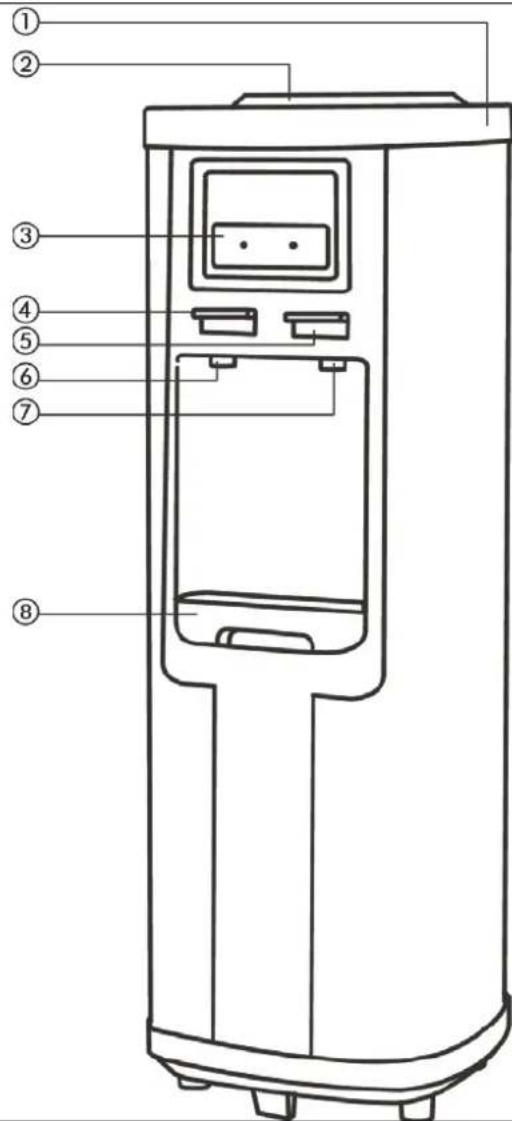
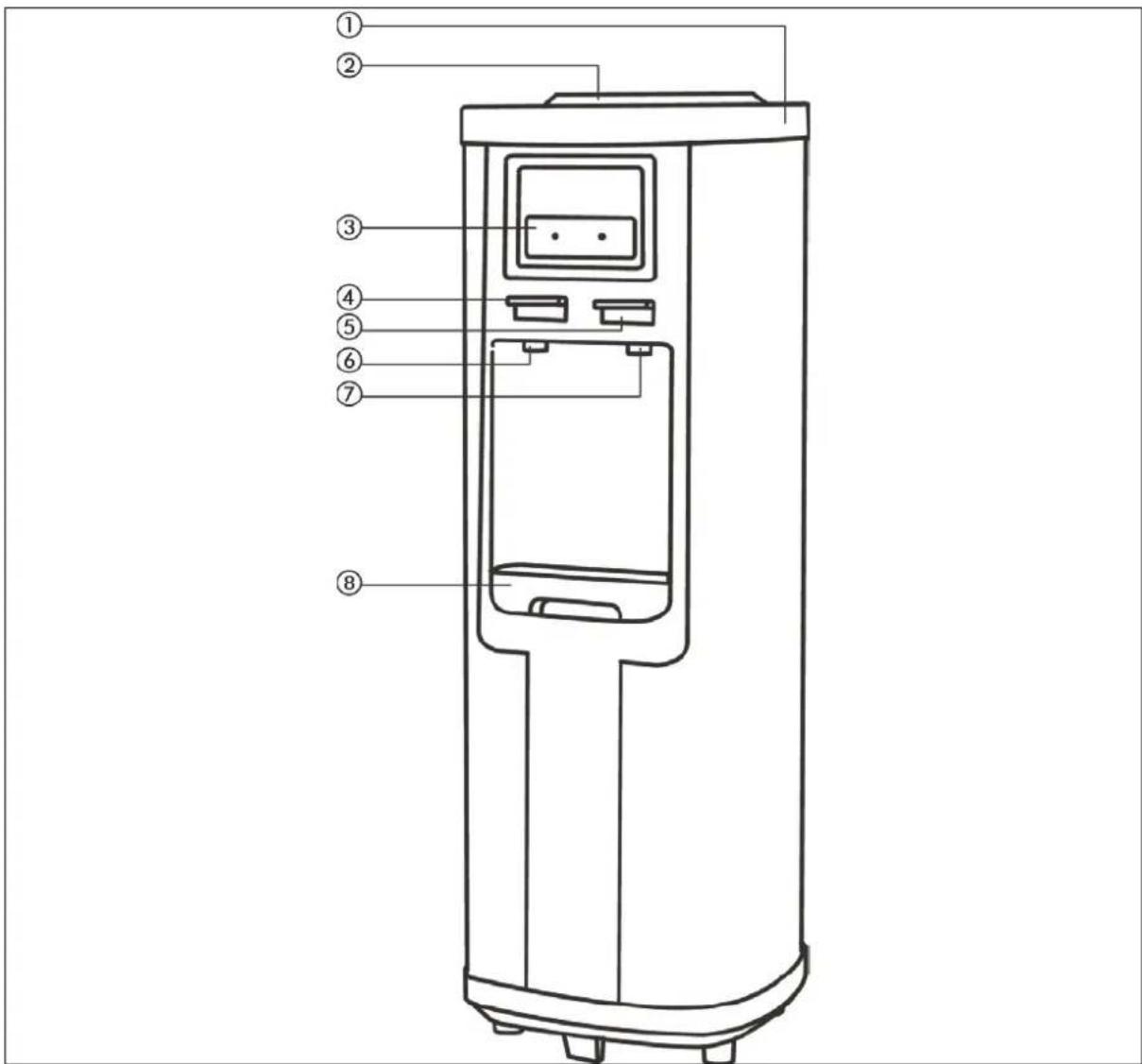
| 1 | Power ON/OFF swtiches at rear |
| 2 | Water Bottle Inlet |
| 3 | Indicator Lights |
| 4 | Hot Water Button |
| 5 | Cold Water Button |
| 6 | Hot Water Faucet |
| 7 | Cold Water Faucet |
| 8 | Water Drip Tray |
Important Safety Instructions
| WARNING | To reduce the risk of burns, fire, electrical shock, or injury when using your appliance, follow these basic precautions: |
| Read all instructions before using the water dispenser.Never clean parts with flammable fluids. The fumes can create a fire hazard or explosion.Do not store or use gasoline or any other flammable vapors and liquids in the vicinity of this or any other water dispenser. The fumes can create a fire hazard or explosionDo not plug unit into receptacle until you ensure the water tank switches are off.-Save these instructions- | |
Electrical Connection
This appliance should be properly grounded for your safety. The power cord of this appliance is equipped with a three-prong plug which mates with standard three prong wall outlets to minimize the possibility of electrical shock.
Plug the appliance into an exclusive properly installed-grounded wall outlet. Do not under any circumstances cut or remove the third (ground) prong from the power cord. Any questions concerning power and or grounding should be directed toward a certified electrician or an authorized Avanti Products service center.
This appliance requires a standard 115/120-volt 60Hz electrical outlet with three-prong ground.
The cord should be secured behind the appliance and not left exposed or dangling to prevent accidental injury.
Do not use an adapter plug with this appliance.
Do not use an extension cord with this appliance. If the power cord is too short, have a qualified electrician or service technician install an outlet near the appliance.
INSTALLATION GUIDELINES:
- Remove the exterior and interior packing.
- Place your appliance on a floor that is strong enough to support the dispenser when it is fully loaded. If it does not sit level on the floor, adjust the front right foot to level the unit well to the floor. Note: Both of the front feet are adjustable.
- Locate the appliance away from direct sunlight and sources of heat (stove, heater, radiator, etc.). Direct sunlight may affect the acrylic coating and heat sources may increase electrical consumption. Extreme cold ambient temperatures may also cause the appliance not to perform properly.
- Allow 5 inches of space between the water dispenser and the wall, which allows for proper air circulation to cool the compressor.
- Plug the appliance into an exclusive properly installed-grounded wall outlet. Do not cut or remove the third (ground) prong from the power cord under any circumstances. Any questions concerning power and/or grounding should be directed toward a certified electrician or an authorized Avanti Products service center.
- This water dispenser is not recommended for outdoor use.
- Do not locate the dispenser in area where the temperature may fall below freezing (32° F).
- Keep area around dispenser free of dust and dirt.
- Keep the reserve supply of water bottles away from excessive heat and light.
- Never unplug the water cooler, except for maintenance or transport.
OPERATION INSTRUCTIONS
Before Using Your Water Dispenser
- Check to be sure the following parts are included:
■ Instruction manual
■ 4 extra cup dispenser cabinet plugs
■ 2 extra drain plug seals
- Before connecting the appliance to the power source, let it stand upright for approximately 2 hours. This will reduce the possibility of a malfunction in the cooling system from handling during transportation.
- The water dispenser is pre-cleaned at the factory but the reservoir and water lines must be flushed with fresh water before use as follows:
- Keep the unit unplugged.
- Fill water tank with tap water full to capacity (more than 3/4 of a gallon). Wait for 5 minutes until water settles.
- Press the hot water faucet until water comes out, then stop.
- Plug the dispenser into the electrical outlet. Both heating and cooling indicator lights on front will light up at first. We are ready to complete the first cycle. In order to do that, wait for the hot water indicator light to go off first (approximately 10 minutes), then wait for the cold water indicator light to go off (another 40 minutes, approximately).
- Unplug the dispenser from the electrical outlet. Proceed to drain the water from the faucets one at a time until no more water remains.
(Note: To facilitate this operation, use a large container). - Then, drain any water left in the tanks by opening the drain plug located on the back, until it drains completely.
• Proceed to close the drain cap.
Be sure the drain plug seal is in place. If not, replace with one of the spares included with this manual.
Closing the drain cap without the seal in place will result in leakage and possible damage to the water dispenser and or its surroundings. - Place the 5-gallon bottle of water on the water intake, allow water to stand for approximately one minute.
- Open water faucets to insure water flows from both faucets.
- Check the area around the drain valve at the rear of the unit for leakage.
- Plug dispenser into the electrical outlet.
• Now you are ready to use your water dispenser.
NOTE: Your water dispenser has been cleaned and sanitized before leaving the factory, but in case a taste problem develops, place two tablespoons of baking soda and add tap water. Fill water tank again and repeat basic operations previously outlined, except turn the switch marked HOT "OFF" to avoid leaving residues in hot water tank.
ATTENTION:
If you do not plan to use the water heating function for more than three days, we recommend that you turn the HOT switch to the "OFF" position.
WARNING
IMPROPER USE OF THE GROUNDED PLUG CAN RESULT IN THE RISK OF ELECTRICAL SHOCK. IF THE POWER CORD IS DAMAGED, HAVE IT REPLACED BY AN AUTHORIZED AVANTI PRODUCTS SERVICE CENTER.
Steps to replace water bottles
• Use a clean cloth to wipe off neck of bottle.
- Remove cap.
- Carefully lift bottle (approx. 40 lbs.) using your legs and not your back. Do not place hands on opening of bottle while placing in reservoir.
- Insert the water bottle on the water intake over reservoir opening so it settles properly on it.
- Wipe off any water which may have splashed on dispenser top.
- When a new bottle is installed you must open the hot water faucet and remove no less than 4 full cups of water to insure the water flows properly and the water reservoir is at the proper level.
Hot and Cold Power ON/OFF Indicator Lights
Once the power switches for the HOT and COLD water systems (located on the rear of the unit) have been turn ON, these lights will illuminate to advise the user that the systems are activated and operating.
Hot Water Indicator Light
Turn the heating switch on, the red indicator will glow and the heating process starts. When the water reaches the right temperature (185° - 203°F / 85° - 95°C) the red light goes off automatically. When the temperature goes below 176°F (80°C), the red indicator will glow again and another heating process starts.
➢ Cold Water Indicator Light
Turn the cooling switch on. The blue indicator will glow and the cooling process will begin. When the water reaches the right temperature (41° - 50°F / 5° - 10°C) the blue indicator light will turn off automatically. Once the water temperature reaches above 50°F (10°C) the blue indicator light will glow again indicating another cooling process has started.
NOTE: THE HOT WATER FAUCET HAS A CHILD-SAFETY GUARD ATTACHMENT.
To dispense hot water:
◆ Slide red safety button to the right and hold while pressing downward on hot water faucet to dispense hot water.
◆ Safety button will return to its original position when faucet is released.
◆ Ensure all water has dispensed prior to removing glass from the dispensing area.
To dispense cold water:
◆ Press and hold downward on the cold water faucet to dispense cold water.
- When you have dispensed the desired amount of water, simply release the cold water faucet.
◆ Ensure all water has dispensed prior to removing glass from the dispensing area.
CARE AND MAINTENANCE
- Wash the inside of the reservoir with a warm water and baking soda solution. The solution should be about 2 tablespoons of baking soda to a quart of water.
• The drip tray and water faucets should be cleaned with mild detergent and warm water. - At regular intervals or once a month inspect the coils located across the back of the dispenser. Vacuum accumulation of dust or clean it with a soft bristled brush.
TAKING DISPENSER OUT OF SERVICE
- If the water dispenser will not be used for a long period of time, unplug the power cord from the wall outlet.
- Drain the water through the faucets.
- Turn the switch market hot to the "OFF" position.
- Drain the water from the tank by removing the plug from the back of the dispenser.
WARNING—THE WATER COMING OUT OF THE BACK SIDE MARKED "HOT" MAY BE SCOLDING.
- Unit should not be transported on the sides. Place it upright if possible and cover it with a blanket.
PROBLEMS WITH YOUR WATER DISPENSER
You can solve many common water dispenser problems easily, saving you the cost of a possible service call. Try the suggestions outlined below to see if you can solve the problem before calling the service.
TROUBLESHOOTING GUIDE
| PROBLEM | POSSIBLE CAUSE |
| Water dispenser does not operate. | Not plugged in.The circuit breaker tripped or a blown fuse. |
| Water cooler is not cold enough. | Check to be sure the cold switch on the back is ON.The water dispenser does not have the correct clearances. |
| Water dispenser hot water is not hot enough. | Check to be sure the hot switch on the back is ON. |
| Compressor turns on and off frequently. | The room temperature is hotter than normal.The temperature control is not set correctly.The water dispenser does not have the correct clearances. |
| Vibrations. | Check to assure that the water dispenser is level. |
| The water dispenser seems to make too much noise. | The rattling noise may come from the flow of the refrigerant, which is normal.As each cycle ends, you may hear gurgling sounds caused by the flow of refrigerant in your water dispenser.Contraction and expansion of the inside walls may cause popping and crackling noises.The water dispenser is not level. |
| Bottle feels warm. | The water system is overfilled. Dispense Cold water until air is released into the bottle. |
| Water bottle is hot. | Water is boiling in the hot tank and bubbling up into the bottle. Press the hot dispenser button until water flows to remove air from the hot tank. |
SERVICE FOR YOUR WATER DISPENSER
We are proud of our customer service organization and the network of professional service technicians that provide service on your Avanti appliances. With the purchase of your Avanti appliance, you can have the confidence that if you ever need additional information or assistance, the Avanti Products Customer Service team will be here for you. Just call us toll-free.
AVANTI PRODUCTS CUSTOMER SERVICES
| Product Information800-323-5029 | Whatever your questions are about our products, help is available. |
| Part Orders800-220-5570 | You may order parts and accessories that will be delivered directly to your home.You may order these items by personal check, money order, Master Card, or Visa. |
| In-Home Repair Service800-220-5570 | An Avanti Products authorized service center will provide expert repair service, scheduled at a time that is convenient for you. Our trained servicers know your appliance inside and out. |
| YOUR AVANTI PRODUCTSWARRANTY | Staple your sales receipt here. Proof of original purchase date is needed to obtain service under warranty. |
| WHAT IS COVERED - LIMITED ONE-YEAR WARRANTYAvanti Products warrants that the product is free from defects in materials and/or workmanship for a period of twelve (12) months from the date of purchase by the original owner. The foregoing timeline begins to run upon the date of purchase, and shall not be stalled, tolled, extended, or suspended for any reason whatsoever unless described in detail in the warranty document. For one year from the date of purchase by the original owner, Avanti products will, at its option, repair or replace any part of the product which proves to be defective in material or workmanship under normal use. Avanti Products will provide you with a reasonably similar product that is either new or factory refurbished. During this period Avanti Products will provide all parts and labor necessary to correct such defects free of charge, so long as the product has been installed and operated in accordance with the written instructions in this manual. In rental or commercial use, the warranty period is 90 days. All Avanti appliances of 3.5 cubic feet capacity or less must be brought/sent to the appliance service center for repair. | |
| LIMITED SECOND THROUGH FIFTH YEAR WARRANTYFor the second through the fifth year from the date of original purchase, Avanti Products will provide a replacement compressor free of charge due to a failure. You are responsible for the service labor and freight charges. In rental or commercial use, the limited compressor warranty is one year and nine months. Costs involved to move the product to the service center and back to the user's home, as maybe required, are the user's responsibility. | |
| WARRANTY EXCLUSIONS / WHAT IS NOT COVERED:The warranty coverage described herein excludes all defects or damage that are not the direct fault of Avanti Products, including without limitation, one or more of the following: | |
| A failure to comply with any applicable state, local, city, or county electrical, plumbing and/or building codes, regulations, or laws, including failure to install the product in strict conformity with local fire and building codes and regulations.Any external, elemental and/or environmental forces and factors, including without limitation, rain, wind, sand, floods, fires, mud slides, freezing temperatures, excessive moisture or extended exposure to humidity, lightning, power surges, structural failures surrounding the appliance, and acts of God. | |
| Content losses of food or other content due to spoilage.Incidental or consequential damagesParts and labor costs for the following will not be considered as warranty:Shipping and handling costs associated with the replacement of the unit.Repairs performed by unauthorized servicers.Service calls that are related to external problems, such as abuse, misuse, inadequate electrical power, accidents, fire, floods, or any other acts of God. | Failure of the product if it is used for other than it intended purpose.Surcharges including but not limited to, any after hour, weekend, or holiday service calls, tolls, ferry trip charges, or mileage expense for service calls to remote areas.The warranty does not apply outside the Continental USA. |
| In no event shall Avanti Products have any liability or responsibility whatsoever for damage to surrounding property, including cabinetry, floors, ceilings, and other structures and/or objects around the product. Also excluded from this warranty are scratches, nicks, minor dents, and other cosmetic damages on external surfaces and exposed parts; Products on which the serial numbers have been altered, defaced or removed; service visits for customer education, or visits where there is nothing wrong with the product; correction of installation problems (you are solely responsible for any structure and setting for the product, including all electrical, plumbing and/or other connecting facilities, for proper foundation/flooring, and for any alterations including without limitation cabinetry, walls, floors, shelving etc., as well as the resetting of breakers or fuses. | |
| OUT OF WARRANTY PRODUCTAvanti Products is under no obligation, at law or otherwise, to provide you with any concessions, including repairs, pro-rates, or product replacement, once this warranty has expired.WARRANTY - WATER DISPENSER - COMPRESSOR | |
POSIBLES PROBLEMAS CAUSA
| DERRAME DE AGUA POR FUERA DEL ENFRIADOR | LA BOTELLA ESTA PERFORADA – REEMPLACELA |
| EL AGUA NO ESTA SUFICIENTEMENTE FRIA. | SU TEMPERATURA DEBERIA SER DE 5° A 7° C CON UNA TEMPERATURA AMBIENTE DE 20° C. SI NO ES ASI, LLAME AL CENTRO DE SERVICIO, EL TERMOSTATO PODRIA ESTAR DEFECTUOSO. |
| EL AGUA NO ESTA SUFICIENTE CALIENTE | SU TEMPERATURA DEBERIA SER DE 80° A 90° C CON UNA TEMPERATURA AMBIENTE DE 20° C. SI NO ES ASI, LLAME AL CENTRO DE SERVICIO, EL TERMOSTATO PODRIA ESTAR DEFECTUOSO. |
| EL ENFRIADOR NO ENFRIA O CALIENTA EL AGUA | VERIFIQUE LOS CIRCUITOS, FUSIBLES O DISYUNTORES. |
AIDEZ NOUS À VOUS AIDER ...
AVANTI PRODUCTS SERVICES CLIENTS
Thank you for purchasing this fine Avanti product. Please fill out this form and return it to the following address within 100 days from the date of purchase and receive these important benefits:
AVANTI PRODUCTS LLC
P.O.Box 520604 – Miami, Florida 33152
Protect your product:
We will keep the model number and date of purchase of your new Avanti product on file to help you refer to this information in the event of an insurance claim such as fire or theft.
➢ Promote better products:
We value your input. Your responses will help us develop products designed to best meet your future needs.
(detach here)-
Avanti Registration Card
| Name | Model # | Serial # | ||
| Address | Date Purchased | Store / Dealer Name | ||
| City | State | Zip | E-mail Address | |
| Area Code | Phone Number | Occupation | ||
| Did You Purchase An Additional Warranty | As your Primary Residence, Do You: | |||
| ☐ Extended☐ None | ☐ Own ☐ Rent | |||
| Reason for Choosing This Avanti Product: Please indicate the most important factors That influenced your decision to purchase this product: | Your Age: | |||
| ☐ under 18 ☐ 18-25 ☐ 26-30☐ 31-35 ☐ 36-50 ☐ over 50Marital Status:☐ Married ☐ Single | ||||
| ☐ Price☐ Product Features☐ Avanti Reputation☐ Product Quality☐ Salesperson Recommendation☐ Other: ____☐ Friend / Relative Recommendation☐ Warranty☐ Other: ____ | Is This Product Used In The:☐ Home ☐ Business | |||
| How Did You Learn About This Product:☐ Advertising☐ In-Store Demo☐ Personal Demo | ||||
Comments:
WDC760I3S - 05182016
PRINTED IN CHINA


- HELP US HELP YOU
- READ THIS GUIDE CAREFULLY
- AVANTI CUSTOMER SERVICE 800-220-5570
- WRITE DOWN THE MODEL AND SERIAL NUMBERS
- IF YOU NEED SERVICE
- IMPORTANT SAFETY INSTRUCTIONS
- ELECTRICAL CONNECTION
- INSTALLATION GUIDELINES
- OPERATION INSTRUCTIONS
- BEFORE USING YOUR WATER DISPENSER
- ATTENTION
- WARNING
- STEPS TO REPLACE WATER BOTTLES
- HOT AND COLD POWER ON/OFF INDICATOR LIGHTS
- HOT WATER INDICATOR LIGHT
- ➢ COLD WATER INDICATOR LIGHT
- NOTE: THE HOT WATER FAUCET HAS A CHILD-SAFETY GUARD ATTACHMENT
- CARE AND MAINTENANCE
- TAKING DISPENSER OUT OF SERVICE
- PROBLEMS WITH YOUR WATER DISPENSER
- SERVICE FOR YOUR WATER DISPENSER
- AIDEZ NOUS À VOUS AIDER
- AVANTI PRODUCTS LLC
- P.O.BOX 520604 – MIAMI, FLORIDA 33152
- PROTECT YOUR PRODUCT
- ➢ PROMOTE BETTER PRODUCTS
- AVANTI REGISTRATION CARD
Brand : Avanti
Model : WDC760I3S
Category : Water dispenser