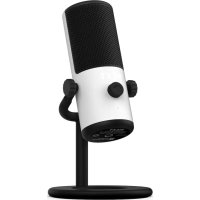
Capsule Mini - Microphone NZXT - Free user manual and instructions
Find the device manual for free Capsule Mini NZXT in PDF.


| Product Type | USB Microphone |
| Brand | NZXT |
| Model | Capsule Mini |
| Recommended Use | Gaming, streaming, single audio source |
| Connection | USB-C to USB-A |
| Power | Via PC USB port |
| Headphone Output | 3.5mm Jack |
| Controls | Headphone volume wheel, mute button with LED |
| LED Indicator | White (microphone on), Red (microphone off) |
| Background Noise Cancellation | Yes, integrated |
| Boom Arm Compatibility | Yes, with included 1/4" to 3/8" threaded adapter |
| Box Contents | Capsule Mini microphone, USB-C to USB-A cable, built-in stand, threaded adapter |
| Installation | Plug-and-play, automatic setup |
| Maintenance | Clean with a soft, dry cloth |
| Compliance | CE, RoHS, European directives |
| Customer Service | service@nzxt.com, support.nzxt.com |
| Warranty | See NZXT website |
Frequently Asked Questions - Capsule Mini NZXT
User questions about Capsule Mini NZXT
0 question about this device. Answer the ones you know or ask your own.
Ask a new question about this device
Download the instructions for your Microphone in PDF format for free! Find your manual Capsule Mini - NZXT and take your electronic device back in hand. On this page are published all the documents necessary for the use of your device. Capsule Mini by NZXT.
USER MANUAL Capsule Mini NZXT
natural_image
Line drawing of a vintage black-and-white studio microwave device labeled 'NZXT' with no additional text or symbolsCAPSULE MINI
SMALL GAMING MICROPHONE WITH UNIDIRECTIONAL CARDIOID POLAR PATTERN
TABLE OF CONTENTS
VERSION 1.0, 2022/12/01
INTRODUCTION 01
ABOUT THE NZXT CAPSULE MINI 03
PACKAGE CONTENTS & DESCRIPTION 05
SETTING UP CAPSULE MINI 12
MAIN CONTROLS 22
APPENDIX 27
INTRODUCTION
INTRODUCCIÓN
INTRODUCTION
EINLEITUNG
INTRODUZIONE
INTRODUÇÃO
소개
はじめに
简介
簡介
natural_image
Line drawing of a vintage black-and-white studio microwave device (no text or symbols on body)Introduction
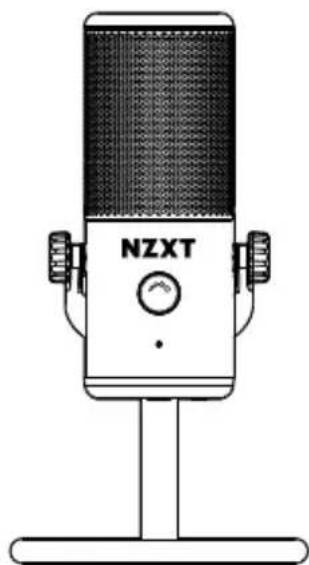
Congratulations on your purchase of the NZXT Capsule Mini USB Microphone! Whether you are a professional streamer, a casual player, or a hardcore gamer; we'd like to welcome you to the NZXT family of high-end gaming peripherals.
Introducción
ABOUT THE NZXT CAPSULE MINI
INFORMACIÓN SOBRE EL CAPSULE MINI DE NZXT À PROPOS DU CAPSULE MINI NZXT ÜBER DAS NZXT CAPSULE MINI INFORMAZIONI SU CAPSULE MINI DI NZXT SOBRE O CAPSULE MINI DA NZXT
Create crystal clear audio with minimal background noise with the Capsule Mini. Designed for single sound-source gaming and streaming use, Capsule Mini delivers high-resolution voice pickup while suppressing unwanted background noise, so the only fans you hear are the ones watching your stream.
ABOUT THE NZXT CAPSULE MINI
INFORMACIÓN SOBRE EL CAPSULE MINI DE NZXT À PROPOS DU CAPSULE MINI NZXT ÜBER DAS NZXT CAPSULE MINI INFORMAZIONI SU CAPSULE MINI DI NZXT SOBRE O CAPSULE MINI DA NZXT
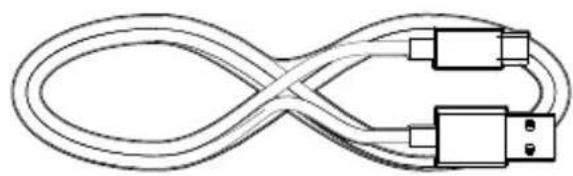
B USB-C to USB-A Cable x1
natural_image
Pure diagram of a twisted cable with two connectors, no text or symbols presentC Integrated Stand x1
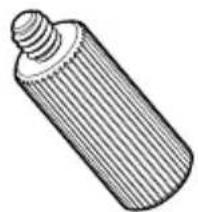
D Mic Thread Adapter x1
natural_image
Illustration of a cylindrical object with a threaded tip, resembling a mechanical component or tool (no text or symbols)
- Headset Volume
- USB-C Connection
- Adapter Connection
4.3.5mm Headphone Output
- Volumen de los auriculares
- Conexión USB-C
- Conexión del soporte del micrófono
-
Salida de auriculares de 3,5 mm
-
Volume du casque
- Connexion USB-C
- Connexion support du micro
-
Sortie casque 3,5 mm
-
Headset-Lautstärke
- USB-C-Anschluss
-
Mikrofon-Ständer-Anschluss
4.3,5-mm-Kopfhörerausgang -
Volume delle cuffie
- Presa USB-C
- Presa supporto del microfono
- Uscita cuffie da 3,5 mm
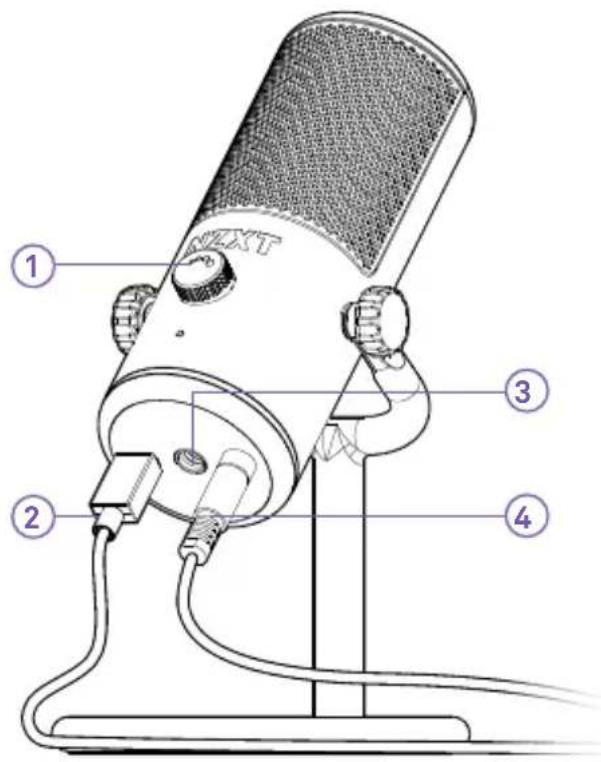
NZXT CAPSULE MINI USB MICROPHONE
MICRÓFONO CAPSULE MINI USB DE NZXT
MICROPHONE USB CAPSULE MINI NZXT
NZXT CAPSULE MINI USB-MIKROFON
MCIRFONO USB CAPSULE MINI DI NZXT
MICROFONE USB NZXT CAPSULE MINI
NZXT 캡슐 미니 USB 마이크
USB-C TO USB-A CABLE
CABLE DE USB-C A USB-A
C BLE USB-C VERS USB-A
USB-C-AUF-USB-A-KABEL
CAVO USB-A - USB-C
CABO USB-C PARA USB-A
USB-C to USB-A 케이블
USB-C - USB-Aケーブル
USB-C 转 USB-A 数据线
USB-C 轉 USB-A 數據線

flowchart
graph LR
    Server["Server"] --> USB["USB Cable"]
    USB --> Cable1["Switch"]
    Cable1 --> Cable2["USB Cable"]
    Cable2 --> Phone["Phone"]
A. USB-A
B.USB-C
A. USB-A
B. USB-C
A. USB-A
B. USB-C
A. USB-A
B. USB-C
A. USB-A
B.USB-C
A. USB-A
B. USB-C
A. USB-A
B. USB-C
A. USB-A
B. USB-C
A. USB-A
B. USB-C
A. USB-A
B. USB-C

MIC THREAD ADAPTER
ADAPTADOR DE ROSCA DEL MICRÓFONO ADAPTATEUR FILETÉ POUR MICRO MIKROFON-GEWINDEADAPTER ADATTATORE FILETTATO MICROFONO ADAPTADOR DE ROSCA DO MICROFONE
natural_image
Line drawing of a cylindrical object with a threaded cap (no text or symbols)For use with male 3/8" threaded microphone boom arm or microphone stands including NZXT Boom Arm
natural_image
Line drawing of a desktop microphone with stand and buttons (no text or symbols)Insert into bottom of Capsule Mini to use with Boom Arm
STEP 1
CONNECTING CAPSULE MINI TO YOUR PC
Capsule Mini comes with a USB-C cable that connects from the microphone directly to the USB input on your PC.
-
Insert the USB-C cable into the USB-C port of the microphone.
-
Insert the opposite end of the cable into your PC.
Plugging the cable into the PC will provide power to the unit. The unit will turn on and automatically begin installing Capsule Mini
Important : Keep the USB cable fully inserted and seated into the connector on the back of the Microphone for proper operation. An incorrectly seated cable may cause feedback or other interference.

SETTING UP CAPSULE MINI
INSTALACIÓN DEL CAPSULE MINI CONFIGURATION DU CAPSULE MINI EINRICHTEN DES CAPSULE MINI CONFIGURAZIONE DI CAPSULE MINI CONFIGURAR O CAPSULE MINI
CONTROL AND APPLICUM
CAPSULE MINIの注意
注意出货的差异
我正在向智翼安克
PC: 11111
田■■PCJUSB□■日和HLSF□■10001
natural_image
Line drawing of a desktop audio workstation with headphones and a studio microphone (no text or symbols)STEP 2
CONNECT THE HEADSET
You'll find a 3.5mm headphone output jack at the bottom of the microphone. Insert your 3.5mm headset into this jack.
Important: For proper performance of the Capsule, make sure that the cable is fully seated in the 3.5mm headset jack.

SETTING UP CAPSULE MINI
INSTALACIÓN DEL CAPSULE MINI CONFIGURATION DU CAPSULE MINI EINRICHTEN DES CAPSULE MINI CONFIGURAZIONE DI CAPSULE MINI CONFIGURAR O CAPSULE MINI
STEP 3
CHANGE THE AUDIO SETTING
- Open your sound preferences or right click the audio icon located at the bottom of the task bar.
- Click on the "Playback devices" selection.
- Select "Speakers" or (Output). Underneath the speaker icon should read "NZXT MINI USB MIC"
- Select "Default Device"
- Click on the "Recording" (or Input) tab.
- Click on "Default Communication Device" • Select "NZXT MINI USB MIC"

SETTING UP CAPSULE MINI
INSTALACIÓN DEL CAPSULE MINI CONFIGURATION DU CAPSULE MINI EINRICHTEN DES CAPSULE MINI CONFIGURAZIONE DI CAPSULE MINI CONFIGURAR O CAPSULE MINI
natural_image
Diagram of a robotic arm with a device labeled 'NEXN' and a purple arrow indicating motion (no text or symbols on the diagram itself)STEP 4
CONNECTING NZXT CAPSULE TO NZXT BOOM ARM
Boom Arm is threaded for male 3/8" connections.
If using NZXT Capsule USB Microphone, insert included male 1 / 4" to female 3/8" adapter into bottom of microphone, then attach the microphone with adapter onto Boom Arm's male 3/8" connection.

SETTING UP CAPSULE MINI
INSTALACIÓN DEL CAPSULE MINI CONFIGURATION DU CAPSULE MINI EINRICHTEN DES CAPSULE MINI CONFIGURAZIONE DI CAPSULE MINI CONFIGURAR O CAPSULE MINI
Boom Arm is threaded for male 3/8" connections.
If using NZXT Capsule USB Microphone, insert included male 1 / 4" to female 3/8" adapter into bottom of microphone, then attach the microphone with adapter onto Boom Arm's male 3/8" connection.
CONECTAR O CAPSULE NZXT À HASTE NZXT
natural_image
Line drawing of a vintage NZXT microphone on a stand (no text or symbols)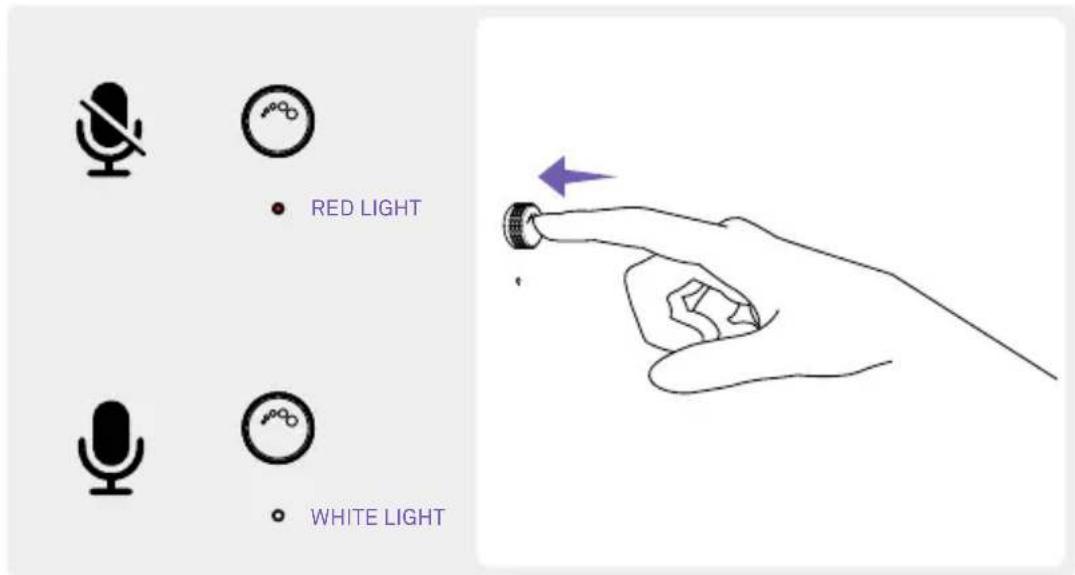
LED
Capsule Mini contains an LED to show various states of the device's features.
When lit in white = microphone is unmuted and record-enabled. The device will now pickup your voice and will playback the sounds from your PC. The brightness of Capsule Mini's LED will increase or decrease in intensity with headphone volume adjustments.
When lit in red = microphone is muted. The device will not pickup your voice, but you will still be able to hear the sounds coming from your PC.
LED
natural_image
Line drawing of a vintage black-and-white studio microwave with 'NZXT' branding and control knob (no text or symbols on device body)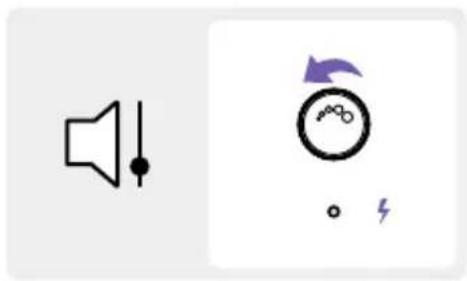
natural_image
Two icons: a speaker symbol and a circular dial with an arrow, both without any text or labels.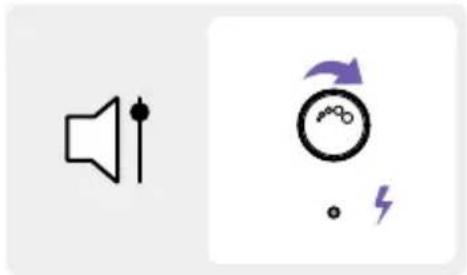
natural_image
Two icons: a speaker with sound waves and a circular gauge with an arrow and lightning bolt (no text or symbols)
HEADSET VOLUME
The headphone output controls the volume of the headphones connected to the USB microphone. Turn clockwise to increase the volume and counterclockwise to decrease.
The brightness of Capsule Mini's LED will increase or decrease in intensity with headphone volume adjustments.
To mute the Microphone input, press the microphone gain knob. The LED will change from white to red. To unmute, press the microphone gain knob again and the LED will change from red to white.
MAIN CONTROLS
CONTROLES PRINCIPALES COMMANDES PRINCIPALES HAUPTBEDIENELEMENTE COMANDI PRINCIPALI CONTROLOS PRINCIPAIS
BASIC TROUBLESHOOTING
RESOLUCIÓN DE PROBLEMAS BÁSICOS DÉPANNAGE DE BASE EINFACHE FEHLERBEHEBUNG RISOLUZIONE DEI PROBLEMI DI BASE RESOLUÇÃO DE PROBLEMAS BÁSICOS
If the USB cable is fully plugged into the USB jack on both the Microphone and PC.
IF YOUR NZXT CAPSULE MINI HAS NO SOUND, CHECK...
If headset audio cable is firmly pushed into the 3.5mm audio connection.
If the sound output selector is switched to the appropriate device you would like to listen to.
BASIC TROUBLESHOOTING
RESOLUCIÓN DE PROBLEMAS BÁSICOS DÉPANNAGE DE BASE EINFACHE FEHLERBEHEBUNG RISOLUZIONE DEI PROBLEMI DI BASE RESOLUÇÃO DE PROBLEMAS BÁSICOS
This device complies with Part 15 of the FCC Rules. Operation is subject to the following two conditions: (1) This device may not cause harmful interference, and (2) this device must accept any interference received, including interference that may cause undesired operation.
CAN ICES-003(B) / NMB-003(B)
REGULATORY STATEMENT

To protect the global environment and as an environmentalist, NZXT must remind you that:
Under the European Union ("EU") Directive on Waste Electrical and Electronic Equipment,
Directive 2002/96/EC, which takes effect on August 13, 2005, products of "electrical and electronic equipment" cannot be discarded as municipal waste anymore and manufacturers of covered electronic equipment will be obligated to take back such products at the end of their useful life. NZXT will comply with the product take back requirements at the end of life of NZXT-branded products that are sold into the EU. You can return these products to local collection points.
EU REACH SVHC Disclosure on Candidate List
REACH (Registration, Evaluation, Authorization and Restriction of Chemicals, EC 1907/2006) is the European Union's (EU) chemical substances regulatory framework. REACH requires NZXT Inc. to provide customers with sufficient information on Substances of Very High Concern (SVHC) contained in products in concentration above 0.1% weight by weight (w/w) to allow safe use of the product.
RoHS Statement
This product is compliant to implemented RoHS (Restriction of Hazardous Substances) type regulations worldwide, including but not limited to Japan, Korea and European Union.
CE Statement
The device complies with the requirements set out in the Council Directives relevant Union harmonization legislation:
• EMC Directive 2014/30/EU
• LVD Directive 2014/35/EU
• RoHS Directive 2011/65/EU & (EU) 2015/863
DÉCLARATION DE CONFORMITÉ
KONFORMITETSDEKLARATION
KONFORMITETSDEKLARATION
The object of the declaration described above is in conformity with the relevant UK harmonisation legislation:
• Electromagnetic Compatibility Regulations 2016
• Electrical Equipment (Safety) Regulations 2016
• The Restriction of the Use of Certain Hazardous Substances in Electrical and Electronic Equipment Regulations 2012

NZXT GLOBAL WARRANTY POLICY
This NZXT Global Warranty Policy governs the sale of products by NZXT to you.

I. WARRANTY LENGTH
New NZXT Product Warranty Length
Audio 2 Years
Any replacement product will be covered under warranty for the remainder of the warranty period or thirty days, whichever is longer. Proof of purchase is required for warranty service.
II. WHO IS PROTECTED
The Warranty covers only NZXT products purchased by the original consumer.
III. WHAT IS AND IS NOT COVERED
Please note that our warranty is not an unconditional guarantee. If the product, in NZXT's reasonable opinion, malfunctions within the warranty period, NZXT will provide you at its sole discretion with a repaired or replacement product, either new or refurbished, with a similar function that is equal or greater in value depending on supply. Our warranty does not cover the following:
- any product or serial number/warranty sticker modification applied without permission from NZXT;
- any damage that is not a manufacturing defect;
- damage, deterioration or malfunction resulting from: accident, abuse, misuse, neglect, fire, water, lightning, or other acts of nature, unauthorized product modification or failure to follow instructions included with the product;
- improper installation, unauthorized alterations or modifications, or repair or attempted repair by anyone not authorized by NZXT;
- shipping or transport damage (claims must be made with the carrier);
- normal wear and tear.
NZXT does not warrant that this product will meet your requirements. It is your responsibility to determine the suitability of this product for your purpose. For NZXT Store orders, we cover two way return shipping for all exchanges and returns. For all other authorized dealers, NZXT Support does not cover return shipping and only covers one way shipping from NZXT back to the end user for exchanges. Two way expedited shipping is provided for all PSUs covered under the Less Than Three program, indiscriminate of purchase location, provided the location is an approved NZXT reseller.
IV. EXCLUSION OF DAMAGES (DISCLAIMER)
NZXT's sole obligation and liability under this warranty is limited to the repair or replacement of a defective product with either a new or refurbished product with a similar function that is equal or greater in value at our option. NZXT shall not, in any event, be liable for any incidental or consequential damage, including but not limited to damages resulting from interruption of service and loss of data, business, or for liability in tort relating to this product or resulting from its use or possession.
V. LIMITATIONS OF IMPLIED WARRANTIES
There are no other warranties, expressed or implied, including but not limited to those of merchantability or fitness for a particular purpose. The duration of implied warranties is limited to the warranty length specified in Paragraph I.
VI. TO OBTAIN TECHNICAL SUPPORT
If you have already referenced your product owner's manual and still need help, you may contact us by phone at +1 (800) 228-9395, by email at service@nzxt.com, or visit the NZXT Support site at nzxt.com/customer-support.
VII. HOW TO OBTAIN A WARRANTY SERVICE FROM NZXT
To receive a warranty service for your product when purchased directly from N2XT, you must submit a request to the N2XT Support side outlining the problem. If a custom can examine the product collection or repairing loading, you will be required to provide a copy of your proof of purchase, which will enable you to submit a Return Meronandise Authorization "RM4" request.
Once approved, you will receive an BMA number, upon which you will be asked to ship the defective item back to NZXT with the RNA number clearly marked or labelled on the package NZXT recommends that appropriate measures are taken to safeguard the product from damage during shipping.
VIII. APPLICABLE LAW AND ADDITIONAL LEGAL RIGHTS FOR CONSUMERS
This warranty places you specific legal rights. These conditions are governed and continue in accordance with the laws of California which exception of its limitation or violation, and the explanation of the United States Convention of Commerce for the International Sales House. In addition to regulatory changes, the non-conservative jurisdiction of the courts of California is a serious, which means that you may bring a claim to enforce your consumer protection rights in connection with this litigation. Realty in the country/which you have your retained, no residence where you may have additional rights. These rights may vary. For general consumers who are covered by consumer protection laws or regulations in their country, state, or province of purchase or, if different, their country, state, or province of remissure, the benefits conferred by this warranty are in addition. In all rights and services contained by such consumer protection laws or regulations. To the extent that liability under such consumer laws can be limited, NZD's liability is limited, and to sole option, to replace or rereplace, either not or discontinued, with a similar framework that is equal or greater in value depending on supply.
In the United Kingdom:
- For NZKT products sold to customers in the UK, during the expected lifespan of your product, your legal rights entitle you to the following:
Up to six months, if your goods can't be repaired or replaced, then you are entitled to a full refund in most cases.
3) In to six words: if your words do not just a reasonable length of time you may be sbiting to some more hard.
- If the person seeking to rely on the guarantee is not the original consumer the NZ&T Warranty will over the product in relation to that person provided the terms, and the company of the company of the benefit of the products being used.
The implied warranties under the Consumer Rights Act 2015 says that our goods must be as described fit for all purposes for which such goods are
- The price from customers is on the consumer, high as far as to say that your goods is sold or purchased in any purpose of which being sold are usually supplied, and at satisfactory quality.
In the EU:
- If you are a consumer and must your habitual residence in the EU, you additionally enjoy the provisions offered to you by provisions that cannot be delegated from by agreement by virtue of the law where you have your habitual residence.
IX. WARRANTY SERVICE FROM RESELLERS
In the event that a warranty service is sought, you must provide proof of purchase (store receipt or involved in order to receive the service and if deemed necessary, repair or replacement product.
In North America:
within the first 60 days after purchase, please return your product (or for power supplies installed within our enclosure, just the latent power supply) to your dealer or dealer for a replacement. If the product is still within warranty and you can no longer return it to your display, please contact NZKT Customer Support (see above) for assistance and instructors. NZKT will not accept returns without prior approval and an ¥144 number.
In Europe:
within the first year after purchase, please return your product for power supplies installed within our enclosure, just the billed power supply to your dealer or dealer for an replacement. If the product is still within warranty and you cannot longer return it to your dealer, please contact HZXT Customer Support (see above) for assistance and instructions. HZXT will not accept returns without prior approval.
In Australasia:

Within the first two years after purchase, please return your product (or for power supplies installed within our enclosures, just the failed power supply) to your dealer or reseller for a replacement. If the product is still within warranty and you can no longer return it to your dealer, please contact NZXT Customer Support (see above) for assistance and instructions. NZXT will not accept returns without prior approval.
The cost of shipping will be borne at the first instance by you; however, if the purchased item is defective, NZXT will reimburse reasonable postage or transportation of costs.
Outside North America, Europe, and Australasia:
If your product needs to be returned within the warranty period, please contact the retailer or distributor from whom you purchased the product.
X. NZXT.COM STORE RETURNS/EXCHANGE POLICY
Eligible products under this NZXT Warranty qualify for a full refund or exchange only with an authorized RMA number and if the item is returned to the NZXT.com store inventory within 30 days of purchase. Returns are not allowed beyond 30 days of the purchase date. The NZXT.com Store reserves the right to deny any return or exchange. Refunds will be credited to the original method of payment. To initiate a return, simply submit a request via NZXT support site.
Visit nzxt.com/warranty and support.nzxt.com for information on warranty coverage and service.
Visite el sitio Web nzxt.com/warranty y support.nzxt.com para obtener información sobre la cobertura y el servicio de la garantía.
Visitez nzxt.com/warranty et support.nzxt.com pour les informations de la couverture de la garantie et du service.
Informationen zu Geltungsbereich und Service der Garantie finden Sie unter support.nzxt.com und nzxt.com/warranty.
Visitare il sito nzxt.com/warranty e support.nzxt.com per informazioni sulla copertura e sul servizio della garanzia.
Visite nzxt.com/warranty e support.nzxt.com para obter informações sobre a cobertura da garantia e assistência.
제품 보증 범위와 서비스 정보를 확인하시려면 nzxt.com/warranty 또는 support.nzxt.com을 방문해 주시기 바랍니다.
保証範囲およびサービスに関する情報については、support.nzxt.comとnzxt.com/warrantyにアクセスしてください。
请造访 nzxt.com/warranty 和 support.nzxt.com 了解保修范围和服务的信息。
請訪問 nzxt.com/warranty 和 support.nzxt.com 了解產品保固範圍和更多服務訊息。
NZXT, Inc. | 15736 E. Valley Blvd, City of Industry, CA 91744, USA
NZXT UK Ltd. | First Floor 5 Fleet Place London EC4M 7RD, GB United Kingdom
+1 (800) 228-9395 / service@nzxt.com / nzxt.com
SUPPORT AND SERVICE

SUPPORT AND SERVICE
If you have any questions or problems with the NZXT product you purchased, please don't hesitate to contact us using our support system. service@nzxt.com support.nzxt.com
Please include a detailed explanation of your problem and your proof of purchase. For comments and suggestions, you can e-mail our design team, designer@nzxt.com.
Lastly we would like to thank you for your support by purchasing this product. For more information about NZXT, please visit us online. NZXT Website: NZXT.com
SOPORTE Y SERVICIO
NZXT, Inc. | 15736 E. Valley Blvd, City of Industry, CA 91744, USA
NZXT UK Ltd. | First Floor 5 Fleet Place London EC4M 7RD, GB United Kingdom
+1 (800) 228-9395 / service@nzxt.com / nzxt.com
- CAPSULE MINI
- TABLE OF CONTENTS
- INTRODUCTION
- Introducción
- ABOUT THE NZXT CAPSULE MINI
- NZXT CAPSULE MINI USB MICROPHONE
- USB-C TO USB-A CABLE
- MIC THREAD ADAPTER
- STEP 1
- CONNECTING CAPSULE MINI TO YOUR PC
- SETTING UP CAPSULE MINI
- STEP 2
- CONNECT THE HEADSET
- STEP 3
- CHANGE THE AUDIO SETTING
- STEP 4
- CONNECTING NZXT CAPSULE TO NZXT BOOM ARM
- CONECTAR O CAPSULE NZXT À HASTE NZXT
- LED
- HEADSET VOLUME
- MAIN CONTROLS
- BASIC TROUBLESHOOTING
- REGULATORY STATEMENT
- RoHS Statement
- CE Statement
- DÉCLARATION DE CONFORMITÉ
- KONFORMITETSDEKLARATION
- NZXT GLOBAL WARRANTY POLICY
- WARRANTY LENGTH
- New NZXT Product Warranty Length
- WHO IS PROTECTED
- WHAT IS AND IS NOT COVERED
- EXCLUSION OF DAMAGES (DISCLAIMER)
- LIMITATIONS OF IMPLIED WARRANTIES
- TO OBTAIN TECHNICAL SUPPORT
- HOW TO OBTAIN A WARRANTY SERVICE FROM NZXT
- APPLICABLE LAW AND ADDITIONAL LEGAL RIGHTS FOR CONSUMERS
- In the United Kingdom:
- In the EU:
- WARRANTY SERVICE FROM RESELLERS
- In North America:
- In Europe:
- In Australasia:
- Outside North America, Europe, and Australasia:
- NZXT.COM STORE RETURNS/EXCHANGE POLICY
- SUPPORT AND SERVICE
- SOPORTE Y SERVICIO
Brand : NZXT
Model : Capsule Mini
Category : Microphone