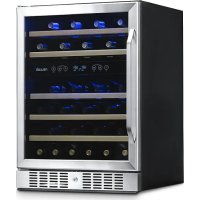
AWR460DB - Wine cellar NewAir - Free user manual and instructions
Find the device manual for free AWR460DB NewAir in PDF.


| Product Type | Wine Cellar |
| Brand | NewAir |
| Model | AWR460DB |
| Storage Capacity | 46 bottles |
| Cooling Type | Built-in Compressor |
| Temperature Zone | Dual Zone |
| Temperature Range (Upper Zone) | 5°C – 10°C (40 °F – 50 °F) |
| Temperature Range (Lower Zone) | 10°C – 18°C (50 °F – 66 °F) |
| Dimensions (W x D x H) | 60.2 x 57.4 x 85.3 cm (23.7 x 22.6 x 33.6 in) |
| Net Weight | 47.4 kg (104.5 lb) |
| Supply Voltage | 110~120 V |
| Frequency | 60 Hz |
| Current | 1.2 A |
| Power Consumption | 140 W |
| Interior Volume | 5.3 cu ft (150 L) |
| Number of Shelves | 5 |
| Interior Lighting | LED (separate switch) |
| Door Reversal | Possible (help needed) |
| Door Material | Glass |
| Manufacturer Warranty | 1 year (parts and labor) |
| Model Number | AWR-460DB |
Frequently Asked Questions - AWR460DB NewAir
User questions about AWR460DB NewAir
0 question about this device. Answer the ones you know or ask your own.
Ask a new question about this device
Download the instructions for your Wine cellar in PDF format for free! Find your manual AWR460DB - NewAir and take your electronic device back in hand. On this page are published all the documents necessary for the use of your device. AWR460DB by NewAir.
USER MANUAL AWR460DB NewAir
24” Built-in 46 Bottle Dual Zone Wine Fridge
natural_image
Exterior view of a modern stainless steel double-chamber refrigerator with blue-lit water bottles on the front panel (no visible text or symbols)OWNER'S MANUAL
A Name You Can Trust
Trust should be earned and we will earn yours. Customer happiness is the focus of our business.
From the factory to the warehouse, from the sales floor to your home, the whole NewAir family promises to provide you with innovative products, exceptional service, and support when you need it the most.
Count on NewAir.
As a proud NewAir owner, welcome to our family. There are no robots here, real people shipped your product and real people are here to help you.
Contact Us:
For questions regarding your product, please contact us at:
Call: 1-855-963-9247
Email: support@newair.com
Online: www.newair.com
Connect with Us:

Facebook.com/newairusa

Instagram.com/newairusa

YouTube.com/newairusa

Twitter.com/newairusa
READ AND SAVE THESE INSTRUCTIONS.
TABLE OF CONTENTS
Specifications 4
Register Your Product Online.... 5
Safety Information & Warnings 6
Parts List....7
Parts Diagram....7
Assembly & Installation 8
Handle Assembly....8
Installation 8
Reversing The Door Swing 9
Operating Instructions....10
How To Use The Buttons On The Display Panel.... 10
The Display Screen....11
Cleaning & Maintenance....13
Cleaning Your Cooler....13
Moving Your Cooler 13
Wine Storage Guide 14
How Long Should I Store My Wine?...... 14
Troubleshooting.... 15
Limited Manufacturer's Warranty 17
SPECIFICATIONS
| MODEL NO. | AWR-460DB |
| VOLTAGE: | 110~120V |
| CURRENT: | 1.2A |
| FREQUENCY: | 60Hz |
| POWER CONSUMPTION: | 140W |
| STORAGE CAPACITY: | 5.3 Cu. Ft. |
| TEMPERATURE RANGE: | 40°F - 50°F (upper zone)50°F - 66°F (lower zone) |
| NETWEIGHT: | 104.5 lbs |
| UNIT SIZE (W x D x H): | 22.50"D (24.00" w/handle) x23.50"W x 33.00"H |
REGISTER YOUR PRODUCT ONLINE
Register Your NewAir Product Online Today!
Take advantage of all the benefits product registration has to offer:

Service and Support
Diagnose troubleshooting and service issues faster and more accurately

Recall Notifications
Stay up to date for safety, system updates and recall notifications

Special Promotions
Opt-in for NewAir promotions and offers
Registering your product information online is safe & secure and takes less than 2 minutes to complete:
newair.com/register
Alternatively, we recommend you attach a copy of your sales receipt below and record the following information, located on the manufacturer's nameplate on the rear of the unit. You will need this information if it becomes necessary to contact the manufacturer for service inquiries.
Date of Purchase: ____
Serial Number: ____
Model Number: ____
SAFETY INFORMATION & WARNINGS

natural_image
Warning symbol: white exclamation mark inside a triangle (no text or numbers)When using any electrical appliance, basic safety precautions must be followed in order to reduce the risk of fire, electrical shock and/or injury to persons or property. Be sure to read all instructions before using this appliance and observe the following safety tips:
Attention: To avoid the risk of child entrapment, do not allow children to operate, play with, or crawl inside the unit. If the unit will not be used for an extended period of time, remove the door and leave the shelves in place so that children cannot crawl inside. Also remove the door when disposing of the unit.
Shock Hazard – Electrical Grounding Required
- Never attempt to repair or perform maintenance on the unit until the electricity has been disconnected.
- Never remove the round grounding prong from the plug and never use a two-prong grounding adaptor.
- Altering or cutting of power cord, removal of power cord, removal of power plug, or direct wiring can cause serious injury, fire, and loss of property and/or life, and will void the warranty.
- Never use an extension cord to connect power to the unit.
- Avoid operating this wine cooler in excessively moist or humid environments.

Important Precautions:
- Do not lift unit by door handle.
- Never install or operate the unit inside cabinets or without proper clearances.
- Failure to clean the condenser every six months can cause the unit to malfunction.
- Allow unit temperature to stabilize for 24 hours before use.
- Do not block any internal fans.
- Keep the wine cooler away from hazardous materials or combustible/flammable substances.
- Use only genuine supplier's replacement parts. Imitation parts can damage the unit, affect its operation or performance, and may void the warranty.
PARTS LIST
When you receive your unit, carefully remove the exterior and interior packaging. It is recommended that you retain the packaging for future use. Check to make sure the following parts are included:
- 5 Shelves
• Door handle and 2 screws
• 1 instruction manual
PARTS DIAGRAM
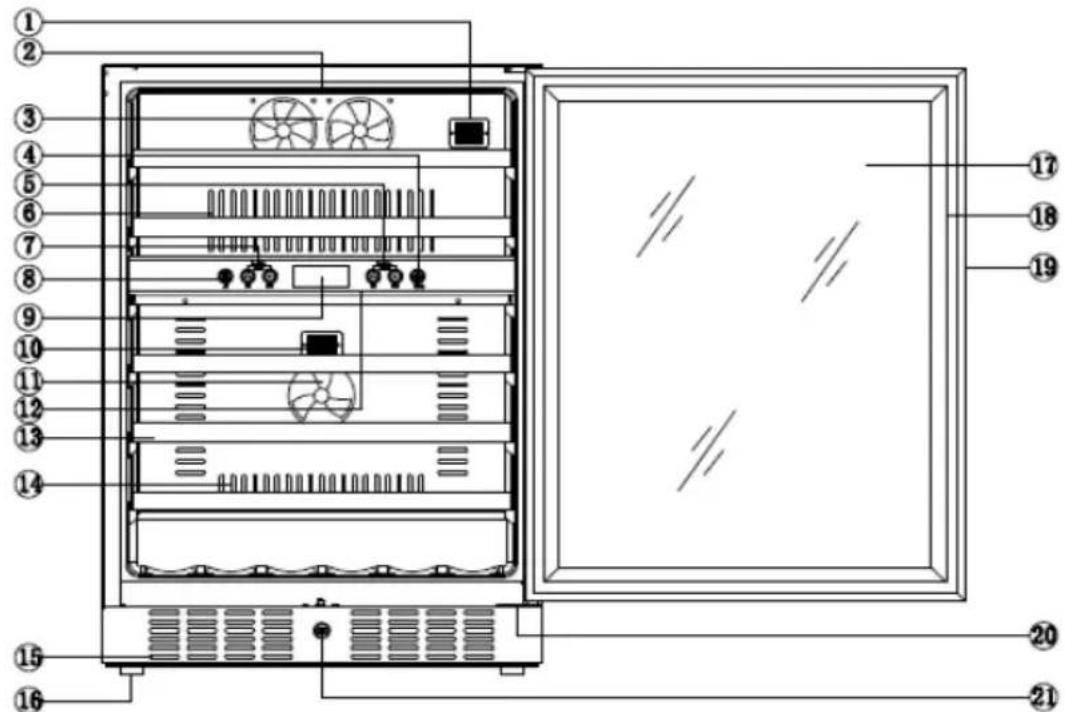
- Upper zone NTC point
- Upper zone Light
- Upper zone Fan
- Light switch
- Lower zone temperature controls
- Exhaust window
-
Upper zone temperature controls
-
Temperature switch
-
Temperature display
-
Lower zone NTC point
-
Lower zone Fan
-
Lower zone Light
-
Shelf
-
Exhaust window
-
Exhaust window
-
Leveling Foot
-
Glass
-
Door seal
-
Handle
-
Lower Hinge
-
Lock
ASSEMBLY & INSTALLATION
HANDLE ASSEMBLY
Tools Required for Assembly: Phillips screwdriver (not included)
Estimated Assembly Time: 5 minutes
Before installation, attach the handle to the front of the unit with the included screws. It may be necessary to push aside the rubber seal on the inside of the door to reveal the screw holes.
Caution: Avoid over-tightening the screws, or you may cause damage to the unit.
INSTALLATION

Before connecting the appliance to a power source, let it stand upright for approximately 24 hours. This will reduce the possibility of a malfunction in the cooling system from handling during transportation.
This appliance can either stand alone or be built in. The front grille must be unobstructed.
Before operating your wine cooler for the first time, follow these steps:
- Clean the interior surface of the unit with lukewarm water and a soft cloth.
- Place the cooler on a level surface that will be strong enough to support the unit when it is fully loaded. To level your cooler, adjust the front feet located at the bottom of the unit.
- Install the cooler away from direct sunlight and heat sources such as stoves, heaters, or radiators. Direct sunlight may affect the unit's acrylic coating, and nearby heat sources can increase electrical consumption. Extreme cold or hot ambient temperatures may also prevent proper performance.
REVERSING THE DOOR SWING
The door hinge is on the left side by default. If you wish to reverse the swing so that the door opens from the right, it is important to have at least one other person to help. It is dangerous to try to reverse the door swing by yourself.
- Unscrew the upper door hinge while the second person supports the door.
- Remove the upper hinge and carefully lift the door off the bottom hinge.
- Unscrew the bottom hinge and install it on the left side of the unit.
- Flip the door around so that the handle is on the right side and slip the door over the bottom hinge.
- Reattach the door by screwing the top hinge into the holes provided on the upper left surface of the unit. Make adjustments as necessary to be sure the door is aligned properly.
OPERATING INSTRUCTIONS
HOW TO USE THE BUTTONS ON THE DISPLAY PANEL


Select Celsius or Fahrenheit temperature scale.

Raise the desired temperature. *

Turn the light on and off. Lower the desired temperature. *
* To set the upper zone temperature, press the UP or DOWN button on the left side of the control panel. The interior temperature of the upper zone can be adjusted in increments of 1 degree between 40^ and 50^ ( 5^ - 10^ ).
* To set the lower zone temperature, press the UP or DOWN button on the right side of the control panel. The interior temperature of the lower zone can be adjusted in increments of 1 degree between 50^ and 66^ ( 10^ - 18^ ).
THE DISPLAY SCREEN
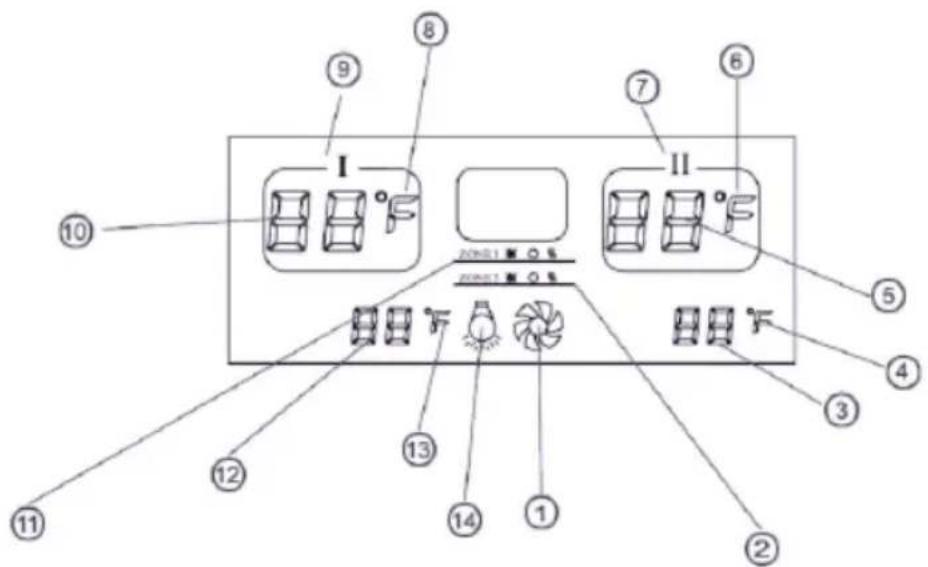
- Indicates the working status of the entire unit
- Indicates the working status of the lower zone
- Shows set temperature of the lower zone
- Shows Celsius or Fahrenheit degrees
- Actual temperature of the lower zone
- Shows Celsius or Fahrenheit degrees
-
Lower Zone
-
Celsius or Fahrenheit degrees
- Upper Zone
- Actual temperature of the upper zone
- Indicates the working status of the upper zone
- Shows set temperature of the upper zone
- Celsius or Fahrenheit degrees
- Indicates status of the internal light (on/off)
Working Status Icons:

Cooling

Maintaining current temperature

Heating
HOW TO USE YOUR MOISTURE TRAY
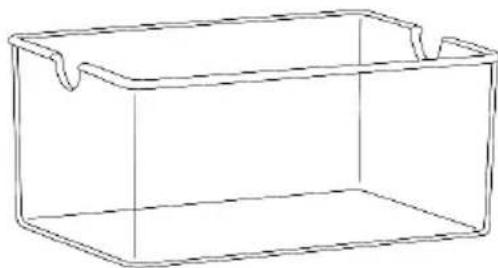
Your unit comes with a small water tray to help moisturize corks and or wooden shelves so they don't dry out. Fill the tray halfway and place it on the middle shelf— horizontally and towards the back —so moisture is evenly distributed throughout the inside of the cabinet. Refill the tray when it is a quarter of the way empty and exercise caution when removing or restocking bottles so water does not spill out.
natural_image
Simple line drawing of a rectangular container with side handles (no text or symbols)CLEANING & MAINTENANCE
CLEANING YOUR COOLER
To clean your cooler:
• Unplug the cooler and remove anything inside.
- Wash the inside of the unit with a solution made of warm water and baking soda solution (2 tablespoons of baking soda to one quart of water).
- Unscrew the water reservoir at the bottom of the unit and rinse with water.
• To clean the outside of the unit, use a mild detergent and warm water.
MOVING YOUR COOLER
To move your cooler:
- Remove anything stored inside.
- Securely tape down all loose parts located inside the unit.
• Turn the leveling feet up to the base in order to avoid damage. - Tape the door shut.
Be sure the cooler stays in an upright position during transportation.
WINE STORAGE GUIDE
- The ideal temperature for storing red or white wines is 55^ F, with humidity between 60% and 75% RH.
- Store corked bottles on their sides, to keep the cork from drying out and allowing air into the bottle.
• UV rays make wine age faster, so keep bottles out of direct sunlight. - Avoid heavy vibrations from motors, etc.
- Store wine separately from strong odors that might contaminate the flavor of the wine.
HOW LONG SHOULD I STORE MY WINE?
While most wines today are meant to be drunk “young” (within a few years of production) some fine wines are best served by proper aging. But aging too long can decrease the flavor of the wine. Generally speaking, red wines can age longer than white wines, but here is a storage guide for some popular vintages.
Cabernet Sauvignon.... 7-10 years
Pinot Noir 5 years
Merlot 3-5 years
Zinfandel 2-5 years
Beaujolais.... Drink now
Chardonnay.... 2-3 years
Riesling 3-5 years
Sauvignon Blanc.... 18 months – 2 years
Pinot Gris.... 1-2 years
Champagne.... Ready to drink
TROUBLESHOOTING
| Problem | Possible Causes | Solution |
| Wine cellar does not operate. | The unit may be plugged in using a different voltage. | Check if using the wrong voltage. |
| The circuit breaker may be tripped or there is a blown fuse. | Reset the circuit breaker or check for a broken fuse | |
| Wine cellar is not cold enough. | The external environment may require a higher setting. | Lower the temperature of the cooler. |
| The door may be opened too frequently. | Open the door less frequently. | |
| The door is not closed completely. | Make sure the door is closed securely. | |
| The door seal does not seal properly. | Replace the seal on the door. Replacements can be acquired from the manufacturer. | |
| The front grille is obstructed. | Make sure nothing is blocking the front grille. | |
| The light does not work. | There may be a problem with the display board. | Contact the manufacturer. |
| The cooler vibrates while operating. | The unit is not sitting on a level floor, or the unit's feet are not correctly installed. | Make sure the unit's feet are in the proper position and tightened securely. |
| The cooler produces a lot of noise. | The unit is not leveled. | See above. |
| The fan may be obstructed | Check the fan to make sure there is no debris or obstruction. If not, contact the manufacturer. | |
| The door will not close properly. | The unit is not leveled. | See above. |
| The door is not properly installed. | Check the door hinges to make sure they are properly installed. | |
| The seal is weak. | Replace the seal on the door. Replacements can be acquired from the manufacturer. | |
| The shelves are out of position. | Make sure the shelves slide all the way into the unit. | |
| The LED display does not work. | There may be a problem with the main control board. | Contact the manufacturer. |
| There is a problem with the plug. | Contact the manufacturer. | |
| There is an LED display error, or the LED displays “LO”. | The cooling kit is no longer working properly. | Contact the manufacturer. |
| The PC Board is faulty. | Contact the manufacturer. | |
| The buttons do not function. | The temperature control panel may be damaged. | Contact the manufacturer. |
LIMITED MANUFACTURER'S WARRANTY
This appliance is covered by a limited manufacturer's warranty. For one year from the original date of purchase, the manufacturer will repair or replace any parts of this appliance that prove to be defective in materials and workmanship, provided the appliance has been used under normal operating conditions as intended by the manufacturer.
Warranty Terms:
During the first year, any components of this appliance found to be defective due to materials or workmanship will be repaired or replaced, at the manufacturer's discretion, at no charge to the original purchaser. The purchaser will be responsible for any removal or transportation costs.
Warranty Exclusions:
The warranty will not apply if damage is caused by any of the following:
- Power failure
• Damage in transit or when moving the appliance - Improper power supply such as low voltage, defective household wiring or inadequate fuses
- Accident, alteration, misuse or abuse of the appliance such as using non-approved accessories, inadequate air circulation in the room or abnormal operating conditions (extreme temperatures)
• Use in commercial or industrial applications - Fire, water damage, theft, war, riot, hostility or acts of God such as hurricanes, floods, etc.
• Use of force or damage caused by external influences
• Partially or completely dismantled appliances - Excess wear and tear by the user
Obtaining Service:
When making a warranty claim, please have the original bill of purchase with the purchase date available. Once confirmed that your appliance is eligible for warranty service, all repairs will be performed by a NewAir™ authorized repair facility. The purchaser will be responsible for any removal or transportation costs. Replacement parts and/or units will be new, re-manufactured or refurbished and is subject to the manufacturer's discretion. For technical support and warranty service, please email support@newairusa.com.
Un nom de confiance
Instagram.com/newairusa

YouTube.com/newairusa

Twitter.com/newairusa
LISEZ ET CONSERVEZ CES INSTRUCTIONS.
TABLE DES MATIÈRES
natural_image
Warning symbol: white exclamation mark inside a triangle on black background (no text or numbers)
natural_image
Simple line drawing of a rectangular container with two side handles (no text or symbols)NETTOYAGE ET ENTRETIEN
NETTOYAGE DE VOTRE REFROIDISSEUR
Email: support@newair.com
Instagram.com/newairusa

YouTube.com/newairusa

Twitter.com/newairusa
LEA Y GUARDE ESTAS INSTRUCCIONES.
INDICE
natural_image
Warning symbol with exclamation mark inside a triangle (no text or numbers)
natural_image
Simple line drawing of a rectangular container with side handles (no text or symbols)LIMPIEZA Y MANTENIMIENTO
- 24” Built-in 46 Bottle Dual Zone Wine Fridge
- OWNER'S MANUAL
- A Name You Can Trust
- Count on NewAir.
- Contact Us:
- Connect with Us:
- READ AND SAVE THESE INSTRUCTIONS.
- TABLE OF CONTENTS
- SPECIFICATIONS
- REGISTER YOUR PRODUCT ONLINE
- Register Your NewAir Product Online Today!
- Service and Support
- Recall Notifications
- Special Promotions
- newair.com/register
- SAFETY INFORMATION & WARNINGS
- Shock Hazard – Electrical Grounding Required
- Important Precautions:
- PARTS LIST
- PARTS DIAGRAM
- ASSEMBLY & INSTALLATION
- HANDLE ASSEMBLY
- INSTALLATION
- REVERSING THE DOOR SWING
- OPERATING INSTRUCTIONS
- HOW TO USE THE BUTTONS ON THE DISPLAY PANEL
- THE DISPLAY SCREEN
- Working Status Icons:
- HOW TO USE YOUR MOISTURE TRAY
- CLEANING & MAINTENANCE
- CLEANING YOUR COOLER
- To clean your cooler:
- MOVING YOUR COOLER
- To move your cooler:
- WINE STORAGE GUIDE
- HOW LONG SHOULD I STORE MY WINE?
- TROUBLESHOOTING
- LIMITED MANUFACTURER'S WARRANTY
- Warranty Terms:
- Warranty Exclusions:
- Obtaining Service:
- Un nom de confiance
- LISEZ ET CONSERVEZ CES INSTRUCTIONS.
- TABLE DES MATIÈRES
- NETTOYAGE ET ENTRETIEN
- NETTOYAGE DE VOTRE REFROIDISSEUR
- LEA Y GUARDE ESTAS INSTRUCCIONES.
- INDICE
- LIMPIEZA Y MANTENIMIENTO
Brand : NewAir
Model : AWR460DB
Category : Wine cellar