
Buds Immersion - Wireless earphones WIKO - Free user manual and instructions
Find the device manual for free Buds Immersion WIKO in PDF.


| Product type | In-ear wireless earphone |
| Brand | WIKO |
| Model | Buds Immersion |
| Bluetooth version | 5.0 |
| Bluetooth range | 10 meters |
| Frequency response | 20 Hz - 20 kHz |
| Earphone battery | 45 mAh Li-Ion rechargeable |
| Charging case battery | 500 mAh Li-Ion rechargeable |
| Charging port | USB Type-C (5V - 0.5A) |
| Water resistance | IPX4 (splash proof) |
| Active noise reduction | Yes, with transparent mode |
| Touch controls | Play/pause, next track, voice assistant, call, ANC |
| Companion app | Wiko Connect (Android only) |
| Compatibility | Android and iOS (call and music) |
| Box contents | Earphones, charging case, USB-C cable, user guide, 2 extra ear tips |
| Warranty | To be defined with seller |
| Safety | Avoid contact with liquids and metals, do not use while driving |
| Recycling | Do not dispose of with household waste, compliant with REACH, RoHS and WEEE |
Frequently Asked Questions - Buds Immersion WIKO
User questions about Buds Immersion WIKO
0 question about this device. Answer the ones you know or ask your own.
Ask a new question about this device
Download the instructions for your Wireless earphones in PDF format for free! Find your manual Buds Immersion - WIKO and take your electronic device back in hand. On this page are published all the documents necessary for the use of your device. Buds Immersion by WIKO.
USER MANUAL Buds Immersion WIKO
D Primary microphone
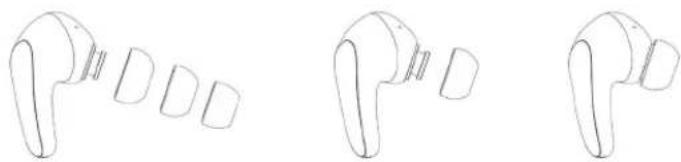
SELECTING EAR TIPS
DECLARATION OF CONFORMITY
D Primary microphone
E Secondary microphone
F Touch area
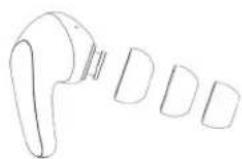
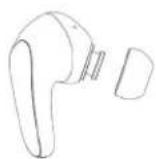
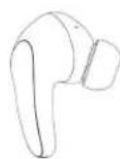
SELECTING EAR TIPS
Try on ear tips of varying sizes and choose the one that best suits you.
Appropriately sized ear tips will provide the best experience in terms of noise reduction, music, and comfort.
LET'S GET STARTED...
- Power on / power off
Open the charging box, your earbuds will power on automatically. When you put back the earbuds into the charging box and close it, they will power off automatically.
In case of problem, long press for 4 seconds on both earbuds to power them on and 10 seconds to power them off manually.
~ Note: charge the earbuds for minimum 10 minutes before first use.
- Bluetooth® Pairing
~ Automatic pairing
Power on your earbuds and search for WIKO BUDS IMMERSION in your smartphone's Bluetooth® list to pair them.
- Manual pairing
Put your earbuds into the charging box (lid open), then long press for 10 seconds on the multi-function button to pair them successfully.
~ Pair to another device
Press for 3 seconds on the multi-function button to see your earbuds in the Bluetooth® list of another device.
- Connect / disconnect
Once paired, earbuds will automatically be connected to your device when the charging box is opened, and they will be disconnected when placed back into the charging box.
- Note: if the distance between the earbuds and the mobile phone exceeds the range of Bluetooth® signal, they will be disconnected. Automatic reconnection will occur within 3 minutes when back in the connection area.
- Factory settings
Press and hold the multi-function button for 10 seconds to clear the earbuds' pairing history and restore factory settings (put them into the charging box with lid open).
ENJOY YOUR EARBUDS
- Music
Play/pause music: tap twice the left earbud. Play the next song: tap twice the right earbud.
- Voice assistant
Long press left earbud for 2 seconds.
Note: accept voice assistant function in settings.
- Calls
Answer/hang up a call: tap once on any earbud when calling.
- Active Noise Cancelling mode
Switch between ON and Transparency mode: long press the right earbud for 2 seconds.
In ON mode, the Active Noise Cancelling function can reduce, but not eliminate, low-frequency noise.
If you feel that the noise reduction function isn't working for you, select some appropriate ear-tips to improve your experience.
In transparency mode, your Wiko Buds Immersion collect external sounds, improving your ability to perceive and communicate with your surroundings without taking them off.
WIKO CONNECT APP
You can download Wiko Connect App to install firmware updates and additional features for your Wiko Buds Immersion. Search for it on Google Play store or scan the QR code below.
Wiko Connect App is only available for Android devices.

CHARGING Charge the box with the provided USB C cable.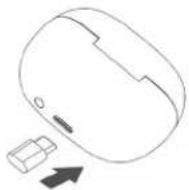
Light indicator
Full battery: green light flashes 4 seconds.
Low battery: red light flashes 4 seconds.
Ultra-low battery: red light flashes 5 times.
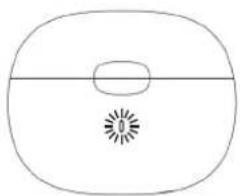
Press once to know the battery level:
Green light indicates sufficient battery level (> 20%)
Red light indicates low battery level (< 20%)
TECHNICAL SPECIFICATION
| Connectivity | |
| Bluetooth® version 5.0 | |
| Bluetooth® operating range 10 metres | |
| Bluetooth® frequency range 20Hz - 20KHz | |
| Power supply | |
| Earbuds battery type 45 mAh Li-Ion rechargeable | |
| Charging box battery type 500 mAh Li-Ion rechargeable | |
| Charging port 5V - 0.5A (USB C) | |
| Autres | |
| Water resistance IPX4 (splashes) | |
| Compatibility Android & iOS | |
| Certifications CE, RoHS, REACH, DEEE, Bluetooth® | |
| In the box Earbuds, charging box, USB C cable, user guide + additional ear-tips | |
WARRANTY POLICY
In case of failure or defect of your product, please contact your seller to be informed of the warranty process to be followed.
SAFETY INFORMATION
Please read the warnings listed below to use your device safely:
- Avoid the earbuds from getting into contact with conductive elements such as metal and liquids.
- If any part of the device is cracked or broken, stop using it immediately and contact your seller or Wiko After Sales service.
• Using earbuds while driving is not recommended and may be illegal in some areas while driving.
Prevention of hearing loss
To prevent possible hearing damage, do not listen to your device at high volumes for long periods.
Recycling
This symbol affixed on the product indicates that neither it nor its electronic accessories (USB cable, etc.) can be thrown away with other household waste at the end of its life.
Dangerous substances
This device complies with the requirements resulting from the REACH regulation (EC N°1907/2006) and those of the revised RoHS (Directive 2011/65/EU).
STATEMENT OF COMPLIANCE
Hereby, WIKO SAS - 1 rue Capitaine Dessemond - 13007 Marseille - France, declares that the radio equipment type Wiko Buds Immersion is in compliance with Directive 2014/53/EU. The full text of the device's EU declaration of conformity is available on written request to the following address WIKO SAS - 1 rue Capitaine Dessemond - 13007 Marseille - France or www.wikomobile.com/certification
Thank you! Move your body to the beat! ©2021 Wiki. All rights reserved.
Wiko SAS | 1, rue Capitaine Dessemond - 13007 Marseille - France
Tel +33 4 88 08 95 15 | Fax +33 4 88 08 95 20
wikomobile.com | SIRET 530 072 206 00028 - APE 4652Z


Brand : WIKO
Model : Buds Immersion
Category : Wireless earphones