
EMKS2BEU - Scooter SHARP - Free user manual and instructions
Find the device manual for free EMKS2BEU SHARP in PDF.
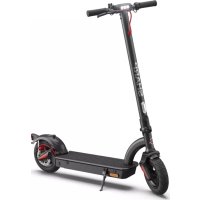



| Product type | Electric scooter |
| Brand | Sharp |
| Model | EMKS2BEU (KS2 series) |
| Dimensions (unfolded) | 470 x 1200 x 1180 mm (W x H x D) |
| Dimensions (folded) | 470 x 498 x 1180 mm |
| Weight | 18.3 kg |
| Battery | Lithium 18650, 36 V, capacity 6.6 or 10.4 Ah depending on version |
| Range | Up to 40 km (depending on version and conditions) |
| Charging time | 4 to 8 hours depending on capacity |
| Maximum speed | 25 km/h (max mode) |
| Speed modes | Walk (6 km/h), Medium (20 km/h), Max (25 km/h) |
| Motor power | 250 W or 350 W depending on version |
| Maximum load | 120 kg |
| Tires | 10 inches, inflatable (pressure 2.5 bar) |
| Brakes | Disc brake, electric brake, foot brake (depending on version) |
| Connectivity | Bluetooth 5.0 LE, SHARP Life app |
| Lighting | Front and rear lights controlled together |
| Operating temperature range | -10 °C to +45 °C |
| Protection class | Class II, not waterproof |
| Package contents | Scooter, charger, manual, Allen key, handlebar screws, power cord |
Frequently Asked Questions - EMKS2BEU SHARP
User questions about EMKS2BEU SHARP
0 question about this device. Answer the ones you know or ask your own.
Ask a new question about this device
Download the instructions for your Scooter in PDF format for free! Find your manual EMKS2BEU - SHARP and take your electronic device back in hand. On this page are published all the documents necessary for the use of your device. EMKS2BEU by SHARP.
USER MANUAL EMKS2BEU SHARP
User manual
EM-KS1 | EM-KS2
Electric Scooter

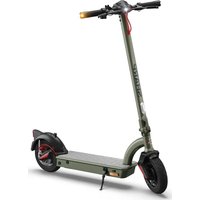
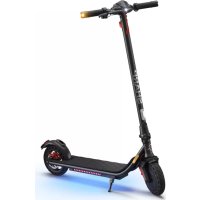
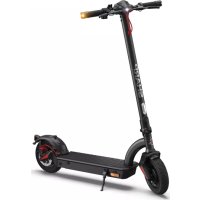
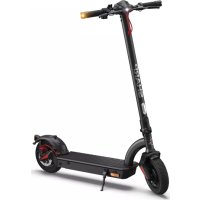
*Product images are for illustration purposes only. Actual product may vary.
Trademarks:

Bluetooth®
The Bluetooth® word mark and logos are registered trademarks owned by Bluetooth SIG, Inc.
EM-KS2A EM-KS1A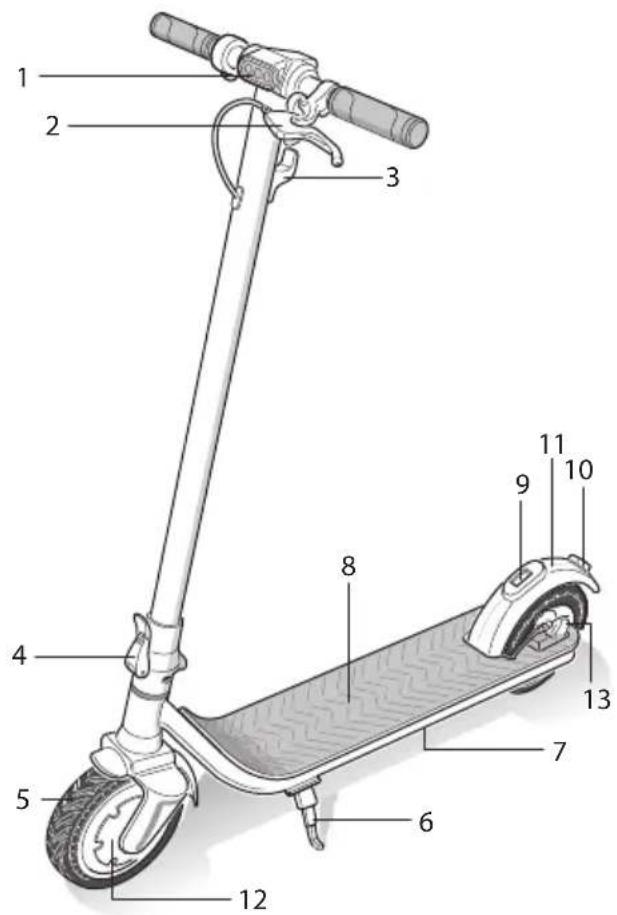
www.sharpconsumer.com/contact/
www.sharpconsumer.com/support/
www.sharpconsumer.com/documents-of-conformity/
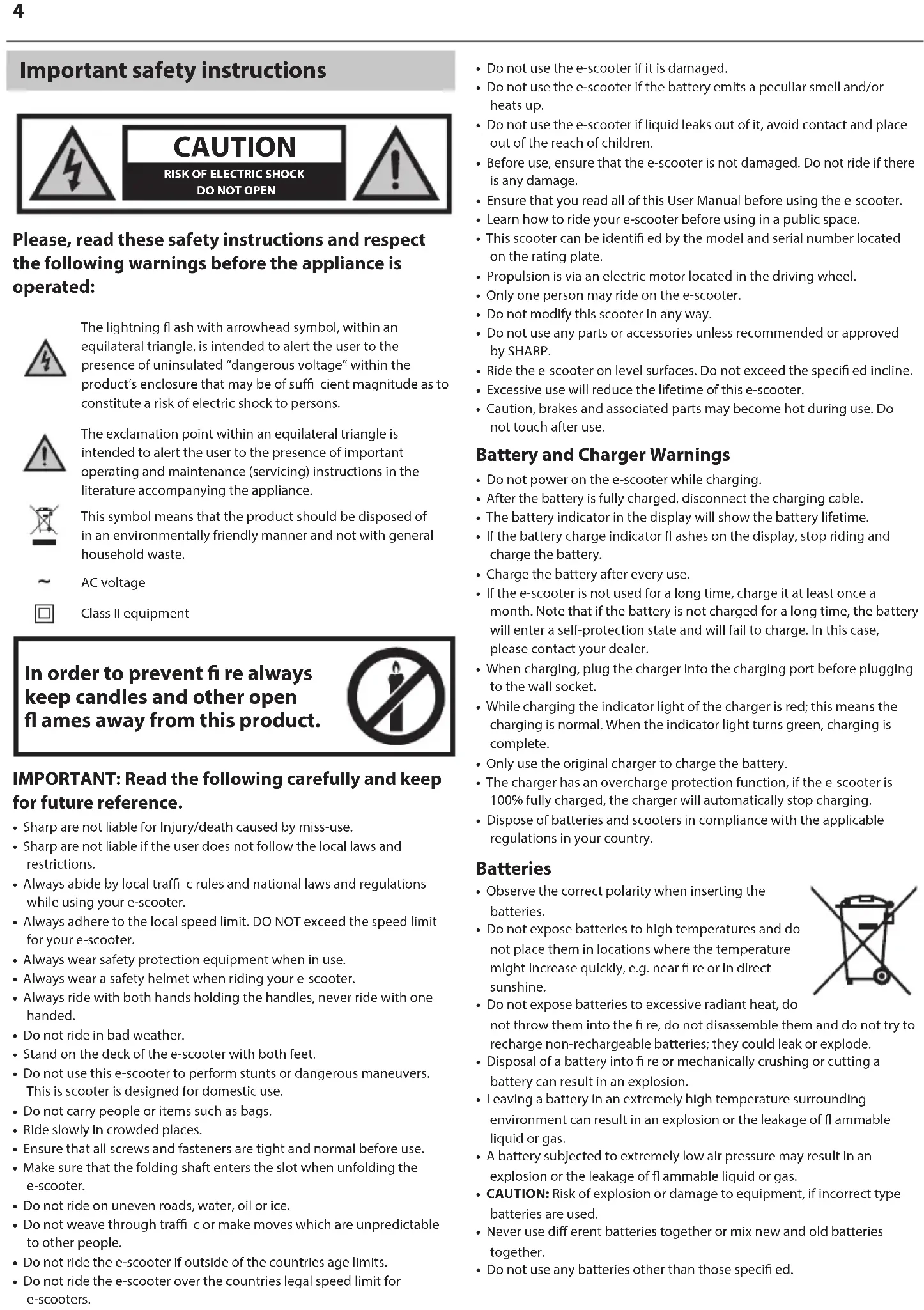
Important safety instructions
Please read these safety instructions and respect the following warnings before operating the appliance:

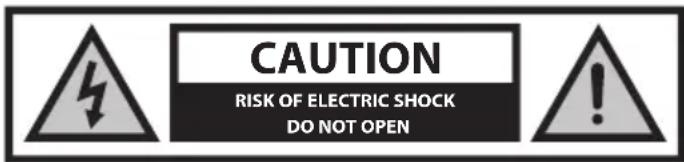
The lightning flash with arrowhead symbol, within an equilateral triangle, is intended to alert the user to the presence of uninsulated "dangerous voltage" within the product's enclosure that may be of sufficient magnitude to constitute a risk of electric shock to persons.

The exclamation point within an equilateral triangle is intended to alert the user to the presence of important operating and maintenance (servicing) instructions in the literature accompanying the appliance.

This symbol means that the product should be disposed of in an environmentally friendly manner and not with general household waste.

AC voltage

Class II equipment
In order to prevent fire always keep candles and other open flames away from this product.

IMPORTANT: Read the following carefully and keep for future reference.
- Sharp are not liable for injury or death caused by misuse.
- Sharp are not liable if the user does not follow the local laws and restrictions.
- Always abide by local traffic rules and national laws and regulations while using your e-scooter.
- Always adhere to the local speed limit. DO NOT exceed the speed limit for your e-scooter. • Always wear safety protection equipment when in use. • Always wear a safety helmet when riding your e-scooter.
- Always ride with both hands holding the handles, never ride with one hand.
- Do not ride in bad weather.
- Stand on the deck of the e-scooter with both feet.
- Do not use this e-scooter to perform stunts or dangerous maneuvers. This scooter is designed for domestic use.
- Do not carry people or items such as bags.
- Ride slowly in crowded places.
- Ensure that all screws and fasteners are tight and normal before use.
- Make sure that the folding shaft enters the slot when unfolding the e-scooter.
- Do not ride on uneven roads, water, oil or ice.
- Do not weave through traffic or make moves which are unpredictable to other people.
- Do not ride the e-scooter if outside of the countries age limits.
- Do not ride the e-scooter over the countries legal speed limit for e-scooters.
- Do not use the e-scooter if it is damaged.
- Do not use the e-scooter if the battery emits a peculiar smell and/or heats up.
- Do not use the e-scooter if liquid leaks out of it, avoid contact and place out of the reach of children.
- Before use, ensure that the e-scooter is not damaged. Do not ride if there is any damage.
- Ensure that you read all of this User Manual before using the e-scooter.
- Learn how to ride your e-scooter before using in a public space.
- This scooter can be identified by the model and serial number located on the rating plate.
- Propulsion is via an electric motor located in the driving wheel.
- Only one person may ride on the e-scooter.
- Do not modify this scooter in any way.
- Do not use any parts or accessories unless recommended or approved by SHARP.
- Ride the e-scooter on level surfaces. Do not exceed the specified incline.
- Excessive use will reduce the lifetime of this e-scooter.
- Caution, brakes and associated parts may become hot during use. Do not touch after use.
Battery and Charger Warnings
- Do not power on the e-scooter while charging. After the battery is fully charged, disconnect the charging cable.
- The battery indicator in the display will show the battery lifetime.
- If the battery charge indicator flashes on the display, stop riding and charge the battery.
Charge the battery after every use.
If the e-scooter is not used for a long time, charge it at least once a month. Note that if the battery is not charged for a long time, the battery will enter a self-protection state and will fail to charge. In this case, please contact your dealer.
When charging, plug the charger into the charging port before plugging to the wall socket.
While charging the indicator light of the charger is red; this means the charging is normal. When the indicator light turns green, charging is complete.
- Only use the original charger to charge the battery.
- The charger has an overcharge protection function. If the e-scooter is 100% fully charged, the charger will automatically stop charging.
- Dispose of batteries and scooters in compliance with the applicable regulations in your country.
Batteries
- Observe the correct polarity when inserting the batteries.
- Do not expose batteries to high temperatures and do not place them in locations where the temperature might increase quickly, e.g., near fire or in direct sunshine.
- Do not expose batteries to excessive radiant heat, do not throw them into the fire, do not disassemble them, and do not try to recharge non-rechargeable batteries; they could leak or explode.
- Disposal of a battery into fire or mechanically crushing or cutting a battery can result in an explosion.
- Leaving a battery in an extremely high temperature surrounding environment can result in an explosion or the leakage of flammable liquid or gas.
- A battery subjected to extremely low air pressure may result in an explosion or the leakage of flammable liquid or gas.
- CAUTION: Risk of explosion or damage to equipment if incorrect type batteries are used.
- Never use different batteries together or mix new and old batteries together.
- Do not use any batteries other than those specified.
Removal of Battery
EM-KS1A
- To remove the battery, peel up the rubber foot mat and remove the 6 screws on the wooden deck, then the 10 screws securing the metal plate. Now unplug the battery connector and remove. Ensure that the battery terminals are not shorted out. Dispose of the battery as required by your local regulations.
- To remove the battery, peel up the rubber foot mat and remove the 11 retaining screws from the metal plate, the plate can now be taken off to reveal the battery. Now unplug the battery connector and remove. Ensure that the battery terminals are not shorted out. Dispose of the battery as required by your local regulations.
Disposal of this equipment and batteries
- Do not dispose of this product or its batteries as unsorted municipal waste. Return it to a designated collection point for the recycling of WEEE in accordance with local law. By doing so, you will help to conserve resources and protect the environment.
- Most of the EU countries regulate the disposal of batteries by law. Recycling symbol appears on electrical equipment, packaging and batteries to remind users to dispose these items correctly. Users are requested to use existing return facilities for used equipment and batteries. Contact your retailer or local authorities for more information.

CE and UKCA statement:
- Hereby, Sharp Consumer Electronics Poland sp. z o.o. declares that this e-scooter is in compliance with the essential requirements and other relevant provisions of RED Directive 2014/53/EU, UK Radio Equipment Regulations 2017 and PN-EN 17128: 2021-03
- The full text of the EU declaration of conformity is available by following the link www.sharpconsumer.com and then entering download section of your model and choosing "CE Statements".
Cleaning
- When cleaning your e-scooter, please make sure that it is turned off, the battery charger has been unplugged, and the charging port cap on the device is covered.
- It is recommended to use a soft and slightly damp cloth. If there are stubborn dirt residues that are difficult to clean, use a toothbrush and repeatedly brush to remove it. After removing the stain, use a soft and slightly damp cloth with an appropriate amount of detergent to remove residue.
NOTES:
- Do not use alcohol or other solvents to avoid corrosive chemical products from damaging the paint on the surface of the body and its internal structural parts.
- Do not use high-pressure water jets to clean the scooter.
- Clean the e-scooter regularly.
Care and Maintenance
- When not using the e-scooter, store it in a dry environment to avoid damage to electronic components due to moisture.
- Do not store the e-scooter outside for an extended period of time. Excessive exposure to sunlight, high temperature, or low temperature may damage the e-scooter and accelerate the wear of tires and batteries.
- Do not touch the disc brake disc immediately after using the disc brake of the electric scooter, as there is a danger of high temperature burns!
- Disc brake adjustment: If the brake is too tight, use the provided hex wrench to slightly loosen the screw holding the brake cable on the disc brake to release the brake tension. Then slightly extend the position of the brake cable bolt compared to the last time. If the brake is too loose, perform the opposite operation and adjust the brake cable.
- If any damage is found on your e-scooter, do not store indoors due to potential fire risk.
- Should you experience any issues with the care and maintenance of your e-scooter, contact your dealer or SHARP Support for advice.
What's in the Box:
- E-scooter
- User manual
- Warranty card
- 1 x Allen key
- 4 × Handlebar screws
- 1 × Charger
- 1 × Power cord
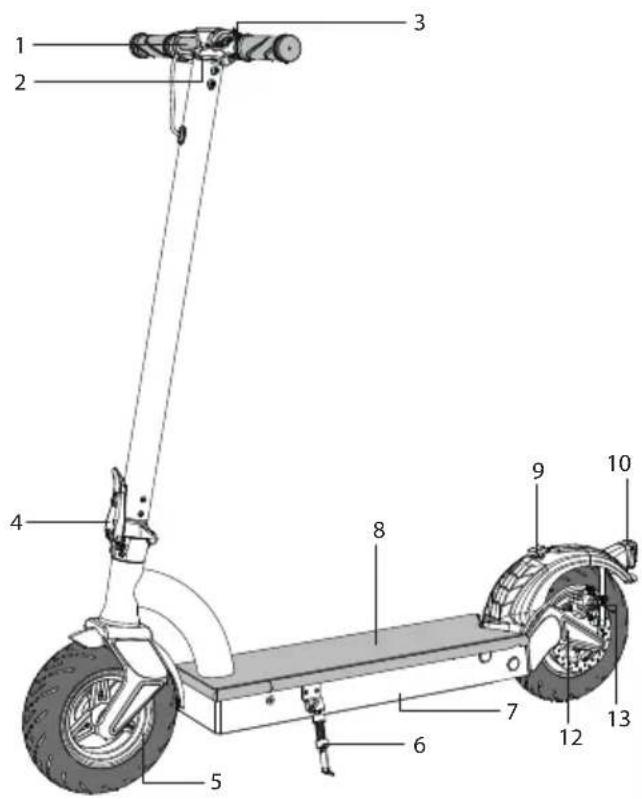
Location of Parts
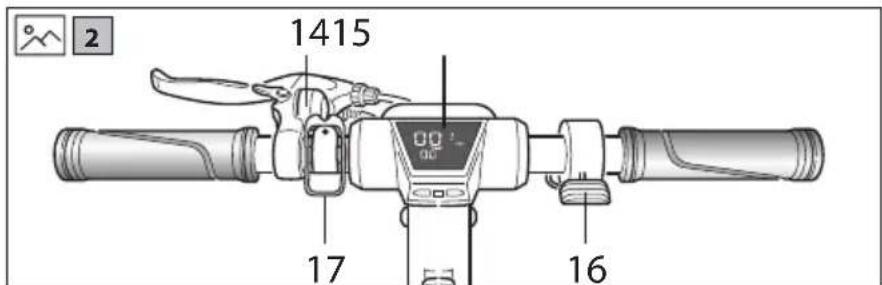
Refer to the pictures 1 and 2 on page 1.
- Front Light
- Rear Brake Lever
- Hook/Stem Fold Lock Catch
- Stem Lock Lever
- Front Wheel
- Stand
- Battery Location
- Foot Pad
- Handlebar Lock
- Rear Light
- Foot Brake
- Electric Motor
- Rear Brake
- Bell
- Display
- Throttle
- Fold Lock Catch (EM-KS2A only)
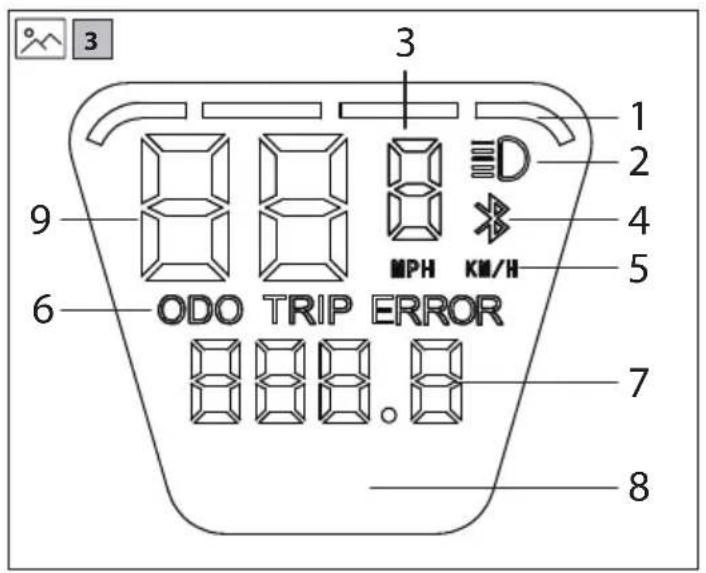
Display
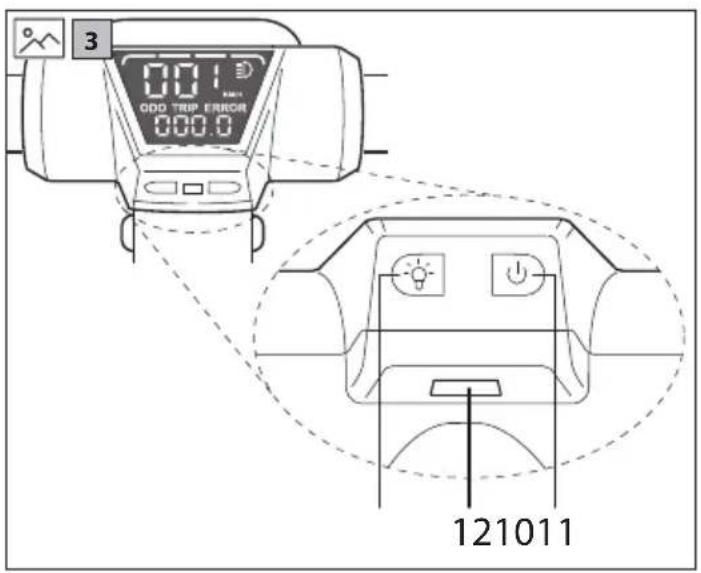
Refer to the pictures 3 on page 2.
- Battery level
- Lights on
- Speed Mode
- Bluetooth mode (for use with app)
- Speed unit
- ODO / TRIP mode indicator
- ODO / TRIP details
- Power (this will appear on the display for about 2 seconds after turning on)
- Speed
- Light Button
- Power Button
- USB Charging Socket
Odo/Trip
Odo will show the total distance covered by the e-scooter; Trip info that indicates the single driving distance. It is possible to toggle between the Odo and Trip by short pressing the power-button.
Lights
To turn the front and rear lights on, press the Light Button for a few seconds. To turn off the lights, press the button for a few seconds.
NOTE: the front and rear lights cannot be controlled independently.
Speed Mode
To change gear, press the light button quickly. The Speed Mode with Change will go up then down.
Maximum speed in each mode:
- Walk Mode - 6km/h • Medium Mode - 20km/h • Maximum Mode - 25km/h
The maximum speed for Maximum Mode is 25 km/h.
Note that these are the maximum speeds which are attainable in each Speed Mode; the e-scooter will not go faster than these speeds in the Speed Mode selected.
Speed
Speed units can be changed in the app.
Cruise Control
Your e-scooter is equipped with a cruise control. To enable this, when you reach the desired speed hold down the thumb throttle control for 9 seconds. A bleep will sound when the cruise control is engaged. To release the cruise control, engage the handbrake.
Assembling the Handlebars
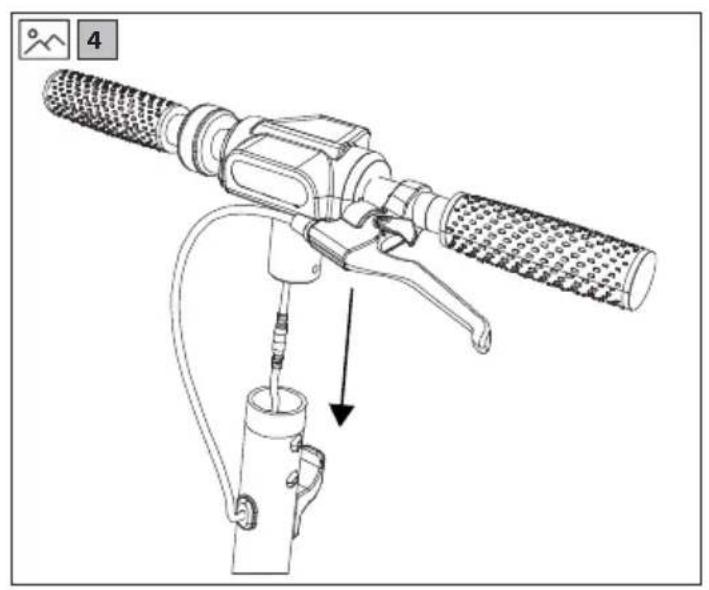
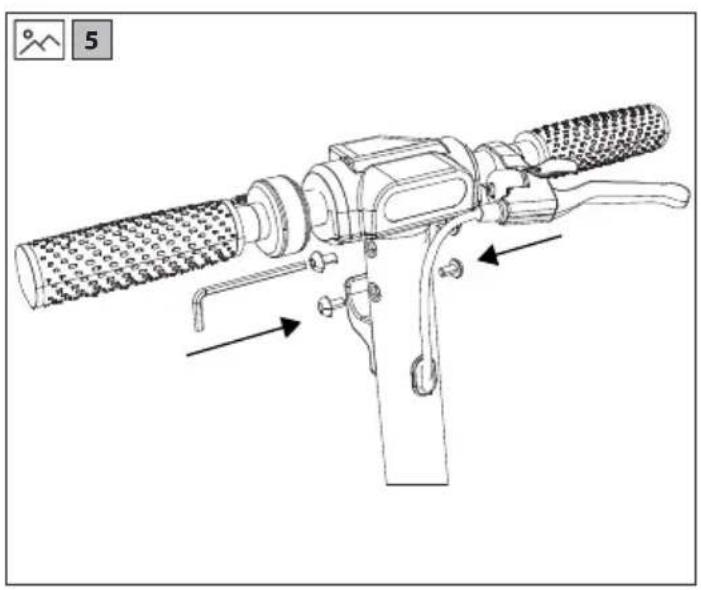
- With reference to pictures 4 and 5 on page 2, assemble the handlebars with the supplied Allen key. This only has to be carried out when the product is un-boxed; the handlebars do not have to be removed after being attached.
- Insert the handlebars into the handlebar stem as shown in the pictures. The handlebars have to be orientated as shown. While assembling the handlebars, be careful not to bend or break any parts.
- Ensure that the screws are not overtightened and that the handlebars are secure and do not wobble after construction.
- Ensure that the brake cable is not bent or damaged.
Unfolding and Folding the e-scooter
How to unfold?
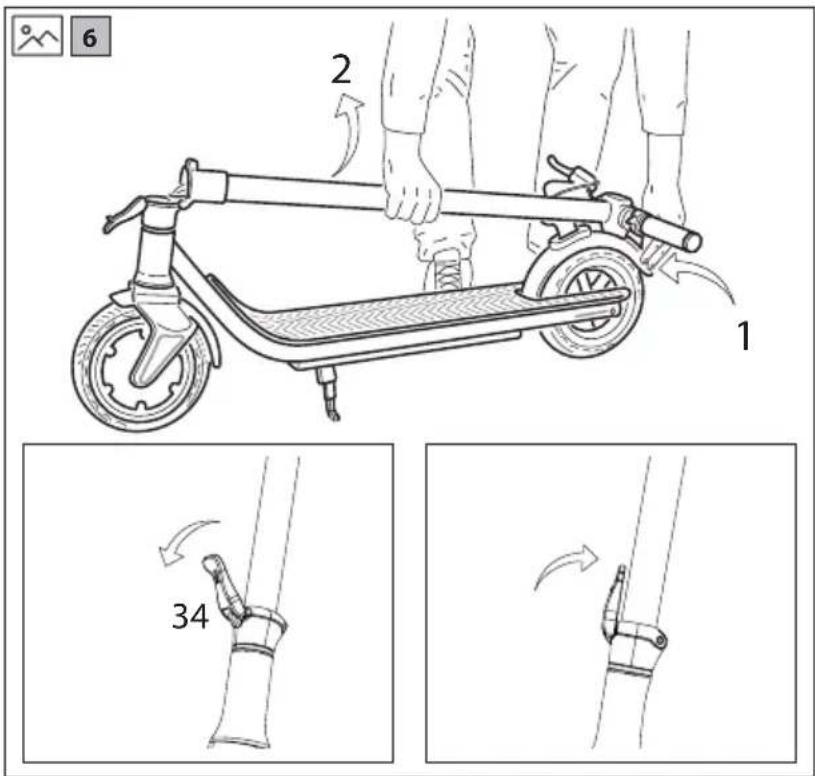
Refer to the pictures 6 on page 3 unfold the e-scooter.
Press down on the rear fender with one hand and use the other to lift up the Handlebar Stem so that it is straight, refer to picture 6 step 3. When straight it will not move any further. Once locked, use the Fold Lock Lever to secure in place. This lever must be as close to the Handlebar Stem as possible when in the lock position. See picture 6 step 3 and 4.
How to fold?
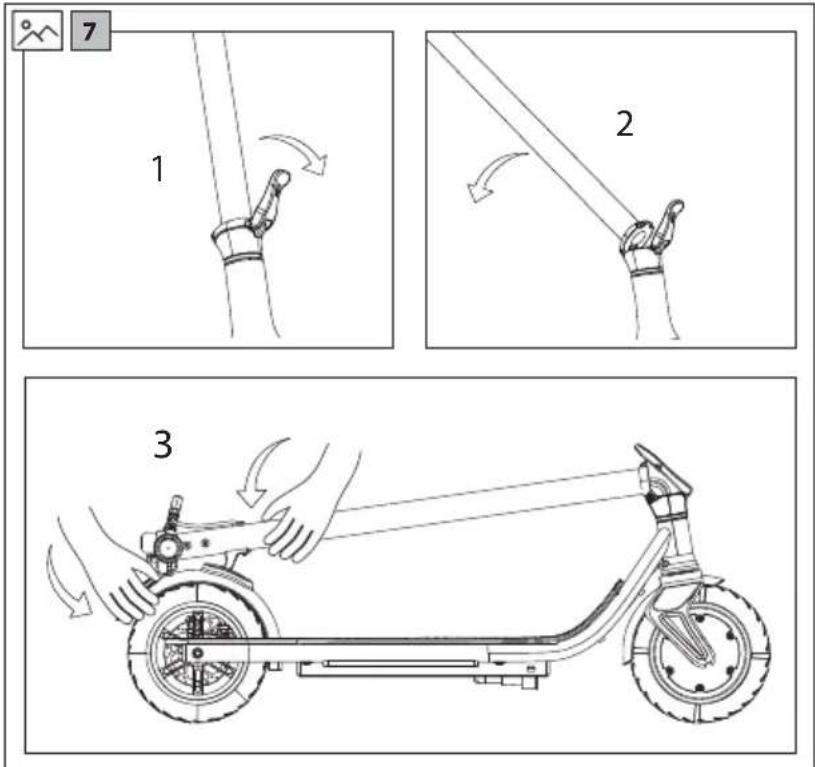
Refer to the pictures 7 on page 3 to fold the e-scooter for storage.
Lift up the Fold Lock Lever as shown in step 1 to release the Handlebar Stem. Push the Handlebar Stem down as shown in step 2 until it is touching the Rear Fender. Press down so that it connects with the hook in the Rear Fender as shown in step 3.
Note that on the EM-KS2A, the Fold Lock Catch is located on one side of the display, and this results in the handlebar stem being slightly diagonal to the Foot Pad when correctly located.
Using Your e-scooter
Riding
- Before riding, ensure that it is safe to do so and that the e-scooter is being operated in accordance with this User Manual. It is important that safety equipment is worn and that the scooter is in good condition.
- If you are using your e-scooter for the first time, practice how to use it away from public spaces and wear safety equipment. When you are confident to use your e-scooter, you can operate near other people and vehicles.
- When riding, always follow your country's legal requirements.
- Check that the brakes, lights, and tyres are working, adjusted correctly, and in good condition before riding.
To ride your e-scooter safely:
- Make sure that you are wearing suitable safety equipment. • Power on the e-scooter.
- Put one foot on the Foot Rest first, and the other foot on the ground. Kick the scooter to move forward, and slowly press down the accelerating throttle.
NOTE:
- When accelerating, lean backwards to maintain your centre of gravity. When decelerating, move your centre of gravity by leaning forward. This will make your riding more comfortable and safer.
Braking
- To brake correctly, release the accelerating throttle and engage the disc brake by squeezing the brake lever on the handlebars. By using the disc brake, the electronic brake will also operate and your scooter will decelerate and stop. It is also possible to use the fender brake on the KS1.
NOTE: model KS2 does not have a rear fender brake.
Walk Mode
- While in Walk Mode, the brake light will flash to indicate that your scooter is traveling slowly. When changing to Medium Mode, the brake light will stop flashing.
Using the Kickstand
- Your e-scooter has a built-in stand that allows it to be parked without needing to lean it against anything or having to collapse it for storage.
- To use the kickstand, use your foot to press it downward until it locks in place. Lean the e-scooter so that it rests on the ground. Do not use the kickstand on uneven or soft surfaces.
- To release the kickstand, use your foot to push it upward and into the body of the scooter. It will lock into place. Ensure that the kickstand is stowed correctly before riding.
- Be careful when deploying the kickstand, as it may cause injury if used incorrectly.
Charging
- Ensure that the battery fitted to your e-scooter is charged correctly by following the instructions below:
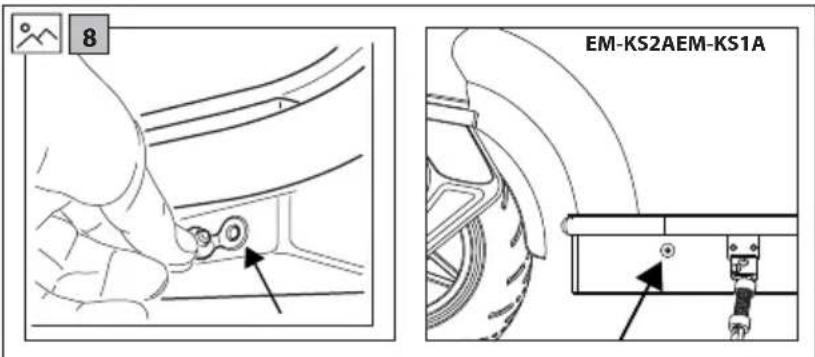
- Plug the charger lead into the e-scooter charge port. Refer to picture 8 on page 3 for the location of the charging port on your e-scooter.
- Plug the charger mains lead into the mains wall socket.
- When connected to the battery charger, the battery will start to charge and the charge indicator will turn red. After the charging is complete, the charge indicator will turn green.
- Disconnect the battery charger when fully charged and replace the rubber cap on the e-scooter charge socket.
NOTES:
- If the scooter is not being used regularly, it is recommended to charge the battery every month.
- Do not charge the battery outside.
- Do not charge if the cable or scooter is wet.
- Do not charge when the scooter is powered on.
- Do not charge the battery if the ambient temperature is below 1°C.
USB Charging Socket
- For your convenience a USB charging socket is located on the display module. To access the socket, pull the socket cover to one side.
- The USB charging socket is designed to enable your mobile device to be kept charged while being used with your e-scooter.
SHARP Life App
Add the SHARP Life app to your mobile device to start enjoying the benefits of additional functionality. This includes:
– Speed monitoring on your device. - Changing the speed/distance units between kilometers and miles. - Setting the maximum speed. - Lock the functions on your e-scooter. - Activation of the cruise control.
Click on "Add Device", when the e-scooter is turned on and the Bluetooth icon is flashing on the display.
Your device will scan automatically for your e-scooter. Make sure that the Bluetooth function is enabled on the e-scooter. Allow location services if requested.
Once the device is found, Bluetooth pairing is complete.
To add your scooter to the App, use one of the methods below:
- Create groups.
- Remove device from previous account.
- When the e-scooter is powered on, press the power button 4 times quickly.
https://www.sharpconsumer.com/sharp-life-app
Troubleshooting
The e-scooter does not move after start-up.
Cause / Action
The brake has not restored completely, this will interrupt the operation of the power supply. / Manually reset the brake. This can be achieved by pushing the brake lever back to its normal position.
The e-scooter moves at low speed or does not move at all.
Cause / Action
Battery is low. / Battery requires replacement.
The motor starts and switches off again.
Cause / Action
Battery is low. / Battery requires replacement.
The controller is damaged. / Controller requires replacement.
The battery connection is loose. / Battery connections need to be checked.
The battery cannot be charged or has charged slowly.
Cause / Action
Voltage is not correct. / Battery requires replacement.
The battery does not charge.
The battery life cycle has come to an end. / Battery requires replacement. The battery charger does not provide power. / Replace the battery charger. The charging lead is damaged. / Replace the battery charger.
Error codes
It is possible that error codes may be displayed. The e-scooter will stop operating under these conditions.
E0 - Communication error
E1 - Abnormal current
E2 - Throttle failure
E3 – Brake failure
E4 - MOS failure / Over current failure
E5 – Hall / Motor failure
E6 - Motor failure
E7 - Low voltage error
Should you experience any issues which cannot be resolved, contact your dealer or SHARP Support for advice.
Technical Specification
| Model EM-KS1A EM-KS1B EM-KS1C EM-KS2A | EM-KS2B EM-KS2C | |||||
| Unfolded Size (W x H x L in mm) 470 x 1190 x 1065 | 470 x 1200 x 1180 | |||||
| Folded Size (W x H x L in mm) 470 x 455 x 1065 470 x 498 x 1180 | ||||||
| Wheel Size (inches) 8,5 10 | ||||||
| Foot Plate Size (W x L in mm) 162 x 460 160 x 483 | ||||||
| Foot Plate to Top of Handlebars (mm) 1020 | 1025 | |||||
| Ground to Foot Plate (mm) | 145 | 180 | ||||
| Other Specifications | ||||||
| Brake Type | Disc brake / Power off brake / Foot brake | Disc brake / Power off brake | ||||
| Motor Type | brushless energy-saving motor | |||||
| Driving Wheel | Front | Rear | ||||
| Maximum Climbing Angle (degrees) | 15° | |||||
| Maximum Load (kg) | 120 | |||||
| Maximum Speed (km/hour) | 25 | 25 | 20 | 25 | 25 | 20 |
| Motor Power (Watts) | 350 W | 250 W | 350 W | 350 W | 250 W | 350 W |
| Range per Full Charge (km) | 25 | 40 | ||||
| Tyre Pressure | - | 2,5 bar (36psi) | ||||
| Wheel Type | honeycomb tyre | inflatable tyre | ||||
| Weight (kg) | 16 | 18,3 | ||||
| USB charging socket | 5 V; 0,5 A | |||||
| Battery | ||||||
| Battery Type (Ah) | 18650 lithium battery | |||||
| Battery Capacity (A/hour) | 6,6 | 10,4 | ||||
| Battery (Voltage) | 36 | |||||
| Battery (Wattage) | 237,6 | 374,4 | ||||
| Charging Time (Hours) | 4 to 5 | 6 to 8 | ||||
| Battery Charger | ||||||
| Effecency - charging | 87% | |||||
| Standby Power | TBA | |||||
| Model Name | FY0634201500 | |||||
| Input | 100 - 240 V AC, 50/60 Hz, 1,8 A (Max) | |||||
| Mains Connector Type | "Figure 8" type. Lead - C7, Charger - C8 | |||||
| Output | 42 V DC, 1,5 A | |||||
| Manufacturer and Address | Shenzhen Fuyuandian Power Co., Ltd. 8F, A9 Bldg, Tiarui Industrial Park, Fuyong Town, Baoan District, Shenzhen, Guangdong, China | |||||
| Bluetooth | |
| Version LE5.0 /BT7L 8.30 | |
| Maximum power transmitted 10 dbm | |
| Frequency bands 2,4 GHz | |
| Connectivity Used to connect mobile device to e-scooter for app functionality | |
| Standards The Bluetooth® word mark and logos are registered trademarks owned by Bluetooth SIG,. Inc. | |
| Working environment | |
| Temperature -10 °C to +45 °C | |
| Storage Temperature -10 °C to +25 °C | |
| Relative humidity up to 75% RH | |
AS PART OF A POLICY OF CONTINUOUS IMPROVEMENT, WE RESERVE THE RIGHT TO ALTER DESIGN AND SPECIFICATIONS WITHOUT NOTICE.
https://www.sharpconsumer.com/sharp-life-app
https://www.sharpconsumer.com/sharp-life-app
Troubleshooting
The electric scooter does not move after starting.
Cause / Action
https://www.sharpconsumer.com/sharp-life-app
Troubleshooting
https://www.sharpconsumer.com/sharp-life-app
Troubleshooting
In order to prevent fire always keep candles and other open flames away from this product.

https://www.sharpconsumer.com/sharp-life-app
Troubleshooting
https://www.sharpconsumer.com/sharp-life-app
Troubleshooting
https://www.sharpconsumer.com/sharp-life-app
Important safety instructions
https://www.sharpconsumer.com/sharp-life-app
Troubleshooting
https://www.sharpconsumer.com/sharp-life-app
Troubleshooting
https://www.sharpconsumer.com/sharp-life-app
Troubleshooting
• The software is not used for any other function.
•
•
•
https://www.sharpconsumer.com/sharp-life-app
בַרְשָׁה
.הכלההוּרָהוּרָהוּרָהוּרָהוּרָהוּרָהוּרָהוּרָהוּרָהוּרָהוּרָהוּרָהוּרָהוּרָהוּרָה
• Among successful military policy.
•
USB
https://www.sharpconsumer.com/sharp-life-app
https://www.sharpconsumer.com/sharp-life-app
Hibaelhárítás
https://www.sharpconsumer.com/sharp-life-app
https://www.sharpconsumer.com/sharp-life-app
https://www.sharpconsumer.com/sharp-life-app
Problēmu novēršana
https://www.sharpconsumer.com/sharp-life-app
Troubleshooting
E1 - Abnormal current
E2 - Throttle malfunction
E3 - Brake malfunction
E4 - MOS malfunction/overcurrent malfunction
E5 - Hall sensor/motor malfunction
E6 - Motor malfunction
https://www.sharpconsumer.com/sharp-life-app
Troubleshooting
https://www.sharpconsumer.com/sharp-life-app
https://www.sharpconsumer.com/sharp-life-app
https://www.sharpconsumer.com/sharp-life-app
Troubleshooting
https://www.sharpconsumer.com/sharp-life-app
Troubleshooting
https://www.sharpconsumer.com/sharp-life-app
Troubleshooting
The e-scooter does not move after starting.
Cause / Action
https://www.sharpconsumer.com/sharp-life-app
Troubleshooting
The e-scooter does not move after starting.
Reason / Action
https://www.sharpconsumer.com/sharp-life-app
Troubleshooting
In order to prevent fire always keep candles and other open flames away from this product.

https://www.sharpconsumer.com/sharp-life-app
Sharp Consumer Electronics Poland sp. z o.o. Ostaszewo 57B, 87-148 Łysomice, Poland
Made in China
SDA/MAN/0192
www.sharpconsumer.eu
SHARP

- USER MANUAL
- TRADEMARKS
- BLUETOOTH®
- IMPORTANT SAFETY INSTRUCTIONS
- PLEASE READ THESE SAFETY INSTRUCTIONS AND RESPECT THE FOLLOWING WARNINGS BEFORE OPERATING THE APPLIANCE
- IN ORDER TO PREVENT FIRE ALWAYS KEEP CANDLES AND OTHER OPEN FLAMES AWAY FROM THIS PRODUCT
- IMPORTANT: READ THE FOLLOWING CAREFULLY AND KEEP FOR FUTURE REFERENCE
- BATTERY AND CHARGER WARNINGS
- BATTERIES
- REMOVAL OF BATTERY
- EM-KS1A
- DISPOSAL OF THIS EQUIPMENT AND BATTERIES
- CE AND UKCA STATEMENT
- CLEANING
- NOTES
- CARE AND MAINTENANCE
- WHAT'S IN THE BOX
- LOCATION OF PARTS
- DISPLAY
- ODO/TRIP
- LIGHTS
- SPEED MODE
- MAXIMUM SPEED IN EACH MODE
- SPEED
- CRUISE CONTROL
- ASSEMBLING THE HANDLEBARS
- UNFOLDING AND FOLDING THE E-SCOOTER
- HOW TO UNFOLD
- HOW TO FOLD
- USING YOUR E-SCOOTER
- RIDING
- TO RIDE YOUR E-SCOOTER SAFELY
- NOTE
- BRAKING
- WALK MODE
- USING THE KICKSTAND
- CHARGING
- USB CHARGING SOCKET
- SHARP LIFE APP
- TO ADD YOUR SCOOTER TO THE APP, USE ONE OF THE METHODS BELOW
- TROUBLESHOOTING
- THE E-SCOOTER DOES NOT MOVE AFTER START-UP
- CAUSE / ACTION
- THE E-SCOOTER MOVES AT LOW SPEED OR DOES NOT MOVE AT ALL
- THE MOTOR STARTS AND SWITCHES OFF AGAIN
- THE BATTERY CANNOT BE CHARGED OR HAS CHARGED SLOWLY
- THE BATTERY DOES NOT CHARGE
- ERROR CODES
- THE ELECTRIC SCOOTER DOES NOT MOVE AFTER STARTING
- בַרְשָׁה
- HIBAELHÁRÍTÁS
- PROBLĒMU NOVĒRŠANA
- THE E-SCOOTER DOES NOT MOVE AFTER STARTING
- REASON / ACTION
Brand : SHARP
Model : EMKS2BEU
Category : Scooter