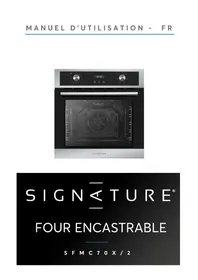
SFMC70X - Cooker SIGNATURE - Free user manual and instructions
Find the device manual for free SFMC70X SIGNATURE in PDF.


| Product type | Built-in electric oven |
| Brand | SIGNATURE |
| Model | SFMC70X |
| Energy class | A |
| Energy consumption (convection mode) | 0.79 kWh/cycle |
| Useful volume | 70 L |
| Total power | 2200 W |
| Supply voltage | 220-240 V ~ 50/60 Hz |
| Net weight | 28 kg |
| Number of functions | 6 functions: top/bottom heat + fan, top/bottom heat, bottom heat, bottom heat + fan, top heat, grill |
| Temperature range | 50 °C to 250 °C |
| Grill | Yes |
| Internal light | Yes |
| Programmable timer | Yes (up to 10 hours) |
| Built-in clock | Yes |
| Child lock | Yes |
| Removable door | Yes (for easy cleaning) |
| Removable shelves | Yes |
| Cleaning | Damp cloth and mild detergent; do not use steam cleaner or abrasives |
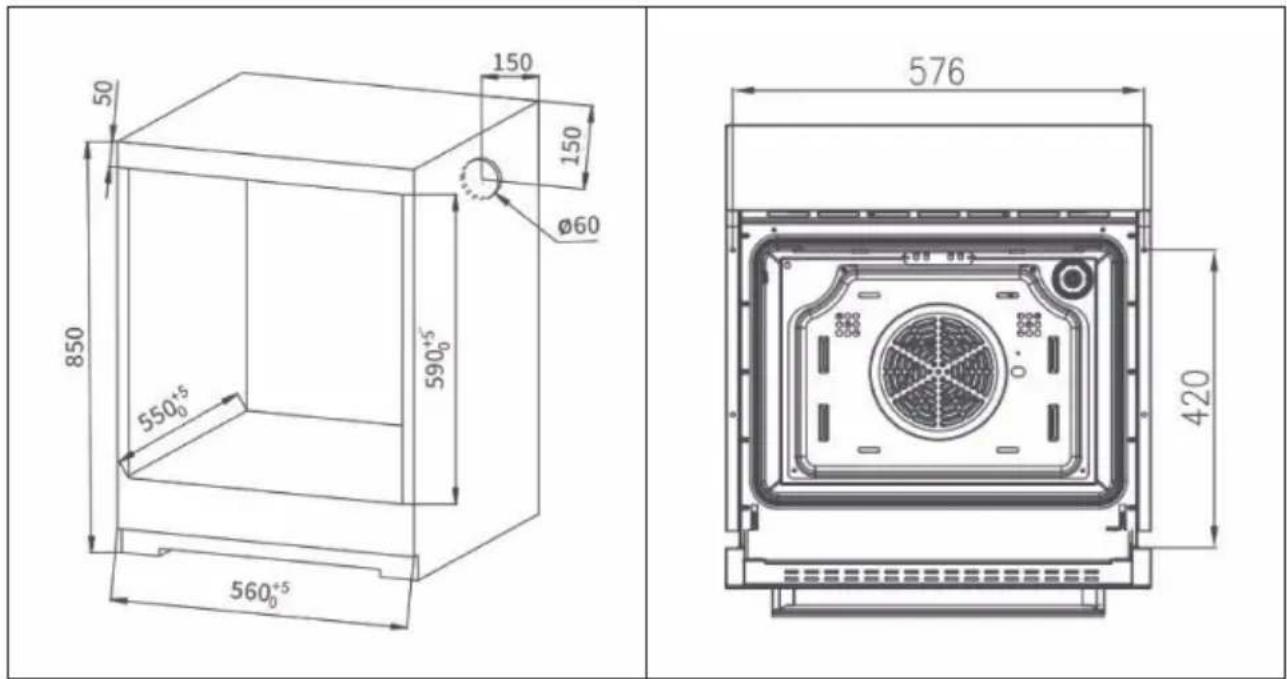
| Installation type | Built-in in a 60 cm wide cabinet (niche dimensions: 590 x 550 x 850 mm) |
| Legal warranty of conformity | 2 years |
Frequently Asked Questions - SFMC70X SIGNATURE
User questions about SFMC70X SIGNATURE
0 question about this device. Answer the ones you know or ask your own.
Ask a new question about this device
Download the instructions for your Cooker in PDF format for free! Find your manual SFMC70X - SIGNATURE and take your electronic device back in hand. On this page are published all the documents necessary for the use of your device. SFMC70X by SIGNATURE.
USER MANUAL SFMC70X SIGNATURE
natural_image
Exterior view of a modern stainless steel oven with digital dials and a visible inner air vent (no text or symbols)SIGNATURE®
FOUR ENCASTRABLE
S F M C 7 0 X / 2
TABLE DES MATIÈRES
CONSIGNES IMPORTANTES DE SECURITE -2-
COMMENT UTILISER -11-
INSTRUCTIONS DE L'OPÉRATION -13-
NETTOYAGE ET MAINTENANCE
-16-
SPECIFICATIONS TECHNIQUES -21-


natural_image
Warning symbol with steam inside a triangle (no text or numbers)ATTENTION SURFACE CHAUDE
natural_image
Simple line drawing of a rectangular grid pattern with vertical lines (no text or symbols)Grille
natural_image
Simple line drawing of a rectangular frame with internal diagonal lines and a central square (no text or symbols)natural_image
Two identical wireframe structural panels with horizontal grooves, no text or symbols presentnatural_image
Diagram showing a mechanical component with rotational motion and a close-up of its internal structure (no text or symbols)Installation
natural_image
Symbol of a trash bin crossed out by two diagonal lines, with no text or labels present.natural_image
Exterior view of a modern stainless steel oven with digital dials and a visible internal air vent (no text or symbols)SIGNATURE®
BUILT-IN ELECTRIC OVEN
S F M C 7 0 X / 2
CONTENT
WARNING -2-
HOW TO USE -9-
OPERATION -11-
CLEANING AND CARE -10-
TECHNICAL SPECIFICATION -18-

THIS PRODUCT IS FOR HOUSEHOLD USE ONLY!
Please read these instructions carefully before the first use of this product and save this manual for your future reference.
ACKNOWLEDGMENT
Thank you for purchasing our product. We hope you enjoy using the many features and benefits it provides. Before using this product please study this entire Instruction Manual carefully. Keep this manual in a safe place for future reference. Ensure that other people using the product are familiar with these instructions as well.
WARNING
- When the oven is first switched on, it may give off an unpleasant smell. This is due to the bonding agent used for the insulating panels within the oven. Please run up the new empty product with the conventional cooking function, 250 °C , 90 minutes to clean oil impurities inside the cavity.
- During the first use, it is completely normal that there will be a slight smoke and odors. If it does occur, you merely have wait for the smell to clear before putting food into the oven.
- Please use the product under the open environment.
● The appliance and its accessible parts become
hot during use. Care should be taken to avoid touching heating elements. Children less than 8 years of age shall be kept away unless continuously supervised.
- If the surface is cracked, switch off the appliance to avoid the possibility of electric shock.
- This appliance can be used by children aged from 8 years and above and persons with reduced physical, sensory or mental capabilities or lack of experience and knowledge if they have been given supervision or instruction concerning use of the appliance in a safe way and understand the hazards involved. Children shall not play with the appliance. Cleaning and user maintenance shall not be made by children without supervision.
- During use, the appliance becomes very hot. Care should be taken to avoid touching heating elements inside the oven.
- Do not allow children to go near the oven when it is operating, especially when the grill is on.
-
Ensure that the appliance is switched off before replacing the oven lamp to avoid the possibility of electric shock.
-
The means for disconnection must be incorporated in the fixed wiring in accordance with the wiring specifications.
● Children should be supervised to ensure that they do not play with the appliance. - Accessible parts may become hot during use. Young children should be kept away.
- An all-pole disconnection means must be incorporated in the fixed wiring in accordance with the wiring rules.
- If the supply cord is damaged, it must be replaced by the manufacturer, its service agent or similarly qualified persons in order to avoid a hazard.
- Do not use harsh abrasive cleaners or sharp metal scrapers to clean the oven door glass since they can scratch the surface, which may result in shattering of the glass.
● A steam cleaner is not to be used.
The appliances are not intended to be operated by means of an external timer or separate remote-control system. - Regarding the instructions for the installation of the accessories, replacement of the bulb, please refer to below paragraphs of this manual.
- Regarding the instructions for the installation of the oven and connection to power supply,
please refer to below paragraphs of this manual.
● WARNING: The appliance and its accessible parts become hot during use.
Care should be taken to avoid touching heating elements.
Children less than 8 years of age shall be kept away unless continuously supervised.
- This appliance is intended to be used in household and similar applications such as:
- staff kitchen areas in shops, offices and other working environments;
- farm houses;
- by clients in hotels, motels and other residential type environments;
- bed and breakfast type environments.
- WARNING: Ensure that the appliance is switched off before replacing the lamp to avoid the possibility of electric shock.
- The appliance is not intended to be operated by means of an external timer or separate remote-control system.
- Regarding the instructions for installation and electric connection of the appliance, thanks to refer to the below paragraph of the manual.
- Regarding the instructions for cleaning surfaces in contact with food thanks to refer to the below paragraph of the manual.
- Regarding the information of the method for replacing illuminating lamps, thanks to refer to the below paragraph of the manual.
- Do not place any heavy load on the oven door when it is open, and do not let children climb or sit on it.
- Replacing certain parts of your household electrical appliance may lead to a danger. Please ensure that you have the necessary skills and own all tools required to carry out the self-repair operations safely. Otherwise, please contact a qualified professional.
SAFETY HINTS
- Do not use the oven unless you are wearing something on your feet. Do not touch the oven with wet or damp hands or feet.
- For oven: Oven door should not be opened often during the cooking period.
- The appliance must be installed by an authorized technician and put into use. The producer is not responsible for any damage that might be
caused by defective placement, and installation by unauthorized personnel.
- When the door or drawer of oven is open do not leave anything on it, you may unbalance your appliance or break the door.
- Some parts of appliance may keep its heat for a long time; it is required to wait for it to cool down before touching onto the points that are exposed to the heat directly.
- If you will not use the appliance for a long time, it is advised to plug it off.
FITTING THE OVEN INTO THE KITCHEN UNIT
Fit the oven into the space provided in the kitchen unit; it may be fitted underneath a work top or into an upright cupboard. Fix the oven in position by screwing into place, using the two fixing holes in the frame. To locate the fixing holes, open the oven door and look inside. To allow adequate ventilation, the measurements and distances adhered to when fixing the oven.
IMPORTANT
If the oven is to work properly, the kitchen housing must be suitable. The panels of the kitchen unit that are next to the oven must be made of a heat resistant material. Ensure that the glues of units that are made of veneered wood can with stand temperatures of at least 120^ C. Plastics or glues that cannot withstand such temperatures will melt and deform the unit, once the oven has been lodged inside the units, electrical parts must be completely insulated. This is a legal safety requirement. All guards must be firmly fixed into place so that it is impossible to remove them without using special tools. Remove the back of the kitchen unit to ensure an adequate current of air circulates around the oven. The hob must have a rear gap of at least 45 mm.
DECLARATION OF COMPLIANCE
When you have unpacked the oven, make sure that it has not been damaged in any way. If you have any doubts at all, do not use it: contact a professionally CE
qualified person. Keep packing materials such as plastic bags, polystyrene, or nails out of the reach of children because these are dangerous to children.
HOW TO USE
■ To set functions by turning the function knob to desired level.
■ To set the temperature by turning the temperature knob.
The oven will automatically start cooking after function, time and temperature are set.
If the oven is not in use, always set all the knobs to "0".
PRODUCT DESCRIPTION
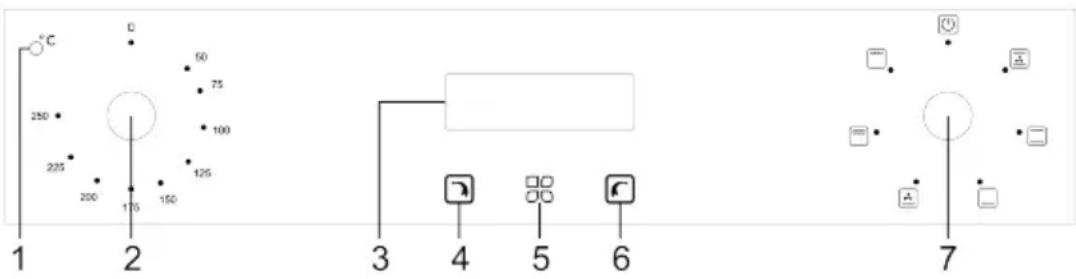
| 1 | Operating light |
| 2 | Temperature controller: turn the controller to the desired temperature. |
| 3 | Display |
| 4 | Minus key |
| 5 | Setting the timer/clock |
| 6 | Plus key |
| 7 | Function controller: turn the controller to the desired function. |
Function controls
Turn the function control knob to the desired symbol. The following functions are available:
 | Top heat/bottom heat + circulating air:The combination of fan and upper and lower heating elements ensures more even heat distribution and saves up to 30-40 % energy. The crust is lightly browned on the outside, while the food does not dry out on the inside. The function is suitable for most dishes that are baked. |
 | Top heat/bottom heat:The upper and lower heating elements are switched on. This function is suitable for grilling or frying large pieces of meat at a higher temperature. |
 | Bottom heat:The concealed heating element at the bottom of the stove provides a more concentrated heat without tanning. The function is suitable for slow-cooking dishes such as casseroles, stews, pastries and pizzas. |
 | Bottom heat + circulating air:The rear fan and the lower heating element work simultaneously.The temperature can be set between 50°C and 250°C. |
 | Top heat + grill:The upper inner ring heating element and the upper outer ring heating element work simultaneously. The temperature can be set between 50°C and 250°C. The upper inner ring heating element and the upper outer ring heating element operate simultaneously. |
 | Grill:The upper inner ring heating element works. The temperature can be adjusted between 50°C and 250°C. |
COOKING TIME AND SETTINGS
| Weight Quantity | Stage | Function Temp. Time | Time (1. side) | Time (2. side) | Accessories | ||
| Biscuits | 500g | 3 |  | 200 °C | 10-15 min | — | Baking tray |
| Sandwich | 200g | 3 |  | 180 °C | 15-20 min | — | Grating |
| Biscuit roll | 200g | 3 |  | 180 °C | 10-18 min | — | Baking tray |
| Cakes | 300g 400g | 3 |  | 185 °C | 20-25 min | — | Baking tray |
| Sponge cake | 500g | 3 |  | 175 °C | 30-35 min | — | Grating |
| Pizza | 350g | 3 |  | 200 °C | 10 min | — | Baking tray |
| Apple pie | 1200g1200g3 | 3 |  | 185 °C | 50-60 min | — | Grating |
| Toast | 9 pieces | 5 |  | 240 °C | 1-2 min | — | Grating |
| Hamburger | 1 | 5 |  | 240 °C | 10-20 min | 5-10 min | Baking tray |
OPERATION
Setting the time
- When the unit is turned on for the first time, the clock displays [12:00] and the clock icon ⏻ blinks.
- Press the 📄 or 📋 button to set the current time.
- Then wait 5 seconds until the time is set and the clock icon ☐stops blinking.
Setting the Alarm
The alarm can be applied to any function. The adjustable time is between 1 minute to 23 hours and 59 minutes.
- Press the 📁 button until the bell symbol 🔊 flashes.
- Press the 📄 or 📋 buttons to set the time for the alarm (= current time + set time).
- Wait 5 seconds until the time is set and the bell symbol △ stops flashing.
- When the working time reaches the set time, the alarm sounds and the bell symbol △ flashes. Press the 📄, 🏠 or 🌐 button to cancel the alarm, the bell symbol △ will go out. If you do not press any key, the alarm will go off after 2 minutes.
Setting the cooking time
If the food is only to be cooked for a certain time, you can set the oven to automatically turn off after the desired cooking time. The adjustable time is between 0-10 hours.
- Press the ☐ key until the following symbol flashes on the display:
- Press the 📄 or 🏠 buttons to set the cooking time. Wait briefly. When the icon |→|stops blinking, the set time has been taken.
- Then set the desired temperature and function.
- When the set time has elapsed, the oven stops.
The alarm sounds and the symbol flashes. Press the 📄, 📋 or 📃 button to cancel the alarm. If you do not press any key, the alarm will go off after 2 minutes.
- When the oven goes out, the display returns to the current time.
- Turn the Function Knob to the [0] position to turn off the oven.
For example, the current time is 12:00, and the cooking time you want is 50 minutes, first press the button 📁 until |→| you see flashes on the screen, then set the cooking time:
-
Press the Ⓞ to set the cooking time 50 minutes. When |→| is constant lighting, that means the setting is completed.
-
Adjust the oven function knob and temperature knob to your desired function and temperature.
-
When the cooking time is over, the oven stops working. The bell rings and |→| flashes. Pressing 📄, 📋 or 🏠 at this time will stop the bell rings. If you don't press any button, the bell ring will stop after 2 minutes.
Child lock setting
-
To active the child lock, press and hold 🎥 and 📞 for 3 seconds until the icon is displayed.
-
To deactive the child lock, press and hold ☐ and 📞 again for 3 seconds until Ⓞ icon disappears.
PRODUCT OVERVIEW
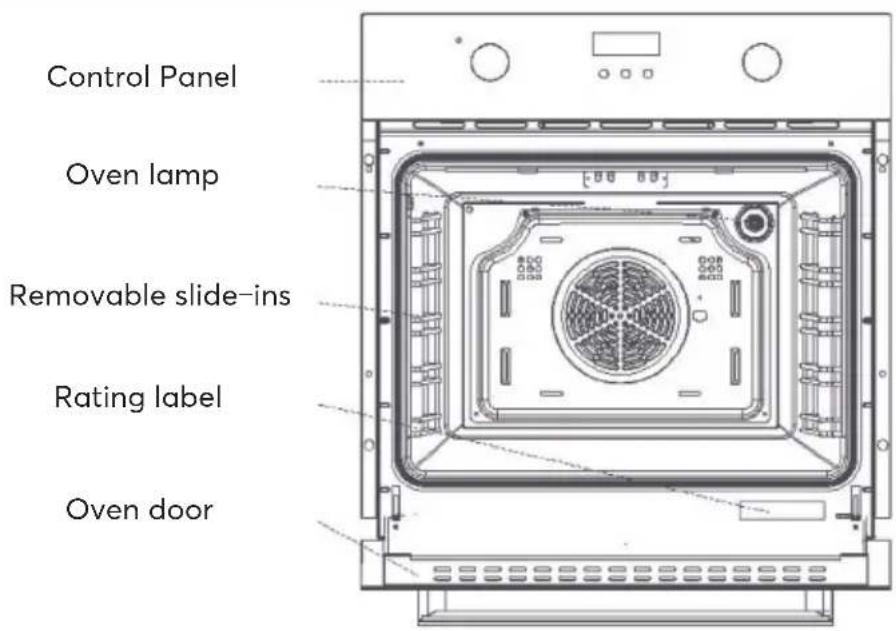
Accessories
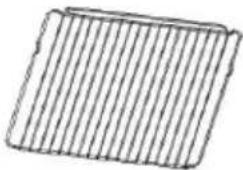
natural_image
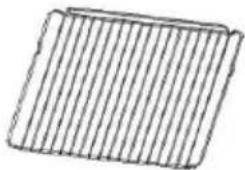
Simple line drawing of a rectangular grid pattern with vertical lines (no text or symbols)Grating: for baking and grilling
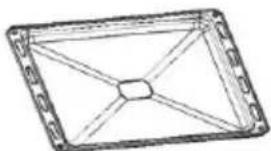
natural_image
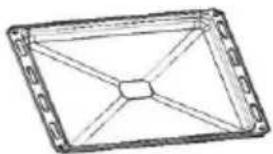
Simple line drawing of a rectangular frame with internal diagonal lines and a central square (no text or symbols)Baking tray: Used to cook large quantities of food, such as moist cakes, pastries, frozen foods. Also used to collect fat, crumbs and sauce.
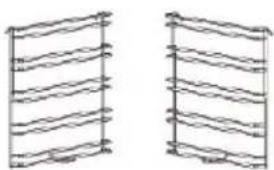
natural_image
Two identical wireframe diagrams of vertical panels with horizontal bands, no text or symbols present.Slide-ins: For easier cleaning of the oven, the two drawer units can be removed.
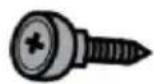
2 screws: For fixing the oven.
CLEANING AND CARE
Removing the oven door
Removing the oven door gives you easier access to the entire interior of the oven for cleaning and maintenance of the oven.
| Open the oven door and pull back the latches on the two door hangers. | Close the door to 15°, lift it up and remove the door. Proceed in reverse order to reinstall the door after cleaning the furnace. |
Removing the trays
Removing the drawers gives you easier access to the entire furnace interior for cleaning and maintenance of the furnace.
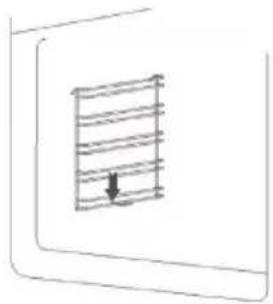 | 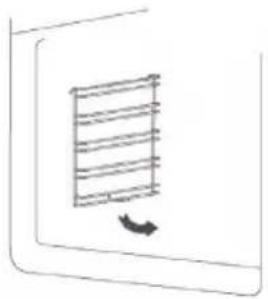 | 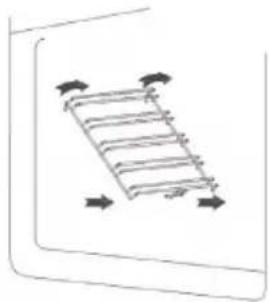 |
| Remove the grate and plate. Then push down the hook on the drawers. | Raise the drawers 45°. Unhook the drawers at the top and remove them. Proceed in reverse order to re-insert the drawers after cleaning the oven. | |
Cleaning
All parts of the appliance that come into contact with food must be cleaned regularly.
- Switch off the appliance before each cleaning and maintenance and disconnect it from the mains supply.
- Turn all switches to the "off" position.
- Wait until the appliance has cooled down to the point where it is only warm and not hot, as this makes cleaning the appliance easier.
- Clean the surface with a damp cloth, a soft brush, or a fine sponge and then rub dry. In case of heavy soiling, you can use hot water and a non-abrasive detergent to clean the unit.
- Do not use aggressive or abrasive detergents or sharp metal scrapers to clean the glass in the oven door as they may scratch the surface and damage the glass.
- Do not leave acidic substances (lemon juice, vinegar) on stainless steel parts.
- Do not use steam cleaners to clean the appliance. The baking trays and grilles can be cleaned with a mild detergent.
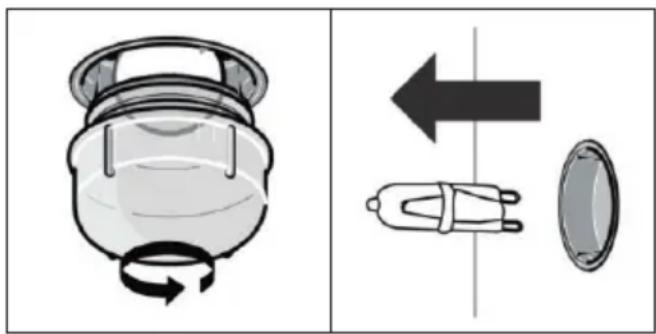
Replacing the lamp
To replace the lamp, follow these steps:
- Unplug the appliance from the wall outlet.
- Loosen the lamp cover by turning it counterclockwise (it could be very tight)
- Remove the bulb and replace it with a new bulb of the same type.
- Reattach the lamp cover.
natural_image
Diagram showing a device with rotational flow and a separate mechanical component with directional arrows (no text or symbols)Important note on the slide-in modules
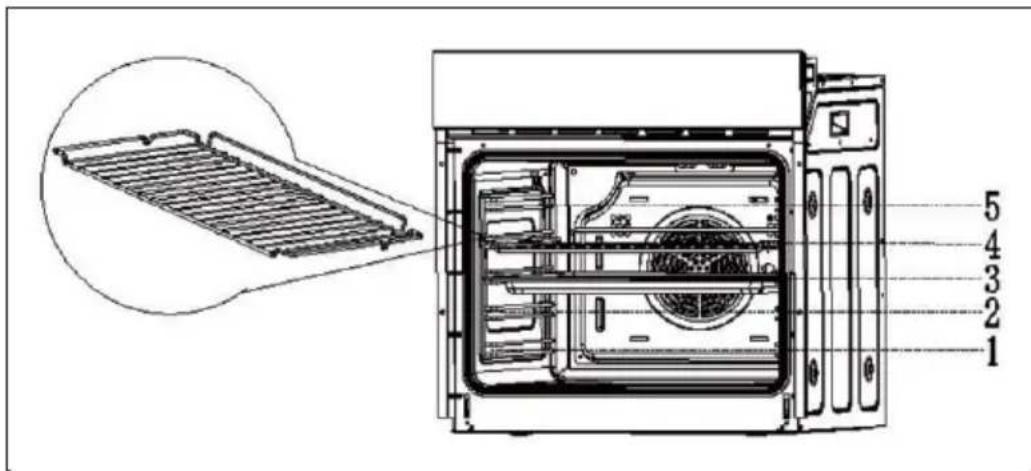
- To ensure that the oven can be used safely, it is essential that the grilles and baking trays are placed correctly.
- The grilles and the baking tray may only be used between the first and the fifth level.
- The grilles and baking trays should be pushed into the oven the right way round, as this ensures that they are removed carefully and that hot food cannot slip out.
Notes on electrical connection
- The device is designed for fixed installation with a three-pole mains cable and may only be connected by an authorised specialist in accordance with the wiring diagram.
- Only a qualified electrician who complies with the relevant regulations may replace the mains cable.
- Do not use multiple plugs, socket strips or extensions, as overloading can lead to a fire hazard.
- If the connection is no longer accessible after installation, an all-pole disconnector with a contact opening of at least 3 mm is required.
Wiring
| Green-Yellow | Earth wire (E) | 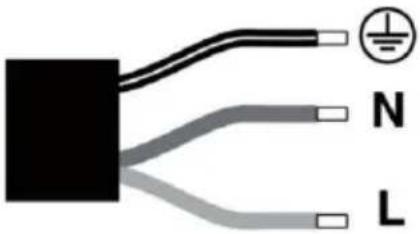 |
| Blue Neutral | wire (N) | |
| Brown Live wire | (L) |
Basic installation instructions
- Observe the specified installation dimensions exactly.
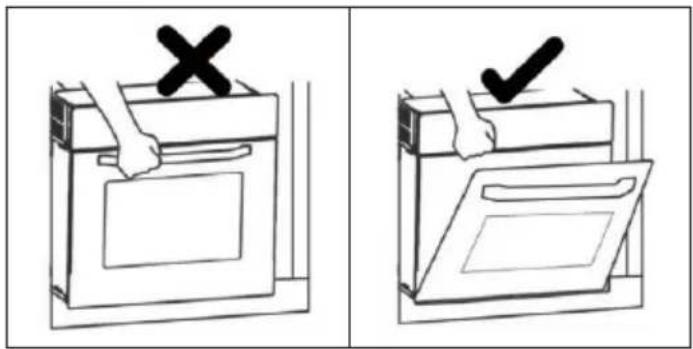
• To achieve optimum integration into the kitchen unit, install the oven in a standard 600 mm wide cabinet so that it is flush with the front of the cabinet. - Do not hold the stove by the stove door when installing.
Installation
Before installing the unit, please make sure that the cabinet has the following empty internal dimensions. To ensure air circulation, the oven must be installed in accordance with the dimensions and distances shown in the figure below.
CLEANING AND MAINTENANCE
For the sake of good appearance and reliability, keep the unit clean. The modern design of the unit facilitates maintenance to a minimum. The parts of the unit which come into contact with food have to be cleaned regularly.
■ Before any maintenance and cleaning, disconnect the power.
■ Set all controls in the OFF position.
- Wait until the inside of the unit is not hot but only slightly warm-cleaning is easier than when warm.
- Clean the surface of the unit with a damp cloth, soft brush or fine sponge and then wipe dry. In case of heavy soiling, use hot water with non-abrasive cleaning product.
For cleaning the glass of the oven door, do not use abrasive cleaners or sharp metal scrapers, these can scratch the surface or lead to the glass being damaged.
■ Never leave acidic substances (lemon juice, vinegar) on stainless steel parts. - Do not use a high pressure cleaner for cleaning the unit. The baking pans may be washed in mild detergent.
TECHNICAL SPECIFICATIONS according to (EU) No 66/2014
TECHNICAL SPECIFICATION
| Supplier's name BUT | |
| Supplier's model identifier | SFMC70X/2 |
| Type of oven | Built-in |
| Mass of the appliance | 28 kg |
| Energy efficiency index(EEIcavity) per cavity | 93.6 |
| Energy class A | |
| Energy consumption per cycle in forced air mode | 0.79 |
| Energy consumption per cycle in conventional mode | 0.80 |
| Number of cavity 1 | |
| The heat source per cavity Electricity | |
| Volume of each cavity 70L | |
| Voltage | 220-240V~50/60Hz |
| Max power 2200W |
CORRECT DISPOSAL OF THIS PRODUCT
natural_image
Symbol of a trash bin crossed with no text or numbers, representing waste sorting or recycling (no text present)European directive 2012/19/EU on Waste from Electrical and Electronic Equipment (WEEE), requires that used household appliances are not thrown into the normal municipal waste stream. Used appliances must be collected separately in order to optimize the rate of recovery and recycling of materials that compose them, and to reduce the impact on human health and on the environment. The crossed bin symbol is affixed to all the products to remind you of the obligations of separated collection.
We decline liability for any damage or accident derived from any use of this product which is not in conformity with the instructions contained in this booklet.
In accordance with Article L. 217 of the Consumer Code, your product benefits from a legal guarantee of conformity of 2 years To contact our After-Sales Service, before going to your BUT store, call 09 78 97 97 97, From Monday to Friday from 9:00 to 19:00, Saturday from 9:00 to 18:00 (local call price).




- SIGNATURE®
- FOUR ENCASTRABLE
- TABLE DES MATIÈRES
- Installation
- BUILT-IN ELECTRIC OVEN
- CONTENT
- ACKNOWLEDGMENT
- WARNING
- SAFETY HINTS
- FITTING THE OVEN INTO THE KITCHEN UNIT
- IMPORTANT
- DECLARATION OF COMPLIANCE
- HOW TO USE
- Function controls
- OPERATION
- Setting the time
- Setting the Alarm
- Setting the cooking time
- Child lock setting
- PRODUCT OVERVIEW
- Accessories
- CLEANING AND CARE
- Cleaning
- Replacing the lamp
- Basic installation instructions
- CLEANING AND MAINTENANCE
- CORRECT DISPOSAL OF THIS PRODUCT
Brand : SIGNATURE
Model : SFMC70X
Category : Cooker