DLG2102W - Tumble drier LG - Free user manual and instructions
Find the device manual for free DLG2102W LG in PDF.


User questions about DLG2102W LG
0 question about this device. Answer the ones you know or ask your own.
Ask a new question about this device
Download the instructions for your Tumble drier in PDF format for free! Find your manual DLG2102W - LG and take your electronic device back in hand. On this page are published all the documents necessary for the use of your device. DLG2102W by LG.
USER MANUAL DLG2102W LG
Before beginning installation, read these instructions carefully. This will simplify installation and ensure that the dryer is installed correctly and safely. Leave these instructions near the dryer after installation for future reference.
SECADORAS
GUÍA DEL USUARIO E
To contact LG Electronics, 24 hours a day, 7 days a week:
1-800-243-0000
Or visit us on the Web at: us.lge.com
To contact LG Electronics, 24 hours a day, 7 days a week :
1-888-LGCANADA
Or visit us on the Web at : ca.lge.com
natural_image
Silhouette of a formal dress with a bow tie and collar, no text or symbols presentIMPORTANT SAFETY INSTRUCTIONS
What to Do if You Smell Gas ....3
Basic Safety Precautions 4
California safe drinking water and toxic
enforcement act 4
Grounding Instructions 5
Safety Instructions for Installation 5, 6
Safety Instructions for Connecting Electricity .....7
PARTS AND FEATURES
Key Parts and Components 8
INSTALLATION INSTRUCTIONS
IMPORTANT: Read all installation instructions
completely before installing and operating your
dryer! 9
Choose the Proper Location 9
Clearances 9
Installation With Optional
Pedestal Base or Stacking Kit 10
Leveling the Dryer 11
Reversing the Door Swing 11
Changing the Dryer Vent Location 12
Venting the Dryer 13, 14
Connecting Gas Dryers 15, 16
Connecting Electric Dryers 17-21
Special Requirements for Manufactured
or Mobile Homes 22
Final Installation Check 22
HOW TO USE
Sorting Loads 23
Loading the Dryer 23
Check the Lint Filter Before Every Load 23
Control Panel Features 24
Cycle Guide 25
The LED Display 26
Operating the Dryer 27
Cycle Setting Buttons 28
Custom Program 28
Cycle Option Buttons 29
USER-MAINTENANCE INSTRUCTIONS
Regular Cleaning 30
TROUBLESHOOTING
Before Calling for Service ....31, 32
SPECIFICATIONS/OPTIONAL ACCESSORIES
Key Dimensions and Specifications 33
Optional Accessories 33
Pedestal Installation 34, 35
Stacking Kit Installation 36, 37
WARRANTY 38, 39
THANK YOU!
Congratulations on your purchase
and welcome to the LG family. Your
new LG Dryer combines the most
advanced drying sensor technology
with simple operation and high
efficiency. By following the
operating and care instructions
in this manual, your dryer will
provide you with many years of
reliable service.
Product Registration Information
Model:
Serial Number:
Date of Purchase:
The model and serial number can be located on the rating plate inside the front door.
natural_image
Silhouette of a clothes hanger with a cloth and a spray bottle, no text or symbols presentREAD ALL INSTRUCTIONS BEFORE USE
WARNING
For your safety, the information in this manual must be followed to minimize the risk of fire or explosion, electric shock, or to prevent property damage, personal injury, or loss of life.
Your Safety and the safety of others is very important.
We have provided many important safety messages in this manual and on your appliance. Always read and obey all safety messages.

This is the safety alert symbol.
This symbol alerts you to potential hazards that can kill or hurt you and others.
All safety messages will follow the safety alert symbol and either the word DANGER or WARNING. These words mean:

You can be killed or seriously injured if you don't immediately follow instructions.

You can be killed or seriously injured if you don't follow instructions.
All safety messages will tell you what the potential hazard is, tell you how to reduce the chance of injury, and tell you what can happen if the instructions are not followed.
- Do not install a clothes dryer with flexible plastic venting materials. If flexible metal (foil type) duct is installed, it must be of a specific type identified by the appliance manufacturer as suitable for use with clothes dryers. Flexible venting materials are known to collapse, be easily crushed, and trap lint. These conditions will obstruct clothes dryer airflow and increase the risk of fire.
- Do not store or use gasoline or other flammable vapors and liquids in the vicinity of this appliance or any other appliances.
• Installation and service must be performed by a qualified installer, service agency, or the gas supplier. - Install the clothes dryer according to the manufacturer's instructions and local codes.
- Save these instructions.
WHAT TO DO IF YOU SMELL GAS:
- Do not try to light a match or cigarette, or turn on any gas or electrical appliance.
- Do not touch any electrical switches. Do not use any phone in your building.
-
Clear the room, building, or area of all occupants.
-
Immediately call your gas supplier from a neighbor's phone. Follow the gas supplier's instructions carefully.
- If you cannot reach your gas supplier, call the fire department.
READ ALL INSTRUCTIONS BEFORE USE
⚠ WARNING For your safety, the information in this manual must be followed to minimize the risk of fire or explosion, electric shock, or to prevent property damage, personal injury, or loss of life.
BASIC SAFETY PRECAUTIONS
⚠ WARNING: To reduce the risk of fire, electric shock, or injury to persons when using this appliance, follow basic precautions, including the following:
- Read all instructions before using the dryer.
- Before use, the dryer must be properly installed as described in this manual.
- Do not place items exposed to cooking oils in your dryer. Items contaminated with cooking oils may contribute to a chemical reaction that could cause a load to catch fi re.
- Do not dry articles that have been previously cleaned in, washed in, soaked in, or spotted with gasoline, dry-cleaning solvents, or other fl ammable or explosive substances as they give off vapors that could ignite or explode.
- Do not reach into the dryer if the drum or any other part is moving.
- Do not repair or replace any part of the dryer or attempt any servicing unless specifically recommended in this Use and Care Guide or in published user-repair instructions that you understand and have the skills to carry out.
- Do not tamper with controls.
-
Before the dryer is removed from service or discarded, remove the door to the drying compartment.
-
Do not allow children to play on or in the dryer. Close supervision of children is necessary when the dryer is used near children.
- Do not use fabric softeners or products to eliminate static unless recommended by the manufacturer of the fabric softener or product.
- Do not use heat to dry articles containing foam rubber or similarly textured rubber-like materials.
- Keep area around the exhaust opening and adjacent surrounding areas free from the accumulation of lint, dust, and dirt.
- The interior of the dryer and exhaust vent should be cleaned periodically by qualified service personnel.
- Do not install or store the dryer where it will be exposed to the weather.
- Always check the inside of the dryer for foreign objects.
- Clean lint screen before or after each load.
CALIFORNIA SAFE DRINKING WATER AND TOXIC ENFORCEMENT ACT
This act requires the governor of California to publish a list of substances known to the state to cause cancer, birth defects, or other reproductive harm and requires businesses to warn customers of potential exposure to such substances.
Gas appliances can cause minor exposure to four of these substances, namely benzene, carbon monoxide, formaldehyde, and soot, caused primarily by the incomplete combustion of natural gas or LP fuels.
Properly adjusted dryers will minimize incomplete combustion. Exposure to these substances can be minimized further by properly venting the dryer to the outdoors.
READ ALL INSTRUCTIONS BEFORE USE
⚠ WARNING For your safety, the information in this manual must be followed to minimize the risk of fire or explosion, electric shock, or to prevent property damage, personal injury, or loss of life.
GROUNDING INSTRUCTIONS
This appliance must be grounded. In the event of malfunction or breakdown, grounding will reduce the risk of electric shock by providing a path of least resistance for electric current. This appliance must be equipped with a cord having an equipment-grounding conductor and a grounding plug. The plug must be plugged into an appropriate outlet that is properly installed and grounded in accordance with all local codes and ordinances.
WARNING — Improper
connection of the equipment-grounding conductor can result in a risk of electric shock.
Check with a qualified electrician or service person if you are in doubt as to whether the appliance is properly grounded.
Do not modify the plug provided with the appliance. If it will not fit the outlet, have a proper outlet installed by a qualified electrician.
This appliance must be connected to a grounded metal, permanent wiring system or an equipment-grounding conductor must be run with the circuit conductors and connected to the equipment-grounding terminal or lead on the appliance.
Electrical shock can result if the dryer is not properly grounded.
SAFETY INSTRUCTIONS FOR INSTALLATION
⚠ WARNING: To reduce the risk of fire, electric shock, or injury to persons when using this appliance, follow basic precautions, including the following:
- Properly ground dryer to conform with all governing codes and ordinances. Follow details in the installation instructions. Electrical shock can result if the dryer is not properly grounded.
- Before use, the dryer must be properly installed as described in this manual. Electrical shock can result if the dryer is not properly grounded.
• Install and store the dryer where it will not be exposed to temperatures below freezing or exposed to the weather. - All repairs and servicing must be performed by an authorized servicer unless specifically recommended in this Owner's Guide. Use only authorized factory parts. Failure to follow this warning can cause serious injury, fire, electrical shock, or death.
-
To reduce the risk of electric shock, do not install the dryer in humid spaces. Failure to follow this warning can cause serious injury, fire, electrical shock, or death.
-
Connect to a properly rated, protected, and sized power circuit to avoid electrical overload. Improper power circuit can melt, creating electrical shock and/or fire hazard.
- Remove all packing items and dispose of all shipping materials properly. Failure to do so can result in death, explosion, fire, or burns.
- Place dryer at least 18 in. above the floor for a garage installation. Failure to do so can result in death, explosion, fire, or burns.
- Keep all packaging from children. Packaging material can be dangerous for children. There is a risk of suffocation.
- Do not install nearby heat item. Such as stove, cooking oven. Failure to do so can cause deform, smoke and fire.
- Do not place candle and cigarettes on top of the product. Failure to do so can cause deform, smoke and fire.
- Remove all protective vinyl film from the product. Failure to do so can cause deform, smoke and fire.
READ ALL INSTRUCTIONS BEFORE USE
⚠ WARNING For your safety, the information in this manual must be followed to minimize the risk of fire or explosion, electric shock, or to prevent property damage, personal injury, or loss of life.
SAFETY INSTRUCTIONS FOR INSTALLATION
Exhaust/Ducting:
- Gas dryers MUST be exhausted to the outside. Failure to follow these instructions can result in fire or death.
- The dryer exhaust system must be exhausted to the outside of the dwelling. If the dryer is not exhausted outdoors, some fi ne lint and large amounts of moisture will be expelled into the laundry area. An accumulation of lint in any area of the home can create a health and fi re hazard.
- Use only rigid metal or fl exible metal 4-in. diameter ductwork inside the dryer cabinet or for exhausting to the outside. Use of plastic or other combustible ductwork can cause a fi re. Punctured ductwork can cause a fi re if it collapses or becomes otherwise restricted in use or during installation.
-
Ductwork is not provided with the dryer, and you should obtain the necessary ductwork locally. The end cap should have hinged dampers to prevent backdraft when the dryer is not in use. Failure to follow these instructions can result in fire or death.
-
The exhaust duct must be 4 in. (10.2 cm) in diameter with no obstructions. The exhaust duct should be kept as short as possible. Make sure to clean any old ducts before installing your new dryer. Failure to follow these instructions can result in fi re or death.
- Rigid or semi rigid metal ducting is recommended for use between the dryer and the wall. In special installations when it is impossible to make a connection with the above recommendations, a UL-listed fl exible metal transition duct may be used between the dryer and wall connection only. The use of this ducting will affect drying time. Failure to follow these instructions can result in fi re or death.
- DO NOT use sheet metal screws or other fasteners which extend into the duct that could catch lint and reduce the effi ciency of the exhaust system. Secure all joints with duct tape. For complete details, follow the Installation Instructions. Failure to follow these instructions can result in fi re or death.
READ ALL INSTRUCTIONS BEFORE USE
⚠ WARNING For your safety, the information in this manual must be followed to minimize the risk of fire or explosion, electric shock, or to prevent property damage, personal injury, or loss of life.
SAFETY INSTRUCTIONS FOR CONNECTING ELECTRICITY
⚠ WARNING: To reduce the risk of fire, electric shock, or injury to persons when using this appliance, follow basic precautions, including the following:
- Do not, under any circumstances, cut or remove the ground prong from the power cord. To prevent personal injury or damage to the dryer, the electrical power cord must be plugged into a properly grounded outlet.
- For personal safety, this dryer must be properly grounded. Failure to do so can result in electrical shock or injury.
- Refer to the installation instructions in this manual for specific electrical requirements for your model. Failure to follow these instructions can create an electrical shock hazard and/or a fire hazard.
- This dryer must be plugged into a properly grounded outlet. Electrical shock can result if the dryer is not properly grounded. Have the wall outlet and circuit checked by a qualified electrician to make sure the outlet is properly grounded. Failure to follow these instructions can create an electrical shock hazard and/or a fire hazard.
-
The dryer should always be plugged into its own individual electrical outlet which has a voltage rating that matches the rating plate. This provides the best performance and also prevents overloading house wiring circuits which could cause a fire hazard from overheated wires.
-
Never unplug your dryer by pulling on the power cord. Always grip plug firmly and pull straight out from the outlet. The power cord can be damaged, resulting in a risk of fire and electrical shock.
- Repair or replace immediately all power cords that have become frayed or otherwise damaged. Do not use a cord that shows cracks or abrasion damage along its length or at either end. The power cord can melt, creating electrical shock and/or fire hazard.
- When installing or moving the dryer, be careful not to pinch, crush, or damage the power cord. This will prevent injury and prevent damage to the dryer from fire and electrical shock.
SAVE THESE INSTRUCTIONS
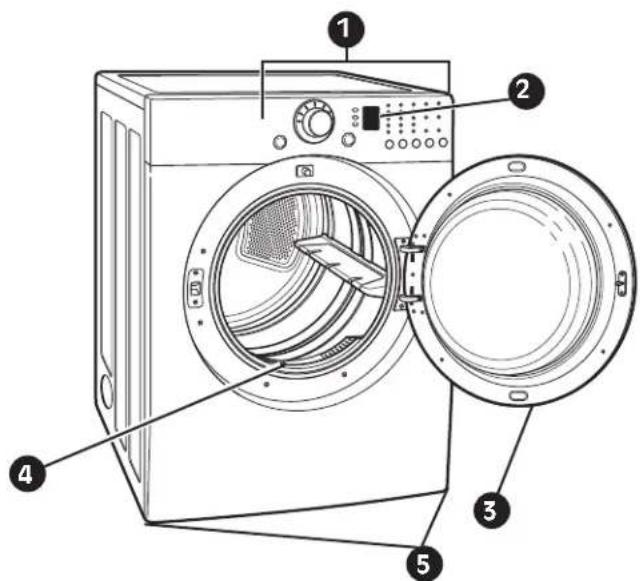
KEY PARTS AND COMPONENTS
1 EASY-TO-USE CONTROL PANEL
Rotate the Cycle Selector Knob to select the desired dry cycle. Add cycle options or adjust settings with the touch of a button.
② LED DISPLAY
The easy-to-read LED display shows cycle options and information and provides status messages during operation.
3 EASY-ACCESS REVERSIBLE DOOR
Wide-opening door provides easy access for loading and unloading. Door swing can be reversed to adjust for installation location.
4 FRONT-MOUNT LINT FILTER
Front-mounted lint filter allows for easy access and cleaning after every load.
5 LEVELING FEET
Four leveling feet (two in the front, and two in the back) adjust to improve dryer stability on uneven floors.
text_image
Diagram of a washing machine with numbered parts for identification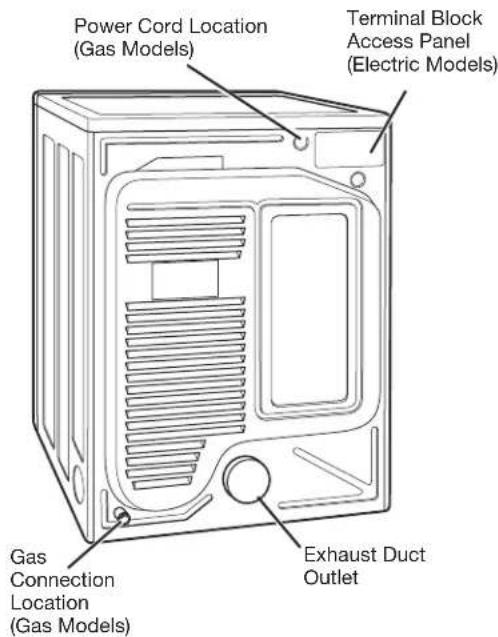
text_image
Power Cord Location (Gas Models) Terminal Block Access Panel (Electric Models) Gas Connection Location (Gas Models) Exhaust Duct OutletRear of Dryer
IMPORTANT: Read all installation instructions completely before installing and operating your dryer!
It is important that you review this entire manual before installing and using your dryer. Detailed instructions concerning electrical connections, gas connections, and exhaust requirements are provided on the following pages.
- Store and install the dryer where it will not be exposed to temperatures below freezing or exposed to outdoor weather conditions.
- Choose a location with a solid, level floor.
-
If the dryer is being installed in a garage, place the dryer at least 18 in. (46 cm) above the floor.
-
Properly ground dryer to conform with all governing codes and ordinances.
- To reduce the risk of electric shock, do not install the dryer in damp or wet locations.
- If you are installing your dryer in a manufactured or mobile home, please refer to the section Special Requirements for Manufactured or Mobile Homes.
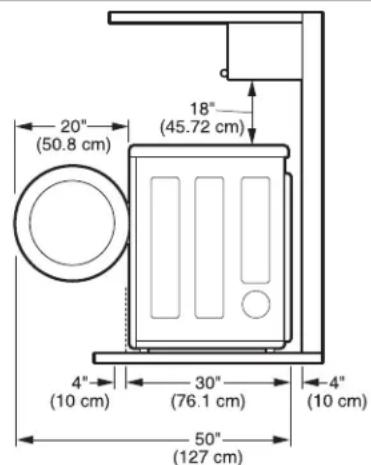
CLEARANCES
text_image
20" (50.8 cm) 18" (45.72 cm) 4" (10 cm) 30" (76.1 cm) 4" (10 cm) 50" (127 cm)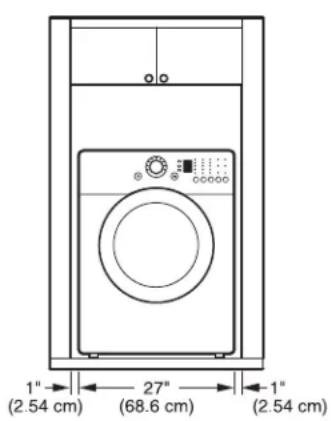
text_image
1" (2.54 cm) 27" (68.6 cm) -1" (2.54 cm)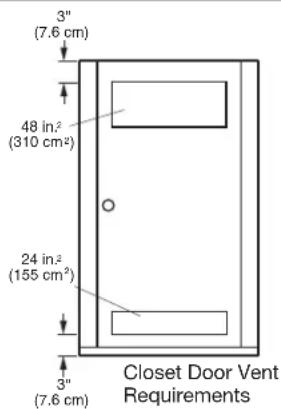
text_image
3" (7.6 cm) 48 in² (310 cm²) 24 in² (155 cm²) 3" (7.6 cm) Closet Door Vent Requirements- Most installations require a minimum 5 12 in. (14 cm) clearance behind the dryer for the exhaust ducting.
- Allow minimum clearances of at least 1 in. (2.5 cm) on the sides and back to minimize vibration and noise.
- Allowing additional clearance for installation and servicing is recommended.
- Be sure to allow for wall, door, or floor moldings that may increase the required clearances.
- Allow at least 24 in. (61 cm) in front of the dryer to open the door.
Additional Instructions for closet installations:
- The closet door must allow for sufficient airflow. Refer to the diagram above for minimum vent opening requirements. A louvered door is also acceptable.
- Make sure that there is at least 18 in. (46 cm) of clearance above the dryer.
INSTALLATION WITH OPTIONAL PEDESTAL BASE OR STACKING KIT
IMPORTANT: If you are installing your dryer using an optional pedestal base or stacking kit, please refer to Optional Accessories in this manual or to the instructions for your pedestal or stacking kit before proceeding with the installation.
Required Dimensions for Installation With Pedestal
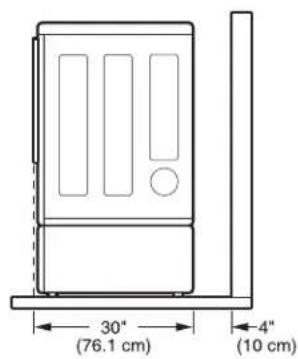
text_image
30° (76.1 cm) 4" (10 cm)Required Dimensions for Installation With Stacking Kit
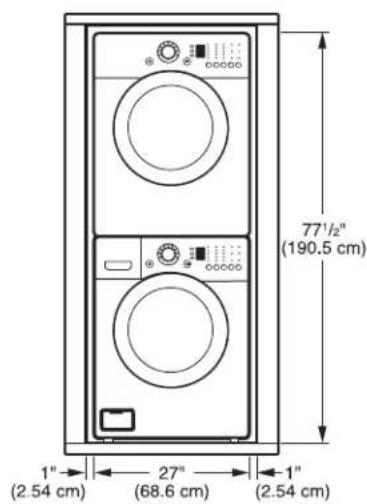
text_image
77½" (190.5 cm) 1" (2.54 cm) 27" (68.6 cm) 1" (2.54 cm)OPTIONAL ACCESSORIES
For these and other LG products, contact your local LG dealer, or visit our Web site at ca.lge.com
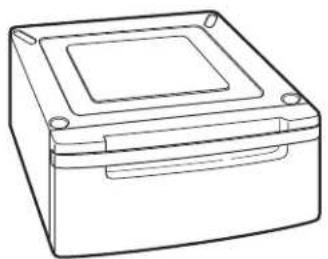
natural_image
Line drawing of a rectangular electronic device with a square top and side slots (no text or symbols)Pedestal (sold separately)
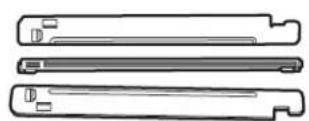
Stacking Kit (sold separately)
INSTALLATION INSTRUCTIONS
LEVELING THE DRYER
WARNING
- Wear gloves during installation.
- Failure to follow these instructions can result in injury.
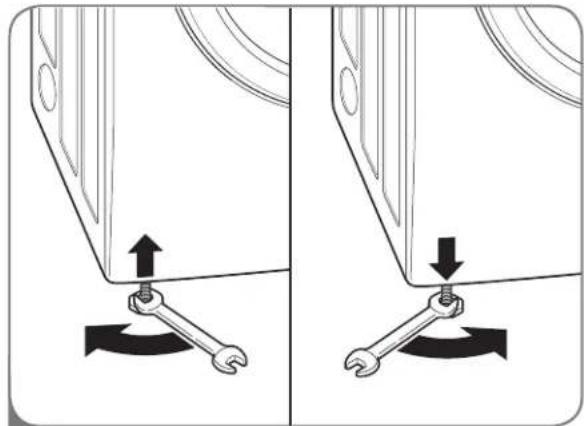
To ensure that the dryer provides optimal drying performance, it must be level. To minimize vibration, noise, and unwanted movement, the floor must be a perfectly level, solid surface.
NOTE: Adjust the leveling feet only as far as necessary to level the dryer. Extending the leveling feet more than necessary can cause the dryer to vibrate.
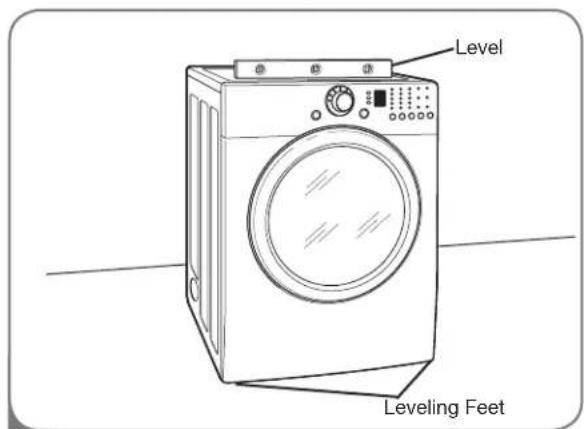
text_image
Level Leveling Feet1 Position the dryer in the final location. Place a level across the top of the dryer.
- All four leveling feet must rest solidly on the floor. Gently push on the top corners of the dryer to make sure that the dryer does not rock from corner to corner.
If you are installing the dryer on the optional pedestal, you must use the leveling feet on the pedestal to level the dryer. The dryer leveling feet should be fully retracted.
natural_image
Diagram showing two mechanical components with arrows indicating movement or force, no text or symbols present2 Use an adjustable wrench to turn the leveling feet. Turn clockwise to raise the dryer or counterclockwise to lower it. Raise or lower the leveling feet until dryer is level from side to side and front to back.
Make sure that all 4 leveling feet are in firm contact with the floor.
REVERSING THE DOOR SWING
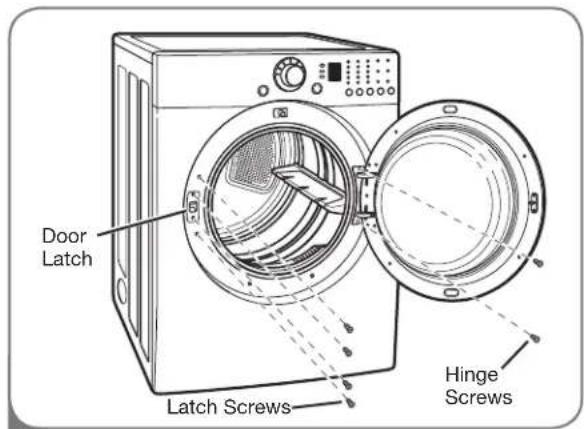
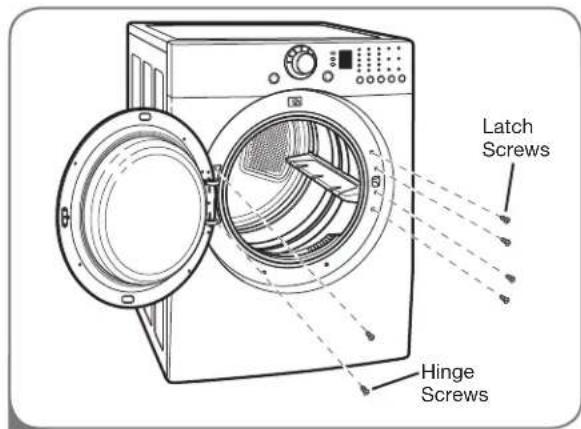
The swing of the dryer door can be reversed to fit your installation location.
text_image
Door Latch Latch Screws Hinge Screws1 Open the dryer door. Using a Phillips screwdriver, remove the 2 screws that secure the door hinge to the dryer door opening. Remove the 4 screws from the latch side of the dryer door opening, and remove the door latch.
text_image
Latch Screws Hinge Screws2 Turn the door around so the hinge is reversed, and reattach the door using the 2 screws previously removed. Reinstall the door latch and the 4 screws.
Test the door swing to make sure the door moves freely and latches securely. 11
CHANGING THE DRYER VENT LOCATION
WARNING
- Use a heavy metal vent.
- Do not use plastic or thin foil duct.
- Clean old ducts before installing this dryer.
- Wear gloves during installation.
- Failure to follow these instructions can result in death or fi re.
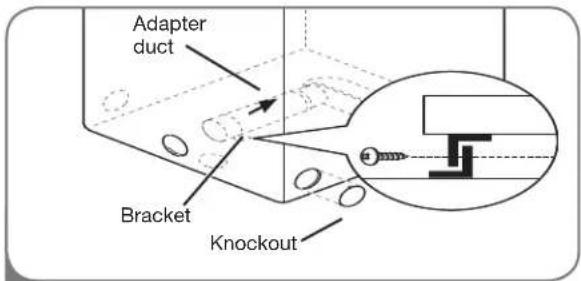
Your new dryer is shipped to vent to the rear. It can also be configured to vent to the bottom or side (right-side venting is not available on gas models).
An adapter kit, part number 383EEL9001B, may be purchased from your LG retailer. This kit contains the necessary duct components to change the dryer vent location.
OPTION 1: Side Venting
text_image
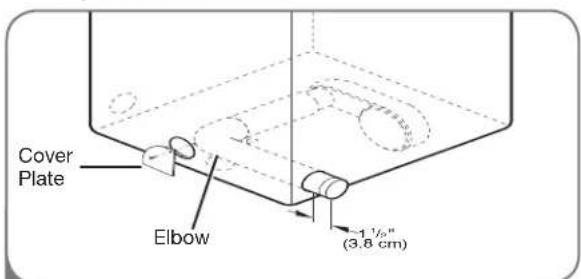
Adapter duct Bracket Knockout2 Press the tabs on the knockout and carefully remove the knockout for the desired vent opening (right-side venting is not available on gas models). Press the adapter duct onto the blower housing and secure to the base of the dryer as shown.
text_image
Cover Plate Elbow 1½" (3.8 cm)3 Preassemble a 4-in. (10 cm) elbow to the next 4-in. (10 cm) duct section, and secure all joints with duct tape. Be sure that the male end of the elbow faces AWAY from the dryer. Insert the elbow/duct assembly through the side opening and press it onto the adapter duct. Secure in place with duct tape. Be sure that the male end of the duct protrudes 1½ in. (3.8 cm) to connect the remaining ductwork. Attach cover plate to the back of the dryer with included screw.
text_image
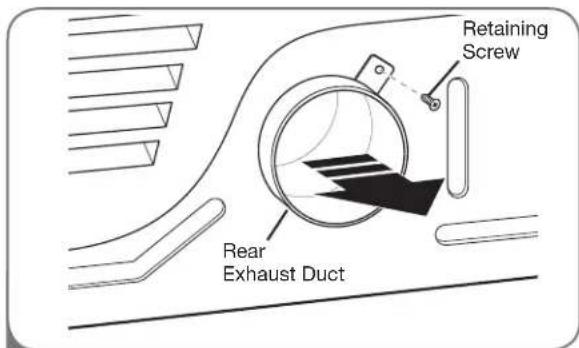
Retaining Screw Rear Exhaust Duct1 Remove the rear exhaust duct retaining screw. Pull out the exhaust duct.
OPTION 2: Bottom Venting
text_image
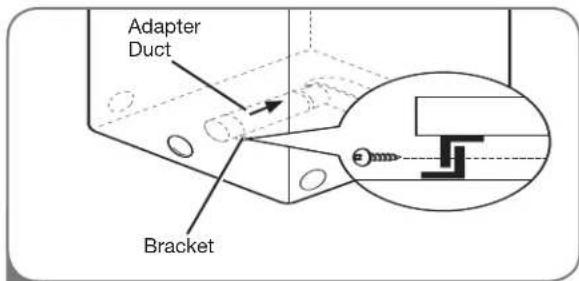
Adapter Duct Bracket2 Press the adapter duct onto the blower housing and secure to the base of the dryer as shown.
text_image
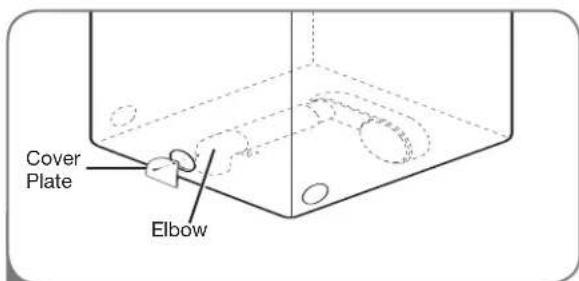
Cover Plate Elbow3 Insert the 4-in. (10 cm) elbow through the rear opening and press it onto the adapter duct. Be sure that the male end of the elbow faces down through hole in the bottom of the dryer. Secure in place with duct tape. Attach the cover plate to the back of the dryer with included screw.
VENTING THE DRYER
WARNING:
To reduce the risk of fire, electric shock, or injury to persons when using this sautions, including the following:
- Do not crush or collapse ductwork. Failure to follow these instructions can result in fire or death.
- Do not allow ductwork to rest on or contact sharp objects. Failure to follow these instructions can result in fire or death.
- If connecting to existing ductwork, make sure it is suitable and clean before installing the dryer. Failure to follow these instructions can result in fire or death.
- Venting must conform to local building codes. Failure to follow these instructions can result in fire or death.
- Gas dryers MUST exhaust to the outdoors. Failure to follow these instructions can result in fire or death.
- Use only 4-in. (10.2 cm) rigid or flexible metal ductwork inside the dryer cabinet and for venting outside. Failure to follow these instructions can result in fire or death.
- To reduce the risk of fire, combustion, or accumulation of combustible gases, DO NOT exhaust dryer air into an enclosed and unventilated area, such as an attic, wall, ceiling, crawl space, chimney, gas vent, or concealed space of a building. Failure to follow these instructions can result in fire or death.
- To reduce the risk of fire, DO NOT exhaust the dryer with plastic or thin foil ducting. Failure to follow these instructions can result in fire or death.
-
The exhaust duct must be 4 in. (10.2 cm) in diameter with no obstructions. The exhaust duct should be kept as short as possible. Make sure to clean any old ducts before installing your new dryer. Failure to follow these instructions can result in fire or death.
-
Rigid or semirigid metal ducting is recommended for use between the dryer and the wall. In special installations when it is impossible to make a connection with the above recommendations, a UL-listed flexible metal transition duct may be used between the dryer and wall connection only. The use of this ducting will affect drying time. Failure to follow these instructions can result in fire or death.
- DO NOT use sheet metal screws or other fasteners which extend into the duct that could catch lint and reduce the efficiency of the exhaust system. Secure all joints with duct tape. Failure to follow these instructions can result in fire or death.
- To maximize operating results, please observe the duct length limitations noted in the chart on page 15. Failure to follow these instructions can result in fire or death.
- Ductwork is not provided with the dryer. You should obtain the necessary ductwork locally. The end cap should have hinged dampers to prevent backdraft when the dryer is not in use. Failure to follow these instructions can result in fire or death.
- The Total length of flexible metal duct shall not exceed 8 ft.(2.4m)
- In Canada, that only those foil-type flexible ducts, if any, specifically identified for use with the appliance by the manufacturer shall be used. In the United States, that only those foil-type flexible ducts, if any, specifically identified for use with the appliance by the manufacturer and that comply with the Outline for Clothes Dryer Transition Duct, Subject 2158A, shall be used.
INSTALLATION INSTRUCTIONS
VENTING THE DRYER (cont.)
Ductwork
| Wall Cap Type | Number of 90° Elbows | Max. Length of 4-In. Dia. Rigid Metal Duct |
Recommended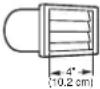 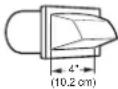 | 0 | 65 ft. (19.8 m) |
| 1 | 55 ft. (16.8 m) | |
| 2 | 47 ft. (13.7 m) | |
| 3 | 36 ft. (11.0 m) | |
| 4 | 28 ft. (8.5 m) | |
Use Only for Short Run Installations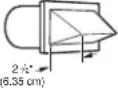 | 0 | 55 ft. (16.8 m) |
| 1 | 47 ft. (13.7 m) | |
| 2 | 41 ft. (12.5 m) | |
| 3 | 30 ft. (9.1 m) | |
| 4 | 22 ft. (6.7 m) |
NOTE: Deduct 6 ft. (1.8 m) for each additional elbow. It is not recommended to use more than four 90° elbows.
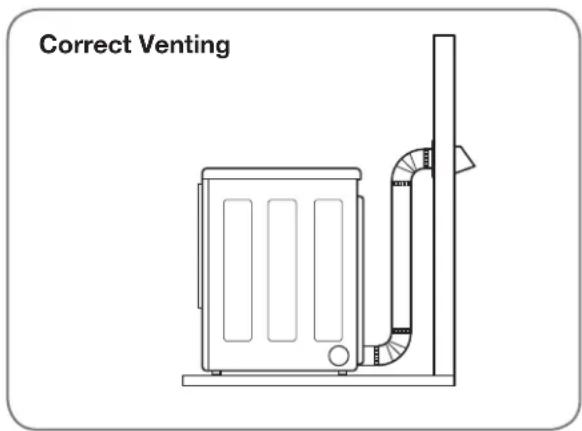
Routing and Connecting Ductwork
Follow the guidelines below to maximize drying performance and reduce lint buildup and condensation in the ductwork.
NOTE: Ductwork and fittings are NOT included and must be purchased separately.
- Use 4-in. (10.2 cm) diameter rigid or semirigid metal ductwork.
- The exhaust duct run should be as short as possible.
- Use as few elbow joints as possible.
- The male end of each section of exhaust duct must point away from the dryer.
- Use duct tape on all duct joints.
- Insulate ductwork that runs through unheated areas in order to reduce condensation and lint buildup on duct surfaces.
IMPORTANT: Failure to exhaust the dryer correctly will void the dryer's warranty.
text_image
Correct Venting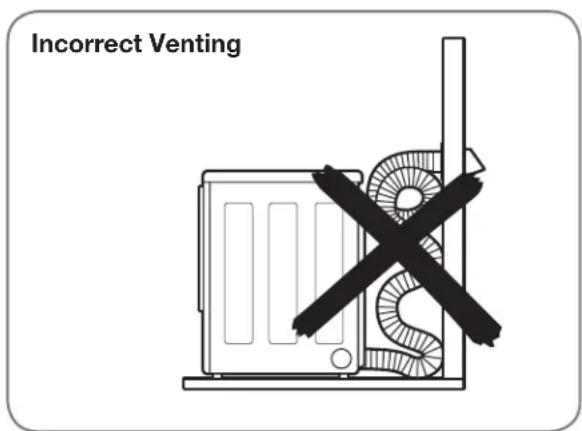
text_image
Incorrect Venting©
CONNECTING GAS DRYERS (cont.)
WARNING:
To reduce the risk of fire, electric shock, or injury to persons when using this appliance, follow basic precautions, including the following:
- Installation and service must be performed by a qualified installer, service agency, or the gas supplier. Failure to do so can result in fire, explosion, or death.
- Use only a new stainless steel fl exible connector and a new AGA-certified connector. Failure to do so can result in fire, explosion, or death.
- A gas shutoff valve must be installed within 6 ft. (1.8 m) of the dryer. Failure to do so can result in fire, explosion, or death.
-
The dryer is configured for Natural Gas when shipped from the factory. Make sure that the dryer is equipped with the correct burner nozzle for the type of gas being used (Natural Gas or Liquefi ed Petroleum). Failure to do so can result in fire, explosion, or death.
-
If necessary, the correct nozzle (for the LP nozzle kit order part number 4948EL4002B) should be installed by a qualified technician and the change should be noted on the dryer. Failure to do so can result in fire, explosion, or death.
- All connections must be in accordance with local codes and regulations. Failure to do so can result in fire, explosion, or death.
- Gas dryers MUST exhaust to the outdoors. Failure to do so can result in fire, explosion, or death.
Connecting the Gas Supply
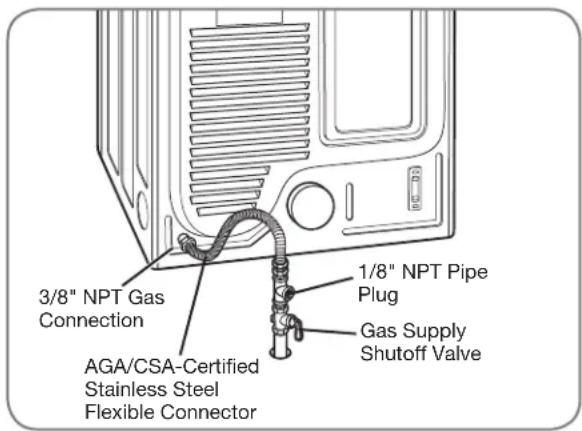
1 Make sure that the gas supply to the laundry room is turned OFF. Confirm that the type of gas available in your laundry room is appropriate for the dryer. The dryer is prepared for Natural Gas with a 3/8-in. NPT gas connection.
2 Remove the shipping cap from the gas connection at the back of the dryer. Be careful not to damage the threads of the gas connector when removing the shipping cap.
3 Connect the dryer to your laundry room's gas supply using a new flexible stainless steel connector with a 3/8-in. NPT fitting.
4 Securely tighten all connections between the dryer and your laundry room's gas supply. Turn on your laundry room's gas supply and check all pipe connections (both internal and external) for gas leaks with a noncorrosive leak-detection fluid.
Electrical Connection
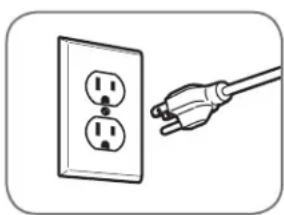
natural_image
Illustration of a hand holding a plug inserted into an electrical outlet (no text or symbols)Plug dryer into a 120-VAC, 60-Hz. grounded 3-prong outlet.
text_image
3/8" NPT Gas Connection 1/8" NPT Pipe Plug AGA/CSA-Certified Stainless Steel Flexible Connector Gas Supply Shutoff ValveHigh-Altitude Installations
The BTU rating of this dryer is AGA-certified for elevations below 10,000 feet.
If your gas dryer is being installed at an elevation above 10,000 feet, it must be derated by a qualified technician or gas supplier.
CONNECTING ELECTRIC DRYERS
⚠ WARNING: To help prevent fire, electric shock, serious injury, or death, the wiring and grounding must conform to the latest edition of the National Electrical Code, ANSI/NFPA 70 and all applicable local regulations. Please contact a qualified electrician to check your home's wiring and fuses to ensure that your home has adequate electrical power to operate the dryer.
Electrical Requirements for Electric Models Only
⚠ WARNING: To reduce the risk of fire, electric shock, or injury to persons when using this appliance, follow basic precautions, including the following:
- This dryer must be connected to a grounded metal, permanent wiring system, or an equipment-grounding conductor must be run with the circuit conductors and connected to the equipment-grounding terminal or lead on the dryer. Failure to do so can result in fire, explosion, or death.
-
The dryer has its own terminal block that must be connected to a separate 240 VAC, 60-Hertz, single-phase circuit, fused at 30 amperes (the circuit must be fused on both sides of the line). ELECTRICAL SERVICE FOR THE DRYER SHOULD BE OF THE MAXIMUM RATE VOLTAGE LISTED ON THE NAMEPLATE. DO NOT CONNECT DRYER TO 110-, 115-, OR 120-VOLT CIRCUIT. Heating elements are available for field installation in dryers which are to be connected to an electrical service of a different voltage than that listed on the rating plate. Failure to follow these instructions can result in fire, explosion, or death.
-
If branch circuit to dryer is 15 ft. (4.5 m) or less in length, use UL (Underwriters Laboratories) listed No.-10 AWG wire (copper wire only), or as required by local codes. If over 15 ft. (4.50 m), use UL-listed No.-8 AWG wire (copper wire only), or as required by local codes. Allow sufficient slack in wiring so dryer can be moved from its normal location when necessary. Failure to do so can result in fire, explosion, or death.
- The power cord (pigtail) connection between wall receptacle and dryer terminal block IS NOT supplied with dryer. Type of pigtail and gauge of wire must conform to local codes and with instructions on the following pages. Failure to follow these instructions can result in fire, explosion, or death.
- A 4-wire connection is required for all mobile and manufactured home installations, as well as all new construction after January 1, 1996. A 4-wire connection must be used where local codes do not permit grounding through the neutral wire. Failure to do so can result in fire, explosion, or death.
Special Electrical Requirements for Mobile or Manufactured Homes
⚠ WARNING: To reduce the risk of fire, electric shock, or injury to persons when using this appliance, follow basic precautions, including the following:
- Any installation in a manufactured or mobile home must comply with the Manufactured Home Construction and Safety Standards Title 24 CFR, Part 32-80 or Standard CAN/CSA0Z240 MH and local codes and ordinances.
- A 4-wire connection is required for all mobile and manufactured home installations, as well as all new construction after January 1, 1996. Failure to do so can result in fire, explosion, or death.
CONNECTING ELECTRIC DRYERS (cont.)
USA ONLY
WARNING:
- Connect the power cord to the terminal block. Each colored wire should be connected to same color screw. Wire color indicated on manual is connected to the same color screw in block. Failure to follow these instructions may result in a short or overload.
- Grounding through the neutral conductor is prohibited for: (1) new branch-circuit installations, (2) mobile homes, (3) recreational vehicles, and (4) areas where local codes prohibit grounding through the neutral conductor.

Four-Wire Connection for Electric Dryers: Power Cord
- A 4-wire connection is required for all mobile and manufactured home installations, as well as all new construction after January 1, 1996.
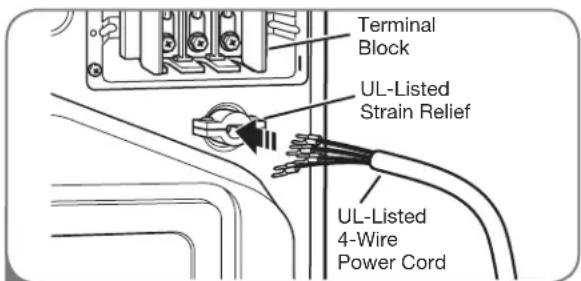
- A UL-listed strain relief is required.
- Use a 30-amp, 240V, UL-listed power cord with #10 AWG-minimum copper conductor and closed loop or forked terminals with upturned ends.
text_image
Terminal Block UL-Listed Strain Relief UL-Listed 4-Wire Power Cord1 Remove the terminal block access cover on the upper back of the dryer. Install a UL-listed strain relief into the power cord through-hole; then thread a UL-listed, 30A, 240V, 4-wire, #10 AWG-minimum copper conductor power cord through the strain relief.
text_image
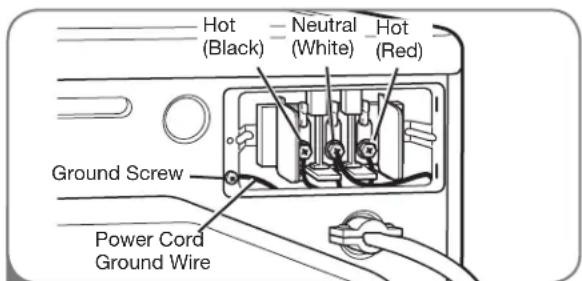
Hot (Black) Neutral (White) Hot (Red) Ground Screw Power Cord Ground Wire2 Transfer the dryer's ground wire from behind the green ground screw to the center screw of the terminal block. Attach the two hot leads of the power cord to the outer terminal block screws. Attach the white neutral wire to the center terminal block screw. Attach the power cord ground wire to the green ground screw. TIGHTEN ALL SCREWS SECURELY. Reinstall the terminal block access cover.
CONNECTING ELECTRIC DRYERS (cont.)
USA ONLY
WARNING:
- Connect the power cord to the terminal block. Each colored wire should be connected to same color screw. Wire color indicated on manual is connected to the same color screw in block. Failure to follow these instructions may result in a short or overload.
- Grounding through the neutral conductor is prohibited for: (1) new branch-circuit installations, (2) mobile homes, (3) recreational vehicles, and (4) areas where local codes prohibit grounding through the neutral conductor.
Four-Wire Connection for Electric Dryers: Direct Wire
- A 4-wire connection is required for all mobile and manufactured home installations, as well as all new construction after January 1, 1996.
- A UL-listed strain relief is required.
text_image
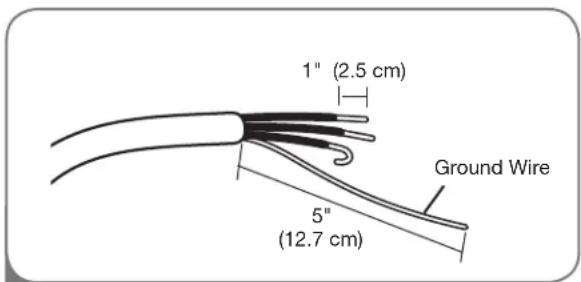
1" (2.5 cm) 5" (12.7 cm) Ground Wire1 Remove 5 inches (12.7 cm) of the outer covering from the wire. Remove 5 inches of insulation from the ground wire. Cut off approximately 112 inches (3.8 cm) from the other three wires and strip 1 inch (2.5 cm) insulation from each wire. Bend the ends of the three shorter wires into a hook shape.
- Use UL-listed 4-wire #10 AWG-minimum copper conductor cable.
- Allow at least 5 ft (1.5 m) length to allow for removal and reinstallation of the dryer.
text_image
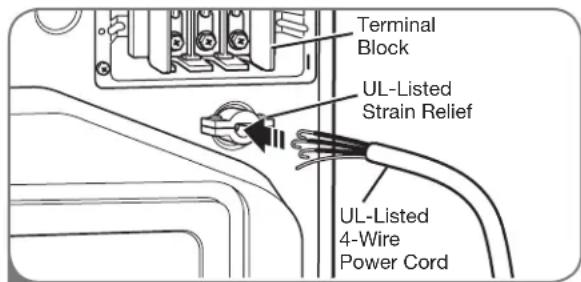
Terminal Block UL-Listed Strain Relief UL-Listed 4-Wire Power Cord2 Remove the terminal block access cover on the upper back of the dryer. Install a UL-listed strain relief into the power cord through-hole; then thread the power cable prepared in Step 1 through the strain relief.
text_image
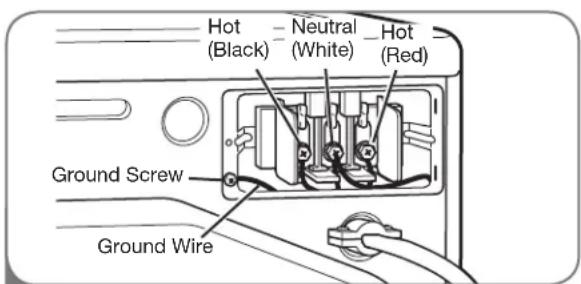
Hot (Black) - Neutral (White) - Hot (Red) Ground Screw Ground Wire3 Transfer the dryer's ground wire from behind the green ground screw to the center screw of the terminal block. Attach the two hot leads of the power cable to the outer terminal block screws. Attach the white neutral wire to the center terminal block screw. Attach the power cable ground wire to the green ground screw. TIGHTEN ALL SCREWS SECURELY. Reinstall the terminal block access cover.
CONNECTING ELECTRIC DRYERS (cont.)
USA ONLY
WARNING:
- Connect the power cord to the terminal block. Each colored wire should be connected to same color screw. Wire color indicated on manual is connected to the same color screw in block. Failure to follow these instructions may result in a short or overload.
- Grounding through the neutral conductor is prohibited for: (1) new branch-circuit installations, (2) mobile homes, (3) recreational vehicles, and (4) areas where local codes prohibit grounding through the neutral conductor.

Three-Wire Connection for Electric Dryers: Power Cord
- A 3-wire connection is NOT permitted on new construction after January 1, 1996.
- A UL-listed strain relief is required.
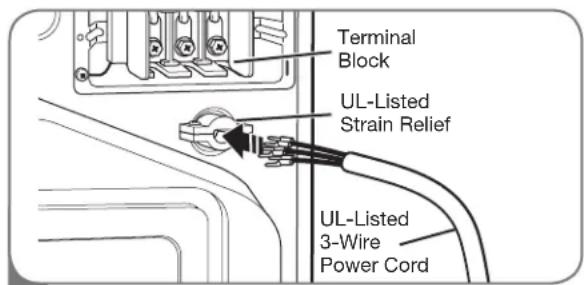
text_image
Terminal Block UL-Listed Strain Relief UL-Listed 3-Wire Power Cord1
Remove the terminal block access cover on the upper back of the dryer. Install a UL-listed strain relief into the power cord through-hole; then thread a UL-listed, 30A, 240V, 3-wire, #10 AWG-minimum copper conductor power cord through the strain relief.
- Use a 30-amp, 240V, UL-listed power cord with #10 AWG-minimum copper conductor and closed loop or forked terminals with upturned ends.
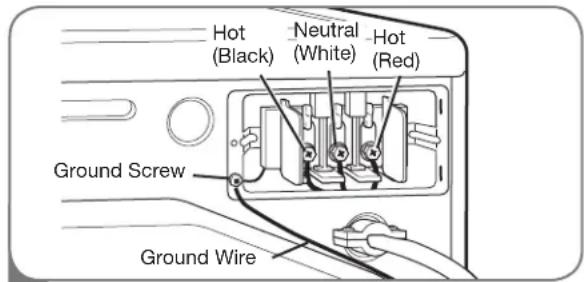
text_image
Hot (Black) Neutral (White) Hot (Red) Ground Screw Ground Wire2
Attach the two hot leads of the power cord to the outer terminal block screws. Attach the neutral wire to the center terminal block screw. Connect the external ground (if required by local codes) to the green ground screw. TIGHTEN ALL SCREWS SECURELY. Reinstall the terminal block access cover.
CONNECTING ELECTRIC DRYERS (cont.)
USA ONLY
WARNING:
- Connect the power cord to the terminal block. Each colored wire should be connected to same color screw. Wire color indicated on manual is connected to the same color screw in block. Failure to follow these instructions may result in a short or overload.
- Grounding through the neutral conductor is prohibited for: (1) new branch-circuit installations, (2) mobile homes, (3) recreational vehicles, and (4) areas where local codes prohibit grounding through the neutral conductor.
Three-Wire Connection for Electric Dryers: Direct Wire
- A 3-wire connection is NOT permitted on new construction after January 1, 1996.
- A UL-listed strain relief is required.
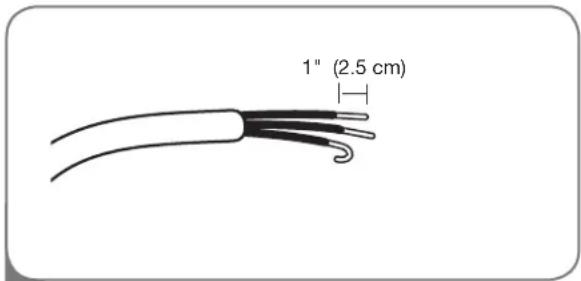
text_image
1" (2.5 cm)1 Remove 3½ inches (8.9 cm) of the outer covering from the wire. Strip 1 inch (2.5 cm) insulation from each wire. Bend the ends of the three wires into a hook shape.
- Use UL-listed 3-wire #10 AWG-minimum copper conductor cable.
- Allow at least 5 ft (1.5 m) length to allow for removal and reinstallation of the dryer.
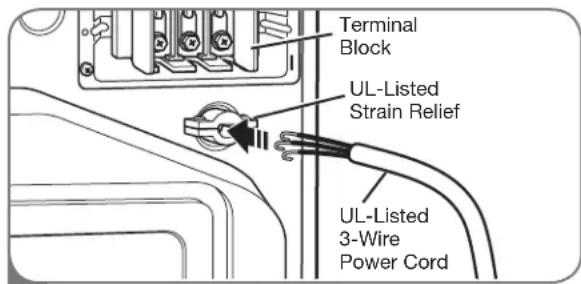
text_image
Terminal Block UL-Listed Strain Relief UL-Listed 3-Wire Power Cord2 Remove the terminal block access cover on the upper back of the dryer. Install a UL-listed strain relief into the power cord through-hole; then thread the power cable prepared in Step 1 through the strain relief.
text_image
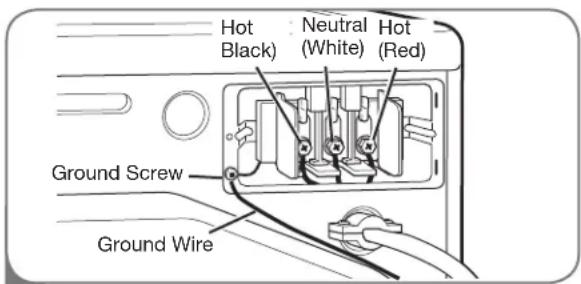
Hot Black) Neutral (White) Hot (Red) Ground Screw Ground Wire3 Attach the two hot leads of the power cord to the outer terminal block screws. Attach the neutral wire to the center terminal block screw. Connect the external ground (if required by local codes) to the green ground screw. TIGHTEN ALL SCREWS SECURELY. Reinstall the terminal block access cover.
SPECIAL REQUIREMENTS FOR MANUFACTURED OR MOBILE HOMES
Any installation in a manufactured or mobile home must comply with the Manufactured Home Construction and Safety Standards Title 24 CFR, Part 32-80 or Standard CAN/CSA0Z240 MH and local codes and ordinances. If you are uncertain whether your proposed installation will comply with these standards, please contact a service and installation professional for assistance.
- A gas dryer must be permanently attached to the floor.
- The electrical connection for an electric dryer must be a 4-wire connection. More detailed information concerning the electrical connection is provided in the section Connecting Electric Dryers.
- To reduce the risk of combustion and fire, the dryer must be vented to the outside.
- DO NOT vent the dryer under a manufactured home or mobile home.
- Electric dryers may be vented to the outside using the back, left, right, or bottom panel.
-
Gas dryers may be vented to the outside using the back, left, or bottom panel. Gas dryers may not be vented to the outside using the right side panel because of the burner housing.
-
The dryer exhaust duct must be affixed securely to the manufactured or mobile home structure, and the exhaust duct must be made of a material that will resist fire and combustion. It is recommended that you use a rigid or fl exible metal duct.
- DO NOT connect the dryer exhaust duct to any other duct, vent, chimney, or other exhaust duct.
- Make sure the dryer has adequate access to outside fresh air to ensure proper operation. The opening for outside fresh air must be at least 25in^2 (163 cm²).
- It is important that the clearance of the duct from any combustible construction be at least 2 in. (5 cm), and when venting the dryer to the outdoors, the dryer can be installed with a clearance of 1 in. (2.5 cm) at the sides and back of the dryer.
- Please be aware that venting materials are not supplied with the dryer. You should obtain the venting materials necessary for proper installation.
FINAL INSTALLATION CHECK
Once you have completed the installation of the dryer and it is in its final location, confirm proper operation with the following tests.
Testing Dryer Heating
GAS MODELS
Close the dryer door, press the ON/OFF switch to turn the dryer on, and start the dryer on a heat setting. When the dryer starts, the igniter should ignite the main burner.
NOTE: If all air is not purged from the gas line, the gas igniter may turn off before the main burner ignites. If this happens, the igniter will reattempt gas ignition after approximately two minutes.
ELECTRIC MODELS
Close the dryer door, press the ON/OFF switch to turn the dryer on, and start the dryer on a heat setting. The exhaust air should be warm after the dryer has been operating for 3 minutes.
Checking Airflow
Effective dryer operation requires proper airflow. The adequacy of the airflow can be measured by evaluating the static pressure. Static pressure in the exhaust duct can be measured with a manometer, placed on the exhaust duct approximately 2 ft. (60.9 cm) from the dryer. Static pressure in the exhaust duct should not exceed 0.6 in. (1.5 cm). The dryer should be checked while the dryer is running with no load.
Checking Levelness
Once the dryer is in its final location, recheck the dryer to be sure it is level. Make sure it is level front to back and side to side, and that all 4 leveling feet are firmly on the floor.
Following are instructions for starting and using your new dryer. Please refer to specific sections of this manual for more detailed information. Important Warning: To reduce the risk of fire, electric shock, or injury to persons, read this entire manual, including the Important Safety Instructions, before operating this dryer.
SORTING LOADS
Fabric Care Labels
Most articles of clothing feature fabric care labels that include instructions for proper care.
Grouping Similar Items
For best results, sort clothes into loads that can be dried with the same drying cycle.
Different fabrics have different care requirements, and some fabrics will dry more quickly than others.
Fabric Care Labels
Tumble dry

Dry

Normal

Permanent Press/ wrinkle resistant

Gentle/ delicate

Do not tumble dry

Do not dry (used with do not wash)
Heat setting

High

Medium

Low

No heat/air
LOADING THE DRYER
WARNING:
To reduce the risk of fire, electric shock, or injury to persons when using this appliance, follow basic precautions, including the following:
- Check all pockets to make sure that they are empty. Items such as clips, pens, coins, and keys can damage both your dryer and your clothes. Flammable objects such as lighters or matches could ignite, causing a fire. Failure to do so can result in fire, explosion, or death.
-
Never dry clothes that have been exposed to oil, gasoline, or other flammable substances. Washing clothes will not completely remove oil residues. Failure to obey this warning can result in fire, explosion, or death.
-
Combine large and small items in a load.
- Damp clothes will expand as they dry. Do not overload the dryer; clothes require room to tumble dry properly.
- Close zippers, hooks, and drawstrings to prevent these items from snagging or tangling on other clothes.
CHECK THE LINT FILTER BEFORE EVERY LOAD
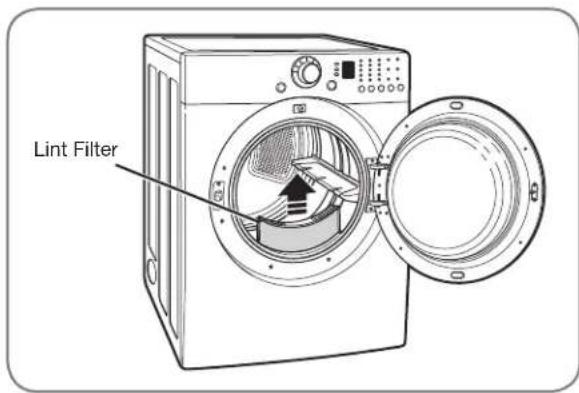
Always make sure the lint filter is clean before starting a new load; a clogged lint filter will increase drying times.
To clean, pull the lint filter straight up and roll any lint off the filter with your fingers. Do not rinse or wash the filter to remove lint. Push the lint filter firmly back into place. See “Care and Cleaning” for more information.
Always ensure the lint filter is properly installed before running the dryer. Running the dryer with a loose or missing lint filter may damage the dryer and articles in the dryer.
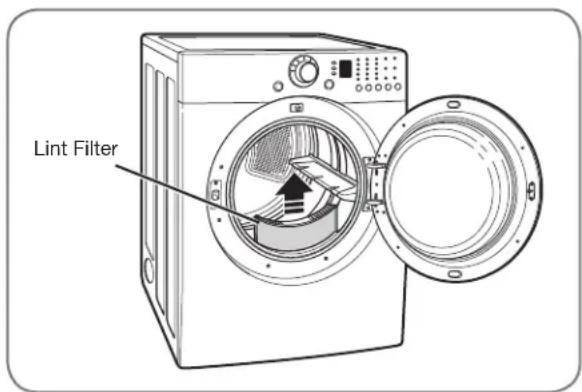
text_image
Lint FilterCONTROL PANEL FEATURES
Following are instructions for starting and using your new dryer. Please refer to specific sections of this manual for more detailed information. Important Warning: To reduce the risk of fire, electric shock, or injury to persons, read this entire manual, including the Important Safety Instructions, before operating this dryer.
text_image
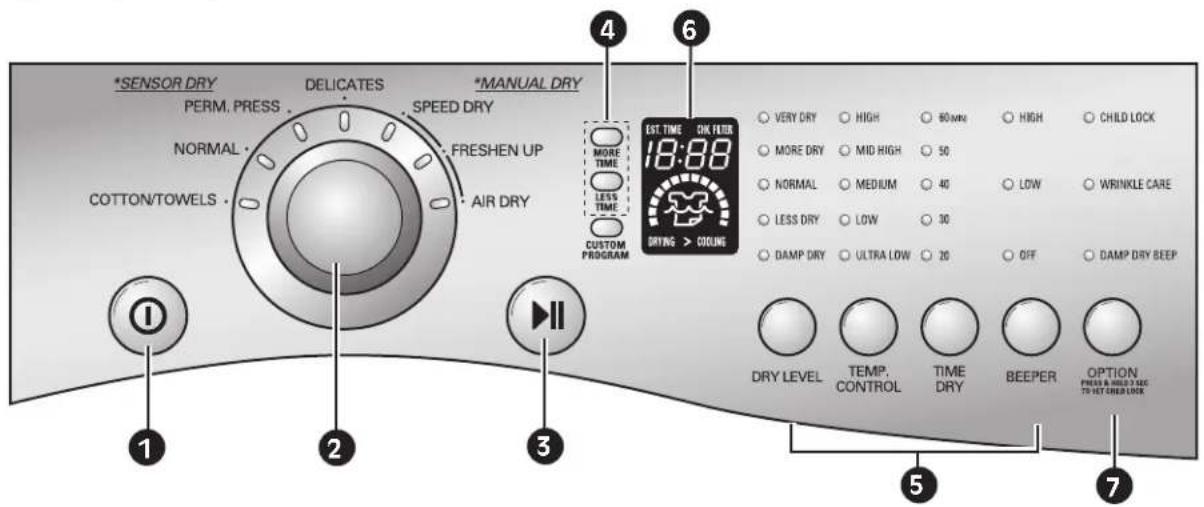
*SENSOR DRY PERM. PRESS NORMAL COTTON/TOWELS DELICATES SPEED DRY FRESHEN UP AIR DRY *MANUAL DRY MORE TIME LESS TIME CUSTOM PROGRAM EST. TIME OK FILTER 18:00 DRIVING > COOLING VERY DRY HIGH 80 min High CHILD LOCK MORE DRY MID HIGH 50 NORMAL MEDIUM 40 LOW WRINKLE CARE LESS DRY LOW 30 DAMP DRY ULTRA LOW 20 OFF DAMP DRY BEEP DRY LEVEL TEMP. TIME BEEP CONTROL DRY BEEPER OPTION PRESO AND WMG TASC TO HOT COLD LOCK1 POWER ON/OFF BUTTON
Press to turn the dryer ON. Press again to turn the dryer OFF.
NOTE: Pressing the ON/OFF button during a cycle will cancel that cycle and any load settings will be lost.
2 CYCLE SELECTOR KNOB
Turn this knob to select the desired cycle. Once the desired cycle has been selected, the standard presets will be shown in the display. On MANUAL DRY cycles, these settings can be adjusted using the cycle settings buttons anytime before starting the cycle.
3 START/PAUSE BUTTON
Press this button to START the selected cycle. If the dryer is running, use this button to PAUSE the cycle without losing the current settings.
NOTE: If you do not press the START/PAUSE button to resume a cycle within 4 minutes, the dryer automatically turns off.
4 MORE TIME/LESS TIME BUTTONS
Use these buttons with MANUAL DRY and TIME DRY cycles to adjust the drying time. Press the MORE TIME button to increase the selected manual cycle time by a minute; press LESS TIME to decrease the cycle time by a minute.
5 CYCLE SETTINGS BUTTONS
Use these buttons to select the desired cycle settings for the selected cycle. The current settings are shown in the display. Press the button for that option to view and select other settings.
6 LED DISPLAY
The display shows the settings, estimated time remaining, options, and status messages for your dryer.
7 OPTION BUTTON
The option buttons allow you to select additional cycle options.
For detailed information about the individual options, please see the following pages.
CYCLE GUIDE
The cycle guide below shows the options and recommended fabric types for each cycle.
| Type | Cycle | Fabric Type | Dry Level | Temperature | Time in Min. | More Time/ Less Time | Wrinkle Care | Damp Dry |
| SENSOR DRY | COTTON/ TOWELS | Denims, towels, heavy cottons | Normal | MID HIGH | 55 | ● | ● | |
| Adjustable | ||||||||
| NORMAL | Work clothes, corduroys, etc. | Normal | MEDIUM | 41 | ● | ● | ||
| Adjustable | ||||||||
| PERM. PRESS | Permanent press, synthetic items | Normal | LOW | 36 | ● | ● | ||
| Adjustable | ||||||||
| DELICATES | Lingerie, sheets, blouses | Normal | LOW | 32 | ● | ● | ||
| Adjustable | ||||||||
| MANUAL DRY | SPEED DRY | For small loads with short drying times | off | HIGH | 25 | ● | ● | |
| Adjustable | Adjustable | |||||||
| FRESHEN UP | For removing light wrinkles from clothing | off | MID HIGH | 20 | ● | ● | ||
| Adjustable | Adjustable | |||||||
| AIR DRY | For irems that require heat-free drying such as plastics or rubber | off | No Heat | 30 | ● | ● | ||
| Adjustable | ||||||||
| TIME DRY | For general drying; time, temperature, and options can be set manually | off | HIGH | 40 | ● | ● | ||
| Adjustable | Adjustable |
Sensor Dry Cycles
Sensor Dry cycles utilize LG's unique dual sensor system to detect and compare the moisture level in clothes and in the air and adjust the drying time as needed to ensure superior results. The dryer automatically sets the dryness level and temperature at the recommended setting for each cycle. The estimated time remaining will be shown in the display.
Manual Dry Cycles
Use Manual Dry cycles to select a specific amount of drying time and a drying temperature. When a Manual Dry cycle is selected, the ESTIMATED TIME REMAINING display shows the actual time remaining in your cycle. You can change the actual time in the cycle by pressing MORE TIME or LESS TIME.
NOTE: To protect your garments, not every dry level, temperature, or option is available with every cycle.
THE LED DISPLAY
The LED display shows the settings, estimated time remaining, options, and status messages for your dryer. When the dryer is turned on, the light in the display will illuminate.
text_image
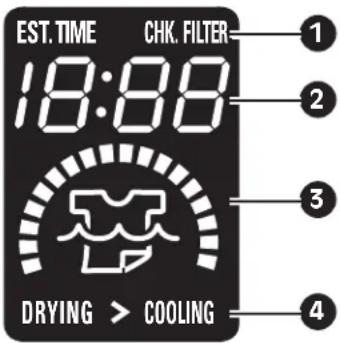
EST. TIME 18:00 DRYING > COOLING CHK. FILTER 1 2 3 41 CHECK FILTER REMINDER
The display will show CHK.FILTER when the dryer is turned on as a reminder to check the filter. It turns off when the START/PAUSE button is pressed.
② ESTIMATED TIME REMAINING
When the START/PAUSE button is pressed, the dryer will display the estimated (SENSOR DRY) or set time (TIME DRY) remaining, and begin tumbling.
NOTE: The cycle time on SENSOR DRY cycles may fluctuate as the dryer recalculates drying time for optimal results.
3 CYCLE COMPLETION INDICATOR
Shows how much of the current drying cycle has been completed.
4 STATUS/CYCLE DISPLAY
This portion of the display shows the selected cycle, operating status, and special messages. If a cycle has special instructions, they will also be displayed in this area.
OPERATING THE DRYER
Once you have loaded the dryer:
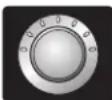
1 Press the ON/OFF button to turn on the dryer. The lights around the cycle selector knob will illuminate.
2 Turn the cycle selector knob to the desired cycle. The display will show the preset Dry Level, Temperature, Time, and Option settings for that cycle.
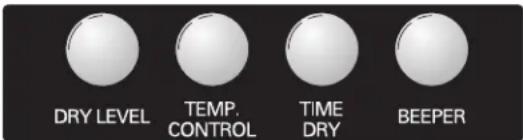
3 If you would like to change the settings for that cycle, press the option button(s) to display additional settings for that option. Press the button again to cycle through the settings until the desired setting is highlighted.

text_image
DRY LEVEL TEMP. CONTROL TIME DRY BEEPERNOTE: To protect your garments, not every dry level, temperature, or option is available with every cycle.
text_image
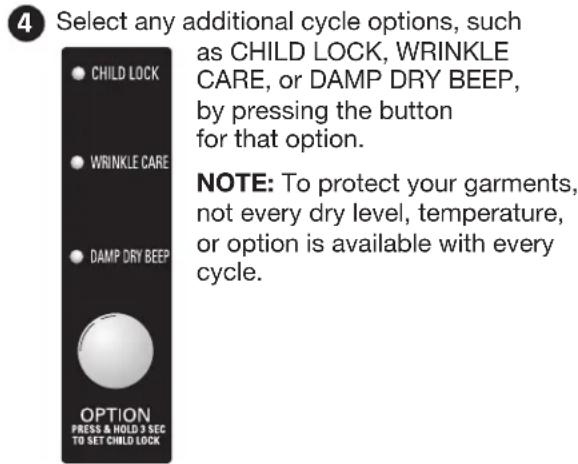
4 Select any additional cycle options, such as CHILD LOCK, WRINKLE CARE, or DAMP DRY BEEP, by pressing the button for that option. NOTE: To protect your garments, not every dry level, temperature, or option is available with every cycle.5 Press the START/PAUSE button to begin the

cycle. The display will change, and the dryer will display the estimated (SENSOR DRY) or set time (MANUAL DRY) remaining
and start tumbling. To pause the cycle at any time, open the dryer door or press PAUSE. To resume the cycle where it was stopped, press START/PAUSE again.
NOTE: If the dryer has been stopped for more than 8 minutes, the dryer will turn off automatically.
6 When the load is finished, the beeper (if set) will sound. If you have set the Wrinkle Care option, the dryer will tumble the load periodically for up to 3 hours.
To prevent wrinkling, remove items from the dryer immediately after the end of the cycle.
7 Always clean the lint filter after every cycle.
To clean, pull the lint filter straight up and roll any lint off the filter with your fingers. Do not rinse or wash the filter to remove lint. Push the lint filter firmly back into place.
CYCLE SETTING BUTTONS
SENSOR DRY cycles have preset settings that are selected automatically and cannot be changed. MANUAL DRY cycles have default settings, but you may also customize the settings using the cycle setting buttons. Press the button for that option to view and select other settings.
DRY LEVEL
Selects the level of dryness for the cycle. Press the DRY LEVEL button repeatedly to scroll through available settings.
- This option is only available with SENSOR DRY cycles.
- The dryer will automatically adjust the cycle time. Selecting VERY DRY or MORE DRY will increase the cycle time, while LESS DRY or DAMP DRY will decrease the cycle time.
- Use a LESS DRY or DAMP DRY setting for items that you wish to iron.
NOTE: To protect your garments, not every dryness level, temperature, or option is available with every cycle. See the Cycle Guide for details.
TEMP. CONTROL
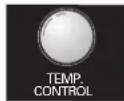
Adjusts the temperature setting from ULTRA LOW to HIGH. This allows precise care of your fabrics and garments. Press the TEMP.
CONTROL button repeatedly to scroll through available settings.
TIME DRY
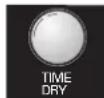
Allows you to manually select the drying time, from 20 to 60 minutes, in 10-minute increments. Use this for small loads or to remove wrinkles. Use the
MORE TIME/LESS TIME buttons to add or reduce the drying time in 1-minute increments.
BEEPER
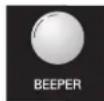
Adjusts the volume of the end-of-cycle beeper, or turns off the beeper.
CUSTOM PROGRAM

If you have a special combination of settings that you use frequently, you can save these settings as a CUSTOM PROGRAM.
To Save a Custom Program:
1 Turn on the dryer and turn the cycle selector knob to select the desired cycle.
2 Use the cycle setting buttons to adjust the settings for that cycle.
3 Press the cycle option button(s) for the option you would like to add. A confirmation message will be shown in the display.
4 Press and hold the CUSTOM PROGRAM button for 3 seconds.
NOTE: You may only save one custom program at a time. Pressing and holding the CUSTOM PROGRAM button will overwrite any previously saved custom program.
To Recall a Custom Program:
① Turn on the dryer.
2 Press the CUSTOM PROGRAM button.
3 Press the START/PAUSE button to start the cycle.
CYCLE OPTION BUTTONS
Your dryer features several additional cycle options to customize cycles to meet your individual needs. Certain option buttons also feature a special function (see the following page for details) that can be activated by pressing and holding that option button for 3 seconds.
To Add Cycle Options to a Cycle:
1 Turn on the dryer and turn the cycle selector knob to select the desired cycle.
2 Use the cycle settings buttons to adjust the settings for that cycle.
3 Press the cycle option button(s) for the option you would like to add. A confirmation message will be shown in the display.
4 Press the START/PAUSE button to start the cycle. The dryer will start automatically.
CHILD LOCK

Use this option to prevent unwanted use of the dryer or to keep cycle settings from being changed while the dryer is operating.
All controls are disabled. The dryer can be locked during a cycle.
WRINKLE CARE

Selecting this option will tumble the load periodically for up to 3 hours after the selected cycle, or until the door is opened. This is helpful in preventing
wrinkles when you are unable to immediately remove items from the dryer.
DAMP DRY BEEP
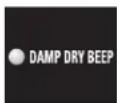
With this option, the dryer will beep when the load is approximately 80% dry. This allows you to remove faster-drying lightweight items or items
that you would like to iron or hang while still slightly damp.
USER-MAINTENANCE INSTRUCTIONS
REGULAR CLEANING
WARNING:
To reduce the risk of fire, electric shock, or injury to persons when using this sautions, including the following:
- Unplug the dryer before cleaning to avoid the risk of electric shock. Failure to follow this warning can cause serious injury, fi re, electrical shock, or death.
- Never use harsh chemicals, abrasive cleaners, or solvents to clean the washer. They will damage the finish.
Cleaning the Exterior
Proper care of your dryer can extend its life. The outside of the machine can be cleaned with warm water and a mild, nonabrasive household detergent.
Immediately wipe off any spills with a soft, damp cloth.
IMPORTANT: Do not use methylated spirits, solvents, or similar products.
Never use steel wool or abrasive cleansers; they can damage the surface.
Cleaning the Interior
Wipe around the door opening and seal with a soft, damp cloth to prevent lint and dust buildup that could damage the door seal.
Clean the window with a soft cloth dampened with warm water and a mild, nonabrasive household detergent; then wipe dry.
The stainless steel drum can be cleaned with a conventional stainless steel cleaner, used according to the manufacturer's specifications. Never use steel wool or abrasive cleansers; they can scratch or damage the surface.
Cleaning Around and Under the Dryer
Vacuum lint and dust from around the dryer and underneath it regularly. Vent ductwork should be checked for lint buildup and cleaned at least once per year. If any noticeable reduction in airflow or drying performance occurs, immediately check ductwork for obstructions and blockages.
Maintaining Ductwork
Vent ductwork should be checked for lint buildup and cleaned at least once per year. If any noticeable reduction in airflow or drying performance occurs, immediately check ductwork for obstructions and blockages. Contact a qualified technician or service provider.
Cleaning the Lint Filter
text_image
Lint FilterAlways clean the lint filter after every cycle.
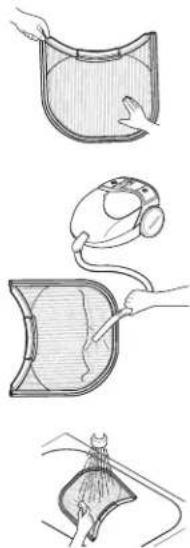
To clean, open the dryer door and pull the lint filter straight up. Then:
1 Roll any lint off the filter with your fingers, or
natural_image
Illustration of four different medical or surgical procedures with no visible text or symbols② Vacuum the lint filter, or
3 Wash the lint filter in warm, soapy water and allow to dry thoroughly before reinstalling.
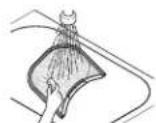
NOTE: NEVER operate the dryer without the lint filter in place.
BEFORE CALLING FOR SERVICE
Your dryer is equipped with an automatic error-monitoring system to detect and diagnose problems at an early stage. If your dryer does not function properly or does not function at all, check the following before you call for service.
| Problem Possible Causes Solutions | ||
| Dryer will not turn on | Power cord is not properly plugged in.House fuse is blown, circuit breaker has tripped, or power outage has occurred. | Make sure that the plug is plugged securely into a grounded outlet matching the dryer's rating plate.Reset circuit breaker or replace fuse. Do not increase fuse capacity. If the problem is a circuit overload, have it corrected by a qualified electrician. |
| Dryer does not heat | House fuse is blown, circuit breaker has tripped, or power outage has occurred.Gas supply or service turned off (gas models only). | Reset circuit breaker or replace fuse. Do not increase fuse capacity. If the problem is a circuit overload, have it corrected by a qualified electrician.Confirm that the house gas shutoff and the dryer gas shutoff are both fully open. |
| Greasy or dirty spots on clothes | Fabric softener used incorrectly.Clean and dirty clothes being dried together.Clean and dirty clothes being dried together. | Confirm and follow the instructions provided with your fabric softener.Make sure to use your dryer to dry only clean items, because dirty items can soil clean clothes placed in the same or subsequent loads.Stains on dried clothes are actually stains that weren't removed during the washing process. Make sure that clothes are being completely cleaned according to the instructions for your washer and detergent. |
| Display shows error code tE1 or tE2 | Thermistor is malfunctioning. | Turn off the dryer and call for service. |
| Lint on clothes | Lint filter not cleaned properly.Laundry not sorted properly.Excess static in clothes.Dryer is overloaded.Tissue, paper, etc., left in pockets. | Make sure the lint filter is cleaned before every load. With some loads that produce high amounts of lint, it may be necessary to clean the filter during the cycle.Some fabrics are lint producers (i.e., a fuzzy white cotton towel) and should be dried separately from clothes that are lint trappers (i.e., a pair of black linen pants).See the Excess static in clothes after drying section below.Divide larger loads into smaller loads for drying.Check pockets thoroughly before washing and drying clothes. |
| Excess static in clothes after drying | Fabric softener not used or used incorrectly.Clothes dried too long (overdried).Drying synthetics, permanent press, or synthetic blends. | Use a fabric softener to reduce static electricity correctly. Do not use fabric softeners or products to eliminate static unless recommended by the manufacturer of the fabric softener or product.Overdrying a load of laundry can cause a buildup of static electricity. Adjust settings and use a shorter drying time, or use SENSOR DRY cycles.These materials can cause static buildup. Try using a fabric softener. |
| Problem Possible Causes Solutions | ||
| Drying time is not consistent | Heat settings, load size, or dampness of clothing is not consistent. | The drying time for a load will vary depending on the heat setting, the type of heat used (electric, natural, or LP gas), the size of the load, the type of fabrics, the wetness of the clothes, and the condition of the exhaust ducts and lint fi iter. |
| Clothes take too long to dry | Load is not properly sorted.Large load of heavy fabrics.Dryer controls are not set properly.Lint fi Iter needs to be cleaned.Exhaust ducts blocked, dirty, or duct run is too long.House fuse is blown, circuit breaker has tripped, or power outage has occurred.Dryer is overloaded.Dryer is underloaded. | Separate heavy items from lightweight items. Larger and heavier items take longer to dry.Heavy fabrics take longer to dry because they tend to retain more moisture. To help reduce and maintain more consistent drying times for large and heavy fabrics, separate these items into smaller loads of a consistent size.Use the appropriate control settings for the type of load you are drying.Make sure the lint fi Iter is cleaned before every load. With some loads that produce high amounts of lint, it may be necessary to clean the fi iter during the cycle.Confi rm that the exhaust ductwork is properly confi gured and free of debris, lint, and obstructions. Make sure that outside wall dampers can open properly and are not blocked, jammed, or damaged.Reset circuit breaker or replace fuse. Do not increase fuse capacity. If the problem is a circuit overload, have it corrected by a qualifi ed electrician.Divide larger loads into smaller loads for drying.If you are drying a very small load, add a few extra items to ensure proper tumbling action. |
| Clothes are wrinkled | Clothes dried too long (overdried).Clothes left in dryer too long after cycle ends. | Overdrying a load of laundry can lead to wrinkled clothes. Try a shorter drying time, and remove items while they still retain a slight amount of moisture.Remove items from the dryer immediately at the end of the cycle. Use the WRINKLE CARE option to continue tumbling clothes at the end of the cycle, for up to 3 hours. |
| Clothes are shrinking | Garment care instructions are not being followed. | To avoid shrinkage, please carefully follow the fabric care instructions for your garment, because some fabrics will naturally shrink when washed. Other fabrics can be washed but will shrink when dried in a dryer. Use a low or no heat setting and/or the RACK DRY option. |
SPECIFICATIONS/OPTIONAL ACCESSORIES
KEY DIMENSIONS AND SPECIFICATIONS
The appearance and specifications listed in this guide may vary due to constant product improvements.
| Dryer Models DLE2101W DLG2102W, DLE2101R, DLG2102R, DLE2101S, DLG2102S, DLE2101L and DLG2102L | |
| Description Dryer | |
| Electrical Requirements* | Please refer to the rating label regarding detailed information. |
| Gas Requirements* NG: 4-10.5 inches WCLP: 8-13 inches WC (Gas Models only) | |
| Dimensions 27"(W) X 30"(D) X 38 ^11/_16 "(H), 50° (D with door open)68.6 cm (W) X 76.1 cm (D) X 98.3 cm (H),127 cm (D with door open) | |
| Net Weight 126 lb. (57.2 kg) | |
| Drying Capacity IEC 7.3 cu.ft. (22.5 lbs./10.2 kg) | |
*Refer to the rating plate on your dryer.
OPTIONAL ACCESSORIES
For these and other LG products, contact your local LG dealer, or visit our Web site at ca.lge.com
natural_image
Line drawing of a rectangular electronic device with a square top and side slots (no text or symbols)Pedestal
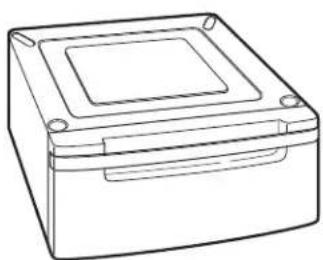
Give your LG washer and dryer a boost with matching 14-inch high pedestals. They feature a storage drawer for added convenience.
14" Pedestal Color
WDP3W White
WDP3B Black
WDP3S Titanium
WDP3N Navy Blue
WDP3R Wild Cherry Red
Stacking Kit
If space is at a premium, use this kit to securely stack your LG front-load washer and dryer.
Bracket Kit Color
WSTK1 White BSTK1 Black SSTK1 Titanium NSTK1 Navy Blue RSTK1 Wild Cherry Red
PEDESTAL INSTALLATION
The pedestal accessory includes:
- Drawer divider (1) • Wrench (1)
- Screws (18) †
- Retainers (4) ††
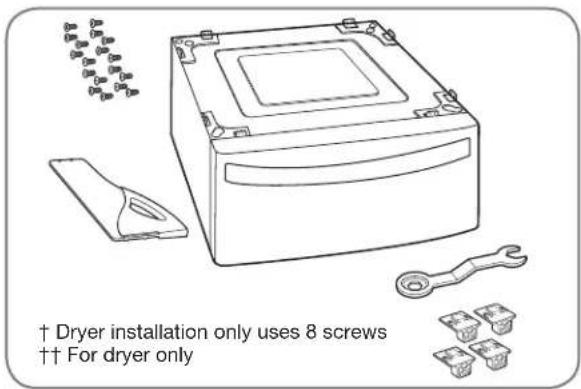
text_image
† Dryer installation only uses 8 screws †† For dryer onlyTools Needed for Installation:
• Phillips-head screwdriver
- Wrench (supplied)
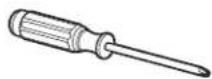
To ensure safe and secure installation, please thoroughly follow the instructions below.
WARNING
- Incorrect installation can cause serious accidents.
- The appliances are heavy. Two or more people are required when installing the pedestal. There is a risk of serious back injury or other injuries.
- Do not allow children to play in or on the drawer. There is a risk of suffocation or injury.
- Do not step on the handle. There is a risk of serious injury.
- If appliances are already installed, disconnect them from all power, water, or gas lines and from draining or venting connections. Failure to do so can result in electrical shock, fire, explosion, or death.
- When installing, gloves must be put on.
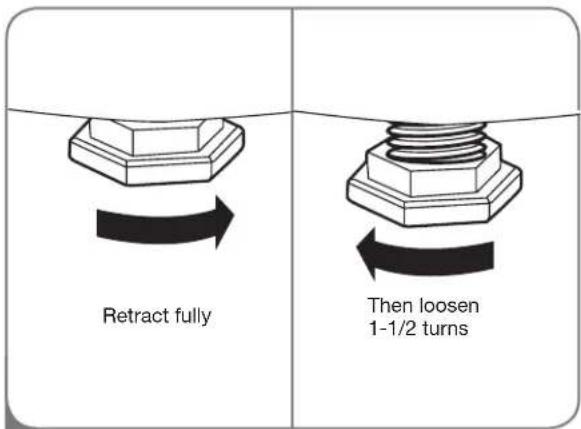
text_image
Retract fully Then loosen 1-1/2 turns1 To set the dryer to the same height as the washer, fully retract the leveling feet of the dryer by turning them counterclockwise, then turn them clockwise 1-1/2 turns.
NOTE: The appliance and pedestal assembly must be placed on a solid, sturdy, level floor for proper operation.
text_image
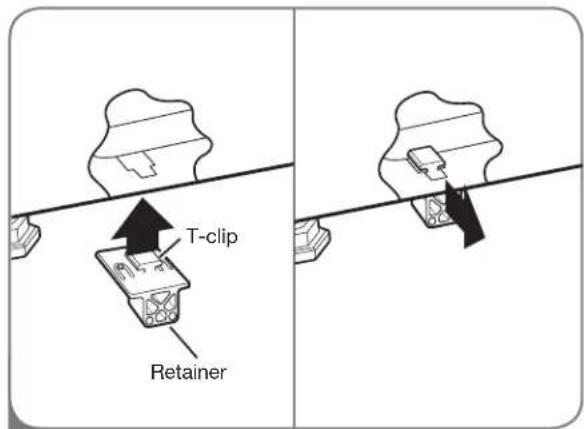
T-clip Retainer2 Insert the T-clip of the 4 retainers into the dryer base as shown. Press up on the back of the clip and pull outward to lock into place.
PEDESTAL INSTALLATION (cont.)
text_image
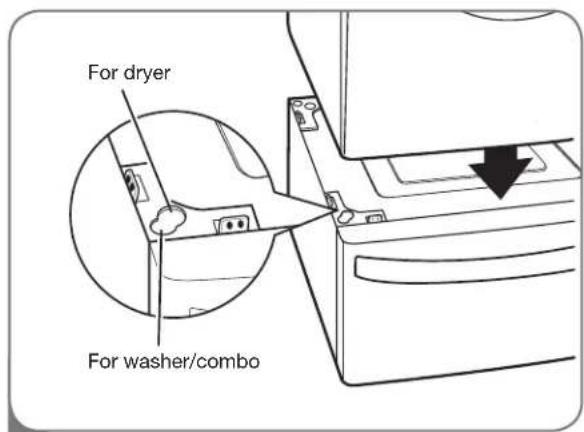
For dryer For washer/combo3 Place the dryer on the pedestal. Make sure the front and back feet are in the correct positions. The dryer feet will fit into the innermost positions as shown.
natural_image
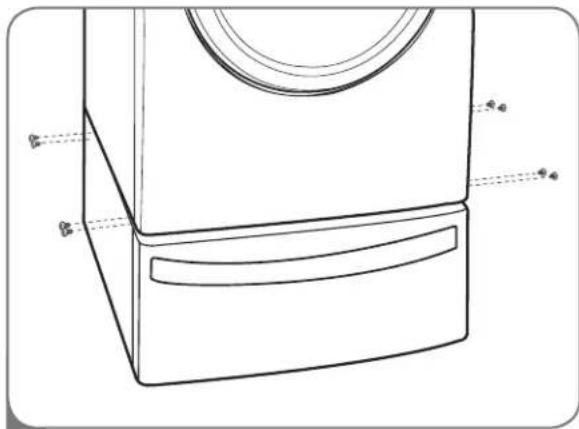
Line drawing of a washing machine casing with handle and side panel (no text or symbols)4 Make sure the screws on the pedestal align with the holes in the retainers, then install 4 screws at each corner to securely attach the appliance to the pedestal.
NOTE: If the screws are not installed properly, noise and vibration may result.
Move the appliance to the desired location.
text_image
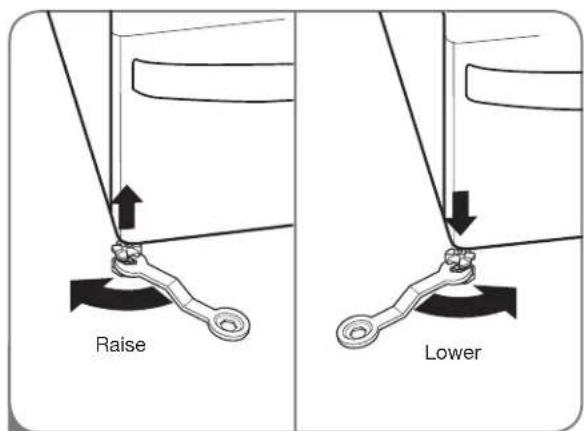
Raise Lower5 Loosen the locknuts on all 4 leveling feet of the pedestal until you can turn them with the wrench. Turn clockwise to raise or counterclockwise to lower until the pedestal is level and all 4 feet are solidly against the floor.
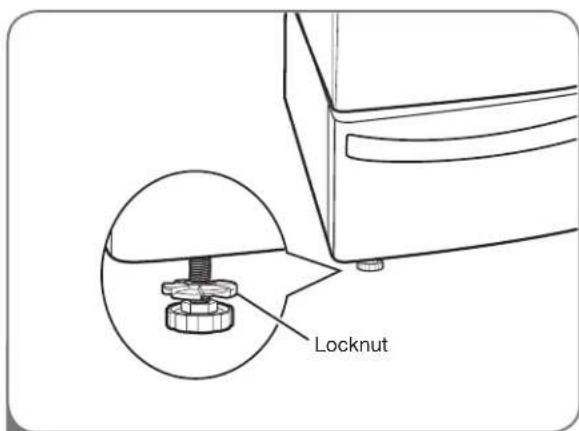
text_image
Locknut6 Securely tighten all locknuts by hand.
NOTE: Noise and vibration may result if locknuts are not tightened.
Be sure to connect the appliances to all water, power, or gas lines and draining or venting connections before operation.
If there is excessive vibration during the first operation after installation, slightly adjust the leveling feet.
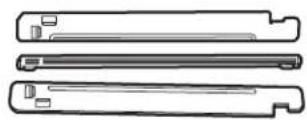
STACKING KIT INSTALLATION
This stacking kit includes:
- Two (2) side rails
- One (1) front rail
- Four (4) screws

natural_image
Technical line drawing of three parallel metal bracket components (no text or symbols)Tools Needed for Installation:
• Phillips-head screwdriver
To ensure safe and secure installation, please observe the following instructions.
WARNING
- Incorrect installation can cause serious accidents.
- The weight of the dryer and the height of installation make this stacking procedure too risky for one person. Two or more people are required when installing the stacking kit. There is a risk of serious back injury or other injuries.
- Do not use the stacking kit with a gas dryer in potentially unstable conditions such as a mobile home. Failure to follow this warning can result in serious injury.
- Place the washer on a solid, stable, level floor capable of supporting the weight of both appliances. Failure to follow this warning can result in serious injury.
- If appliances are already installed, disconnect them from all power, water, or gas lines and from draining or venting connections. Failure to do so can result in electrical shock, fire, explosion, or death.
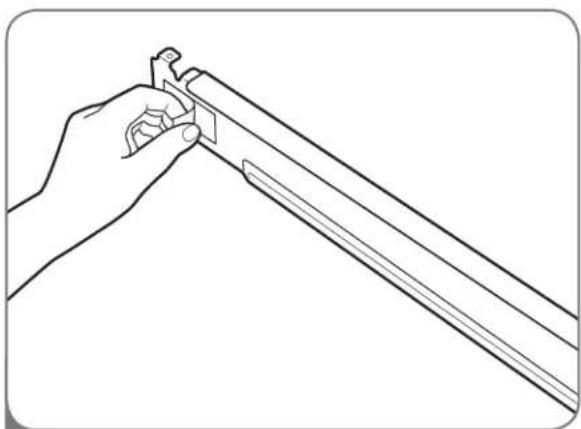
natural_image
Line drawing of a hand holding a tool, no text or symbols present1 Make sure the surface of the washer is clean and dry. Remove paper backing from the tape on one of the stacking kit side brackets.
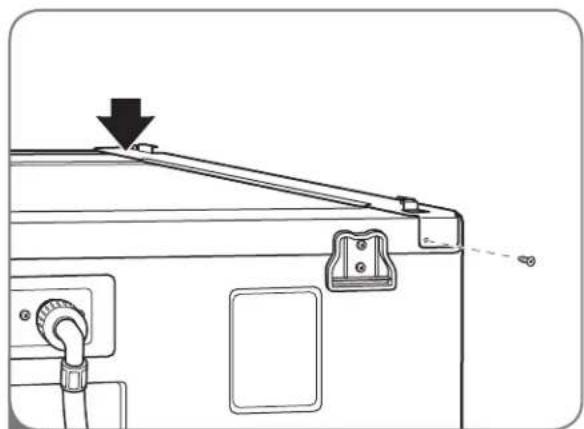
natural_image
Technical line drawing of a mechanical device with a downward arrow indicating a component (no text or symbols present)2 Fit the side bracket to the side of the washer top as shown in the above illustration. Firmly press the adhesive area of the bracket to the washer surface. Secure the side bracket to the washer with a screw on the back side of the bracket. Repeat steps 1 and 2 to attach the other side bracket.
OPTIONAL ACCESSORIES
STACKING KIT INSTALLATION (cont.)
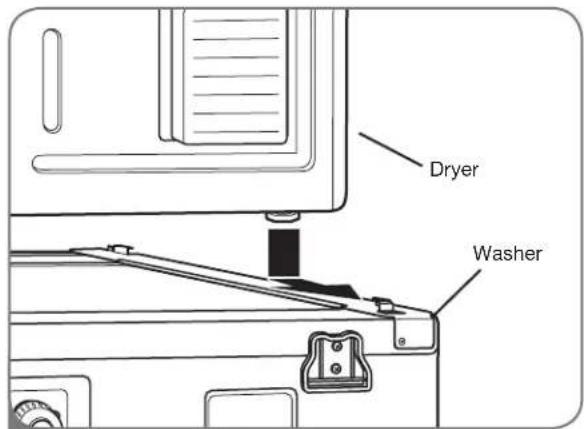
text_image
Dryer Washer3
Place the dryer on top of the washer by fitting the dryer feet into the side brackets as illustrated. Avoid finger injuries; do not allow fingers to be pinched between the washer and dryer. Slowly slide the dryer toward the back of the washer until the side bracket stoppers catch the dryer feet.
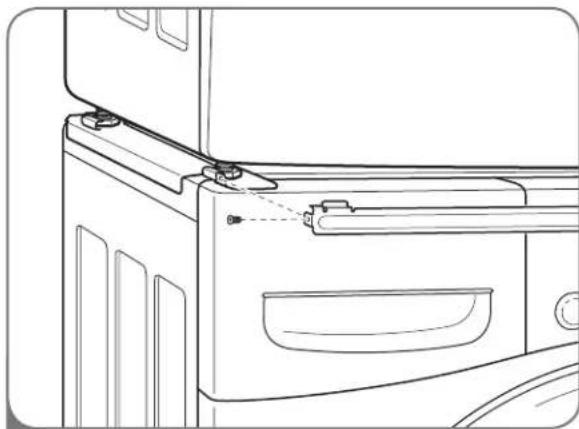
natural_image
Line drawing of a refrigerator interior showing door, drawer, and handle (no text or symbols)4
Insert the front rail between the bottom of the dryer and the top of the washer. Push the front rail toward the back of the washer until it comes in contact with the side rail stoppers. Install the two remaining screws to secure the front rail to the side rails.
LG ELECTRONICS, INC. LG DRYER LIMITED WARRANTY - USA

Your LG Dryer will be will repaired or replaced, at LG's option, if it proves to be defective in material or workmanship under normal use, during the warranty period ("Warranty Period") set forth below, effective from the date ("Date of Purchase") of original consumer purchase of the product. This warranty is good only to the original purchaser of the product and effective only when used in the United States, including Alaska, Hawaii, and U.S. Territories.
WARRANTY PERIOD:
LABOR: One Year from the Date of Purchase.
PARTS: One Year from the Date of Purchase.
Replacement Units and Repair Parts may be new or remanufactured.
Replacement Units and Repair Parts are warranted for the remaining portion of the original unit's warranty period.
Dryer drum 10 years limited warranty
Parts only. Customer will be responsible for any labor or in-home service to replace defective parts.
HOW SERVICE IS HANDLED:
In-Home Service:
Please retain dealer's dated bill of sale or delivery ticket as evidence of the Date of Purchase for proof of warranty, and submit a copy of the bill of sale to the service person at the time warranty service is provided.
Please call 1-800-243-0000 and choose the appropriate option to locate your nearest LG Authorized Service Center.
Or visit our Web site at: http://www.lgservice.com.
THIS WARRANTY IS IN LIEU OF ANY OTHER WARRANTY, EXPRESS OR IMPLIED, INCLUDING WITHOUT LIMITATION, ANY WARRANTY OF MERCHANTABILITY OR FITNESS FOR A PARTICULAR PURPOSE. TO THE EXTENT ANY IMPLIED WARRANTY IS REQUIRED BY LAW, IT IS LIMITED IN DURATION TO THE EXPRESS WARRANTY PERIOD ABOVE. NEITHER THE MANUFACTURER NOR ITS U.S. DISTRIBUTOR SHALL BE LIABLE FOR ANY INCIDENTAL, CONSEQUENTIAL, INDIRECT, SPECIAL, OR PUNITIVE DAMAGES OF ANY NATURE, INCLUDING WITHOUT LIMITATION, LOST REVENUES OR PROFITS, OR ANY OTHER DAMAGE WHETHER BASED IN CONTRACT, TORT, OR OTHERWISE. Some states do not allow the exclusion or limitation of incidental or consequential damages or limitations on how long an implied warranty lasts, so the above exclusion or limitation may not apply to you. This warranty gives you specific legal rights and you may also have other rights that vary from state to state.
THIS LIMITED WARRANTY DOES NOT APPLY TO:
- Service trips to your home to deliver, pick up, and/or install the product, instruct, or replace house fuses or correct wiring, or correction of unauthorized repairs.
- Damages or operating problems that result from misuse, abuse, operation outside environmental specifications or contrary to the requirements of precautions in the Operating Guide, accident, vermin, fire, flood, improper installation, acts of God, unauthorized modification or alteration, incorrect electrical current or voltage, or commercial use, or use for other than intended purpose.
The cost of repair or replacement under these excluded circumstances shall be borne by the consumer.
CUSTOMER INTERACTIVE CENTER NUMBERS
To obtain Customer Assistance, Product Information, or Dealer or Authorized Service Center location:
Call 1-800-243-0000 (24 hours a day, 365 days per year), and select the appropriate option from the menu. Or visit our Web site at: http://www.lgservice.com.
TO CONTACT LG ELECTRONICS BY MAIL:
LG Customer Interactive Center
P. O. Box 240007
201 James Record Road
Huntsville, Alabama 35824
ATTN: CIC
Product Registration Information
Model:
Serial Number:
Date of Purchase:
The model and serial number can be located on the rating plate inside the front door.
LG ELECTRONICS CANADA, INC. LG DRYER LIMITED WARRANTY - Canada
WARRANTY: Should your LG Dryer ("Product") fail due to a defect in material or workmanship under normal home use during the warranty period set forth below, LG Canada will at its option repair or replace the Product upon receipt of proof of original retail purchase. This warranty is valid only to the original retail purchaser of the product and applies only to a Product distributed in Canada by LG Canada or an authorized Canadian distributor thereof. The warranty only applies to Products located and used within Canada.
WARRANTY PERIOD: (Note: If the original date of purchase can not be verified, the warranty will begin sixty (60) days from the date of manufacture).
Dryer
One (1) year from the date of original retail purchase
Parts and Labor (internal/functional parts only)
Dryer drum 10 years limited warranty
Parts only. Customer will be responsible for any labor or in-home service to replace defective parts.
- Replacement products and parts are warranted for the remaining portion of the original warranty period or ninety (90) days, whichever is greater.
- Replacement products and parts may be new or remanufactured.
• LG Authorized Service Center warranties their repair work for thirty (30) days.
LG CANADA'S SOLE LIABILITY IS LIMITED TO THE WARRANTY SET OUT ABOVE. EXCEPT AS EXPRESSLY PROVIDED ABOVE, LG CANADA MAKES NO AND HEREBY DISCLAIMS ALL OTHER WARRANTIES AND CONDITIONS RESPECTING THE PRODUCT, WHETHER EXPRESS OR IMPLIED, INCLUDING, BUT NOT LIMITED TO, ANY IMPLIED WARRANTY OR CONDITION OF MERCHANTABILITY OR FITNESS FOR A PARTICULAR PURPOSE, AND NO REPRESENTATIONS SHALL BE BINDING ON LG CANADA. LG CANADA DOES NOT AUTHORIZE ANY PERSON TO CREATE OR ASSUME FOR IT ANY OTHER WARRANTY OBLIGATION OR LIABILITY IN CONNECTION WITH THE PRODUCT. TO THE EXTENT THAT ANY WARRANTY OR CONDITION IS IMPLIED BY LAW, IT IS LIMITED TO THE EXPRESS WARRANTY PERIOD ABOVE. LG CANADA, THE MANUFACTURER OR DISTRIBUTOR SHALL NOT BE LIABLE FOR ANY INCIDENTAL, CONSEQUENTIAL, SPECIAL, DIRECT OR INDIRECT DAMAGES, LOSS OF GOODWILL, LOST PROFITS, PUNITIVE OR EXEMPLARY DAMAGES OR ANY OTHER DAMAGE, WHETHER ARISING DIRECTLY OR INDIRECTLY FROM ANY CONTRACTUAL BREACH, FUNDAMENTAL OR OTHERWISE, OR FROM ANY ACTS OR OMISSIONS, TORT, OR OTHERWISE.
This warranty gives you specific legal rights. You may have other rights which may vary from province to province depending on applicable provincial laws. Any term of this warranty that negates or varies any implied condition or warranty under provincial law is severable where it conflicts with provincial law without affecting the remainder of this warranty's terms.
THIS LIMITED WARRANTY DOES NOT COVER:
- Service trips to deliver, pick up, or install the product; instructing a customer on operation of the product; repair or replacement of fuses or correction of wiring, or correction of unauthorized repairs/installation.
- Failure of the product to perform during power failures and interruptions or inadequate electrical service.
- Damage caused by leaky or broken water pipes, frozen water pipes, restricted drain lines, inadequate or interrupted water supply or inadequate supply of air.
- Damage resulting from operating the Product in a corrosive atmosphere or contrary to the instructions outlined in the Product owner's manual.
- Damage to the Product caused by accidents, pests and vermin, lightning, wind, fire, floods, or acts of God.
- Damage resulting from the misuse, abuse, improper installation, repair, or maintenance of the Product. Improper repair includes use of parts not approved or specified by LG Canada.
- Damage or product failure caused by unauthorized modification or alteration, or use for other than its intended purpose, or resulting from any water leakage due to improper installation.
- Damage or Product failure caused by incorrect electrical current, voltage, commercial or industrial use, or use of accessories, components, or cleaning products that are not approved by LG Canada.
- Damage caused by transportation and handling, including scratches, dents, chips, and/or other damage to the finish of your product, unless such damage results from defects in materials or workmanship and is reported within one (1) week of delivery.
- Damage or missing items to any display, open box, discounted, or refurbished Product.
- Products with original serial numbers that have been removed, altered, or cannot be readily determined. Model and Serial numbers, along with original retail sales receipt, are required for warranty validation.
- Increases in utility costs and additional utility expenses. Replacement of light bulbs, filters, or any consumable parts. Repairs when your Product is used in other than normal and usual household use (including, without limitation, commercial use, in offices or recreational facilities) or contrary to the instructions outlined in the Product owner's manual.
- Costs associated with removal of the Product from your home for repairs.
- The removal and reinstallation of the Product if it is installed in an inaccessible location or is not installed in accordance with published installation instructions, including the Product owner's and installation manuals.
- Accessories to the Product such as door bins, drawers, handles, shelves, etc.. Also excluded are parts besides those that were originally included with the Product.
All costs associated with the above excluded circumstances shall be borne by the consumer.
For complete warranty details and customer assistance, please call or visit our website:
Call 1-888-542-2623 (24 hours a day, 365 days a year) and select the appropriate option from the menu, or visit our website at http://www.lg.ca
Write your warranty information below:
Product Registration Information:
Model:
Serial Number:
Date of Purchase:
Water and Toxic Enforcement Act) 42
natural_image
Silhouette of a clothes rack with a hanging cloth and a bottle, no text or symbols presentLEA TODAS LA INSTRUCCIONES ANTES DE USAR
ADVERTENCIA
text_image
Diagram of a washing machine with labeled parts including front, back, side, and interior views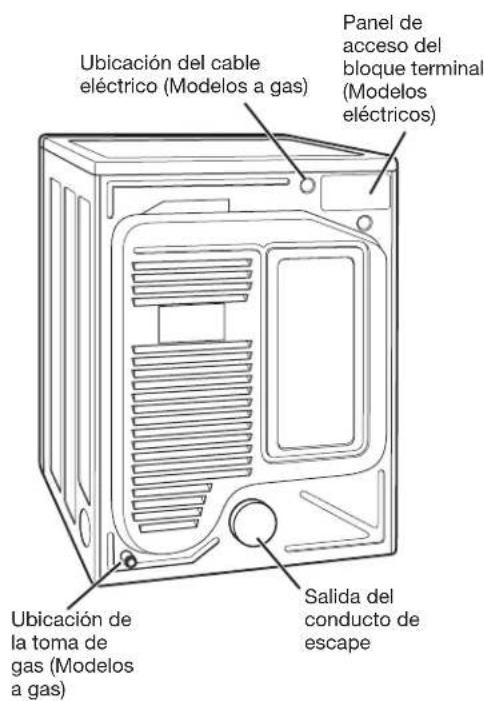
text_image
20" (50,8 cm) 18" (45,72 cm) 4" (10 cm) 30" (76,1 cm) 4" (10 cm) 50" (127 cm)
text_image
1" (2,54 cm) 27" (68,6 cm) -1" (2,54 cm)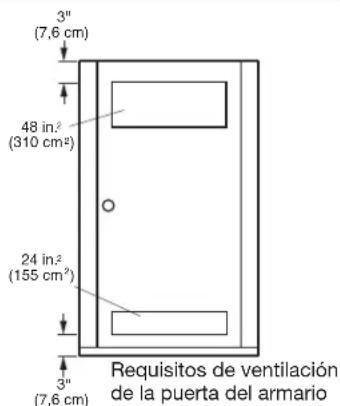
text_image
3" (7,6 cm) 48 in² (310 cm²) 24 in² (155 cm²) 3" (7,6 cm) Requisitos de ventilación de la puerta del armariotext_image
30° (76,1 cm) 4" (10 cm)natural_image
Line drawing of a rectangular box with a square top and side handles (no text or symbols)natural_image
Diagram showing two mechanical components with arrows indicating motion, no text or symbols presentnatural_image
Illustration of a hand holding two electrical plugs into a wall socket (no text or symbols)natural_image
Illustration of a handheld device connected to a shield-like object, with no visible text or symbols.natural_image
Line drawing of a rectangular electronic device with a square top and side compartments (no text or symbols)Pedestal
natural_image
Line drawing of a washing machine with labeled dimensions (no text or symbols)text_image
Raise Bajarnatural_image
Technical line drawing of three parallel metal bracket components (no text or symbols)natural_image
Line drawing of a hand holding a tool, no text or symbols presentnatural_image
Technical line drawing of a mechanical device with adjustment arrows and mounting bracket (no text or symbols)natural_image
Line drawing of a refrigerator interior showing door, drawer, and handle (no text or symbols)LG Customer Interactive Center
P. O. Box 240007
201 James Record Road
Huntsville, Alabama 35824
ATTN: CIC
text_image
Diagram of a washing machine with labeled parts including front, back, and interior views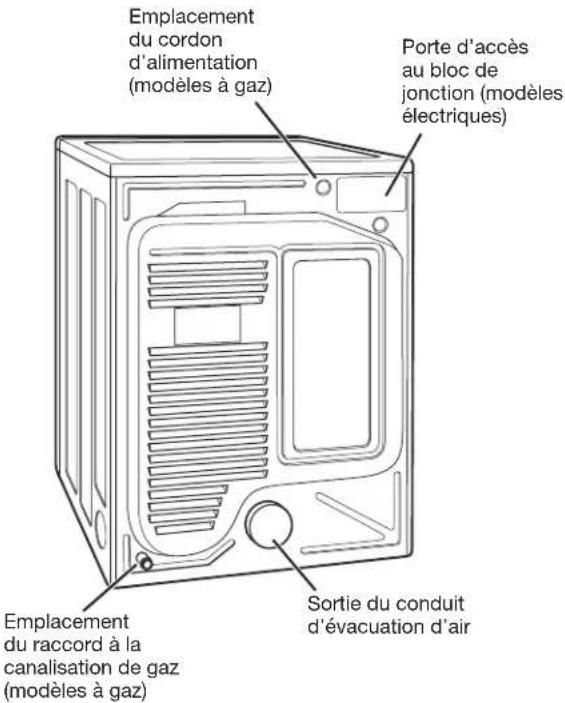
natural_image
Line drawing of a rectangular electronic device with a square top and side compartments (no text or symbols)natural_image
Diagram showing two mechanical components with wrenches and directional arrows indicating movement (no text or symbols)natural_image
Technical line drawing of a vertical panel with a curved duct and labeled 'correcte' (no other text or symbols)Ventilation incorrecte

text_image
incorrecteRACCORDEMENT DES SÉCHEUSES À GAZ
⚠AVERTISSEMENT
natural_image
Illustration of a hand connecting two electrical outlets to a terminal block (no text or symbols)natural_image
Illustration of a handheld device connected to a screen with a pen inserted (no text or symbols)
natural_image
Line drawing of a rectangular electronic device with a square top and internal compartments (no text or symbols)Piédestal
text_image
Technical diagram of a washing machine with labeled dimensions and component annotations4
