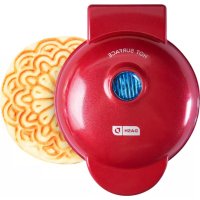
DMP001 - Waffle Maker Dash - Free user manual and instructions
Find the device manual for free DMP001 Dash in PDF.


| Product Type | Waffle Maker |
| Brand | Dash |
| Model | DMP001 |
| Power Supply | 120 V ~ 60 Hz |
| Cooking Surface | Non-stick |
| Capacity | 1 mini waffle |
| Material | Plastic and metal |
| Main Functions | Quick cooking of mini waffles, heating indicator light |
| Care and Cleaning | Clean with a damp cloth after cooling; do not use abrasives; do not wash in dishwasher |
| Safety | Do not immerse; hot surfaces; polarized plug; do not use unattended |
| Power Cord | Short (to avoid entanglement or tripping hazards) |
| Usage | Household use only |
| Customer Service | Contact StoreBound at 1-800-898-6970 or support@storebound.com |
| Repairability | StoreBound authorized service center |
Frequently Asked Questions - DMP001 Dash
User questions about DMP001 Dash
0 question about this device. Answer the ones you know or ask your own.
Ask a new question about this device
Download the instructions for your Waffle Maker in PDF format for free! Find your manual DMP001 - Dash and take your electronic device back in hand. On this page are published all the documents necessary for the use of your device. DMP001 by Dash.
USER MANUAL DMP001 Dash
Instruction Manual | Recipe Guide

natural_image
Simple line drawing of a fork, knife, and a round plate with a flower (no text or symbols)















MINI PIZZELLE MAKER
Important Safeguards....4-7
Parts & Features....8
Using Your Mini Pizzelle Maker....9-12
Cleaning & Maintenance 13
Troubleshooting....14-15
Recipes....17-31
Notes....32-33
Customer Support 34
Warranty 35

IMPORTANT SAFEGUARDS IMPORTANT SAFEGUARDS
IMPORTANT SAFEGUARDS
IMPORTANT SAFEGUARDS: PLEASE READ AND SAVE THIS INSTRUCTION AND CARE MANUAL.
When using electrical appliances, basic safety precautions should be followed, including:
- Read all instructions.
- Remove all bags and packaging from appliance before use.
- Never leave appliance unattended when in use.
• Make sure the appliance is cleaned thoroughly before using. - Do not use appliance for other than intended use. For household use only. Do not use outdoors.
- Warning: Hot surfaces! Never touch the Cooking Surface or Cover while appliance is in use. Always lift and lower the Cover by the Cover Handle.
- DO NOT lift the Cover so that your arm is over the Cooking Surface as it is hot and may cause injury. Lift from the side.
• To prevent the risk of fire, electric shock, or personal injury, do not put cord, plug, or appliance in or near water or other liquids. The Mini Maker is NOT dishwasher safe.
• Never use abrasive cleaning
agents to clean your appliance as this may damage the Mini Maker and its non-stick Cooking Surface.
- Do not operate this appliance with a damaged cord, damaged plug, after the appliance malfunctions, is dropped, or damaged in any manner. Return appliance to the nearest authorized service facility for examination, repair or adjustment.
- DO NOT use the Mini Maker near water or other liquids, with wet hands, or while standing on a wet surface.
- For maintenance other than cleaning, please contact StoreBound directly at 1-800-898-6970 from 7AM - 7PM PST Monday - Friday or by email at support@storebound.com.
- Do not use metal utensils on the Cooking Surface as this will damage the non-stick surface.
- This appliance is not intended for use by persons (including children) with reduced physical, sensory, or mental capabilities, or lack of
experience and knowledge unless they are provided with supervision and instruction concerning use of the appliance by a person responsible for their safety.
- Do not place appliance on or near a hot gas burner, hot electric burner, or in a heated oven.
- Be cautious when moving an appliance containing hot oils or other hot liquids.
- Refrain from using attachments that are not recommended by the appliance manufacturer, as this may result in fire, electric shock, or personal injury.
- Allow Mini Maker to cool completely before moving, cleaning, or storing.
- Close supervision is necessary when any appliance is used by or near children.
- Do not let the cord touch hot surfaces or hang over the edge of tables or counters.
• Always be sure to unplug the appliance from outlet prior to moving, cleaning, storage, and when not in use.
• StoreBound shall not accept liability for damages caused by improper
use of the appliance.
- Improper use of the Mini Maker can result in property damage or even in personal injury.
- This appliance has a polarized plug (one blade is wider than the other). To reduce the risk of electric shock, this plug will fit in a polarized outlet only one way. If the plug does not completely fit in the outlet, reverse the plug. If it still does not fit, contact a qualified electrician. Do not attempt to modify the plug in any way.
- A short power supply cord is to be provided to reduce the risk resulting from becoming entangled in or tripping over a longer cord. An extension cord may be used if care is exercised in its use. If an extension cord is used, the marked electrical rating of the extension cord should be at least as great as the electrical rating of the appliance. If the appliance is of the grounded type, the extension cord should be a grounding 3-wire cord. The extension cord should be arranged so that it will not drape over the countertop or tabletop where it can be pulled on by children or tripped over unintentionally.
IMPORTANT SAFEGUARDS: PLEASE READ AND SAVE THIS INSTRUCTION AND CARE MANUAL.
PAGE ITEMS
GARANTIES IMPORTANTES GARANTIES IMPORTANTES
GARANTIES IMPORTANTES: VEUILLEZ LIRE ET CONSERVER CE MODE D'EMPLOI ET D'ENTRETIEN
USING YOUR MINI MAKER

Before first use, remove all packaging material and thoroughly clean your Mini Pizzelle Maker.
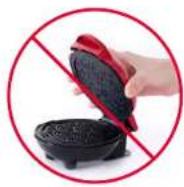
Never touch the Cooking Surface or Cover while appliance is in use.

DO NOT lift the Cover so that your arm is over the Cooking Surface as it is hot and may cause injury.
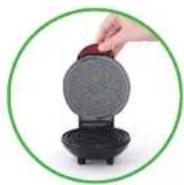
Always lift and lower the Cover by the Cover Handle. Lift from the side.
USING YOUR MINI MAKER USING YOUR MINI MAKER
PAGE TITLE

natural_image
Close-up of a decorative waffle or pastry with intricate floral patterns and a red lid (no text or symbols visible)1 Place the appliance on a stable and dry surface. Plug the cord into a power outlet. The Indicator Light (photo A) will illuminate, signaling that the Mini Maker is heating up.
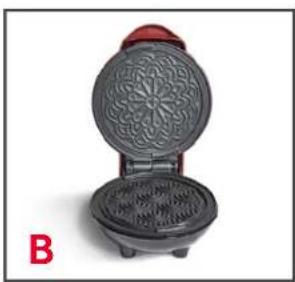
2 Once the Cooking Surface reaches the optimal cooking temperature, the Indicator Light will automatically shut off. Now, you're ready to get cooking (photo B)!

natural_image
Close-up of a red and black electric waffle grill with a hand holding a small pink tool, no visible text or symbols.
natural_image
Person cooking a waffle using a spoon, no text or symbols visible3 Carefully lift the Cover by the Cover Handle and spray both Cooking Surfaces with a small amount of cooking spray (photo C).
4 Place or pour 1-2 tablespoons of batter onto the Cooking Surface (photo D) and close the Cover.
USING YOUR MINI MAKER CLEANING & MAINTENANCE
PAGE TITLE

natural_image
Close-up of a red and black waffle being placed with a spatula, showing the kernel and sponge (no text or symbols visible)
natural_image
Red industrial exhaust fan with blue vent and label 'F' (no readable text or symbols)5 Once pizzelle is cooked to your preference, carefully remove it from the Cooking Surface with a heat-resistant nylon or silicone cooking utensil (photo E). For crisp pizzelles, remove from the Mini Maker and allow to cool completely on a cooling rack.
6 When you have finished cooking, unplug your Mini Maker and allow it to cool before moving or cleaning (photo F).

NOTE: Do not use metal utensils to remove or place food on the Cooking Surface as this will damage the non-stick surface.
Always allow the appliance to cool completely before moving, cleaning, or storing. Do not submerge appliance in water or any other liquids. Never use abrasive cleaning agents to clean your appliance as this may damage the Mini Maker.
In order to keep your Mini Maker in pristine working order, thoroughly clean the appliance after each use. This will prevent the build-up of food or oil.
- Unplug Mini Maker and allow it to cool completely.
- Using a damp, soapy cloth, wipe down the Cooking Surface and Cover. Thoroughly rinse the cloth and wipe again.
• Thoroughly dry Mini Maker before storing. - If there is food burned onto the Cooking Surface, pour on a little cooking oil and let sit for 5 to 10 minutes. Scrub the Cooking Surface with a sponge or soft bristled brush to dislodge food. Use a damp, soapy cloth to wipe down the Cooking Surface. Thoroughly rinse the cloth and wipe again. If any food remains, pour on cooking oil and let sit for a few hours, then scrub and wipe clean.
- Never use abrasive cleaning agents to clean your appliance as this may damage the Mini Maker and its nonstick Cooking Surface.
TROUBLESHOOTING TROUBLESHOOTING
While Dash products are durable, you may encounter one or more of the problems listed below. If the issue is either not solved by the solutions recommended below or not included on this page, please contact our Customer Support Team at 1-800-898-6970 or support@storebound.com.
| ISSUE SOLUTION | |
| The light on the Mini Maker keeps shutting off. | This is normal. During the cooking process, the heating element will automatically turn on and off to regulate the temperature and ensure that the Cooking Surface does not get too hot or cold. When this occurs, the Indicator Light turns on and off. |
| How do I know when the Mini Maker is heated and ready to use? | When the Mini Maker reaches the optimal temperature, the Indicator Light shuts off and that means you're ready to get cooking! |
| There is no On/Off Button. How do I turn the Mini Maker off and on? | To turn on, simply plug in the power cord. When you're done cooking, turn off the Mini Maker by unplugging it. |
| ISSUE SOLUTION | |
| When using my Mini Maker, the Cover gets very hot. Is this normal? | Yes, this is completely normal. When using your Mini Maker, always lift and lower the Cover by the Cover Handle. To prevent personal injury, DO NOT lift the Cover so that your arm is over the Cooking Surface as it is hot and may cause injury. Lift from the side. |
| After using my Mini Maker a few times, food is starting to stick to the surface. What is happening? | There is probably a build-up of burnt food residue on the Cooking Surface. This is normal, especially when cooking with sugar. Allow the appliance to cool fully, pour on a little cooking oil and let sit for 5-10 minutes. Scrub Surface with a sponge or soft bristled brush to dislodge food. Use a damp, soapy cloth to wipe down the Cooking Surface. Rinse the cloth and wipe again. If food remains, pour on cooking oil and let sit for a few hours, then scrub and wipe clean. |
| The Indicator Light will not turn on and the Cooking Surface is failing to heat. | 1. Ensure that the power cord is plugged into the power outlet.2. Check to make sure the power outlet is operating correctly.3. Determine if a power failure has occurred in your home, apartment or building. |

natural_image
Decorated waffle making with pastries, Christmas ornaments, and a glass of milk in the background (no text or symbols visible)MINI PIZZELLE MAKER
RECIPE GUIDE

Follow us @unprocessyourfood
for recipes, videos, & daily inspiration

BASIC PIZZELLE
Yield: 25 pizzelle cookies
Ingredients:
1 cup all purpose flour
14 teaspoon salt
12 cup sugar
2 large eggs
6 tablespoons butter, melted
1 teaspoon vanilla or anise extract
1 teaspoon baking powder
Directions:
- Whisk flour, sugar, salt, and baking powder together.
- Add the melted butter, eggs, and vanilla and mix until combined.
- Scoop 1 heaping tablespoon of batter into the Pizzelle Maker and cook until golden brown.

natural_image
Exterior view of a red waffle griddle with baked cookies and a coffee cup in the background (no text or symbols visible)
GLUTEN-FREE PIZZELLE
Yield: 25 pizzelle cookies
Ingredients:
1 cup + 1 tablespoon almond meal (or gluten free flour blend)
½ cup sugar
6 tablespoons butter, melted
1 teaspoon vanilla or anise extract
1 teaspoon baking powder
14 teaspoon salt
2 large eggs
Directions:
- Whisk almond meal, sugar, salt, and baking powder together.
- Add the melted butter, eggs, and vanilla and mix until combined.
- Scoop 1 heaping tablespoon of batter into the Pizzelle Maker and cook until golden brown.

VEGAN PIZZELLE
Yield: 25 pizzelle cookies
Ingredients:
1 cup all purpose flour
12 cup sugar
6 tablespoons coconut oil, melted
1 teaspoon vanilla or anise extract
1 teaspoon baking powder
14 teaspoon salt
2 flax eggs (2 tablespoons flax meal whisked with 6 tablespoons water)
Directions:
- Whisk flour, sugar, salt, and baking powder together.
- Add the melted coconut oil, flax eggs, and vanilla and mix until combined.
- Scoop 1 heaping tablespoons of batter into the Pizzelle Maker and cook until golden brown.

natural_image
Plated waffle cakes with chocolate chip toppings, red raspberries, and a white cup of coffee in the background (no text or symbols visible)
PIZZELLE CANNOLI
Yield: 25 pizzelle cookies
Ingredients:
1 recipe basic pizzelles
12 cup whipping cream
2 cups ricotta cheese
34 cup powdered sugar
- Just as the pizzelles finish cooking wrap them around a 14 inch wooden dowel and allow them to cool in a cannoli shape.
- To make the filling, whip the cream until light and fluffy.
- Mix the ricotta cheese with the powdered sugar and gently fold in the cream and chocolate chips.
- When you are ready to eat the cannoli fill each cookie with a few tablespoons of filling and garnish with more chocolate chips.

VEGAN CHOCOLATE GANACHE FILLING
Ingredients:
8 oz dark chocolate, melted and cooled
1 ½ cups coconut cream, chilled
1 teaspoon vanilla extract
Directions:
- Use a hand held hand mixer to whip the cold coconut cream until soft peaks form.
- Add the cooled melted chocolate and mix until well combined.
- Fold in vanilla. Fill vegan or chocolate pizzelles cannoli style or spread as a sandwich cookie.

CHOCOLATE PIZZELLE
Yield: 25 pizzelle cookies
Ingredients:
1 cup all purpose flour 1 teaspoon vanilla
2 tablespoons unsweetened 1 teaspoon baking powder
cocoa powder ¼ teaspoon salt
½ cup sugar 2 large eggs
6 tablespoons butter, melted
Directions:
- Whisk flour, sugar, cocoa powder, salt, and baking powder together.
- Add the melted butter, eggs, and vanilla and mix until combined.
- Scoop 1 heaping tablespoons of batter into the Pizzelle Maker and cook until golden brown.

PARMESAN & ONION PIZZELLE
Yield: 25 pizzelle cookies
Ingredients:
2 eggs
12 teaspoon onion powder
5 tablespoons butter, melted
14 teaspoon sea salt
13 cup parmesan cheese
1 cup all purpose flour
1 teaspoon baking powder
Directions:
- Whisk flour, parmesan, baking powder, salt, and onion powder together.
- Add the melted butter and eggs.
- Scoop 1 heaping tablespoon of batter into the Pizzelle Maker and cook until golden brown, about 1 minute.

natural_image
Close-up of waffle and strawberry-shaped pastries on a metal grating rack, with additional items in bowls (no text or symbols visible)
LEMON & DILL PIZZELLE
Yield: 25 pizzelle cookies
Ingredients:
2 eggs
5 tablespoons butter, melted
1 tablespoon fresh dill
1 cup + 2 tablespoons all purpose flour
1 teaspoon baking powder
2 teaspoons lemon zest
14 teaspoon sea salt
Directions:
- Whisk flour, baking powder, salt, lemon zest, and fresh dill together.
- Add the melted butter and eggs.
- Scoop 1 heaping tablespoon of batter into the Pizzelle Maker and cook until golden brown, about 1 minute.

GOAT CHEESE RICOTTA FILLING
Ingredients:
1 cup ricotta cheese
8 oz goat cheese, room temperature
14 teaspoon sea salt
zest of one lemon
1 clove garlic, minced
2 tablespoons olive oil
Directions:
- Mix ricotta cheese with salt, lemon zest, minced garlic, and olive oil.
- Mix in softened goat cheese and add lemon juice, one teaspoon at a time, if it's too thick.
- Serve cannoli style with Lemon & Dill Pizzelle or as a dip.
natural_image
A black waffle-shaped griddle with a decorative floral pattern, placed on a white surface with red ornaments and a glass of milk in the background (no text or symbols visible).
STROOPWAFEL PIZZELLE
Yield: 25 pizzelle cookies
Ingredients:
1 recipe basic pizzelles
12 cup dark brown sugar
½ cup white sugar
2 tablespoons water
5 tablespoons butter
3 tablespoons corn syrup
1 tablespoon honey
1 teaspoon cinnamon
14 teaspoon sea salt
Directions:
- Make pizzelles and set aside.
- To make caramel combine the sugars, water, butter, corn syrup, honey, and sea salt in a sauce pan.
- Bring to a boil over medium heat while stirring. Once caramel is boiling cover it for 2 to 3 minutes to dissolve sugar crystals and then add the cinnamon and cook it without stirring until it reaches 240°F.
- Remove the caramel from the heat and allow it to cool for a few minutes.
- Carefully place about a tablespoon of caramel on a pizzelle and cover with a second pizzelle. Repeat with remaining cookies.
NOTES
NOTES
CUSTOMER SUPPORT
WARRANTY

Dash values quality and workmanship and stands behind this product with our Feel Good Guarantee™. To learn more about our commitment to quality, visit bydash.com/feelgood.
Our US-based customer support team is at your service Monday - Friday during the times below.
Reach us at 1 (800) 898-6970 or support@bydash.com
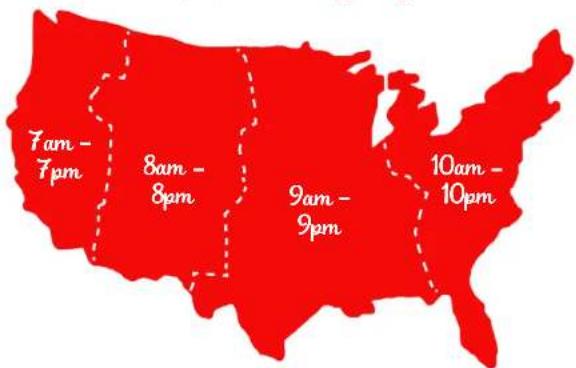
Hey Hawaii! You can reach our customer service team from 5AM to 5PM. And also, Alaska, feel free to reach out from 6AM - 6PM.
STOREBOUND, LLC - 1 YEAR LIMITED WARRANTY
Your StoreBound product is warranted to be free from defects in material and workmanship for a period of one (1) year from the date of the original purchase when utilized for normal and intended household use. Should any defect covered by the terms of the limited warranty be discovered within one (1) year, StoreBound, LLC will repair or replace the defective part. To process a warranty claim, contact Customer Support at 1-800-898-6970 for further assistance and instruction. A Customer Support agent will assist you by troubleshooting minor problems. If troubleshooting fails to fix the problem, a return authorization will be issued. Proof of purchase indicating the date and place of purchase is required and should accompany the return. You must also include your full name, shipping address, and telephone number. We are unable to ship returns to a PO box. StoreBound will not be responsible for delays or unprocessed claims resulting from a purchaser's failure to provide any or all of the necessary information. Freight costs must be prepaid by the purchaser.
Send all inquiries to support@storebound.com.
There are no express warranties except as listed above.
REPAIR OR REPLACEMENT AS PROVIDED UNDER THIS WARRANTY IS THE EXCLUSIVE REMEDY OF THE CUSTOMER. STOREBOUND SHALL NOT BE LIABLE FOR ANY INCIDENTAL OR CONSEQUENTIAL DAMAGES OR FOR BREACH OF ANY EXPRESS OR IMPLIED WARRANTY ON THIS PRODUCT EXCEPT TO THE EXTENT REQUIRED BY APPLICABLE LAW. ANY IMPLIED WARRANTY OF MERCHANTABILITY OR FITNESS FOR A PARTICULAR PURPOSE ON THIS PRODUCT IS LIMITED IN DURATION TO THE DURATION OF THIS WARRANTY.
Some states do not allow the exclusion or limitation of incidental or consequential damages, or limitations on how long an implied warranty lasts. Therefore, the above exclusions or limitations may not apply to you. This warranty gives you specific legal rights and you may also have other rights, which vary from state to state.
Refurbished items or items not purchased through an authorized retailer are not eligible for warranty claims.
REPAIRS
DANGER! Risk of electric shock! The Dash Mini Maker is an electrical appliance.
Do not attempt to repair the appliance yourself under any circumstances.
Contact Customer Support regarding repairs to the appliance.
TECHNICAL SPECIFICATIONS
Voltage 120V \~ 60Hz
Power Rating 350W
Stock#: DMP001_20200516_V3


This product has passed food safety testing in accordance with FDA guidelines.

- MINI PIZZELLE MAKER
- IMPORTANT SAFEGUARDS IMPORTANT SAFEGUARDS
- IMPORTANT SAFEGUARDS
- IMPORTANT SAFEGUARDS: PLEASE READ AND SAVE THIS INSTRUCTION AND CARE MANUAL.
- GARANTIES IMPORTANTES GARANTIES IMPORTANTES
- GARANTIES IMPORTANTES: VEUILLEZ LIRE ET CONSERVER CE MODE D'EMPLOI ET D'ENTRETIEN
- USING YOUR MINI MAKER
- USING YOUR MINI MAKER USING YOUR MINI MAKER
- USING YOUR MINI MAKER CLEANING & MAINTENANCE
- TROUBLESHOOTING TROUBLESHOOTING
- RECIPE GUIDE
- BASIC PIZZELLE
- Ingredients:
- Directions:
- GLUTEN-FREE PIZZELLE
- VEGAN PIZZELLE
- PIZZELLE CANNOLI
- VEGAN CHOCOLATE GANACHE FILLING
- CHOCOLATE PIZZELLE
- PARMESAN & ONION PIZZELLE
- LEMON & DILL PIZZELLE
- GOAT CHEESE RICOTTA FILLING
- STROOPWAFEL PIZZELLE
- NOTES
- CUSTOMER SUPPORT
- WARRANTY
- STOREBOUND, LLC - 1 YEAR LIMITED WARRANTY
- REPAIRS
- TECHNICAL SPECIFICATIONS
Brand : Dash
Model : DMP001
Category : Waffle Maker