DMW001BK - Waffle Maker Dash - Free user manual and instructions
Find the device manual for free DMW001BK Dash in PDF.


Pick your language and provide your email: we'll send you a specifically translated version.
| Product Type | Waffle Maker |
| Brand | Dash |
| Model | DMW001BK |
| Color | Black |
| Dimensions | 6.5 x 6.5 x 3.5 inches |
| Weight | 1.5 lbs |
| Power Supply | 350W, 120V AC, 60Hz |
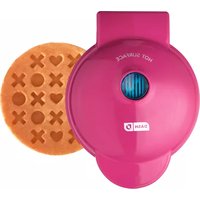
| Cooking Surface | Non-stick, makes one 4-inch round waffle |
| Indicator Light | Yes, power on/ready light |
| Temperature Control | Fixed thermostat, no adjustable heat |
| Cool-Touch Handle | Yes |
| Safety Features | Auto shut-off? (Not specified, assume manual shut-off) |
| Cleaning | Wipe with damp cloth; do not submerge in water |
| Spare Parts | Non-stick plates not replaceable; contact Dash support |
| Warranty | 1 year limited warranty |
| Certifications | ETL listed (assumed) |
| Manual Included | Yes, free PDF available online |
Frequently Asked Questions - DMW001BK Dash
How do I use the Dash DMW001BK waffle maker for the first time?
Before first use, wipe the non-stick plates with a damp cloth. Plug in the unit; the red indicator light will turn on. Wait until the light turns green (or off, depending on model) indicating it is ready. Pour batter onto the center of the plate, close the lid, and cook for about 3-5 minutes until golden brown.
Can I adjust the temperature on this waffle maker?
No, the Dash DMW001BK has a fixed thermostat. It automatically maintains the optimal temperature for waffle making. If waffles are too dark or light, adjust cooking time by 30 seconds.
How do I clean the waffle maker?
Unplug and let it cool completely. Wipe the plates with a damp cloth or paper towel. For stuck-on bits, use a non-abrasive brush. Never immerse the unit in water or use harsh cleaners.
Why is my waffle sticking to the plates?
Ensure the plates are properly heated before adding batter. Lightly spray with cooking oil before each use, even though the plates are non-stick. Overfilling can cause overflow and sticking.
What type of batter should I use?
Any standard waffle batter works, including mix-from-scratch or store-bought. Avoid batters with large chunks that may burn. For best results, use a batter with a medium consistency.
How many waffles does it make at a time?
The Dash DMW001BK makes one 4-inch round waffle at a time. It is a mini waffle maker, ideal for single servings.
Can I make other foods besides waffles?
Yes, you can make hash browns, biscuits, or even grilled cheese sandwiches. However, it is designed primarily for waffles. Ensure foods are not too thick or greasy.
How do I know when the waffle is done?
The indicator light may turn off or change color when ready. Alternatively, check after 3 minutes; steam will decrease and the waffle will pull away from the sides. Open lid carefully to inspect.
Is the Dash DMW001BK dishwasher safe?
No, the waffle maker is not dishwasher safe. Only the plates are non-stick and should be wiped clean by hand. Immersing the unit can damage it.
Where can I find a replacement or spare parts?
Contact Dash customer support or visit their official website. The non-stick plates are not replaceable; if damaged, the unit may need to be replaced. The manual is available for free download.
User questions about DMW001BK Dash
0 question about this device. Answer the ones you know or ask your own.
Ask a new question about this device
No questions yet. Be the first to ask one.
Download the instructions for your Waffle Maker in PDF format for free! Find your manual DMW001BK - Dash and take your electronic device back in hand. On this page are published all the documents necessary for the use of your device. DMW001BK by Dash.
USER MANUAL DMW001BK Dash
Manual assistant
Powered by Anthropic
Waiting for your message
Product information
Brand : Dash
Model : DMW001BK
Category : Waffle Maker