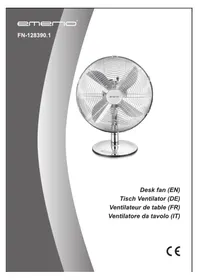
FN128390.1 - Fan Emerio - Free user manual and instructions
Find the device manual for free FN128390.1 Emerio in PDF.


| Product Type | Table Fan |
| Brand | Emerio |
| Model | FN128390.1 |
| Supply Voltage | 220-240 V ~ 50/60 Hz |
| Power Consumption | 35 W |
| Number of Speeds | 3 (low, medium, high) |
| Oscillation Function | Yes, oscillation button |
| Adjustable Tilt | Yes, by pushing the grill |
| Protection Grill | Front and rear included |
| Assembly Required | Yes (base, grills, blade) |
| Cleaning | Damp cloth, do not immerse |
| Blade Material | Plastic |
| Warranty | 2 years |
| Child Safety | Minimum age 8 years under supervision |
| Maximum Airflow | 39.25 m³/min |
| Sound Power Level | 58.77 dB(A) |
| Service Value | 1.19 (m³/min)/W |
| Maximum Air Velocity | 2.68 m/s |
| Intended Use | Indoor cooling |
| Environmental Protection | Recycling according to directive 2012/19/EU |
Frequently Asked Questions - FN128390.1 Emerio
User questions about FN128390.1 Emerio
0 question about this device. Answer the ones you know or ask your own.
Ask a new question about this device
Download the instructions for your Fan in PDF format for free! Find your manual FN128390.1 - Emerio and take your electronic device back in hand. On this page are published all the documents necessary for the use of your device. FN128390.1 by Emerio.
USER MANUAL FN128390.1 Emerio
natural_image
Exterior view of a modern office desk fan with four blades and a stand (no text or symbols visible)Desk fan (EN)
Tisch Ventilator (DE)
Instruction manual – English ...... - 2 -
Before use make sure to read all of the below instructions in order to avoid injury or damage, and to get the best results from the appliance. Make sure to keep this manual in a safe place. If you give or transfer this appliance to someone else make sure to also include this manual.
In case of damage caused by user failing to follow the instructions in this manual the warranty will be void. The manufacturer/importer accepts no liability for damages caused by failure to follow the manual, a negligent use or use not in accordance with the requirements of this manual.
-
This appliance can be used by children aged from 8 years and above and persons with reduced physical, sensory or mental capabilities or lack of experience and knowledge if they have been given supervision or instruction concerning use of the appliance in a safe way and understand the hazards involved.
-
Children shall not play with the appliance.
-
Cleaning and user maintenance shall not be made by children without supervision.
-
If the supply cord is damaged, it must be replaced by the manufacturer, its service agent or similarly qualified persons in order to avoid a hazard.
-
Before inserting the plug into the mains socket, please check that the voltage and frequency comply with the specifications on the rating label.
-
Incorrect operation and improper handling can lead to faults on the device and injuries to the user.
-
In the event of improper use or incorrect handling, no liability can be accepted for any damage that may occur.
-
Do not immerse the unit or mains plug in water or other liquids. There is danger to life due to electric shock! However, if this should occur, remove the mains plug
immediately and then have the unit checked by an expert before using it again.
-
Do not operate the device if the mains cable or the mains plug show signs of damage, if the device has fallen on the floor or has been otherwise damaged. In such cases take the device to a specialist for checking and repair, if necessary.
-
Never remove the mains plug from the socket by pulling on the mains cable, or with wet hands.
-
Ensure that the mains cable does not hang over sharp edges or allow it to become trapped.
-
Keep the appliance away from damp, and protect from splashes.
-
Keep the appliance away from hot objects (e.g. hotplates) and open flames.
-
Keep the appliance and its cord out of reach of children less than 8 years.
-
Use the appliance on a flat, dry and heat resistance surface.
-
Never leave the device unattended during use.
-
Do not store or operate the appliance in the open air.
-
Keep the appliance in a dry place, inaccessible to children (in its packaging).
-
Never put fingers or any other objects through the fan guards when the fan is running.
-
Never operate the product without the fan guards in place, as serious personal injury may result.
-
The appliance must be assembled completely before use.
-
Watch out for long hair! It can be caught in the fan owing to the air turbulence.
-
Do not point the air flow to the people for a long time.
-
After assembly, do not remove the guards during use or cleaning.
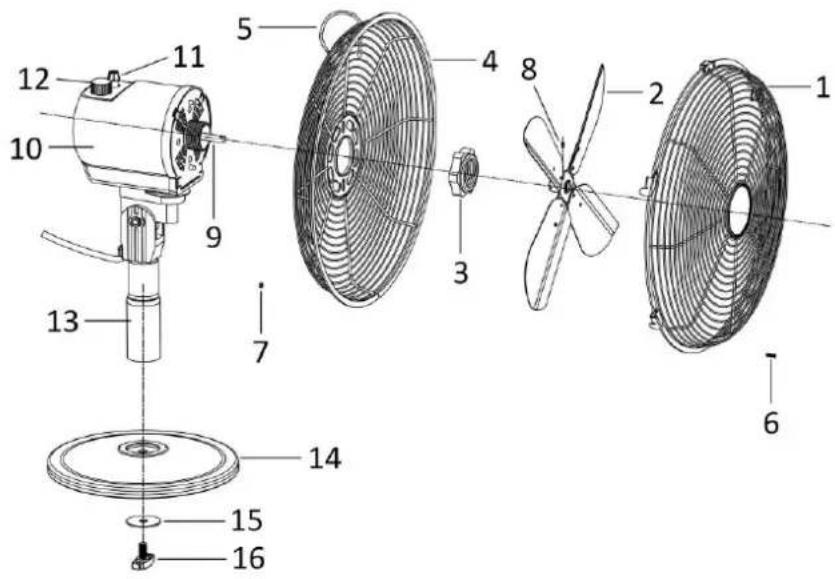
PARTS DESCRIPTION
- Front guard
- Blade
- Fixation screw for rear guard
- Rear guard
- Handle
- Grill locking screw
- Grill locking nut
- Blade fastening screw
- Motor shaft
- Motor unit
- Oscillation knob
- Speed control switch
- Standing shaft
- Standing base
- Washer
- Base locking screw
ASSEMBLY INSTRUCTIONS
** Please assemble correctly by the following order when using.
-
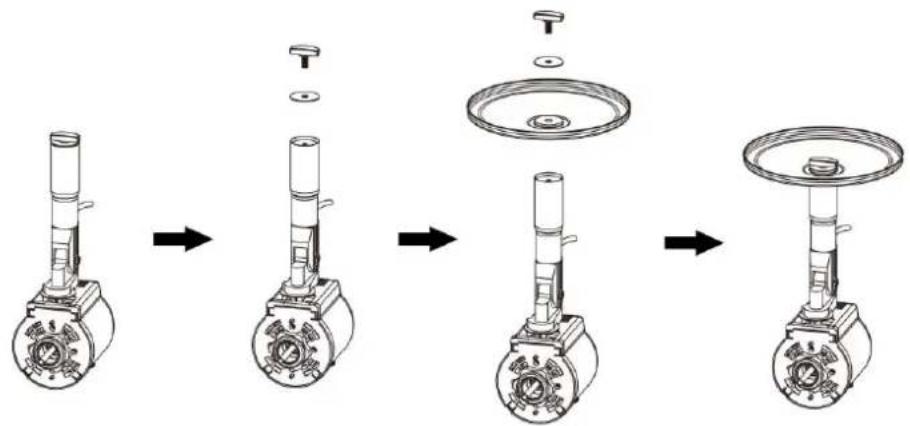
The stand assembly
-
Screw off the washer and base locking screw from the standing shaft.
- Attach the standing shaft onto the standing base. Place the washer and base locking screw. Rotate the base locking screw to fix the standing shaft firmly.
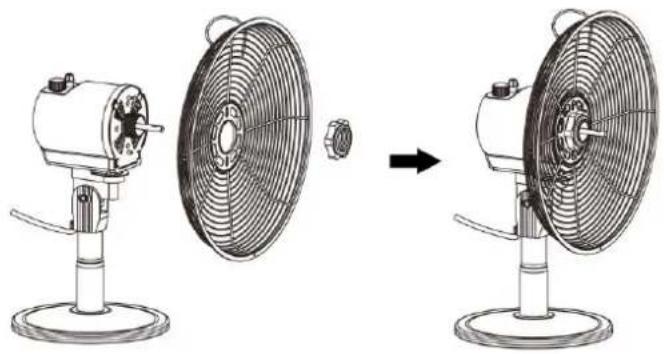
- Rear guard assembly
● Fit the rear guard onto motor with the handle on the top. Tighten the rear guard with the fixation screw.
natural_image
Line drawing of a desktop fan with an open lid and base, showing the process from front to side view (no text or symbols)3. Fan blade assembly
- Install the fan blade onto the motor shaft and use the blade fastening screw to fix the blade.
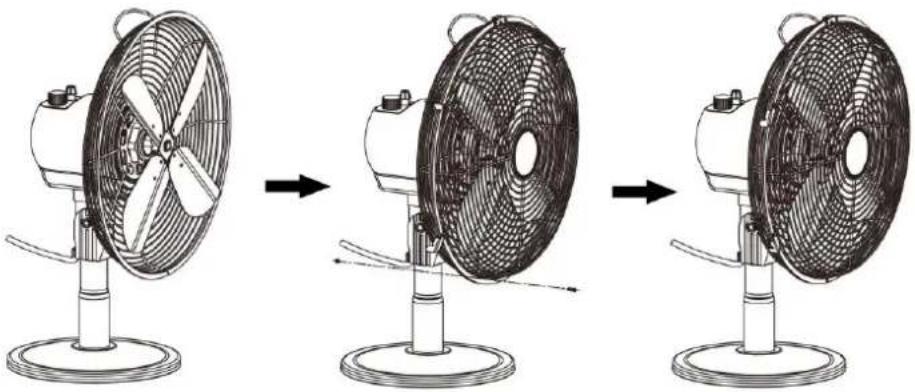
4. Front guard assembly
- Put the hook of the front guard onto the top of rear guard.
- Attach front guard to rear guard, close clips, using the grill locking screw and nut to fix the two grilles together.
natural_image
Three-step diagram showing a desktop fan with a four-blade fan, before and after press, no text or symbols present.OPERATING INSTRUCTIONS
-
Plug the power cord into a suitable socket.
-
Oscillation: To make the fan head oscillate, push down the oscillation knob. To stop the fan head from oscillating, pull up the oscillation knob.
-
Tilting Angles: By pushing the fan-guard, you can adjust the fan to the preferred elevation.
-
The fan is switched on by turning the speed control switch on the motor unit, i.e. 0 = OFF, I = low speed, II = medium speed, III = high speed.
CLEANING
-
Before servicing the fan and after each occasion of use, switch off the appliance and unplug the mains cable from the socket.
-
Never immerse the appliance in water (danger of short-circuit). To clean the appliance, only wipe it down with a damp cloth and dry it carefully. Always take out the mains plug first.
-
Take care that excessive dust does not build up in the air-intake and air-outlet grille, and clean it occasionally using a dry brush or vacuum cleaner.
TECHNICAL DATA
Operating voltage: 220-240V \~ 50/60Hz
Power consumption: 35W
GUARANTEE AND CUSTOMER SERVICE
Before delivery our devices are subjected to rigorous quality control. If, despite all care, damage has occurred during production or transportation, please return the device to your dealer. In addition to statutory legal rights, the purchaser has an option to claim under the terms of the following guarantee:
For the purchased device we provide 2 years guarantee, commencing from the day of sale. If you have a defective product, you can directly go back to the point of purchase.
Defects which arise due to improper handling of the device and malfunctions due to interventions and repairs by third parties or the fitting of non-original parts are not covered by this guarantee. Always keep your receipt, without the receipt you can't claim any form of warranty. Damage caused by not following the instruction manual, will lead to a void of warranty, if this results in consequential damages then we will not be liable.
Neither can we hold responsible for material damage or personal injury caused by improper use if the
instruction manual is not properly executed. Damage to accessories does not mean free replacement of the whole appliance. In such case please contact our service department. Broken glass or breakage of plastic parts is always subject to a charge. Defects to consumables or parts subjected to wearing, as well as cleaning, maintenance or the replacement of said parts are not covered by the warranty and are to be paid.
ENVIRONMENT FRIENDLY DISPOSAL
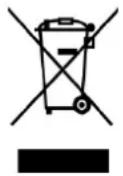
Recycling – European Directive 2012/19/EU
This marking indicates that this product should not be disposed with other household wastes. To prevent possible harm to the environment or human health from uncontrolled waste disposal, recycle it responsibly to promote the sustainable reuse of material resources. To return your used device, please use the return and collection systems or contact the retailer where the product was
purchased. They can take this product for environmental safe recycling.
Declare that the product detailed below:
Information requirements
| The mentioned information to identify the FN-128390.1[Desk fan] | |||
| Description | Symbol | Value | Unit |
| Maximum fan flow rate | F | 39,25 | m^3/min |
| Fan power input | P | 33,10 | W |
| Service value | S_V | 1,19 | (m^3/min)/W |
| Standby power consumption | P_SB | --- | W |
| Fan sound power level | L_WA | 58,77 | dB(A) |
| Maximum air velocity | C | 2,68 | meters/sec |
| Measurement standard for service value | EN IEC 60879:2019 | ||
| Contact details for obtaining more information | Migros-Genossenschafts-BundLimmatstrasse 152CH-8031 Zürich | ||
Satisfies the requirement of the Council Directives:
COMMISSION REGULATION (EU) No 206/2012 of 6 March 2012 and Amending COMMISSION REGULATION (EU) 2016/2282 implementing Directive 2009/125/EC of the European Parliament and of the Council with regard to ecodesign requirements for air conditioners and comfort fans
Regarding information for consumers on how to install, use and maintain the product, WEEE information, please check the instruction manual provided with packaging.
MONTAGEANWEISUNGEN
natural_image
Diagram showing the change in fan blade structure from a desktop fan to an open fan, with no text or symbols present.3. Rotor montieren
natural_image
Three-step diagram showing a fan with blades and a base, illustrating the process from opening to closing (no text or symbols present)CONSIGNES D'ASSEMBLAGE
natural_image
Diagram showing the transformation of a desktop fan into a base fan, illustrating the process from mechanical to electrical setup (no text or labels present)natural_image
Three-step diagram showing a fan with a four-blade fan on a stand, before and after rotation, then back to a base (no text or symbols)CONSIGNES D'UTILISATION
ASSEMBLAGGIO
natural_image
Diagram showing the change in fan blade structure from a desktop fan to a front-mounted fan, with no text or symbols present.natural_image
Three-step diagram showing a fan with four blades moving from the top to the base, illustrating fan rotation and mounting mechanism (no text or symbols)ISTRUZIONI D'USO

Brand : Emerio
Model : FN128390.1
Category : Fan