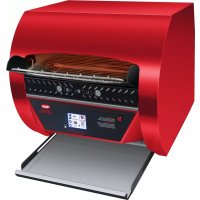
ToastQwik TQ32000H - Toaster Hatco - Free user manual and instructions
Find the device manual for free ToastQwik TQ32000H Hatco in PDF.


| Product Type | Professional Conveyor Toaster |
| Brand | Hatco |
| Model | ToastQwik TQ32000H |
| Number of Slices | 3 slices |
| Maximum Capacity | Approximately 30 buns per minute |
| Maximum Bread Thickness | 44 mm (1.73") |
| Maximum Bread Width | 348 mm (13.7") |
| Opening Height | 76 mm (3") - high version |
| Dimensions (W x D x H) | 475 x 536 x 435 mm |
| Net Weight (packed) | 27 kg (60 lbs) |
| Power Supply | 208-240 V, 50/60 Hz, single phase |
| Rated Current | 19.3 A (208 V) / 16.8 A (240 V) |
| Plug Type | NEMA 6-30P |
| Control Panel | Touchscreen with 12 customizable menu presets |
| Control System | Patented ColorGuard: automatically adjusts speed and temperature |
| Energy Save Mode | Yes, reduces heat after inactivity or manual activation |
| Exterior Materials | Stainless steel |
| Power Cord Length | 1829 mm (6 ft) |
| Included Accessories | Bun inlet chute, removable crumb tray, extending toast rack, USB port |
| Maintenance | Daily surface cleaning, monthly fan filter cleaning |
| Safety | High temperature safety switch, automatic shutdown in case of overheating |
| Warranty: Heating Elements | 1 year parts and labor + 1 year additional parts |
| Warranty: Other Parts | 1 year parts and labor |
| Usage | Professional only |
Frequently Asked Questions - ToastQwik TQ32000H Hatco
User questions about ToastQwik TQ32000H Hatco
0 question about this device. Answer the ones you know or ask your own.
Ask a new question about this device
Download the instructions for your Toaster in PDF format for free! Find your manual ToastQwik TQ32000H - Hatco and take your electronic device back in hand. On this page are published all the documents necessary for the use of your device. ToastQwik TQ32000H by Hatco.
USER MANUAL ToastQwik TQ32000H Hatco
Register Online! (see page 2)
WARNING
Do not operate this equipment unless you have read and understood the contents of this manual! Failure to follow the instructions contained in this manual may result in serious injury or death. This manual contains important safety information concerning the maintenance, use, and operation of this product. If you're unable to understand the contents of this manual, please bring it to the attention of your supervisor. Keep this manual in a safe location for future reference.
English = p 2
ADVERTENCIA
Important Owner Information....2
Introduction......2
Important Safety Information....3
Model Descriptions 4
Model Designation 5
Specifications 5
Plug Configurations 5
Electrical Rating Charts....5
Dimensions....6
Installation....7
General....7
Operation....8
General 8
Touchscreen Control....8
Operating the Toaster....9
Programming Menu Items....10
PowerSave Mode 10
Updating Firmware 10
Adjusting Automatic PowerSave 11
Changing Control Settings 11
Maintenance....12
General....12
Daily Cleaning 12
Cleaning the Fan Filter....13
Cleaning the Bottom Element Reflector....13
Cleaning the Touchscreen Control 13
Options and Accessories 13
Troubleshooting Guide....14
Error Message Guide 14
Limited Warranty 15
Authorized Parts Distributors ....Back Cover
IMPORTANT OWNER INFORMATION
Record the model number, serial number, voltage, and purchase date of the unit in the spaces below (specification label located on the back of the unit). Please have this information available when calling Hatco for service assistance.
Model No. ____
Serial No.
Voltage
Date of Purchase
Register your unit!
Completing online warranty registration will prevent delay in obtaining warranty coverage. Access the Hatco website at www.hatcocorp.com, select the Support pull-down menu, and click on "Warranty".
Business
Hours: 7:00 AM to 5:00 PM Monday–Friday, Central Time (CT)
(Summer Hours — June to September:
7:00 AM to 5:00 PM Monday–Thursday
7:00 AM to 4:00 PM Friday)
Telephone: 800-558-0607; 414-671-6350
E-mail: support@hatcocorp.com
24 Hour 7 Day Parts and Service Assistance available in the United States and Canada by calling 800-558-0607.
Additional information can be found by visiting our web site at www.hatcocorp.com.
INTRODUCTION
Hatco TQ3 Series Toast-Qwik® Conveyor Toasters are specially-designed to automate, accelerate, and enhance the toasting operation. The touchscreen control provides quick, easy access to menu item presets for the desired product and toasting color. Product then passes through a heating chamber for rapid and thorough toasting. Conveyor speed and temperature determine the toasting color.
Hatco toasters are built with quality to meet the demands of foodservice operations and provide years of trouble-free performance. The metal-sheathed tubular heating elements are guaranteed against breakage and burnout for two years.
Hatco TQ3 Series Toast-Qwik Conveyor Toasters are products of extensive research and field testing. The materials used were selected for maximum durability, attractive appearance and optimum performance. Every unit is thoroughly inspected and tested prior to shipment.
This manual provides the installation, safety, and operating instructions for TQ3 Series Toast-Qwik Conveyor Toasters. Hatco recommends all installation, operating, and safety instructions appearing in this manual be read prior to installation or operation of a unit.
Safety information that appears in this manual is identified by the following signal word panels:

WARNING indicates a hazardous situation which, if not avoided, could result in death or serious injury.

CAUTION indicates a hazardous situation which, if not avoided, could result in minor or moderate injury.
NOTICE
NOTICE is used to address practices not related to personal injury.

Read the following important safety information before using this equipment to avoid serious injury or death and to avoid damage to equipment or property.
WARNING
ELECTRIC SHOCK HAZARD:
- Plug unit into a properly grounded electrical receptacle of the correct voltage, size, and plug configuration. If plug and receptacle do not match, contact a qualified electrician to determine and install proper voltage and size electrical receptacle.
- Put unit in standby, allow to cool, turn OFF power switch, and unplug power cord before performing cleaning, adjustments, maintenance, or attempting to clear a jam.
- Unit is not weatherproof. Locate unit indoors where ambient air temperature is a minimum of 70°F (21°C) and a maximum of 85°F (29°C).
- DO NOT submerge or saturate with water. Unit is not waterproof. Do not operate if unit has been submerged or saturated with water.
- Do not steam clean or use excessive water on unit.
- This unit is not "jet-proof" construction. Do not use jet-clean spray to clean this unit.
- Do not clean unit when it is energized or hot.
- Do not allow liquids to spill into unit.
- Do not pull unit by power cord.
- Discontinue use if power cord is frayed or worn.
- Do not attempt to repair or replace a damaged power cord. Cord must be replaced by Hatco, an Authorized Hatco Service Agent, or a person with similar qualifications.
- Never insert a knife, fork, or similar object into toasting chamber.
- Do not pick up the toaster by inserting fingers into the toaster feed opening.
- This unit must be serviced by qualified personnel only. Service by unqualified personnel may lead to electric shock or burn.
- Use only Genuine Hatco Replacement Parts when service is required. Failure to use Genuine Hatco Replacement Parts will void all warranties and may subject operators of the equipment to hazardous electrical voltage, resulting in electrical shock or burn. Genuine Hatco Replacement Parts are specified to operate safely in the environments in which they are used. Some after-market or generic replacement parts do not have the characteristics that will allow them to operate safely in Hatco equipment.
EXPLOSION HAZARD: Do not store or use gasoline or other flammable vapors or liquids in the vicinity of this or any other appliance.
If toaster overheats or cooling fan inside unit stops working, the safety high-limit switch will shut off toaster. Contact Authorized Service Agent or Hatco for assistance.
Make sure all operators have been instructed on the safe and proper use of the unit.
This unit is not intended for use by children or persons with reduced physical, sensory, or mental capabilities. Ensure proper supervision of children and keep them away from the unit.
WARNING
FIRE HAZARD:
- Allow a minimum clearance of 1" (25 mm) along the sides and rear of unit. Allow a minimum clearance of 12" (305 mm) in the front, measured from cha opening on toaster body. If safe distances are not maintained, discoloration or combustion could occur.
- Do not locate toaster under shelving or closer than 12" (305 mm) from the ceiling.
- Do not place anything on top of toaster. Do not place toaster near or underneath curtains or other combustible materials. Items near or on top of toaster could catch fire causing injury and/or damage to the toaster.
- In case of fire, disconnect toaster from power source immediately. This allows unit to cool, making it easier and safer to put out fire.
This unit has no "user-serviceable" parts. If service is required on this unit, contact an Authorized Hatco Service Agent or contact the Hatco Service Department at 800-558-0607 or 414-671-6350.
CAUTION
BURN HAZARD:
- Some exterior surfaces on unit will get hot. Use caution when touching these areas.
- Do not remove feed ramp, crumb tray, or toast tray for cleaning until toaster is cool.
Locate unit at the proper counter height in an area that is convenient for use. Location should be level and strong enough to support weight of unit and contents.
Always operate toaster with crumb tray installed.
If Warning light comes on, unit is malfunctioning. Turn off or disconnect unit from power supply and have unit serviced by a qualified technician.
Toasting of coated or buttered products such as garlic bread, cheese sandwiches, and sweet rolls is NOT recommended. Residue will reduce toaster performance and could ignite inside toaster. Using toaster with food products listed above will void unit warranty.
NOTICE
Plug unit into a dedicated circuit. Do not use multiple appliances on same circuit.
Do not locate unit in an area subject to temperatures above 85° F ( 29° C) or grease from grills, fryers, etc. Excessive temperatures and grease could cause damage to unit.
Do not locate toaster in an area that restricts air flow around front or rear of unit. Do not locate toaster in direct discharge path of air conditioning vent or makeup air vent.
Damage to any countertop material caused by heat generated from Hatco equipment is not covered under the Hatco warranty. Contact manufacturer of countertop material for application information.
NOTICE
Use non-abrasive cleaners and cloths only. Abrasive cleaners and cloths could scratch finish of unit, marring its appearance and making it susceptible to soil accumulation.
NOTICE
This unit is intended for commercial use only — NOT for household use.
Clean unit daily to avoid malfunctions and maintain sanitary operation.
MODEL DESCRIPTIONS
All Models
All TQ3 Series Toast-Qwik® Conveyor Toasters are fast, reliable, and versatile. The touchscreen control allows pre-programming of 12 custom menu items for quick and easy selection during operation. All TQ3 Series conveyor toasters include a toast feed ramp, a removable crumb tray, a removable fan filter, a USB port, and a factory attached 6' (1829 mm) power cord and plug.
PowerSave Mode
TQ3 Series Conveyor Toasters feature an energy-saving PowerSave mode that reduces heat levels to a specified percentage of full power. The toaster enters PowerSave mode automatically after a specified period of inactivity or when the PowerSave ( ) icon on the touchscreen control is touched. Full power to the toaster is restored immediately by touching the icon, and toasting can resume.
During recovery from PowerSave mode, the ColorGuard system will slow down the conveyor speed for consistent toast color. Full conveyor speed will be achieved in approximately 10 minutes, depending on how much the heat output level of the elements was reduced during PowerSave mode.
ColorGuard System
All TQ3 series Conveyor Toasters use a patented ColorGuard sensing system. The ColorGuard sensing system monitors and adjusts conveyor speed and chamber temperature automatically during high usage periods and recovery from PowerSave mode for consistent toast color.
Model TQ3-400
Model TQ3-400 is a two-slice toaster that allows for toasting of bread products up to 1-3/4" (44 mm) thick and 9-5/8" (244 mm) wide. It has a maximum capacity of approximately 6 bread products per minute. Model-specific features include a removable toast tray.
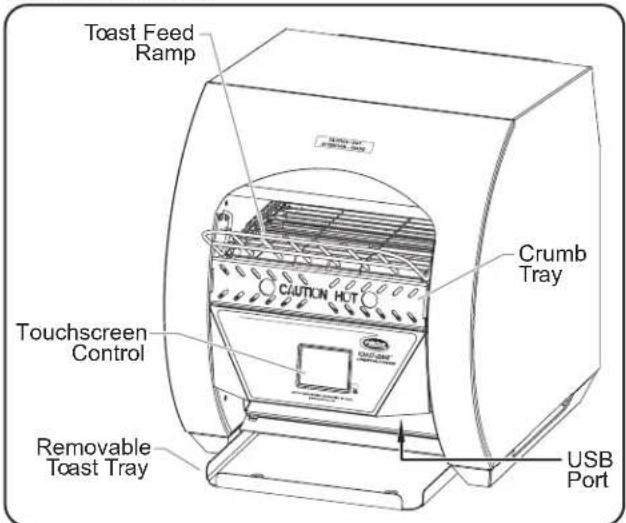
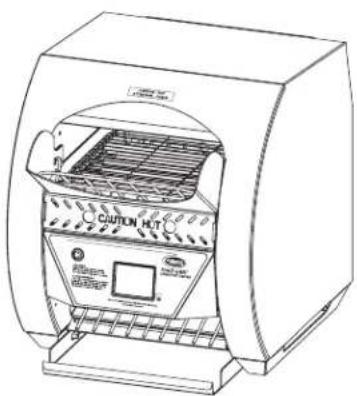
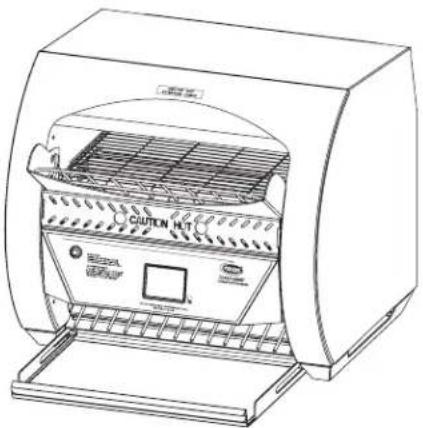
Model TQ3-400 Conveyor Toaster
Model TQ3-500
Model TQ3-500 is a two-slice toaster that allows for toasting of bread products up to 1-3/4" (44 mm) thick and 9-5/8" (244 mm) wide. It has a maximum capacity of approximately 8 bread products per minute. Model-specific features include a removable toast slide, an expandable toast tray, and a over-temperature warning light.
Model TQ3-500H
Model TQ3-500H includes the same features as model TQ3-500, but has a 3" (76 mm) high opening allowing for the toasting of food items up to 2-3/4" (70 mm) thick.
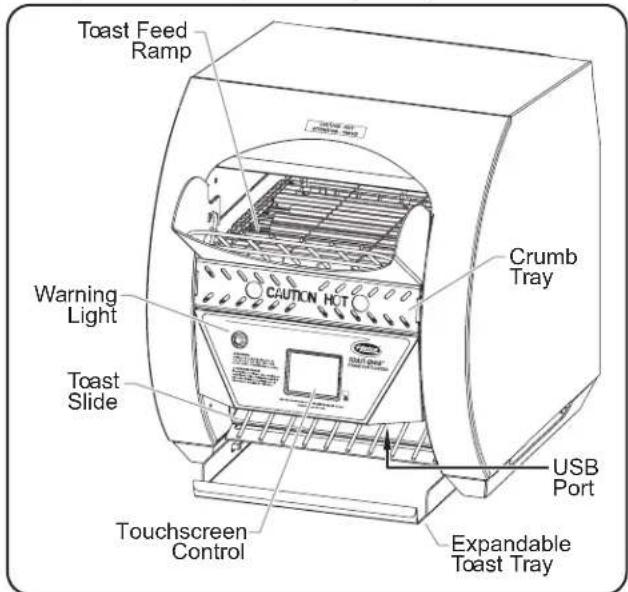
Model TQ3-500 Conveyor Toaster
Model TQ3-900
Model TQ3-900 is a two-slice toaster that allows for toasting of bread products up to 1-3/4" (44 mm) thick and 9-5/8" (244 mm) wide. It has a maximum capacity of approximately 15 bread products per minute. Model-specific features include a removable toast slide, an expandable toast tray, and an over-temperature warning light.
Model TQ3-900H
Model TQ3-900H includes the same features as model TQ3-900, but has a 3" (76 mm) high opening allowing for the toasting of food items up to 2-3/4" (70 mm) thick.
Model TQ3-2000
Model TQ3-2000 is a three-slice toaster that allows for toasting of bread products up to 1-3/4" (44 mm) thick and 13-3/4" (348 mm) wide. It has a maximum capacity of approximately 30 bread products per minute. Model-specific features include a removable toast slide, an expandable toast tray, and an over-temperature warning light.
Model TQ3-2000H
Model TQ3-2000H includes the same features as model TQ3-2000, but has a 3" (76 mm) high opening allowing for the toasting of food items up to 2-3/4" (70 mm) thick.
MODEL DESIGNATION

SPECIFICATIONS
Plug Configurations
Units are supplied from the factory with an electrical cord and plug. Plugs are supplied according to the application.
WARNING
ELECTRIC SHOCK HAZARD: Plug unit into a properly grounded electrical receptacle of the correct voltage, size, and plug configuration. If plug and receptacle do not match, contact a qualified electrician to determine and install proper voltage and size electrical receptacle.
NOTE: Receptacles are not supplied by Hatco, but are available as accessories.
NOTE: Specification label located on the back of the unit. See label for serial number and verification of unit electrical information.
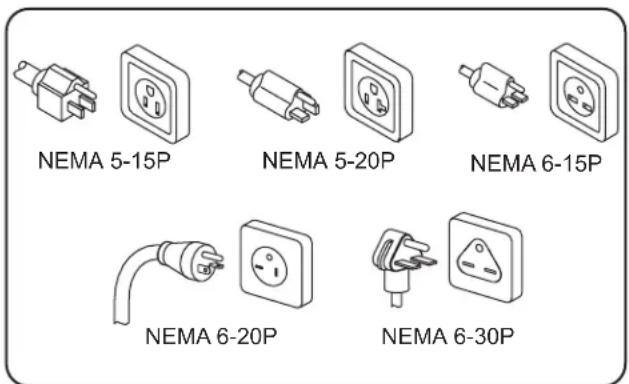
Plug Configurations
Electrical Rating Chart
| Model Voltage Hertz Watts Amps Plug Configuration Shipping Weight | ||||||
| TQ3-400 120 | 50/60 1780 14.8 | NEMA 5-15P * 46 lbs. (21 kg) | ||||
| TQ3-500 TQ3-500H | 208 | 50/60 2220 | 10.7 | NEMA 6-15P † | 54 lbs. (25 kg) | |
| 240 9.3 | ||||||
| TQ3-900 TQ3-900H | 208 | 50/60 3020 | 14.5 | NEMA 6-20P † | 50 lbs. (23 kg) | |
| 240 12.6 55 lbs. (25 kg) | ||||||
| TQ3-2000 TQ3-2000H | 208 | 50/60 4020 | 19.3 | NEMA 6-30P 60 lbs. (27 kg) | ||
| 240 16.8 | ||||||
* NEMA 5-20P plug required for Canada.
† Optional NEMA 6-30P plug available.
NOTE: Shipping weight includes packaging.
Dimensions
| Model | Width (A) | Depth (B) | Height (C) | Footprint Width (D) | Footprint Depth (E) | Opening Height (F) | Opening Width (G) |
| TQ3-400 | 14-3/4" (373 mm) | 20-5/8" (524 mm) | 17-3/16" (435 mm) | 13-1/8" (333 mm) | 11-1/16" (281 mm) | 2" (51 mm) | 10-1/16" (256 mm) |
| TQ3-500 | 14-3/4" (373 mm) | 20-5/8" (524 mm) | 17-3/16" (435 mm) | 13-1/8" (333 mm) | 11-1/16" (281 mm) | 2" (51 mm) | 10-1/16" (256 mm) |
| 3" (76 mm) | |||||||
| TQ3-900 | 14-3/4" (373 mm) | 20-5/8" (524 mm) | 17-3/16" (435 mm) | 13-1/8" (333 mm) | 11-1/16" (281 mm) | 2" (51 mm) | 10-1/16" (256 mm) |
| 3" (76 mm) | |||||||
| TQ3-900H | |||||||
| TQ3-2000 | 18-3/4" (475 mm) | 21-1/8" (536 mm) | 17-3/16" (435 mm) | 16-9/16" (520 mm) | 11-1/16" (281 mm) | 2" (51 mm) | 14-1/8" (359 mm) |
| TQ3-2000H | 3" (76 mm) |
Model TQ3-500 shown.
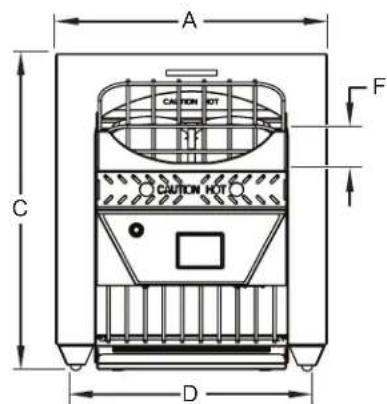
Front View
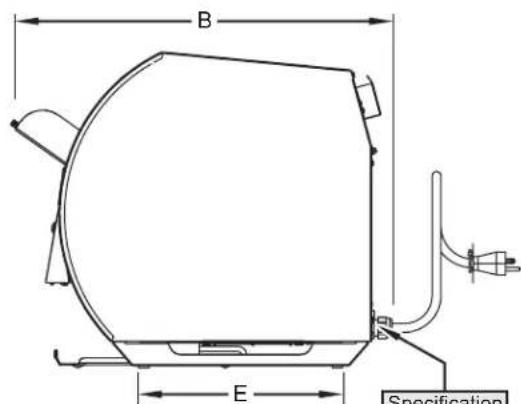
Side View
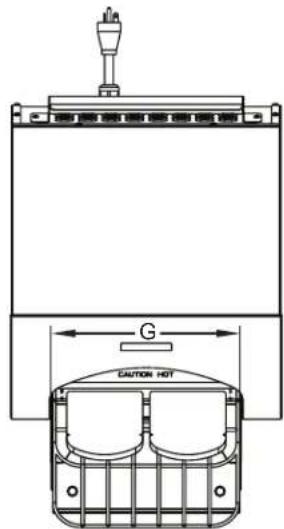
Top View
General
Hatco Toast-Qwik® Conveyor Toasters are shipped with most components pre-assembled. Care should be taken when unpacking the shipping carton to avoid damage to the unit and the components enclosed.
WARNING
ELECTRIC SHOCK HAZARD: Unit is not weatherproof. Locate unit indoors where ambient air temperature is a minimum of 70° F ( 21° C) and a maximum of 85° F ( 29° C).
EXPLOSION HAZARD: Do not store or use gasoline or other flammable vapors or liquids in the vicinity of this or any other appliance.
FIRE HAZARD:
- Allow a minimum clearance of 1" (25 mm) along the sides and rear of unit. Allow a minimum clearance of 12" (305 mm) in the front, measured from opening on toaster body. If safe distances are not maintained, discoloration or combustion could occur.
- Do not locate toaster under shelving or closer than 12" (305 mm) from the ceiling.
- Do not place anything on top of toaster. Do not place toaster near or underneath curtains or other combustible materials. Items near or on top of toaster could catch fire causing injury and/or damage to the toaster.
- In case of fire, disconnect toaster from power source immediately. This allows unit to cool, making it easier and safer to put out fire.
CAUTION
Locate unit at the proper counter height in an area that is convenient for use. Location should be level and strong enough to support weight of unit and contents.
NOTICE
Plug unit into a dedicated circuit. Do not use multiple appliances on same circuit.
Do not locate unit in an area subject to temperatures above 85° F ( 29° C) or grease from grills, fryers, etc. Excessive temperatures and grease could cause damage to unit.
Do not locate toaster in an area that restricts air flow around front or rear of unit. Do not locate toaster in direct discharge path of air conditioning vent or makeup air vent.
- Remove the unit from the carton.
NOTE: To prevent delay in obtaining warranty coverage, complete online warranty registration. See the IMPORTANT OWNER INFORMATION section for details.
- Remove tape and protective packaging from all surfaces of the unit.
- Place the unit in the desired location.
- Locate the unit in an area where the ambient air temperature is constant and between 70°F (21°C) and 85°F (29°C). Avoid areas that may be subject to active air movements or currents (i.e., near exhaust fans/ hoods, air conditioning ducts, and exterior doors).
- Make sure the unit is at the proper counter height in an area convenient for use.
- Make sure the countertop is level, made of non-chamberbustible material, and strong enough to support the weight of the unit and its contents.
• Make sure all the feet on the bottom of the unit are positioned securely on the countertop.
CAUTION
Always operate toaster with crumb tray installed.
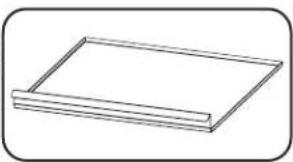
- For TQ3-400 models: Install the removable toast tray underneath the discharge area.
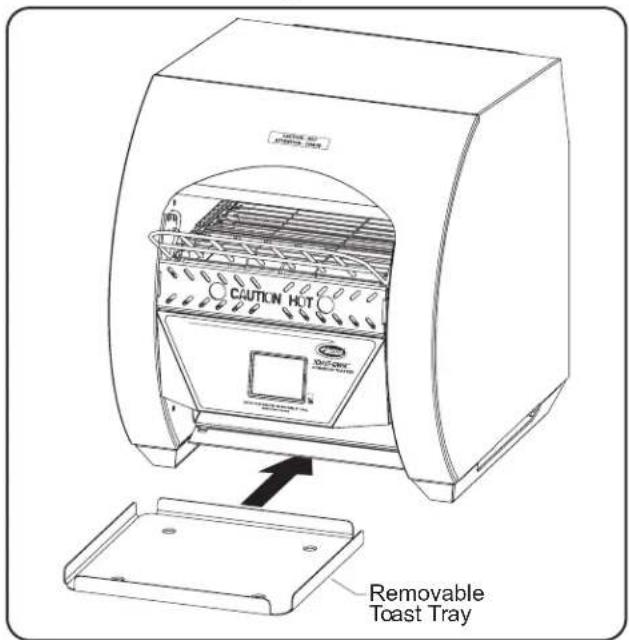
Installing the Toast Tray (Model TQ3-400 only)
General
Toast-Qwik® Conveyor Toasters are designed for ease of operation. To operate the toaster, perform the appropriate procedure in this section.

Read all safety messages in the IMPORTANT SAFETY INFORMATION section before operating this equipment.

BURN HAZARD:
- Some exterior surfaces on unit will get hot. Use caution when touching these areas.
- Do not remove crumb tray for cleaning until toaster is cool.
Always operate toaster with crumb tray installed.
Toasting of coated or buttered products such as garlic bread, cheese sandwiches, and sweet rolls is NOT recommended. Residue will reduce toaster performance and could ignite inside toaster. Using toaster with food products listed above will void unit warranty.
Touchscreen Control
The following are descriptions of the controls used to operate TQ3 Series Toast-Qwik Conveyor Toasters. All controls are located on the touchscreen control at the front of the unit.
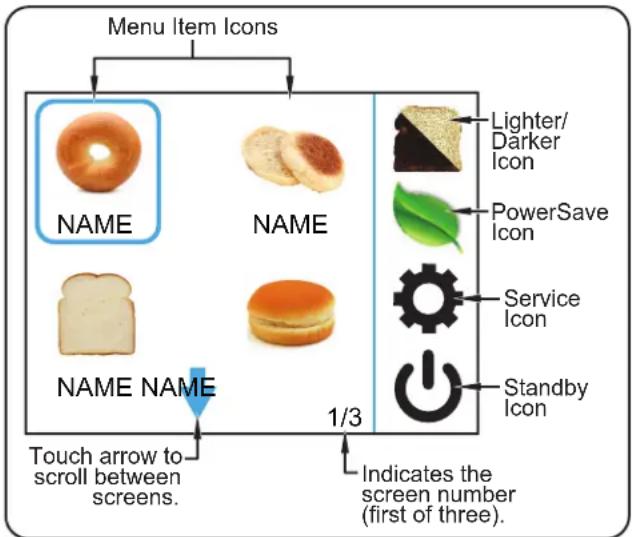
Touchscreen Control (showing the Menu screen)
Menu Item Icons
Each menu item icon stores the toast settings for a custom menu item. Touching one of the menu item icons will adjust the element and conveyor belt settings to the selected menu item. There are 12 customizable menu item icons available on the touchscreen control. Refer to "Programming a Menu Item" in this section to change or create custom menu items.
NOTE: When programming menu items, set up the most used menu items on the first Menu screen (screen 1/3).

Lighter/Darker Icon
The Lighter/Darker (icon) allows the toasting shade to be changed from the current menu item setting at any time during operation.
To use the icon:
a. Place the item on the conveyor, and touch the desired menu item icon.
b. Touch the second on the touchscreen. The Toast Shade screen will appear.
c. Touch either the or icon to five times to produce toasting shades lighter or darker than the current menu item setting.

PowerSave Icon
Touching the PowerSave ( ) icon puts the toaster into PowerSave mode. In PowerSave mode, the toaster remains activated but the conveyor stops and the heat level drops to a reduced percentage of the current heat settings.
NOTE: During recovery from PowerSave mode, the ColorGuard system will slow down the conveyor speed for consistent toast color. Full conveyor speed will be achieved in approximately 10 minutes, depending on how much the heat output level of the elements was reduced during PowerSave mode.

Service Icon
The Service (icon provides access to the password-protected Service screen. The Service screen allows management and service technicians to access specific toaster settings, diagnostic/service information, and software update functions.

Standby Icon
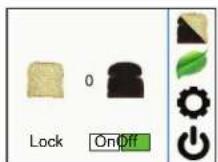
The Standby (Union) ton toggles the toaster between operation and standby. In standby, the conveyor and elements are off and the touchscreen control display is dark, but the toaster remains energized.
- From standby, touch and hold the ⏻ icon for three seconds to activate the toaster. The toaster will be ready for operation in approximately ten minutes.
- From operation, touch and hold the ⏻ icon for three seconds to shut down operation and put the toaster into standby.
Operating the Toaster
Startup
- Plug the unit into a properly grounded electrical receptacle. Make sure the electrical receptacle matches the plug on the unit and the supply voltage matches the unit specification label.
-
Move the toast feed ramp to the desired position.
-
For automatic feeding, move the toast feed ramp to the automatic feed position. Bread products enter the toaster by placing them on the toast feed ramp and releasing.
- For manual feeding, rotate the toast feed ramp up until it rests on top of the unit. Bread products can be loaded manually by placing directly on the conveyor belt.
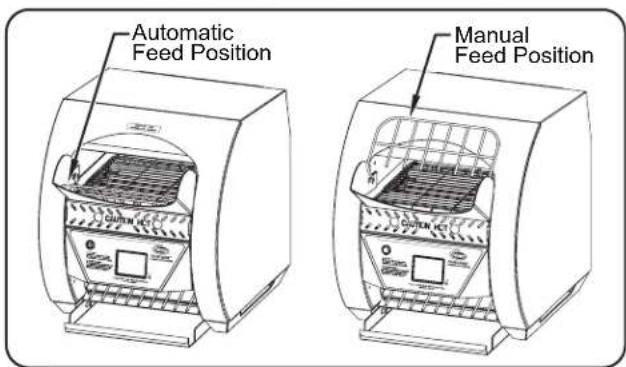
Toast Feed Ramp
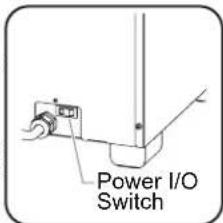
- Move the Power I/O switch located on the back of the unit to the "I" (on) position.
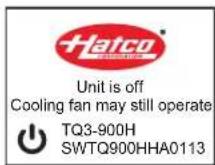
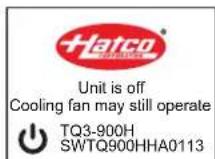
- Logo and software version information will appear on the touchscreen, followed by the Standby screen.
NOTE: If the touchscreen goes dark after turning on the power, touch anywhere on the touchscreen to "wake up" the display.
- Touch and hold the icon on the touchscreen for three seconds to activate the toaster.
- The preheating cycle will begin and last approximately 10 minutes. When preheating is complete, the conveyor belt will start moving, and the Menu screen the available menu items.
-
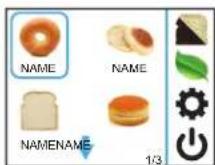
Touch the desired menu item icon on the touchscreen.
-
A blue square will outline the selected menu item.
- The elements and conveyor belt will adjust settings to the selected menu item.
- Use the blue arrow keys to scroll between screens of available menu items.
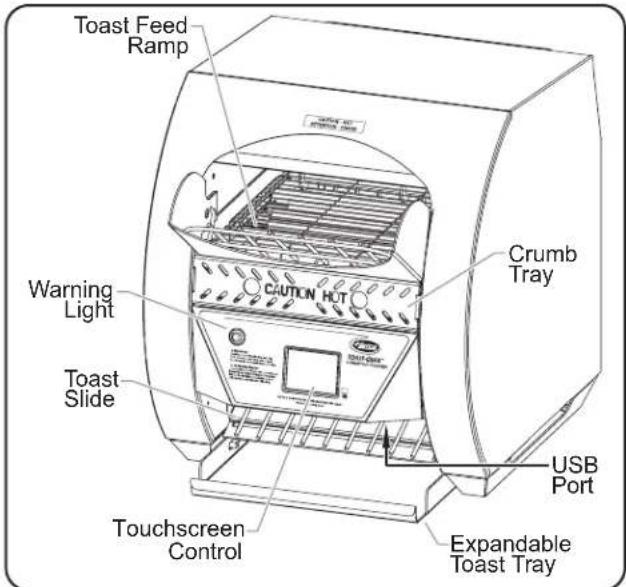
Model TQ3-500 Conveyor Toaster
- Place bread product onto the toast feed ramp.
- Change the toasting shade at any time during toasting. To change:
a. Touch the 📁 icon. The Toast Shade screen will appear.
b. Touch the 📄 or 🌐 icon up to five times to produce a shade lighter or darker than the current
- Change the selected menu item at any time by touching the desired menu item icon on the touchscreen.
- Use the blue arrow keys to scroll between screens of available menu items.
NOTE: For TQ3-500, TQ3-900, and TQ3-2000 models: If the Warning light on the control panel comes on, the unit may be overheating due to fan failure/blockage. Turn off and unplug the unit. Contact an Authorized Service Agent or Hatco for assistance.
Standby Shutdown
Use standby shutdown to put the toaster in standby during extended periods of non-use.
- Touch and hold the icon on the touchscreen for one second to shut down operation and put the toaster into standby.
• The heating elements and conveyor will shut down.
• The cooling fans will run until the unit is cool.
Shutdown
- Touch and hold the icon on the touchscreen for one second to shut down operation and put the toaster into standby.
- After the cooling fans stop, move the Power I/O switch located on the back of the unit to the "O" (off) position to turn off the toaster. NOTICE: Do not turn off unit while cooling fans are running. Damage to unit may occur.
Programming Menu Items
Use the following procedure to change or create custom menu item settings.
- Touch and hold the desired menu item on the Menu Screen for three seconds.
• The Programming screen will appear showing a list of programmable settings.
Top Heat: Heat output level from top elements. Setting range is 1–100%. 1 = lowest heat/lightest toast. 100 = highest heat/darkest toast.
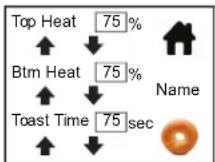
Btm Heat: Heat output level from bottom elements. Setting range is 1–100%. 1 = lowest heat/lightest toast. 100 = highest heat/darkest toast.
Time: Total time product is in toasting chamber. Increasing belt time will slow down conveyor and create darker product. Decreasing belt time will speed up conveyor and create lighter product.
-
Touch the or arrow next to the desired setting to change the setting.
-
To change the menu item picture, touch the picture. A screen will appear with the available pictures
a. Touch the desired picture. The touchscreen will return to the Programming screen and show the new picture.
- To change or edit the menu item name, touch the name. A keypad screen will appear.
a. Touch the ✗ key to delete the current name.
b. Use the keypad to change or update the menu item name.
c. Touch the ← key to save the name and return to the Programming screen.
- When all programming is done, touch the 🔊 icon to return to the Menu screen.
PowerSave Mode
All TQ3 series toasters have a built-in PowerSave mode. This feature significantly reduces heat levels and energy consumption when the toaster has not been used for a specified period of time or when activated by the operator.
To start PowerSave mode manually during operation:
- Touch the icon on the Menu screen.
- The conveyor belt will speed up temporarily to clear product from toaster.
- The PowerSave screen will show on the touchscreen.
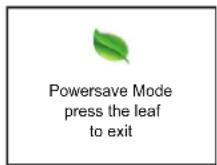
To exit PowerSave mode:
- Touch the icon on the PowerSave screen. The unit will be ready to toast immediately
NOTE: During recovery from PowerSave mode, the ColorGuard system will slow down the conveyor speed for consistent toast color. Full conveyor speed will be achieved in approximately 10 minutes, depending on how much the heat output level of the elements was reduced during PowerSave mode.
Updating Firmware
Use the following procedure to upload firmware updates to the toaster from an external USB drive.
- Follow the "Startup" procedure listed previously in this section.
- Touch the icon on the Menu Screen. A password screen will appear.
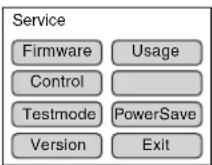
- Enter the 3-digit password "248". The Service screen will appear.
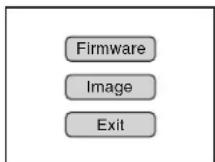
- Touch FIRMWARE on the Service screen. The Update Select screen will appear.
-
Touch FIRMWARE on the Update Select screen. The Firmware Update screen will appear.
-
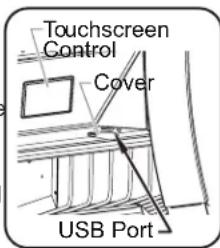
Slide the cover to the side, and insert the USB drive into the USB port.
- The USB port is on the front of the unit, underneath and to the right of the touchscreen.
- Touch UPDATE.
• The firmware up will begin and last approximately 30 seconds (a progress bar will appear). NOTICE: Do not remove the USB drive or turn off the unit during a software update.

- When the update is complete, the unit will restart and the Logo screen will appear for a few seconds showing the new firmware version.
- Remove the USB drive from the USB port, and slide the cover back to cover the port.
Adjusting Automatic PowerSave
Use the following procedure to enable/disable the automatic PowerSave feature as well as make adjustments to its settings.
- Touch the icon on the Menu Screen. A password screen will appear.
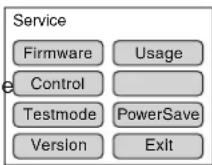
- Enter the 3-digit password "248". The Service screen will appear.
-
Touch POWERSAVE on the Service screen. The Automatic PowerSave screen will appear.
-
Make the desired adjustments on the Automatic PowerSave screen.
- Touch ON to enable automatic PowerSave. Touch OFF to disable automatic PowerSave.
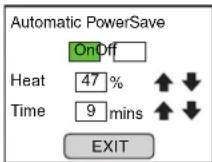
- Heat: Touch the ↑ or ↓ arrow next to the Heat percentage to change the heat output level of the elements during PowerSave mode.
- Time: Touch the ↑ or ↓ arrow next to the Time value to change the number of minutes of inactivity required before automatic PowerSave is activated.
- When all adjustments are done, touch EXIT to return to the Service screen, then EXIT again to return to the Menu Screen.
Changing Control Settings
Use the following procedure to make changes to control access privileges and toaster operation.
- Touch the icon on the Menu Screen. A password screen will appear.
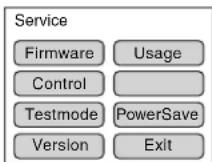
- Enter the 3-digit password "248". The Service screen will appear.
-
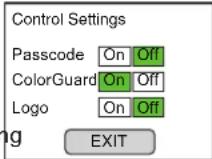
Touch CONTROL on the Service screen. The Control Settings screen will appear.
-
Make the desired adjustments on the Control Settings screen.
- Touch ON or OFF to enable or disable each of the operational settings shown on this screen.
• Passcode: Enable this setting to require a password to make changes to menu item settings.
- ColorGuard: Disable this setting to turn off the ColorGuard System, as described in the MODEL DESCRIPTIONS section of this manual.
- Logo: Enable this setting to put the toaster into a single setting, "always on" mode.
- When all changes are done, touch EXIT to return to the Service screen, then EXIT again to return to the Menu Screen.
General
Hatco Toast-Qwik ® Conveyor Toasters are designed for maximum durability and performance with minimum maintenance.
WARNING
ELECTRIC SHOCK HAZARD:
- Put unit in standby, allow to cool, turn OFF power switch, and unplug power cord before performing cleaning, adjustments, maintenance, or attempting to clear a jam.
- DO NOT submerge or saturate with water. Unit is not waterproof. Do not operate if unit has been submerged or saturated with water.
- Do not steam clean or use excessive water on unit.
- This unit is not "jet-proof" construction. Do not use jet-clean spray to clean this unit.
- Do not clean unit when it is energized or hot.
- Do not allow liquids to spill into unit.
- This unit must be serviced by qualified personnel only. Service by unqualified personnel may lead to electric shock or burn.
- Use only Genuine Hatco Replacement Parts when service is required. Failure to use Genuine Hatco Replacement Parts will void all warranties and may subject operators of the equipment to hazardous electrical voltage, resulting in electrical shock or burn. Genuine Hatco Replacement Parts are specified to operate safely in the environments in which they are used. Some after-market or generic replacement parts do not have the characteristics that will allow them to operate safely in Hatco equipment.
This unit has no "user-serviceable" parts. If service is required on this unit, contact an Authorized Hatco Service Agent or contact the Hatco Service Department at 800-558-0607 or 414-671-6350.
Daily Cleaning
To preserve the finish of the unit, it is recommended that the metal surfaces be wiped daily with a damp cloth.
WARNING
Submerging or saturating unit with water will damage the unit and void unit warranty.
NOTICE
Use non-abrasive cleaners and cloths only. Abrasive cleaners and cloths could scratch finish of unit, marring its appearance and making it susceptible to soil accumulation.
Clean unit daily to avoid malfunctions and maintain sanitary operation.
- Perform the "Daily Shutdown" procedure in the OPERATION section, and unplug the power cord.
CAUTION
BURN HAZARD: Do not remove feed ramp, crumb tray, or toast tray for cleaning until toaster is cool.
- Remove and clean the crumb tray, removable toast tray (TQ3-400 only), and toast tray insert (if equipped).
a. Wash the crumb tray and toast trays with warm water and a mild detergent. Rinse with water.
b. Allow the crumb tray and toast trays to air dry.
- Wipe the exterior surfaces of the toaster with a non-abrasive, damp cloth.
- Stubborn stains may be removed with a good stainless steel cleaner or a non-abrasive cleaner. Hard to reach areas should be cleaned with a small brush and mild soap.
-
Clear all crumbs from the expandable toast tray and wipe clean.
-
Wipe dry the entire unit using a soft, non-abrasive cloth.
-
Reinstall the crumb tray, removable toast tray (TQ3-400 only), and toast tray insert (if equipped).
a. Position the crumb tray directly below the conveyor belt on the tray floor at the front of the toaster.
b. Slide the crumb tray into the toaster until it stops.
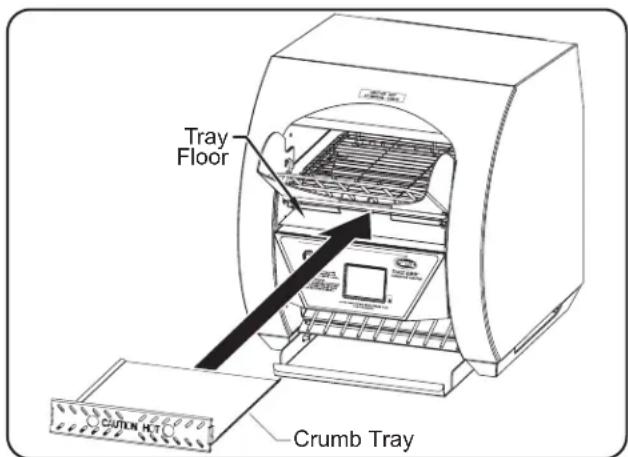
Installing the Crumb Tray
Cleaning the Fan Filter
A cooling fan filter is located on the bottom of the unit. This filter should be checked/cleaned weekly and anytime "Routine Maintenance; Clean Fan Filter" appears on the touchscreen. Use the following procedure to clean the filter.
- Perform the "Shutdown" procedure in the OPERATION section, and unplug the power cord.
- Using the filter handle, slide the filter out of the filter housing.
- Tilt the unit up and wipe the filter housing clean using a damp non-abrasive cloth.
-
Rinse the filter using hot water. Allow the filter to dry completely.
-
Slide the filter back into the filter housing.
NOTE: The filter can be installed from either side of the toaster.
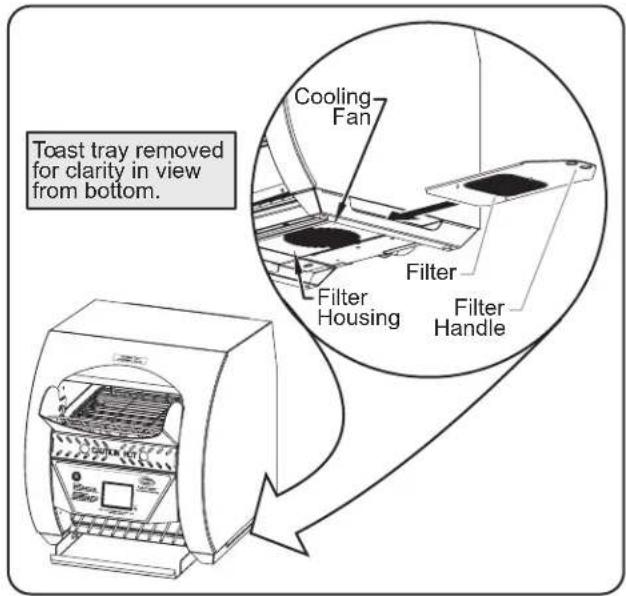
Cleaning the Filter
Cleaning the Bottom Element Reflector
The bottom heating element reflector inside the toasting chamber has slots that allow bread crumbs to drop through to the crumb tray. Over an extended period of use, bread crumbs may build up on the reflector and not drop through onto the tray.
- Turn off the unit, unplug the power cord, and allow the unit to cool.
- Wipe the crumbs onto the crumb tray using a bristle brush.
- To wipe the reflector, place the bristle brush through the conveyor belt and wipe to each side.
- Perform the "Daily Cleaning" procedure in this section.
Cleaning the Touchscreen Control
Dirt and grease will build up on the touchscreen control over an extended period of use. Use the following procedure to clean the touchscreen control and maintain performance.
- Perform the "Shutdown" procedure in the OPERATION section, and unplug the power cord.
- Spray a mild degreaser onto a soft, damp non-abrasive cloth, and wipe the entire touchscreen until clean. Repeat, if necessary.
- Allow the touchscreen to dry completely.
- Wipe away any hazy residue that remains on the touchscreen using a clean, dry non-abrasive cloth.
OPTIONS AND ACCESSORIES
Extended Toast Feed Ramp
An extended toast feed ramp is available as a factory-installed option for TQ3-500, TQ3-900, and TQ3-2000 models. The extended toast feed ramp is a longer feed ramp that allows more or longer bread products to be loaded onto the toast feed ramp.
Toast Tray Insert
A removable, stainless steel toast tray insert is available as a factory-installed option for TQ3-500, TQ3-900, and TQ3-2000 models. The toast tray insert fits inside the toast tray and is easily removable for cleaning.
WARNING
This unit must be serviced by qualified personnel only. Service by unqualified personnel may lead to electric shock or burn.
WARNING
ELECTRIC SHOCK HAZARD: Turn OFF power switch, unplug power cord, and allow unit to cool before performing any cleaning, setup, or maintenance.
| Symptom Probable | Cause Corrective Action | |
| Toast too light. Wrong menu item | item selected on touchscreen control. | Select the correct menu item for desired toasting results. |
| Supply voltage to unit is low. Verify the supply | voltage to the toaster matches the unit specifications. | |
| Toast too dark. Wrong menu item | item selected on touchscreen control. | Select the correct menu item for desired toasting results. |
| Supply voltage to unit is high. Verify the supply | voltage to the toaster matches the unit specifications. | |
| Unit toasts on one side only. Wrong menu item selected on touchscreen control. | Select the correct menu item for desired toasting results. | |
| Heating element defective. Visually check the heating element inside the toaster during operation. The heating element should glow red. If the element does not glow, Contact Authorized Service Agent or Hatco for assistance. | ||
| Toaster trips the circuit breaker or GFCI. | Circuit breaker is not sized properly for the toaster. | Check circuit breaker for proper sizing. |
| Wiring fault inside toaster. Contact Authorized Service Agent or Hatco for assistance. | ||
| Toaster conveyor doesn't move. | Bread slices or buns jammed in conveyor track. | Turn off unit, wait for unit to cool, and remove bread product jamming the conveyor. |
Error Message Guide
| Error Message Troubleshooting | Corrective Action(if Troubleshooting fails to fix) | |
| Temperature Probe Error Verify wire connections on RTD temperature probe. Check resistance across probe. | Replace temperature probe. | |
| Control Board Overtemp Check fan for physical blockage that would prevent fan from turning. Verify voltage to fan. Make sure unit is on legs and filter area is clear. | Replace cooling fan. | |
| Heating Error | Verify all wire connections on relay and element. Check resistance across failing heating element. | Replace heating element. |
| Communication Error | Update software—download from Hatco website to USB drive. Follow the “Updating Firmware” procedure in OPERATION section of manual. | Replace electronic control. |
| Touch Panel Error | Check touchpad for grease and dirt buildup. Perform “Cleaning the Touchscreen Control” procedure in MAINTENANCE section on manual. | Replace electronic control. |
Troubleshooting Questions?
If you continue to have problems resolving an issue, please contact the nearest Authorized Hatco Service Agency or Hatco for assistance. To locate the nearest Service Agency, log onto the Hatco website at www.hatcocorp.com, select the Support pull-down menu, and click on "Find A Service Agent"; or contact the Hatco Parts and Service Team at:
Telephone: 800-558-0607 or 414-671-6350
e-mail: support@hatcocorp.com
WARRANTY, EXCLUSIVE REMEDY:
Hatco Corporation (Seller) warrants that the products it manufactures (Products) will be free from defects in materials and workmanship under normal use and service and when stored, maintained, and installed in strict accordance with factory recommendations. Seller's sole obligation to the person or entity buying the Products directly from Seller (Customer) under this warranty is the repair or replacement by Seller or a Seller-authorized service agency, at Seller's option, of any Product or any part thereof deemed defective upon Seller's examination, for a period of: (i) the Warranty Duration from the date of shipment by Seller or (ii) the Warranty Duration from the date of Product registration in accordance with Seller's written instructions, whichever is later. The "Warranty Duration" shall mean the specific periods set forth below for specific Product components, or, to the extent not listed below, eighteen (18) months. Credit for Products or parts returned with the prior written permission of Seller will be subject to the terms shown on Seller's material return authorization form. PRODUCTS OR PARTS RETURNED WITHOUT PRIOR WRITTEN PERMISSION OF SELLER WILL NOT BE ACCEPTED FOR CREDIT. Expenses incurred by Customer in returning, replacing, or removing the Products will not be reimbursed by Seller. If the defect comes under the terms of the limited warranty, the Products will be repaired or replaced and returned to the Customer and the cost of return freight will be paid by Seller. The remedy of repair or replacement provided for herein is Customer's exclusive remedy. Any improper use, alteration, repairs, tampering, misapplication, improper installation, application of improper voltage, or any other action or inaction by Customer or others (including the use of any unauthorized service agency) that in Seller's sole judgment adversely affects the Product shall void this warranty. The warranty expressly provided herein may only be asserted by Customer and may not be asserted by Customer's customers or other users of the Products; provided, however, that if Customer is an authorized equipment dealer of Seller, Customer may assign the warranty herein to Customer's customers, subject to all of the limitations of these Terms, and in such case, the warranty shall be exclusively controlled by Seller in accordance with these Terms. THIS LIMITED WARRANTY IS EXCLUSIVE AND IS IN LIEU OF ANY OTHER WARRANTY, EXPRESSED OR IMPLIED, INCLUDING BUT NOT LIMITED TO ANY IMPLIED WARRANTY OF NONINFRINGEMENT, MERCHANTABILITY OR FITNESS FOR A PARTICULAR PURPOSE, WHICH ARE EXPRESSLY DISCLAIMED.
One (1) Year Parts and Labor PLUS One (1) Additional Year Parts-Only Warranty:
Conveyor Toaster Elements (metal sheathed)
Drawer Warmer Elements (metal sheathed)
Drawer Warmer Drawer Rollers and Slides
Food Warmer Elements (metal sheathed)
Display Warmer Elements (metal sheathed air heating)
Holding Cabinet Elements (metal sheathed air heating)
Heated Well Elements — HW, HWB, and HWBI Series (metal sheathed)
Two (2) Year Parts and Labor Warranty:
Induction Ranges
Induction Warmers
One (1) Year Replacement Warranty:
TPT Pop-Up Toasters
One (1) Year Parts and Labor PLUS Four (4) Years
Parts-Only Warranty:
3CS and FR Tanks
One (1) Year Parts and Labor PLUS Nine (9) Years
Parts-Only Warranty:
Electric Booster Heater Tanks
Gas Booster Heater Tanks
Ninety (90) Day Parts-Only Warranty:
Replacement Parts
Notwithstanding anything herein to the contrary, the limited warranty herein will not cover components in Seller's sole discretion such as, but not limited to, the following: coated incandescent light bulbs, fluorescent lights, heat lamp bulbs, coated halogen light bulbs, halogen heat lamp bulbs, xenon light bulbs, LED light tubes, glass components, and fuses; Product failure in booster tank, fin tube heat exchanger, or other water heating equipment caused by liming, sediment buildup, chemical attack, or freezing.
WARRANTY REGISTRATION INSTRUCTIONS:
Product registration must be submitted within 90 days from the date of shipment from our factory to qualify for additional coverage. Registration may be submitted through the form on Seller's website, through the form accessible through the QR code on the Product (where available), or by calling Customer Service with the required information at: 800-558-0607 or 414-671-6350.
LIMITATION OF LIABILITY:
SELLER WILL NOT BE LIABLE FOR ANY INDIRECT, INCIDENTAL, CONSEQUENTIAL, PUNITIVE, EXEMPLARY, OR SPECIAL DAMAGES, INCLUDING WITHOUT LIMITATION ANY LOST PROFITS, COSTS OF SUBSTITUTE PRODUCTS, OR LABOR COSTS ARISING FROM THE SALE, USE, OR INSTALLATION OF THE PRODUCTS, FROM THE PRODUCTS BEING INCORPORATED INTO OR BECOMING A COMPONENT OF ANOTHER PRODUCT, OR FROM ANY OTHER CAUSE WHATSOEVER, WHETHER BASED ON WARRANTY (EXPRESSED OR IMPLIED) OR OTHERWISE BASED ON CONTRACT, TORT, OR ANY OTHER THEORY OF LIABILITY, AND REGARDLESS OF ANY ADVICE OR REPRESENTATIONS THAT MAY HAVE BEEN RENDERED BY SELLER CONCERNING THE SALE, USE, OR INSTALLATION OF THE PRODUCTS, EVEN IF SELLER IS AWARE OF THE POSSIBILITY OF SUCH DAMAGES. IN NO EVENT WILL SELLER'S AGGREGATE LIABILITY ARISING OUT OF OR RELATED TO THIS AGREEMENT EXCEED THE TOTAL AMOUNTS PAID TO SELLER BY CUSTOMER FOR THE PRODUCTS WITHIN THE THREE (3) MONTH PERIOD IMMEDIATELY PRECEDING THE EVENT GIVING RISE TO CUSTOMER'S CLAIM. THE LIMITATIONS SET FORTH HEREIN REGARDING SELLER'S LIABILITY SHALL BE VALID AND ENFORCEABLE NOTWITHSTANDING A FAILURE OF ESSENTIAL PURPOSE OF THE LIMITED REMEDY SPECIFIED IN THESE TERMS.
Seller reserves the right to update these Terms at any time, at its sole discretion, which become binding upon the date of publishing. For the most current version of our full Terms of Sale, see our website at: https://www.hatcocorp.com/terms-of-sale
GARANTIE, RECOURS EXCLUSIF :
Byassee Equipment Co. Phoenix 602-252-0402
CALIFORNIA
Industrial Electric Commercial Parts & Service, Inc. Huntington Beach 714-379-7100
Chapman Appl. Service San Diego 619-298-7106
P & D Appliance Commercial Parts & Service, Inc. S. San Francisco 650-635-1900
COLORADO
Hawkins Commercial Appliance Englewood 303-781-5548
FLORIDA
Whaley Foodservice Repair Jacksonville 904-725-7800
Whaley Foodservice Repair Orlando 407-757-0851
B.G.S.I./Heritage Pompano Beach 954-971-0456
Comm. Appliance Service Tampa 813-663-0313
GEORGIA
Heritage Service Group Norcross 866-388-9837
HAWAJ
Burney's Comm. Service, Inc. Honolulu 808-848-1466
Food Equip Parts & Service Honolulu 808-847-4871
ILLINOIS
Parts Town Addison 708-865-7278
Eichenauer Elec. Service Decatur 217-429-4229
Midwest Elec. Appl. Service Elmhurst 630-279-8000
Cone's Repair Service Moline 309-797-5323
IOWA
Goodwin Tucker Group Des Moines 515-262-9308
KENTUCKY
Tech 24 Lexington 859-254-8854
Tech 24 Louisville 502-451-5411
LOUISIANA
Chandlers Parts & Service Baton Rouge 225-272-6620
MARYLAND
Electric Motor Service Baltimore 410-467-8080
MASSACHUSETTS
Ace Service Co., Inc. Needham 781-449-4220
MICHIGAN
Bildons Appliance Service Detroit 248-478-3320
Commercial Kitchen Service Bay City 989-893-4561
Midwest Food Equip. Service Grandville 616-261-2000
MISSOURI
General Parts Kansas City 816-421-5400
Commercial Kitchen Services St. Louis 314-890-0700
Kaemmerlen Parts & Service St. Louis 314-535-2222
NEBRASKA
Anderson Electric Omaha 402-341-1414
NEVADA
Burney's Commercial Las Vegas 702-736-0006 Hi. Tech Commercial Service N. Las Vegas 702-649-4616
NEW JERSEY
Jay Hill Repair Fairfield 973-575-9145 Service Plus Flanders 973-691-6300
NEW YORK
Alpro Service Co. Maspeth 718-386-2515 Duffy's - AIS Buffalo 716-884-7425
3Wire Plattsburgh 800-634-5005
Duffy's - AIS Sauquoit 800-836-1014
J.B. Brady, Inc. Syracuse 315-422-9271
NORTH CAROLINA
Authorized Appliance Charlotte 704-377-4501
OHIO
Akron/Canton Comm. Svc. Inc. Akron 330-753-6634
Tech 24 Cincinnati 513-772-6600
Commercial Parts and Service Columbus 614-221-0057
Electrical Appl. Repair Service Brooklyn Heights 216-459-8700
E. A. Wichman Co. Toledo 419-385-9121
OKLAHOMA
Hagar Rest. Service, Inc. Oklahoma City 405-235-2184
OREGON
General Parts Group Portland 503-624-0890
PENNSYLVANIA
Elmer Schultz Services Philadelphia 215-627-5401
FAST Comm. Appl. Service Philadelphia 215-288-4800
AIS Commercial Parts and Service Pittsburgh 412-809-0244
K & D Service Co. Harrisburg 717-236-9039
Electric Repair Co. Reading 610-376-5444
RHODE ISLAND
Marshall Electric Co. Providence 401-331-1163
SOUTH CAROLINA
Whaley Foodservice Repair Lexington 803-996-9900
TENNESSEE
Camp Electric Memphis 901-527-7543
TEXAS
Armstrong Repair Service Houston 713-666-7100
Cooking Equipment Specialist Mesquite 972-686-6666
Commercial Kitchen Repair Co. San Antonio 210-735-2811
UTAH
La Monica's Rest. Equip. Service Murray 801-263-3221
VIRGINIA
Daubers Norfolk 757-855-4097
Daubers Springfield 703-866-3600
WASHINGTON
3Wire Seattle 800-207-3146
WISCONSIN
A.S.C., Inc. Madison 608-246-3160
A.S.C., Inc. Milwaukee 414-543-6460
CANADA
ALBERTA
Key Food Equipment Service Edmonton 780-438-1690
BRITISH COLUMBIA
Key Food Equipment Service Vancouver 604-433-4484
Key Food Equipment Service Victoria 250-920-4888
MANITOBA
Air Rite, Inc. Winnipeg 204-895-2300
NEW BRUNSWICK
EMR Services, Ltd. Moncton 506-855-4228
ONTARIO
R.G. Henderson Ltd. Toronto 416-422-5580
Choquette - CKS, Inc. Ottawa 613-739-8458
QUÉBEC
Choquette - CKS, Inc. Montreal 514-722-2000
Choquette - CKS, Inc. Québec City 418-681-3944
UNITED KINGDOM
Marren Group Northants +44(0)1933 665313
HATCO CORPORATION
P.O. Box 340500
Milwaukee, WI 53234-0500 U.S.A.
800-558-0607 414-671-6350
support@hatcocorp.com
www.hatcocorp.com
Register your unit online!
See IMPORTANT OWNER INFORMATION section for details.
- WARNING
- ADVERTENCIA
- IMPORTANT OWNER INFORMATION
- REGISTER YOUR UNIT
- INTRODUCTION
- ELECTRIC SHOCK HAZARD
- FIRE HAZARD
- CAUTION
- BURN HAZARD
- NOTICE
- MODEL DESCRIPTIONS
- ALL MODELS
- POWERSAVE MODE
- COLORGUARD SYSTEM
- MODEL TQ3-400
- MODEL TQ3-500
- MODEL TQ3-500H
- MODEL TQ3-900
- MODEL TQ3-900H
- MODEL TQ3-2000
- MODEL TQ3-2000H
- MODEL DESIGNATION
- SPECIFICATIONS
- PLUG CONFIGURATIONS
- GENERAL
- ALWAYS OPERATE TOASTER WITH CRUMB TRAY INSTALLED
- TOUCHSCREEN CONTROL
- MENU ITEM ICONS
- LIGHTER/DARKER ICON
- POWERSAVE ICON
- SERVICE ICON
- STANDBY ICON
- OPERATING THE TOASTER
- STARTUP
- STANDBY SHUTDOWN
- SHUTDOWN
- PROGRAMMING MENU ITEMS
- UPDATING FIRMWARE
- ADJUSTING AUTOMATIC POWERSAVE
- CHANGING CONTROL SETTINGS
- DAILY CLEANING
- CLEANING THE FAN FILTER
- CLEANING THE BOTTOM ELEMENT REFLECTOR
- CLEANING THE TOUCHSCREEN CONTROL
- OPTIONS AND ACCESSORIES
- EXTENDED TOAST FEED RAMP
- TOAST TRAY INSERT
- TROUBLESHOOTING QUESTIONS
- WARRANTY, EXCLUSIVE REMEDY
- ONE (1) YEAR PARTS AND LABOR PLUS ONE (1) ADDITIONAL YEAR PARTS-ONLY WARRANTY
- TWO (2) YEAR PARTS AND LABOR WARRANTY
- ONE (1) YEAR REPLACEMENT WARRANTY
- ONE (1) YEAR PARTS AND LABOR PLUS FOUR (4) YEARS
- PARTS-ONLY WARRANTY
- ONE (1) YEAR PARTS AND LABOR PLUS NINE (9) YEARS
- NINETY (90) DAY PARTS-ONLY WARRANTY
- WARRANTY REGISTRATION INSTRUCTIONS
- LIMITATION OF LIABILITY
- GARANTIE, RECOURS EXCLUSIF
- CALIFORNIA
- COLORADO
- FLORIDA
- GEORGIA
- HAWAJ
- ILLINOIS
- IOWA
- KENTUCKY
- LOUISIANA
- MARYLAND
- MASSACHUSETTS
- MICHIGAN
- MISSOURI
- NEBRASKA
- NEVADA
- NEW JERSEY
- NEW YORK
- NORTH CAROLINA
- OHIO
- OKLAHOMA
- OREGON
- PENNSYLVANIA
- RHODE ISLAND
- SOUTH CAROLINA
- TENNESSEE
- TEXAS
- UTAH
- VIRGINIA
- WASHINGTON
- WISCONSIN
- CANADA
- ALBERTA
- BRITISH COLUMBIA
- MANITOBA
- NEW BRUNSWICK
- ONTARIO
- QUÉBEC
- UNITED KINGDOM
Brand : Hatco
Model : ToastQwik TQ32000H
Category : Toaster