MAROON - Wireless keyboard and mouse Cherry - Free user manual and instructions
Find the device manual for free MAROON Cherry in PDF.

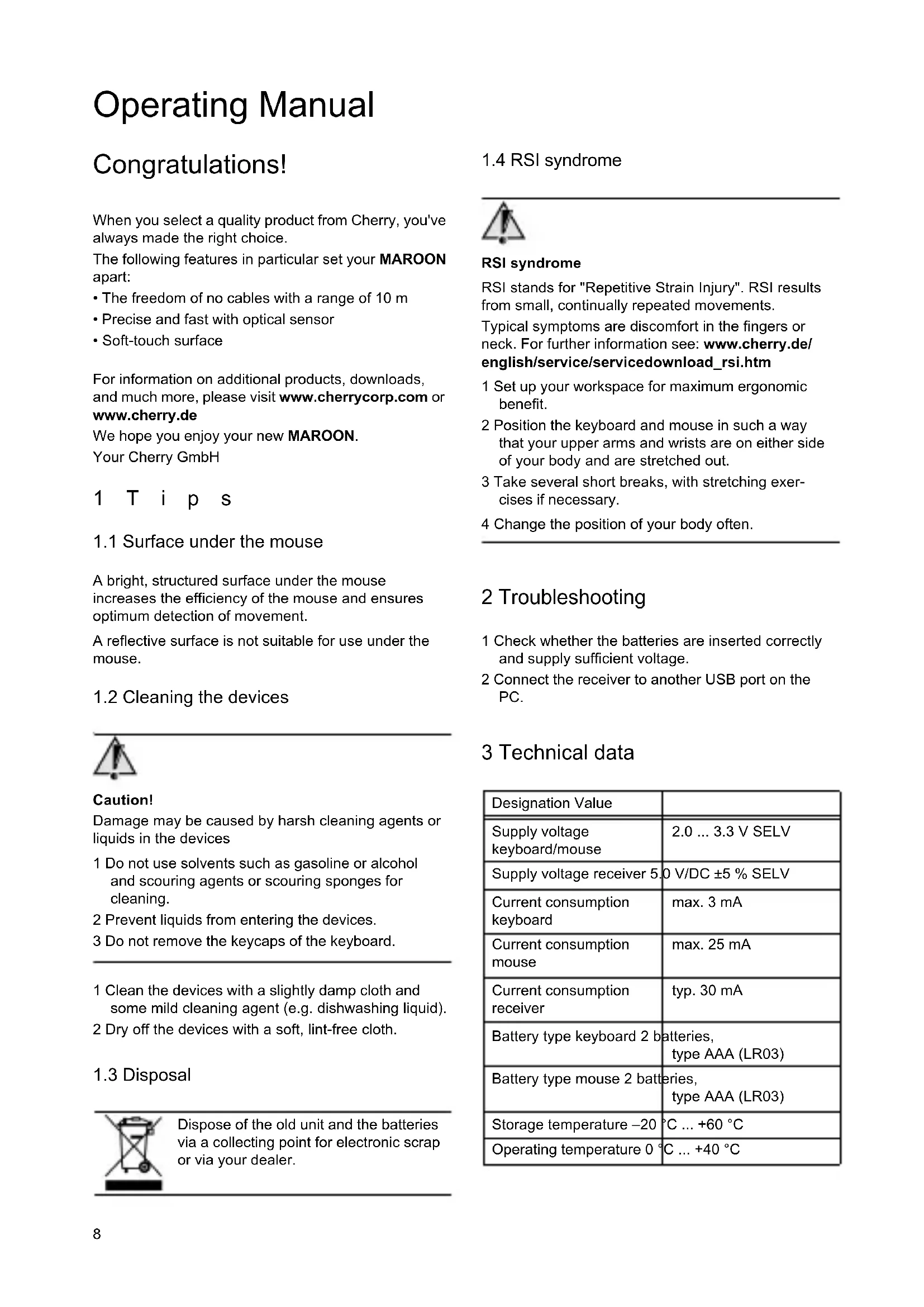


| Product type | Wireless keyboard and mouse |
| Brand | Cherry |
| Model | MAROON |
| Wireless range | 10 meters |
| Sensor | Optical |
| Surface | Soft Touch |
| Keyboard power supply | 2 LR03 (AAA) batteries |
| Mouse power supply | 2 LR03 (AAA) batteries |
| Keyboard consumption | max. 3 mA |
| Mouse consumption | max. 25 mA |
| Receiver power supply | 5.0 V/DC via USB |
| Operating temperature | 0 °C to +40 °C |
| Storage temperature | -20 °C to +60 °C |
| Maintenance and cleaning | Slightly damp cloth with mild detergent; do not use solvents or abrasive products |
| Safety | Choking hazard from ingestion of small parts; keep out of reach of children under 6 years old |
| Warranty | 3 years (except software: 90 days) |
Frequently Asked Questions - MAROON Cherry
User questions about MAROON Cherry
0 question about this device. Answer the ones you know or ask your own.
Ask a new question about this device
Download the instructions for your Wireless keyboard and mouse in PDF format for free! Find your manual MAROON - Cherry and take your electronic device back in hand. On this page are published all the documents necessary for the use of your device. MAROON by Cherry.
USER MANUAL MAROON Cherry
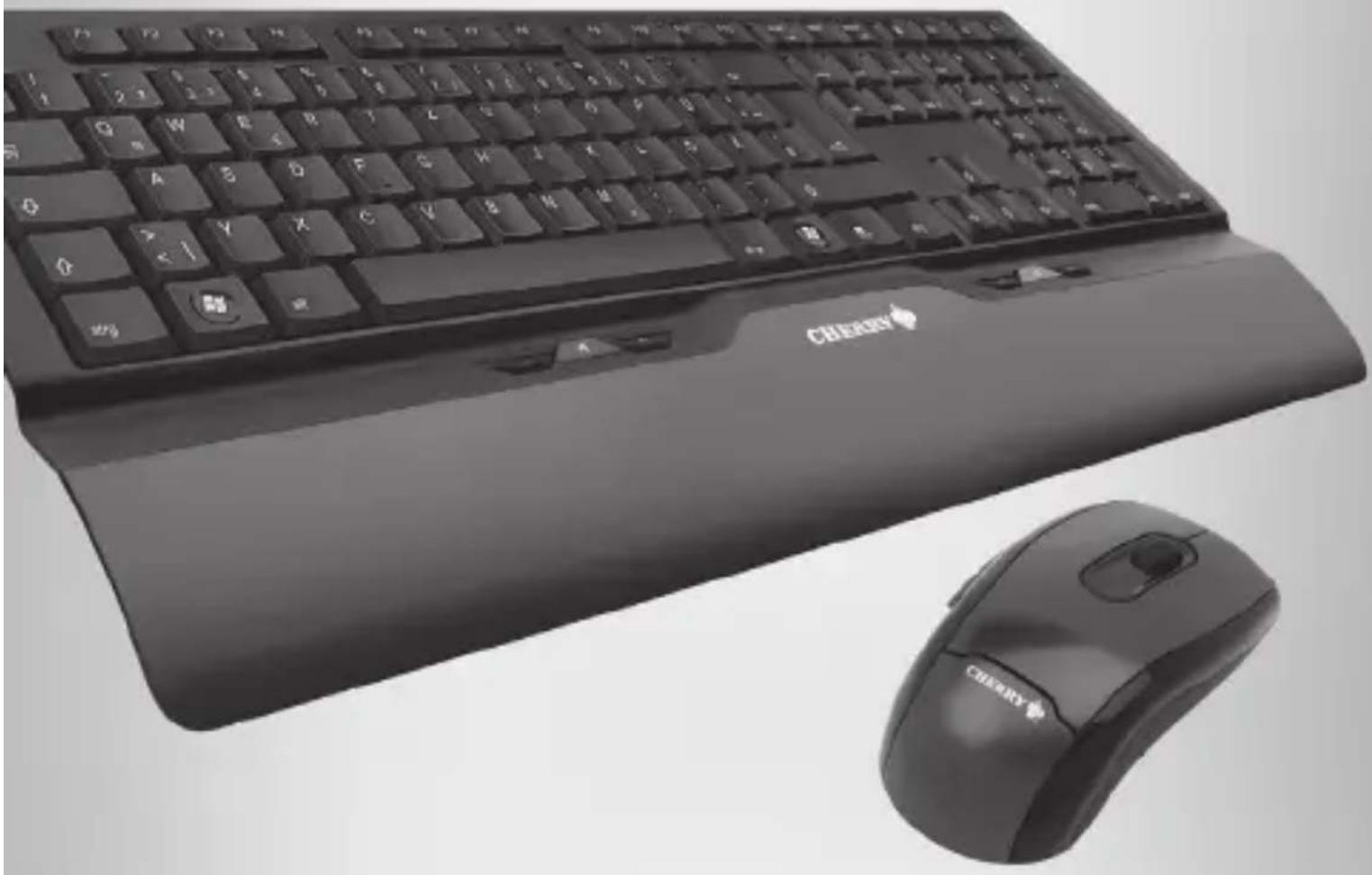
Wireless MultiMedia Desktop
natural_image
Black foldable keyboard and mouse with brand logo, no visible text or symbols on the main device.Bedienungsanleitung
Operating Manual
Mode d'emploi
Guida rapida
Introducción
natural_image
Simple line drawing of a tool interacting with a wall-mounted device (no text or symbols)2 Batterien in die Maus einlegen / Inserting batteries into the mouse / Insérer les piles dans la souris / Introducir las pilas en el ratón / Inserire le batterie nel mouse / Batterijen in de muis plaatsen
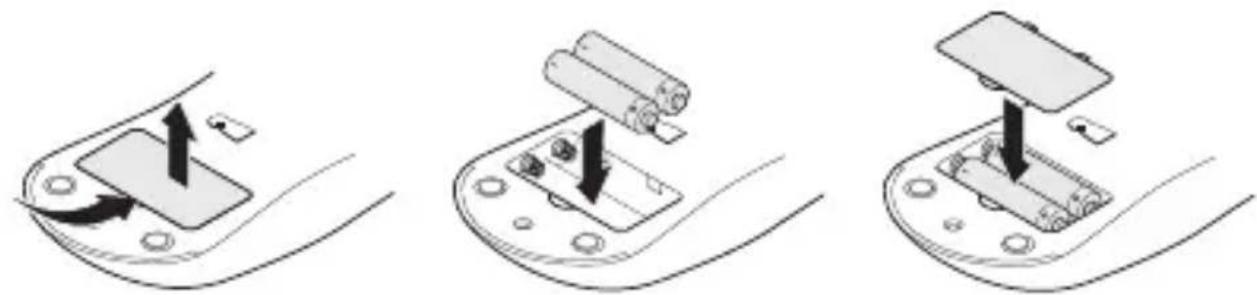
natural_image
Three-step diagram showing a device being inserted into a battery, with arrows indicating the process (no text or symbols present)3 Batterien in die Tastatur einlegen / Inserting batteries into the keyboard / Insérer les piles dans le clavier / Colocar pilas en el teclado / Inserire le batterie nella tastiera / Batterijen in het toetsenbord plaatsen
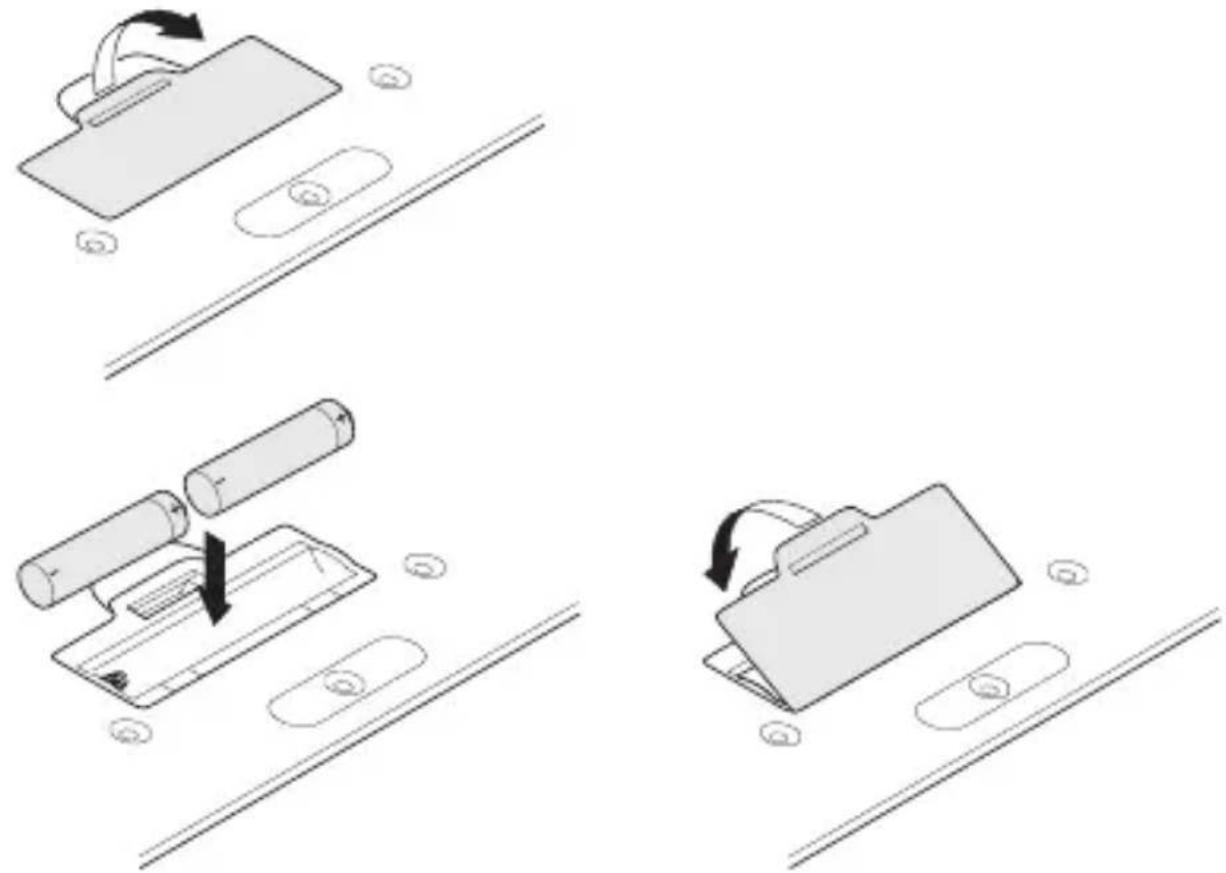
flowchart
graph TD
    A["Start"] --> B["Shelfing Battery"]
    B --> C{Battery Disassembly}
    C -->|Yes| D["Shelfing Battery with Bottle"]
    C -->|No| E["Shelfing Battery with Packet"]
    D --> F["Packaging System"]
    F --> G["Final Package"]
    G --> H["End"]
Bedienungsanleitung
When you select a quality product from Cherry, you've always made the right choice.
The following features in particular set your MAROON apart:
• The freedom of no cables with a range of 10 m
- Precise and fast with optical sensor
- Soft-touch surface
For information on additional products, downloads, and much more, please visit www.cherrycorp.com or www.cherry.de
We hope you enjoy your new MAROON.
Your Cherry GmbH
1 Tips
1.1 Surface under the mouse
A bright, structured surface under the mouse increases the efficiency of the mouse and ensures optimum detection of movement.
A reflective surface is not suitable for use under the mouse.
1.2 Cleaning the devices

Caution!
Damage may be caused by harsh cleaning agents or liquids in the devices
1 Do not use solvents such as gasoline or alcohol and scouring agents or scouring sponges for cleaning.
2 Prevent liquids from entering the devices.
3 Do not remove the keycaps of the keyboard.
1 Clean the devices with a slightly damp cloth and some mild cleaning agent (e.g. dishwashing liquid).
2 Dry off the devices with a soft, lint-free cloth.
1.3 Disposal
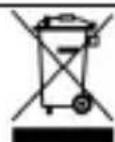
Dispose of the old unit and the batteries via a collecting point for electronic scrap or via your dealer.
1.4 RSI syndrome

RSI syndrome
RSI stands for "Repetitive Strain Injury". RSI results from small, continually repeated movements.
Typical symptoms are discomfort in the fingers or neck. For further information see: www.cherry.de/english/service/servicedownload_rsi.htm
1 Set up your workspace for maximum ergonomic benefit.
2 Position the keyboard and mouse in such a way that your upper arms and wrists are on either side of your body and are stretched out.
3 Take several short breaks, with stretching exercises if necessary.
4 Change the position of your body often.
2 Troubleshooting
1 Check whether the batteries are inserted correctly and supply sufficient voltage.
2 Connect the receiver to another USB port on the PC.
3 Technical data
| Designation Value | |
| Supply voltage keyboard/mouse | 2.0 ... 3.3 V SELV |
| Supply voltage receiver 5.0 V/DC ±5 % SELV | |
| Current consumption keyboard | max. 3 mA |
| Current consumption mouse | max. 25 mA |
| Current consumption receiver | typ. 30 mA |
| Battery type keyboard 2 batteries, type AAA (LR03) | |
| Battery type mouse 2 batteries, type AAA (LR03) | |
| Storage temperature -20 °C ... +60 °C | |
| Operating temperature 0 °C ... +40 °C | |
4 Contact
Cherry GmbH
Cherrystraße
91275 Auerbach
Germany
www.cherrycorp.com
www.cherry.de
Sales:
Phone: +49 (0) 1805 243779 (01805 CHERRY), (14 euro cent/min. from German landlines, prices may vary for calls made from mobile networks.)
E-mail: sales@cherry.de
Technical support:
Phone: +49 (0) 1805 919108 (14 euro cent/min. from German landlines, prices may vary for calls made from mobile networks.)
E-mail: support@cherry.de
Please have the following information on hand when contacting technical support:
- Item and serial no. of the product
- Name and manufacturer of your PC/notebook or motherboard
- Operating system and, if applicable, installed service pack version
5 General advice
Cherry continuously optimizes products as new technologies are developed. For this reason we reserve the right to make technical alterations. The evaluation of product reliability and the definition of the product's technical performance are carried out according to Cherry's own requirements in order to meet internationally recognized regulations and standards. Requirements in addition to these can be met through mutual cooperation. Improper usage, handling, storage and external influences could lead to faults and defects during use.
We do not accept warranty for defects caused by alterations to our product by the user and shall not be held liable for unauthorized modifications. All repairs must be made by Cherry or an officially appointed organization or person.
Possible compensation claims against Cherry or its nominated officers – whatever the legal justification including physical or stress related injuries – are excluded. Exceptions to this exist in the case of intent or gross negligence on the part of Cherry, infringements of Product Liability Law or in cases of injury, bodily harm or risk to health. These operating instructions only apply to the accompanying product.
Full details can be obtained from your local Cherry dealer or direct from Cherry GmbH.
6 Warning notes

Danger of suffocation due to swallowing of small parts
➢ Ensure that this unit does not end up in the hands of children under the age of six.

CAUTION
Risk of explosion if batteries are replaced by an incorrect type.
➢ Dispose of used batteries according to these instructions.
7 Certifications
7.1 CE Declaration of Conformity
Hereby, Cherry GmbH, Auerbach/Opf., Germany, declares that this Radio-Frequency peripheral is in compliance with the essential requirements and other relevant provisions of Directive 1999/5/EC. The CE Declaration of Conformity can be retrieved by accessing the following internet address:
Once accessed, click on the relevant product name to retrieve the CE Declaration of Conformity.
7.2 Federal Communications Commission (FCC) Radio Frequency Interface Statement
Information to the user: This equipment has been tested and found to comply with the limits for Class B digital device, pursuant to Part 15 of the FCC Rules. These limits are designed to provide reasonable protection against harmful interference in a residential installation. This equipment generates, uses and can radiate radio frequency energy and, if not installed and used in accordance with the instructions, may cause harmful interference to radio communications. However, there is no guarantee that interference will not occur in a particular installation. If this equipment does cause harmful interference to radio or television reception, which can be determined by turning the equipment off and on, the user is encouraged to try to correct the interference by one or more of the following measures:
- Reorientate or relocate the receiving antenna.
- Increase the separation between the equipment and receiver.
- Connect the equipment into an outlet on a circuit different from that to which the receiver is connected.
- Consult the dealer or an experienced radio/TV technician for help.
Caution: Any changes or modifications not expressly approved by the party responsible for compliance could void the user's authority to operate the equipment.
7.3 For UL
For use with Listed Personal Computers only!
Restricted Manufacturer's Guarantee
Restricted Guarantee – statutory Guarantee: Please note that the Restricted Manufacturer's Guarantee set out below applies in addition to your statutory guarantee and neither replaces nor restricts it. Please contact the seller of this product with any claim based on your statutory guarantee rights arising from the sale of consumer goods.
Guarantee rights: With effect from June 1, 2006, Cherry GmbH (“Cherry”) grants the purchaser of this Cherry product (“Product”) a Restricted Manufacturer’ Guarantee (“Guarantee”) provided that this Product is bought and used by the purchaser in his capacity as a consumer. Commercial users of this Product or purchasers acting in their capacity as entrepreneurs are excluded from the Guarantee as set out below. The granting of a guarantee and its contents for these purchasers can be agreed with Cherry individually at the contact address given in the instructions for use.
The Guarantee is not transferable and is limited to the original purchaser.
This Guarantee applies only to Products bought in a member state of the European Union, Iceland, Norway, Switzerland or Turkey and which were intended for sale in one of these countries; it is valid and enforceable in these countries only.
Guarantee period: The Guarantee period begins on the date on which the Product is purchased by an end customer (date of original proof of purchase) and runs for three (3) years, or ninety (90) days for all media on which software for this Product is provided.
Claiming under the Guarantee: If you wish to make a claim under this Guarantee, you must, within thirty (30) days of the occurrence of a defect, submit the following to an authorized Cherry customer service office: the Product and the original proof of purchase. This must show the name and address of the authorized Cherry salesperson and the date and place of purchase as well as the unique product designation.
Responsibility for loss or damage to the Product is not transferred to Cherry until the product has reached Cherry.
Guarantee benefits: Defects in the material, construction or processing of the hardware will be remedied within the Guarantee period by Cherry or by an authorized Cherry customer service office free of charge within a commercially acceptable period by repair to the extent necessary to restore operation, or, should Cherry at its own discretion consider it necessary, by replacing the Product or parts of it.
If neither of these two possibilities is feasible, Cherry will reimburse the customer the purchase price paid. Replacement products may also be products which were state-of-the-art at the time of the purchase of the Product to be replaced. Cherry may use new, refurbished or as-new products or parts for the repair and replacement of the Product. As far as legally possible, Cherry may choose between the possibilities mentioned above at its own discretion. Replaced parts or Products are guaranteed either until the end of the original Guarantee period for the original Product or for three (3) months from the exchange of the parts or Products, whichever Guarantee period is longer.
Exchanged or returned parts or pieces of equipment become the property of Cherry.
Defects in parts subject to wear and tear, which by their nature have only a limited service life (e.g. batteries or fuses), are not covered by the Guarantee. Products from third parties supplied together with the Product under Guarantee are not covered by the Guarantee from Cherry.
Furthermore, the Guarantee does not cover normal wear and tear. Additionally, the Guarantee from Cherry does not apply if the defect is the result of disregard of the instructions for use, improper or rough treatment or attempts at modification, e.g. using sharp objects, bending, pressure or dropping, of unauthorized interference or attempts at connection, unauthorized opening or repair or attempted repair with non-approved spare parts, incorrect operation or faulty installation. Nor does the Guarantee cover cases where the Product has been exposed to moisture, damp, extreme heat or extreme climatic conditions or short
fluctuations of these influences, corrosion or oxidation, where food or liquids have been spilled over it or it has been attacked by chemical substances.
Limitation of liability: Cherry's liability is limited to the original purchase price of the Product. to the legally permitted extent, Cherry also precludes liability for any accompanying or resulting damage, indirect or other damage and the shortfall or loss of income or profit, the loss of information or data or other financial damage incurred in connection with the purchase, installation, maintenance or use of the product, in particular higher costs or expenditure on indirect losses or damage, even if Cherry has been informed of the possibility of such damage.
The limitation and preclusion of liability shall apply even if a remedy provided under the Guarantee has not fulfilled its purpose.
Cherry is under no circumstances responsible for the customer's software, information or data stored on or integrated into the Product returned to Cherry.
The limitations of liability detailed above do not apply in cases of intent or gross negligence on the part of Cherry or in the case of death or injury to persons.
No guarantee on operator software: This Product may contain software from third-party providers whose use is regulated through a separate licence contract, or it may be connected to software of this kind. The Guarantee granted by Cherry does not cover such third-party software, regardless of whether it is contained in the product or has been downloaded on to the product and regardless of whether it was added during installation, assembly, transport or at any other time in the delivery chain or was received by the purchaser in another way. Information concerning the guarantee applicable in this case may be obtained from the licence contract with the end user, which regulates the use of software of this type.
Further information: This Guarantee contains the sole and exclusive legal remedy of the purchaser towards Cherry and Cherry's sole and exclusive liability for defects in the product. This Guarantee replaces all other guarantees and declarations of liability where these were made in verbal, written or implied form or are based on (non-mandatory) applicable statutory or contractual provisions. It also replaces implied guarantees of the marketable quality of the Product or its suitability for a particular purpose.
No Cherry distributor, sales agent or employee is authorized to grant amendments, extensions or supplements to this Guarantee.
Information on the conditions of the Guarantee, authorized customer service offices and any up-dates may be obtained from the CHERRY Web site at: http://www.cherry.de/guarantee/.