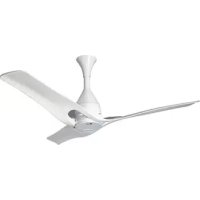
LCF12P - Air-conditioner LG - Free user manual and instructions
Find the device manual for free LCF12P LG in PDF.



| Product Type | Ceiling Fan |
| Brand | LG |
| Model | LCF12P |
| Sweep Diameter | 1200 mm |
| Net Weight | 3.7 kg |
| Power Supply | AC 220-240 V ~ 50 Hz |
| Rated Power | 30 W |
| Number of Speeds | 4 |
| Remote Control | Yes (CR2025 battery included) |
| Timer | Yes (2/4/6/8 hours) |
| Standby Mode | Yes |
| Sleep Mode | Yes (automatic speed reduction) |
| Wi-Fi Connectivity | Optional (LCW-003 module, 2.4 GHz) |
| LG ThinQ App | Yes |
| Smart Diagnosis | Yes |
| Minimum Installation Height | 2.5 m from floor |
| Minimum Distance from Wall | 1 m |
| Maintenance Frequency | Annual cleaning, monthly blade inspection |
| Safety | Automatic shutdown in case of malfunction |
| Warranty | Manufacturer's warranty (see manual) |
Frequently Asked Questions - LCF12P LG
User questions about LCF12P LG
0 question about this device. Answer the ones you know or ask your own.
Ask a new question about this device
Download the instructions for your Air-conditioner in PDF format for free! Find your manual LCF12P - LG and take your electronic device back in hand. On this page are published all the documents necessary for the use of your device. LCF12P by LG.
USER MANUAL LCF12P LG
Read this owner's manual thoroughly before operating the appliance and keep it handy for reference at all times.
TYPE: CEILING FAN
EN ENGLISH FR FRANÇAIS AR العربية
Copyright © 2020 LG Electronics Inc. All Rights Reserved
TABLE OF CONTENTS
This manual may contain images or content different from the model you purchased.
This manual is subject to revision by the manufacturer.
SAFETY INSTRUCTIONS ...... 3
IMPORTANT SAFETY INSTRUCTIONS 3
PRODUCT OVERVIEW......8
Parts and Specifications....8
OPERATION 9
Status Display Panel 9
Remote Controller.... 10
Using the Extra Function....12
SMART FUNCTIONS....13
LG ThinQ Application 13
Smart Diagnosis.... 14
MAINTENANCE....15
Recommended Maintenance Schedule 15
TROUBLESHOOTING 16
SAFETY INSTRUCTIONS
EN
The following safety guidelines are intended to prevent unforeseen risks or damage from unsafe or incorrect operation of the appliance. The guidelines are separated into ‘WARNING’ and ‘CAUTION’ as described below.

This symbol is displayed to indicate matters and operations that can cause risk. Read the part with this symbol carefully and follow the instructions in order to avoid risk.

WARNING
This indicates that the failure to follow the instructions can cause serious injury or death.

CAUTION
This indicates that the failure to follow the instructions can cause the minor injury or damage to the product.
IMPORTANT SAFETY INSTRUCTIONS

WARNING
To reduce the risk of explosion, fire, death, electric shock, injury or scalding to persons when using this product, follow basic precautions, including the following:
Children in the Household
This appliance is not intended for use by persons (including children) with reduced physical, sensory or mental capabilities, or lack of experience and knowledge, unless they have been given supervision or instruction concerning use of the appliance by a person responsible for their safety. Children should be supervised to ensure that they do not play with the appliance.
If unusual oscillating movement is observed, immediately stop using the ceiling fan and contact the manufacturer, its service agent or suitably qualified persons.
Installation
- Electrical or installation work needs to be performed by a qualified service personnel.
- The replacement of parts of the safety suspension system device shall be performed by the manufacturer, its service agent or suitably qualified persons.
- Do not install the appliance less than 2.5 m from the ground and 1 m from the wall to the blades.
- Ensure that the ceiling hook or other safety suspension devices shall sustain more than 10 times the appliance weight.
- Ensure that the shaft has been fully tighten to motor shaft and shackle.
- Firmly tighten the blade screws using a screwdriver.
- Do not install the appliance in a place where flammable liquids or gases such as gasoline, propane, paint thinner, etc., are stored.
- Do not install the appliance somewhere exposed to direct sunlight.
- Do not install the appliance in an area prone to combustible gas leaks, grease, or metal dust.
- If the supply cord is damaged, it must be replaced by manufacturer or service personnel in order to avoid hazard.
Operation
- Connect this appliance as per the rated voltage and frequency printed on the name plate.
- Do not touch the power switch with wet hands.
- Do not disassemble, repair, modify or touch the appliance while it is operating.
- Do not insert hands or any objects into the appliance.
-
Do not place any objects on the appliance.
-
Do not use or store flammable or combustible substances (ether, benzene, alcohol, chemical, LPG, combustible spray, insecticide, air freshener, cosmetics, etc.) near the appliance.
- If there is a gas leakage (isobutane, propane, natural gas, etc.), do not touch the appliance or power switch and ventilate the area immediately.
- Cut off the power supply if there is any noise, smell, or smoke coming from the appliance.
- Do not expose the appliance to splashing water or rain.
- Do not touch, operate, or repair the appliance with wet hands.
- In case of flood, cut off the power switch and contact the LG Electronics customer service center.
- Dispose of all packaging materials (such as plastic bags and styrofoam) away from children. The packaging materials can cause suffocation.
Maintenance
- Before cleaning or performing maintenance, disconnect the power supply and wait until the blade stops.
- Do not use an abrasive cloth, sponge, or a metal brush to clean the appliance.
Battery
- A button/coin-shaped battery is used in the remote controller of the appliance. If you accidentally swallowed the battery, go to the doctor immediately for emergency treatment. If you fail to receive first aid within 2 hours after you swallowed it, you may experience damage to your internal organs or death in severe cases.
- Do not swallow the battery.
- If the battery tray is not secured firmly, stop using the appliance instantly and keep it away from children.
- Replace the all batteries in the remote controller with new ones of the same type. Do not mix old and new batteries or different types of batteries.

CAUTION
To reduce the risk of minor injury to persons, malfunction, or damage to the product or property when using this product, follow basic precautions, including the following:
Installation
- Do not install the appliance at a wet, high temperature, high humidity area, high vibration, windy places.
- Do not install the appliance in freezing temperature.
- Do not install the appliance on or near items that may be damaged or discolored by heat or humidity.
- Do not install the appliance near curtains.
- Do not install the appliance within 1 m of a TV or stereo equipment. It may cause interference.
• After installation make sure the appliance does not tremble extremely.
Operation
- Do not use the appliance in place of a vent hood. Doing so will shorten the appliance's lifespan.
- Do not operate in an area with unstable voltage, the appliance may automatically shut down to protect appliance components.
- This appliance is intended to be used in household and domestic applications only and must not be used for commercial purposes.
Maintenance
- Replace all the blades if any of them breaks or cracks.
- Never use strong cleaning agents or solvents when cleaning the appliance. Use a smooth cloth.
- Use a sturdy stool or ladder, when cleaning, maintaining or repairing the ceiling fan at height.
Battery
- Do not modify the battery arbitrarily.
- Misplaced battery may cause an explosion.
- Do not recharge or take apart the battery.
- Do not throw the battery in the fire for disposal or leave it near the heat.
- Remove and store the battery in a safe location if you don't intend to use the remote controller for a long time.
PRODUCT OVERVIEW
EN
Parts and Specifications
Exterior
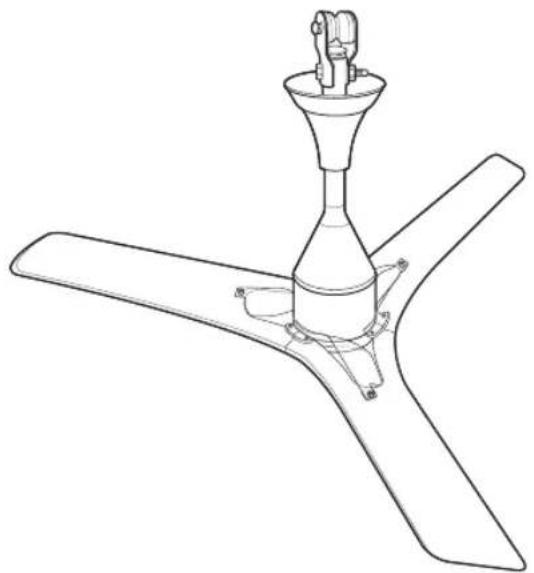
natural_image
Line drawing of a three-blade propeller with a central fan and mounting bracket (no text or symbols)Specifications
| Parameters Values | |
| Input Voltage AC 220-240 V 1 ∅ | |
| Rated Frequency 50 Hz | |
| Sweep 1200 mm | |
| Typical Input Power 30 W | |
| Speed Control Through Remote and Power Switch | |
| Remote Battery CR2025 3V | |
| Weight 3.7 kg (Net) | |
NOTE
- Specified weight may differ from actual weight.
OPERATION
EN
Status Display Panel
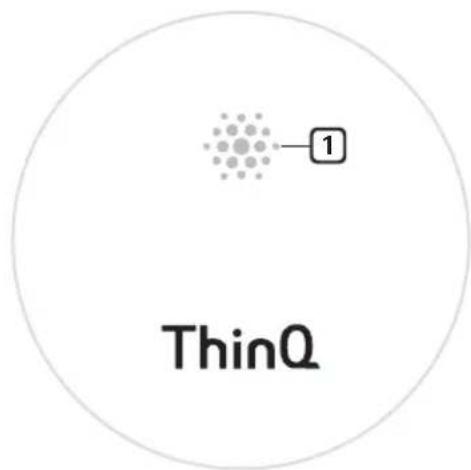
text_image
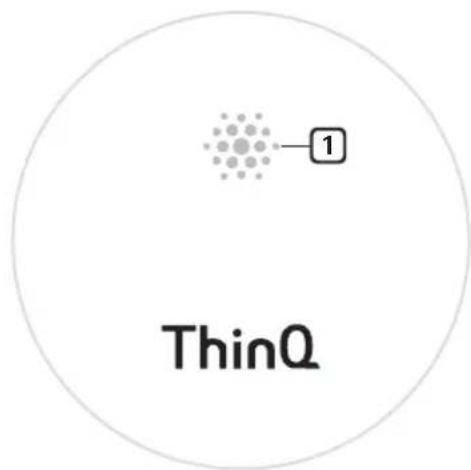
1 ThinQ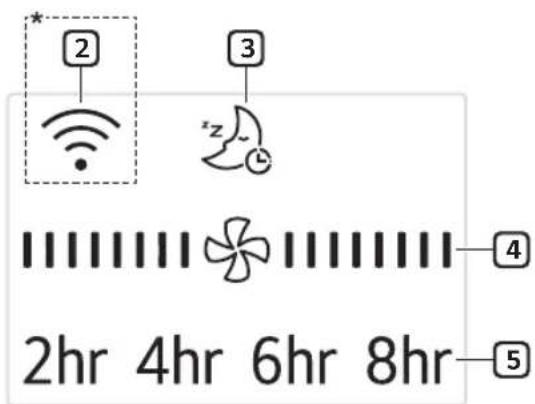
text_image
* 2 3 z 4 2hr 4hr 6hr 8hr 5*Broken Line (☐): Optional
1 Receiver for Remote Controller Signal
Face the remote controller to the Receiver, the remote signal will pass through it.
2 Wi-Fi (Optional)
When the appliance is connected to a Wi-Fi network, 📤 is displayed on the display screen.
3 Sleep Mode
When the sleep mode is selected, all display except the 📋 will be off after displaying 📋 for 3 seconds.
4 Fan Speed
Whenever press Speed button ( ) on the remote controller, fan speed will be changed.

flowchart
graph TD
    A["Star Symbol"] --> B["Star Symbol"]
    B --> C["Star Symbol"]
    C --> D["Star Symbol"]
    D --> E["Star Symbol"]
    E --> F["Star Symbol"]
    style A fill:#f9f,stroke:#333
    style B fill:#f9f,stroke:#333
    style C fill:#f9f,stroke:#333
    style D fill:#f9f,stroke:#333
    style E fill:#f9f,stroke:#333
    style F fill:#f9f,stroke:#333
5 Timer
Whenever press Timer button ( Ⓤ ) on the remote controller, the setting time will be changed.
2hr 4hr 6hr 8hr Off → →
NOTE
- Only when the functions operate, the display will light on.
- The appearance or functions of the appliance may differ depending on the model.
EN
Remote Controller Inserting Battery
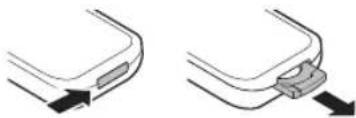
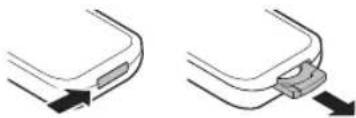
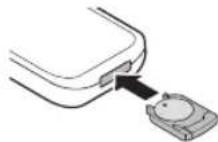
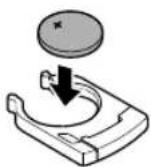
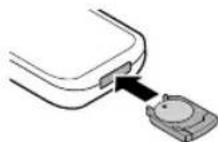
1 With the backside of the remote controller facing up, remove the battery tray from the remote controller.
natural_image
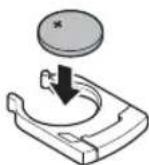
Two-step diagram showing a curved object with an arrow pointing to it, connected by a bracket (no text or symbols present)2 Insert the battery provided with the appliance to the tray.
- The (+) electrode of the battery must face upward.
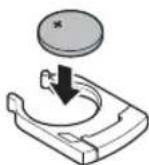
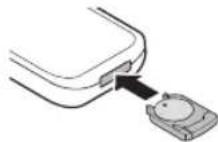
3 Insert the battery tray to the remote controller.
NOTE
- If the battery runs out of charge, replace it with a new one (CR2025).
- If the remote controller does not work as expected, try to replace the battery or check the polarity (+, -) of the battery. If the problem continues, contact the service centre.
- Dispose of the used battery according to the environmental regulations.
EN
Remote Controller Features
flowchart
graph TD
    A["Power Input"] --> B["1"]
    B --> C["Speed Icon"]
    B --> D["Timer Icon"]
    B --> E["Display Icon"]
    B --> F["Sleep Wi-Fi (3s)"]
    C --> G["4"]
    D --> H["5"]
    E --> I["3"]
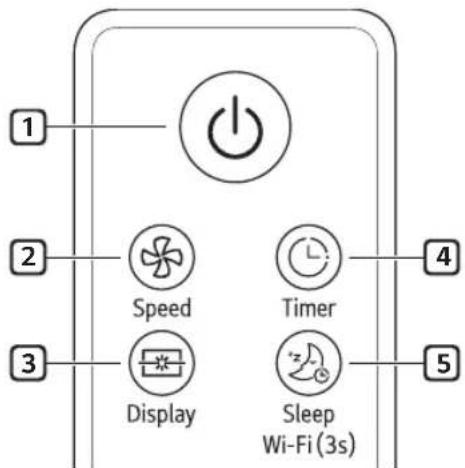
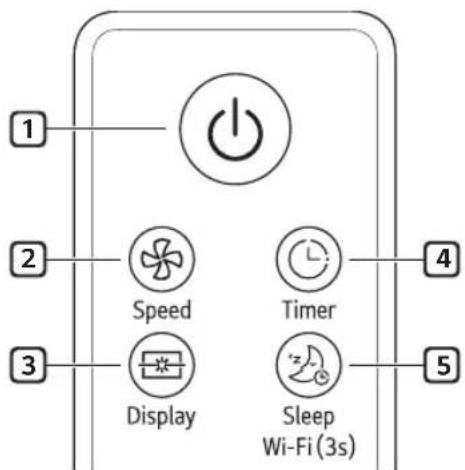
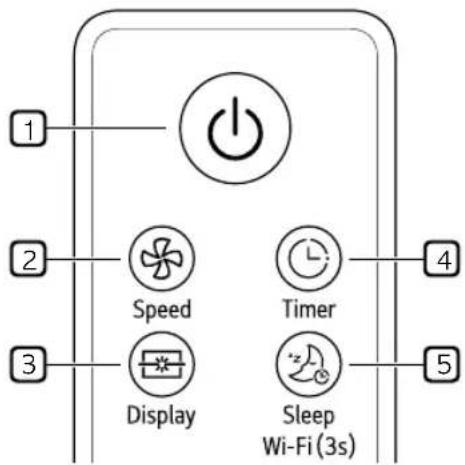
1 Start/Stop
2 Speed
Controls the fan speed.
3 Display
Turn on/off the display lightings.
4 Timer
Set time to power off.
5 Sleep
Turn on/off the sleep mode.
- When you enter sleep mode, the wind speed decreases by one step every hour. In case of "Speed1", it is maintained.
Wi-Fi
Press this button during 3 seconds for paring. For unparing, press 3 seconds again.
- Turning off Wi-Fi
- Press and hold the Start/Stop button and the Wi-Fi button at the same time for more than 3 seconds to turn off Wi-Fi. After finishing the product registration and while Wi-Fi is off, press and hold the Wi-Fi button for more than 3 seconds just once to turn on Wi-Fi and to control the product using the registered smartphone.
NOTE
- When operating the fan, you have to set up the regulator with 5 step (maximum) only.
- If you miss your remote controller, you can operate the fan by using wall switch on/off.
- The appearance or function of the remote controller may vary depending on the model.
| 1 time Return to previous step before you switch on/off. | |
| 2 times Speed 1 | |
| 3 times Speed 2 | |
| 4 times Speed 3 | |
| 5 times Speed 4 |
11
Operating Method
text_image
5 m 45° 45°
CAUTION
- Do not step on or apply pressure.
- Do not store or use near water or in high humidity.
- Do not store or use near an open flame or heating devices such as space heaters or ovens. Otherwise the battery could explode.
NOTE
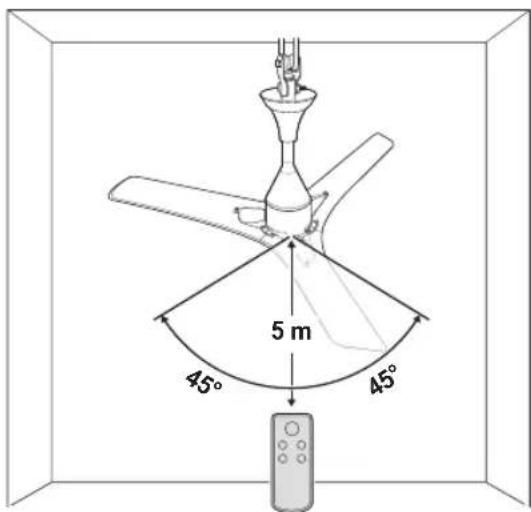
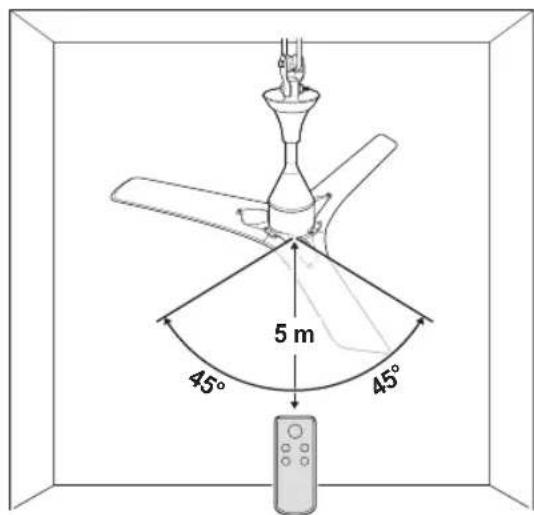
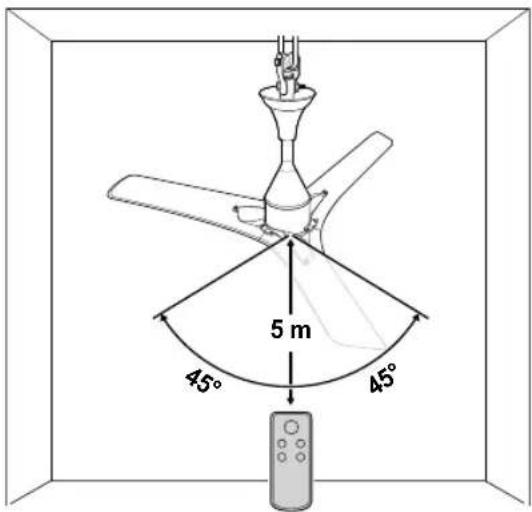
• To use the remote controller, direct the signal sending area of the remote controller toward the signal reception area of the appliance.
- The remote works best within 5 m and 45° to the left or right of the sensor in front of the appliance.
- Pressing multiple buttons at the same time may cause the remote controller to malfunction.
- The remote controller may not work properly where there is a strong light, such as those from a 3-wave length fluorescent lamp or a neon sign.
- If you lost the remote controller, you can purchase a new one in a nearby service centre.
Using the Extra Function
Sleep Mode
Use the sleep mode to make more silent and display lighting off.
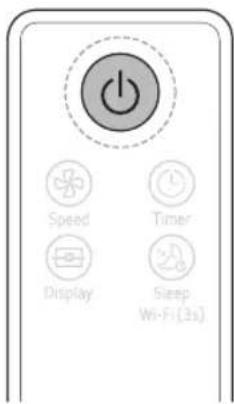
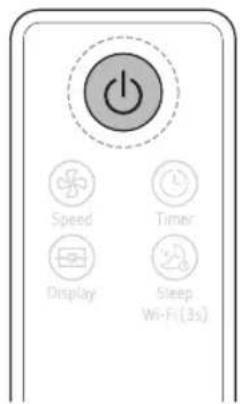
1 Press the Start/Stop button.
text_image
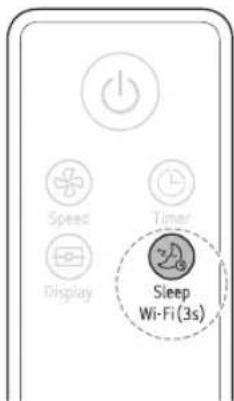
Power Speed Timer Display Sleep Wi-Fi (3s)2 Press the Sleep button to select the Sleep mode.
text_image
Speed Display Timer Sleep Wi-Fi (3s)NOTE
• After setting this mode, the fan speed will reduce next step automatically and to fan speed 1 finally.
- In Sleep mode, you can adjust the fan speed manually using the Speed button.
- The Sleep mode will be kept until pressing the Sleep button once.
SMART FUNCTIONS
EN
LG ThinQ Application
The LG ThinQ application allows you to communicate with the appliance using a smartphone.
LG ThinQ Application Features
Smart Diagnosis
If you experience a problem while using the appliance, this smart diagnosis feature will help you diagnose the problem.
Settings
Allows you to set various options on the appliance and in the application.
NOTE
- If you change your wireless router, Internet service provider, or password, delete the registered appliance from the LG ThinQ application and register it again.
- The application is subject to change for appliance improvement purposes without notice to users.
• Functions may vary by model.
Before using LG ThinQ Application
This feature is only available on models with Wi-Fi function.
1 Check the distance between the appliance and the wireless router (Wi-Fi network).
- If the distance between the appliance and the wireless router is too far, the signal strength becomes weak. It may take a long time to register or installation may fail.
2 Turn off the Mobile data or Cellular Data on your smartphone.
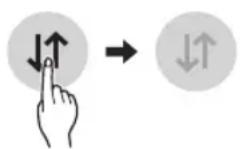
3 Connect your smartphone to the wireless router.
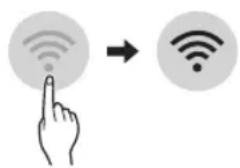
text_image
Diagram showing a hand interacting with wireless signals via a finger icon and a Wi-Fi symbol to illustrate wireless connectivity.NOTE
- To verify the Wi-Fi connection, check that Wi-Fi icon on the control panel is lit.
- The appliance supports 2.4 GHz Wi-Fi networks only. To check your network frequency, contact your Internet service provider or refer to your wireless router manual.
- LG ThinQ is not responsible for any network connection problems or any faults, malfunctions, or errors caused by network connection.
- If the appliance is having trouble connecting to the Wi-Fi network, it may be too far from the router. Purchase a Wi-Fi repeater (range extender) to improve the Wi-Fi signal strength.
- The Wi-Fi connection may not connect or may be interrupted because of the home network environment.
- The network connection may not work properly depending on the Internet service provider.
- The surrounding wireless environment can make the wireless network service run slowly.
- The appliance cannot be registered due to problems with the wireless signal transmission. Unplug the appliance and wait about a minute before trying again.
- If the firewall on your wireless router is enabled, disable the firewall or add an exception to it.
- The wireless network name (SSID) should be a combination of English letters and numbers. (Do not use special characters.)
- Smartphone user interface (UI) may vary depending on the mobile operating system (OS) and the manufacturer.
- If the security protocol of the router is set to WEP, you may fail to set up the network. Please change it to other security protocols (WPA2 is recommended) and register the product again.
Installing LG ThinQ Application
Search for the LG ThinQ application from the Google Play Store or Apple App Store on a smartphone. Follow instructions to download and install the application.
Wireless LAN Module Specifications
| Model LCW-003 | |
| Frequency Range | 2412 - 2472 MHz |
| Output Power (Max) | IEEE 802.11b: 18.37 dBmIEEE 802.11g: 17.67 dBmIEEE 802.11n: 17.67 dBm |
Open Source Software Notice Information
To obtain the source code under GPL, LGPL, MPL, and other open source licenses, that is contained in this product, please visit http://opensource.lge.com.
In addition to the source code, all referred license terms, warranty disclaimers and copyright notices are available for download.
LG Electronics will also provide open source code to you on CD-ROM for a charge covering the cost of performing such distribution (such as the cost of media, shipping, and handling) upon email request to opensource@lge.com. This offer is valid for a period of three years after our last shipment of this product. This offer is valid to anyone in receipt of this information.
Smart Diagnosis
This feature is only available on models with the 🧑 or 🟣 logo.
Use this feature to help you diagnose and solve problems with your appliance.
NOTE
- For reasons not attributable to LGE's negligence, the service may not operate due to external factors such as, but not limited to, Wi-Fi unavailability, Wi-Fi disconnection, local app store policy, or app unavailability.
- The feature may be subject to change without prior notice and may have a different form depending on where you are located.
Using LG ThinQ to Diagnose Issues
If you experience a problem with your Wi-Fi equipped appliance, it can transmit troubleshooting data to a smartphone using the LG ThinQ application.
- Launch the LG ThinQ application and select the Smart Diagnosis feature in the menu. Follow the instructions provided in the LG ThinQ application.
MAINTENANCE
EN

CAUTION
- Do not spray water on or into appliance. Doing so will cause appliance failure.
- Do not bend the blade while cleaning.
- Do not use alkaline detergents to clean the appliance.
- Do not attach stickers or use sulfuric acid, hydrochloric acid, or organic solvents such as thinners, lamp oil, or acetone on the appliance's surface. Doing so may damage the surface.
- Wipe away dirt with a clean soft cloth, ordinary soap and water.
- Ensure the ceiling fan is cut-off from power supply before removing the guard.
Recommended Maintenance Schedule
| Parts Frequency | |
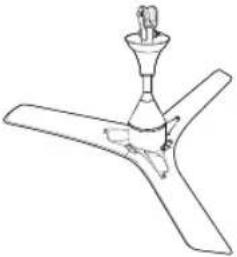 Ceiling Fan Ceiling Fan | Check and clean every one year. |
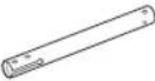 Shaft Assembly Shaft Assembly | Check for any damage and corrosion every year. |
 Shackle Assembly Shackle Assembly | Check for any damage and corrosion every year. |
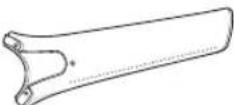 Blade Assembly Blade Assembly | Keep the blades clean and check every month. |
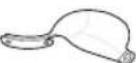 Guide Guide | Keep the guides clean and check every month. |
TROUBLESHOOTING
EN
Before Calling for Service
Please check the following before you contact the service center. If the problem persists, contact your local service center.
| Problem Possible | Causes & Solution |
| When supply power but not power on, can't hear the beep. | Power is not supplied.Turn on the power switch. |
| Appliance is making noise. | Install location is too close to the wall or ceiling.Check the distance and reinstall at proper location. |
| Installation is not good.Check each assemble parts are proper and firmly tightened. | |
| Sleep lighting is flickering continuously. | Fan is locked.Use a regulator to turn off the power and turn on one minute later.If the same problem occurs, power off and call to service center. |
| Ceiling Fan not Working. | The voltage conditions are unstable.Check Voltage Condition, If unstable contact local Electrician. |
| Ceiling fan suddenly turns off and turns on. | The installed environment is very windy.It's the normal process of finding the right wind speed for your environment.So fan can stop and re-adjust during high external wind. |
| When press a button on remote controller, can't hear the beep. | Remote controller power is not supplied.Check the direction of remote controller battery or change it. |
| Remote controller is not working. | Too far to communicate with sensor.Move close to the appliance and try again. |
| Your home appliance and smartphone is not connected to the Wi-Fi network. | The password for the Wi-Fi that you are trying to connect to is incorrect.Find the Wi-Fi network connected to your smartphone and remove it, then register your appliance on LG ThinQ. |
| Mobile data for your smartphone is turned on.Turn off the Mobile data of your smartphone and register the appliance using the Wi-Fi network. | |
| The wireless network name (SSID) is set incorrectly.The wireless network name (SSID) should be a combination of English letters and numbers. (Do not use special characters.) | |
| The router frequency is not 2.4 GHz.Only a 2.4 GHz router frequency is supported. Set the wireless router to 2.4 GHz and connect the appliance to the wireless router. To check the router frequency, check with your Internet service provider or the router manufacturer. | |
| The distance between the appliance and the router is too far.If the distance between the appliance and the router is too far, the signal may be weak and the connection may not be configured correctly. Move the location of the router so that it is closer to the appliance. |

LG
Life's Good
Customer's Copy
Name of Purchaser ____
Invoice No. & Date
Model
Serial No.
Name & Address of the Seller (LG / Authorised Dealer)

LG
Life's Good
Customer's Copy
Name of Purchaser ____
Invoice No. & Date
Model
Serial No.
Name & Address of the Seller (LG / Authorised Dealer)
Memo
Memo
Memo
Memo
Memo
Memo
Memo
MANUEL DU PROPRIÉTAIRE
VENTILATEUR DE PLAFOND


natural_image
Line drawing of a three-blade propeller with a central fan and mounting bracket (no text or symbols)Caractéristiques
natural_image
Two diagrams showing a curved object with an arrow pointing to its side, connected by a cable (no text or symbols present)Application LG ThinQ
text_image
Diagram showing a hand interacting with wireless signals to form a Wi-Fi symbolREMARQUE
text_image
Diagram showing a hand interacting with a Wi-Fi icon and a Wi-Fi symbol, indicating wireless signal interaction.LG ThinQ تطبيق
text_image
Diagram of a ceiling fan with labeled components and angular measurements, including a remote control.
natural_image
Line drawing of a three-blade propeller with a central conical top and three blades (no text or symbols)المواصفات
Read this owner's manual thoroughly before operating the appliance and keep it handy for reference at all times.
TYPE: CEILING FAN
EN ENGLISH TR TÜRKÇE
Copyright © 2020 LG Electronics Inc. All Rights Reserved
TABLE OF CONTENTS
This manual may contain images or content different from the model you purchased.
This manual is subject to revision by the manufacturer.
SAFETY INSTRUCTIONS .... 3
IMPORTANT SAFETY INSTRUCTIONS .... 3
PRODUCT OVERVIEW......8
Parts and Specifications....8
OPERATION 9
Status Display Panel 9
Remote Controller.... 10
Using the Extra Function....12
SMART FUNCTIONS....13
LG ThinQ Application 13
Smart Diagnosis.... 14
MAINTENANCE....15
Recommended Maintenance Schedule 15
TROUBLESHOOTING 16
SAFETY INSTRUCTIONS
EN
The following safety guidelines are intended to prevent unforeseen risks or damage from unsafe or incorrect operation of the appliance. The guidelines are separated into ‘WARNING’ and ‘CAUTION’ as described below.

This symbol is displayed to indicate matters and operations that can cause risk. Read the part with this symbol carefully and follow the instructions in order to avoid risk.

WARNING
This indicates that the failure to follow the instructions can cause serious injury or death.

CAUTION
This indicates that the failure to follow the instructions can cause the minor injury or damage to the product.
IMPORTANT SAFETY INSTRUCTIONS

WARNING
To reduce the risk of explosion, fire, death, electric shock, injury or scalding to persons when using this product, follow basic precautions, including the following:
Children in the Household
This appliance can be used by children aged from 8 years and above and persons with reduced physical, sensory or mental capabilities or lack of experience and knowledge if they have been given supervision or instruction concerning.
If unusual oscillating movement is observed, immediately stop using the ceiling fan and contact the manufacturer, its service agent or suitably qualified persons.
Installation
- Electrical or installation work needs to be performed by a qualified service personnel. There is risk of fire, electric shock, explosion or injury.
- The replacement of parts of the safety suspension system device shall be performed by the manufacturer, its service agent or suitably qualified persons.
- Do not install the appliance less than 2.3 m from the ground and 1 m from the wall to the blades.
- Ensure that the ceiling hook or other safety suspension devices shall sustain more than 10 times the appliance weight.
- Ensure that the shaft has been fully tighten to motor shaft and shackle.
- Firmly tighten the blade screws using a screwdriver.
- Do not install the appliance in a place where flammable liquids or gases such as gasoline, propane, paint thinner, etc., are stored.
- Do not install the appliance somewhere exposed to direct sunlight.
- Do not install the appliance in an area prone to combustible gas leaks, grease, or metal dust.
- If the supply cord is damaged, it must be replaced by manufacturer or service personnel in order to avoid hazard.
• Always ground the product.
- There is risk of fire or electric shock.
Operation
- Connect this appliance as per the rated voltage and frequency printed on the name plate.
- Do not touch the power switch with wet hands.
- Do not disassemble, repair, modify or touch the appliance while it is operating.
- Do not insert hands or any objects into the appliance.
- Do not place any objects on the appliance.
• Take care to ensure that power cable could not be pulled out or damaged during operation.
- There is risk of fire or electric shock.
- Do not use or store flammable or combustible substances (ether, benzene, alcohol, chemical, LPG, combustible spray, insecticide, air freshener, cosmetics, etc.) near the appliance.
- If there is a gas leakage (isobutane, propane, natural gas, etc.), do not touch the appliance or power switch and ventilate the area immediately.
- Cut off the power supply if there is any noise, smell, or smoke coming from the appliance.
- Do not expose the appliance to splashing water or rain.
- Do not touch, operate, or repair the appliance with wet hands.
- In case of flood, cut off the power switch and contact the LG Electronics customer service center.
- Dispose of all packaging materials (such as plastic bags and styrofoam) away from children. The packaging materials can cause suffocation.
Maintenance
- Before cleaning or performing maintenance, disconnect the power supply and wait until the blade stops.
- Do not use an abrasive cloth, sponge, or a metal brush to clean the appliance.
Battery
- A button/coin-shaped battery is used in the remote controller of the appliance. If you accidentally swallowed the battery, go to the doctor immediately for emergency treatment. If you fail to receive first aid within 2 hours after you swallowed it, you may experience damage to your internal organs or death in severe cases.
- Do not swallow the battery.
- If the battery tray is not secured firmly, stop using the appliance instantly and keep it away from children.
- Replace the all batteries in the remote controller with new ones of the same type. Do not mix old and new batteries or different types of batteries.

CAUTION
To reduce the risk of minor injury to persons, malfunction, or damage to the product or property when using this product, follow basic precautions, including the following:
Installation
- Do not install the appliance at a wet, high temperature, high humidity area, high vibration, windy places.
- Do not install the appliance in freezing temperature.
- Do not install the appliance on or near items that may be damaged or discolored by heat or humidity.
- Do not install the appliance near curtains.
- Do not install the appliance within 1 m of a TV or stereo equipment. It may cause interference.
• After installation make sure the appliance does not tremble extremely.
Operation
- Do not use the appliance in place of a vent hood. Doing so will shorten the appliance's lifespan.
- Do not operate in an area with unstable voltage, the appliance may automatically shut down to protect appliance components.
- This appliance is intended to be used in household and domestic applications only and must not be used for commercial purposes.
Maintenance
- Replace all the blades if any of them breaks or cracks.
- Never use strong cleaning agents or solvents when cleaning the appliance. Use a smooth cloth.
- Use a sturdy stool or ladder, when cleaning, maintaining or repairing the ceiling fan at height.
Battery
- Do not modify the battery arbitrarily.
- Misplaced battery may cause an explosion.
- Do not recharge or take apart the battery.
- Do not throw the battery in the fire for disposal or leave it near the heat.
- Remove and store the battery in a safe location if you don't intend to use the remote controller for a long time.
Disposal of your old appliance
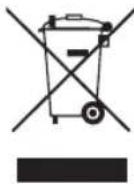
- All electrical and electronic products should be disposed of separately from the municipal waste stream via designated collection facilities appointed by the government or the local authorities. Waste electrical and electronic products should be delivered to collection points established by the municipalities or you should request your seller to take your waste electrical and electronic product when you buy a new model of the same product and when the seller delivers it to your address.
- The correct disposal of your old appliance will help prevent potential negative consequences for the environment and human health.
- The product bearing this symbol may include hazardous substances. Hazardous substances in the products may cause environmental pollution and injury/death,
- EEE Complies with Directive
- For more detailed information about disposal of your old appliance, please contact your city office, waste disposal service or the shop where you purchased the product. (www.lg.com/global/recycling)
PRODUCT OVERVIEW
EN
Parts and Specifications
Exterior
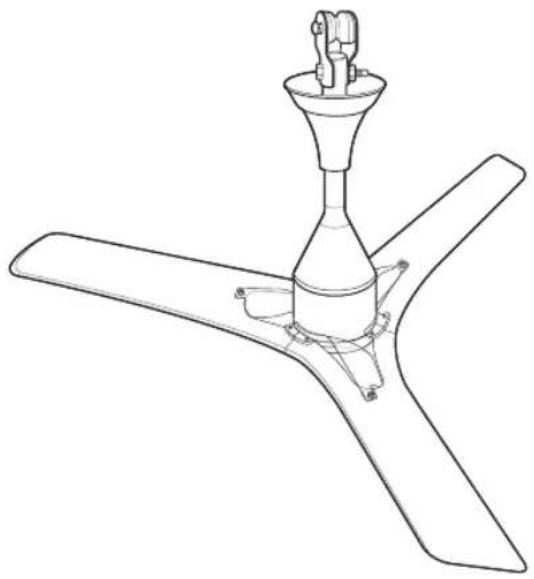
natural_image
Line drawing of a three-blade propeller with a central fan and mounting bracket (no text or symbols)Specifications
| Parameters Values | |
| Input Voltage AC 220-240 V 1 ∅ | |
| Rated Frequency 50 Hz | |
| Sweep 1200 mm | |
| Typical Input Power 30 W | |
| Speed Control Through Remote and Power Switch | |
| Remote Battery CR2025 3V | |
| Weight 3.7 kg (Net) | |
NOTE
- Specified weight may differ from actual weight.
OPERATION
EN
Status Display Panel
text_image
1 ThinQ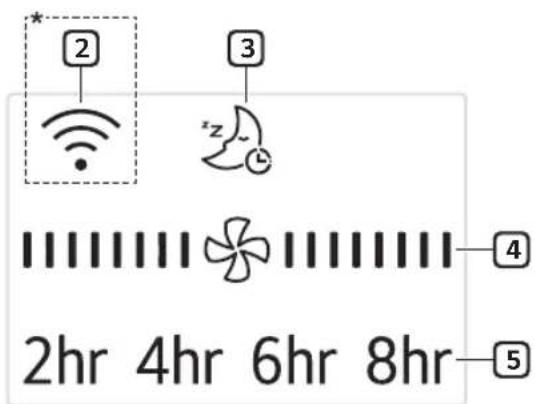
text_image
2hr 4hr 6hr 8hr * 2 3 z 4 5*Broken Line (☐): Optional
1 Receiver for Remote Controller Signal
Face the remote controller to the Receiver, the remote signal will pass through it.
2 Wi-Fi (Optional)
When the appliance is connected to a Wi-Fi network, 📤 is displayed on the display screen.
3 Sleep Mode
When the sleep mode is selected, all display except the 📋 will be off after displaying 📋 for 3 seconds.
4 Fan Speed
Whenever press Speed button ( ) on the remote controller, fan speed will be changed.

flowchart
graph LR
    A["||||"] --> B["||||||||"]
    B --> C["||||||||"]
    C --> D["||||||||"]
    D --> E[(Speed 4)(Spe)
5 Timer
Whenever press Timer button ( Ⓤ ) on the remote controller, the setting time will be changed.
2hr 4hr 6hr 8hr Off → →
NOTE
- Only when the functions operate, the display will light on.
- The appearance or functions of the appliance may differ depending on the model.
EN
Remote Controller Inserting Battery
1 With the backside of the remote controller facing up, remove the battery tray from the remote controller.
natural_image
Two-step diagram showing a curved mechanical component with an arrow indicating direction (no text or symbols)2 Insert the battery provided with the appliance to the tray.
- The (+) electrode of the battery must face upward.
3 Insert the battery tray to the remote controller.
NOTE
- If the battery runs out of charge, replace it with a new one (CR2025).
- If the remote controller does not work as expected, try to replace the battery or check the polarity (+, -) of the battery. If the problem continues, contact the service centre.
- Dispose of the used battery according to the environmental regulations.
EN
Remote Controller Features
flowchart
graph TD
    A["Power"] --> B["1"]
    B --> C["2"]
    C --> D["3"]
    D --> E["Display"]
    D --> F["Timer"]
    F --> G["4"]
    G --> H["5"]
1 Start/Stop
2 Speed
Controls the fan speed.
3 Display
Turn on/off the display lightings.
4 Timer
Set time to power off.
5 Sleep
Turn on/off the sleep mode.
- When you enter sleep mode, the wind speed decreases by one step every hour. In case of "Speed1", it is maintained.
Wi-Fi
Press this button during 3 seconds for paring. For unparing, press 3 seconds again.
- Turning off Wi-Fi
- Press and hold the Start/Stop button and the Wi-Fi button at the same time for more than 3 seconds to turn off Wi-Fi. After finishing the product registration and while Wi-Fi is off, press and hold the Wi-Fi button for more than 3 seconds just once to turn on Wi-Fi and to control the product using the registered smartphone.
NOTE
- When operating the fan, you have to set up the regulator with 5 step (maximum) only.
- If you miss your remote controller, you can operate the fan by using wall switch on/off.
- The appearance or function of the remote controller may vary depending on the model.
| 1 time Return to previous step before you switch on/off. | |
| 2 times Speed 1 | |
| 3 times Speed 2 | |
| 4 times Speed 3 | |
| 5 times Speed 4 |
11
Operating Method
text_image
5 m 45° 45°
CAUTION
- Do not step on or apply pressure.
- Do not store or use near water or in high humidity.
- Do not store or use near an open flame or heating devices such as space heaters or ovens. Otherwise the battery could explode.
NOTE
• To use the remote controller, direct the signal sending area of the remote controller toward the signal reception area of the appliance.
- The remote works best within 5 m and 45° to the left or right of the sensor in front of the appliance.
- Pressing multiple buttons at the same time may cause the remote controller to malfunction.
- The remote controller may not work properly where there is a strong light, such as those from a 3-wave length fluorescent lamp or a neon sign.
- If you lost the remote controller, you can purchase a new one in a nearby service centre.
Using the Extra Function Sleep Mode
Use the sleep mode to make more silent and display lighting off.
1 Press the Start/Stop button.
text_image
Power Speed Timer Display Sleep Wi-Fi (3s)2 Press the Sleep button to select the Sleep mode.
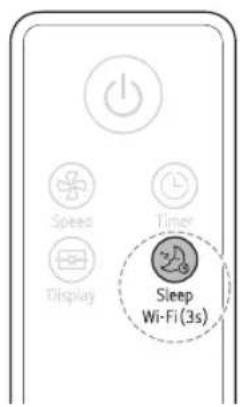
text_image
Speed Timer Display Sleep Wi-Fi(3s)NOTE
• After setting this mode, the fan speed will reduce next step automatically and to fan speed 1 finally.
- In Sleep mode, you can adjust the fan speed manually using the Speed button.
- The Sleep mode will be kept until pressing the Sleep button once.
SMART FUNCTIONS
EN
LG ThinQ Application
The LG ThinQ application allows you to communicate with the appliance using a smartphone.
LG ThinQ Application Features
Smart Diagnosis
If you experience a problem while using the appliance, this smart diagnosis feature will help you diagnose the problem.
Settings
Allows you to set various options on the appliance and in the application.
NOTE
- If you change your wireless router, Internet service provider, or password, delete the registered appliance from the LG ThinQ application and register it again.
- The application is subject to change for appliance improvement purposes without notice to users.
• Functions may vary by model.
Before using LG ThinQ Application
This feature is only available on models with Wi-Fi function.
1 Check the distance between the appliance and the wireless router (Wi-Fi network).
- If the distance between the appliance and the wireless router is too far, the signal strength becomes weak. It may take a long time to register or installation may fail.
2 Turn off the Mobile data or Cellular Data on your smartphone.
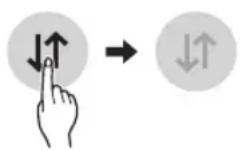
3 Connect your smartphone to the wireless router.
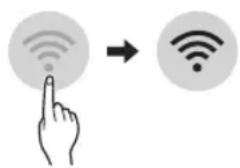
text_image
Diagram showing a hand interacting with wireless signals via a finger icon and a Wi-Fi symbol, indicating wireless signal interaction.NOTE
- To verify the Wi-Fi connection, check that Wi-Fi icon on the control panel is lit.
- The appliance supports 2.4 GHz Wi-Fi networks only. To check your network frequency, contact your Internet service provider or refer to your wireless router manual.
- LG ThinQ is not responsible for any network connection problems or any faults, malfunctions, or errors caused by network connection.
- If the appliance is having trouble connecting to the Wi-Fi network, it may be too far from the router. Purchase a Wi-Fi repeater (range extender) to improve the Wi-Fi signal strength.
- The Wi-Fi connection may not connect or may be interrupted because of the home network environment.
- The network connection may not work properly depending on the Internet service provider.
- The surrounding wireless environment can make the wireless network service run slowly.
- The appliance cannot be registered due to problems with the wireless signal transmission. Unplug the appliance and wait about a minute before trying again.
- If the firewall on your wireless router is enabled, disable the firewall or add an exception to it.
- The wireless network name (SSID) should be a combination of English letters and numbers. (Do not use special characters.)
- Smartphone user interface (UI) may vary depending on the mobile operating system (OS) and the manufacturer.
- If the security protocol of the router is set to WEP, you may fail to set up the network. Please change it to other security protocols (WPA2 is recommended) and register the product again.
Installing LG ThinQ Application
Search for the LG ThinQ application from the Google Play Store or Apple App Store on a smartphone. Follow instructions to download and install the application.
Wireless LAN Module Specifications
| Model LCW-003 | |
| Frequency Range | 2412 - 2472 MHz |
| Output Power (Max) | IEEE 802.11b: 18.37 dBmIEEE 802.11g: 17.67 dBmIEEE 802.11n: 17.67 dBm |
Wireless function S/W version : 1.0
For consideration of the user, this device should be installed and operated with a minimum distance of 20 cm between the device and the body.
Open Source Software Notice Information
To obtain the source code under GPL, LGPL, MPL, and other open source licenses, that is contained in this product, please visit http://opensource.lge.com. In addition to the source code, all referred license terms, warranty disclaimers and copyright notices are available for download.
LG Electronics will also provide open source code to you on CD-ROM for a charge covering the cost of performing such distribution (such as the cost of media, shipping, and handling) upon email request to opensource@lge.com. This offer is valid for a period of three years after our last shipment of this product. This offer is valid to anyone in receipt of this information.
Smart Diagnosis
This feature is only available on models with the 🧑 or 🟣 logo.
Use this feature to help you diagnose and solve problems with your appliance.
NOTE
- For reasons not attributable to LGE's negligence, the service may not operate due to external factors such as, but not limited to, Wi-Fi unavailability, Wi-Fi disconnection, local app store policy, or app unavailability.
- The feature may be subject to change without prior notice and may have a different form depending on where you are located.
Using LG ThinQ to Diagnose Issues
If you experience a problem with your Wi-Fi equipped appliance, it can transmit troubleshooting data to a smartphone using the LG ThinQ application.
- Launch the LG ThinQ application and select the Smart Diagnosis feature in the menu. Follow the instructions provided in the LG ThinQ application.
Declaration of Conformity
CE
Hereby, LG Electronics declares that the radio equipment type Ceiling Fan is in compliance with Directive 2014/53/EU. The full text of the EU declaration of conformity is available at the following internet address:
http://www.lg.com/global/support/cedoc/cedoc#
LG ELECTRONICS TIC A.S.
Kaptanpasa Mah. Piyalepasa Bulv. No:73
Ortadgou Plaza Kat:7 Ortadogu Plaza Okmeydan/Sisli/ISTANBUL
MAINTENANCE
EN

CAUTION
- Do not spray water on or into appliance. Doing so will cause appliance failure.
- Do not bend the blade while cleaning.
- Do not use alkaline detergents to clean the appliance.
- Do not attach stickers or use sulfuric acid, hydrochloric acid, or organic solvents such as thinners, lamp oil, or acetone on the appliance's surface. Doing so may damage the surface.
- Wipe away dirt with a clean soft cloth, ordinary soap and water.
- Ensure the ceiling fan is cut-off from power supply before removing the guard.
Recommended Maintenance Schedule
| Parts Frequency | |
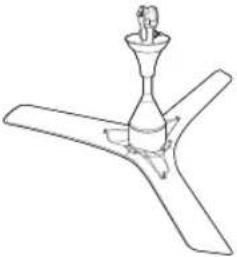 Ceiling Fan Ceiling Fan | Check and clean every one year. |
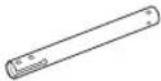 Shaft Assembly Shaft Assembly | Check for any damage and corrosion every year. |
 Shackle Assembly Shackle Assembly | Check for any damage and corrosion every year. |
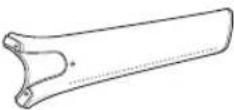 Blade Assembly Blade Assembly | Keep the blades clean and check every month. |
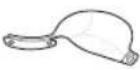 Guide Guide | Keep the guides clean and check every month. |
TROUBLESHOOTING
EN
Before Calling for Service
Please check the following before you contact the service center. If the problem persists, contact your local service center.
| Problem Possible | Causes & Solution |
| When supply power but not power on, can't hear the beep. | Power is not supplied.Turn on the power switch. |
| Appliance is making noise. | Install location is too close to the wall or ceiling.Check the distance and reinstall at proper location. |
| Installation is not good.Check each assemble parts are proper and firmly tightened. | |
| Sleep lighting is flickering continuously. | Fan is locked.Use a regulator to turn off the power and turn on one minute later.If the same problem occurs, power off and call to service center. |
| Ceiling Fan not Working. | The voltage conditions are unstable.Check Voltage Condition, If unstable contact local Electrician. |
| Ceiling fan suddenly turns off and turns on. | The installed environment is very windy.It's the normal process of finding the right wind speed for your environment.So fan can stop and re-adjust during high external wind. |
| When press a button on remote controller, can't hear the beep. | Remote controller power is not supplied.Check the direction of remote controller battery or change it. |
| Remote controller is not working. | Too far to communicate with sensor.Move close to the appliance and try again. |
| Your home appliance and smartphone is not connected to the Wi-Fi network. | The password for the Wi-Fi that you are trying to connect to is incorrect.Find the Wi-Fi network connected to your smartphone and remove it, then register your appliance on LG ThinQ. |
| Mobile data for your smartphone is turned on.Turn off the Mobile data of your smartphone and register the appliance using the Wi-Fi network. | |
| The wireless network name (SSID) is set incorrectly.The wireless network name (SSID) should be a combination of English letters and numbers. (Do not use special characters.) | |
| The router frequency is not 2.4 GHz.Only a 2.4 GHz router frequency is supported. Set the wireless router to 2.4 GHz and connect the appliance to the wireless router. To check the router frequency, check with your Internet service provider or the router manufacturer. | |
| The distance between the appliance and the router is too far.If the distance between the appliance and the router is too far, the signal may be weak and the connection may not be configured correctly. Move the location of the router so that it is closer to the appliance. |

LG
Life's Good
Customer's Copy
Name of Purchaser ____
Invoice No. & Date
Model
Serial No.
Name & Address of the Seller (LG / Authorised Dealer)

LG
Life's Good
Customer's Copy
Name of Purchaser ____
Invoice No. & Date
Model
Serial No.
Name & Address of the Seller (LG / Authorised Dealer)
Memo
SAHİBİN KILAVUZU
TAVAN VANTİLATÖRÜ


natural_image
Line drawing of a three-blade propeller with a central fan and propeller base (no text or symbols)Teknik Özellikler
natural_image
Two-step diagram showing a curved mechanical component with an arrow indicating direction (no text or symbols)text_image
Diagram showing a hand interacting with wireless signals to form a Wi-Fi symbolNOT
Read this owner's manual thoroughly before operating the appliance and keep it handy for reference at all times.
TYPE: CEILING FAN
EN ENGLISH
MODEL : LCF12* (FC481****)
MFL70584111
Rev.03_021921
www.lg.com
Copyright © 2020 - 2021 LG Electronics Inc. All Rights Reserved
TABLE OF CONTENTS
This manual may contain images or content different from the model you purchased.
This manual is subject to revision by the manufacturer.
SAFETY INSTRUCTIONS .... 3
IMPORTANT SAFETY INSTRUCTIONS 3
PRODUCT OVERVIEW......8
Parts and Specifications....8
OPERATION 9
Status Display Panel....9
Remote Controller.... 10
Using the Extra Function....12
SMART FUNCTIONS....13
LG ThinQ Application 13
Smart Diagnosis.... 14
MAINTENANCE....15
Recommended Maintenance Schedule 15
TROUBLESHOOTING 16
SAFETY INSTRUCTIONS
EN
The following safety guidelines are intended to prevent unforeseen risks or damage from unsafe or incorrect operation of the appliance. The guidelines are separated into ‘WARNING’ and ‘CAUTION’ as described below.

This symbol is displayed to indicate matters and operations that can cause risk. Read the part with this symbol carefully and follow the instructions in order to avoid risk.

WARNING
This indicates that the failure to follow the instructions can cause serious injury or death.

CAUTION
This indicates that the failure to follow the instructions can cause the minor injury or damage to the product.
IMPORTANT SAFETY INSTRUCTIONS

WARNING
To reduce the risk of explosion, fire, death, electric shock, injury or scalding to persons when using this product, follow basic precautions, including the following:
Children in the Household
This appliance is not intended for use by persons (including children) with reduced physical, sensory or mental capabilities, or lack of experience and knowledge, unless they have been given supervision or instruction concerning use of the appliance by a person responsible for their safety. Children should be supervised to ensure that they do not play with the appliance.
If unusual oscillating movement is observed, immediately stop using the ceiling fan and contact the manufacturer, its service agent or suitably qualified persons.
Installation
• Electrical or installation work needs to be performed by a qualified service personnel. There is risk of fire, electric shock, explosion or injury.
- The replacement of parts of the safety suspension system device shall be performed by the manufacturer, its service agent or suitably qualified persons.
- Do not install the appliance less than 2.3 m from the ground and 1 m from the wall to the blades.
- Ensure that the ceiling hook or other safety suspension devices shall sustain more than 10 times the appliance weight.
- Ensure that the shaft has been fully tighten to motor shaft and shackle
• Firmly tighten the blade screws using a screwdriver.
- Do not install the appliance in a place where flammable liquids or gases such as gasoline, propane, paint thinner, etc., are stored.
- Do not install the appliance somewhere exposed to direct sunlight.
- Do not install the appliance in an area prone to combustible gas leaks, grease, or metal dust.
- If the supply cord is damaged, it must be replaced by manufacturer or service personnel in order to avoid hazard.
• Always ground the product
- There is risk of fire or electric shock
Operation
- Connect this appliance as per the rated voltage and frequency printed on the name plate.
• Do not touch the power switch with wet hands. - Do not disassemble, repair, modify or touch the appliance while it is operating.
- Do not insert hands or any objects into the appliance.
• Do not place any objects on the appliance.
• Take care to ensure that power cable could not be pulled out or damaged during operation.
- There is risk of fire or electric shock.
- Do not use or store flammable or combustible substances (ether, benzene, alcohol, chemical, LPG, combustible spray, insecticide, air freshener, cosmetics, etc.) near the appliance.
- If there is a gas leakage (isobutane, propane, natural gas, etc.), do not touch the appliance or power switch and ventilate the area immediately.
- Cut off the power supply if there is any noise, smell, or smoke coming from the appliance.
• Do not expose the appliance to splashing water or rain.
• Do not touch, operate, or repair the appliance with wet hands. - In case of flood, cut off the power switch and contact the LG Electronics customer service center.
- Dispose of all packaging materials (such as plastic bags and styrofoam) away from children. The packaging materials can cause suffocation.
Maintenance
- Before cleaning or performing maintenance, disconnect the power supply and wait until the blade stops.
- Do not use an abrasive cloth, sponge, or a metal brush to clean the appliance.
Battery
- A button/coin-shaped battery is used in the remote controller of the appliance. If you accidentally swallowed the battery, go to the doctor immediately for emergency treatment. If you fail to receive first aid within 2 hours after you swallowed it, you may experience damage to your internal organs or death in severe cases.
• Do not swallow the battery. - If the battery tray is not secured firmly, stop using the appliance instantly and keep it away from children.
- Replace the all batteries in the remote controller with new ones of the same type. Do not mix old and new batteries or different types of batteries.

CAUTION
To reduce the risk of minor injury to persons, malfunction, or damage to the product or property when using this product, follow basic precautions, including the following:
Installation
- Do not install the appliance at a wet, high temperature, high humidity area, high vibration, windy places.
- Do not install the appliance in freezing temperature.
- Do not install the appliance on or near items that may be damaged or discolored by heat or humidity.
- Do not install the appliance near curtains.
- Do not install the appliance within 1 m of a TV or stereo equipment. It may cause interference.
• After installation make sure the appliance does not tremble extremely. - Be installed in a place with a voltage of 110 - 120 V. Otherwise, it may cause injury and product failure.
Operation
- Do not use the appliance in place of a vent hood. Doing so will shorten the appliance's lifespan.
- Do not operate in an area with unstable voltage, the appliance may automatically shut down to protect appliance components.
- This appliance is intended to be used in household and domestic applications only and must not be used for commercial purposes.
Maintenance
- Replace all the blades if any of them breaks or cracks.
- Never use strong cleaning agents or solvents when cleaning the appliance. Use a smooth cloth.
- Use a sturdy stool or ladder, when cleaning, maintaining or repairing the ceiling fan at height.
Battery
• Do not modify the battery arbitrarily.
• Misplaced battery may cause an explosion.
• Do not recharge or take apart the battery.
- Do not throw the battery in the fire for disposal or leave it near the heat.
- Remove and store the battery in a safe location if you don't intend to use the remote controller for a long time.
PRODUCT OVERVIEW
EN
Parts and Specifications
Exterior
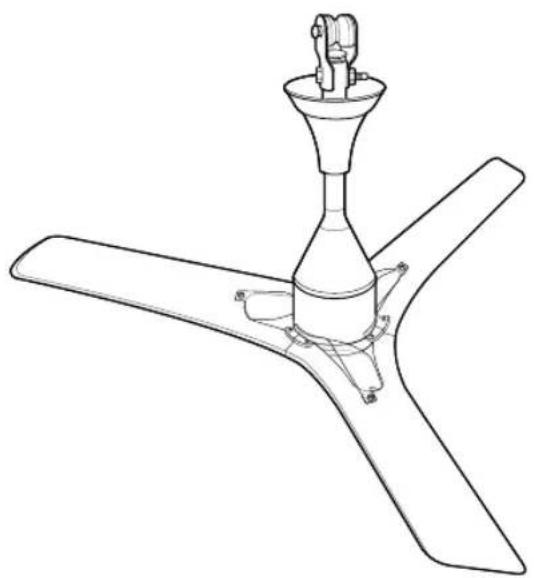
natural_image
Line drawing of a three-blade propeller with a central conical top and mounting base (no text or symbols)Specifications
| Parameters Values | |
| Input Voltage AC 110-120 V 1 ∅ | |
| Rated Frequency 50/60 Hz | |
| Sweep 1200 mm | |
| Typical Input Power 32 W | |
| Speed Control Through Remote and Power Switch | |
| Remote Battery CR2025 3V | |
| Weight 3.7 kg (Net) |
NOTE
• Specified weight may differ from actual weight.
OPERATION
EN
Status Display Panel
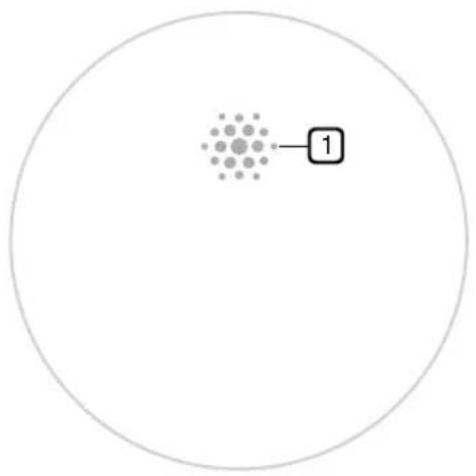
text_image
1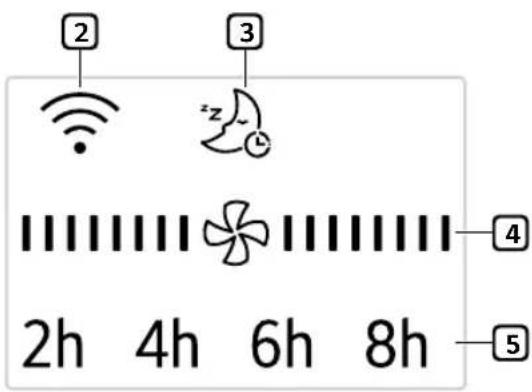
text_image
2 3 2h 4h 6h 8h 4 5① Receiver for Remote Controller Signal
Face the remote controller to the Receiver, the remote signal will pass through it.
2 Wi-Fi
When the appliance is connected to a Wi-Fi network, is displayed on the display screen.
3 Sleep Mode
When the sleep mode is selected, all display except the ⚙ will be off after displaying ‘z’ for 3 seconds.
4 Fan Speed
Whenever press Speed button ( ) on the remote controller, fan speed will be changed.

flowchart
graph TD
    A["Star"] --> B["Star"]
    B --> C["Star"]
    C --> D["Star"]
    D --> E["Star"]
    E --> F["Star"]
    style A fill:#f9f,stroke:#333
    style B fill:#ccf,stroke:#333
    style C fill:#cfc,stroke:#333
    style D fill:#fcc,stroke:#333
    style E fill:#cff,stroke:#333
    style F fill:#ffc,stroke:#333
5 Timer
Whenever press Timer button ( Ⓤ ) on the remote controller, the setting time will be changed.
2h4h6h8hOf → →
NOTE
• Only when the functions operate, the display will light on.
• The appearance or functions of the appliance may differ depending on the model.
EN
Remote Controller
Inserting Battery
1 With the backside of the remote controller facing up, remove the battery tray from the remote controller.
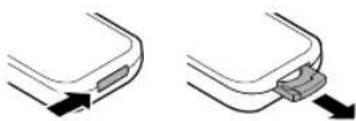
natural_image
Two diagrams showing a curved mechanical component with an arrow indicating direction, no text or symbols present.2 Insert the battery provided with the appliance to the tray.
- The (+) electrode of the battery must face upward.
3 Insert the battery tray to the remote controller.
NOTE
- If the battery runs out of charge, replace it with a new one (CR2025).
- If the remote controller does not work as expected, try to replace the battery or check the polarity (+, -) of the battery. If the problem continues, contact the service centre.
- Dispose of the used battery according to the environmental regulations.
EN
Remote Controller Features
flowchart
graph TD
    A["Power"] --> B["1"]
    B --> C["2"]
    C --> D["3"]
    D --> E["Display"]
    D --> F["Timer"]
    F --> G["4"]
    G --> H["5"]
    H --> I["Sleep Wi-Fi (3s)"]
1 Start/Stop
2 Speed
Controls the fan speed.
③ Display
Turn on/off the display lightings.
4 Timer
Set time to power off.
5 Sleep
Turn on/off the sleep mode.
- When you enter sleep mode, the wind speed decreases by one step every hour. In case of "Speed1", it is maintained.
Wi-Fi
Press this button during 3 seconds for paring. For unparing, press 3 seconds again.
- Turning off Wi-Fi
- Press and hold the Start/Stop button and the Wi-Fi button at the same time for more than 3 seconds to turn off Wi-Fi. After finishing the product registration and while Wi-Fi is off, press and hold the Wi-Fi button for more than 3 seconds just once to turn on Wi-Fi and to control the product using the registered smartphone.
NOTE
- When operating the fan, you have to set up the regulator with 5 step (maximum) only.
• If you miss your remote controller, you can operate the fan by using wall switch on/off.
• The appearance or function of the remote controller may vary depending on the model.
| 1 time Return to previous step before you switch on/off. | |
| 2 times Speed 1 | |
| 3 times Speed 2 | |
| 4 times Speed 3 | |
| 5 times Speed 4 |
Operating Method
text_image
5 m 45° 45°
CAUTION
• Do not step on or apply pressure.
- Do not store or use near water or in high humidity.
- Do not store or use near an open flame or heating devices such as space heaters or ovens. Otherwise the battery could explode.
NOTE
• To use the remote controller, direct the signal sending area of the remote controller toward the signal reception area of the appliance.
- The remote works best within 5 m and 45° to the left or right of the sensor in front of the appliance.
- Pressing multiple buttons at the same time may cause the remote controller to malfunction.
- The remote controller may not work properly where there is a strong light, such as those from a 3-wave length fluorescent lamp or a neon sign.
- If you lost the remote controller, you can purchase a new one in a nearby service centre.
Using the Extra Function
Sleep Mode
Use the sleep mode to make more silent and display lighting off.
1 Press the Start/Stop button.
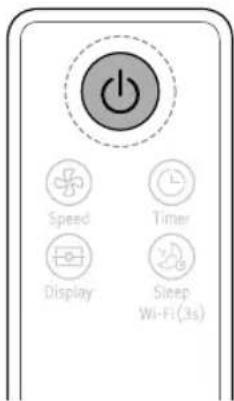
text_image
Power Speed Timer Display Sleep Wi-Fi (3s)2 Press the Sleep button to select the Sleep mode.
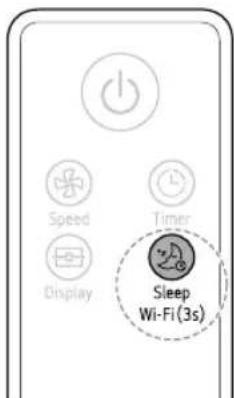
text_image
Speed Display Timer Sleep Wi-Fi (3s)NOTE
• After setting this mode, the fan speed will reduce next step automatically and to fan speed 1 finally.
- In Sleep mode, you can adjust the fan speed manually using the Speed button.
- The Sleep mode will be kept until pressing the Sleep button once.
SMART FUNCTIONS
EN
LG ThinQ Application
The LG ThinQ application allows you to communicate with the appliance using a smartphone.
LG ThinQ Application Features
Smart Diagnosis
If you experience a problem while using the appliance, this smart diagnosis feature will help you diagnose the problem.
Settings
Allows you to set various options on the appliance and in the application.
NOTE
- If you change your wireless router, Internet service provider, or password, delete the registered appliance from the LG ThinQ application and register it again.
- The application is subject to change for appliance improvement purposes without notice to users.
• Functions may vary by model.
Before using LG ThinQ Application
This feature is only available on models with Wi-Fi function.
1 Check the distance between the appliance and the wireless router (Wi-Fi network).
- If the distance between the appliance and the wireless router is too far, the signal strength becomes weak. It may take a long time to register or installation may fail.
2 Turn off the Mobile data or Cellular Data on your smartphone.
3 Connect your smartphone to the wireless router.
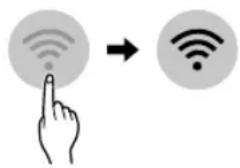
text_image
Diagram showing a hand interacting with wireless signals to form a Wi-Fi symbolNOTE
- To verify the Wi-Fi connection, check that Wi-Fi icon on the control panel is lit.
- The appliance supports 2.4 GHz Wi-Fi networks only. To check your network frequency, contact your Internet service provider or refer to your wireless router manual.
- LG ThinQ is not responsible for any network connection problems or any faults, malfunctions, or errors caused by network connection.
- If the appliance is having trouble connecting to the Wi-Fi network, it may be too far from the router. Purchase a Wi-Fi repeater (range extender) to improve the Wi-Fi signal strength.
- The Wi-Fi connection may not connect or may be interrupted because of the home network environment.
- The network connection may not work properly depending on the Internet service provider.
- The surrounding wireless environment can make the wireless network service run slowly.
- The appliance cannot be registered due to problems with the wireless signal transmission. Unplug the appliance and wait about a minute before trying again.
- If the firewall on your wireless router is enabled, disable the firewall or add an exception to it.
- The wireless network name (SSID) should be a combination of English letters and numbers. (Do not use special characters.)
- Smartphone user interface (UI) may vary depending on the mobile operating system (OS) and the manufacturer.
- If the security protocol of the router is set to WEP, you may fail to set up the network. Please change it to other security protocols (WPA2 is recommended) and register the product again.
Installing LG ThinQ Application
Search for the LG ThinQ application from the Google Play Store or Apple App Store on a smartphone. Follow instructions to download and install the application.
Open Source Software Notice Information
To obtain the source code under GPL, LGPL, MPL, and other open source licenses, that is contained in this product, please visit http://opensource.lge.com.
In addition to the source code, all referred license terms, warranty disclaimers and copyright notices are available for download.
LG Electronics will also provide open source code to you on CD-ROM for a charge covering the cost of performing such distribution (such as the cost of media, shipping, and handling) upon email request to opensource@lge.com. This offer is valid for a period of three years after our last shipment of this product. This offer is valid to anyone in receipt of this information.
Smart Diagnosis
This feature is only available on models with the or -logo.
Use this feature to help you diagnose and solve problems with your appliance.
NOTE
- For reasons not attributable to LGE's negligence, the service may not operate due to external factors such as, but not limited to, Wi-Fi unavailability, Wi-Fi disconnection, local app store policy, or app unavailability.
- The feature may be subject to change without prior notice and may have a different form depending on where you are located.
Using LG ThinQ to Diagnose Issues
If you experience a problem with your Wi-Fi equipped appliance, it can transmit troubleshooting data to a smartphone using the LG ThinQ application.
- Launch the LG ThinQ application and select the Smart Diagnosis feature in the menu. Follow the instructions provided in the LG ThinQ application.
MAINTENANCE
EN

CAUTION
- Do not spray water on or into appliance. Doing so will cause appliance failure.
• Do not bend the blade while cleaning. - Do not use alkaline detergents to clean the appliance.
- Do not attach stickers or use sulfuric acid, hydrochloric acid, or organic solvents such as thinners, lamp oil, or acetone on the appliance's surface. Doing so may damage the surface.
• Wipe away dirt with a clean soft cloth, ordinary soap and water. - Ensure the ceiling fan is cut-off from power supply before removing the guard.
Recommended Maintenance Schedule
| Parts Frequency | |
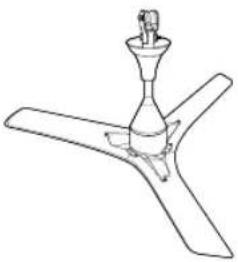 Ceiling Fan Ceiling Fan | Check and clean every one year. |
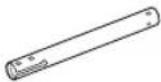 Shaft Assembly Shaft Assembly | Check for any damage and corrosion every year. |
 Shackle Assembly Shackle Assembly | Check for any damage and corrosion every year. |
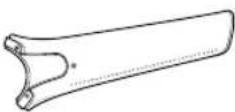 Blade Assembly Blade Assembly | Keep the blades clean and check every month. |
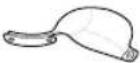 Guide Guide | Keep the guides clean and check every month. |
TROUBLESHOOTING
EN
Before Calling for Service
Please check the following before you contact the service center. If the problem persists, contact your local service center.
| Problem Possible | Causes & Solution |
| When supply power but not power on, can't hear the beep. | Power is not supplied.Turn on the power switch. |
| Appliance is making noise. | Install location is too close to the wall or ceiling.Check the distance and reinstall at proper location. |
| Installation is not good.Check each assemble parts are proper and firmly tightened. | |
| Sleep lighting is flickering continuously. | Fan is locked.Use a regulator to turn off the power and turn on one minute later.If the same problem occurs, power off and call to service center. |
| Ceiling Fan not Working. | The voltage conditions are unstable.Check Voltage Condition, If unstable contact local Electrician. |
| Ceiling fan suddenly turns off and turns on. | The installed environment is very windy.It's the normal process of finding the right wind speed for your environment.So fan can stop and re-adjust during high external wind. |
| When press a button on remote controller, can't hear the beep. | Remote controller power is not supplied.Check the direction of remote controller battery or change it. |
| Remote controller is not working. | Too far to communicate with sensor.Move close to the appliance and try again. |
| Your home appliance and smartphone is not connected to the Wi-Fi network. | The password for the Wi-Fi that you are trying to connect to is incorrect.Find the Wi-Fi network connected to your smartphone and remove it, then register your appliance on LG ThinQ. |
| Mobile data for your smartphone is turned on.Turn off the Mobile data of your smartphone and register the appliance using the Wi-Fi network. | |
| The wireless network name (SSID) is set incorrectly.The wireless network name (SSID) should be a combination of English letters and numbers. (Do not use special characters.) | |
| The router frequency is not 2.4 GHz.Only a 2.4 GHz router frequency is supported. Set the wireless router to 2.4 GHz and connect the appliance to the wireless router. To check the router frequency, check with your Internet service provider or the router manufacturer. | |
| The distance between the appliance and the router is too far.If the distance between the appliance and the router is too far, the signal may be weak and the connection may not be configured correctly. Move the location of the router so that it is closer to the appliance. |

LG
Life's Good
Customer's Copy
Name of Purchaser ____
Invoice No. & Date
Model
Serial No.
Name & Address of the Seller ____
(LG / Authorised Dealer)


LG
Life's Good
Customer's Copy
Name of Purchaser
Invoice No. & Date
Model
Serial No.
Name & Address of the Seller ____
(LG / Authorised Dealer)
Memo
MANUAL DEL PROPIETARIO
VENTILADOR DE TECHO

natural_image
Line drawing of a three-blade propeller with a central conical top and mounting bracket (no text or symbols)Especificaciones
natural_image
Two diagrams showing a curved object with an arrow pointing to its side, connected by a separate bracket (no text or symbols present)text_image
Diagram showing a hand interacting with wireless signals to form a Wi-Fi symbol, indicating signal transmission or wireless access.NOTA
RESUMO DO PRODUTO....8
natural_image
Line drawing of a three-blade propeller with a central conical top and mounting base (no text or symbols)Especificações