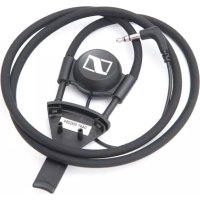
EZT 3011 - Headphones SENNHEISER - Free user manual and instructions
Find the device manual for free EZT 3011 SENNHEISER in PDF.



| Product type | Neck loop for hearing aid |
| Brand | Sennheiser |
| Model | EZT 3011 |
| Audio connector | 3.5 mm stereo jack |
| Cable length | 75 cm |
| Impedance | 28 Ω at 1 kHz |
| Intended use | Transmission of audio signal to a hearing aid via induction |
| Compatibility | Sennheiser TV Set 830 S and TV Set 840 S receivers |
| Features | Wireless listening, volume adjustment via receiver, T position on hearing aid |
| Initial setup | Plug the jack into the receiver, set the hearing aid to the 'T' position |
| Safety instructions | Avoid prolonged high volume, use in a dry environment, observe extreme temperatures |
| Cleaning | Slightly damp cloth |
| Package contents | 1 EZT 3011 neck loop, 1 instruction manual |
| Warranty | 24 months |
| Environmental information | Comply with WEEE regulations, do not dispose of with household waste |
| Weight | Approximately 30 g (estimate) |
Frequently Asked Questions - EZT 3011 SENNHEISER
User questions about EZT 3011 SENNHEISER
0 question about this device. Answer the ones you know or ask your own.
Ask a new question about this device
Download the instructions for your Headphones in PDF format for free! Find your manual EZT 3011 - SENNHEISER and take your electronic device back in hand. On this page are published all the documents necessary for the use of your device. EZT 3011 by SENNHEISER.
USER MANUAL EZT 3011 SENNHEISER
natural_image
3D rendering of a handheld medical or laboratory device with a curved black cable and connector (no text or symbols visible)text_image
Diagram illustrating three steps of a robotic vacuum cleaner with labeled click actions and directional arrowstext_image
Diagram showing a hand inserting a small component into a device with a blue arrow indicating the process.natural_image
Pure mechanical component diagram without any text, numbers, or symbolsImportant safety instructions
- Please read this instruction manual carefully and completely before using the device.
- Make this instruction manual easily accessible to all users at all times. Always include this instruction manual when passing the device on to third parties.
- Do not use the device in situations which require special attention (e.g. when performing skilled jobs).
- Always keep the device dry and do not expose them to extreme temperatures.
Intended use of the device
Intended use includes:
- having read this instruction manual, especially the chapter "Important safety instructions",
- using the device within the operating conditions and limitations described in this instruction manual.
"Improper use" means using the device other than as described in this instructions, or under operating conditions which differ from those described herein.
The EZT 3011 induction loop
The EZT 3011 induction loop is an accessory for the infra-red receiver of the Set 830 S TV listening system and for the RF receiver of the Set 840 S TV listening system. The EZT 3011 inductively couples the audio signal from the receiver to hearing aids.
Using the volume control on the receiver the sound may be easily adjusted to suit an individual user's hearing. This allows hearing aid wearers to take advantage of an interference free, optimum sound quality, wireless, listening experience.
Delivery includes
1 EZT 3011 induction loop
1 instruction manual
Putting the EZT 3011 into operation
Connecting the induction loop to the receiver
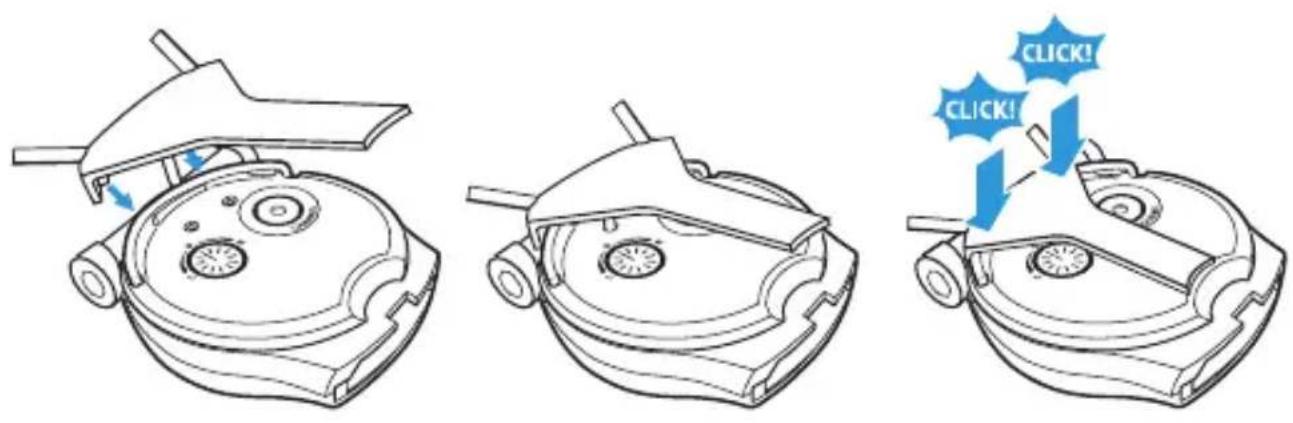
▶ Attach the clip of the induction loop to the receiver as shown.
text_image
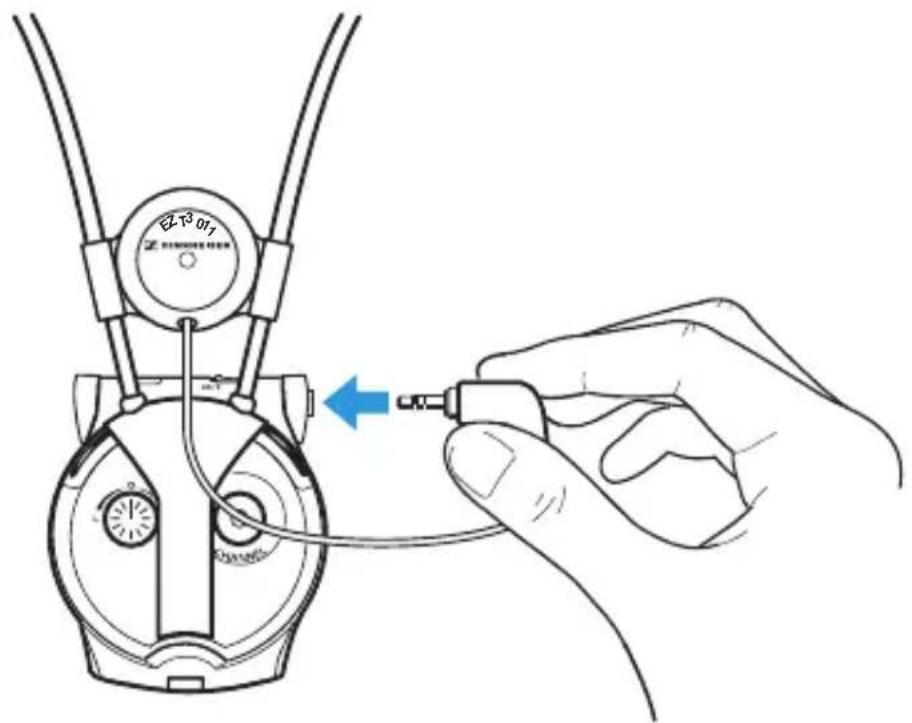
Diagram illustrating three steps of a robotic device with click actions and directional arrows indicating action sequence.Connect the 3.5 mm jack plug to the socket on the receiver.
text_image
Diagram showing a hand inserting a component into a device with a blue arrow indicating the insertion point.▶ Set your hearing aid to the T-position. If your hearing aid has no T-position, please contact your hearing aid acoustician.

For alternative connection possibilities to your hearing aid as well as the connection to cochlea implants, please contact your hearing aid acoustician.
CAUTION! Hearing damage due to high volumes!

Listening at high volume levels for long periods can lead to permanent hearing defects.
Before using the receiver, set the volume to a low value.
Do not continuously expose yourself to high volumes.
Wearing the receiver around the neck
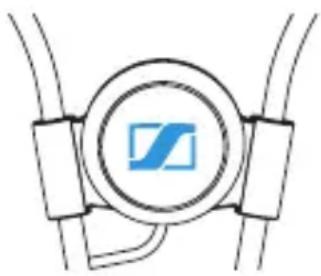
Place the induction loop around your neck, with the Sennheiser logo facing away from your body.
natural_image
Pure diagram of a mechanical or electrical component with no text, numbers, or symbols▶ Switch your audio source on.
▶ Switch the receiver on and enjoy the excellent sound quality.

For further information on the operation of your receiver, please refer to the instruction manual of the receiver.
Cleaning the EZT 3011
▶ Use a slightly damp cloth to clean the induction loop.
Specifications
EZT 3011 induction loop
Audio connector 3.5 mm stereo jack plug
Cable length 75 cm
Impedance
28 Ω at 1 kHz
Manufacturer Declarations
Warranty
Sennheiser electronic GmbH & Co. KG gives a warranty of 24 months on this product. For the current warranty conditions, please visit our web site at www.sennheiser.com or contact your Sennheiser partner.
WEEE Declaration
Please dispose of this product at the end of its operational lifetime by taking it to your local collection point or recycling centre for such equipment.
text_image
Diagram illustrating three steps of a robotic device with click actions and directional arrows, showing progressive states of action.text_image
Diagram showing a hand inserting a small component into a device with a blue arrow indicating the process.text_image
Diagram illustrating three steps of a robotic vacuum cleaner's internal structure, with blue arrows indicating click actions.text_image
Diagram showing a hand inserting a small component into a device with a blue arrow indicating the process.natural_image
Pure electrical circuit lines without any symbolstext_image
Diagram illustrating three steps of a robotic device with click actions and directional arrows indicating action sequence.text_image
Diagram showing a hand connecting a device to a connector with a blue arrow indicating the connection point.natural_image
Pure mechanical diagram showing a circular component with a blue 'Z' symbol, surrounded by rectangular blocks (no text or labels)text_image
Diagram illustrating three steps of a robotic device with labeled click actions and directional arrows indicating movement.text_image
Diagram showing a hand inserting a small component into a device with a blue arrow indicating the process.natural_image
Pure diagram of a circular component with internal components, no text or symbols presentAm Labor 1, 30900 Wedemark, Germany
www.sennheiser.com
Printed in China
Publ.
532832/A01