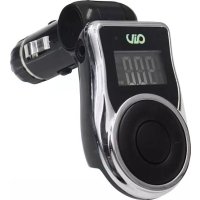
FMT 663 - FM Transmitter AIV - Free user manual and instructions
Find the device manual for free FMT 663 AIV in PDF.


User questions about FMT 663 AIV
0 question about this device. Answer the ones you know or ask your own.
Ask a new question about this device
Download the instructions for your FM Transmitter in PDF format for free! Find your manual FMT 663 - AIV and take your electronic device back in hand. On this page are published all the documents necessary for the use of your device. FMT 663 by AIV.
USER MANUAL FMT 663 AIV
natural_image
Abstract illustration of flowing red and black curved lines on white background (no text or symbols)
CommerceBank, DE:26020050319192130
Inhalt / Index
Bedienungsanleitung
4
Instruction
Manual
Guide
d'utilisation
Manual
de
instrucciones
Security Briefing for Users FMT 663
Please read all warnings in this manual. They inform you of possible risk of personal injury and damage to property!
These products are intended for use only by those possessing the necessary specialized training. The relevant safety regulations regarding auto parts, regulations on internal vehicle safety STVZO-TÜV, as well as regulations of the authorized vehicle manufacturers should be diligently followed.
Dear Valued Customer,
We congratulate you on your purchase of this superior product and thank you for placing your trust in AIV. We have developed this instruction manual with consideration to variations in automobile mechanical and acoustical characteristics. Nevertheless, mistakes can occur. We would greatly appreciate your bringing any problems you encounter within to our attention.
Technical Data
Power Supply: 12-24V DC
Input Connections: 3.5 mm stereo jack
SD-card max. 32GB
USB 2.0 max. 32GB
Music File Formats: MP3, WMA
Frequency Range: 87.6 MHz - 107.9 MHz
Transmission Range: approx. 5m
Dimensions: B 41 x H 65 x T 80 mm
Weight: 37 g
Certificate: CE
In Case of Malfunction FMT 663
If you cannot start the FM Transmitter, please check the device fuse. For this, the top of the cigarette lighter has to be rotated counter-clockwise till the fuse can be removed.
If the fuse thread is blown, the fuse has to be exchanged by an equal fuse. If the new fuse blows again, please contact your authorised AIV-specialist dealer.
If the FM Transmitter cannot be switched on again, please check the function of the cigarette lighter.
If the cigarette lighter has no function, please contact your car garage.
If there is a problem when operating, first switch off the FM Transmitter and then on again.
If the problem can still not be solved, please contact your authorised AIV-specialist dealer.
Instruction
- Insert this FM transmitter into your vehicle's cigarette lighter or power port.
- Tune your radio to a desired FM frequency, then match that same frequency on to the FM transmitter by using the buttons on the unit or on the remote control.
- Plug your compatible SD Card (Max 32 GB, Not Included) into the SD port or USB Flash Drive (Max. 32 GB, Not Included) into the USB port of your FM Transmitter.
- For other compatible music devices or your MP3/MP4 players, use the supplied audio line cable to connect from the other device's "Line Out" to the FM Transmitter "Line In".
When using an external device, all functions will be controlled by the external device, neither the transmitter nor its remote control.
Remarks: When you using this function, please press "Play/Pause" to stop playing the music from USB or a SD-Card.
QUICK GUIDE
FMT 663
| Function FM Transmitter | Remote Control | |
| 1. How to play a track | Press “PLAY” button to play a track.Press “PLAY” button to stop the track. | Press “PLAY/PAUSE” button. |
| 2. How to adjust the volume | Press ▶button long to increase the volume.Press ◀button long to decrease the volume. | Press “VOL+” to increase the volume.Press “VOL-” to reduce the volume. |
| 3. How to change the frequency | Press “B+” button to increase the frequency.Press “A-” button to decrease the frequency. | Press “CH+” button to increase the frequency by 0.1 MHz stepsPress “CH-” button to decrease the frequency by 0.1 MHz stepsOr key in the desired frequency and press “CH” to confirm. |
| 4. How to choose a track | Press ▶button shortly to play the next track.Press ◀button shortly to play the previous track. | Press ▶button to play the next track.Press ◀button to play the previous trackOr key in the track number directly. |
| 5. How to set EQ Not supported by the device buttons. | Press “EQ” button to toggle through the available EQ presets: NORMAL, POP, ROCK, JAZZ, CLASSIC, COUNTRY. | |
| 6. How to change loop mode | Press “PLAY/PAUSE” button each time long to toggle through the four loop modes: Folder, Single, Random, All. | Not supported by remote control. |
| 7. How to switch folder Not supported by the device buttons. | Press “Folder+” or “Folder-” button. | |