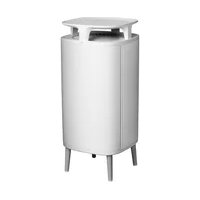
DustMagnet 5210i - Air purifier BLUEAIR - Free user manual and instructions
Find the device manual for free DustMagnet 5210i BLUEAIR in PDF.



| Product Type | Air Purifier |
| Brand | Blueair |
| Model | DustMagnet 5210i |
| Model Number | 523111000 |
| Recommended Room Size | 22 m² |
| CADR Smoke | 260 m³/h |
| CADR Dust | 260 m³/h |
| CADR Pollen | 293 m³/h |
| Power Consumption (min/max) | 5-22 W |
| Input Voltage | 100-240 VAC, 50/60 Hz |
| Sound Pressure (min/max) | 29-45 dB |
| Wi-Fi Frequency | 2402-2480 MHz |
| Wi-Fi Output Power | Max 5 mW |
| Filters | 2 pre-filters + 2 HEPASilent™ main filters |
| Filter Replacement Indicator | Yes |
| Air Quality Sensor | Yes (PM2.5) |
| Operating Modes | Manual (speeds 0-3), automatic, night |
| Connectivity | Wi-Fi, Blueair app |
| Pre-filter Maintenance | Weekly cleaning with a dust cloth |
| Main filter replacement | Every 6 to 12 months depending on usage |
| Safety | Automatic shutoff after power outage, protection against electric shocks |
Frequently Asked Questions - DustMagnet 5210i BLUEAIR
User questions about DustMagnet 5210i BLUEAIR
0 question about this device. Answer the ones you know or ask your own.
Ask a new question about this device
Download the instructions for your Air purifier in PDF format for free! Find your manual DustMagnet 5210i - BLUEAIR and take your electronic device back in hand. On this page are published all the documents necessary for the use of your device. DustMagnet 5210i by BLUEAIR.
USER MANUAL DustMagnet 5210i BLUEAIR
Please read this user manual carefully and keep it for future reference. The latest version of this user manual can be found on www.blueair.com
Note: There may be local variations of these models.
Product name: Model number:
| 5210i 5231111000 |
| 5240i 5231112000 |
| 5410i 5431111000 |
| 5440i 5431112000 |
Hereby, Blueair AB, declares that the radio equipment types in the above table is in compliance with Directive 2014/53/EU. The full text of the EU declaration of conformity is available at the following internet address: www.blueair.com/customer-support
Contents
DustMagnet ^TM 4
Safety instructions 6
Get started 8
Controls and indicators 11
Filters 14
Care and maintenance 18
Disposal and recycling 20
Help and support 20
Warranty information 20
Specification 21
Blueair DustMagnet™
Blueair DustMagnet ^™ air purifiers are available in four models. All models are Wi-Fi enabled, have two pre-filters and two HEPASilent ^™ main filters to purify air. All DustMagnet ^™ models have control functions and a built-in sensor.
The air purifier is mainly composed of a motor, a fan and filters. The air purifier removes contaminants from the air in a room to improve indoor air quality.
You can change the air purifier settings at any time, using the control panel on the air purifier or remotely, using the Blueair app. Additional functions are available for all models through the Blueair app.
Recommendations for best performance
- Use the air purifier in a room that does not exceed the room size recommendation.
- Place the air purifier in a location where air can circulate freely in, out and around the air purifier.
- Do not place the air purifier closer than 10cm to another object.
- During operation, keep doors and windows in the room with the air purifier closed.
- Only use original Blueair filters.
- Change the main filter when the filter replacement indicator appears on the control panel.
- Follow the maintenance instructions in this user manual.
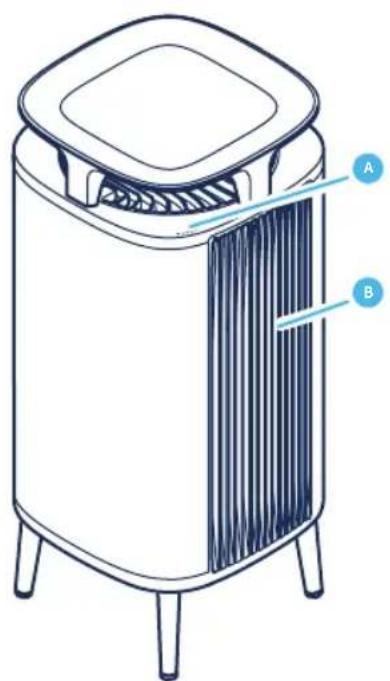
natural_image
Line drawing of a portable air purifier with labeled parts A and B (no text or symbols on the device itself)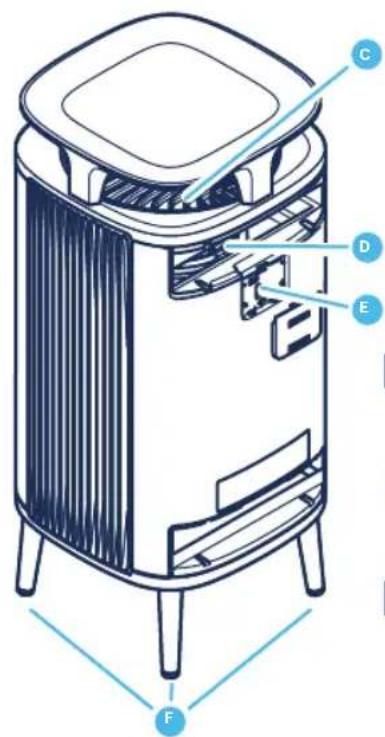
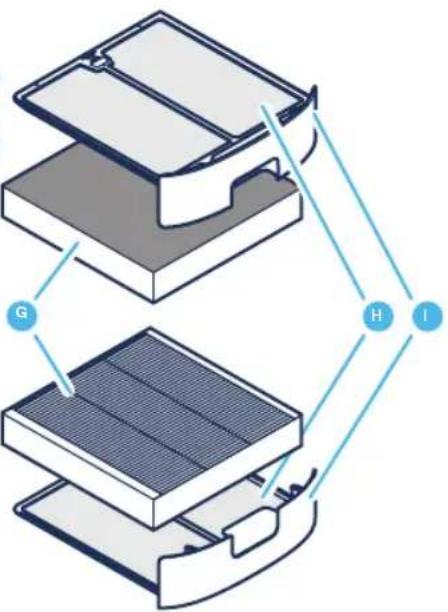
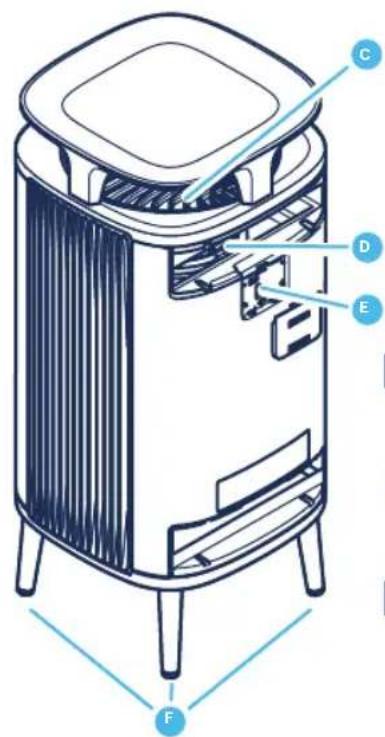
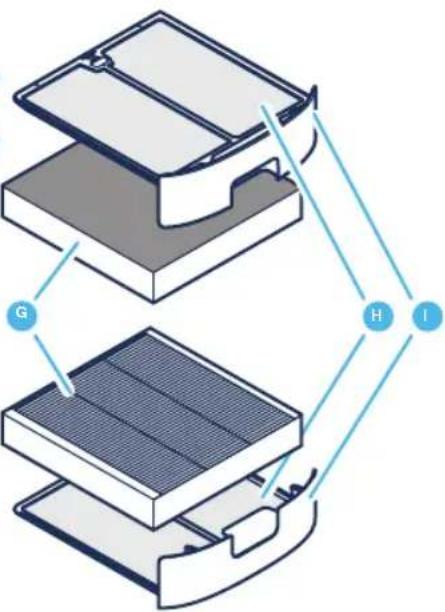
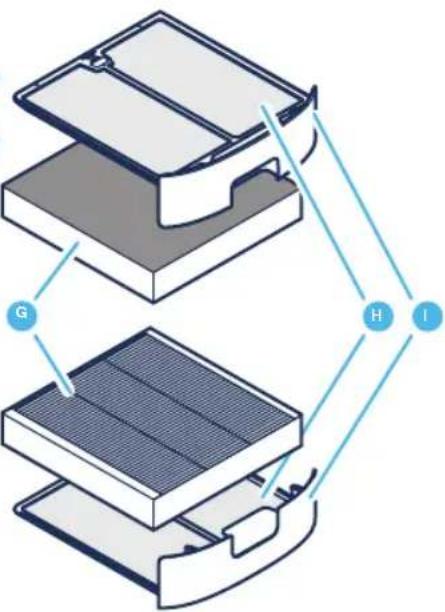
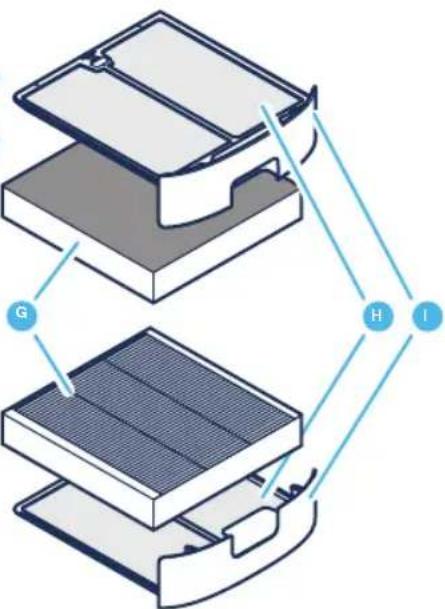
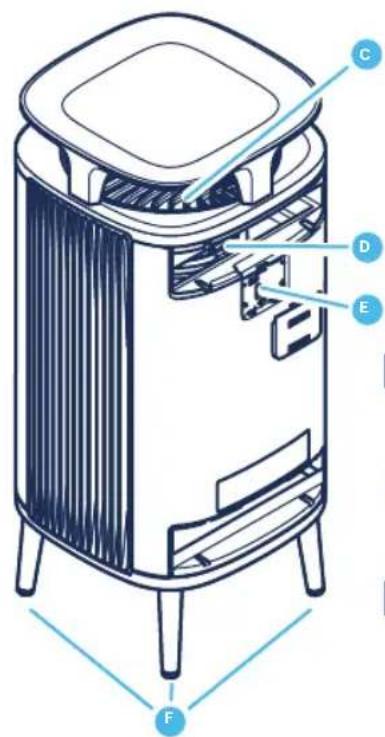
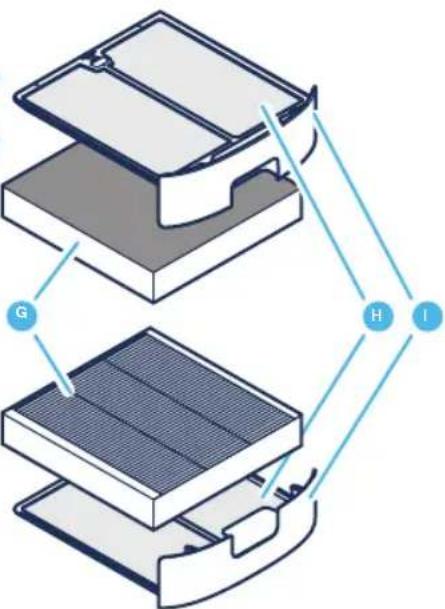
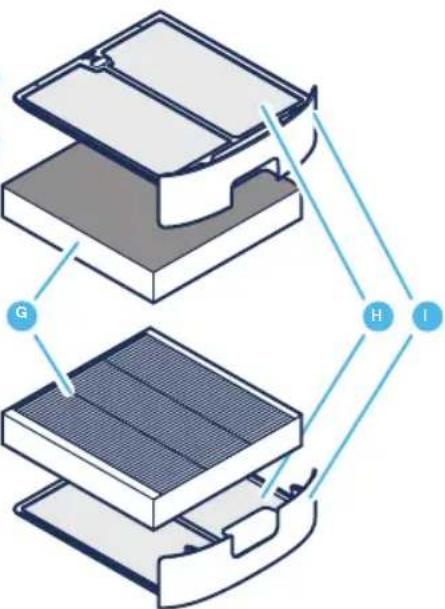
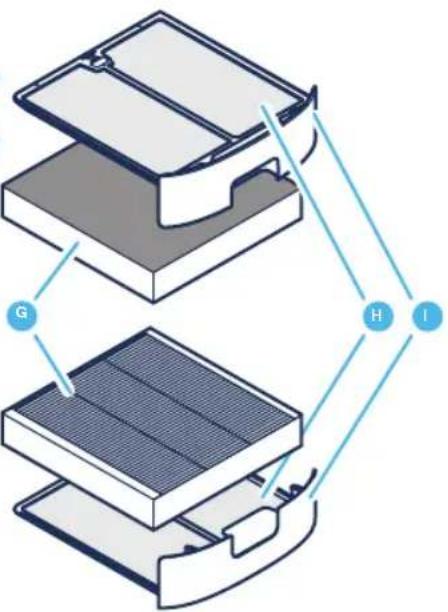
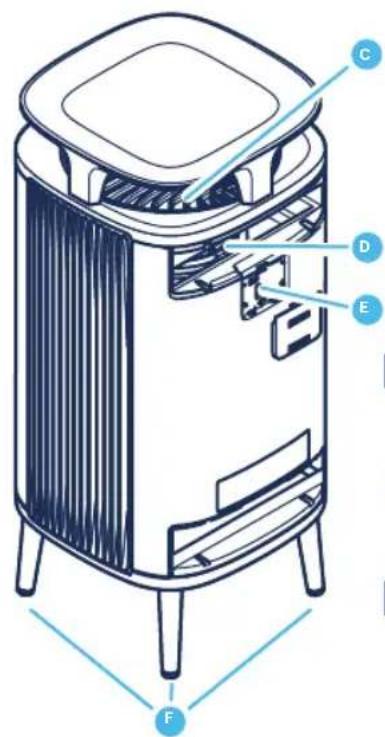
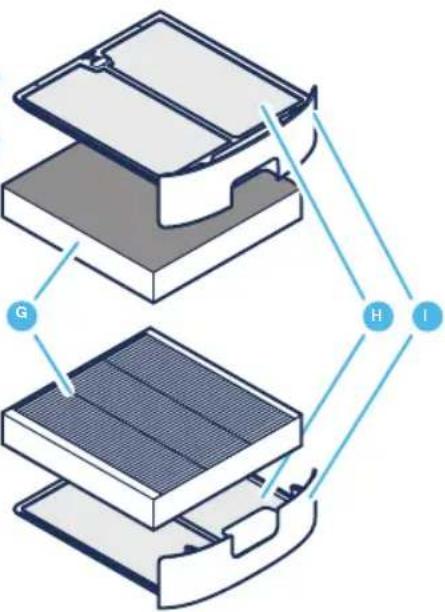
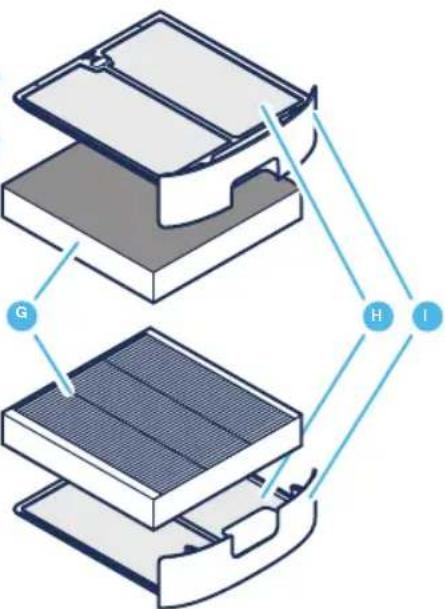
A Control panel G Main filters
B Air outlet H Pre-filters
C Air inlet I Filter hatch
D Fan and motor
E Air quality sensor
F Legs
J Power adapter (not in picture)
K User Manual (not in picture)
Safety instructions
Blueair DustMagnet™ air purifiers are electrical appliances for indoor use only, take the necessary precautions to reduce the risk of fire, electric shock or injury.
- This appliance can be used by children aged from 8 years and above and persons with reduced physical, sensory or mental capabilities or lack of experience and knowledge if they have been given supervision or instruction concerning use of the appliance in a safe way and understand the hazards involved.
• Children shall not play with the appliance. - Cleaning and maintenance shall not be made by children without supervision.
- Always disconnect the appliance from the power supply before maintenance.
- Do not attempt to open or service the appliance yourself. Service must be done by the manufacturer, service agent or similarly qualified personnel using only original Blueair spare parts.
- Ensure that the power cable and the power plug are not at risk of getting damaged. To avoid hazard, a damaged power cable must always be replaced by the manufacturer, service agent or similarly qualified person.
- If the appliance is damaged or is malfunctioning, turn it off, disconnect it from the power supply and contact Blueair.
- The power plug must be firmly inserted in the power socket.
-
When disconnecting the unit from the power supply, do not pull the power cord, pull the power plug.
-
Use the power cable provided with your Blueair air purifier to plug directly and firmly into an appropriate, electrical outlet.
- Do not use an extension cord or a power strip. Refer to the rating label on your appliance.
- Do not alter the power plug in any way. If the plug does not fit into the outlet, contact qualified personnel to install the proper outlet.
- Do not use the included power cord for anything else but the appliance.
- Do not allow objects to enter or block the air inlets and air outlets as this can cause electric shock or damage the appliance.
- Do not place any liquids on top of the product.
- Do not put any objects heavier than 10kg on top of the product.
- Do not put any objects directly against the appliance.
- Do not sit on, stand, climb onto or hang from the appliance.
- Keep the appliance, including the power cable, at a safe distance from heated surfaces and open fire.
- Keep the appliance and power plug away from water and other liquids.
- Keep the appliance and power plug away from chemicals such as pesticides and deodorants.
- Place the appliance on the floor. The appliance must be placed on a stable surface.
- Do not use the appliance outdoors or in wet environments such as bathrooms, laundry rooms or pool areas.
Get started
Step 1
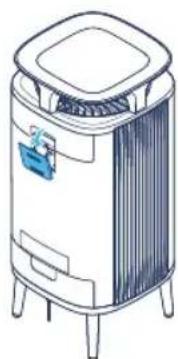
Carefully place the unit with the table top down on a stable soft surface.
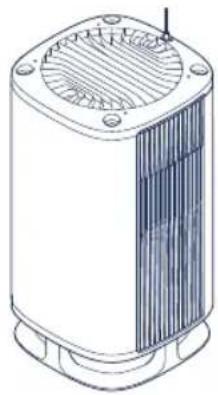
natural_image
Technical line drawing of a cylindrical industrial or electrical component with internal heat dissipation zones (no text or symbols)Step 3
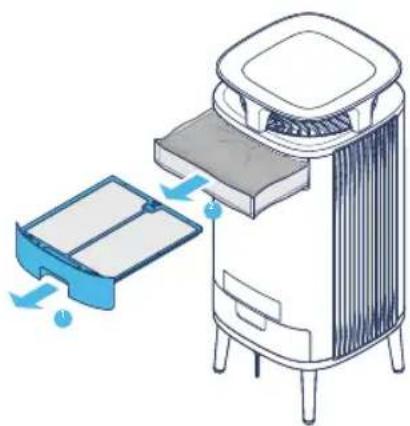
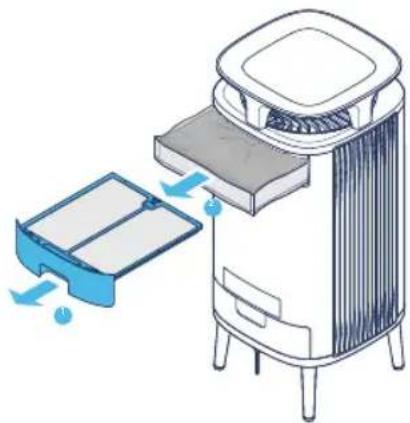
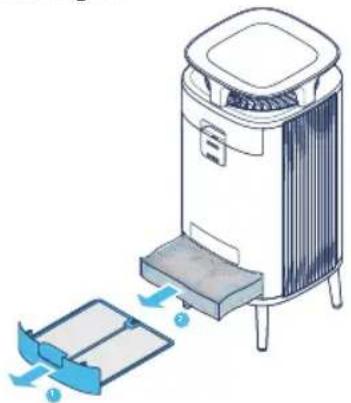
Open the top filter hatch, pull out the main filter and remove the protective plastic wrapping.
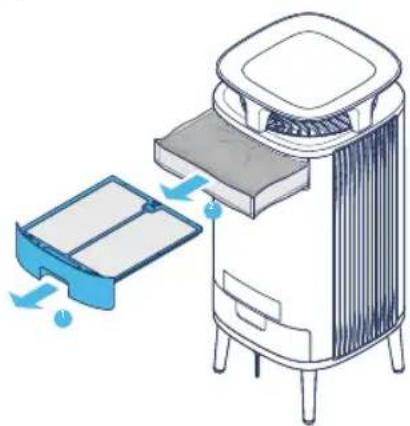
natural_image
Illustration of a portable air conditioner unit with a blue tray and airflow arrows indicating process (no text or symbols)Step 2
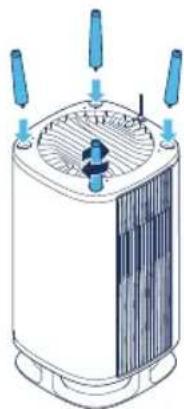
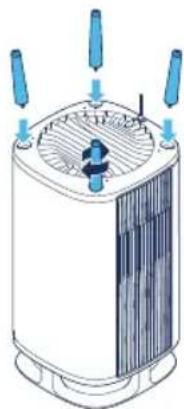
Attach the four legs onto the unit by screwing them on.
natural_image
Diagram of a cylindrical device with blue arrows indicating airflow or movement, no text or symbols presentStep 4
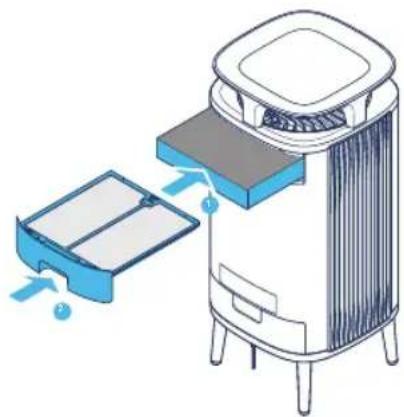
Insert the main filter back into the unit, and close the filter hatch.
natural_image
Illustration of a smart air purifier with a device and airflow path (no text or symbols)Step 5
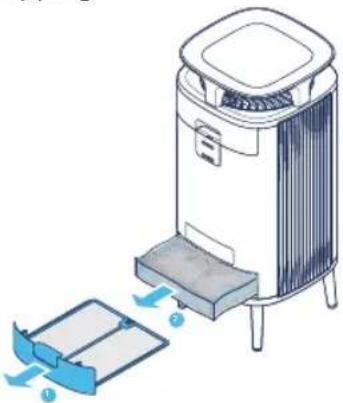
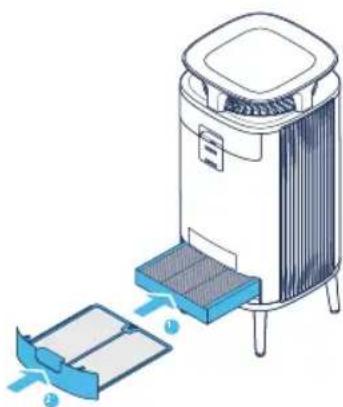
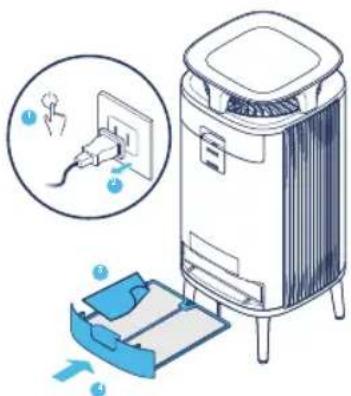
Open the bottom filter hatch, pull out the main filter and remove the protective plastic wrapping.
natural_image
Illustration of a portable air purifier with blue insulation and airflow indicators (no text or symbols)Step 7
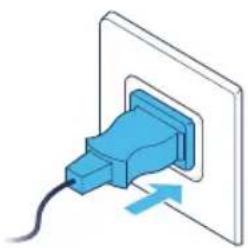
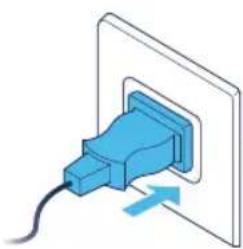
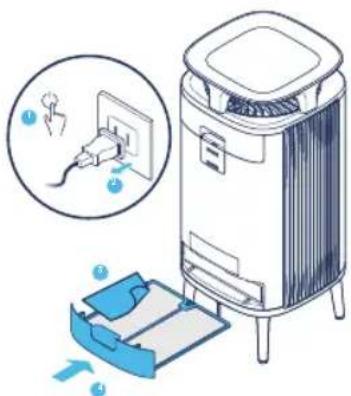
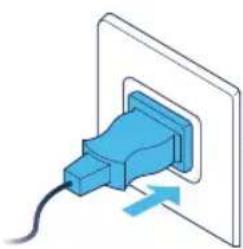
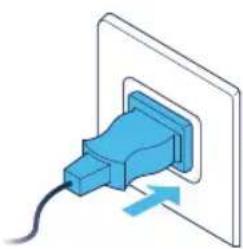
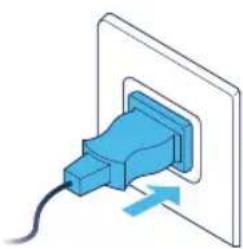
Plug the power adapter into a wall outlet.
Step 6
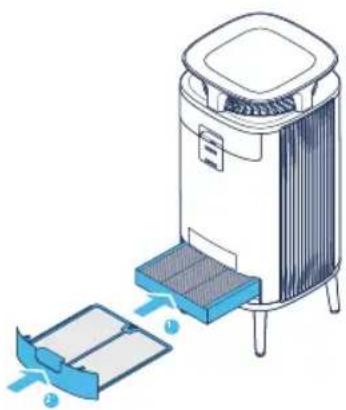
Place the main filter back into the unit, and close the filter hatch.
natural_image
Illustration of a portable air purifier with blue insulation and a side panel, showing internal components and airflow direction (no text or symbols)Step 8
Press the On/Off button to turn the unit on.
natural_image
Illustration of a blue electrical plug inserted into a wall socket with a cable (no text or symbols)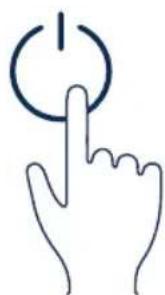
natural_image
Hand icon showing a finger pressing a button with a power symbol (no text or labels)See section Filters for more information regarding filter handling.
Connect to the Blueair app
Connecting the air purifier to the Blueair app allows you to control the air purifier remotely and change the settings. The app adds additional functions to the air purifier.
Step 1
Download the Blueair app from the App store or Google play.
Step 2
Open the Blueair app and follow the instructions to connect it to the air purifier.
Controls and indicators
Control the air purifier using the buttons on the control panel or using the Blueair app. The LED light below the symbol indicates active status.
On/Off

Press to turn On or Off.
Note! Wi-Fi continues to be in operation when the air purifier is turned off.
Airflow speed
Available airflow speed options are: 0, 1, 2, 3, Auto mode and Night mode.

Press to switch between airflow speed options, Auto mode and Night mode.
Auto mode

In Auto mode the air purifier automatically controls the airflow based on air quality information from the sensor.
Night mode

In Night mode the air purifier uses low fan speed and dimmed LED lights. The brightness of the LED is possible to set in the Blueair app.
Autostart
The air purifier has an Autostart feature. This means that the unit will automatically restart at the set speed if a power failure occurs, the unit is unplugged or a power switch timer is used.
Wi-Fi Connection

A Wi-Fi function is available on all models and allows the air purifier to connect to the Blueair app and to receive functional updates. The LED light below the symbol indicates status.
Indicators

Status White light Connected to Wi-Fi network.

Status White "pulsating" light Wi-Fi On, ready for onboarding.

Status White fast "blinking" light Connection error.
See the Blueair app for further information regarding Wi-Fi connection. For support, visit www.blueair.com/customer-support
Filter indicator
The air purifier calculates the remaining lifetime of the filters based on usage and sensor readings, and indicates when it is time to replace the filters.

Status Filter replacement No lifetime left of the filter.
Air quality information
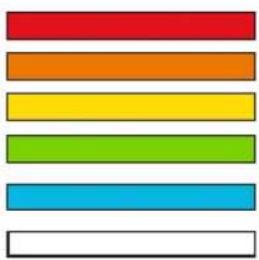
The air quality levels for particulate matter (PM) are indicated using a color scale on the air quality indicator. This scale gives a reading for PM2.5, which are particles with a diameter of 2.5 micrometers or less.
Air quality level
natural_image
Five horizontal color bars in red, orange, yellow, green, cyan, and white (no text or symbols)Very Polluted
Slightly Polluted
Moderate
Good
Excellent
Data not available
See the Blueair app for further information regarding air quality.
Filters
The air purifier is delivered with two pre-filters and two main filters installed. The filters purify the air from particles and gases. For best performance, clean the pre-filters regularly and change the main filters when the air purifier indicates filter change. To find the right main filter for your air purifier, use the Blueair app or visit www.blueair.com. The model number of your air purifier can be found on the rating label on the air purifier.
Important! Always turn off and disconnect the appliance from the power supply before changing filters, cleaning or carrying out maintenance procedures.
Important! Do not use the unit without filters.
Blueair filter subscription program
Use the Blueair app or visit www.blueair.com to sign up for the Blueair filter subscription program. (Not available in all markets)
Clean the pre-filters
For best performance, clean the pre-filters weekly.
Step 1
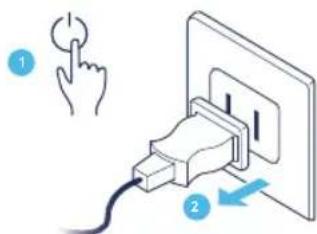
Turn the unit off and unplug it.
Step 2
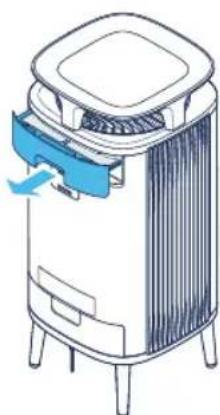
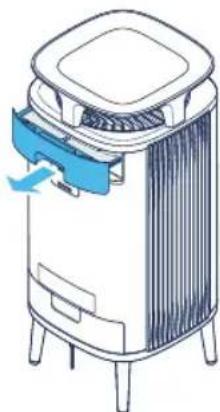
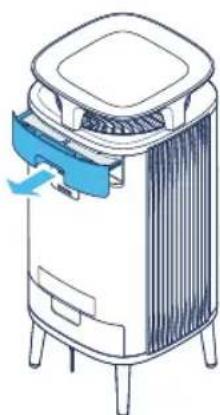
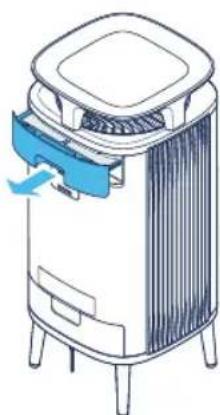
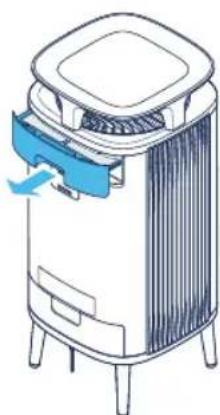
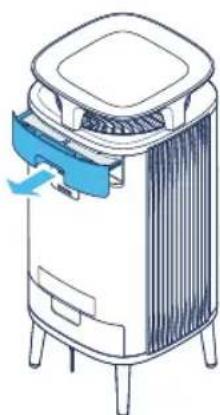
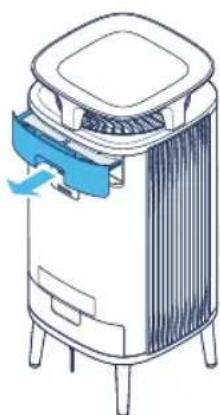
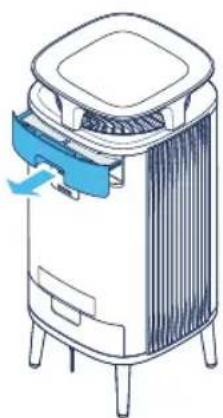
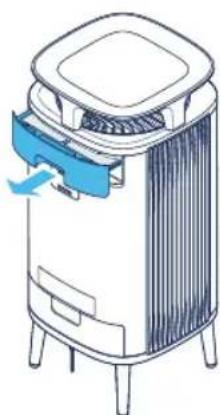
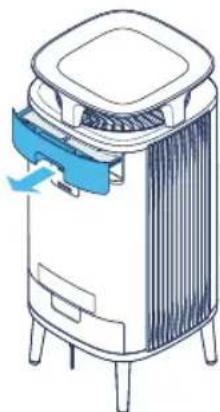
Open the top filter hatch and pull out the pre-filter.
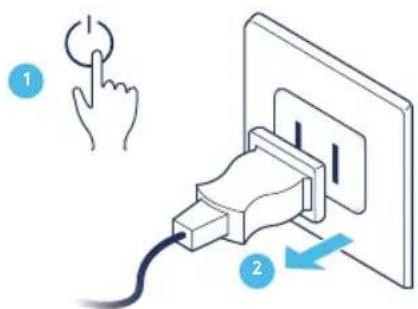
natural_image
Illustration of a portable air conditioner unit with blue airflow arrow (no text or symbols)Step 3
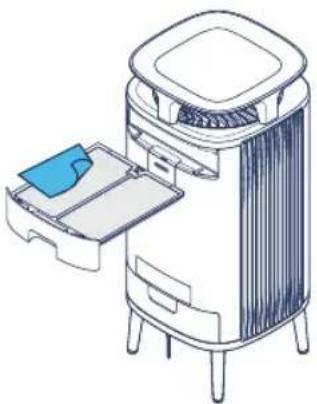
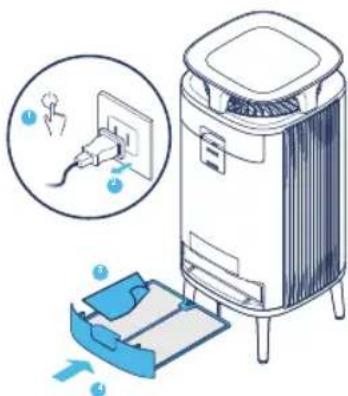
Clean the pre-filter by wiping it with a dust cloth.
natural_image
Illustration of a portable kitchen appliance with a drawer and top shelf (no text or symbols)Step 5
Repeat step 1-4 on the bottom pre-filter.
Step 4
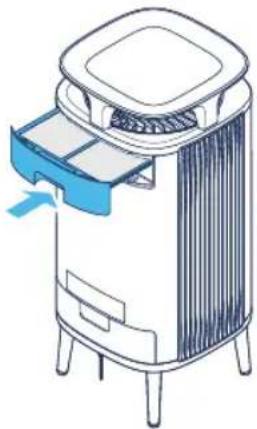
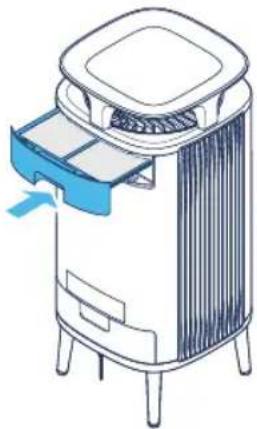
Place the pre-filter back into the unit and close the filter hatch.
natural_image
Illustration of a portable air conditioner unit with a blue handle and cooling fan (no text or symbols)Step 6
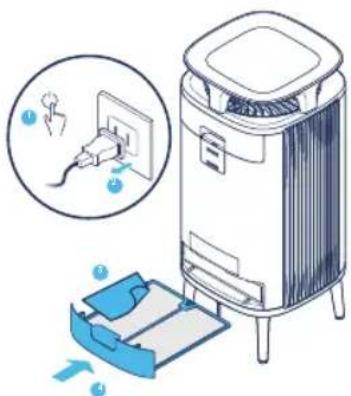
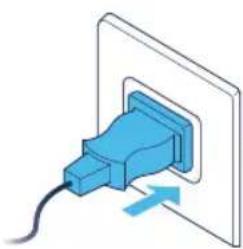
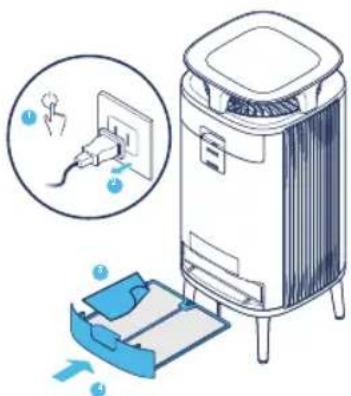
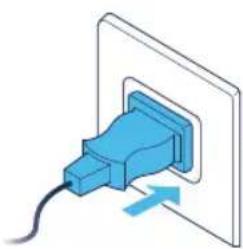
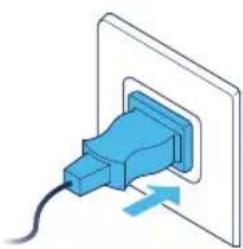
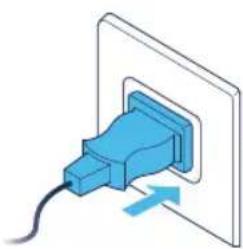
Plug in the unit.
natural_image
Illustration of a blue electrical plug inserted into a wall socket with a cable (no text or symbols)Change the main filters
The air purifier calculates the remaining lifetime of the filters based on usage and sensor readings, and indicates when it is time to change filter. The recommended time for filter change is between 6-12 months depending on the indoor conditions.
A filter replacement indicator indicates when it is time to change the filters.

Filter replacement indicator
Important! Use only original Blueair filters suitable for the model to ensure proper function and performance of the air purifier, and to qualify for full warranty coverage.
Step 1
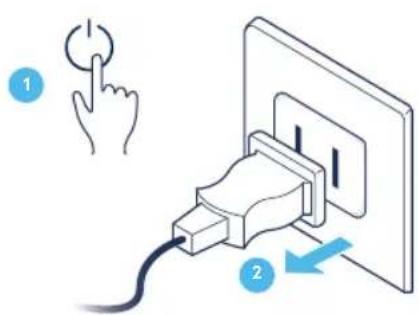
Turn the unit off and unplug it.
Step 2
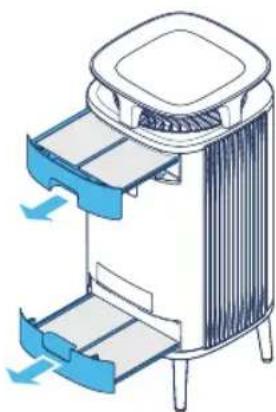
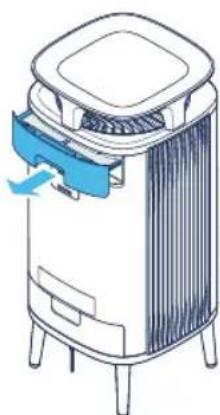
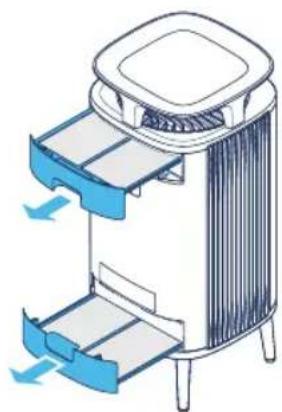
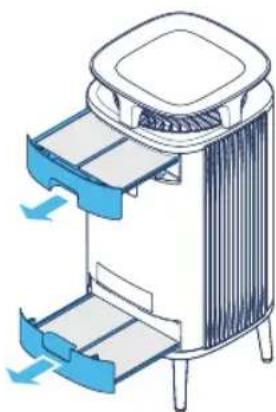
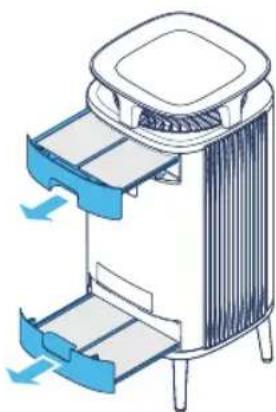
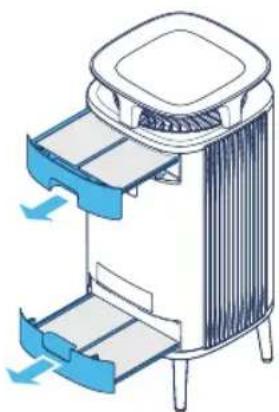
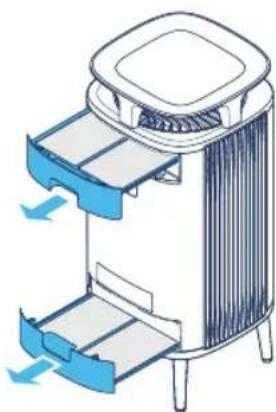
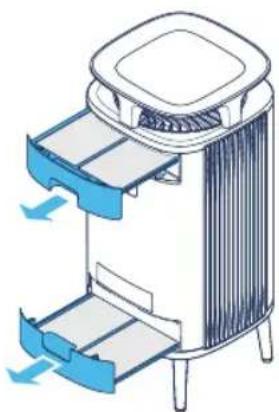
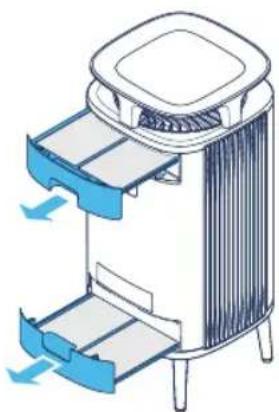
Open the two filter hatches.
natural_image
Illustration of a multi-tiered appliance with blue and gray compartments, showing airflow direction (no text or symbols)Step 3
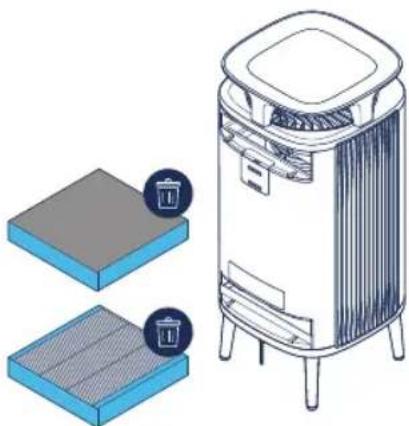
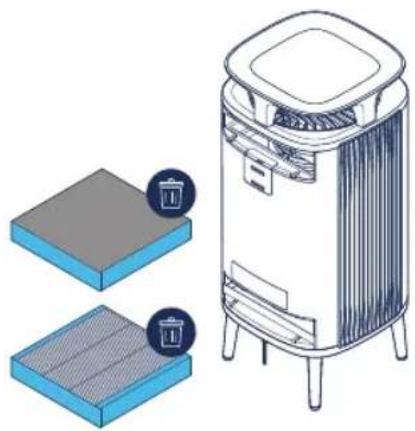
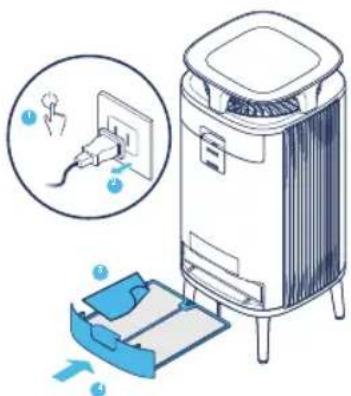
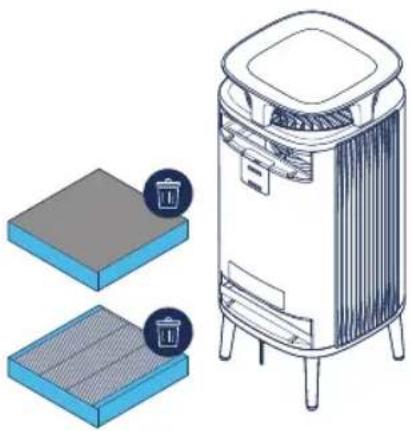
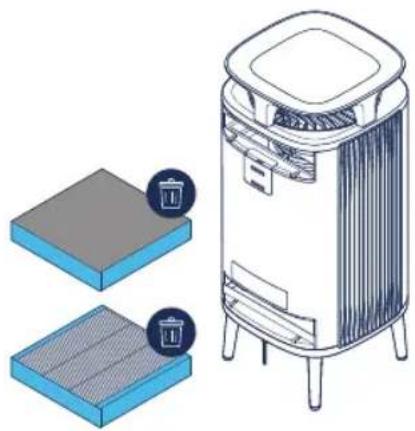
Remove and dispose of the old main filters.
natural_image
Illustration of a portable air conditioner unit with two blue filter panels and a paper stack, alongside a separate paper stack with a trash bin (no text or symbols)Step 5
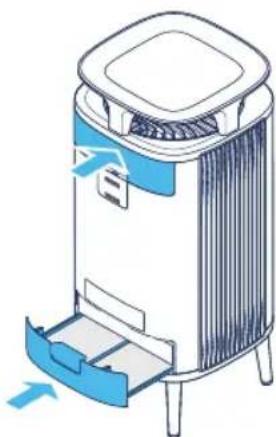
Close the two filter hatches.
Note! Make sure that the filter hatches are closed correctly.
natural_image
Illustration of a portable air conditioner unit with blue airflow indicators (no text or symbols)Step 4
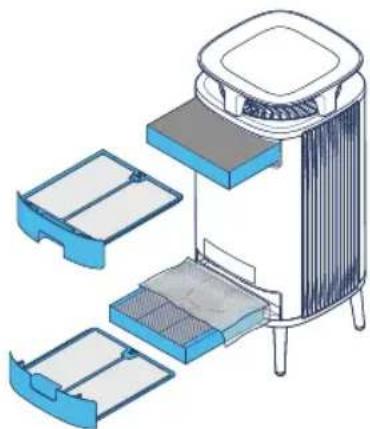
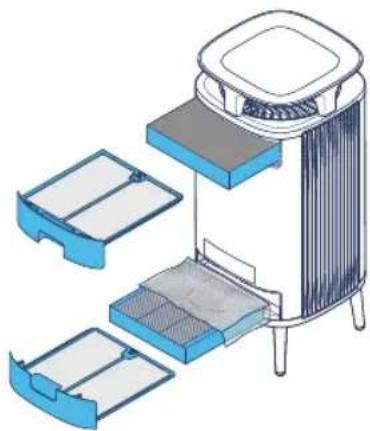
Note! Remove the protective plastic from the new main filters before use.
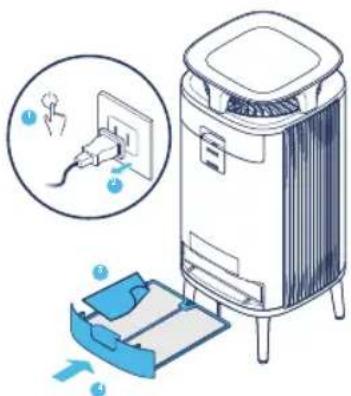
Insert the new main filters.
natural_image
Illustration of a multi-tiered appliance with blue compartments and a gray top unit (no text or symbols)Step 6
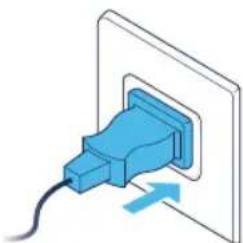
Plug in the unit.
Note! Press the airflow speed button for 15s to reset the filter timer.
natural_image
Illustration of a blue electrical plug inserted into a wall socket with a cable, showing an upward arrow (no text or symbols)Care and maintenance
General
- Disconnect the air purifier from the power supply before maintenance.
- Do not allow foreign objects to enter the air inlets or air outlets. This may cause electric shock or damage the air purifier.
- Never clean with gasoline, chemical solvents or corrosive materials as these agents may damage the air purifier.
- Make sure the air purifier is completely dry before connecting it to power.
- Do not wash the main filter. The main filter is not washable or reusable.
Cleaning
- Clean the pre-filters by wiping with a dust cloth or vacuuming with a soft brush attachment (not included).
- Wipe the exterior of the air purifier with a soft, clean, damp cloth.
• Vacuum the small air inlets with a soft brush attachment (not included).
• Vacuum the inside of the air purifier with a soft brush attachment (not included). - Clean and check the power cable and power plug for wear or damages.
- Clean the sensor when changing the main filter.
Moving the air purifier
Important!
- Unplug the air purifier before moving it.
- Make sure that the filter hatches on the air purifier are securely closed.
- Lift the air purifier to move it. Do not drag or push the air purifier.
Clean the air quality sensor
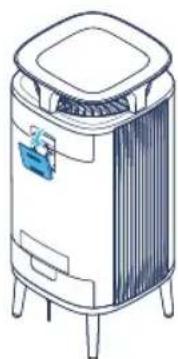
The inlet for the air quality sensor is located at the back of the air purifier. Vacuum the opening to clean the inlet for the sensor.
Important! Do not use fingers or any unrecommended objects to clean inside the sensor inlet.
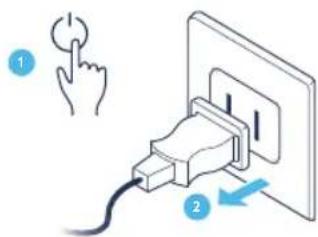
Step 1
Turn the unit off and unplug it.
Step 3
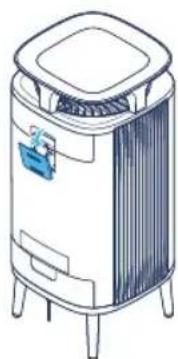
Gently clean the sensor with a cotton swab, and attach the sensor lid.
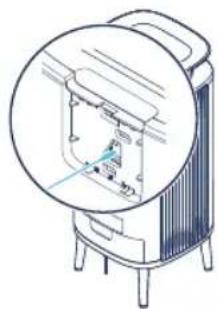
natural_image
Technical line drawing of a mechanical device with a circular housing and internal components (no text or symbols)Step 2
Remove the lid covering the sensor.
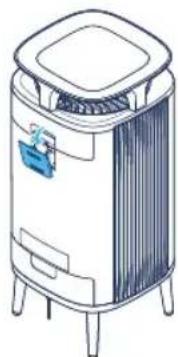
natural_image
Line drawing of a four-legged appliance with lid and side legs (no text or symbols)Step 4
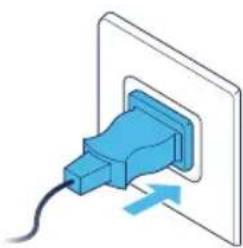
Plug in the unit.
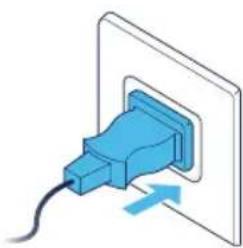
natural_image
Illustration of a blue electrical plug inserted into a wall socket with a cable, showing a directional arrow (no text or symbols)Disposal and recycling
This air purifier should be disposed or recycled as electrical waste and the filter may be recycled as plastic. If you have questions regarding the disposal and recycling of this air purifier, please contact your local recycling facility for availability or Blueair dealer and ask for the correct method of recycling.
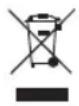
The crossed-out waste bin symbol on the appliance or on its packaging means that at the end of its useful lifespan, the product must be disposed of separately from ordinary household wastes.
Help and support
If you have questions about your product, please visit www.blueair.com or contact your local Blueair retailer.
To contact Blueair for personalized support, please visit www.blueair.com/customer-support
Warranty information
The Blueair Limited Warranty applies only if the air purifier is installed, used and maintained according to the instructions in this manual.
For warranty conditions, please visit www.blueair.com/warranty
Warranty and returns
If you purchased the air purifier at one of our authorized retailers, please contact the same store to request assistance.
Specification
5210i/5240i 5410i/5440i
| Input Power, Frequency 100-240VAC | 50/60Hz 100-240VAC 50/60Hz | |
| Power consumption/Rated input power (min/max) | 5-22W 7-42W | |
| Operating frequency 2402-2480 MHz | 2402-2480 MHz | |
| Output power Max 5mW Max 5mW | ||
| Sound level (min/max) ^1 | 29-45 dB 31-50 dB | |
| Recommended room size ^2 | 22 m ^2 | 35 m ^2 |
| CADR Smoke ^2 | 260 m ^3 /h 416 m | ^3 /h |
| CADR Dust ^2 | 260 m ^3 /h 453 m | ^3 /h |
| CADR Pollen ^2 | 293 m ^3 /h 450 m | ^3 /h |
^1 Sound pressure according to GB/T18801
^2 According to AHAM AC-1-2019
FR
natural_image
Technical line drawing of a cylindrical industrial or electrical component with internal heat dissipation zones (no text or symbols)Étape 3
natural_image
Illustration of a smart air conditioner unit with a blue tray and airflow arrows indicating process (no text or symbols)Étape 2
natural_image
Diagram of a cylindrical device with blue arrows indicating airflow or movement, showing internal components (no text or symbols)Étape 4
natural_image
Illustration of a smart air conditioner unit with cooling panel and heat exchanger (no text or symbols)Étape 5
natural_image
Illustration of a portable air purifier with blue insulation and airflow indicators (no text or symbols)Étape 7
natural_image
Illustration of a blue electrical plug inserted into a wall socket with an arrow indicating direction (no text or symbols)Étape 6
natural_image
Illustration of a portable air purifier with blue insulation panels and a side-mounted rack (no text or symbols)Étape 8
natural_image
Hand icon showing a finger pressing a button with a power symbol (no text or labels)natural_image
Five horizontal color bars in red, orange, yellow, green, cyan, and white (no text or symbols)Très pollué
Légèrement pollué
Moyenne
Bonne
Excellente
natural_image
Illustration of a portable air conditioner unit with blue handle and cooling fan (no text or symbols)Étape 3
natural_image
Illustration of a portable kitchen appliance with a drawer and top shelf (no text or symbols)Étape 5
Étape 4
natural_image
Illustration of a portable air conditioner unit with blue airflow arrow (no text or symbols)Étape 6
natural_image
Illustration of a blue electrical plug inserted into a wall socket with a cable (no text or symbols)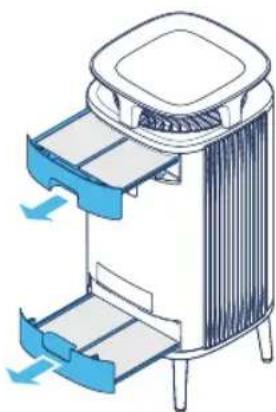
natural_image
Illustration of a multi-tiered appliance with blue and gray compartments, showing airflow direction (no text or symbols)Étape 3
natural_image
Illustration of a portable kitchen appliance with two blue filter panels and a paper bed, alongside its exterior view (no text or symbols)Étape 5
natural_image
Illustration of a portable air conditioner unit with blue airflow arrows indicating airflow direction (no text or symbols)Étape 4
natural_image
Illustration of a modular appliance with blue compartments and a top-mounted unit (no text or symbols)Étape 6
natural_image
Illustration of a blue electrical plug inserted into a wall socket with a cable, showing an upward arrow (no text or symbols)Étape 3
natural_image
Technical line drawing of a mechanical device with a circular housing and internal components (no text or symbols)Étape 2
natural_image
Line drawing of a four-legged appliance with lid and side legs (no text or symbols)Étape 4
natural_image
Illustration of a blue electrical plug inserted into a wall socket with a cable, showing a directional arrow (no text or symbols)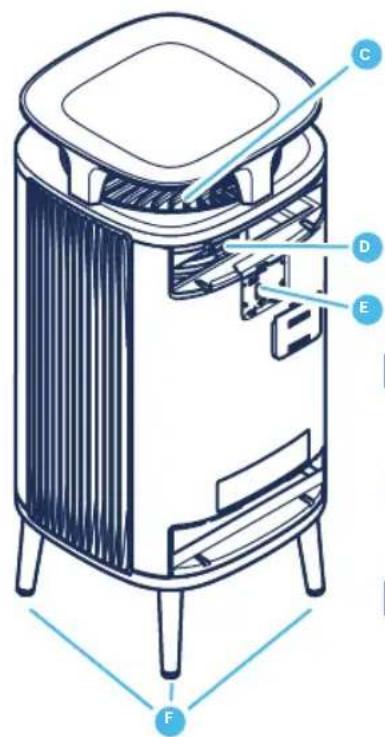
natural_image
Technical line drawing of a cylindrical industrial fan or heater with heat dissipation fins (no text or symbols)Paso 3
natural_image
Illustration of a smart air conditioner unit with a blue tray and airflow arrows indicating process (no text or symbols)Paso 2
natural_image
Diagram of a cylindrical air conditioner unit with blue indicator lights and internal cooling fan (no text or symbols)Paso 4
natural_image
Illustration of a portable air conditioner unit with cooling fins and a separate drawer, showing airflow direction (no text or symbols)Paso 5
natural_image
Illustration of a portable air purifier with cooling unit and blue heat exchanger (no text or symbols)Paso 7
natural_image
Illustration of a blue electrical plug inserted into a wall socket with a cable, showing an upward arrow (no text or symbols)Paso 6
natural_image
Illustration of a portable air purifier with blue insulation panels and a side-mounted rack (no text or symbols)Paso 8
natural_image
Hand icon showing a finger pressing a button with a power symbol (no text or labels)natural_image
Five horizontal color bars in red, orange, yellow, green, cyan, and white (no text or symbols)Muy contaminado
Ligeramente contaminado
Moderado
Bueno
Excelente
natural_image
Illustration of a portable air conditioner unit with blue airflow arrow (no text or symbols)Paso 3
natural_image
Line drawing of a portable kitchen appliance with drawer and top shelf (no text or symbols)Paso 5
Paso 4
natural_image
Illustration of a portable air conditioner unit with blue airflow arrow (no text or symbols)Paso 6
Enchufar la unidad.
natural_image
Illustration of a blue electrical plug inserted into a wall socket with a cable (no text or symbols)Cambie los filtros principales
natural_image
Illustration of a multi-tiered appliance with blue and gray compartments, showing airflow direction (no text or symbols)Paso 3
natural_image
Illustration of a portable air conditioner unit with two blue filter panels and a paper lid, alongside an empty cylindrical device (no text or symbols)Paso 5
natural_image
Illustration of a portable air conditioner unit with blue airflow indicators (no text or symbols)Paso 4
natural_image
Illustration of a multi-tiered appliance with blue compartments and a gray top unit (no text or symbols)Paso 6
Enchufar la unidad.
natural_image
Illustration of a blue electrical plug inserted into a wall socket with an arrow indicating power flow (no text or symbols)Paso 3
natural_image
Technical line drawing of a circular device with internal components and mounting base (no text or symbols)Paso 2
natural_image
Line drawing of a four-legged appliance with lid and side legs (no text or symbols)Paso 4
Enchufar la unidad.
natural_image
Illustration of a blue electrical plug inserted into a wall socket with a cable, showing a directional arrow (no text or symbols)natural_image
Technical line drawing of a cylindrical industrial or electrical component with internal heat dissipation zones (no text or symbols)Punto 3
natural_image
Illustration of a portable air conditioner unit with cooling fins and a blue tray, showing airflow direction (no text or symbols)Punto 2
natural_image
Diagram of a cylindrical device with blue arrows indicating airflow or movement, showing internal components (no text or symbols)Punto 4
natural_image
Illustration of a portable air conditioner unit with cooling fan and door panel, showing airflow direction (no text or symbols)Punto 5
natural_image
Illustration of a smart air purifier with blue insulation and airflow indicators (no text or symbols)Punto 7
natural_image
Illustration of a blue electrical plug inserted into a wall socket with a cable, showing an upward arrow (no text or symbols)Punto 6
natural_image
Illustration of a portable air purifier with blue insulation panels and a side-mounted rack (no text or symbols)Punto 8
natural_image
Hand icon showing a finger pressing a button with a power symbol (no text or labels)natural_image
Five horizontal color bars in red, orange, yellow, green, cyan, and white (no text or symbols)Molto inquinata
Punto 2
natural_image
Illustration of a portable air conditioner unit with blue handle and cooling fan (no text or symbols)Punto 3
natural_image
Illustration of a portable kitchen appliance with a drawer and top shelf (no text or symbols)Punto 5
Punto 4
natural_image
Illustration of a portable air conditioner unit with blue airflow arrow (no text or symbols)Punto 6
natural_image
Illustration of a blue electrical plug inserted into a wall socket with a cable (no text or symbols)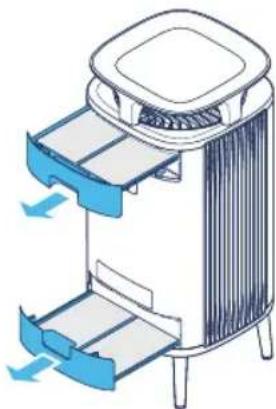
natural_image
Illustration of a multi-tiered appliance with blue and gray compartments, showing airflow direction (no text or symbols)Punto 3
natural_image
Illustration of a kitchen appliance with two rectangular plates and a cylindrical drawer, alongside a simple line drawing of its interior (no text or symbols)Punto 5
natural_image
Illustration of a portable air purifier with blue insulation and airflow arrows (no text or symbols)Punto 4
natural_image
Isometric illustration of a smart air conditioner unit with blue plastic compartments and a top panel (no text or symbols)Punto 6
natural_image
Illustration of a blue electrical plug inserted into a wall socket with a cable, showing a blue arrow indicating direction (no text or symbols)Cura e manutenzione
Procedure generali
Punto 3
natural_image
Line drawing of a four-legged appliance with lid and side legs (no text or symbols)Punto 4
natural_image
Technical line drawing of a mechanical device with a circular housing and internal components (no text or symbols)
natural_image
Illustration of a blue electrical plug inserted into a wall socket with a cable, showing a directional arrow (no text or symbols)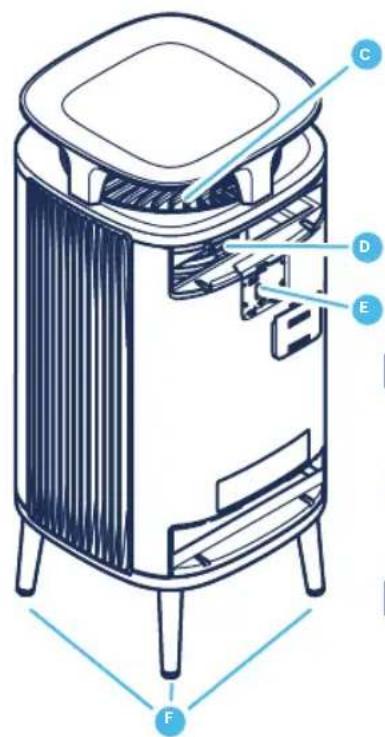

natural_image
Technical line drawing of a cylindrical industrial fan or vent with heat dissipation fins (no text or symbols)Schritt 3
natural_image
Illustration of a portable air conditioner unit with cooling fins and a blue tray, showing airflow direction (no text or symbols)Schritt 2
natural_image
Diagram of a cylindrical air conditioner unit with blue indicator lights and internal cooling fan (no text or symbols)Schritt 4
natural_image
Illustration of a portable air conditioner unit with cooling fins and a separate drawer, showing airflow direction (no text or symbols)Schritt 5
natural_image
Illustration of a portable air conditioner unit with cooling fins and a slide, showing airflow direction (no text or symbols)Schritt 7
natural_image
Illustration of a blue electrical plug inserted into a wall socket with a cable, showing an upward arrow (no text or symbols)Schritt 6
natural_image
Illustration of a portable air purifier with blue insulation and a side-mounted drain, showing internal components and airflow paths (no text or symbols)Schritt 8
natural_image
Hand icon showing a finger pressing a button with a power symbol (no text or labels)natural_image
Five horizontal color bars in red, orange, yellow, green, cyan, and white (no text or symbols)Stark verschmutzt
Leicht verschmutzt
Moderat
Gut
Hervorragend
natural_image
Illustration of a portable air conditioner unit with blue airflow arrow (no text or symbols)Schritt 3
natural_image
Illustration of a portable kitchen appliance with a drawer and top shelf (no text or symbols)Schritt 5
natural_image
Illustration of a portable air conditioner unit with a blue handle and cooling fan (no text or symbols)Schritt 6
natural_image
Illustration of a blue electrical plug inserted into a wall socket with a cable (no text or symbols)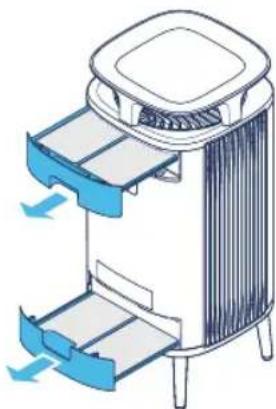
natural_image
Illustration of a multi-tiered appliance with blue and gray compartments, showing airflow direction (no text or symbols)Schritt 3
natural_image
Illustration of a portable air conditioner unit with two blue filter panels and a separate paper holder (no text or symbols)Schritt 5
natural_image
Illustration of a portable air purifier with blue insulation and airflow arrows (no text or symbols)Schritt 4
natural_image
Isometric illustration of a modular appliance with blue and gray components, no text or symbols presentSchritt 6
natural_image
Illustration of a blue electrical plug inserted into a wall socket with a cable, showing an upward arrow (no text or symbols)Pflege und Wartung
Allgemeines
Schritt 3
natural_image
Technical line drawing of a circular device with internal components and mounting base (no text or symbols)Schritt 2
natural_image
Line drawing of a four-legged appliance with lid and side legs (no text or symbols)Schritt 4
natural_image
Illustration of a blue electrical plug inserted into a wall socket with a cable, showing a directional arrow (no text or symbols)natural_image
Line drawing of a portable air purifier with labeled parts A and B (no text or symbols on the device itself)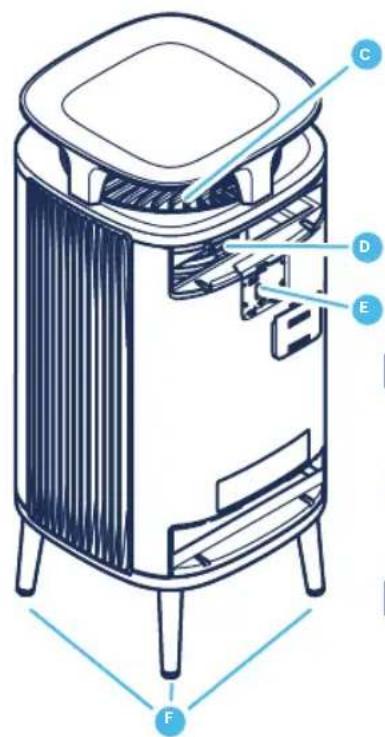
flowchart
graph TD
    A["Top Panel"] --> B["Bottom Panel"]
    B --> C["Component G"]
    B --> D["Component H"]
    D --> E["Component I"]
natural_image
Technical line drawing of a cylindrical industrial fan or vent with heat dissipation fins (no text or symbols)Stap 3
natural_image
Illustration of a portable air conditioner unit with cooling fins and a blue tray, showing airflow direction (no text or symbols)Stap 2
natural_image
Diagram of a cylindrical air conditioner unit with blue indicator lights and internal cooling fan (no text or symbols)Stap 4
natural_image
Illustration of a smart air conditioner unit with cooling panel and heat exchanger (no text or symbols)Stap 5
natural_image
Illustration of a portable air purifier with blue insulation and airflow indicators (no text or symbols)Stap 7
natural_image
Illustration of a blue electrical plug inserted into a wall socket with a cable, showing an upward arrow (no text or symbols)Stap 6
natural_image
Illustration of a portable air purifier with blue insulation panels and a side-mounted rack (no text or symbols)Stap 8
natural_image
Hand icon showing a finger pressing a button with a power symbol (no text or labels)natural_image
Five horizontal color bars in red, orange, yellow, green, cyan, and white (no text or symbols)Sterk vervuild
Licht vervuild
Matig
Goed
Uitstekend
natural_image
Illustration of a portable air conditioner unit with blue airflow arrow (no text or symbols)Stap 3
natural_image
Line drawing of a portable kitchen appliance with a blue bag and drawer (no text or symbols)Stap 5
Stap 4
natural_image
Illustration of a portable air conditioner unit with blue airflow arrow (no text or symbols)Stap 6
natural_image
Illustration of a blue electrical plug inserted into a wall socket with a cable, showing a directional arrow (no text or symbols)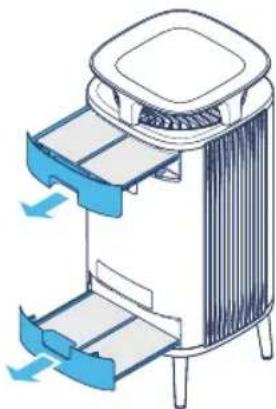
natural_image
Illustration of a multi-tiered appliance with blue and gray compartments, showing airflow direction (no text or symbols)Stap 3
natural_image
Illustration of a portable air conditioner unit with two blue filter panels and a separate paper holder (no text or symbols)Stap 5
natural_image
Illustration of a portable air purifier with blue airflow indicators (no text or symbols)Stap 4
natural_image
Isometric illustration of a modular appliance with blue and gray components, no text or symbols presentStap 6
natural_image
Illustration of a blue electrical plug inserted into a wall socket with a cable, showing a blue arrow indicating direction (no text or symbols)Onderhoud
Algemeen
Stap 3
natural_image
Technical line drawing of a circular device with internal components and mounting base (no text or symbols)Stap 2
natural_image
Line drawing of a four-legged appliance with lid and base (no text or symbols)Stap 4
natural_image
Illustration of a blue electrical plug inserted into a wall socket with a cable, showing a directional arrow (no text or symbols)Specifications
5210i/5240i 5410i/5440i
| Ingangsvermogen, frequentie 100-240 | VAC 50/60 Hz 100-240 VAC 50/60 Hz | |
| Stroomverbruik/nominaal ingangsvermogen (min/max) | 5-22 W 7-42 W | |
| Bedrijfsfrequentie 2402-2480 MHz 2402-2480 MHz | ||
| Afgegeven vermogen Max 5mW Max 5mW | ||
| Geluidsniveau (min/max) ^1 | 29-45 dB 31-50 dB | |
| Aanbevolen grootte van de ruimte ^2 | 22 m ^2 | 35 m ^2 |
| CADR - rook ^2 | 260 m ^3 /uur 416 m | ^3 /uur |
| CADR - stof ^2 | 260 m ^3 /uur 453 m | ^3 /uur |
| CADR - pollen ^2 | 293 m ^3 /uur 450 m | ^3 /uur |
natural_image
Illustration of a portable air purifier with blue filter units and airflow indicators (no text or symbols)Krok 7
natural_image
Illustration of a portable air purifier with blue insulation panels and a side-mounted rack (no text or symbols)Krok 8
natural_image
Illustration of a blue electrical plug inserted into a wall socket with an arrow indicating direction (no text or symbols)
natural_image
Hand icon showing a finger pressing a button with a power symbol (no text or labels)natural_image
Five horizontal color bars in red, orange, yellow, green, cyan, and white (no text or symbols)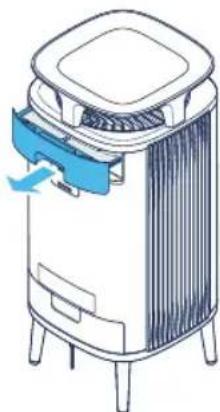
natural_image
Illustration of a portable air conditioner unit with blue handle and cooling fan (no text or symbols)Krok 3
natural_image
Line drawing of a portable kitchen appliance with a blue bag and drawer (no text or symbols)Krok 5
Krok 4
natural_image
Illustration of a portable air conditioner unit with blue airflow arrow (no text or symbols)Krok 6
natural_image
Illustration of a blue electrical plug inserted into a wall socket with a cable (no text or symbols)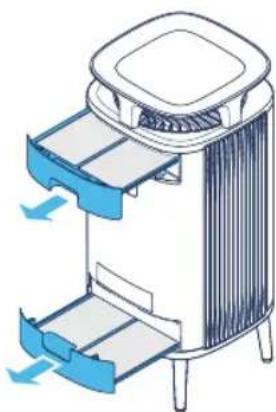
natural_image
Illustration of a multi-tiered appliance with blue and gray compartments, showing airflow direction (no text or symbols)Krok 3
natural_image
Illustration of a portable air conditioner unit with two blue filter panels and a separate paper holder (no text or symbols)Krok 5
natural_image
Illustration of a portable air conditioner unit with blue airflow arrows indicating airflow direction (no text or symbols)Krok 4
natural_image
Illustration of a modular appliance with blue compartments and a cylindrical top unit (no text or symbols)Krok 6
natural_image
Illustration of a blue electrical plug inserted into a wall socket with a cable, showing an upward arrow (no text or symbols)Krok 3
natural_image
Technical line drawing of a mechanical device with a circular housing and internal components (no text or symbols)Krok 2
natural_image
Line drawing of a four-legged appliance with lid and side legs (no text or symbols)Krok 4
natural_image
Illustration of a blue electrical plug inserted into a wall socket with a cable, showing a directional arrow (no text or symbols)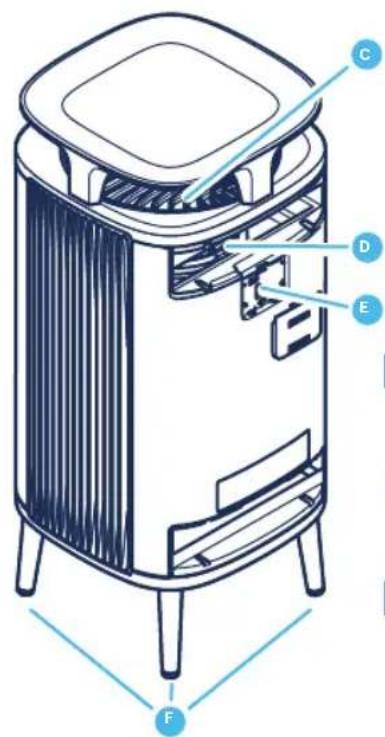
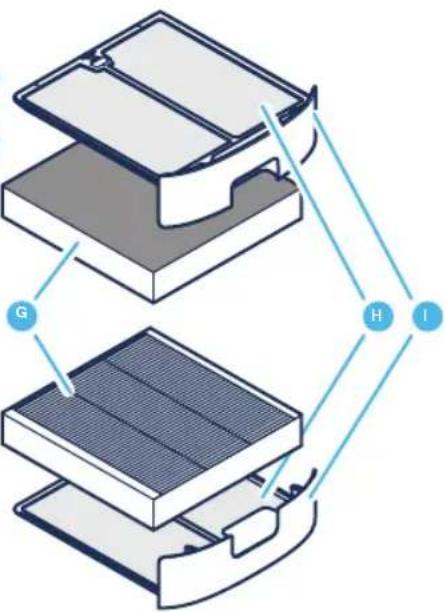
A Komandna tabla G Glavni filteri
B Izlaz za vazduh H Predfilteri
C Ulaz za vazduh I Držač filtera
D Ventilator i motor
E Senzor za kvalitet vazduha
F Nogare
J Adapter napajanja (nije prikazan na ilustraciji)
K Korisničko uputstvo (nije prikazano na ilustraciji)
natural_image
Technical line drawing of a cylindrical industrial fan or vent with heat dissipation fins (no text or symbols)Korak 3
natural_image
Diagram of a cylindrical air conditioner unit with blue indicator lights and internal cooling fan (no text or symbols)Korak 4
Ponovo postavite glavni filter u uređaj i zatvorite držač filtera.
natural_image
Illustration of a portable air conditioner unit with a blue tray and airflow arrows indicating process (no text or symbols)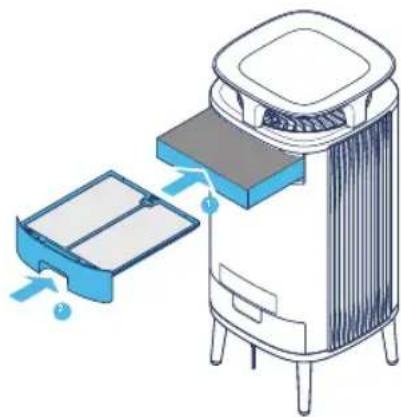
natural_image
Illustration of a portable air conditioner unit with cooling fan and door panel, showing airflow direction (no text or symbols)Korak 5
natural_image
Illustration of a portable air purifier with blue filter units and airflow indicators (no text or symbols)Korak 7
natural_image
Illustration of a blue electrical plug inserted into a wall socket with an arrow indicating direction (no text or symbols)Korak 6
Ponovo postavite glavni filter u uređaj i zatvorite držač filtera.
natural_image
Illustration of a portable air purifier with blue insulation panels and a side-mounted rack (no text or symbols)Korak 8
natural_image
Hand icon showing a finger pressing a button with a power symbol (no text or labels)natural_image
Five horizontal color bars in red, orange, yellow, green, cyan, and white (no text or symbols)Veoma zagađen
Blago zagađen
Srednji
Dobar
Odličan
Korak 2
Otvorite gornji držač filtera i izvucite predfilter.
natural_image
Illustration of a portable air conditioner unit with blue handle and cooling fan (no text or symbols)Korak 3
natural_image
Illustration of a portable kitchen appliance with a drawer and top shelf (no text or symbols)Korak 5
Ponovite korake od 1 do 4 i za donji predfilter.
Korak 4
Ponovo postavite predfilter u uređaj i zatvorite držač filtera.
natural_image
Illustration of a portable air conditioner unit with a blue handle and cooling fan (no text or symbols)Korak 6
Ukopčajte uređaj.
natural_image
Illustration of a blue electrical plug inserted into a wall socket with a cable (no text or symbols)Zamena glavnih filtera
natural_image
Illustration of a multi-tiered appliance with blue and gray compartments, showing airflow direction (no text or symbols)Korak 3
Uklonite i odložite dotrajale glavne filtere.
natural_image
Illustration of a portable kitchen appliance with two blue filter panels and a paper bed, alongside its exterior view (no text or symbols)Korak 5
natural_image
Illustration of a portable air purifier with blue and white casing, showing airflow direction arrows (no text or symbols)Korak 4
Napomena! Pre korišćenja uklonite zaštitnu plastičnu ambalažu sa novih filtera.
Postavite nove glavne filtere.
natural_image
Illustration of a modular appliance with blue compartments and a top-mounted unit (no text or symbols)Korak 6
Ukopčajte uređaj.
Napomena! Držite pritisnutim taster za brzinu protoka vazduha u trajanju od 15 sekundi da biste poništili stanje tajmera za zamenu filtera.
natural_image
Illustration of a blue electrical plug inserted into a wall socket with a cable, showing an upward arrow (no text or symbols)Nega i održavanje
Opšte stavke
Korak 2
Uklonite poklopac za senzor.
natural_image
Line drawing of a four-legged appliance with lid and side legs (no text or symbols)Korak 3
natural_image
Technical line drawing of a mechanical device with a circular housing and internal components (no text or symbols)Korak 4
Ukopčajte uređaj.
natural_image
Illustration of a blue electrical plug inserted into a wall socket with a cable, showing a directional arrow (no text or symbols)Odlaganje i recikliranje
Ovaj prečistač vazduha treba da se reciklira kao elektronski otpad, dok se filter reciklira kao plastika. Ukoliko imate bilo kakvih pitanja u vezi sa odlaganjem i recikliranjem ovog prečistača vazduha, obratite se lokalnim postrojenjima za recikliranje ili prodavcu Blueair proizvoda i informišite se o pravilnom načinu za recikliranje.
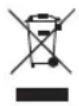
Simbol precrtane korpe za otpatke na uređaju ili njegovom pakovanju označava da se uređaj na kraju njegovog radnog veka odlaže zasebno od komunalnog otpada.
Pomoć i podrška
Ukoliko imate bilo kakvih pitanja o proizvodu, posetite veb-adresu www.blueair.com ili kontaktirajte prodavca Blueair proizvoda.
Posetite veb-adresu www.blueair.com/customer-support da biste stupili u kontakt sa korisničkom podrškom kompanije Blueair.
Informacije o garanciji
Ograničena garancija kompanije Blueair je važeća samo kada je prečistač vazduha postavljen, korišćen i održavan u skladu sa uputstvima navedenim u ovom priručniku
Uslove garancije možete da pročitate na veb-adresiwww.blueair.com/warranty
flowchart
graph TD
    A["Top Panel"] --> B["Bottom Panel"]
    B --> C["Component G"]
    B --> D["Component H"]
    D --> E["Component I"]
A Kontrol paneli G Ana filtreler
natural_image
Technical line drawing of a cylindrical industrial component with heat dissipation fins and mounting flanges (no text or symbols)3. Adim
natural_image
Diagram of a cylindrical air conditioner unit with blue indicator lights and internal cooling fan (no text or symbols)4. Adim
natural_image
Illustration of a portable air conditioner unit with a blue tray and airflow arrows indicating process (no text or symbols)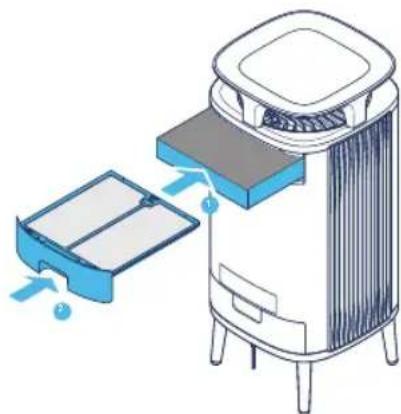
natural_image
Illustration of a portable air conditioner unit with cooling fins and a separate drawer, showing airflow direction (no text or symbols)5. Adim
natural_image
Illustration of a portable air purifier with blue filter units and airflow indicators (no text or symbols)7. Adim
natural_image
Illustration of a portable air conditioner unit with blue insulation and a side panel, showing internal components (no text or symbols)8. Adim
natural_image
Illustration of a blue electrical plug inserted into a wall socket with an arrow indicating direction (no text or symbols)
natural_image
Hand icon showing a finger pressing a button with a power symbol (no text or labels)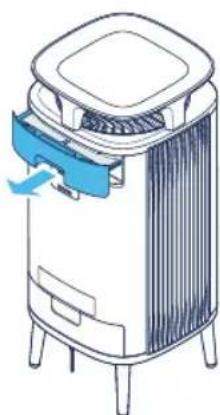
natural_image
Illustration of a portable air conditioner unit with blue airflow arrow (no text or symbols)3. Adim
natural_image
Illustration of a portable kitchen appliance with a drawer and top shelf (no text or symbols)5. Adim
natural_image
Illustration of a portable air conditioner unit with blue airflow arrow (no text or symbols)6. Adim
Üniteyi fişe takın.
natural_image
Illustration of a blue electrical plug inserted into a wall socket with a cable (no text or symbols)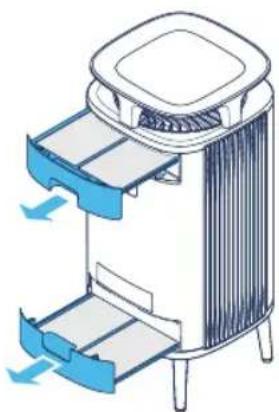
natural_image
Illustration of a multi-tiered appliance with blue and gray compartments, showing airflow or movement arrows (no text or symbols)3. Adim
natural_image
Illustration of a portable air conditioner unit with two blue filter panels and a paper stack, alongside a separate paper stack with a trash bin (no text or symbols)5. Adim
natural_image
Illustration of a portable air conditioner unit with blue airflow indicators (no text or symbols)4. Adim
natural_image
Illustration of a modular appliance with blue compartments and a top-mounted unit (no text or symbols)6. Adim
Üniteyi fişe takın.
natural_image
Illustration of a blue electrical plug inserted into a wall socket with an arrow indicating power flow (no text or symbols)Bakım ve onarım
Genel
natural_image
Line drawing of a portable air conditioner unit with lid and base (no text or symbols)3. Adim
natural_image
Technical line drawing of a mechanical device with a circular housing and internal components (no text or symbols)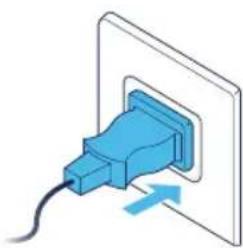
natural_image
Illustration of a blue electrical plug inserted into a wall socket with a cable, showing a directional arrow (no text or symbols)natural_image
Technical line drawing of a cylindrical industrial or electrical component with internal heat dissipation zones (no text or symbols)Steg 3
natural_image
Illustration of a portable air conditioner unit with cooling fins and a blue tray, showing airflow direction (no text or symbols)Steg 2
natural_image
Diagram of a cylindrical device with blue arrows indicating airflow or movement, showing internal components (no text or symbols)Steg 4
natural_image
Illustration of a portable air conditioner unit with cooling mechanism and airflow indicators (no text or symbols)Steg 5
natural_image
Illustration of a portable air purifier with cooling unit and blue heat exchanger (no text or symbols)Steg 7
natural_image
Illustration of a portable air purifier with blue insulation and a side panel, showing internal components (no text or symbols)Steg 8
natural_image
Illustration of a blue electrical plug inserted into a wall socket with an arrow indicating direction (no text or symbols)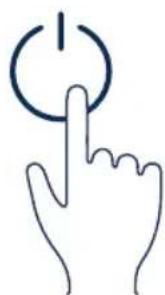
natural_image
Hand icon showing a finger pressing a button with a power symbol (no text or labels)natural_image
Five horizontal color bars in red, orange, yellow, green, cyan, and white (no text or symbols)Mycket förorenad
Något förorenad
Måttlig
Bra
Utmärkt
Uppgift saknas
natural_image
Illustration of a portable air conditioner unit with blue airflow arrow (no text or symbols)Steg 3
natural_image
Illustration of a portable kitchen appliance with a drawer and top shelf (no text or symbols)Steg 5
natural_image
Illustration of a portable air conditioner unit with blue airflow arrow (no text or symbols)Steg 6
Koppla in enheten.
natural_image
Illustration of a blue electrical plug inserted into a wall socket with a cable, showing a directional arrow (no text or symbols)Byta huvudfilter
natural_image
Illustration of a multi-tiered appliance with blue and gray compartments, showing airflow direction (no text or symbols)Steg 3
natural_image
Illustration of a portable air conditioner unit with two blue filter panels and a paper stack, alongside a separate paper stack with a trash bin (no text or symbols)Steg 5
natural_image
Illustration of a portable air conditioner unit with blue airflow indicators (no text or symbols)Steg 4
natural_image
Illustration of a modular appliance with blue compartments and a top-mounted unit (no text or symbols)Steg 6
Koppla in enheten.
natural_image
Illustration of a blue electrical plug inserted into a wall socket with a cable, showing an upward arrow (no text or symbols)Steg 2
Ta bort locket som täcker sensorn.
natural_image
Line drawing of a four-legged appliance with lid and side legs (no text or symbols)Steg 3
natural_image
Technical line drawing of a mechanical device with a circular housing and internal components (no text or symbols)Steg 4
Koppla in enheten.
natural_image
Illustration of a blue electrical plug inserted into a wall socket with a cable, showing a directional arrow (no text or symbols)www.blueair.com/customer-support
Innhold
DustMagnet ^TM 204
A Kontrollpanel G Hovedfiltre
natural_image
Technical line drawing of a cylindrical industrial fan or heater with heat dissipation fins (no text or symbols)Trinn 3
Åpne den øverste filterluken, trekk ut hovedfilteret og fjern den beskyttende plastinnpakningen.
natural_image
Illustration of a portable air conditioner unit with cooling fins and a blue tray, showing airflow direction (no text or symbols)Trinn 2
Fest de fire bena på enheten ved å skru dem på.
natural_image
Diagram of a cylindrical device with blue arrows indicating airflow or movement, showing internal components (no text or symbols)Trinn 4
natural_image
Illustration of a portable air conditioner unit with cooling system and airflow direction arrows (no text or symbols)Trinn 5
Åpne den nederste filterluken, trekk ut hovedfilteret og fjern den beskyttende plastinnpakningen.
natural_image
Illustration of a portable air purifier with a side panel and cooling unit, showing airflow direction (no text or symbols)Trinn 7
natural_image
Illustration of a portable air purifier with blue insulation and a side-mounted drain, showing internal components and airflow paths (no text or symbols)Trinn 8
natural_image
Illustration of a blue electrical plug inserted into a wall socket with a cable, showing a directional arrow (no text or symbols)
natural_image
Hand icon showing a finger pressing a button with a power symbol (no text or labels)natural_image
Five horizontal color bars in red, orange, yellow, green, cyan, and white (no text or symbols)Svært forurenset
Noe forurenset
Moderat
Bra
Utmerket
natural_image
Illustration of a portable air conditioner unit with blue airflow arrow (no text or symbols)Trinn 3
natural_image
Illustration of a portable kitchen appliance with a drawer and top shelf (no text or symbols)Trinn 5
natural_image
Illustration of a portable air conditioner unit with blue airflow arrow (no text or symbols)Trinn 6
Sett inn støpselet.
natural_image
Illustration of a blue electrical plug inserted into a wall socket with a cable (no text or symbols)Bytte hovedfiltrene
natural_image
Illustration of a multi-tiered appliance with blue and gray compartments, showing airflow direction (no text or symbols)Trinn 3
Ta ut og kast de gamle hovedfiltrene.
natural_image
Illustration of a portable air conditioner unit with two blue filter panels and a separate paper holder (no text or symbols)Trinn 5
Lukk de to filterlukene.
natural_image
Illustration of a portable air conditioner unit with blue airflow arrows indicating airflow direction (no text or symbols)Trinn 4
natural_image
Illustration of a modular appliance with blue compartments and a cylindrical top unit (no text or symbols)Trinn 6
Sett inn støpselet.
natural_image
Illustration of a blue electrical plug inserted into a wall socket with a cable, showing an upward arrow (no text or symbols)Trinn 3
natural_image
Technical line drawing of a mechanical device with a circular housing and internal components (no text or symbols)Trinn 2
natural_image
Line drawing of a four-legged appliance with lid and side legs (no text or symbols)Trinn 4
Sett inn støpselet.
natural_image
Illustration of a blue electrical plug inserted into a wall socket with a cable, showing a directional arrow (no text or symbols)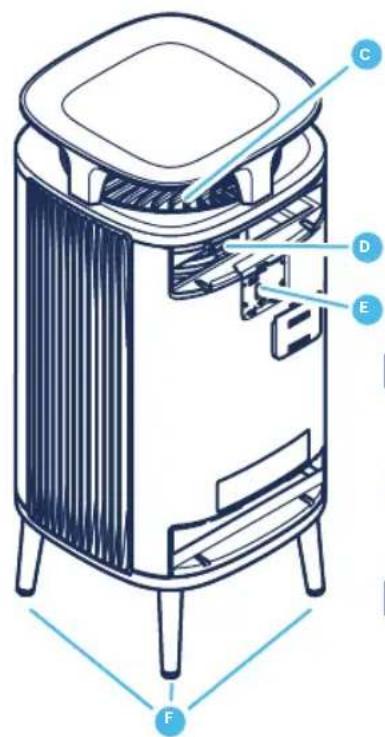
flowchart
graph TD
    A["Top Panel"] --> B["Bottom Panel"]
    B --> C["Top Panel"]
    C --> D["Bottom Panel"]
    D --> E["Top Panel"]
    style A fill:#f9f,stroke:#333
    style B fill:#ccf,stroke:#333
    style C fill:#cfc,stroke:#333
    style D fill:#fcc,stroke:#333
    style E fill:#cff,stroke:#333
natural_image
Technical line drawing of a cylindrical industrial or electrical component with internal heat dissipation zones (no text or symbols)Vaihe 3
natural_image
Illustration of a portable air conditioner unit with cooling fins and a blue tray, showing airflow direction (no text or symbols)Vaihe 2
natural_image
Diagram of a cylindrical device with blue arrows indicating airflow or movement, showing internal components (no text or symbols)Vaihe 4
natural_image
Illustration of a portable air conditioner unit with cooling system and airflow direction arrows (no text or symbols)Vaihe 5
natural_image
Illustration of a portable air purifier with a side-mounted base and blue vent, showing internal components and airflow direction (no text or symbols)Vaihe 7
natural_image
Illustration of a portable air purifier with blue insulation and a side panel, showing internal components and airflow direction (no text or symbols)Vaihe 8
natural_image
Illustration of a blue electrical plug inserted into a wall socket with a cable, showing an upward arrow (no text or symbols)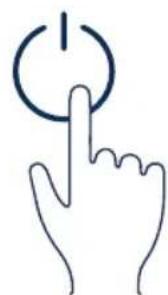
natural_image
Hand icon with a finger pressing a button to the left, symbolizing press or navigation (no text or symbols present)natural_image
Five horizontal color bars in red, orange, yellow, green, blue, and white (no text or symbols)Erittäin huono
Heikko
Kohtuullinen
Hyvä
Erinomainen
natural_image
Illustration of a portable air conditioner unit with blue handle and cooling fan (no text or symbols)Vaihe 3
natural_image
Illustration of a portable kitchen appliance with a drawer and top shelf (no text or symbols)Vaihe 5
natural_image
Illustration of a portable air conditioner unit with a blue handle and cooling fan (no text or symbols)Vaihe 6
natural_image
Illustration of a blue electrical plug inserted into a wall socket with a cable (no text or symbols)Vaihe 2
Avaa molemmat suodatinluukut.
natural_image
Illustration of a multi-tiered appliance with blue and gray compartments, showing airflow direction (no text or symbols)Vaihe 3
natural_image
Illustration of a portable air conditioner unit with two blue filter panels and a paper stack, alongside a separate paper stack with a trash bin (no text or symbols)Vaihe 5
Sulje molemmat suodatinluukut.
natural_image
Illustration of a portable air conditioner unit with blue airflow arrows indicating airflow direction (no text or symbols)Vaihe 4
natural_image
Illustration of a modular appliance with blue compartments and a top-mounted unit (no text or symbols)Vaihe 6
natural_image
Illustration of a blue electrical plug inserted into a wall socket with an arrow indicating power flow (no text or symbols)Hoito ja huolto
Yleisohjeet
Vaihe 3
natural_image
Technical line drawing of a mechanical device with a circular housing and internal components (no text or symbols)Vaihe 2
natural_image
Line drawing of a four-legged appliance with lid and side legs (no text or symbols)Vaihe 4
natural_image
Illustration of a blue electrical plug inserted into a wall socket with a cable, showing a directional arrow (no text or symbols)natural_image
Line drawing of a portable air purifier with labeled parts A and B (no text or symbols on the device itself)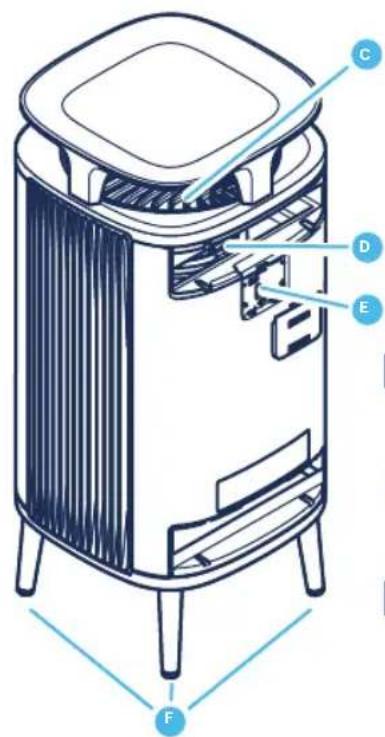
natural_image
Technical line drawing of a cylindrical industrial or electrical component with internal heat dissipation zones (no text or symbols)Trin 3
natural_image
Illustration of a smart air conditioner unit with a blue tray and airflow arrows indicating process (no text or symbols)Trin 2
natural_image
Diagram of a cylindrical device with blue arrows indicating airflow or movement, showing internal components (no text or symbols)Trin 4
natural_image
Illustration of a portable air conditioner unit with cooling panel and fan, showing airflow direction (no text or symbols)Trin 5
natural_image
Illustration of a portable air purifier with blue filter units and airflow indicators (no text or symbols)Trin 7
natural_image
Illustration of a blue electrical plug inserted into a wall socket with an arrow indicating direction (no text or symbols)Trin 6
natural_image
Illustration of a portable air purifier with blue insulation and a side panel, showing internal components (no text or symbols)Trin 8
natural_image
Hand icon showing a finger pressing a button with a power symbol (no text or labels)natural_image
Five horizontal color bars in red, orange, yellow, green, blue, and white (no text or symbols)Meget forurenet
Let forurenet
Moderat
God
Fremragende
natural_image
Illustration of a portable air conditioner unit with blue airflow arrow (no text or symbols)Trin 3
natural_image
Illustration of a portable kitchen appliance with a drawer and top shelf (no text or symbols)Trin 5
Gentag trin 1-4 på det nederste forfilter.
Trin 4
natural_image
Illustration of a portable air conditioner unit with a blue handle and cooling fan (no text or symbols)Trin 6
Tilslut luftrenseren.
natural_image
Illustration of a blue electrical plug inserted into a wall socket with a cable (no text or symbols)Udskift hovedfiltrene
natural_image
Illustration of a multi-tiered appliance with blue and gray compartments, showing airflow or movement arrows (no text or symbols)Trin 3
natural_image
Illustration of a portable air conditioner unit with two blue filter panels and a separate paper holder (no text or symbols)Trin 5
Luk de to filterluger.
natural_image
Illustration of a portable air conditioner unit with blue and white casing, showing airflow direction (no text or symbols)Trin 4
natural_image
Illustration of a modular appliance with blue compartments and a cylindrical top unit (no text or symbols)Trin 6
Tilslut luftrenseren.
natural_image
Illustration of a blue electrical plug inserted into a wall socket with a cable, showing an upward arrow (no text or symbols)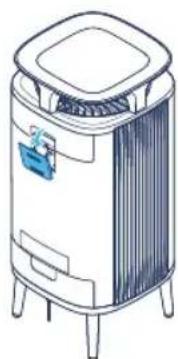
natural_image
Line drawing of a four-legged appliance with lid and side legs (no text or symbols)Trin 3
natural_image
Technical line drawing of a mechanical device with a circular housing and internal components (no text or symbols)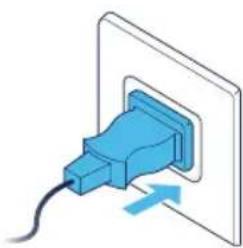
natural_image
Illustration of a blue electrical plug inserted into a wall socket with a cable, showing a directional arrow (no text or symbols)Besøg blueair.com/customer-support for at få personlig support
Garantiinformation
A Panel kendali G Filter utama
B Lubang udara keluar H Pra-filter
C Lubang udara masuk I Pintu filter
D Kipas dan motor
E Sensor kualitas udara
F Kaki
natural_image
Technical line drawing of a cylindrical industrial fan or heater with heat dissipation fins (no text or symbols)Langkah 3
Buka pintu filter atas, tarik filter utama dan lepaskan pembungkus plastik pelindung.
Langkah 2
natural_image
Diagram of a cylindrical air conditioner unit with blue indicator lights and internal cooling fan (no text or symbols)Langkah 4
natural_image
Illustration of a portable air conditioner unit with a blue tray and airflow arrows indicating process (no text or symbols)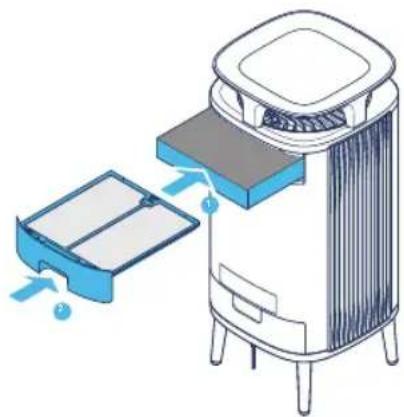
natural_image
Illustration of a portable air conditioner unit with cooling system and airflow direction arrows (no text or symbols)Langkah 5
natural_image
Illustration of a portable air purifier with cooling unit and blue heat exchanger (no text or symbols)Langkah 7
Sambungkan adaptor daya ke stopkontak dinding.
Langkah 6
natural_image
Illustration of a portable air purifier with blue insulation and a side panel, showing internal components and airflow direction (no text or symbols)Langkah 8
natural_image
Illustration of a blue electrical plug inserted into a wall socket with an arrow indicating direction (no text or symbols)
natural_image
Hand icon showing a finger pressing a button with a power symbol (no text or labels)natural_image
Five horizontal color bars in red, orange, yellow, green, cyan, and white (no text or symbols)Sangat Tercemar
Agak Tercemar
Sedang
Bagus
Sangat Baik
Data tidak tersedia
Program langganan filter Blueair
Langkah 2
Buka pintu filter atas dan tarik keluar prafilter.
natural_image
Illustration of a portable air conditioner unit with blue handle and cooling fan (no text or symbols)Langkah 3
natural_image
Line drawing of a portable kitchen appliance with a blue bag and drawer (no text or symbols)Langkah 5
Ulangi langkah 1-4 di pra-filter bawah.
Langkah 4
natural_image
Illustration of a portable air conditioner unit with blue airflow arrow (no text or symbols)Langkah 6
Sambungkan kabel daya unit.
natural_image
Illustration of a blue electrical plug inserted into a wall socket with a cable (no text or symbols)Mengganti filter utama
natural_image
Illustration of a multi-tiered appliance with blue and gray compartments, showing airflow direction (no text or symbols)Langkah 3
Lepas dan buang filter utama lama.
natural_image
Illustration of a portable kitchen appliance with two blue filter panels and a paper bed, alongside its exterior view (no text or symbols)Langkah 5
natural_image
Illustration of a portable air conditioner unit with blue and white casing, showing airflow direction (no text or symbols)Langkah 4
natural_image
Illustration of a modular appliance with blue compartments and a cylindrical top unit (no text or symbols)Langkah 6
Sambungkan kabel daya unit.
natural_image
Illustration of a blue electrical plug inserted into a wall socket with a cable, showing an upward arrow (no text or symbols)Langkah 3
natural_image
Technical line drawing of a mechanical device with a circular housing and internal components (no text or symbols)Langkah 2
natural_image
Line drawing of a four-legged appliance with lid and side legs (no text or symbols)Langkah 4
Sambungkan kabel daya unit.
natural_image
Illustration of a blue electrical plug inserted into a wall socket with a cable, showing a directional arrow (no text or symbols)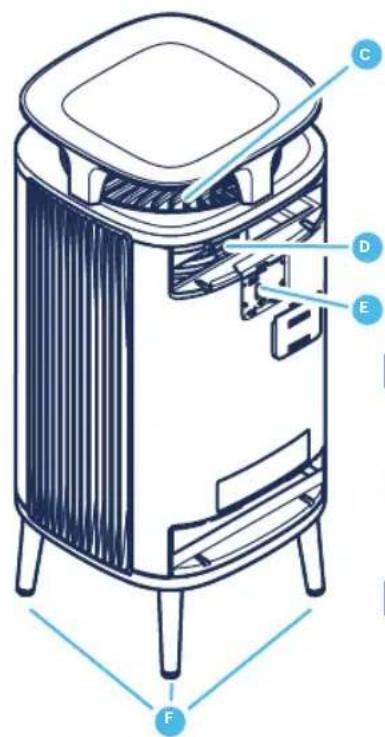
flowchart
graph TD
    A["Top Panel"] --> B["Bottom Panel"]
    B --> C["Component G"]
    B --> D["Component H"]
    D --> E["Component I"]
المرشحات الرئيسية G
المرشحات الأولية H
فتحة المرشح
natural_image
Diagram of a white cylindrical device with blue connectors and ventilation slots, no text or symbols presentnatural_image
Technical line drawing of a cylindrical industrial fan or heater with heat dissipation fins (no text or symbols)natural_image
Illustration of a smart air purifier with airflow arrows indicating process (no text or symbols)
natural_image
Illustration of a portable air conditioner unit with airflow arrows indicating process (no text or symbols)natural_image
Illustration of a portable air purifier with blue insulation and cooling unit (no text or symbols)natural_image
Illustration of a portable air purifier with blue insulation and a side-mounted base, showing airflow direction (no text or symbols)natural_image
Line drawing of a hand pressing a button with a power symbol (no text or labels)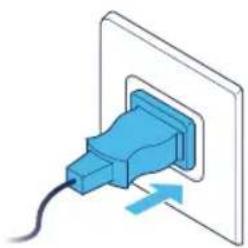
natural_image
Illustration of a blue electrical plug inserted into a wall socket with a cable, showing a directional arrow (no text or symbols)natural_image
Illustration of a portable air conditioner unit with blue handle and cooling fins (no text or symbols)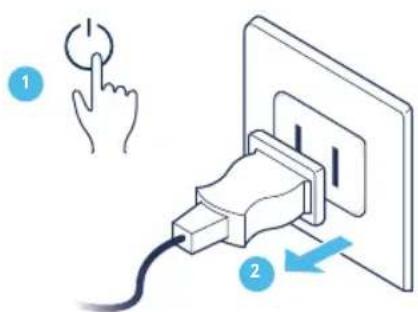
natural_image
Illustration of a portable air conditioner unit with a blue handle and side panel (no text or symbols)natural_image
Line drawing of a portable air conditioner unit with a blue plastic bag inserted, showing internal compartments and top panel (no text or symbols)natural_image
Illustration of a blue electrical plug inserted into a wall socket with a cable (no text or symbols)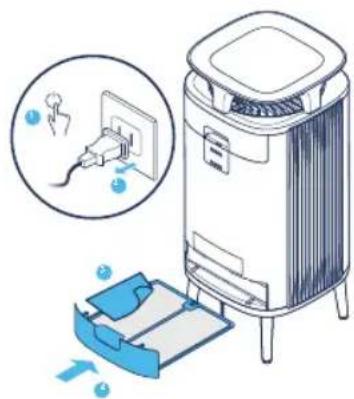
غير المرشح الرئيسي
natural_image
Illustration of a multi-tiered appliance with blue and gray compartments, showing airflow direction (no text or symbols)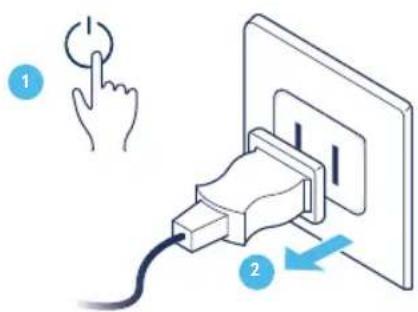
natural_image
Illustration of a smart air conditioner unit with blue plastic compartments and a top-mounted fan (no text or symbols)6 alخطوة
وصل الوحدة.
natural_image
Illustration of a blue electrical plug inserted into a wall socket with a cable, showing an upward arrow (no text or symbols)3 alخطوة
natural_image
Illustration of a portable kitchen appliance with two rectangular plates and a cylindrical drawer, alongside a simple line drawing of its exterior view (no text or symbols present)
5 alخطوة
natural_image
Illustration of a portable air conditioner unit with blue airflow indicators (no text or symbols)الرعية والصيانة
عام
natural_image
Line drawing of a portable air conditioner unit with four legs and a lid (no text or symbols)4 alخطوة
وصل الوحدة.
3 alخطوة
natural_image
Illustration of a blue electrical plug inserted into a white wall socket, with a blue arrow indicating direction (no text or symbols)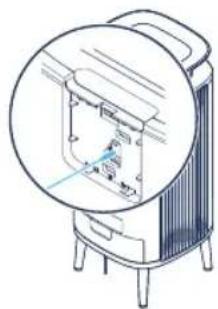
natural_image
Technical line drawing of a mechanical device with internal components and mounting base (no text or symbols)www.blueair.com/customer-support لل九十اصل مع Blueair
معلومات الضمان
Blueair AB Middle East
Jafza One, Office No. AB1503
Jebel Ali Free Zone
P.O. Box No. 263947
Dubai, United Arab Emirates
Tel:+971(4)8821244
salesme@blueair.se
Blueair Inc.
125 S Clark
Suite 2000
Chicago, IL. 60603
USA
Tel: +1 888 258 3247
info@blueair.com
Blueair (Shanghai) Trading Co. Ltd.
Room 1001, City Gateway
No. 398 North Caoxi Road
Xuhui Distr, Shanghai,
China
Tel: 400 006 9693
info@unilever-le.com
Blueair Asia Ltd.
Unit 8C, 8/F, MG Tower,
133 Hoi Bun Road,
Kwun Tong, Kowloon,
Hong Kong
Tel: +852 2345 8988
blueairasia@blueair.se