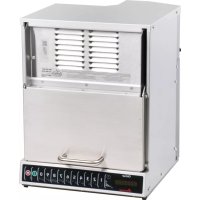
AOC24 - Microwave Oven ACP - Free user manual and instructions
Find the device manual for free AOC24 ACP in PDF.



| Brand | ACP |
| Model | AOC24 |
| Product Type | onCue™ Commercial Microwave Oven |
| Usage | Commercial |
| Programming | Up to 4 cooking stages, one- or two-touch programming, manual time entry |
| Display | Digital screen with cooking time, power level and stage |
| User Options | End-of-cycle beep, speaker volume, keyboard activation window, end-of-cycle message, stop during cycle, maximum cooking time, two-digit operation |
| Grounding | Required with three-prong plug |
| Installation | Built-in or countertop. Minimum clearances: 7" above, 1" sides, 1.25" rear |
| Splatter Grid | Removable, monthly cleaning recommended |
| Cleaning | Mild detergent and damp cloth. Do not use abrasive, ammonia-based, or citrus cleaners |
| Safety | Door lock system, microwave radiation protection, automatic shutdown in case of anomaly |
| Repairability | Repair only by an authorized ACP technician. Part number: 20016004 |
| Customer Service | ComServ Customer Service: 866.426.2621 / 319.368.8195, commercialservice@acpsolutions.com |
| Manual Languages | FR, DE, EN, ES (other languages available upon request) |
| Number of Pages | 48 |
| Additional Functions | OnCue™, stage cooking (up to 4 stages), custom key programming |
| Microwave Power | 0% to 100% (adjustable in 10% increments) |
| Radio Interference | May cause interference. Measures: move devices apart, clean sealing surfaces, use proper antenna |
| Warranty | Contact ComServ Customer Service for warranty details |
Frequently Asked Questions - AOC24 ACP
User questions about AOC24 ACP
0 question about this device. Answer the ones you know or ask your own.
Ask a new question about this device
Download the instructions for your Microwave Oven in PDF format for free! Find your manual AOC24 - ACP and take your electronic device back in hand. On this page are published all the documents necessary for the use of your device. AOC24 by ACP.
USER MANUAL AOC24 ACP
natural_image
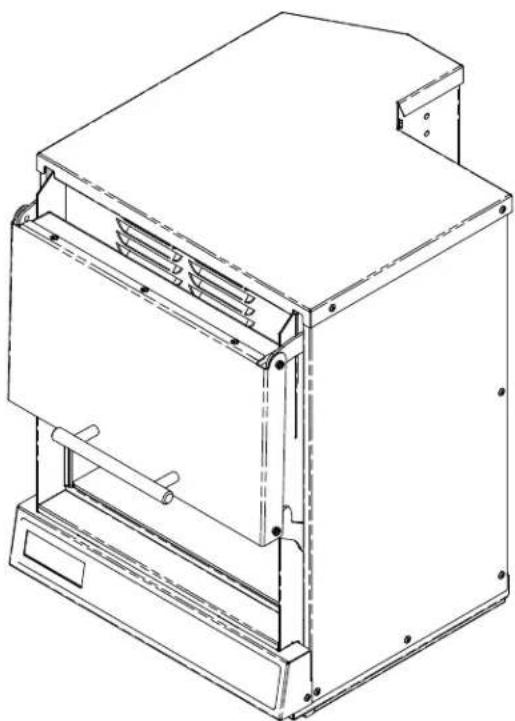
Technical line drawing of a mechanical device with mounting flanges and internal components (no text or symbols)OnCue Commercial Microwave Oven
Keep these instructions for future reference.
If the oven changes ownership, this manual must accompany oven.
Contents
Model Identification 2
PRECAUTIONS TO AVOID POSSIBLE EXPOSURE TO EXCESSIVE MICROWAVE ENERGY....3
IMPORTANT SAFETY INSTRUCTIONS ... 3
Grounding / Earthing Instructions....5 Installation....5
Display and Features 6
Using the Oven Control 8
Programming the Oven Control ..... 9
User Options 10
Care and Cleaning 11
Before Calling for Service 12
When contacting ACP, provide product information. Product information is located on oven serial plate. Record the following information:
Model Number: ____
Manufacturing Number: ____
Serial or S/N Number:
Date of purchase: ____
Dealer's name and address:
Any questions or to locate an authorized service agent contact ACP, Inc. ComServ Customer Service at: Phone 866.426.2621 / 319.368.8195 or email: commercialservice@acpsolutions.com. Warranty service must be performed by an authorized servicer. ACP also recommends contacting an authorized servicer if service is required after warranty expires.
IMPORTANT SAFETY INSTRUCTIONS

Recognize this symbol as a SAFETY message

WARNING
When using electrical equipment, basic safety precautions should be followed to reduce the risk of burns, electrical shock, fire, or injury to persons including the following.
- READ all instructions before using equipment.
- READ AND FOLLOW the specific "PRECAUTIONS TO AVOID POSSIBLE EXPOSURE TO EXCESSIVE MICROWAVE ENERGY" on this page.
- This equipment MUST BE GROUNDED. Connect only to properly GROUNDED outlet. See "GROUNDING / EARTHING INSTRUCTIONS" on page 5.
- Install or locate this equipment ONLY in accordance with the installation instructions in this manual.
- Some products such as whole eggs and sealed containers—for example, closed glass jars—are able to explode and SHOULD NOT be HEATED in this oven.
- Use this equipment ONLY for its intended use as described in this manual. Do not use corrosive chemicals or vapors in this equipment. This type of oven is specifically designed to heat, cook, or dry food. It is not designed for industrial or laboratory use.
- As with any equipment, CLOSE SUPERVISION is necessary when used by CHILDREN.
-
See door cleaning instructions on page 11 of this product safety manual.
-
DO NOT heat baby bottles in oven.
- Baby food jars shall be open when heated and contents stirred or shaken before consumption, in order to avoid burns.
11 DO NOT operate this equipment if it has a damaged cord or plug, if it is not working properly, or if it has been damaged or dropped. - This equipment, including power cord, must be serviced ONLY by qualified service personnel. Special tools are required to service equipment. Contact nearest authorized service facility for examination, repair, or adjustment.
- DO NOT cover or block louvers or other openings on equipment.
- DO NOT store this equipment outdoors. DO NOT use this product near water – for example, near a kitchen sink, in a wet basement, a swimming pool, or a similar location.
- DO NOT immerse cord or plug in water.
- Keep cord AWAY from HEATED surfaces.
- DO NOT let cord hang over edge of table or counter.
- For commercial use only.
PRECAUTIONS TO AVOID POSSIBLE EXPOSURE TO EXCESSIVE MICROWAVE ENERGY
A. DO NOT attempt to operate this oven with the door open since open door operation can result in harmful exposure to microwave energy. It is important not to defeat or tamper with the safety interlocks.
B. DO NOT place any object between the oven front face and the door too allow soil or cleaner residue to accumulate on sealing surfaces.
C. DO NOT operate the oven if it is damaged. It is particularly important that the oven door close properly and that there is no damage to the:
1. door (bent)
2. hinges and latches (broken or loosened)
3. door seals and sealing surfaces.
D. The oven should not be adjusted or repaired by anyone except properly qualified service personnel.
SAVE THESE INSTRUCTIONS
IMPORTANT SAFETY INSTRUCTIONS

WARNING
To avoid risk of fire in the oven cavity:
a. DO NOT overcook food. Carefully attend oven when paper, plastic, or other combustible materials are placed inside the oven to facilitate cooking.
b. Remove wire twist-ties from paper or plastic bags before placing bag in oven.
c. If materials inside the oven ignite, keep oven door CLOSED, turn oven off and disconnect the power cord, or shut off power at the fuse or circuit breaker panel.
d. DO NOT use the cavity for storage. DO NOT leave paper products, cooking utensils, or food in the cavity when not in use.

WARNING
Liquids such as water, coffee, or tea are able to be overheated beyond the boiling point without appearing to be boiling due to surface tension of the liquid. Visible bubbling or boiling when the container is removed from the microwave oven is not always present. THIS COULD RESULT IN VERY HOT LIQUIDS SUDDENLY BOILING OVER WHEN A SPOON OR OTHER UTENSIL IS INSERTED INTO THE LIQUID. To reduce the risk of injury to persons:
i) Do not overheat the liquid.
ii) Stir the liquid both before and halfway through heating it.
iii) Do not use straight-sided containers with narrow necks.
iv) After heating, allow the container to stand in the microwave oven for a short time before removing the container.
v) Use extreme care when inserting a spoon or other utensil into the container.

CAUTION
To avoid personal injury or property damage, observe the following:
- Do not deep fat fry in oven. Fat could overheat and be hazardous to handle.
- Do not cook or reheat eggs in shell or with an unbroken yolk using microwave energy. Pressure may build up and erupt. Pierce yolk with fork or knife before cooking.
- Pierce skin of potatoes, tomatoes, and similar foods before cooking with microwave energy. When skin is pierced, steam escapes evenly.
- Do not operate equipment without load or food in oven cavity.
- Microwave popcorn should not be popped in oven.
- Do not use regular cooking thermometers in oven. Most cooking thermometers contain mercury and may cause an electrical arc, malfunction, or damage to oven.
- Do not use metal utensils in oven.
-
Do not use aluminum foil in oven
-
Never use paper, plastic, or other combustible materials that are not intended for cooking.
- When cooking with paper, plastic, or other combustible materials, follow manufacturer's recommendations on product use.
- Do not use paper towels which contain nylon or other synthetic fibers. Heated synthetics could melt and cause paper to ignite.
- Do not heat sealed containers or plastic bags in oven. Food or liquid could expand quickly and cause container or bag to break. Pierce or open container or bag before heating.
- To avoid pacemaker malfunction, consult physician or pacemaker manufacturer about effects of microwave energy on pacemaker.
- An authorized servicer MUST inspect equipment annually. Record all inspections and repairs for future use.
SAVE THESE INSTRUCTIONS
Unpacking Oven
- Inspect oven for damage such as dents in door or inside oven cavity.
- Report any dents or breakage to source of purchase immediately. Do not attempt to use oven if damaged.
- Remove all materials from oven interior.
- If oven has been stored in extremely cold area, wait a few hours before connecting power.
Radio Interference
Microwave operation may cause interference to radio, television, or a similar oven. Reduce or eliminate interference by doing the following:
- Clean door and sealing surfaces of oven according to instructions in Care and Cleaning section.
- Place radio, television, etc. as far as possible from oven.
- Use a properly installed antenna on radio, television, etc. to obtain stronger signal reception.
Oven Placement
- Do not install oven next to or above source of heat, such as pizza oven or deep fat fryer. This could cause microwave oven to operate improperly and could shorten life of electrical parts.
- Do not block or obstruct oven louvers.
- Oven may be stacked.
• Install oven on level countertop surface or overshelf. - If provided, place warning label in a conspicuous place close to microwave oven.
- Outlet should be located so that plug is accessible when oven is in place.
For Enclosed Installation
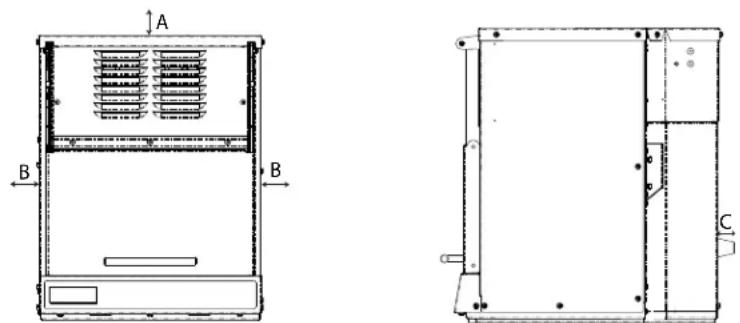
A—Allow at least 7" (17.78 cm) of clearance around top. Proper air flow around oven cools electrical components. With restricted air flow, oven may not operate properly and life of electrical parts is reduced.
B—Allow at least 1" (2.54 cm) on sides of oven.
C—Allow at least 1 1/4" (3.18 cm) between air discharge on back of oven and back wall.
Note: Back to back installation allows correct clearance.
Oven Clearances
(Export Only)
The switching operation of this microwave oven can cause voltage fluctuations on the supply line. The operation of this oven under unfavorable voltage supply conditions can have adverse effects. This device is intended for the connection to a power supply system with a maximum permissible system impedance Zmax of 0.31 Ohm at the interface point of the user's supply. The user has to ensure that this device is connected only to a power supply system which fulfills the requirement above. If necessary, the user can ask the public power supply company for the system impedance at the
Grounding Instructions

WARNING
To avoid risk of electrical shock or death, this oven must be grounded.

WARNING
To avoid risk of electrical shock or death, do not alter the plug.
Oven MUST be grounded.
Grounding reduces risk of electric shock by providing an escape wire for the electric current, if an electrical short occurs. This oven is equipped with a cord having a ground wire with a grounding plug. The plug must be plugged into an outlet that is properly installed and grounded.

WARNING
Improper use of the grounding can result in a risk of electric shock.
Consult a qualified electrician or servicer if grounding instructions are not completely understood, or if doubt exists as to whether the oven is properly grounded.
Do not use an extension cord.
If the product power cord is too short, have a qualified electrician install a three-slot receptacle. This oven should be plugged into a separate circuit with the electrical rating as provided in product specifications (available on acpsolutions.com). When a microwave oven is on a circuit with other equipment, an increase in cooking times may be required and fuses can be blown.
External Equipotential
Earthing Terminal (export only)
Equipment has secondary earthing terminal. Terminal provides external earthing connection used in addition to earthing prong on plug. Located on outside of oven back, terminal is marked with symbol shown below.

flowchart
graph LR
    A["OnCue"] --> B["Time Entry"]
    B --> C["Power Level"]
    C --> D["Start Stop"]
    D --> E["1"]
    E --> F["2"]
    F --> G["3"]
    G --> H["4"]
    H --> I["5"]
    I --> J["6"]
    J --> K["7"]
    K --> L["8"]
    L --> M["9"]
    M --> N["0"]
    N --> O["1"]
Start Pad

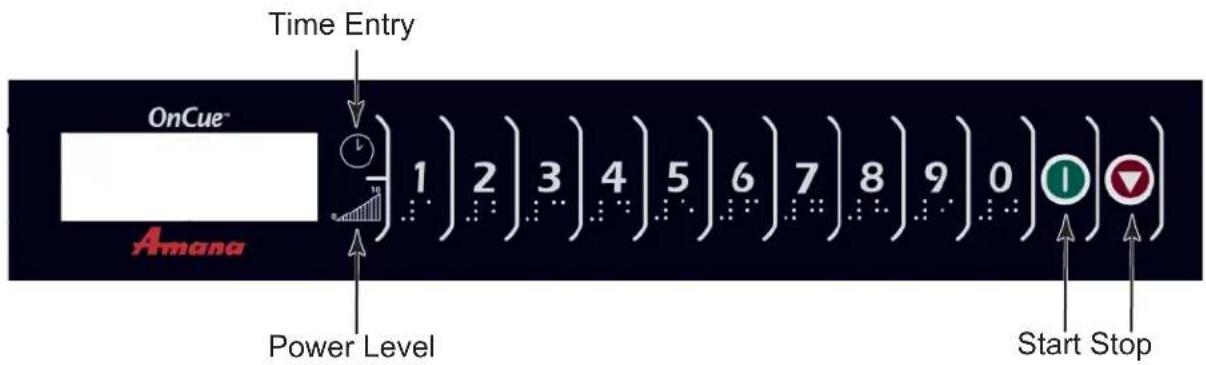
The start pad is used to begin a manual time entry cooking cycle. It is also used to save any changes to programming sequences or user options.
STOP Pad

The STOP pad stops a cooking sequence in progress, and also ends a programming or user option cycle. When the STOP pad is used to end a programming or option change, the changes are discarded. The STOP pad can also be used to open the door after it has been closed.
Single Pad Programming
This feature enables each numbered pad to be programmed for a specific use, such as cooking a certain number of potatoes or defrosting and then cooking vegetables or other frozen foods. To use this feature, simply program the pad to the desired length of time and power level. To use this feature, press the pad once and the microwave will begin cooking.
Double Pad Programming
This feature enables 100 programmed entries to be made. Each entry will be assigned a double digit number, for example 01, 05, or 20. When using the double pad programming, two pads must be pressed to start the cooking cycle.
Manual Time Entry
In addition to programmable pads, this microwave also accepts specific time entry by using the TIME ENTRY 📋. Using manual time entry does not affect the programmed buttons.
Stage Cooking
Stage cooking is a cooking sequence with specific power stage changes. The user can program up to four different power level changes and the specific amount of cooking time at each power level. Each power level/cooking time combination is known as a stage. Up to four stages can be programmed.
User Options
This microwave can be set for specific user preferences. Options such as beep volume, maximum cooking time, and the number of programmable pads can be changed. To change different options, see User Options in this manual.
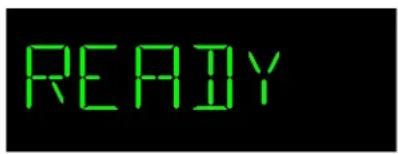
Appears after closing the door. Oven is ready to accept entries
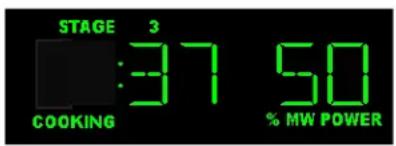
Example of display when cooking at variable power.

Example of display when cooking at full power.

natural_image
Two green dots aligned vertically on a black background (no text or symbols)Display when oven sitting idle.
Cooking Display
| DISPLAYS DESCRIPTION | |
| 00:00 | Displays cooking time. If stage cooking is programmed, total cooking time displays. |
| 50% MW POWER | 50% MW POWER displays the current microwave power level.100% is the highest setting, and 0% is the lowest. (example of 50 microwave power shown) |
| STAGE 1, 2, 3, or 4 | STAGE 1 displays to show the stage number (1 through 4) the oven is at in the cooking cycle. |
Interrupting Operation
Press STOP pad to interrupt or stop operation.
Canceling Mistakes
• If oven is not cooking, press
STOP

to clear display.
• If oven is cooking, press
STOP

once to stop
oven.
Manual Operation
To cook food using a specific entered time and power level.
- Place food in oven. Close door.
- Press TIME ENTRY prep and enter cooking time.
- Press POWER LEVEL pre-to program level of microwave power if less than 100% is desired.
- For a lower microwave power, press pads 1 (for 10% ), through 9 (for 90% ), or 0 for no microwave energy.
- Press START pad.
- At end of cooking cycle oven door opens.
- Remove food from oven. Door remains open and ready for next item to cook.
Open Door
- Press STOP pad to open door.
Preprogrammed Pads
To cook food using preprogrammed cooking sequences.
- Place food in oven. Close door.
- Press desired pad.
- Oven begins to cook.
- At end of cooking cycle oven door opens
Factory Settings
| Pad Time | Pad Time |
| 1 | 5 sec. 6 |
| 2 | 10 sec. 7 |
| 3 | 15 sec. 8 |
| 4 | 20 sec. 9 |
| 5 | 25 sec. 0 |
| 30 sec. | |
| 35 sec. | |
| 40 sec. | |
| 45 sec. | |
| 60 sec. |
"Factory program times may vary on certain models"
Programming Items
-
Press and hold pad 1 for approximately 5 seconds.
-
Press pad to be reprogrammed.
-
Enter cooking time by using the number pads.
-
Press POWER LEVEL will to program level of microwave power if desired.
- For a lower microwave power, press pads 1 (for 10% ), through 9 (for 90% ), or 0 for no microwave energy.
NOTE: Press POWER LEVEL twice to return to 100% microwave power.
-
Press TIME ENTRY to add up to four additional cooking stages.
-
Maximum cooking time cannot exceed 10 minutes per user options.
- Total cooking time factory setting is 5 minutes.
-
Enter cook time and power level as in steps 4 and 5.
-
Press START pad to set new programming changes to the pad.
NOTE: To discard changes, press STOP pad or close oven door.
- Press STOP to exit programming mode.
Didn't like an option?
Factory settings are marked in bold. To change the oven back to the factory setting, simply select the option that is marked in bold.
Changing user options
Changing user options
Options such as single or double pad programming and beep volume can be changed to suit individual preferences.
To change options:
- Press and hold pad 2 for approximately 5 seconds.
- Option appears in display.
- Oven is now in options mode.
- Press number pad that controls option to be changed.
• See table below for options.
- Current option will display.
- Press number pad again to change the option.
• Each time pad is pressed, option will change.
- Match code displayed with code for desired option, then press the START pad.

• Changes take affect after the start pad is pressed.
• To change additional options, repeat steps 3 and 4.
- Press START

to return to Options.
- Press STOP

Numbered Pads Display Options (Factory Settings in Bold)
| 1End of Cycle Beep | OP:10 | 3 second continuous beep. |
| OP:11 | 5 second beeps once. | |
| OP:12 | Continuous beep until done disappears. | |
| OP:13 | Repeating 5 beeps bursts until door is opened. | |
| OP:14 | Continuous beep until stop pad is pressed or door is cycled. | |
| OP:15 | Repeating 5 beeps burst until stop pad is pressed or door is cycled. | |
| OP:16 | No beep. | |
| 2Speaker Volume | OP:20 | Eliminates beep. |
| OP:21 | Sets volume to low. | |
| OP:22 | Sets volume to medium. | |
| OP:23 | Sets volume to high. | |
| 3Key Beep | OP:30 | Prevents beep when pad is pressed. |
| OP:31 | Allows beep when pad is pressed. | |
| 4Keyboard Enable Window | OP:40 | 15 seconds after oven door is closed, keyboard disabled. |
| OP:41 | 30 seconds after oven door is closed, keyboard disabled. | |
| OP:42 | 1 minute after oven door is closed, keyboard disabled. | |
| OP:43 | 2 minutes after oven door is closed, keyboard disabled. | |
| 5End of Cycle Message Time | OP:50 | 10 seconds |
| OP:51 | 20 seconds | |
| OP:52 | 30 seconds | |
| OP:53 | 40 seconds | |
| OP:55 | 60 seconds | |
| OP:56 | 1 minute 10 seconds | |
| OP:57 | 1 minute 20 seconds | |
| OP:58 | 1 minute 30 seconds | |
| OP:59 | 1 minute 40 seconds | |
| 6Stop during cooking cycle | OP:60 | Pressing stop clears information, opens door. |
| OP:61 | Pressing stop pauses oven with door closed. | |
| OP:62 | Pressing stop pauses oven with door open. | |
| 7Maximum Cook Time Entry | OP:70 | Allows 5 minutes of heating time. |
| OP:71 | Allows 10 minutes of heating time. | |
| 8Time Entry | OP:80 | Allows use of preprogrammed pads only. |
| OP:81 | Allows use of manual time entry and preprogrammed pads. | |
| 9Double Digit Operation | OP:90 | Allows 10 (0-9) preprogrammed pads. |
| OP:91 | Allows 100 (00-99) preprogrammed pads. | |
| 0ON-THE-FLY Cooking | OP:00 | Disables ON-THE-FLY Cooking. |
| OP:01 | Allows ON-THE-FLY Cooking. |

WARNING
To avoid electrical shock which can cause severe personal injury or death, unplug power cord or open circuit breaker to oven before cleaning.
Care and Cleaning
Clean interior and exterior of microwave oven with mild detergent and damp soft sponge or cloth. Wring cloth or sponge to remove excess water before wiping equipment.
Splatter Shield (Clean Monthly)
- Unplug the oven.
- Place fingers behind the shield, pull forward and then down. Do not bend antenna.
- Clean soil from shield with damp cloth or clean with mild detergent and water.
Note: Do not run oven without splatter shield.
Interior Door (Clean Daily)
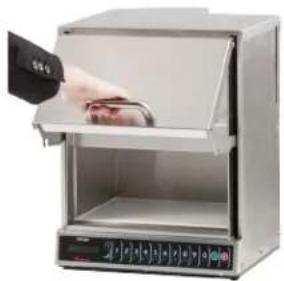
- To clean interior door, gently pull out on door until door opens at a 90-degree angle.
natural_image
Interior view of a laboratory appliance with a hand inserting a sample into the lid (no visible text or symbols)- Wipe the underside of door and inside door arms with a damp cloth. Wipe dry.
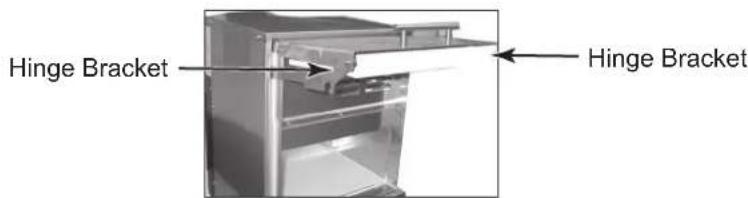
Glide Strips (Clean Monthly)
- Unplug the oven.
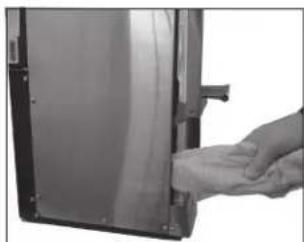
- Clean in between door arms and side of cavity with a cloth (Do not use paper towels) on the end of a non metallic spatula with mild detergent or degreaser, cleaning the glide strips on both sides of the cavity.
- Clean end of each hinge bracket under the front of the door.
natural_image
Close-up of a hand pressing down on a metallic door panel (no text or symbols visible)- Place door back in ready position by gently pushing downward.
Important:
-Do not use abrasive cleaners or cleaners containing ammonia or citrus.
- Never pour water into microwave oven bottom.
-Do not use water pressure type cleaning systems.

WARNING
To avoid electrical shock which can cause severe personal injury or death, do not remove outer case at any time. Only an authorized servicer should remove outer case.
Symptom Possible Cause
| Oven does not operate. | Confirm oven is plugged into dedicated circuit. Confirm oven is on grounded and polarized circuit. (Contact electrician to confirm) Check fuse or circuit breaker. |
| Oven operates intermittently. | Check air louvers and discharge areas for obstructions. |
| If oven does not accept entries when pad is pressed. | Make sure oven is on. Open and close oven door. Press pad again. |
| Oven operates but does not heat food. | Place one cup of water in oven. Run for 30 seconds at full power (100%). If temperature does not rise, oven is not operating correctly. Contact authorized ACP servicer. |
| Call Service in display | Unplug oven, wait for 1 minute, and plug in oven. • Disconnecting electrical supply may eliminate Call Service. If failure continues, contact an authorized ACP servicer. |
| If oven door opens slowly | Clean glide strips (see care and cleaning section). |
Troubleshooting Tips
If the door does not open after a cooking cycle. Press the stop button. If door still does not open, press stop again. If door still remains closed, gently pull door forward to open manually. If this continues to be an issue, please contact service.
If door does not latch, call service.
International Only An authorized servicer MUST inspect equipment annually. Record all inspections and repair for future reference.
natural_image
Technical line drawing of a mechanical device with mounting brackets and internal components (no text or symbols)natural_image
Pure technical line drawing of a mechanical assembly without any text, numbers, or symbolsnatural_image
Two green dots aligned vertically on a black background (no text or symbols)natural_image
Hand placing a tray into a stainless steel appliance with digital display (no visible text or symbols)natural_image
Interior view of a refrigerator with open door and side panel (no visible text or symbols)Patins (nettoyage mensuel)
natural_image
Close-up of a hand cleaning or cleaning a metal electronic device (no visible text or symbols)Cedar Rapids, Iowa 52404
Benutzerhandbuch
natural_image
Technical line drawing of a mechanical device with mounting brackets and internal components (no text or symbols)Gewerbliches
natural_image
Pure technical line drawing of a rectangular frame with internal components and mounting holes (no text or symbols)natural_image
Two green dots aligned vertically on a black background (no text or symbols)natural_image
Hand placing a tray into a stainless steel appliance with open lid (no visible text or symbols)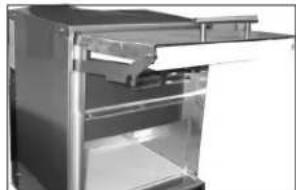
natural_image
Interior view of a stainless steel refrigerator with open door and shelf (no visible text or symbols)natural_image
Hand cleaning a black electronic device with a cloth (no visible text or symbols)Wichtig:
Cedar Rapids, Iowa 52404