
IZ420EUT - Vacuum Cleaner SHARK - Free user manual and instructions
Find the device manual for free IZ420EUT SHARK in PDF.



| Product Type | Cordless Stick Vacuum |
| Brand | Shark |
| Model | IZ420EUT |
| Voltage | 25.2 V |
| Motor Power | 309 W |
| Suction Head Power | 80 W |
| Battery Type | Rechargeable lithium-ion |
| Full Charge Time | Approximately 3.5 hours |
| Runtime (ECO mode, handheld vacuum) | 60 minutes |
| Runtime (Boost mode, handheld vacuum) | 10 minutes |
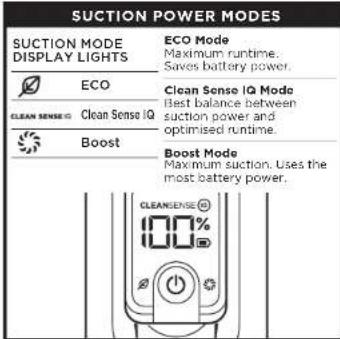
| Suction Modes | ECO, Clean Sense IQ, Boost |
| Technologies | DuoClean, Anti-Tangle PLUS, Clean Sense IQ, Flexology |
| Dirt Indicator | Yes (Clean Sense IQ) |
| Flexible Wand | Yes (Flexology) |
| Dustbin Emptying | Contactless (CleanTouch) |
| Filter Type | Foam and felt (pre-motor), motor downstream filter |
| Filter Cleaning | Rinse with water, dry 48 h |
| Manufacturer Warranty | 5 years (2 years legal + 3 years upon registration) |
| Battery Warranty | 2 years |
| France Customer Service | 0800 908874 (toll-free call) |
Frequently Asked Questions - IZ420EUT SHARK
User questions about IZ420EUT SHARK
0 question about this device. Answer the ones you know or ask your own.
Ask a new question about this device
Download the instructions for your Vacuum Cleaner in PDF format for free! Find your manual IZ420EUT - SHARK and take your electronic device back in hand. On this page are published all the documents necessary for the use of your device. IZ420EUT by SHARK.
USER MANUAL IZ420EUT SHARK
STRATOS Cordless Vacuum with Anti-Hair Wrap PLUS and Clean Sense IQ.
natural_image
Technical line drawing of a mechanical device with an arrow indicating direction (no text or symbols present)Beim Laden
natural_image
Technical line drawing of a mechanical component with an inset view showing a close-up of a button (no text or symbols present)natural_image
Mechanical assembly diagram showing a vertical component with internal components and directional arrows indicating motion (no text or labels)natural_image
Simple line drawing of a robotic arm with a rectangular block and wheels (no text or symbols)natural_image
Technical diagram of a mechanical device with cross-sectional views and an inset showing a component detail (no text or symbols)natural_image
Diagram of a mechanical device with a downward arrow indicating force or movement, no visible text or symbolsnatural_image
Diagram of a laboratory apparatus with a funnel and container, showing liquid flow from a side arm (no text or labels)natural_image
Technical diagram of a mechanical device with a downward arrow indicating a component (no text or symbols present)natural_image
Technical line drawing of a mechanical assembly with a handle and base, showing motion arrows (no text or symbols)natural_image
Technical line drawing of a mechanical component with no visible text or symbolsnatural_image
Technical line drawing of a mechanical device with internal components and a close-up inset showing internal flow or movement (no text or symbols)natural_image
Technical line drawing of a mechanical device with an arrow indicating direction (no text or symbols present)Chargement
natural_image
Technical line drawing of a mechanical device with internal components and directional arrows (no text or symbols)DANS L'ASPIRATEUR : TECHNOLOGIE FLEXOLOGY
natural_image
Technical line drawing of a mechanical component with an inset showing a close-up view of a button (no text or symbols present)natural_image
Mechanical assembly diagram showing a vertical component with internal components and directional arrows indicating motion (no text or labels)natural_image
Simple line drawing of a robotic arm with a rectangular block and wheels (no text or symbols)natural_image
Technical diagram of a mechanical device with cross-sectional views and directional arrows (no text or symbols)natural_image
Technical line drawing of a mechanical device with an arrow indicating direction, no visible text or symbolsnatural_image
Line drawing of a laboratory apparatus with a funnel and water inlet (no text or symbols)natural_image
Technical line drawing of a mechanical assembly with a lever and a handle (no text or symbols)natural_image
Technical line drawing of a mechanical component with no visible text or symbolsnatural_image
Technical line drawing of a mechanical device with internal components and a close-up inset showing internal flow or movement (no text or symbols)for purchasing the Shark ^® Cordless Vacuum with Anti-Hair Wrap PLUS, DuoClean and Clean Sense IQ.


TIP: You can find the model and serial numbers on the QR code label located on the back of your unit.

TIP: You can locate the date code on one of the prongs of the power cord plug.
REGISTER YOUR PURCHASE
TO BENEFIT FROM YOUR PRODUCT'S EXTENDED GUARANTEE, SIMPLY REGISTER YOUR PURCHASE AT:

sharkclean.co.uk/register-guarantee

+44 (0)800 862 0453

Scan QR code using mobile device
Please note, products purchased directly from Shark are automatically registered.
Benefits of registering your product and creating an account:
- Get easier, faster product support and access to guarantee information
- Access troubleshooting and product care instructions
- Be among the first to know about exclusive product promotions
RECORD THIS INFORMATION
Model Number: ____
Serial Number: ____
Date Code: ____
Date of Purchase (Keep Receipt): ____
Store of Purchase: ____
TECHNICAL SPECIFICATIONS
Voltage: 25.2V
Body Motor Watts: 309W
Nozzle Watts: 80W
PLEASE READ CAREFULLY
AND KEEP FOR FUTURE REFERENCE.
This instruction manual is designed to help you get a complete understanding of your new Shark Cordless Vacuum with Anti-Hair Wrap PLUS, DuoClean and Clean Sense IQ.
If you have any questions, please call the customer service line on +44 (0)800 862 0453.
CONTENTS
Product Registration 2
Important Safety Instructions ....4
Assembling your Shark ^x Vacuum Cleaner ....6
Using Your Lithium ION Power Pack Battery 7
LED battery Power and Charging Indicators 7
Recycling your Lithium ION Power Pack Battery 7
Charging Your Lithium ION Power Pack Battery 8
Settings 9
Cleaning Modes 10
Using the Flexology Wand 11
Flexology Reach 11
Flexology Storage....11
Maintaining your Vacuum Cleaner 12
Emptying the Dust Cup 12
Removing and Cleaning the Dust Cup 12
Cleaning the Filters....13
Maintaining the Floor Nozzle 14
Checking for blockages 15
Troubleshooting Guide 16
Additional Accessories Available 17
Guarantee 18
Battery Guarantee 19

This marking indicates that this product should not be disposed with other household wastes. To prevent possible harm to the environment or human health from uncontrolled waste disposal, recycle it responsibly to promote the sustainable reuse of material sources. To return your used device, please use the return and collection systems or contact the retailer where this product was purchased. They can take this product for environmentally safe recycling.

IMPORTANT SAFETY INSTRUCTIONS
FOR HOUSEHOLD USE ONLY • PLEASE READ ALL INSTRUCTIONS BEFORE USING THIS VACUUM.
To reduce the risk of shock and unintended operation, turn off power and remove the ION Power Pack battery before servicing.
NOTE: If you have delicate or wool carpets, particularly loop pile, please try the vacuum on a hidden area first to ensure the spinning brush-rolls do not damage or unpick carpet fibres.
WARNING
REDUCE THE RISK OF FIRE, ELECTRIC SHOCK, INJURY, OR PROPERTY DAMAGE:
- This vacuum consists of a motorised nozzle, wand, and handheld vacuum. These components contain electrical connections, electrical wiring, and moving parts that potentially present risk to the user.
- Before each use, carefully inspect all parts for any damage. If a part is damaged, discontinue use.
- Use only identical replacement parts.
- This vacuum contains no serviceable parts.
- Use only as described in this manual. DO NOT use the vacuum for any purpose other than those described in this manual.
- With the exception of the filters and dust cup, DO NOT expose any parts of the vacuum to water or other liquids.
7 DO NOT allow the appliance to be used by children. Keep the appliance and its cord out of reach of children. Do not allow to be used as a toy. Close supervision is necessary when used near children.
GENERAL USE
8 This appliance can be used by persons with reduced physical, sensory or mental capabilities or lack of experience and knowledge if they have been given supervision or instruction concerning use of the appliance in a safe way and understand the hazards involved. Cleaning and user maintenance should not be done by children.
9 Always turn off the vacuum before connecting or disconnecting any current carrying hoses, motorised nozzles, chargers, batteries, or other electrical or mechanical parts.
10 DO NOT handle plug or vacuum with wet hands.
11 DO NOT use without dust cup, filters, and brush-roll in place.
12 Only use Shark ^® branded filters and accessories. Damage caused by non-Shark filters and accessories may not be covered by the guarantee.
13 DO NOT put any objects into nozzle or accessory openings. DO NOT use with any opening blocked, keep free of dust, lint, hair, and anything that may reduce airflow.
14 DO NOT use if nozzle or accessory airflow is restricted. If the air paths or the motorised floor nozzle become blocked, turn the vacuum off. Remove all obstructions before you turn on the unit again.
15 Keep nozzle and all vacuum openings away from hair, face, fingers, uncovered feet, or loose clothing.
16 DO NOT use if vacuum is not working as it should, or has been dropped, damaged, left outdoors, or dropped into water.
17 Use extra care when cleaning on stairs.
18 DO NOT leave the vacuum unattended while powered on.
19 When powered on, keep the vacuum moving over the carpet surface at all times to avoid damaging the carpet fibres.
20 If you have delicate or wool carpets, particularly loop pile, please try the vacuum on a hidden area first to ensure the spinning brush-rolls do not damage or unpick carpet fibres.
21 DO NOT use to pick up:
a) Liquids
b) Large objects
c) Hard or sharp objects (glass, nails, screws, or coins)
d) Large quantities of dust (including drywall, fireplace ash, or embers). DO NOT use as an attachment to power tools for dust collection.
e) Smoking or burning objects (hot coals, cigarette butts, or matches)
f) Flammable or combustible materials (lighter fluid, petrol, or ketone).
g) Toxic materials (chlorine bleach, ammonia, or drain cleaner)
22 DO NOT use in the following areas:
a) Poorly lit areas
b) Wet or damp surfaces
c) Outdoor areas
d) Spaces that are enclosed and may contain explosive or toxic fumes or vapours (lighter fluid, petrol, kerosene, paint, paint thinners, mothproofing substances, or flammable dust)
23 Turn off the vacuum before plugging in or unplugging the charger.
24 Turn off the vacuum before any adjustment, cleaning, maintenance or troubleshooting.
25 During cleaning or routine maintenance, DO NOT cut anything other than hair, fibres, or string wrapped around the brush-roll.
26 Allow all filters to air-dry completely before replacing in the vacuum to prevent liquid from being drawn into electric parts.
27 DO NOT modify or attempt to repair the vacuum or the battery yourself, except as indicated in this manual.
DO NOT use the battery or vacuum if it has been modified or damaged. Damaged or modified batteries may exhibit unpredictable behavior resulting in fire, explosion or risk of injury.
28 Turn off all controls before unplugging.
29 Always turn off this appliance before connecting or disconnecting motorised nozzle or hand tool.
BATTERY PACK
- The battery is the power source for the vacuum. Carefully read and follow all charging instructions.
- To prevent unintentional starting, ensure the vacuum is powered off before picking up or carrying the vacuum, DO NOT carry the appliance with your finger on the power switch.
- Use only the charger supplied with the unit. Use of an incorrect charger may result in no charging, and/or unsafe conditions. A charger that is suitable for one type of battery pack may create a risk of fire when used with another battery pack.
- Keep the battery away from all metal objects such as paper clips, coins, keys, nails, or screws. Shorting the battery terminal's increases the risk of fire or burns.
-
Under abusive conditions, liquid may be ejected from the battery. Avoid contact with this liquid, as it may cause irritation or burns. If contact occurs, flush with water, if liquid contacts eyes, seek medical help.
-
Battery should not be stored at temperatures below 3^ C ( 37.4^ F) or above 40^ C ( 104^ F) to maintain long-term battery life.
- DO NOT charge battery at temperatures below 5°C (40°F) or above 40°C (104°F). Charging improperly or at temperatures outside of the specified range may damage the battery and increase the risk of fire.
- Store the appliance indoors.
- DO NOT expose the battery to fire or temperatures above 130°C (265°F) as it may explode.
- Use appliances only with specifically designated battery packs. Use of any other battery packs may create a risk of injury and fire.
- Disconnect the battery pack from the appliance before making any adjustments, changing accessories, or storing appliance. Such preventive safety measures reduce the risk of starting the appliance accidentally.
SAVE THESE INSTRUCTIONS
ASSEMBLY
- Insert Wand into Floor Nozzle.
- Insert Handheld Vacuum into Wand
Before use, ensure all components are completely connected and clicked into place.
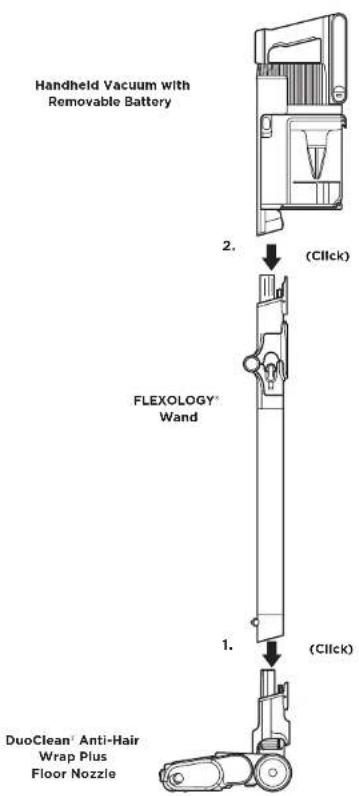
flowchart
graph TD
    A["Handheld Vacuum with Removable Battery"] -->|2. (C1Click)| B["FLEXOLOGY Wand"]
    B -->|1. (C1Click)| C["DuoClean Anti-Hair Wrap Plus Floor Nozzle"]
LI-ION BATTERY
The Lithium Ion Power Pack battery does not come fully charged. Prior to first use, charge completely. During first use, run the battery down until it is completely out of power. This will condition the battery.
LED BATTERY POWER AND CHARGING INDICATORS
Charging
LED will pulse white when reaching 100% charge.
LED will pulse green from 76% - 99% charge.
LED will pulse yellow from 0 - 75% charge.
☐ No LED the battery pack is off
NOTE: Full charge takes approximately 3.5 hours.
Additional Notes
- LEDs turn off once the battery is fully charged.
- Unit will not power on when charger is connected.
This product uses a Lithium ION rechargeable and recyclable battery. When the battery no longer holds a charge, it should be removed from the vacuum and recycled. DO NOT incinerate or compost the battery.
When your Lithium ION Power Pack Battery needs to be replaced, dispose of it or recycle it in accordance with local regulations. In some areas, it is illegal to place spent Lithium ION batteries in the bin or in a municipal solid waste stream. Return spent power packs to an authorised recycling centre or to retailer for recycling. Contact your local recycling centre for information on where to drop off the spent power pack.
Battery Runtime
| MODE MINUTES | |
| Hand Vac - ECO Mode(no motorised tool attached) | 60 |
| Boost Mode (Hand Vac)(no motorised tool attached) | 10 |
Clean Sense IQ runtime depends on individual use and amount of debris on cleaning surfaces. Suction mode impacts runtime. Use Boost in short bursts.
CHARGING THE BATTERY
USING THE LI-ION CHARGER
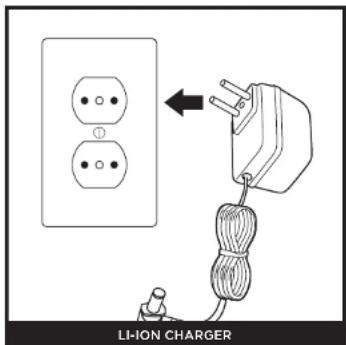
Plug the LI-Ion Charger into a wall outlet.
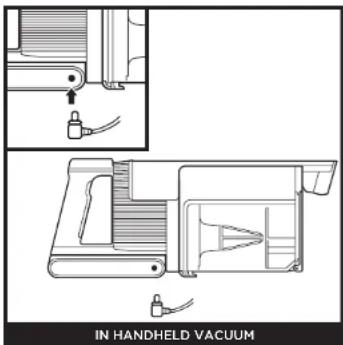
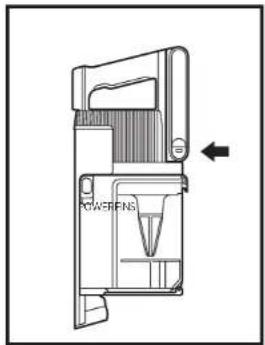
To charge the battery inside the handheld vacuum, connect the charger to an electrical outlet, then insert the charger plug into the port below the handle on the handheld vacuum.
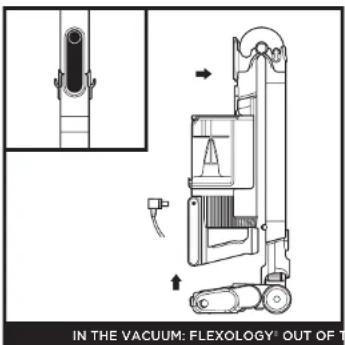
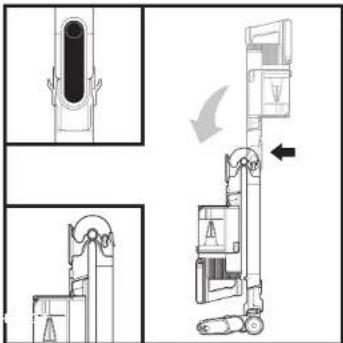
To put the vacuum in storage mode, press the Flexology Wand Unlock Latch while folding the handheld vacuum forward until the wand clicks and locks. Plug the charger into the charging port on the handheld vacuum.
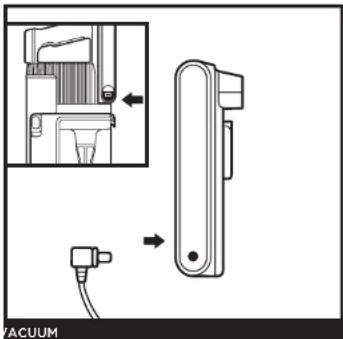
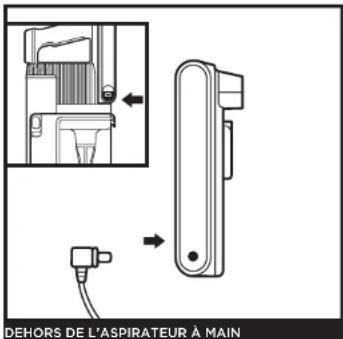
Press and hold the Battery Release Button, then slide out the battery. Plug the charger into the charging port on the battery. To reinstall the battery, slide it into the slot in the back of the handheld vacuum until it clicks into place.
SETTINGS
natural_image
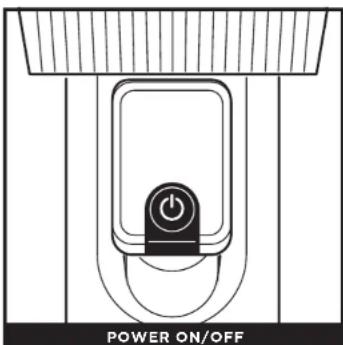
Diagram of a power-on/OFF switch mechanism with no text or symbolsPress power button to turn vacuum on or off.
NOTE: The unit will not turn on if the charger is connected. Unplug the charger before turning on vacuum power.
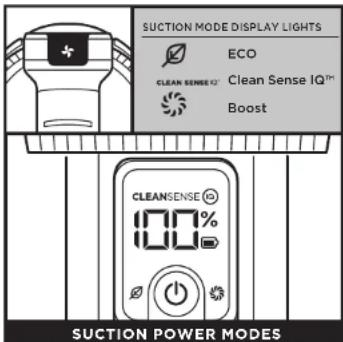
Press the (✗) button to toggle between ECO, Clean Sense IQ™, and Boost modes. To save battery power, select ECO mode. For everyday cleaning power, select Clean Sense IQ mode. For an extra burst of power, select Boost mode.
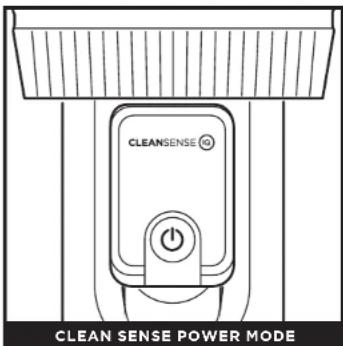
Clean Sense IQ senses the dirt you can't see and automatically boosts power. Clean Sense IQ mode modifies cleaning performance based on the mess at hand, giving you optimal suction and runtime when heavy or light debris is detected.
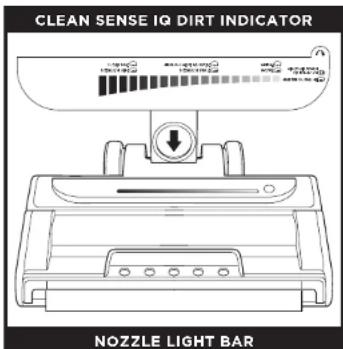
The Clean Indicator visually confirms when floors are cleaned. When the unit senses heavy debris, suction will increase for more cleaning performance. When the debris is cleared, suction will decrease. The clean indicator displays the level of debris detected. For best results, continue cleaning until the indicator returns to its lowest level before moving to the next area.
CLEANING MODES
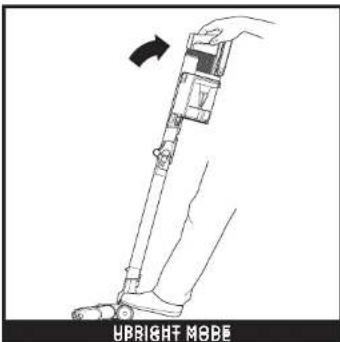
To clean floors, step on floor nozzle and tilt handheld vacuum back.
NOTE: Brushrolls will only engage when the handheld vacuum is tilted back.
natural_image
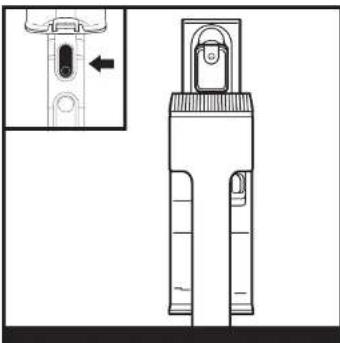
Technical line drawing of a mechanical component with an inset showing a close-up view of a button (no text or symbols present)Press the wand release button and lift the handheld vacuum off the wand. An attachment can be used to clean stairs, furniture, and other above-floor areas.
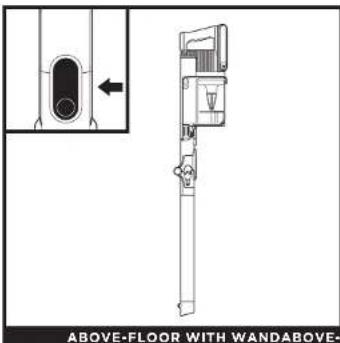
Stand the vacuum upright and press the nozzle release button located at the bottom of the wand, above the nozzle. Lift wand to detach.
Great for cleaning baseboards, ceiling fans, window sills, and other hard-to-access areas.
NOTE: All accessories are compatible with both the wand and the handheld vacuum.
USING THE FLEXOLOGY WAND
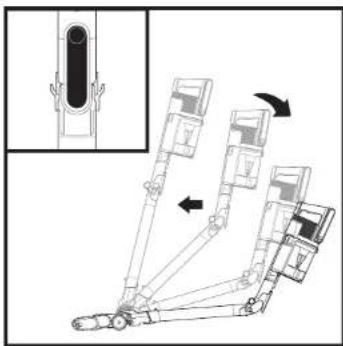
natural_image
Mechanical assembly diagram showing a vertical component with internal components and directional arrows indicating motion (no text or labels)Press the unlock latch on the back of the wand, then adjust the angle.
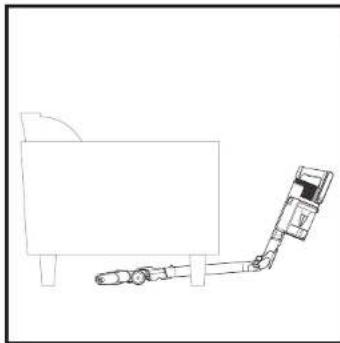
natural_image
Simple line drawing of a robotic arm with a cart and block, no text or symbols presentAdjust the wand to a lower angle to easily clean under furniture.
FLEXOLOGY STORAGE
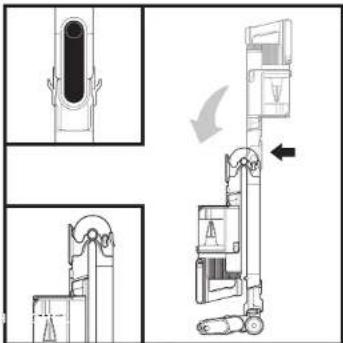
To put the vacuum in storage mode, press the unlock latch while folding the handheld vacuum forward.
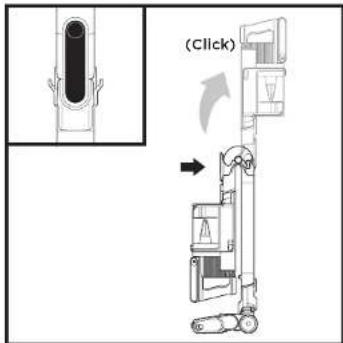
To take the vacuum out of storage mode, press the unlock latch and lift up the handheld vacuum until the wand clicks and locks into place.
MAINTAINING YOUR VACUUM
Press the wand release button to detach the handheld vacuum from the wand.
natural_image
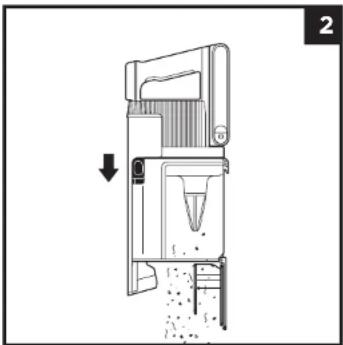
Diagram of a mechanical device with a downward arrow indicating force or movement, no visible text or symbolsTo empty the Dust Cup while it is attached to the handheld vacuum, position the dust cup over a bin and slide the lid release slider forward.
REMOVING AND CLEANING THE DUST CUP
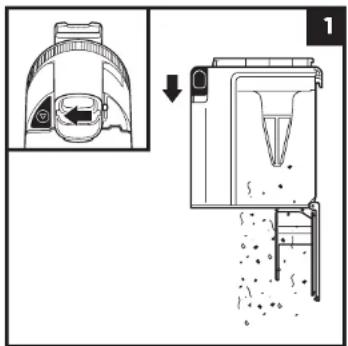
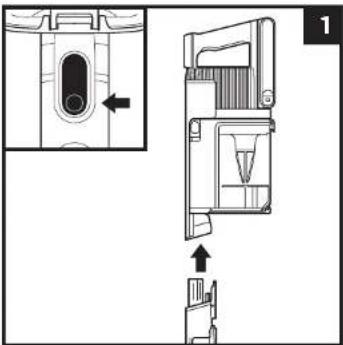
To remove the dust cup from the handheld vacuum, press the Dust Cup Release button located on the base/bottom of the dust cup. Tilt the dust cup and lift off to remove.
To empty dust and debris, hold the dust cup over the bin, then slide the CleanTouch Dirt Ejector slider forward.
natural_image
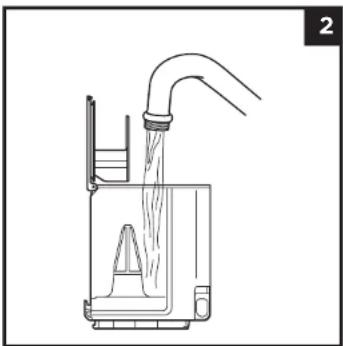
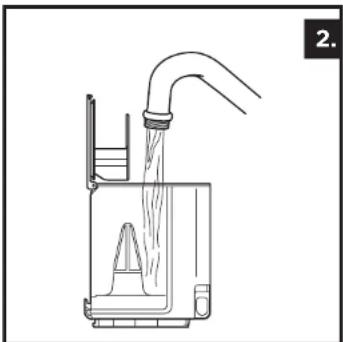
Line drawing of a laboratory apparatus with a funnel and tubing, no text or symbols presentTo clean the interior of the dust cup, rinse it with water. Place it on its side with the lid open to air-dry for at least 48 hours before reinstalling.
MAINTAINING YOUR VACUUM
CLEANING THE FILTERS
Regularly rinse the filters to maintain your vacuum's suction power.
To clean filters, rinse them with water only. Allow all filters to air-dry completely for up to 48 hours before reinstalling, to prevent liquid from being drawn into electric parts.
Clean the pre-motor filters at least once a month and post-motor filter at least once a year. Tap off loose dirt between washes when needed. More frequent cleaning may sometimes be necessary with heavy use.
IMPORTANT: DO NOT use soap when cleaning the filters. Use water only. The vacuum will not have suction if the post-motor filter is not installed. Ensure that all filters are installed before using.
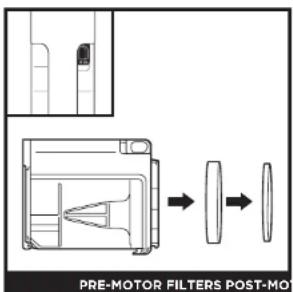
Remove the dust cup, and pull the foam and felt filters out of the back of the dust cup.
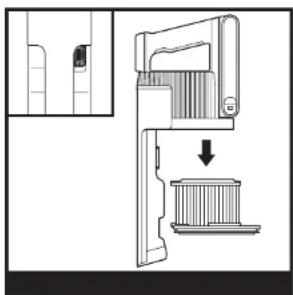
natural_image
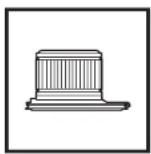
Diagram of a mechanical device with a downward arrow indicating a process or operation (no text or symbols present)Remove the dust cup. Pull the post-motor filter out of the handheld vacuum.
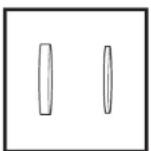
Pre-Motor Foam and Felt Filter Kit Post-Motor Filter
MAINTAINING YOUR VACUUM
FLOOR NOZZLE
If any hair is wrapped around the brushroll, continue cleaning using the Carpet setting on a bare floor surface, a low-pile carpet, or a small area rug. If some fibres remain wrapped around the brushroll after continued use, carefully remove them. If you run over a hard or sharp object or notice a change in noise while vacuuming, check the floor nozzle for blockages. (See the Checking for Blockages in the Floor Nozzle section.)
CLEANING SOFT ROLLER
natural_image
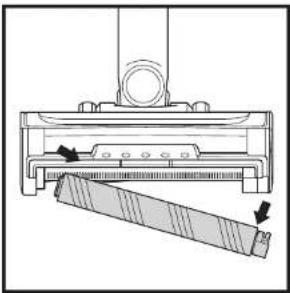
Technical line drawing of a mechanical assembly with a handle and base, showing motion arrows (no text or symbols)1 To remove Soft Roller from nozzle, pull the Soft Roller out by the tab.
2 Tap loose debris off the Soft Roller. Use a dry towel to wipe the Soft Roller clean and to remove any debris caught in the teeth behind the Soft Roller.
3 Hand wash the Soft Roller as needed. Use only water, and let air-dry completely, which should take at least 24-48 hours.
4 Reinsert Soft Roller until you feel it click into place.
CLEANING THE SENSORS
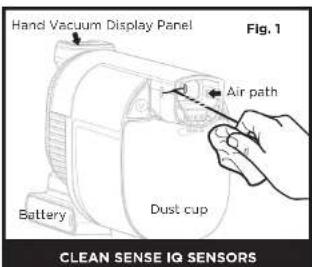
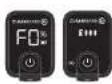
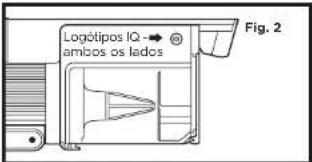
Make sure to clean the sensors inside the hand vacuum regularly, as hair and other debris may build up and obstruct them. If
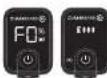
the sensors are partially obstructed, Clean Sense IQ mode will not adjust suction levels as expected. If the sensors are completely obstructed, the F0 error code will appear and the Clean Sense IQ icon will flash on the hand vacuum display panel.
To clean the sensors:
- Turn off power and remove the hand vacuum.
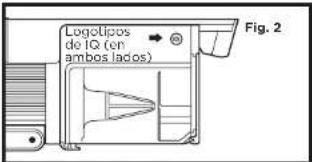
- Locate the sensors inside the nozzle of the hand vacuum. The sensors are on the interior walls of the nozzle, about 3 inches down the air path, aligned with the IQ logos (Fig.2) on the exterior.
- Gently wipe the sensors with a microfiber cloth and remove all hair and debris.
- Turn on power and verify that the unit is functioning normally.
MAINTAINING YOUR VACUUM
CHECKING FOR BLOCKAGES
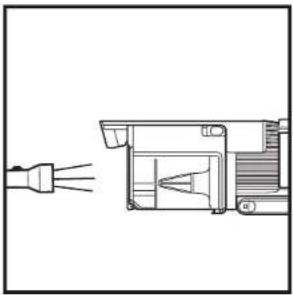
natural_image
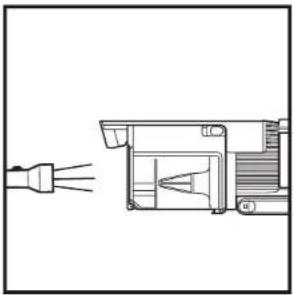
Technical line drawing of a mechanical component with no visible text or symbolsChecking for Blockages In the Handheld Vacuum:
- Turn off vacuum.
- Remove the handheld vacuum from the wand.
- Check all intake openings on the dust cup and remove any debris or blockage.
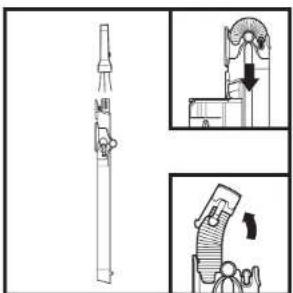
Checking for Blockages In the Wand:
Standard Wand:
- Turn off vacuum.
- Remove the handheld vacuum and floor nozzle.
- Look through wand to check for any blockages.
- Clear away debris and blockages.
FLEXOLOGY ^® Wand:
-
Turn off vacuum.
-
Remove the handheld vacuum and floor nozzle from the wand.
-
ChecktheClog Access Hose on the FLEXOLOGY® section of the wand by pinching the tabs on both sides of the hose and lifting the hose out.
-
Clear any debris and blockages.
natural_image
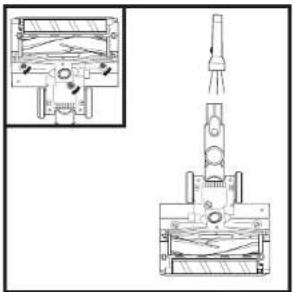
Technical line drawing of a mechanical device with internal components and a close-up inset showing internal structure (no text or symbols)Checking for Blockages in the Floor Nozzle:
- Turn off vacuum.
- Detach the wand.
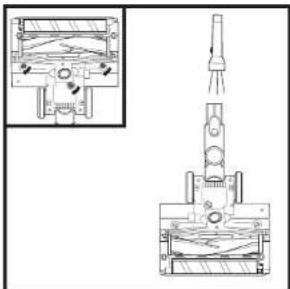
- Use the edge of a coin to open the three locks on the bottom of the floor nozzle.
- Remove the cover and tilt back the neck of the floor nozzle.
- Check the opening and remove any debris.
- Replace the cover by sliding the inserts into the slots, then pressing down firmly on all sides before turning the locks clockwise to close, until they click securely into place.
TROUBLESHOOTING GUIDE

WARNING: To reduce the risk of shock and unintended operation, turn off power and remove the Lithium Ion Power Pack battery before servicing.
Vacuum is not picking up debris. No suction or light suction. Filter icon on handheld vacuum control panel is red. (Refer to Checking for Blockages section for more information.)
- Check filters to see if they need cleaning. Follow instructions for rinsing and completely air-drying the filters before reinserting in the vacuum.
- Dust cup may be full; empty dust cup.
- Check floor nozzle for blockages; clear blockages if required.
- Remove any string, carpet fibres, or hair that may be wrapped around the brushroll.
- Check clog access in wand for any blockages and clear any debris.
- Check connectors between handheld, wand, and floor nozzle for debris. Remove any dust or material in the connectors.
• If the issue persists, please contact Customer Service.
Vacuum lifts area rugs.
- Make sure you are not engaging Boost mode as this can be too much suction for lighter rugs. Take care when vacuuming area rugs or rugs with delicately sewn edges.
- Turn off the unit to disengage the brushroll and press the power button to restart.
Brushrolls do not spin.
- Immediately turn off the vacuum. Remove any blockages before turning the vacuum back on. Make sure the handheld vacuum is tilted back far enough for the brushrolls to engage. If the brushrolls still do not spin, please contact Customer Service.
- If the floor nozzle has headlights and they are not illuminated, there is a connection issue between the handheld vacuum, wand, and nozzle. Try disconnecting and reattaching the pieces. If the headlights still do not illuminate, please contact Customer Service.
Vacuum turns off on its own.
There are several possible reasons for the vacuum turning off on its own, including blockages, battery issues, and overheating. If vacuum turns off on its own, perform the following steps:
- Turn on the vacuum and check the battery indicator lights located on the handheld vacuum, if recharging is needed, make sure power is turned off before connecting to the charger.
- Empty dust cup and clean filters (see Emptying the Dust Cup and Cleaning the Filters sections).
- Check wand, accessories, and inlet openings and remove any blockages.
- Allow unit and battery to cool for at least 45 minutes, until they return to room temperature.
- Press power button to restart the vacuum. Make sure the charger is not plugged into the port on the handheld vacuum.
NOTE: If vacuum still does not operate properly, contact Customer Service at +44 (0)800 862 0453.
TROUBLESHOOTING GUIDE
| Fault | Error code display on | |
| Motor | Motor No Start 10 | |
| Motor Overheat 20 | ||
| Motor Overcurrent 30 | ||
| Motor Short 40 | ||
| Motor Overspeed 50 | ||
| System Comm Error | 60 | |
| Clean Sense IQ Sensor Block-age | F0 | |
| Nozzle | Nozzle Overheat | 70 |
| Nozzle Short | F0 |
ADDITIONAL ACCESSORIES AVAILABLE ON SHARKCLEAN.EU
A 8" Crevice Tool
B 18" Flexi Crevice Tool
© Duster Crevice Tool
D Dusting Brush
E Multi-Angle Dusting Brush
F Anti-Allergen Dust Brush
G Upholstery Tool
Wilde Upholstery Tool
Pet Multi-Tool
Deep-Cleaning Motorised Pet Tool
K FLEXOLOGY* Under-Appliance Wand
Accessory Bag
M Li-Ion Charger
N Dual Li-Ion Charger
Li-Ion Battery
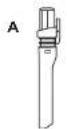
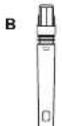
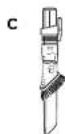

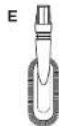
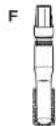

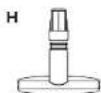


K

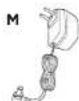
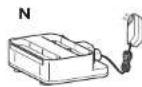


NOTE: Not all accessories come with all units. For a list of the accessories included with this model, see the top inside flap of the box. To order additional accessories, visit sharkclean.co.uk.
Shark NINJA
FIVE (5) YEAR LIMITED GUARANTEE
When a consumer buys a product in the UK, they get the benefit of legal rights relating to the quality of the product (your "statutory rights"). You can enforce these rights against your retailer. However, at Shark we are so confident about the quality of our products that we give the product owner an additional manufacturer's guarantee of up to five years (1 year as standard plus 4 years when you register). Those terms and conditions relate to our manufacturer's guarantee only - your statutory rights are unaffected.
The conditions below describe the prerequisites and scope of our guarantee. They do not affect your statutory rights or the obligations of your retailer and your contract with them.
The Lithium ION power pack is not covered by the 5 year guarantee (see battery guarantee on next page).
Shark ^® Guarantees
A household appliance like a vacuum cleaner constitutes a sizeable investment. Your new machine needs to work properly for as long as possible. The guarantee it comes with is an important consideration - and reflects how much confidence the manufacturer has in its product and manufacturing quality.
Every Shark machine comes with a free parts and labour guarantee. Our customer service helpline (0800 862 0453) is open from 9.00am to 6.00pm Monday - Friday. It's free to call, and you'll be put straight through to a Shark representative. You'll also find online support at www.sharkclean.co.uk
How do I register my extended Shark guarantee?
You can register your guarantee online within 28 days of purchase. To save time, you'll need the following information about your machine:
- Date you purchased the machine (receipt or delivery note)
- Model Number
To register online, please visit www.Sharkclean.eu/uk/register-guarantee. Products purchased directly from Shark are automatically registered.
IMPORTANT
- Your Shark guarantee will only cover your product from the date of purchase.
- Please keep your receipt at all times. Should you need to use your guarantee we will need your receipt to verify the information you have supplied to us is correct. The inability to produce a valid receipt may invalidate your guarantee.
What are the benefits of registering my free Shark guarantee?
When you register your guarantee we'll have your details to hand if we ever need to get in touch. If you further agree to receive communications from us, you can also receive tips and advice on how to get the best out of your Shark vacuum and hear the latest news about new Shark technology and launches.
If you register your guarantee online, you'll get instant confirmation that we've received your details.
How long are new Shark ^® machines guaranteed for?
Our confidence in our design and quality control means that your new Shark vacuum cleaner is guaranteed for a total of up to five years (12 months plus an extra 4 years on registration).
What Is covered by the free Shark ^4 guarantee?
Repair or replacement (at Shark's discretion) of your Shark machine, including all parts (excluding the Lithium ION power pack, please see next page for battery guarantee) and labour. A Shark guarantee is in addition to your legal rights as a consumer.
What is not covered by the free Shark® guarantee?
-
Blockages - for details of how to unblock your vacuum cleaner, please refer to the Operating Manual.
-
Normal wear and tear such as brush bar, fuse, belt, hose etc.
-
Accidental damage, faults caused by negligent use or care, misuse, neglect, careless operation or handling of the vacuum cleaner which is not in accordance with the Shark Operating Manual supplied with your machine.
-
Use of the vacuum cleaner for anything other than normal domestic household purposes.
-
Use of parts not assembled or installed in accordance with the operating instructions.
-
Faults caused by use of parts and accessories which are not Shark Genuine Components.
-
Faulty installation (except where installed by Shark).
-
Repairs or alterations carried out by parties other than Shark or its agents.
-
The Lithium ION power pack battery. Please see next page for battery guarantee.
What happens when my guarantee runs out?
Shark does not design products to last for a limited time. We do appreciate that there may be a desire for our customers to want to repair their vacuum cleaners after the guarantee has lapsed. In this case please contact our Freephone customer service help line and ask about our out of guarantee programme, on 0800 862 0453.
Where can I buy genuine Shark ^1 spares and accessories?
Shark spares and accessories are developed by the same engineers who developed your Shark vacuum. You'll find a full range of Shark spares, replacement parts and accessories for all Shark machines at www.sharkclean.co.uk.
Please remember that damage caused by use of non-Shark spares is not covered under your guarantee.
Shark NINJA
TWO (2) YEAR LIMITED BATTERY GUARANTEE
When a consumer buys a product in the UK, they got the benefit of legal rights relating to the quality of the product (your "statutory rights"). You can enforce these rights against your retailer. However, at Shark ^® we are so confident about the quality of our products that we give the product owner an additional manufacturer's guarantee on the batteries of up to two years (1 year as standard plus 1 year when you register). These terms and conditions relate to our manufacturer's guarantee only - your statutory rights are unaffected.
Every Shark® battery comes with a free parts and labour guarantee. Our customer service helpline (0800 862 0453) is open from 9.00am to 6.00pm Monday - Friday. It's free to call, and you'll be put straight through to a Shark® representative. You'll also find online support at www.sharkclean.co.uk
How do I register my extended Shark ^® guarantee?
You can register your guarantee online within 28 days of purchase. To save time, you'll need the following information about your machine/battery:
- Date you purchase the machine/battery (receipt or delivery note)
- Model Number
To register online, please visit www.Sharkclean.co.uk/register-guarantee. Products purchased directly from Shark are automatically registered.
IMPORTANT
- The manufacturer's guarantee covers your battery for 12 months (or for 2 years, if registered) starting on the date of purchase. You'll need the date you purchased your machine (receipt or delivery note).
- Please keep your receipt at all times. Should you need to use your guarantee we will need your receipt to verify the information you have supplied to us is correct. The inability to produce a valid receipt may invalidate your guarantee.
How long are new Shark® batteries guaranteed for?
Our confidence in our design and quality control means that your new Shark ^2 vacuum cleaner battery is guaranteed for a total of up to two years (12 months plus an extended guarantee of 1 year on registration).
What is covered by the free Shark® guarantee?
Repair or replacement of your Shark® battery (at Shark's discretion to decide whether to replace or repair) including all parts and labour. A Shark® guarantee is in addition to your legal rights as a consumer.
What is not covered by the free Shark guarantee?
-
Normal wear and tear of parts which require regular maintenance and/or replacement to ensure the proper functioning of your unit.
-
Accidental damage, faults caused by negligent use or care, misuse, neglect, careless operation or handling of the battery which is not in accordance with the Shark ^® Instructions supplied with your machine.
-
Use of the battery for anything other than powering the Shark ^® vacuum cleaner with which it was supplied.
-
Use of parts not assembled or installed in accordance with the operating instructions.
-
Faults caused by use of parts and accessories which are not Shark Genuine Components.
-
Faulty installation (except where installed by Shark ^3 ).
Where can I buy genuine Shark® batteries?
Shark ^® batteries are developed by the same engineers who developed your Shark ^® vacuum. You'll find a full range of replacement batteries for all Shark ^® machines at www.sharkclean.co.uk. Please remember that damage caused by use of non-Shark ^® batteries may not be covered under your guarantee. However, your statutory rights are unaffected.
natural_image
Technical line drawing of a mechanical device with an arrow indicating direction (no text or symbols present)Oplader
natural_image
Technical line drawing of a mechanical component with an inset showing a close-up view of a button (no text or symbols present)natural_image
Mechanical assembly diagram showing a vertical component with internal components and directional arrows indicating motion (no text or labels)natural_image
Simple line drawing of a robotic arm with a rectangular block and wheels (no text or symbols)Justér skaftet til en lavere vinkel for let at rengøre under møbler.
OPBEVARING AF FLEXOLOGY
natural_image
Diagram of a mechanical device with an arrow indicating direction, showing internal components and particle distribution (no text or symbols)For at fjerne støvopsamleren fra den håndholdte støvsuger skal du trykke på udløserknappen til støvbeholderen, der or placerot i bunden af støvopsamleren. Vip støvbeholderen og løft op for at fjerne den.
For at tømme støv og snavs skal du holde støvopsamleren over skraldespanden og derefter skubbe CleanTouch Dirt Ejector-skydeknappen fremad.
natural_image
Line drawing of a laboratory apparatus with a funnel and container, no text or symbols presentnatural_image
Technical diagram of a mechanical device with a downward arrow indicating a component (no text or symbols present)natural_image
Technical line drawing of a mechanical assembly with a tool and a cutting tool (no text or symbols)natural_image
Technical line drawing of a mechanical component with no visible text or symbolsKontrollér for blokerlinger | skaftet:
Standard-skaft:
natural_image
Technical line drawing of a mechanical assembly with cross-sectional and top views (no text or symbols)Kontrollér for blokeringer i gulvmundstykket:
natural_image
Technical line drawing of a mechanical device with an arrow indicating direction (no text or symbols present)Carga
natural_image
Technical line drawing of a mechanical component with an inset showing a close-up view of a button (no text or symbols present)natural_image
Mechanical assembly diagram showing a vertical component with internal components and directional arrows indicating motion (no text or symbols)natural_image
Simple line drawing of a robotic arm with a cart and block, no text or symbols presentnatural_image
Technical diagram of a mechanical device with cross-sectional views and directional arrows (no text or symbols)natural_image
Diagram of a mechanical device with an arrow indicating direction, showing internal components and particle distribution (no text or symbols)natural_image
Line drawing of a laboratory apparatus with a funnel and container, no text or symbols presentnatural_image
Technical line drawing of a mechanical assembly with a tool and a cutting tool (no text or symbols)SENSORES CLEAN SENSE IQ
natural_image
Technical line drawing of a mechanical assembly with no visible text or symbolsnatural_image
Technical line drawing of a mechanical assembly with cross-sectional and top views (no text or symbols)natural_image
Technical line drawing of a mechanical device with an arrow indicating direction (no text or symbols present)Ricarica
natural_image
Simple line drawing of a power plug connected to two socket plates, with a cable wrapped around it (no text or symbols)CARICABATTERIE PER BATTERIE AGLI IONI DI LITIO
natural_image
Technical line drawing of a mechanical device with two views: top shows a lock mechanism, bottom shows a component with a triangular handle and cable (no text or symbols)ASPIRAPOLVERE PORTATILE
natural_image
Technical line drawing of a mechanical device with an inset showing a close-up view of a component (no text or symbols present)NELL'ASPIRAPOLVERE: FLEXOLOGY® FUOR
natural_image
Diagram showing a mechanical device with a close-up view of internal components and a separate schematic view (no text or symbols)L'ASPIRAPOLVERE
natural_image
Pure electrical circuit lines without any symbolsnatural_image
Mechanical assembly diagram showing a vertical component with an inset view of its cross-section (no text or symbols present)natural_image
Simple line drawing of a robotic arm with a rectangular block and wheels (no text or symbols)natural_image
Technical diagram of a mechanical device with cross-sectional views and directional arrows (no text or symbols)natural_image
Diagram of a mechanical device with a downward arrow indicating force or movement, no visible text or symbolsnatural_image
Line drawing of a laboratory apparatus with a funnel and container, no text or symbols presentnatural_image
Technical diagram of a mechanical device with a downward arrow indicating a component or assembly (no text or symbols present)natural_image
Technical line drawing of a mechanical device with a roller being inserted (no text or symbols)natural_image
Technical line drawing of a mechanical component with no visible text or symbols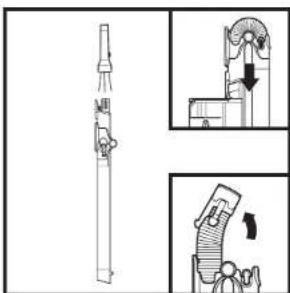
natural_image
Technical line drawing of a mechanical device with internal components and a close-up inset showing internal flow or movement (no text or symbols)natural_image
Technical line drawing of a mechanical device with an arrow indicating direction (no text or symbols present)Aan het opladen
natural_image
Mechanical assembly diagram showing a vertical component with internal components and directional arrows indicating motion (no text or symbols)natural_image
Simple line drawing of a robotic arm with a cart and block, no text or symbols presentnatural_image
Technical diagram of a mechanical device with cross-sectional view and internal components (no text or symbols)natural_image
Diagram of a mechanical device with a downward arrow indicating force or movement, no visible text or symbolsnatural_image
Line drawing of a laboratory apparatus with a funnel and water outlet (no text or symbols)natural_image
Diagram of a mechanical device with a downward arrow indicating a component or assembly (no text or symbols present)natural_image
Technical line drawing of a mechanical assembly with a tool and a cutting tool (no text or symbols)natural_image
Technical line drawing of a mechanical component with two connectors (no text or symbols)FLEXOLOGY ^4 -buls:
natural_image
Technical line drawing of a mechanical assembly with cross-sectional and top views (no text or symbols)Body Motor Watts: 309W
Dyse-watt: 80W
LES N∅YE GJENNOM OG OPPBEVAR FOR FREMTIDIG REFERANSE.
Flexology-oppbevaring 11
natural_image
Technical line drawing of a mechanical device with an arrow indicating direction (no text or symbols present)Lading
LED vil pulsere hvitt när den när 100 % ladning.
LED vil pulsere grønt fra 76 % - 99 % ladning.
LED vil pulsere gult fra 0 % - 75 % ladning.
□ Ved ingen LED er batteripakken av
MERK: Full opiedning tar ca. 3,5 timer.
Ytterligere merknader
natural_image
Technical line drawing of a mechanical component with an inset showing a close-up view of a button (no text or symbols present)natural_image
Mechanical assembly diagram showing a vertical component with internal components and directional arrows indicating motion (no text or symbols)natural_image
Simple line drawing of a robotic arm with a rectangular block and wheels (no text or symbols)VEDLIKEHOLDE ST∅VSUGEREN
T∅MMING AV ST∅VKOPP
natural_image
Technical diagram of a mechanical device with cross-sectional views and an inset showing a component detail (no text or symbols)natural_image
Technical line drawing of a mechanical device with an arrow indicating direction (no text or symbols)natural_image
Line drawing of a laboratory apparatus with a funnel and water inlet (no text or symbols)VEDLIKEHOLDE ST∅VSUGEREN
RENGJ∅RE FILTRENE
natural_image
Technical diagram of a mechanical device with a downward arrow indicating a component or assembly (no text or symbols present)VEDLIKEHOLDE ST∅VSUGEREN
GULVMUNNSTYKKE
natural_image
Technical line drawing of a mechanical assembly with a lever and a handle (no text or symbols)VEDLIKEHOLDE ST∅VSUGEREN
HVORDAN DU SER ETTER BLOKKERINGER
natural_image
Technical line drawing of a mechanical component with no visible text or symbolsSjekke etter blokkeringer i den håndholdte støvsugeren:
natural_image
Technical line drawing of a mechanical device with internal components and a close-up inset showing internal structure (no text or symbols)natural_image
Technical line drawing of a mechanical device with an arrow indicating direction (no text or symbols present)A carregar
natural_image
Technical line drawing of a mechanical component with an inset showing a close-up view of a button (no text or symbols present)natural_image
Mechanical assembly diagram showing a vertical component with internal components and directional arrows indicating motion (no text or labels)natural_image
Simple line drawing of a robotic arm with a rectangular block and wheels (no text or symbols)natural_image
Technical diagram of a mechanical device with cross-sectional views and an inset showing a component detail (no text or symbols)natural_image
Technical line drawing of a mechanical device with an arrow indicating direction, no visible text or symbolsnatural_image
Line drawing of a laboratory apparatus with a funnel and water inlet (no text or symbols)natural_image
Diagram of a mechanical device with a downward arrow indicating a component or process (no text or symbols present)natural_image
Technical line drawing of a mechanical assembly with a tool and a cutting tool (no text or symbols)SENSORES CLEAN SENSE IQ
natural_image
Technical line drawing of a mechanical component with two connectors (no text or symbols)natural_image
Technical line drawing of a mechanical assembly with cross-sectional and top views (no text or symbols)natural_image
Technical line drawing of a mechanical device with an arrow indicating direction (no text or symbols present)Lataaminen
natural_image
Diagram showing a mechanical device with a close-up inset of its internal structure (no text or symbols)natural_image
Technical line drawing of a mechanical component with an inset showing a close-up view of a button (no text or symbols present)natural_image
Mechanical assembly diagram showing a vertical component with internal components and directional arrows indicating motion (no text or labels)natural_image
Simple line drawing of a robotic arm with a rectangular block and wheels (no text or symbols)natural_image
Technical diagram of a mechanical device with cross-sectional view and internal components (no text or symbols)natural_image
Diagram of a mechanical device with a downward arrow indicating force or movement, no visible text or symbolsnatural_image
Line drawing of a laboratory apparatus with a funnel and water inlet (no text or symbols)natural_image
Technical line drawing of a mechanical assembly with a tool and a cutting tool (no text or symbols)natural_image
Technical line drawing of a mechanical component with two connectors (no text or symbols)Rikkalmurin tukosten tarkistus:
Varren tukosten tarklstus:
Vaklovarsl:
natural_image
Technical line drawing of a mechanical assembly with cross-sectional and top views (no text or symbols)natural_image
Technical line drawing of a mechanical device with an arrow indicating direction (no text or symbols present)Laddning
natural_image
Technical line drawing of a mechanical component with an inset showing a close-up view of a button (no text or symbols present)natural_image
Mechanical assembly diagram showing a vertical component with internal components and directional arrows indicating motion (no text or labels)natural_image
Simple line drawing of a robotic arm extending from a rectangular block (no text or symbols)natural_image
Technical diagram of a mechanical device with cross-sectional views and directional arrows (no text or symbols)natural_image
Diagram of a mechanical device with a downward arrow indicating force or movement, no visible text or symbolsnatural_image
Line drawing of a laboratory apparatus with a funnel and water inlet (no text or symbols)natural_image
Diagram of a mechanical device with a downward arrow indicating a component or operation (no text or symbols present)natural_image
Technical line drawing of a mechanical assembly with a tool and a cutting tool (no text or symbols)natural_image
Pure technical line drawing of a mechanical assembly without any text, numbers, or symbolsnatural_image
Technical line drawing of a mechanical assembly with cross-sectional and top views (no text or symbols)FLER TILLBEHÖR FINNS ATT BESTÄLLA PÅ SHARKCLEAN.EU
PLEASE READ CAREFULLY AND KEEP FOR FUTURE REFERENCE.
This Owner's Guide is designed to help you get a complete understanding of your new Shark® vacuum.
Illustrations may differ from actual product. We are constantly striving to improve our products; therefore the specifications contained herein are subject to change without notice.
© 2023 SharkNinja Operating LLC. DUOCLEAN, FLEXOLOGY and SHARK are registered trademarks of SharkNinja Operating LLC.
POWERFINS PLUS is a trademark of SharkNinja Operating LLC.
LÆS DENNE VEJLEDNING OMHYGGELIGT IGENNEM, OG GEM DEN TIL FREMTIDIGE OPSLAG.
- Beim Laden
- Chargement
- REGISTER YOUR PURCHASE
- TO BENEFIT FROM YOUR PRODUCT'S EXTENDED GUARANTEE, SIMPLY REGISTER YOUR PURCHASE AT:
- RECORD THIS INFORMATION
- TECHNICAL SPECIFICATIONS
- PLEASE READ CAREFULLY
- AND KEEP FOR FUTURE REFERENCE.
- CONTENTS
- IMPORTANT SAFETY INSTRUCTIONS
- WARNING
- GENERAL USE
- BATTERY PACK
- SAVE THESE INSTRUCTIONS
- ASSEMBLY
- LI-ION BATTERY
- LED BATTERY POWER AND CHARGING INDICATORS
- Charging
- Additional Notes
- CHARGING THE BATTERY
- USING THE LI-ION CHARGER
- SETTINGS
- MAINTAINING YOUR VACUUM
- CLEANING THE FILTERS
- FLOOR NOZZLE
- CLEANING SOFT ROLLER
- CLEANING THE SENSORS
- To clean the sensors:
- CHECKING FOR BLOCKAGES
- Checking for Blockages In the Handheld Vacuum:
- Checking for Blockages In the Wand:
- Standard Wand:
- FLEXOLOGY ® Wand:
- Checking for Blockages in the Floor Nozzle:
- TROUBLESHOOTING GUIDE
- WARNING: To reduce the risk of shock and unintended operation, turn off power and remove the Lithium Ion Power Pack battery before servicing.
- Vacuum lifts area rugs.
- Brushrolls do not spin.
- Vacuum turns off on its own.
- ADDITIONAL ACCESSORIES AVAILABLE ON SHARKCLEAN.EU
- Shark NINJA
- FIVE (5) YEAR LIMITED GUARANTEE
- Shark ® Guarantees
- How do I register my extended Shark guarantee?
- IMPORTANT
- What are the benefits of registering my free Shark guarantee?
- How long are new Shark ® machines guaranteed for?
- What Is covered by the free Shark 4 guarantee?
- What is not covered by the free Shark® guarantee?
- What happens when my guarantee runs out?
- Where can I buy genuine Shark 1 spares and accessories?
- TWO (2) YEAR LIMITED BATTERY GUARANTEE
- How do I register my extended Shark ® guarantee?
- How long are new Shark® batteries guaranteed for?
- What is covered by the free Shark® guarantee?
- What is not covered by the free Shark guarantee?
- Where can I buy genuine Shark® batteries?
- Oplader
- Kontrollér for blokerlinger | skaftet:
- Standard-skaft:
- Kontrollér for blokeringer i gulvmundstykket:
- Carga
- Ricarica
- Aan het opladen
- FLEXOLOGY 4 -buls:
- LES N∅YE GJENNOM OG OPPBEVAR FOR FREMTIDIG REFERANSE.
- Lading
- Ytterligere merknader
- VEDLIKEHOLDE ST∅VSUGEREN
- RENGJ∅RE FILTRENE
- GULVMUNNSTYKKE
- HVORDAN DU SER ETTER BLOKKERINGER
- Sjekke etter blokkeringer i den håndholdte støvsugeren:
- A carregar
- Lataaminen
- Rikkalmurin tukosten tarkistus:
- Varren tukosten tarklstus:
- Vaklovarsl:
- Laddning
- FLER TILLBEHÖR FINNS ATT BESTÄLLA PÅ SHARKCLEAN.EU
- PLEASE READ CAREFULLY AND KEEP FOR FUTURE REFERENCE.
- LÆS DENNE VEJLEDNING OMHYGGELIGT IGENNEM, OG GEM DEN TIL FREMTIDIGE OPSLAG.
Brand : SHARK
Model : IZ420EUT
Category : Vacuum Cleaner