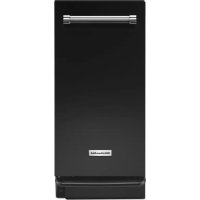
KTTS505EBL - Waste compactor KITCHENAID - Free user manual and instructions
Find the device manual for free KTTS505EBL KITCHENAID in PDF.


| Product Type | Trash Compactor |
| Brand | KitchenAid |
| Model | KTTS505EBL |
| Color | Black (BL for Black) |
| Height | 34 1/2" (87.6 cm) |
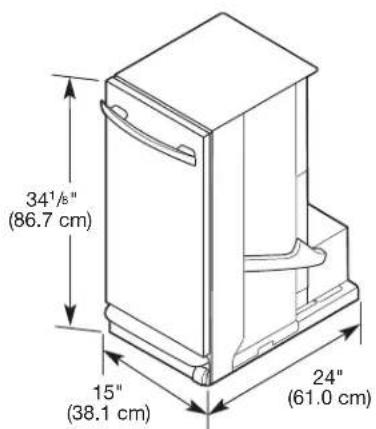
| Width | 15" (38.1 cm) |
| Depth | 24" (61.0 cm) |
| Electrical Supply | 115 V AC, 60 Hz, 15 or 20 A, dedicated circuit recommended |
| Power Cord Plug | 3-prong with grounding |
| Bag Capacity | Special trash compactor bags (ref. W10165295RP, W10165294RB, W10165295BU) |
| Main Functions | Standard compaction, Solid Pack mode (extended compression), odor-absorbing air filter |
| Controls | Removable key button (child safety), Solid Pack switch, air filter switch, start pedal |
| Drawer Opening | By pedal or handle |
| Safety Features | Key lock, automatic shut-off at cycle end, overload protection |
| Maintenance | Clean interior/exterior with mild detergent, vacuum debris, replace charcoal filter (ref. 4151750) |
| Included Accessories | Retaining brackets, mounting screws, handle, protective corner brackets |
| Warranty | 1 year limited (parts and labor), 30 days for charcoal filter |
| Usage | Household use only |
Frequently Asked Questions - KTTS505EBL KITCHENAID
User questions about KTTS505EBL KITCHENAID
0 question about this device. Answer the ones you know or ask your own.
Ask a new question about this device
Download the instructions for your Waste compactor in PDF format for free! Find your manual KTTS505EBL - KITCHENAID and take your electronic device back in hand. On this page are published all the documents necessary for the use of your device. KTTS505EBL by KITCHENAID.
USER MANUAL KTTS505EBL KITCHENAID
THANK YOU for purchasing this high-quality product. If you should experience a problem not covered in TROUBLESHOOTING, please visit our website at www.kitchenaid.com or call us at 1-800-422-1230.
You will need your model and serial number located on the right-hand side, behind the compactor drawer.
TABLE OF CONTENTS
COMPACTOR SAFETY 2
INSTALLATION REQUIREMENTS....3
INSTALLATION INSTRUCTIONS....4
COMPACTOR USE....7
COMPACTOR CARE....9
TROUBLESHOOTING....12
WARRANTY 14
COMPACTOR SAFETY
Your safety and the safety of others are very important.
We have provided many important safety messages in this manual and on your appliance. Always read and obey all safety messages.

This is the safety alert symbol.
This symbol alerts you to potential hazards that can kill or hurt you and others.
All safety messages will follow the safety alert symbol and either the word "DANGER" or "WARNING."
These words mean:
! DANGER
You can be killed or seriously injured if you don't immediately follow instructions.
WARNING
You can be killed or seriously injured if you don't follow instructions.
All safety messages will tell you what the potential hazard is, tell you how to reduce the chance of injury, and tell you what can happen if the instructions are not followed.
IMPORTANT SAFETY INSTRUCTIONS
WARNING: When using an electrical appliance, basic precautions should always be followed, including the following:
- Read all instructions before using the compactor.
■ Close supervision is necessary when used by or near children. Do not allow to be used as a toy, or to run unattended at any time. Lock Key Switch when not in use and store key out of reach of children.
■ Do not touch moving parts.
■ Do not operate with a damaged cord set, plug, motor, or after damage in any manner. Have the compactor examined, repaired or adjusted by an authorized serviceperson.
■ Use only for intended use as described in this manual. Do not use other than manufacturer's recommended attachments.
■ Do not compact toxic or volatile flammable material such as oily rags and insect sprays. Do not compact lighted cigarettes, cigars, or other hot or burning items. Do not overload the compactor.
■ Do not take apart the compactor. Incorrect reassembly can cause electric shock when subsequently used.
■ Handle a loaded trash bag with care. Sharp objects can pierce the bag and cause injury. Do not overload trash bag with heavy material such as glass.
■ This compactor is intended for household use only.
■ Unplug the compactor before servicing.
■ Do not modify the plug attached to the compactor; use only with a grounded receptacle.
SAVE THESE INSTRUCTIONS
State of California Proposition 65 Warnings:
WARNING: This product contains one or more chemicals known to the State of California to cause cancer.
WARNING: This product contains one or more chemicals known to the State of California to cause birth defects or other reproductive harm.
INSTALLATION REQUIREMENTS
Location Requirement
Product Dimensions
Cutout Dimensions
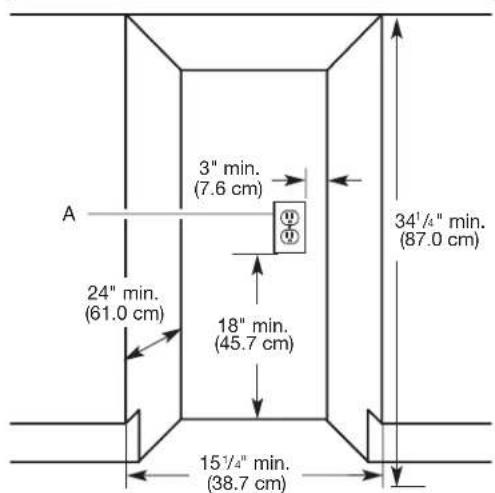
A. Grounded electrical outlet must be a minimum of 3" (7.6 cm) away from surrounding cabinets or nearby walls as shown. It can be placed either to the left or the right side of the compactor.
Clearance Dimensions
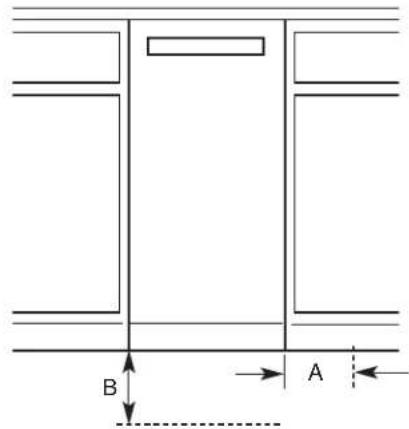
A. Leave 6" (15.2 cm) of clearance space to the right side of the compactor in order to remove the compactor bags.
B. Leave 23" (58.4 cm) of clearance in front of the compactor in order to fully open or remove the compactor drawer.
Electrical Requirements
WARNING

Electrical Shock Hazard
Plug into a grounded 3 prong outlet.
Do not remove ground prong.
Do not use an adapter.
Do not use an extension cord.
Failure to follow these instructions can result in death, fire, or electrical shock.
Recommended Grounding Method
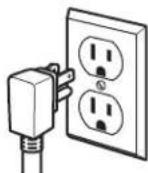
This compactor is for use on a single phase, 115 volt, 60 Hz, AC only, 15 or 20 amp fused and properly grounded circuit and is equipped with a grounding plug as shown. It is recommended that a separate circuit serving only this appliance be provided.
This compactor must be grounded while in use to reduce the risk of electric shock. The compactor is equipped with a three-conductor cord and 3 prong grounding-type plug to fit the proper grounding-type receptacle. The green (or green and yellow) conductor in the cord is the grounding wire. Do not connect the green (or green and yellow) wire to a live terminal. Do not modify the plug attached to the compactor; use with a grounded receptacle.
INSTALLATION INSTRUCTIONS
Tools
Installer: Leave User Instructions with the homeowner. Homeowner: Keep User Instructions for future reference and for local electrical inspector's use if required.
Tools needed:
| Gather the required tools and parts before starting installation. | |
| ■Level | ■Phillips No. 2 screwdriver |
| ■Tape measure | ■Flat-head screwdriver |
| ■Pliers | ■5/16" box-end wrench |
| ■Scissors | ■Utility knife |
Unpacking
WARNING
Excessive Weight Hazard
Use two or more people to move and install compactor.
Failure to do so can result in back or other injury.
Begin in the room where the compactor will be located.
- Remove compactor from shipping carton. Follow the instructions on the shipping carton.
- Remove all packaging materials such as tape and shipping pads.
- Use a mild detergent and warm water to remove waxy residue caused by shipping material.
- Dry thoroughly with a soft cloth. For more information, see the "Cleaning" section.
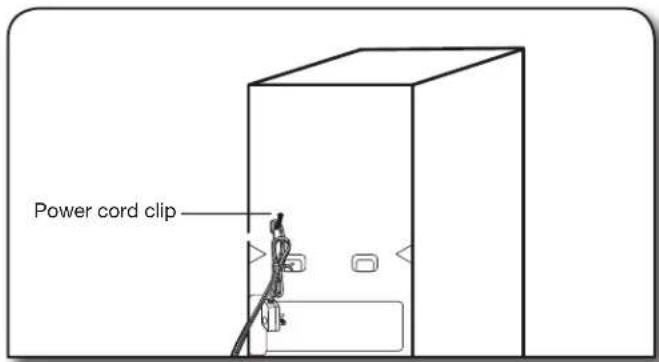
- Be sure the power cord is attached to the cord clip on the rear of the compactor.
- Place two of the four corner posts from the packaging on the floor near the compactor.
- Press the foot pedal to open the compactor drawer and remove any shipping materials or other items from the drawer.
NOTE: Do not remove the compactor bag.
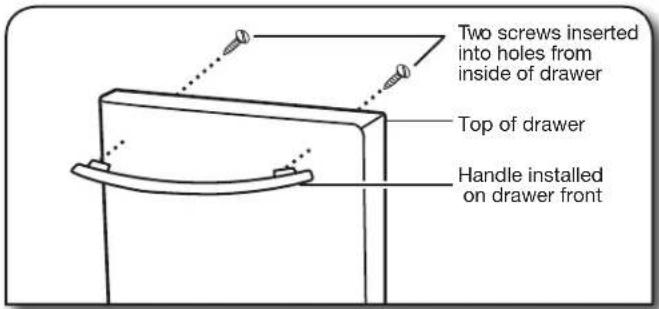
- If the compactor has a full front panel, install the handle. The handle is located inside the drawer.
To install handle:
■Insert screws into the holes from the inside of the drawer.
■Place handle on the front of the drawer and align handle screw holes with screw ends.
■Tighten screws snugly.
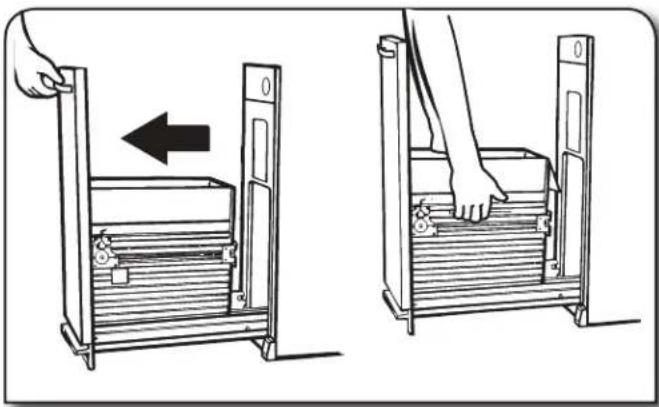
- Grasp the front of the drawer and tilt it backwards slightly while pulling forward to clear the drawer stops.
- Grasp the drawer handle or sides of drawer and lift drawer out of compactor.
- Place the drawer on the two corner posts.
- Place the other two corner posts on the floor to the side of the compactor.
- Grasp the sides of the compactor cabinet and place compactor on its side on top of the corner posts.
- Remove the shipping base from the bottom of the compactor.
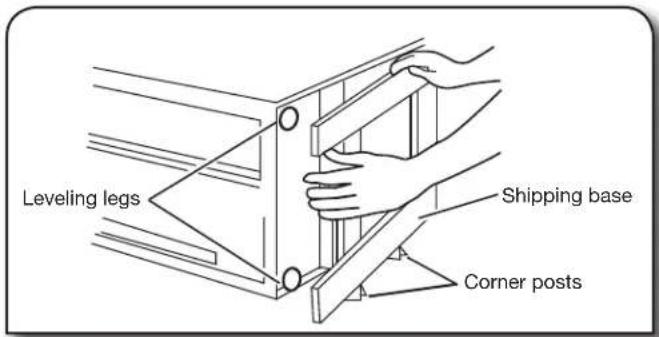
NOTE: Before returning the compactor to the upright position, adjust the height of the compactor as necessary using the following "Height Adjustment" instructions.
Height Adjustment (optional)
- Measure the height of your cabinet opening. The top of the compactor mounting screw head should be at least 1/8" (3 mm) from the top of the cabinet opening.
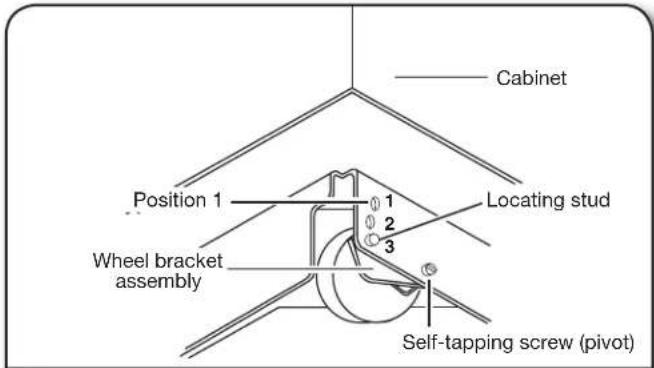
The rear wheels are preset for a cabinet height of 341/4 " (87 cm). See Position "1" in the following picture.
To adjust for cabinet opening heights greater than 341/4 " (87 cm):
■Loosen self-tapping screw just enough to clear stud from hole in Position "1".
■Move the rear wheel and stud to Position "2" or "3" as needed for your cabinet opening measurement:
Position "2": 34 7/16" to 3411/16" (87.5 to 88.1 cm)
Position "3": 34 13/16 " to 35" (88.4 to 88.9 cm)
NOTE: To level the compactor in position "3", you may need to add shims under the front leveling legs. The shims should be approximately 1/4" (6 mm) thick.
■Tighten screw.
- Stand the compactor upright. If you are changing the rear wheel height, move the corner posts to the opposite side and lay the compactor on its other side. Adjust the other rear wheel.
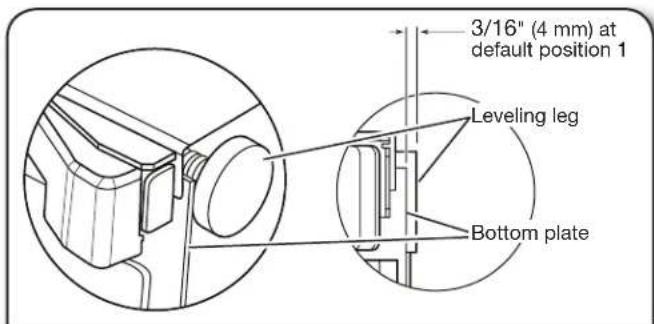
- Use pliers to lower the front leveling legs away from the compactor cabinet. Adjust the leveling legs to agree with the position of the rear wheels.
Rear Wheel position:
"1": 3/16" (4 mm) from bottom plate
"2": 9/16" (14 mm) from bottom plate
"3": 3/4" (19 mm) from bottom plate
- Stand the compactor upright. Dispose of/recycle all packaging materials.
Undercounter Installation
Proper installation is your responsibility. Make sure you have everything necessary for correct installation. It is the personal responsibility and obligation of the customer to contact a qualified installer to assure that electrical installation meets all national and local codes and ordinances.
IMPORTANT:
■To avoid damaging floor covering, slide compactor onto cardboard or hardboard before moving compactor across floor.
■Do not allow the rear frame of the compactor to touch the floor covering when lifting or moving compactor.
- Move the compactor close to its final location.
- Remove cord clip from the back of the compactor. Plug into a grounded 3 prong outlet.
- Determine if you want the compactor cabinet frame or drawer front flush with the kitchen cabinet face.
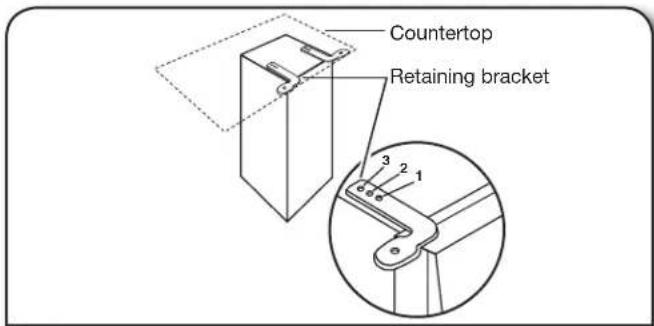
- Rotate the two top retaining brackets 180°
The screws are supplied in position "2". If desired, adjust the brackets to position "1" or "3" as described below:
■If the compactor frame is to be flush with the cabinet front, place retaining bracket screws through "1".
■If the compactor drawer front is to be flush with the cabinet front, place retaining bracket screws through "3".
■If the compactor is to be midway between "1" and "3", leave the retaining bracket screws through "2".
- Slowly lift the front slightly and roll compactor into the cabinet opening.
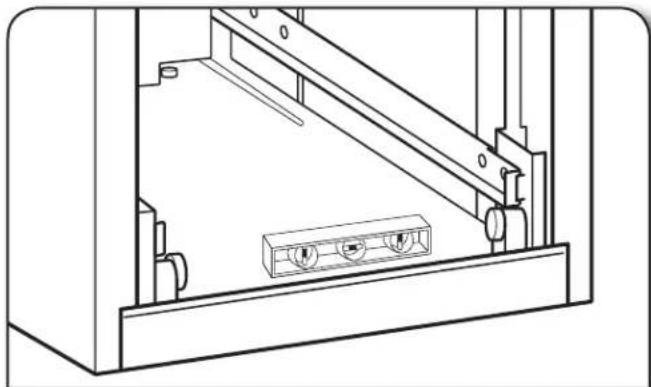
- Adjust the leveling legs until the compactor is level and stable. Place a level inside the bottom of the cabinet as shown. Check the compactor leveling side to side and back to back.
- Using the two #8-18 x 1/2" (13 mm) screws (provided), fasten the retaining brackets to the countertop with the mounting screws.
Countertop Mounting
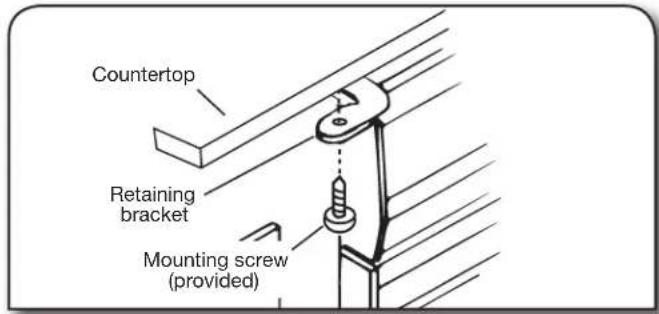
NOTE: If the retaining brackets cannot be attached to the underside of countertop, see the "Cabinet-face Mounting" section.
Cabinet-face Mounting
(use if countertop mounting is not possible)
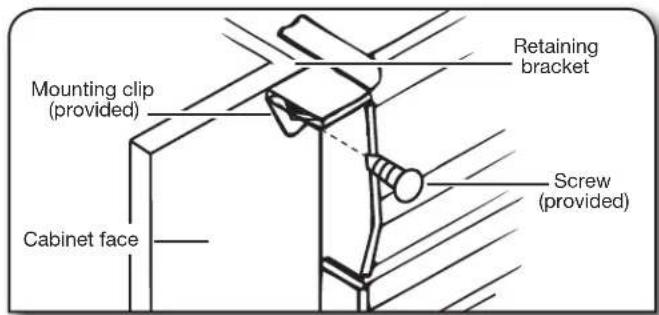
- Grasp sides of compactor drawer and place the wheels of the drawer into the tracks. Lift at the handle so drawer will go over drawer stops. Close the drawer. Make sure the drawer opens and closes freely. If the toe guard rubs against floor, see the "Adjusting the Toe Guard" section for further instructions.
Adjusting the Toe Guard
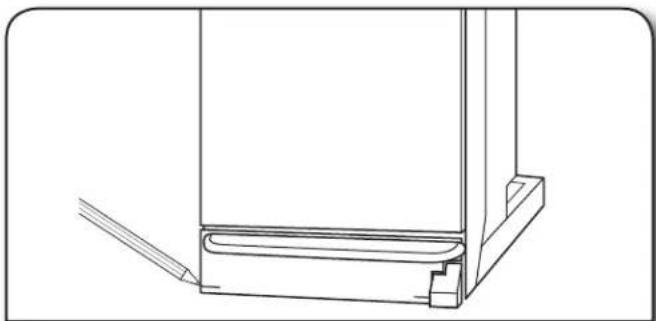
If the toe guard rubs the floor covering, the toe guard clearance may be changed as follows:
- Mark on each side of the toe guard the amount of toe guard that rubs the floor covering.
-
Remove the drawer from the compactor. (See steps 9 and 10 in the "Unpacking" section.)
-
Use a ruler and a pencil or chalk to draw a line between the marks on each side of toe guard. Use scissors or a utility knife to cut toe guard along line.
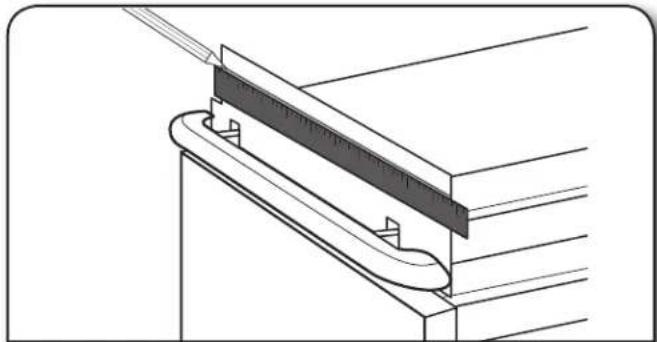
- Replace drawer. If toe guard still rubs floor covering, repeat steps 1-3.
Installing a Custom Panel
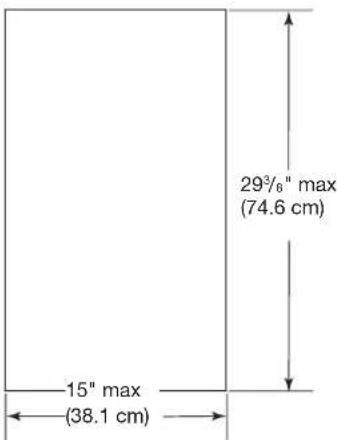
Dimensions
Use these dimensions to create a custom panel. The panel should be a minimum of 1/2" (1.3 cm) thick.
Installation
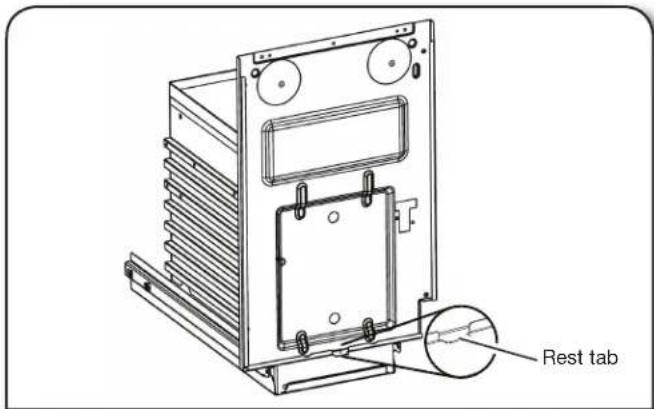
- Align the bottom of the custom panel with the bottom of the exterior drawer front and rest the panel on the rest tab. NOTE: The bottom of the custom panel should not extend below the bottom rest tab which is located at the lower center of the exterior drawer front.
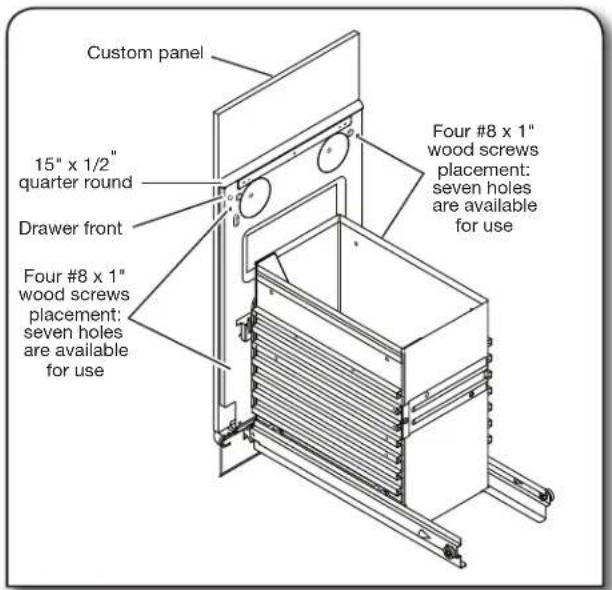
Secure the custom panel to the exterior drawer front by using four #8 x 1" wood screws from the inside drawer front. There are seven holes available for use.
- Attach a 15" x 1/2" (38.1 cm x 13 mm) quarter-round filler along the top inside edge of the drawer front using glue or screws.
COMPACTOR USE
How Your Compactor Works
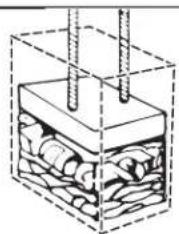
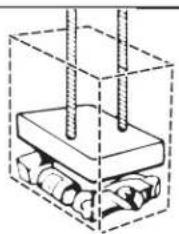
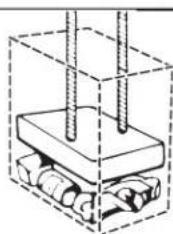
The compacting ram is the part of the compactor which compresses the trash.
IMPORTANT: The compacting ram stops 7" (18 cm) from the bottom of the drawer. You will not see compacting of trash until the drawer is more than 1/2 full.
You may hear a noise when glass breaks. Strong glass bottles may not break. The trash in a full compactor bag will be about 1/4 the size of its original bulk.
WARNING

Cut Hazard
Do not push items down into compactor with hands or feet.
Doing so can result in cuts.
NOTE: You will not see compacting of trash the first few times you load the compactor. The compactor drawer should be at least 1/2 full before the compactor can begin compressing the load.
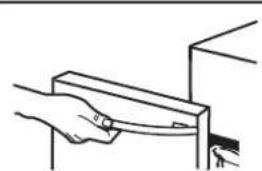
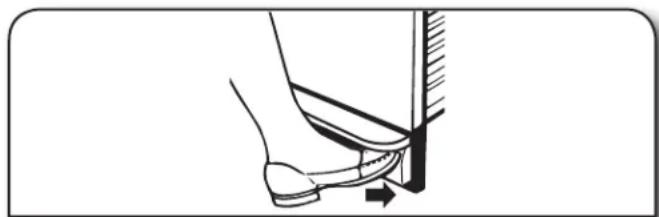
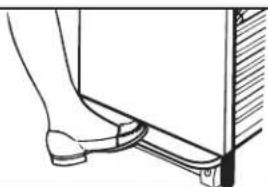
- Open the drawer. Lift and pull the handle or press the foot pedal to open the drawer.
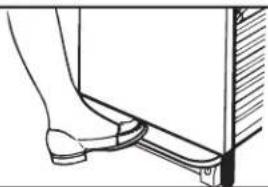
NOTE: Pressing the foot pedal opens the drawer only 3" to 6" (7.6 cm to 15.2 cm), dependent upon the load.
WARNING

Cut Hazard
Cover glass items when compacting to better contain fragments.
Failure to do so can result in cuts.
- Place trash in compactor.
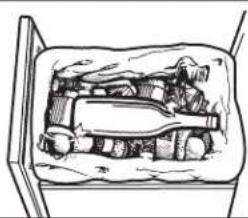
■Wrap or cover wet or messy trash.
■Do not compact items that may develop offensive odors such as raw meat, fish, grapefruit rinds, disposable diapers, or personal hygiene items.
■Load bulky trash in the center of the drawer.
■Load bottles and cans on their sides in the center of the drawer. Do not load bottles in an upright position.
- Close the drawer.
Starting Your Compactor
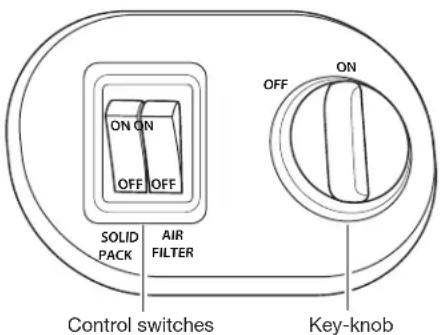
- Open drawer. Load trash.
- Turn the Key-knob to the ON position.
- Set Solid Pack TM cycle switch to OFF.
- Close drawer.
NOTE: The Key-knob is removable. Remove the Key-knob to disallow children to operate the compactor. Press the foot-actuated Start button in with your toe to start the compacting cycle.
Using Solid Pack™ (Locked) Cycle
The Solid Pack ™ (locked) cycle extends the use of the bag by putting constant pressure on the trash to keep it from springing back. Regular use of a Solid Pack ™ cycle can increase bag capacity up to 25 percent.
During the Solid Pack ™ cycle, the ram will stay in the down position for extra compacting. The drawer is locked and cannot be opened when the ram is down.
IMPORTANT: During the Solid Pack™ cycle, the drawer remains locked until you press the foot-actuated Start button to raise the ram.
For best results, use the Solid Pack ™ cycle for at least 30 minutes at a time.
- Lift and pull the handle or press the foot pedal to open the compactor drawer.
- Set compactor Solid Pack TM cycle switch to ON.
- Close drawer.
- Press the foot-actuated Start button in with your toe to start the compacting cycle.
- Press the foot-actuated Start button to raise the ram and allow the drawer to be opened.
Using the Air Filter
- Set the Air Filter switch to ON. The fan creates air movement in the compactor for odor removal.
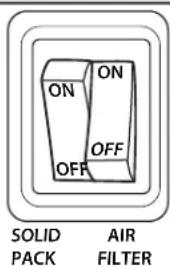
NOTES:
■The Air Filter only works when the Key-knob is in the On position.
■If you hear noise while the compactor is not in use, it might be the fan has been left on.
- Set the Air Filter switch to OFF to turn off the fan.
Removing a Filled Bag
WARNING
Excessive Weight Hazard
Two people may be required to remove and transport compacted bag.
Unlock latch to assist in the removal of the bag.
Failure to do so can result in back or other injury.
When the trash is compacted to the top of the drawer, remove the bag. If the bag is too heavy, compact less trash before emptying it in the future.
WARNING

Cut Hazard
Do not push items down into compactor with hands or feet.
Doing so can result in cuts.
- Lift and pull the handle or press the foot pedal to open the drawer.
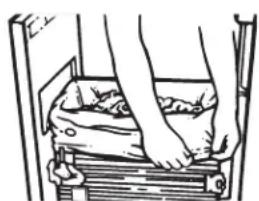
- Remove top of bag from bag retainer buttons. Pull up all four bag cuffs. Close bag with a twist tie.
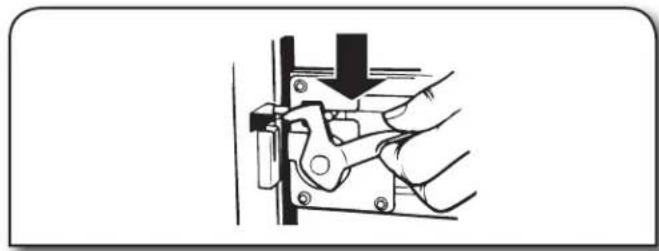
- Release drawer side latch. Tilt drawer to the right. This releases pressure on the bag making it easier to remove the bag.
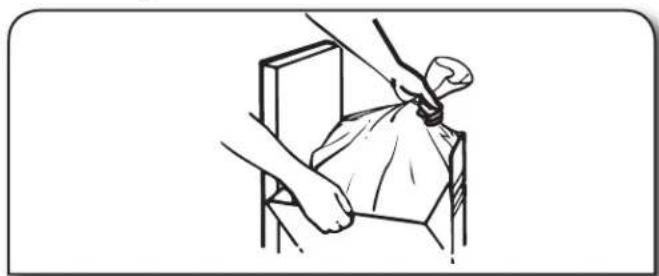
- Lift out bag.
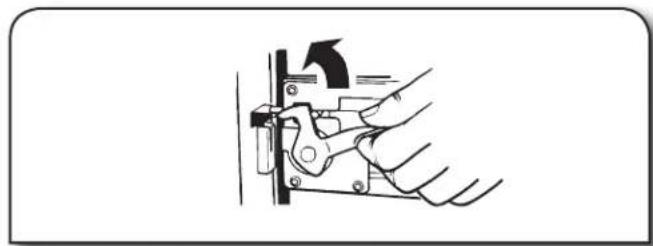
- Latch the drawer if it was unlatched.
Installing a New Bag
Do not use any kind of bag other than those designed specifically for use in your compactor. Order replacement compactor bags through your local dealer or by calling the toll-free number on the cover or in the "Assistance or Service" section.
IMPORTANT:
Before installing a new bag, be sure:
■The drawer latch is securely locked.
■The drawer is clean and free of debris.
NOTE: An unlatched drawer can cause the drawer monitor switch to stay open. This will make the ram return and the compactor will continue to run. Attempt to push the drawer inwards to stop the compactor. The continuous running of the compactor can also be attributed to debris in the drawer area. If it is difficult to open or close the drawer this may be due to either the drawer latch not being locked or debris in the drawer area.
- Place folded bag into the drawer. Open bag and pull top edges over the drawer top.
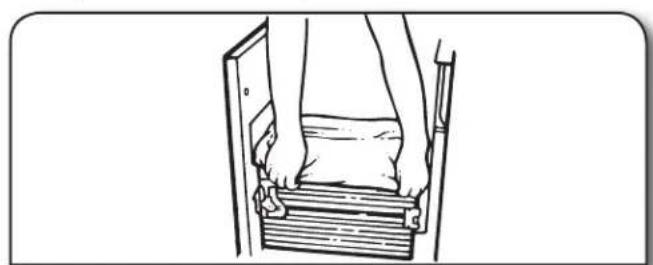
-
Lock bag in place by pulling the four pre-punched holes over the bag retainer buttons. Holes will expand over the buttons without damaging the bag.
-
Press inside of bag against the drawer bottom, sides and corners for a smooth fit.
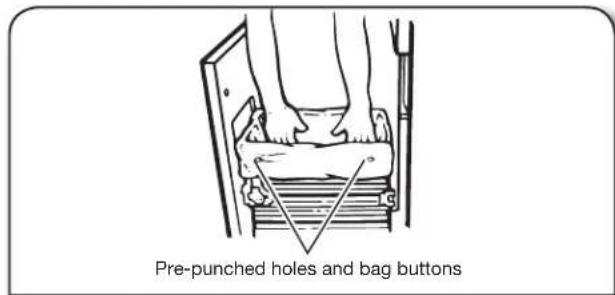
NOTE: The ram can and will tear improperly installed bags.
COMPACTOR CARE
Your new compactor is designed to give you many years of dependable service. However, there are a few things you are expected to do in order to properly maintain your compactor. This section will tell you how to clean and care for your compactor.
Before changing the air filter, open the drawer and turn the Key-knob to the OFF position and remove it.
NOTE: Any services other than those outlined in this section should be performed by an authorized service representative. Cleaning
Changing the Air Filter
It is recommended that you use the charcoal air filter located under the filter cover.
To order the correct replacement charcoal filters, call the toll-free number listed on the cover or in the "Accessories" section.
- Insert fingertips in the air filter cover and pull until the side tabs release. Lift the cover to release the bottom tabs.
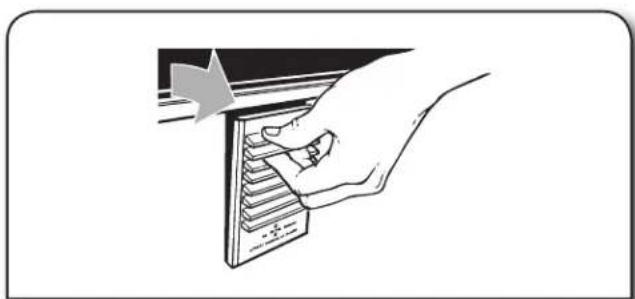
- Remove the air filter by pulling the top edge of the filter. The filter should pull out easily. Throw away the used filter.
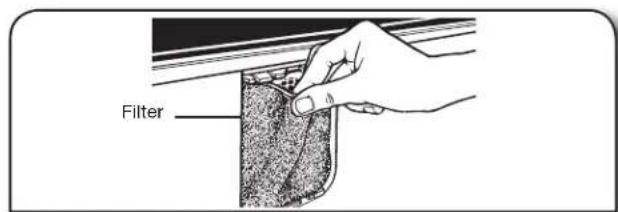
-
To replace air filter, push the replacement filter into place.
-
Insert the bottom tabs of the air filter cover and push in until the side tabs snap into place.
Cleaning
WARNING
Cut Hazard
Wear gloves when cleaning inside the drawer or cabinet, or the ram.
Failure to do so can result in cuts.
Before cleaning the compactor, open the drawer and turn the Key-Knob to the OFF position and remove it.
Cleaning Inside the Drawer
- Pull drawer out until it stops.
- Remove the bag. See the "Removing a Filled Bag" section.
- Optional: Remove the drawer side. Hold the drawer latch open and tilt the side of the drawer out until the latch clears the drawer front.
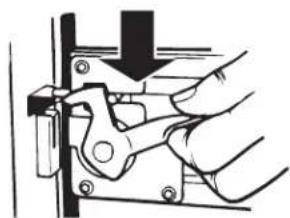
Remove the drawer side by lifting it out of the drawer.
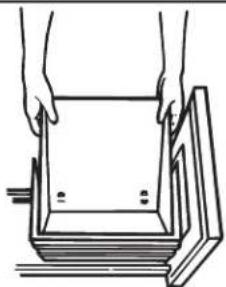
- Wash the interior of the drawer with a clean sponge or soft cloth and a mild detergent in warm water. Rinse and dry thoroughly with a soft cloth.
- If the drawer side was removed, slide it back into the tilted position.
- Press the drawer latch down while pushing the drawer side to the upright position.
- Latch the drawer side.
- Close the drawer.
Cleaning Inside the Cabinet
- Pull the drawer out until it stops.
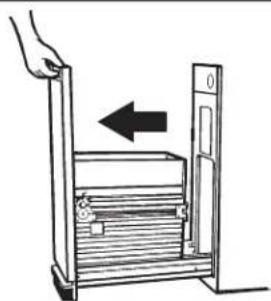
NOTE: Look to see how the drawer rollers move in the tracks and disengage. It will be easier to replace the drawer after you have finished cleaning.
- Lift the front of the drawer to clear the stops.
- Grasp the handle or drawer on the sides and pull it out the rest of the way. Set the drawer down gently.
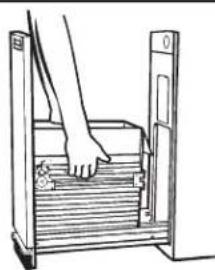
Vacuum the inside of the cabinet. Liquid spills or wet trash should be cleaned up by hand, or by using a vacuum designed to pick up liquids.
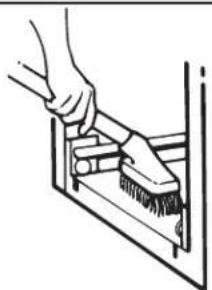
- Wash the inside of the cabinet with a clean sponge or soft cloth and a mild detergent in warm water. Rinse and dry thoroughly with a soft cloth.
- To replace the drawer, grasp it by the sides and insert the rollers onto the tracks.
- Lift the front of the drawer and push it in fully past the stops.
Cleaning Exterior Surfaces
- Wash exterior surfaces (including stainless steel) with a clean sponge or soft cloth and a mild detergent in warm water. Do not use abrasive or harsh cleaners. Rinse and dry thoroughly with a soft cloth.
- Wipe up spills immediately. Some foods can damage the finish if left on the compactor surface.
Cleaning the Ram
- Wipe glass particles off of the ram cover with a cloth or paper towels. Throw the towel away.
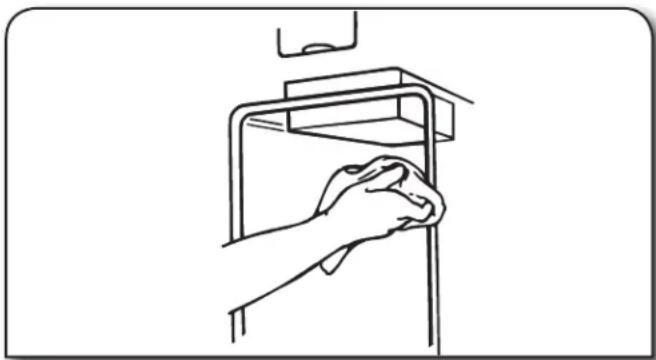
- Remove foods with a clean sponge or soft cloth and a mild detergent in warm water. Rinse and dry thoroughly with a soft cloth.
Cleaning Before a Vacation
If you will be away for more than a couple of days, remove the compactor bag. Remove the Key-knob and store it out of children's reach.
Accessories
To order, contact your local authorized dealer. In the U.S.A. visit our webpage www.kitchenaid.com or call 1-800-422-1230.
In Canada, visit our webpage www.kitchenaid.ca. or call: 1-800-807-6777.
Replacement bags
15-pack - Part Number W10165295RP
60-pack - Part Number W10165294RB
180-pack - Part Number W10165295BU
Charcoal air filter
Part Number 4151750
Bag Carrier
Part Number 776989
Panels and Handles:
Panels
Part Number W10714558 (Stainless Steel)
Part Number W10714559 (White)
Part Number W10714560 (Black)
Handles:
Part Number W10483828 (Stainless Steel Handle)
TROUBLESHOOTING
WARNING

Electrical Shock Hazard
Plug into a grounded 3 prong outlet.
Do not remove ground prong.
Do not use an adapter.
Do not use an extension cord.
Failure to follow these instructions can result in death, fire, or electrical shock.
Try the solutions suggested here first in order to avoid the cost of an unnecessary service call.
| PROBLEM SOLUTION | |
| COMPACTOR WILL NOT OPERATE | Check that the power supply cord is plugged into a grounded 3 prong outlet.Check the type of wall plug the compactor is plugged into. It is possible the compactor power cord is plugged into an outlet controlled by a wall switch. This can occur when the wall switch was meant for a garbage disposal outlet.A household fuse may have blown, or a circuit breaker tripped. Replace the fuse or reset the circuit breaker. If the problem continues, call an electrician.Make sure the drawer is completely closed. Open the drawer to ensure the latch is locked. Close the drawer firmly and start the compactor.Check that the Key-knob is set to ON. See the “Starting Your Compactor” section.Press the foot-actuated start button. See the “Starting Your Compactor” section. |
| TRASH IS NOT COMPACTING | Drawer must be more than half full before trash is compacted. The ram stops 7" (17.8 cm) from the bottom of the drawer. |
| DRAWER WILL NOT OPEN | The Solid PackTM Cycle may be engaged. The drawer will remain locked until you reset by pressing the foot-actuated Start button. Turn the Solid PackTM Cycle off by pushing the Solid PackTM switch to OFF.Push on the drawer front in an attempt to raise the ram. Be sure the latch is locked.Press the foot-actuated Start button. See the “Starting Your Compactor” section. |
| THERE IS NOT ENOUGH COMPACTION OR FORCE | Compacting works best when the Solid PackTM cycle is used. Keep trash compressed for a minimum of 30 minutes. |
| BOTTLES DO NOT BREAK | Factors that affect bottle breakage: Bottles will not break every time. The thickness of the bottle's glass and the content of the trash load below it may keep the bottle from breaking. |
| COMPACTOR WILL NOT TURN OFF | Push on the drawer front to attempt to engage the drawer monitor switch. Open drawer and be sure the latch is locked.The foot actuated Start switch may not be engaged or the lever that pushes the Start switch in may be bent. Push on the lever to stop the compactor. If needed, bend the lever back into position.Debris in the drawer area will cause the door to disengage from the drawer monitor switch causing the compactor to keep running. This can also keep the compactor from starting. |
| DRAWER IS HITTING THE CABINET | The cabinet opening should be 15 1/4 " (38.7 cm) minimum with at least an 1/8" (3.2 mm) clearance on either side.Make sure the compactor is centered in the cabinet opening.Make sure the latch is locked. An unlatched drawer will cause the front door to be wobbly and offset from center.Check for debris on the drawer tracks or under the drawer. Debris may cause the drawer to lean to one side or not sit properly on the tracks.The compactor may be set too high or not level. The compactor can be raised or lowered with front leveling.Ensure the drawer is located on the tracks. If it is not, remove the drawer and reinstall. |
| COMPACTOR MOVING DURING OPERATION | Check that the retaining brackets are installed to the cabinet. See the “Countertop Mounting” or “Cabinet-front Mounting” sections. |
| DRAWER IS WOBBLY OR LOOSE | NOTE: By design, it is normal for the drawer to move slightly side to side.An unlatched door will wobble more than normal. Check that the door latch is in the locked position.The screws on the drawer front (door) may be loose. With a Phillips screwdriver, check to ensure the screws holding the door to the drawer are secure. |
| COMPACTOR IS NOISY | The noise could be normal operation: The compactor is driven by a steel chain and steel sprockets. The fan will make a humming noise when on. Set the air filter switch to OFF to turn the fan off. |
KITCHENAID® COMPACTOR LIMITED WARRANTY
ATTACH YOUR RECEIPT HERE. PROOF OF PURCHASE IS REQUIRED TO OBTAIN WARRANTY SERVICE.
Please have the following information available when you call the Customer eXperience Center:
■Name, address and telephone number
■Model number and serial number
■A clear, detailed description of the problem
■ Proof of purchase including dealer or retailer name and address
IF YOU NEED SERVICE:
- Before contacting us to arrange service, please determine whether your product requires repair. Some questions can be addressed withoutservice. Please take a few minutes to review the Troubleshooting or Problem Solver section of the Use and Care Guide, or visithttp://kitchenaid.custhelp.com.
- All warranty service is provided exclusively by our authorized KitchenAid Service Providers. In the U.S. and Canada, direct all requests for warranty service to:
KitchenAid Customer eXperience Center
In the U.S.A., call 1-800-422-1230. In Canada, call 1-800-807-6777.
If outside the 50 United States or Canada, contact your authorized KitchenAid dealer to determine whether another warranty applies.
ONE YEAR LIMITED WARRANTY
WHAT IS COVERED WHAT IS NOT COVERED
ONE YEAR LIMITED WARRANTY
For one year from the date of purchase, when this major appliance is operated and maintained according to instructions attached to or furnished with the product, KitchenAid or KitchenAid Canada (hereafter "KitchenAid") will pay for factory specified parts and repair labor to correct defects in materials or workmanship. Service must be provided by a KitchenAid designated service company.
30 DAY LIMITED WARRANTY ON THE CHARCOAL FILTER AND AIR FRESHENER
For thirty days from the date of purchase, when the compactor is installed, operated and maintained according to instructions attached to or furnished with the product, KitchenAid will provide a replacement filter or air freshener if the original filter or air freshener fails due to defects in materials or workmanship.
YOUR SOLE AND EXCLUSIVE REMEDY UNDER THIS LIMITED WARRANTY SHALL BE PRODUCT REPAIR AS PROVIDED HEREIN. Service must be provided by a KitchenAid designated service company. This limited warranty is valid only in the United States or Canada and applies only when the major appliance is used in the country in which it was purchased. This limited warranty is effective from the date of original consumer purchase. Proof of original purchase date is required to obtain service under this limited warranty.
- Commercial, non-residential, multiple-family use, or use inconsistent with published user, operator or installation instructions.
- In-home instruction on how to use your product.
- Service to correct improper product maintenance or installation, installation not in accordance with electrical or plumbing codes or correction of household electrical or plumbing (i.e. house wiring, fuses or water inlet hoses).
- Consumable parts (i.e. light bulbs, batteries, air or water filters, preservation solutions, etc.).
- Defects or damage caused by the use of non-genuine KitchenAid parts or accessories.
- Damage from accident, misuse, abuse, fire, floods, acts of God or use with products not approved by KitchenAid.
- Repairs to parts or systems to correct product damage or defects caused by unauthorized service, alteration or modification of the appliance.
- Cosmetic damage including scratches, dents, chips, and other damage to the appliance finishes unless such damage results from defects in materials and workmanship and is reported to KitchenAid within 30 days.
-
Discoloration, rust or oxidation of surfaces resulting from caustic or corrosive environments including but not limited to high salt concentrations, high moisture or humidity or exposure to chemicals.
-
Pick-up or delivery. This product is intended for in-home repair.
-
Travel or transportation expenses for service in remote locations where an authorized KitchenAid servicer is not available.
-
Removal or reinstallation of inaccessible appliances or built-in fixtures (i.e. trim, decorative panels, flooring, cabinetry, islands, countertops, drywall, etc.) that interfere with servicing, removal or replacement of the product.
-
Service or parts for appliances with original model/serial numbers removed, altered or not easily determined.
The cost of repair or replacement under these excluded circumstances shall be borne by the customer.
DISCLAIMER OF IMPLIED WARRANTIES
IMPLIED WARRANTIES, INCLUDING ANY IMPLIED WARRANTY OF MERCHANTABILITY OR IMPLIED WARRANTY OF FITNESS FOR A PARTICULAR PURPOSE, ARE LIMITED TO ONE YEAR OR THE SHORTEST PERIOD ALLOWED BY LAW. Some states and provinces do not allow limitations on the duration of implied warranties of merchantability or fitness, so this limitation may not apply to you. This warranty gives you specific legal rights, and you also may have other rights that vary from state to state or province to province.
DISCLAIMER OF REPRESENTATIONS OUTSIDE OF WARRANTY
KitchenAid makes no representations about the quality, durability, or need for service or repair of this major appliance other than the representations contained in this warranty. If you want a longer or more comprehensive warranty than the limited warranty that comes with this major appliance, you should ask KitchenAid or your retailer about buying an extended warranty.
LIMITATION OF REMEDIES; EXCLUSION OF INCIDENTAL AND CONSEQUENTIAL DAMAGES
YOUR SOLE AND EXCLUSIVE REMEDY UNDER THIS LIMITED WARRANTY SHALL BE PRODUCT REPAIR AS PROVIDED HEREIN. KITCHENAID SHALL NOT BE LIABLE FOR INCIDENTAL OR CONSEQUENTIAL DAMAGES. Some states and provinces do not allow the exclusion or limitation of incidental or consequential damages, so these limitations and exclusions may not apply to you. This warranty gives you specific legal rights, and you also may have other rights that vary from state to state or province to province.
NOTES
KitchenAid®
INSTRUCTIONS
D'UTILISATION
DU COMPACTEUR
⚠ AVERTISSEMENT
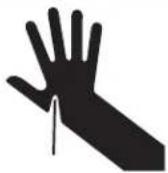
Risque de coupure
KitchenAid Customer eXperience Center
- TABLE OF CONTENTS
- COMPACTOR SAFETY
- YOUR SAFETY AND THE SAFETY OF OTHERS ARE VERY IMPORTANT
- DANGER
- WARNING
- IMPORTANT SAFETY INSTRUCTIONS
- SAVE THESE INSTRUCTIONS
- INSTALLATION REQUIREMENTS
- LOCATION REQUIREMENT
- ELECTRICAL REQUIREMENTS
- ELECTRICAL SHOCK HAZARD
- RECOMMENDED GROUNDING METHOD
- INSTALLATION INSTRUCTIONS
- TOOLS
- UNPACKING
- EXCESSIVE WEIGHT HAZARD
- TO INSTALL HANDLE
- HEIGHT ADJUSTMENT (OPTIONAL)
- REAR WHEEL POSITION
- UNDERCOUNTER INSTALLATION
- IMPORTANT
- ADJUSTING THE TOE GUARD
- INSTALLING A CUSTOM PANEL
- DIMENSIONS
- INSTALLATION
- COMPACTOR USE
- HOW YOUR COMPACTOR WORKS
- USING SOLID PACK™ (LOCKED) CYCLE
- USING THE AIR FILTER
- NOTES
- REMOVING A FILLED BAG
- INSTALLING A NEW BAG
- COMPACTOR CARE
- CHANGING THE AIR FILTER
- CLEANING
- CLEANING INSIDE THE DRAWER
- CLEANING INSIDE THE CABINET
- CLEANING EXTERIOR SURFACES
- CLEANING THE RAM
- CLEANING BEFORE A VACATION
- ACCESSORIES
- PANELS AND HANDLES
- TROUBLESHOOTING
- KITCHENAID® COMPACTOR LIMITED WARRANTY
- IF YOU NEED SERVICE
- ONE YEAR LIMITED WARRANTY
- WHAT IS COVERED WHAT IS NOT COVERED
- 30 DAY LIMITED WARRANTY ON THE CHARCOAL FILTER AND AIR FRESHENER
- DISCLAIMER OF IMPLIED WARRANTIES
- DISCLAIMER OF REPRESENTATIONS OUTSIDE OF WARRANTY
- LIMITATION OF REMEDIES; EXCLUSION OF INCIDENTAL AND CONSEQUENTIAL DAMAGES
- KITCHENAID®
- INSTRUCTIONS
- D'UTILISATION
- DU COMPACTEUR
Brand : KITCHENAID
Model : KTTS505EBL
Category : Waste compactor