
FC272WN1 - Refrigerator BRANDT - Free user manual and instructions
Find the device manual for free FC272WN1 BRANDT in PDF.



| Brand | BRANDT |
| Model | FC272WN1 |
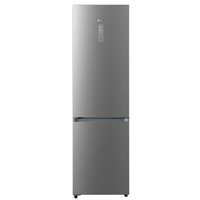
| Product type | Combined refrigerator with freezer |
| Dimensions (H x W x D) | 180 cm x 60 cm x 65 cm (estimated) |
| Net weight | 65 kg (estimated) |
| Power supply | 230 V, 50 Hz |
| Refrigerator capacity | 250 L (estimated) |
| Freezer capacity | 80 L (estimated) |
| Noise level | 40 dB (estimated) |
| Climate class | N-ST (estimated) |
| Cooling system | Forced air cooling (ventilated) in refrigerator, static cooling in freezer |
| Defrost | Automatic for refrigerator, manual for freezer |
| Interior lighting | LED |
| Number of shelves | 4 glass shelves (estimated) |
| Vegetable compartment | 1 vegetable drawer |
| Reversible door | Yes |
| Adjustable thermostat | Yes, mechanical dial |
| Care and cleaning | Clean with a soft cloth and soapy water; do not use abrasive products |
| Safety | Open door alarm (depending on model) |
| Spare parts | Available from BRANDT after-sales service |
| Repairability | Repairability index: 7/10 (estimated) |
Frequently Asked Questions - FC272WN1 BRANDT
User questions about FC272WN1 BRANDT
0 question about this device. Answer the ones you know or ask your own.
Ask a new question about this device
Download the instructions for your Refrigerator in PDF format for free! Find your manual FC272WN1 - BRANDT and take your electronic device back in hand. On this page are published all the documents necessary for the use of your device. FC272WN1 by BRANDT.
USER MANUAL FC272WN1 BRANDT
2. Setting the owner's clock
Hold the button down for quick setting.
-Tilt the grill body down.
Fold-down grill grate
Safety recommendations P.66
Child safety P.66
How to install your oven
Electrical connections P.67-68
Dimensions for installation use P.69
Changing a bulb P.70
How to use your oven
The oven programmer P.71
How to set the clock P.72
How to cook straightaway P.73
How to programme the cooking P.73-76
How to use the timer P.77
Cooking methods P.78-79
Looking after your oven P.80
Troubleshooting P.81
Throughout this manual,

indicates safety recommendations,

indicates advice to help you make the best use of your oven
Introduction
Dear Customer,
Thank you for buying a BRANDT oven.
Our design staff have produced a new generation of kitchen equipment, to make everyday cooking a pleasure.
You will find that the clean lines and modern look of your Brandt oven blends in perfectly with your kitchen décor. It is easy to use and performs to a high standard.
Brandt also makes a range of products that will enhance your kitchen such as hobs, extractor hoods, built-in dishwashers and refrigerators. There are models to complement your new Brandt oven.
Of course, we make every effort to ensure that our products meet all your requirements, and our Customer Relations department is at your disposal, to answer all your questions and to listen to all your suggestions (see back cover of manual).
Brandt has always been a leader in the development of new products, thus enhancing the quality of everyday life by providing increasingly efficient products, that are easy to use, respect the environment, and are attractive and reliable.
The BRANDT name.
Your oven
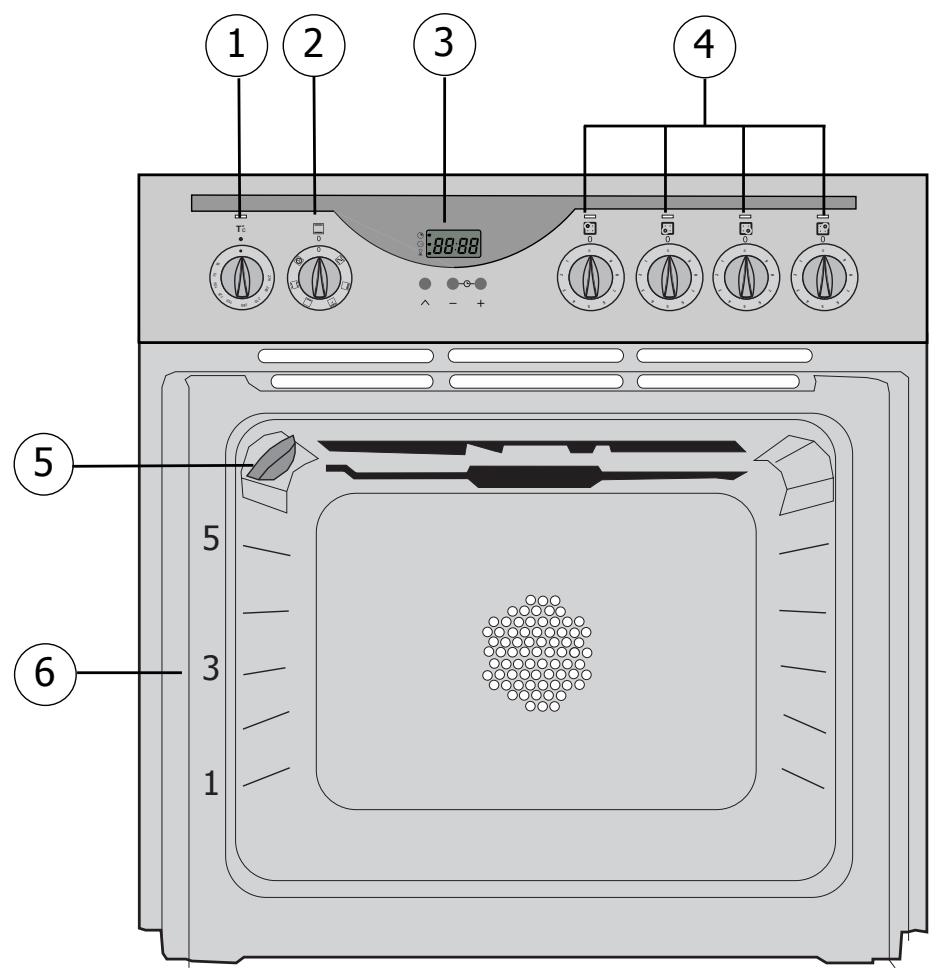
OVEN FEATURES
1 Temperature control 4 Hob controls 2 Feature selector (5) Light 3 Programme selector 6 Rail positions
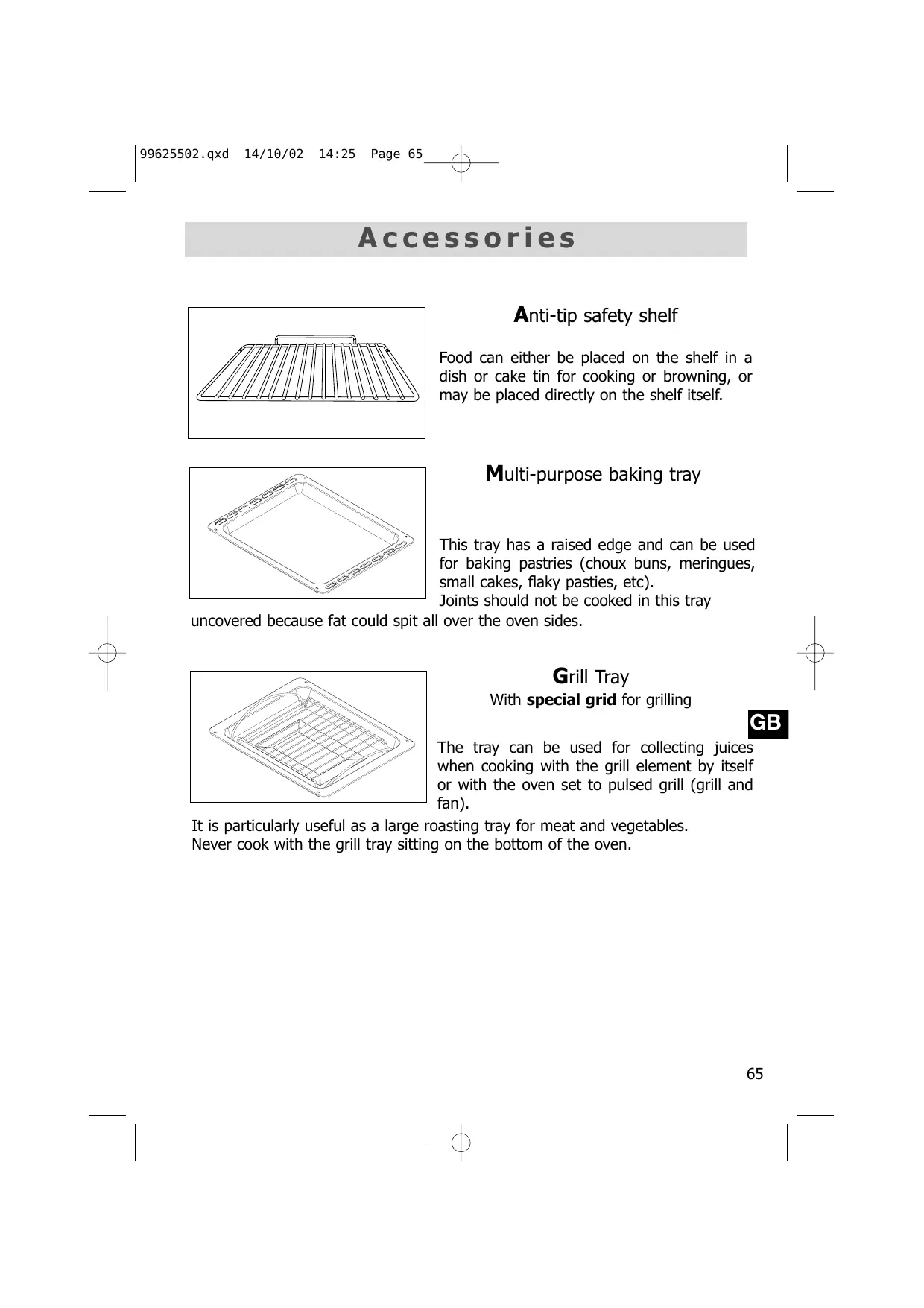
Accessories
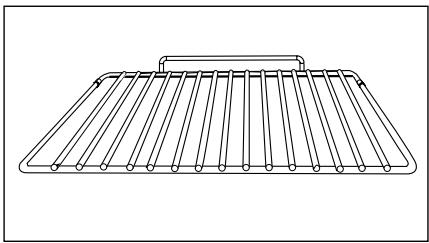
Anti-tip safety shelf
Food can either be placed on the shelf in a dish or cake tin for cooking or browning, or may be placed directly on the shelf itself.
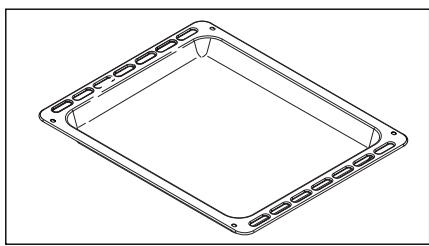
Multi-purpose baking tray
This tray has a raised edge and can be used for baking pastries (choux buns, meringues, small cakes, flaky pasties, etc). Joints should not be cooked in this tray
uncovered because fat could spit all over the oven sides.
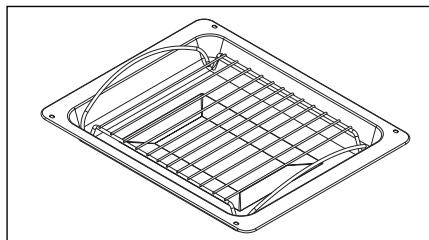
Grill Tray
With special grid for grilling
The tray can be used for collecting juices when cooking with the grill element by itself or with the oven set to pulsed grill (grill and fan).
It is particularly useful as a large roasting tray for meat and vegetables.
Never cook with the grill tray sitting on the bottom of the oven.

Safety recommendations
Please read these instructions before installing and using your oven. The oven has been designed for domestic use only for cooking food. No asbestos has been used in its construction.
USING FOR THE FIRST TIME:
Before you use your oven for the first time, leave it empty and, with the door closed, turn it on to maximum temperature and let it heat up for 15 minutes. This "runs the oven in". During this time there may be some smell from the mineral wool that insulates the oven and there could be some smoke. This is perfectly normal.
NORMAL USE:
- Always close the door properly. The oven is fitted with a seal designed to work with a closed door.
- Never lean or let anyone sit on the oven door when it is open.
- The oven parts and accessories can become hot when the door is left partially open and the grill on. Always keep children at a safe distance.
- When the oven is on it will get hot. Take care not to touch the heating elements inside the oven.
- Always protect your hands with oven gloves or something similar when removing food, accessories or containers from the oven.
- Do not line your oven with kitchen foil. The metal will increase the heat produced and could ruin the food and damage the enamel.
- Never use a spray or a high-pressure washer to clean the oven.
- During self-cleaning, surfaces can become hotter than in normal use. Children must be kept at a distance.
Child safety
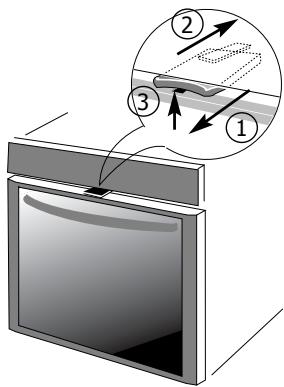
SAFETY MODE
1. To activate safety mode: Pull the catch towards you. 2. To deactivate safety mode: Push the catch back.
USING IN SAFETY MODE
3. When the security catch is in use: open the door and lift the catch at the same time.
When the safety mode is not activated: the door opens normally.
How to install your oven
Electrical connections
1.
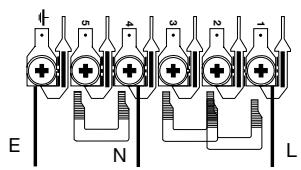
The electrical connections are made before the oven is installed in its housing.
(2)
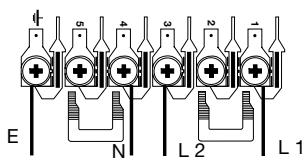
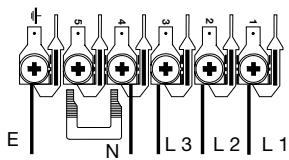
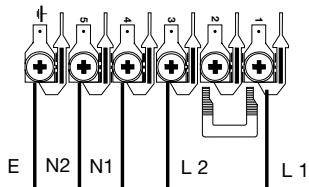
- Before carrying out the wiring on your oven, make sure the power cable supplying the oven is the correct one for this type of appliance. The cable should have a cross section not less than the main power cable to your cooker switch. The fuse to be used is given in the table.
(3)
- Where the oven is connected using a separate plug and socket, this must be accessible after the oven has been installed.
(4)
- If the appliance is not going to be connected using a plug and socket, it must be wired into a multipole switch with at least 3 mm clearance between contacts and wired into the main power supply.
(5)
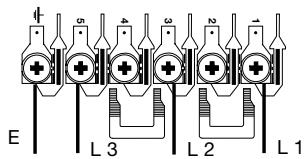
- The oven must be connected using an approved cable that fulfils the following requirements:
| Supply ① 230V- 50Hz | Connection 1 L + N | Min. cross-section 3 x 6 mm² | Fuse rating 40 A |
| ② ③ ④ ⑤ | 400V 2-L -50Hz 400V 3-L -50Hz 230V 2 L-2 N-50Hz 230V 3 L-50Hz | 2 L + N 3 L + N 2 L + 2N 3 L | 4 x 2,5 mm² 5 x 1,5 mm² 5 x 4 mm² 25 A |
| 5 x 4 mm² | 25 A | ||
| 4 x 2,5 mm² |
Allowance made for simultaneous use as per EN 60 335 2-6.
Fitting new wiring and/or changing cables.
- The supply cable (H05 RR-F, H05 RN-F or H05 W-F) must be long enough to allow the oven to rest on the floor in front of its housing.
With the oven sitting on the floor and disconnected:
- Open the trapdoor at the bottom right hand side at the back of the oven by removing the 2 screws and swinging the door away.
- Remove the sheath from each wire in the new cable up to 12 mm.
- Twist the ends carefully together.
- Unscrew the terminal screws and remove the wires that need changing.
- Pass the new cable through the wire clamp to the right of the terminals.
- Connect the wires up in accordance with the markings on the terminals.
- Make sure all wires are trapped under the screws.
- The brown wire (live) going to terminal marked L.
- The green and yellow wire (earth) going to the one marked ⊕.
- The blue wire (neutral) going to the terminal marked N.
- Tighten the screws and check, by tugging on each wire, that they are firmly connected.
- Tighten the clamp to hold the cable.
- Close the trapdoor using the two screws.
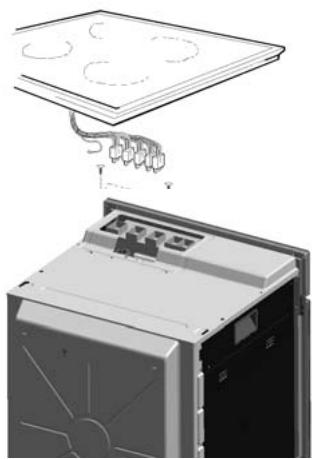
Connecting the hob unit to the oven
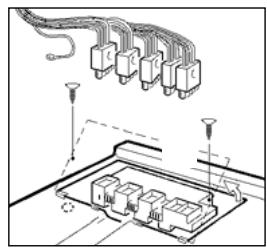
- Remove the 2 screws holding the cover in place on the oven to reveal the hob connectors. Take the cover off.
- Connect the earth wire (yellow and green) of the hob to the special marked screw on the oven.
- Connect the hob cables to the oven sockets making sure the colours match. A diagram (A) appears on the cover plate.
- Tuck the hob wires into the gutter in the top of the oven casing.
- Replace the cover plate carefully, making sure it is sitting properly, and the hob wires are still in the gutter.
- Replace the 2 screws in the cover and tighten.
Diagram A

This appliance must be earthed. Accidents caused by failure to connect the earth properly are not covered by our guarantee.
I l y o u r o v e n
Dimensions for installation use
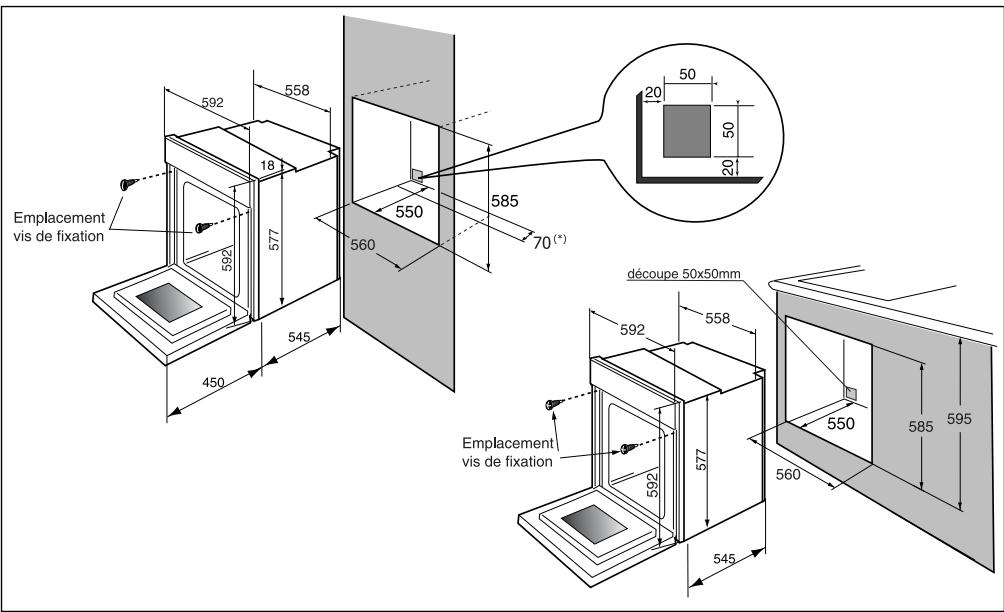
The oven may be housed either under a work surface or built into a column that is open* or closed with a suitable opening.
Your oven works at its best and produces excellent results when cooking and cleaning itself, if its air circulation is not compromised:
- The oven must be centred in the unit so that there is a minimum distance of 5 mm between it and the surrounding unit.
- The housing unit or its outer surface must be capable of withstanding heat.
- To ensure the oven rests firmly in the housing, screw it to the housing unit using the holes on the side uprights provided (see diagram).
To do this:
1) Remove the rubber stoppers masking the fixing holes. 2) To prevent the housing unit splintering, drill two holes 3 mm in diameter in the wall of the housing unit opposite the fixing holes. 3) Attach the oven using the two screws. 4) Conceal the hole using the rubber stoppers. (These also help to cushion the closing of the oven door).
(*) If the housing unit is open at the back, the gap must not be more than 70 mm.

If you are unsure about fitting this oven yourself, please use a qualified electrician.
Changing a bulb
- The light bulb is housed in the ceiling of your oven.

Warning! Switch off the power at the main switch before attempting to change the bulb. Leave the oven to cool if necessary.
a) Unscrew the protective shade (see diagram). b) Unscrew the bulb in the same direction. The bulb used is a:
-15W - 220-240 V - 300°C - E 14 screw-fitting bulb
c) Change the bulb, replace the shade and switch your oven back on at the mains.
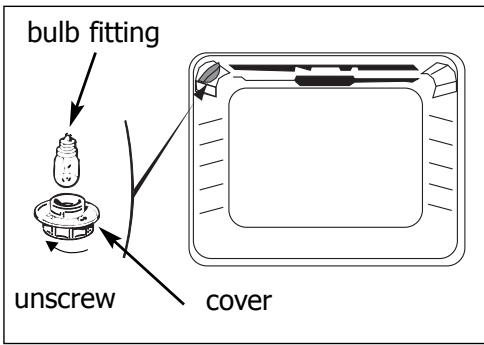

It is easier to unscrew the shade and bulb if you wear a rubber glove.
How to use your oven
1. The oven programmer
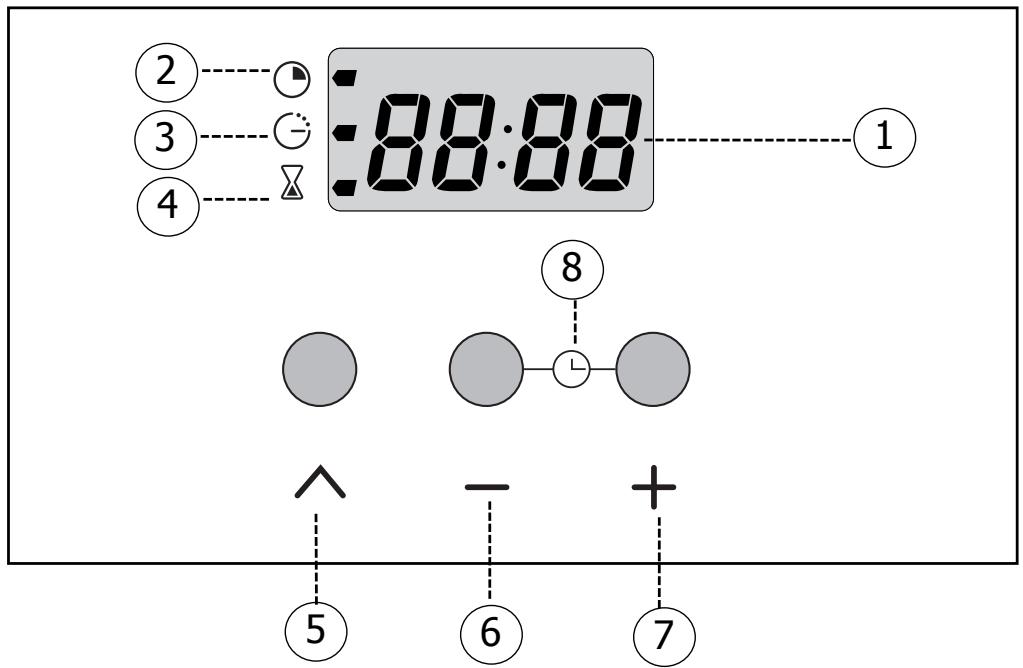
GB
PROGRAMME SETTINGS
1 Clock and cooking time display 2 Cooking time symbol 3 End of cooking time symbol 4 Separate timer 5 Button for setting timed programmes (6) (7) Buttons for adjusting the time 8 Reset clock (press both buttons together)
2. How to set the clock
a) When the oven is first switched on at the mains
- The display blinks.
- Press the + and - buttons until the correct time is shown (keeping a finger on the button, rather than tapping it, is quicker).
- Press the button to confirm the time.
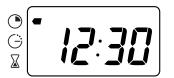
The example shows 12.30.
b) Altering the clock
- Press both the + and - buttons together for a few seconds until the display blinks.
- Adjust the time using the + and - buttons.
- Confirm the time by pressing .
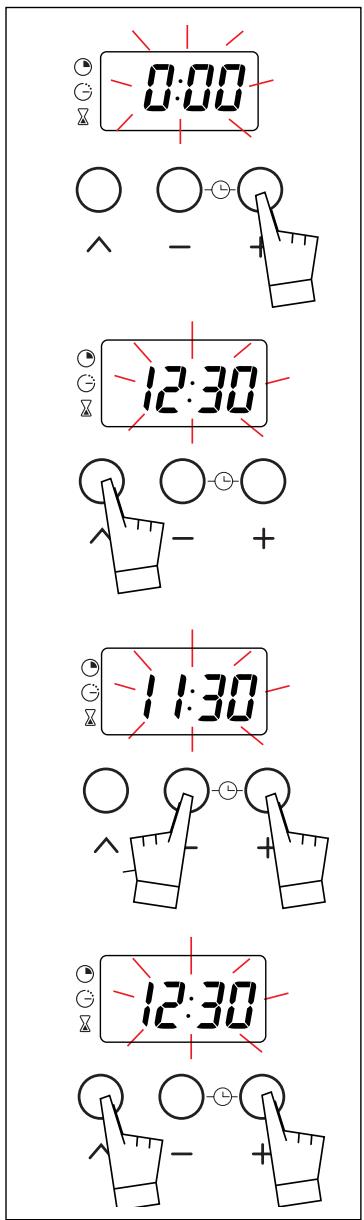
If you forget to confirm the time by pressing the button, the oven will do it automatically after a few seconds.
your oven
3. How to cook straightaway
The timer display only shows the time of day. It should not be blinking.
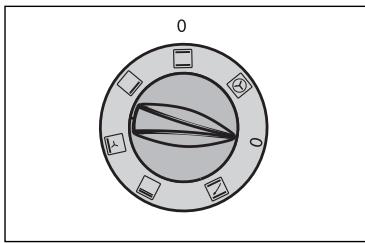
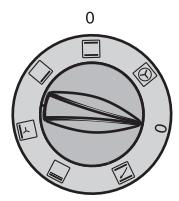
- Choose how you want to cook your food: Turn the dial until it is indicating your choice. The example chosen is "□".
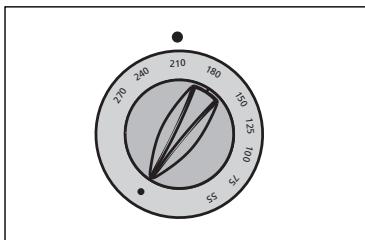
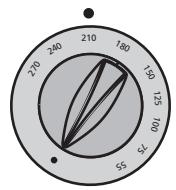
- Choose the temperature you want to cook at: Turn the dial (thermostat) to the temperature recommended for the food you are cooking. The example shows 210°.
- When you have done both these, the oven heats up and the temperature light glows.
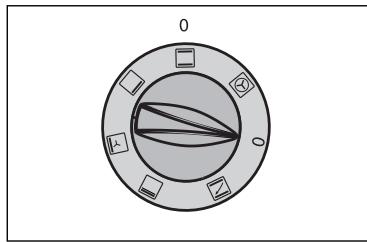
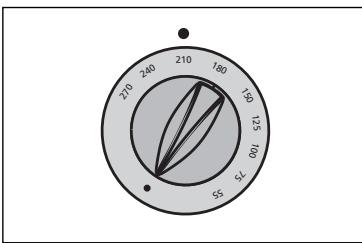
4. How to programme the cooking
GB
a) To finish cooking at a set time:
- Choose how you want to cook your food. Turn the dial until it is indicating your choice. The example chosen is "□",
- Choose the temperature you want to cook at: Turn the dial (thermostat) to the temperature recommended for the food you are cooking. The example here is 210° .
How to use
- Choose how long you want the food to cook.
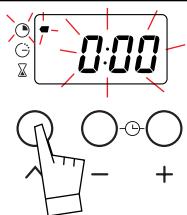
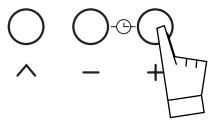
Press once on the button.
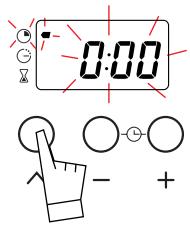
The clock shows 0:00 and the cooking time symbol blinks. You can now instruct the oven how long to cook for.
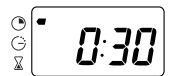
Press the + and - buttons until your chosen time is shown.
The example shows 30 minutes.
The count-down starts as soon as you stop pressing the + and - buttons.
- The oven heats up and the temperature light glows
The cooking time symbol glows steadily and the time of day is displayed again.
When the cooking time is over (the pre-programmed time ends),
- The oven switches off,
- The cooking time symbol goes out,
- The display shows 0:00
- The oven gives a series of bleeps for several minutes.
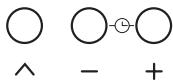
To stop the beeper, press any button on the oven front. The time is displayed again.
your oven
b) How to delay the start for a timed cooking period
- For this operation, you choose the length of cooking time and when you want the food to be ready. The oven itself works out when to start cooking. Set the temperature and select the cooking method.
The example shows "□",
and the temperature is 210°.
- Now press once on the ∧ button. The display shows 0:00 and the cooking time symbol blinks.
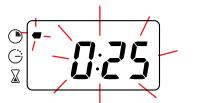
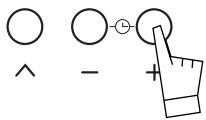
- Press the + and - buttons to enter the length of time the food is to cook for. The example shown is 25 minutes. As soon as you press the + button the blinking stops.
- Now press the ∧ button until the timer display starts blinking again. At the same time, you will notice the end of cooking symbol blinks too.
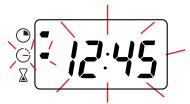
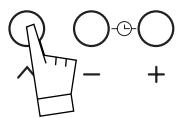
How to use
- You can now enter the time you want the cooking to finish using the + and - buttons.
The example shows cooking to stop at 1 pm (13:00).
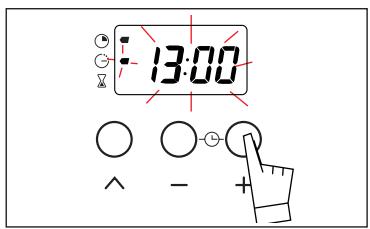
If you forget to enter a time straightaway, the oven automatically assumes one.
The oven works out when to switch on so that the food finishes cooking at the time selected.
When the oven switches on, the end of cooking symbol will go out and the cooking time symbol will come on.
At the chosen time for the cooking to stop,
- The oven switches off,
- The cooking time symbol goes out,
- The display shows 0:00.
- The oven gives a series of bleeps for several minutes.
To stop the bleeping, press any of the buttons on the panel. The time of day will then be displayed again.

Warning! At this point you must switch the temperature and method controls off; otherwise the oven will start warming up again.
After you have programmed in the times you can still:
- Change the length of cooking time.
- Check how much time is left for the food to cook by pressing «^».
- Cancel the programme by keeping your finger on the «^» button until you hear a beep.
your oven
5. How to use the timer
Your oven is fitted with a separate minute timer. It is not connected to the oven's programmes. You can use it just like a kitchen timer.
- Press the button several times until the timer symbol and the display time blink .
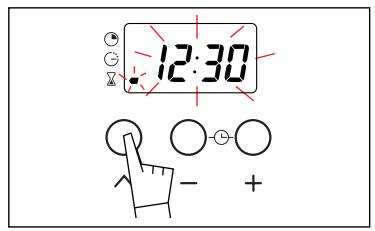
- Select the time (minutes and seconds) you want by pressing the + and - buttons. The seconds are counted in 30-second intervals.
Keeping your finger on the button is quicker than tapping it.
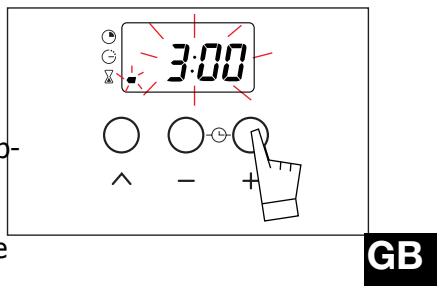
The countdown starts almost straight after the time chosen appears in the display.
At the end of the period a series of pips sounds and the display shows 0:00. To stop the pips, press any button.

You can alter or switch the timer off at any time.
Cooking
Symbol
Feature


Fan oven
A heater element at the back of the oven and the fan help cook the food.

No pre-heating, relatively short cooking times, and the ability to cook on several shelves.


Conventional oven
Food is cooked by a top and bottom element. No fan.

Pre-heating net temperature.

Oven bottom
Only the bottom element heats up.

Pre-heating re. underneathUse

Pulsed grill
Cooking is done alternately by the top element and by the fan.

No pre-heating succulent joint appearanceLap placing directly purpose baking the juices.

Full grill
Cooking is done by the top element only. No fan.

Pre-heat for 5

Pre-heat

Use this before
methods
| Description | Recommendations |
| ng necessary except for food with a art cooking time (e.g. small biscuits selves). | Recommended to prevent meat drying out, and for cooking vegetables and fish and food placed on up to 3 shelves. |
| needed to reach the required | Recommended for food requiring slow, careful cooking such as game and braising joints. Ideal for sealing red meat joints and simmering lidded cas- seroles whose contents have been pa- tially cooked on the hob first. |
| quiredFood is cooked from se a shelf near the bottom. | Recommended for dishes with a lot of liquid (quiches and fruit pies) as the pastry base is cooked through. Use also for food that rises (bread and cakes) and uncovered soufflés. |
| ng required. Suitable for poultry and ts that have a spit-roasted urge joints can be accommodated by ly on the shelf and using the multi- ting tray on the bottom rail to catch | For all poultry and joints, sealing and thoroughly cooking gigot lamb chops, and sides of beef. Also good for cooking fish in breadcrumbs. |
| i minutes. pan onto the rail beneath the grill. | For grilling large amounts that can be spread out across the grid. |
| are cooking some foods. | Set the temperature to the one you wish to cook at. At the end of the pre-heat cycle make sure you turn the selector to the method of your choice. |
Ice with European Standard EN50304 and the European Directive 2002/40/EC
Looking after your oven
Changing the catalytic panels
Always allow the oven to cool down before attempting to remove the panels. Check the cooking selector is at OFF.
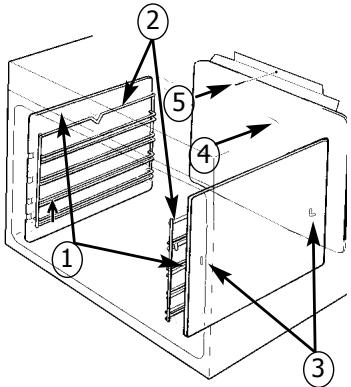
Side panels (1)
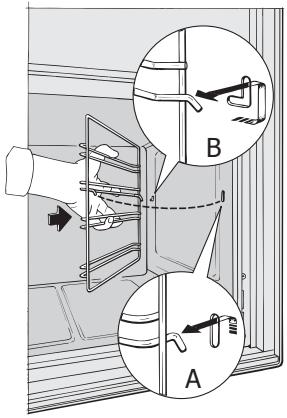
Undo the rail clip (2) at the front by lifting it up (Diagram A). Pull the rail unit toward you, lifting it slightly to unclip the rear catch (Diagram B). Pull it out of the 2 holes (3) of the catalytic panels and the oven casing. Remove the catalytic panel (1). Reverse operations to replace panel and rail unit.
Reverse operations to replace panel and rail unit.
Back panel (4)
Undo and remove the screw (5) at the top of the back panel. Tip the panel towards you so you can remove it from the oven case. Reverse this operation to replace the panel.
Reverse this operation to replace the panel.

Always check that the oven is off before you clean the inside.
Cleaning the inside
Your oven is self-cleaning. The outer shell is lined with removable panels covered in a special microporous enamel known as catalytic enamel. This coating helps eliminate dirt and grease. Splashes are attracted to the tiny holes where they are gradually burnt off. Unfortunately, the coating cannot do the same to sugary substances which is why the bottom of the oven, where these are likely to collect, does not have the same enamel finish.
You are strongly advised,
- Never use wire brushes or any other pointed or cutting implement.
- Never use any scouring material.
- When grilling, a lot of fat can be spat onto the walls of the oven. However, the temperature will not be enough to burn them off completely while you are grilling.
To overcome this problem, leave the oven on for 20 to 30 minutes at the highest temperature possible after you have finished cooking. If any trace remains, it will be burnt off when you use the oven the next few times.
Pull-down Grill
- To make it easier to clean the roof of the oven, the grill can be pulled down.
- Gently pull the grill towards you to release it from the two catches (left and right).
- Lower the grill.
After cleaning the roof, replace the grill, making sure it is sitting firmly on the catches.

Warning: Make sure you do not damage the temperature probe (short metal rod on the right).
Troubleshooting
If you're not sure that your oven is working properly, it doesn't necessarily mean that there's a problem. In all cases, check the following points:
If you realize that...
The oven isn't heating.
Possible causes
- The oven isn't connected to the power supply. The fuse has blown.
- The temperature selected is too low.
- The thermostat is faulty.
What should you do?
- Connect to power supply.
- Change the fuse, checking that it is 16A.
- Increase the temperature selected.
- Contact the After-Sales Service.
The temperature light does not go out.
- Faulty thermostat.
- Contact the After-Sales Service.
GB
The light inside the oven isn't working.
The lamp is unusable.
- Change the bulb.
The cooling fan keeps working after the oven is turned off.
- The oven isn't connected to the power supply or the fuse has blown.
- Connect to power supply or change fuse.
The fan is still working an hour after cooking has stopped.
- Open the door to help the oven cool down more quickly.
- If it has not stopped after 1 hour
- Contact the After-Sales Service.
Copy here the details that are on your oven manufacturer's plate:
Brandt
MADE IN FRANCE
220-240V~50Hz
BRANDT APPLIANCES SAS 7 rue Henri Becquerel 92500 RUEIL MALMAISON

N'SER. REF. TYPE
CONS.N°214

- SETTING THE OWNER'S CLOCK
- FOLD-DOWN GRILL GRATE
- SAFETY RECOMMENDATIONS P
- HOW TO INSTALL YOUR OVEN
- CHANGING A BULB P
- HOW TO USE YOUR OVEN
- LOOKING AFTER YOUR OVEN P
- TROUBLESHOOTING P
- INTRODUCTION
- YOUR OVEN
- OVEN FEATURES
- ACCESSORIES
- ANTI-TIP SAFETY SHELF
- MULTI-PURPOSE BAKING TRAY
- GRILL TRAY
- SAFETY RECOMMENDATIONS
- USING FOR THE FIRST TIME
- NORMAL USE
- CHILD SAFETY
- SAFETY MODE
- USING IN SAFETY MODE
- ELECTRICAL CONNECTIONS
- FITTING NEW WIRING AND/OR CHANGING CABLES
- CONNECTING THE HOB UNIT TO THE OVEN
- I L Y O U R O V E N
- CHANGING A BULB
- THE OVEN PROGRAMMER
- PROGRAMME SETTINGS
- HOW TO SET THE CLOCK
- HOW TO COOK STRAIGHTAWAY
- HOW TO PROGRAMME THE COOKING
- HOW TO USE
- HOW TO DELAY THE START FOR A TIMED COOKING PERIOD
- HOW TO USE THE TIMER
- COOKING
- SYMBOL
- FEATURE
- FAN OVEN
- CONVENTIONAL OVEN
- OVEN BOTTOM
- PULSED GRILL
- FULL GRILL
- PRE-HEAT
- METHODS
- LOOKING AFTER YOUR OVEN
- CHANGING THE CATALYTIC PANELS
- SIDE PANELS (1)
- BACK PANEL (4)
- CLEANING THE INSIDE
- YOU ARE STRONGLY ADVISED
- PULL-DOWN GRILL
- WARNING: MAKE SURE YOU DO NOT DAMAGE THE TEMPERATURE PROBE (SHORT METAL ROD ON THE RIGHT)
- TROUBLESHOOTING
- IF YOU REALIZE THAT
- POSSIBLE CAUSES
- WHAT SHOULD YOU DO
- BRANDT
- MADE IN FRANCE
Brand : BRANDT
Model : FC272WN1
Category : Refrigerator