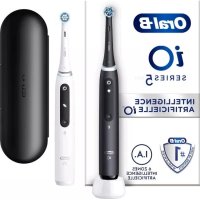
ORAL-B iO 5 - Toothbrush

iO 5 - Toothbrush ORAL-B - Free user manual and instructions

Find the device manual for free iO 5 ORAL-B in PDF.

English EN Download 💬 AI Question 10 questions ⚙️ Specs
📄

Document temporarily unavailable

The manual is currently being transferred to our new server. It will be accessible again in a few hours. Thank you for your patience.

Pick your language and provide your email: we'll send you a specifically translated version.
Product type Rechargeable electric toothbrush
Brand Oral-B
Model iO 5
Power supply Rechargeable Li-Ion battery, mains charger (voltage according to charger base)
Charge time Approximately 16 hours
Brushing modes 5 modes: Clean, Intense Clean, Sensitive, Extra-Sensitive, Whitening
Timer 2 minutes with alerts every 30 seconds
Pressure sensor Smart, 3 colors: white (light), green (optimal), red (heavy)
Connectivity Bluetooth 4.2+ for Oral-B app
Included brush heads Ultimate Clean, Gentle Care, Radiant White (depending on model)
Sound level 64 dB(A)
Warranty 2 years
Maintenance Rinse brush head and handle after use; clean charger with a damp cloth
Safety Pressure sensor, shut-off when battery low, do not expose to >50°C
Included accessories Charger, travel case, brush head holder with cover, stand (depending on model)
Repairability Replaceable brush heads; battery not user-replaceable
Bluetooth radio frequency 2.4 - 2.48 GHz, max power 1 mW

Frequently Asked Questions - iO 5 ORAL-B

How to charge the toothbrush?
Place the toothbrush on the plugged charger. The on/off button flashes white during charging and turns off once fully charged. A full charge takes about 16 hours.
How to change the brushing mode?
Press the Mode button when the toothbrush is on to cycle through modes. Press the on/off button to start brushing with the selected mode. You can also change mode during brushing.
What does the colored light ring mean?
The light ring indicates brushing pressure: white = light/default pressure, green = optimal pressure, red = too much pressure. You can customize the color via the Oral-B app.
How to connect the toothbrush to the Oral-B app?
Download the Oral-B app from the App Store or Google Play. Enable Bluetooth on your toothbrush and smartphone, then follow the pairing instructions in the app.
When to replace the brush head?
Replace the brush head every 3 months or sooner if the INDICATOR® bristles fade. A yellow light on the Mode button will remind you. To reset the reminder, press and hold the Mode button for 2 seconds.
How to clean the toothbrush?
After each use, rinse the brush head and handle under running water. Remove the brush head and clean both separately. Wipe all parts and let them air dry. The charger should be cleaned with a damp cloth after unplugging.
Is the battery replaceable?
No, the Li-Ion battery is not user-replaceable. Do not attempt to open the handle; doing so will void the warranty. For recycling, take the entire device to an appropriate collection point.
What to do if the toothbrush does not charge?
Check that the charger is properly plugged in. The ambient temperature must be between 5°C and 35°C. If the battery is very low, wait up to 30 minutes for the mode display to turn on.
Is the 2-minute timer adjustable?
Yes, via the Oral-B app you can customize the timer and alert intervals. You can also reset factory settings through the app.
Is this toothbrush compatible with all smartphones?
It requires a smartphone compatible with Bluetooth 4.2 (or later) and the Oral-B app. Check app.oralb.com for a list of compatible smartphones and availability in your country.

User questions about iO 5 ORAL-B

0 question about this device. Answer the ones you know or ask your own.

Ask a new question about this device

The email remains private: it is only used to notify you if someone responds to your question.

No questions yet. Be the first to ask one.

Download the instructions for your Toothbrush in PDF format for free! Find your manual iO 5 - ORAL-B and take your electronic device back in hand. On this page are published all the documents necessary for the use of your device. iO 5 by ORAL-B.

USER MANUAL iO 5 ORAL-B

Manual assistant
Powered by Anthropic
Waiting for your message
Product information

Brand : ORAL-B

Model : iO 5

Category : Toothbrush