FoodCyCler FC50 - Food waste disposer Vitamix - Free user manual and instructions
Find the device manual for free FoodCyCler FC50 Vitamix in PDF.


| Product Type | Food waste disposer (countertop composter) |
| Brand | Vitamix |
| Model | FoodCyCler FC50 |
| Dimensions (L × W × H) | 28 × 32 × 36 cm (11 × 12.6 × 14.2 in) |
| Weight | Approximately 9 kg (20 lb) |
| Power supply | 120 V, 60 Hz, 500 W |
| Bucket capacity | Approximately 2.5 L (10.5 cups) |
| Processing cycles | Drying, grinding, cooling (full cycle 4 to 8 hours) |
| Filter type | Activated carbon (replaceable) |
| Bucket materials | Plastic with non-stick coating, dishwasher safe |
| Cleaning | Bucket and collection lid dishwasher safe; exterior cleaned with a damp cloth |
| Safety | Lid lock, automatic shut-off, cooling before opening (35 min), overload protection |
| Spare parts | Activated carbon filters (sold in packs of 2), Foodilizer tablets, collection lid filter, bucket and lid |
| Warranty | Full 3-year warranty |
| Use | Household use only |
Frequently Asked Questions - FoodCyCler FC50 Vitamix
User questions about FoodCyCler FC50 Vitamix
0 question about this device. Answer the ones you know or ask your own.
Ask a new question about this device
Download the instructions for your Food waste disposer in PDF format for free! Find your manual FoodCyCler FC50 - Vitamix and take your electronic device back in hand. On this page are published all the documents necessary for the use of your device. FoodCyCler FC50 by Vitamix.
USER MANUAL FoodCyCler FC50 Vitamix
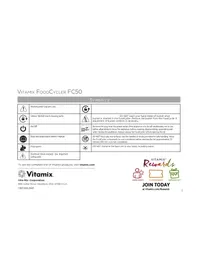
 | Warning and Caution Lock |  | |
 | Unlock NEVER touch moving parts. |  | DO NOT reach your hand inside of bucket when bucket is inserted in the FoodCycler. Remove the bucket from the FoodCycler if adjustment of bucket contents is necessary. |
 | On/Off |  | Remove the plug from the power outlet if the appliance is to be left unattended, not in use, before attempting to move the appliance, before cleaning, disassembling, assembling and when storing the appliance. Always unplug the FoodCycler before opening the lid. |
 | Read and understand owner's manual. |  | DO NOT touch any hot surfaces. Use the handles or knobs provided for safe handling. Allow the FoodCycler components to cool completely before opening the lid (approximately 35 minutes after the cycle has completed). |
 | Pinch point |  | DO NOT immerse the base unit in any liquid, including water. |
 | Electrical Shock Hazard - see Important Safeguards | ||
To see the complete line of Vitamix products, visit vitamix.com

Vitamix.
Vita-Mix ^® Corporation
8615 Usher Road, Cleveland, Ohio 44138 U.S.A.
1-800-848-2649

JOIN TODAY
at Vitamix.com/Rewards
CONTENTS
IMPORTANT SAFEGUARDS....2
PARTS AND FEATURES 4
INDICATOR LIGHTS AND ON/OFF 6
SETUP 7
RUNNING A CYCLE 8
WHAT TO DO WITH RECYCLED FOOD COMPOUND 9
CLEANING 9
TROUBLESHOOTING....10
FILTERS 11
PARTS 13
CONTROL PANEL OVERLAY 13
WARRANTY 14
FOODCYCLER FC50 SPECIFICATIONS....16
IMPORTANT SAFEGUARDS

WARNING: To avoid the risk of serious injury when using your Vitamix® FoodCycler and accessories, basic safety precautions must be followed, including the following.
READ ALL INSTRUCTIONS, SAFEGUARDS, AND WARNINGS BEFORE OPERATION.
- Carefully read all instruction materials accompanying this product.
- To avoid electrical shocks; keep cords, plugs and portable electrical appliances away from water and other liquids.
- DO NOT immerse the base unit in any liquid, including water.
- Keep the appliance and power cords out of reach of children.
- Not intended for use by or near children or persons with reduced physical, sensory or mental capabilities or lack of experience and knowledge. Close supervision is necessary when the FoodCycler is used by or near children or incapacitated persons. Children should be supervised to make sure that they DO NOT play with the FoodCycler.
-
To avoid inadvertent activation, unplug from the outlet when not in use, before putting on or taking off parts and before cleaning. Always unplug the FoodCycler before opening the lid.
-
GFI circuit breakers might be installed in your kitchen. Look for them in outlets near sinks. If the FoodCycler won't operate, unplug the unit. Reset the wall outlet or circuit breaker. If the circuit breaker continues to trip, unplug the FoodCycler from the outlet. Allow the FoodCycler to sit for 24 hours before attempting to use it again. Contact Vitamix Customer Services if the problem persists.
- The FoodCycler must only be plugged into properly grounded outlets.
- DO NOT let the electrical cord hang from counter or table edge.
- Allow the FoodCycler to cool before opening the lid (approximately 35 minutes after cycle has completed). Allow the FoodCycler's interior components to cool completely before handling. Use the handles or knobs provided for safe handling.
- DO NOT open the lid during a cycle.
- DO NOT put your hands inside the FoodCycler unless it has completely finished cycling and has gone through all the cycle modes.
- NEVER touch moving parts. DO NOT reach your hand inside of bucket when bucket is inserted in the FoodCycler. Remove the bucket from the FoodCycler if adjustment of bucket contents is necessary.
- DO NOT operate any appliance with a damaged cord or plug. If the power cord is damaged, it must be replaced by the manufacturer, its service agent or similarly qualified persons in order to avoid a hazard.
- Do NOT operate any appliance showing signs of malfunction, or any product that has been dropped or damaged in any way.
- The use of attachments not recommended or sold by the manufacturer may cause fire, electric shock, or injury.
- DO NOT operate the machine outdoors if the FoodCycler is at all exposed to the elements.
- DO NOT place the FoodCycler on or near a hot gas or electric burner.
- DO NOT place the FoodCycler inside a heated oven.
- Keep the FoodCycler out of direct sunlight.
- DO NOT dismantle, reconfigure, alter or adapt the FoodCycler in any way.
- Keep the FoodCycler at least 6" from all walls and surfaces to ensure proper ventilation of any steam emissions.
-
Make sure that the FoodCycler is sitting on a flat, dry surface.
-
DO NOT add food waste directly into the machine without the bucket installed in the FoodCycler.
- DO NOT consume or ingest dehydrated food waste or any food waste that has been placed into the bucket.
- DO NOT incorporate any recycled food compound byproduct from your FoodCycler that contains animal protein (e.g., chicken bones, fish bones, etc.) into your soil.
- The bucket has a thin, indented fill line located on the inside wall of the bucket. DO NOT add food waste above this line.
- DO NOT pack down food waste to keep it beneath the fill-line once full. Overloading the bucket might cause a jam.
- Always ensure that no food waste falls outside of the bucket and into the unit. You should remove the bucket from the unit prior to adding food waste to the bucket.
- DO NOT place items that are larger than the size of a human palm inside the bucket. Larger items should be cut down to smaller sizes so that they can be more easily processed without placing undue stress on the system.
- DO NOT cycle large bones (such as pork or beef bones), pits, candy, gum, nuts or hard shells: these materials may cause serious damage to the bucket, and/or cause a motor overload.
- DO NOT add oil, flammable materials or compounds, or water to the FoodCycler.
- Do not leave foreign objects, such as spoons, forks, knives or other utensils in the bucket as this will damage the unit components when starting the Food Cycler and may cause injury.
- Allow the bucket to cool before handling it, The cooling cycle lasts approximately 35 minutes.
SAVE THESE INSTRUCTIONS
IMPORTANT INSTRUCTIONS FOR SAFE USE
This product is intended for HOUSEHOLD USE ONLY and is not intended to be used for commercial purposes.
Any repair, servicing or replacement of parts must be performed by Vitamix or a Vitamix-authorised service representative.
NOTICE: THE FAILURE TO FOLLOW ANY OF THE IMPORTANT SAFEGUARDS AND IMPORTANT INSTRUCTIONS FOR SAFE USE IS A MISUSE OF YOUR VITAMIX FOODCYCLER THAT CAN VOID YOUR WARRANTY AND CREATE THE RISK OF SERIOUS INJURY.
| WARNING | ||
| Electrical Shock Hazard.DO NOT immerse the base unit in any liquid,including water.ONLY use an earthed outlet.DO NOT remove the earth.DO NOT use an adapter.DO NOT use an extension cable.Always unplug before removing the lid, cleaningor when not in use.Failure to follow instructions can cause death orelectric shock. | ||
IMPORTANT NOTES!
THE INSTRUCTIONS APPEARING IN THIS USE AND CARE MANUAL CANNOT COVER EVERY POSSIBLE CONDITION AND SITUATION THAT MAY OCCUR. COMMON SENSE AND CAUTION MUST BE PRACTICED WHEN OPERATING AND MAINTAINING ANY APPLIANCE.
PARTS AND FEATURES
Unbox and inspect all parts prior to use. If you find any damage, contact Vitamix Customer Service for instructions. Refer to Setup on page 7 for next steps.
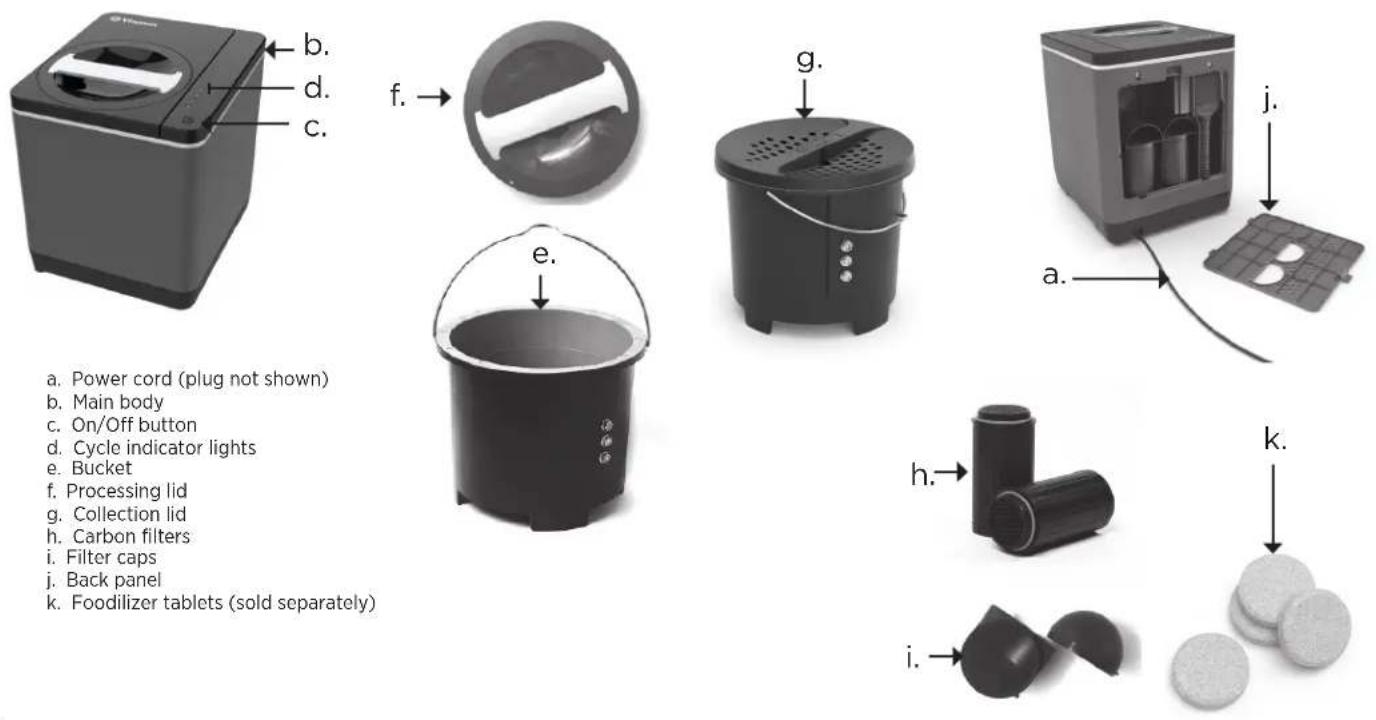
a. Power cord (plug not shown)
b. Main body
c. On/Off button
d. Cycle indicator lights
e. Bucket
f. Processing lid
g. Collection lid
h. Carbon filters
i. Filter caps
j. Back panel
k. Foodilizer tablets (sold separately)
PARTS AND FEATURES
a. Power cord (plug not shown) - It is suggested that you unplug the FoodCycler before leaving your home for an extended period of time.
b. Main body - DO NOT immerse the base unit in any liquid, including water.
c. On/Off Button -
- When the unit is plugged in the On/Off button will flash on and off once indicating that the FoodCycler has entered STANDBY mode. In STANDBY mode, no LED lights will be illuminated.
• To enter PROCESSING mode, press the On/Off button once. The Drying LED will illuminate, indicating that the Drying cycle has begun. The On/Off symbol will illuminate when the unit is in PROCESSING mode.
- Removing the lid or pressing the On/Off button during PROCESSING mode is NOT RECOMMENDED.
- WARNING: TO AVOID INJURY - DO NOT TOUCH surfaces inside the FC-50 if the process is interrupted. Surfaces (including the bucket and bucket handle), will get hot and could burn.
• If the lid is opened during PROCESSING mode, the existing cycle will be paused and the On/Off button will flash. Once the lid is closed and locked, the cycle will resume.
• To put the unit into STANDBY, cancel a PROCESSING mode, or to reset the unit, press and hold the On/Off button for 3 seconds.
• PROCESSING has ended when all operating modes have completed and no indicators light are illuminated.
d. Indicator lights (Drying, Grinding, Cooling and Change Filter)
e. Bucket - removable. The bucket is designed to fully grind and process your food waste.
Note: If the bucket coating fades or chips, this is not a defect. This cosmetic damage is a result of a hard material scraping along the bucket coating during a cycle, but it will not affect the function of the unit.
f. Processing lid - (used during cycling)
• Unplug the unit before opening the lid. If opening the lid after cycling, allow the bucket to cool before handling.
• To open the lid - grip the lid handle and rotate counterclockwise until the arrow on the lid is aligned with the unlock symbol. Lift up on the lid to remove.
- Closing the lid - close the lid by inserting it into the top of the unit, over the bucket. Turn the lid handle clockwise until the arrow on the lid aligns with the lock symbol on the unit.
g. Collection lid - (used when the bucket is not in an active cycle.)
• This lid allows the bucket to be kept on a countertop while collecting food scraps without off-putting smell.
• The unit will not operate with the collection lid.
• The collection lid filter is removable for cleaning or replacement. See page 12.
h. Carbon filters - the filters wick away any and all odors during processing.
- IMPORTANT! Remove filter stickers - Check to see if your unit has stickers on the filters. They must be removed before using the machine. To remove the filter stickers, remove the back panel from the unit and peel the stickers from the top of the two carbon filters. Dispose of the stickers and replace the back panel.
i. Filter caps - small funnels sit on top of your carbon filters, ensuring that the air and steam flow is properly directed toward the unit vents. (set of two)
• The filter caps are placed inside the unit in transportation. Remove the filter caps from inside the unit prior to running a cycle.
- To install - remove the plastic wrap from the Filter Caps and secure them over the top of each filter inside the unit. Place the circle-shaped openings on top of the filters, ensuring that the half-moon-shaped opening faces out toward the back of the unit.
j. Back panel - To remove, face the back of your unit. Grip the plastic tab (with the arrow) at the top of the back panel. Pull down gently on the tab to release the back panel from the unit.
k. Foodilizer tablets - (sold separately) dissolvable soil probiotic that adds beneficial bacteria into soil mixed with recycled food compound from the FC-50.
INDICATOR LIGHTS AND ON/OFF
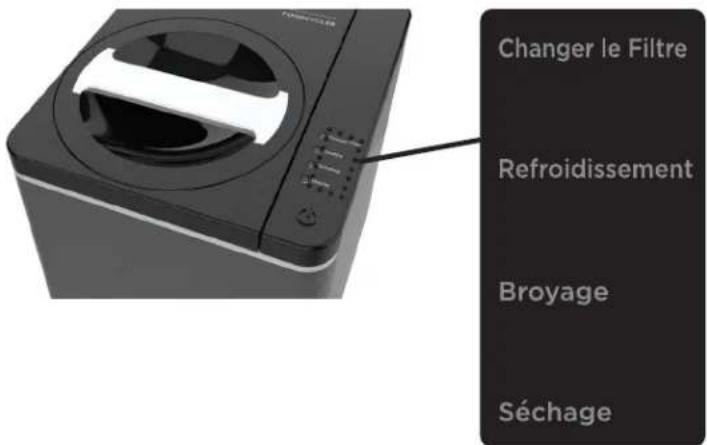
There is a sticker overlay for the control panel in French-Canadian for use by our Canadian customers. See page 13.
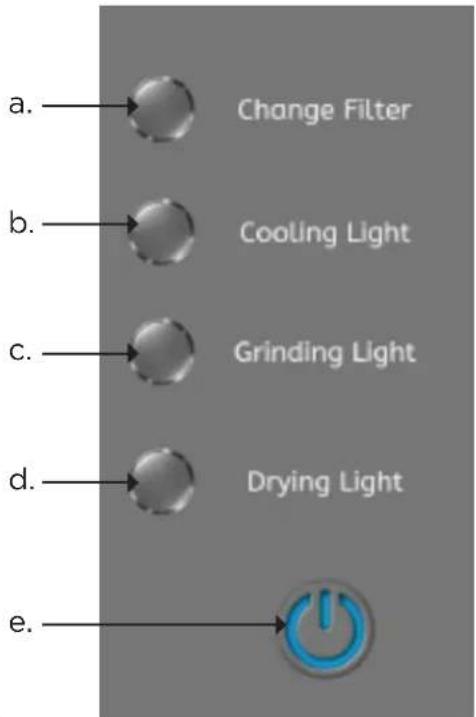
Note: when a cycle is active, the light next to the cycle description will illuminate.
a. The change filter light will illuminate when it is time to change your filters. You must manually reset the Change Filter light after you have installed new filters. Refer to page 12.
b. The cooling cycle is the last mode in unit's cycle. The cooling mode lasts approximately 35 minutes.
c. The grinding cycle is the longest cycle mode and can last anywhere between 150 minutes. Once this cycle is done, the unit will switch automatically to cooling.
d. The drying cycle can last anywhere between 70 minutes. The unit will automatically switch to the grinding cycle after the drying cycle has completed.
e. On/Off - See page 5 for more information about the On/Off button.
SETUP

natural_image
Step-by-step illustration of a computer monitor with a hand inserting a cable into the case (no text or symbols visible)- Remove the back panel.
- Grip the plastic tab (with the arrow) at the top of the back panel. Pull down gently on the tab to release the back panel from the unit.
-
Remove the white stickers from the top of each carbon filter.
-
Open the lid.
- Grip the lid handle and rotate counterclockwise until the arrow on the lid is lined up with the unlock symbol (🔒). Lift up on the lid to remove.
-
Remove the filter caps from inside the bucket.
-
Remove the sticker on the vent on the inside of the bucket compartment.
-
Install a filter cap onto each filter.
- Remove the plastic wrap from the filter cap and discard. Secure each cap. To do so, place the circle-shaped opening on the top of the filter, ensuring the half-moon shaped opening faces towards the back panel (when it is installed).
- Replace the back panel.
- Place the back panel so that the two bottom tabs fit into the grooves lining the bottom of the unit's back cavity. Push the back panel into the unit's back cavity until the panel's tab fits into place in the unit's back cavity. If the sides of the panel do not sit flush against the unit's back cavity press against the non-flush panel sections with your thumb or fingers until it snaps flush to the unit.
- Remove the bucket.
- Remove and discard the max fill sticker from the inside wall of the bucket.
- Grip the metal handle and pull straight up. The bucket should slide out easily.
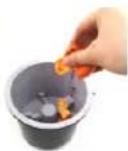
- Add food waste to the bucket.
- DO NOT add food waste directly into the machine without the bucket installed in the FoodCycler. The bucket doesn't have to be installed in the unit to fill with food waste.
- You can add food waste to the bucket throughout the day, until the bucket is full. Do NOT fill the bucket above the max fill line.
- To ensure optimal food waste breakdown, mix food waste together, with heavier foods interspersed with lighter, dryer foods.
- Avoid high concentrations of the following foods (the dense, starchy and/or moisture-rich composition of these foods make them difficult to process in large quantities.):
»starches (bread, cake, rice, pasta, mashed potatoes, stuffing)
»citrus fruit rinds
»condiments, dressings, sauces & soups
»nut butters
»jam, jellies, marmalades
»high sugar fruits (grapes, cherries, melon, oranges, bananas, etc)
- DO NOT cycle large bones (such as pork or beef bones), pits, candy, gum, nuts or hard shells: these materials may cause serious damage to the bucket, and/or cause a motor overload.
- DO NOT add oil, flammable materials or compounds, or water to the FoodCycler.
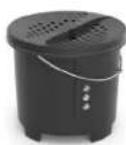
- When the bucket is not in use and you are adding food waste, use the collection lid to reduce the amount of off-putting smells.
RUNNING A CYCLE

WARNINGS! TO AVOID DAMAGE AND INJURY
- DO NOT leave unprocessed food waste in the FoodCycler for long periods of time. The carbon filters only wick away odors during processing, and leaving decomposing organic matter in the enclosed FoodCycler will generate odors and might attract fruit flies or other pests.
- Be careful not to drop the FoodCycler, or the bucket. This may affect the FoodCycler's performance by dislodging or damaging internal components.
• Always ensure that no food waste falls outside of the bucket and into the unit. This may cause damage to the motor and other internal components. You should remove the bucket from the unit prior to adding food waste to the bucket.
• DO NOT pack down food waste to keep it beneath the fill-line once full. Overloading the bucket might cause a jam.
• DO NOT place items that are larger than the size of a human palm inside the bucket. Larger items should be cut down to smaller sizes so that they can be more easily processed without placing undue stress on the system.
- All guidelines on page 7 in the instruction "Add food waste to the Bucket" also apply.
Note: Use these instructions to load the bucket into the unit and start a cycle after collecting the food waste.
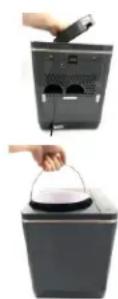
- Open the plastic lid.
- Grip the lid handle and rotate counterclockwise until the arrow on the lid is lined up with the unlock symbol (🔒). Lift up on the lid to remove.
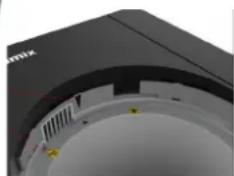
- Insert the bucket by aligning the arrow shape on the rim of the bucket with the arrow stamped along the interior of the unit cavity. This will interlock the unit.
Note: If the bucket does not easily drop into the unit, try turning the bucket's bottom bolt slightly and then insert the bucket again.
natural_image
Close-up of a black electronic device with visible ports and components, no readable text or symbols- Close the lid.
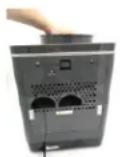
- To place the lid back in the unit, align the arrow on the lid with the "Unlock Symbol" until the lid fits back into the FoodCycler. Turn the lid handle clockwise until the arrow on the lid aligned with the "Lock Symbol" ( )
-
To start the cycle, press On/Off ().
-
The unit's cycle will run anywhere between 3-8 hours, depending on what is being cycled, and the volume of the contents.
• DO NOT open the lid during a cycle. -
When complete, the unit will auto shut off and enter Standby mode.
-
The unit will beep once the cycle is complete.
• The unit will remain in Standby for up to 30 minutes. - To turn the unit off manually, press the On/Off button for 3 seconds. This will shut the unit down completely while it is still plugged into an outlet.
- DO NOT put your hands inside the FoodCycler unless it has completely finished cycling and has gone through all cycle modes and you have unplugged the unit.
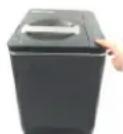
WHAT TO DO WITH RECYCLED FOOD COMPOUND
• DO NOT consume or ingest recycled food compound or any food waste that has been placed into the bucket.
• Using recycled food compound (RFC) as soil fertilizer:
DO NOT incorporate any RFC by-product that contains animal protein (e.g., chicken bones, fish bones, etc.) into your soil.
In most cases, and depending on your existing soil makeup, using the RFC as a soil amendment will incorporate all necessary nutrients to promote plant growth. Delaying planting by 1-4 weeks after the application of RFC to soil allows for the breakdown of the RFC, which makes more nutrients available for uptake by growing plants. Always be mindful of the sodium content of food waste being incorporated into the RFC that will serve as a soil amendment. Food with too high of concentration of sodium (like animal protein) could have a detrimental effect on the growth of plants and Vitamix recommends that you DO NOT incorporate any RFC into your soil that contains animal protein Vitamix recommends that you add RFC to your soil in a ratio of 11 parts soil to 1 part RFC by volume (11:1).
• If you choose not to use your food waste as a fertilizer, follow your local codes to dispose in your trash collection.
CLEANING
WARNING

Electrical Shock Hazard.
DO NOT immerse the base unit in any liquid, including water.
ONLY use an earthed outlet.
DO NOT remove the earth.
DO NOT use an adapter.
DO NOT use an extension cable.
Always unplug before removing the lid, cleaning or when not in use.
Failure to follow instructions can cause death or electric shock.
Both the exterior of the unit and the removable bucket should be cleaned regularly. Note: With particularly stubborn grime, you can add a small amount of dish soap to your damp dish cloth before thoroughly wringing out most of the moisture.
- Soak a dish cloth and wring out the dish cloth until damp (not dripping wet).
- Wipe down the outside of the main body.
- Remove any remaining moisture with a clean, dry towel or cloth.
- Remove the bucket.
- Remove all blockages and loose particles from the bucket.
- Place the bucket into the lower rack of the dishwasher.
- If using the hot cycle in the dishwasher, allow your bucket to cool before handling it, or placing it back in your FoodCycler.
Note: You can also hand wash your bucket. Use warm water, a small amount of dish soap and a dish cloth. Scrub around and beneath the grinding arms as much as possible to clean all surfaces.
Periodically clean the inside of the unit with the bucket removed.
- Turn off and unplug the unit.
- Use a damp dish cloth that is not dripping to wipe down the interior surfaces.
- Allow the inside surfaces to completely dry before using.
Cleaning the Collection Lid:
• The collection lid is dishwasher-safe.
- You must remove the carbon filter liner prior to placing in the dishwasher or immersing in water. See page 12.
- To handwash the lid, use a wrung-out dishcloth or paper towel to wipe away any food waste residue that has adhered to the outer plastic part of the lid, or the inner silver grill.
- Do not attempt to wash the filter. Replacements are sold separately at Vitamix.com.
TROUBLESHOOTING
Note: If the FoodCycler bucket coating fades or chips this is not a defect. This cosmetic damage is a result of a hard material scraping along the bucket coating during a cycle, but it will not affect the function of the unit.
If your unit is signalling a machine issue, DO NOT continue using your unit. Contact Vitamix Customer service for instructions.
| Indicator lights and On/Off | Flashing light(s) and audible “beeps” (what it means) | Light remains on (what it means and what to do next) | Light not illuminated (what it means and what to do next) |
| Power (On/Off symbol) | Lid unlocked, sensor dislodged | Not applicable | Standby mode - no action required other than collecting food waste and starting the processing modes.No Power - (machine is not plugged in and turned on). If plugged in, unplug the unit, plug it in again. If problem persists, contact Vitamix Customer Service for instructions. |
| Drying If this light is flashing, it indicates that the unit is overloaded. In this case, unplug the unit and allow to cool for at least 35 minutes before opening the lid. Refer to page 11 for instructions to help with determining the cause of overload. | in drying cycle - no issue | These lights won't be illuminated until the machine is in these cycles. No action required. | |
| Grinding Machine issue in grinding cycle - no issue | |||
| Cooling Machine issue in cooling cycle - no issue | |||
| All lights Machine issue Contact Vitamix Customer Service for instructions | |||
IF YOUR MACHINE IS OVERLOADED (DRYING INDICATOR LIGHT IS FLASHING)
- Unplug the unit and allow to cool for at least 35 minutes.
- Remove the processing lid.
- Look to see if any food waste is in the unit after the bucket is removed. Remove any food waste that might be inside the unit.
- Remove the bucket.
- There is a gear on the underside of the bucket. Turn it counterclockwise.
- If the grinding arms turn without an issue, proceed to STEP 5 without emptying the bucket.
-
If the grinding arms turn with hesitation or won't turn at all, remove all food waste from the bucket and try to rotate the gear again. If the problem persists, contact Vitamix Customer Service for instructions.
-
Look inside the bucket. Look to see if food waste is above the max fill line. If food waste is above that line, you have overfilled the bucket. Remove some food waste until the top of the material is below the max fill line. Install the bucket. Plug the unit it. Attach the lid and begin the process again. The machine will start with the drying cycle.
- If the material is not above the max fill line and the machine is overloaded, pieces of the food waste might be too large or the material is not ideal for use in the FoodCycler. See page 7, paragraph 9 for parameters about loading the bucket.
- If the problem persists after trying to diagnose with these steps, contact Vitamix Customer Service for instructions.
MANUAL RESET INSTRUCTIONS
A manual reset is necessary if the FoodCycler's operating system needs to be reset. Follow these instructions to properly complete a manual reset:
1. Plug the unit's power cord into an outlet.
2. Press and hold the On/Off ( ) button for upwards of 3 seconds, until you hear a beep and the unit shuts off.
3. Unplug your unit for 1 minute.
4. Plug your unit back in and wait ten seconds.
5. Press the On/Off button () as you normally would to start a cycle.
Note: If the Manual Reset does not work the first time, perform the manual reset again. If this doesn't fix the issue, contact Vitamix Customer Service for instructions.
FILTERS
- Remove the back panel.
- Grip the plastic tab (with the arrow) at the top of the back panel. Pull down gently on the tab to release the back panel from the unit.
-
Remove the filter caps.
-
Locate and remove the filters.
- Turn each filter counter-clockwise to remove. Discard.
-
Remove the packaging on the replacement filters and filter caps (including stickers).
-
Install the new filters.
- Place the filter with threaded end down into the FoodCycler and turn clockwise until you feel resistance and the filter stops turning.
- Install a filter cap onto each filter.
- To do so, place the circle-shaped opening on the top of the filter, ensuring the half-moon shaped opening faces towards the back panel (when it is installed).
- Reset filter indicator light.
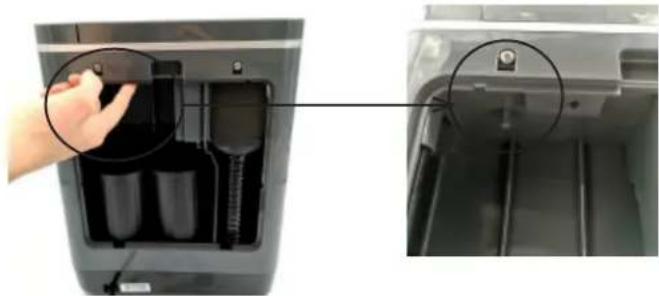
- If the change filter indicator light does not reset automatically once the filters are replaced, you must reset it manually. Feel around along the upper, inner lip of the unit cavity (where, if the unit's back panel were in place, a white filter reset arrow would point). Press and hold the small round button until you hear a beep. The change filter indicator light should go off.
- Replace the back panel.
- Place the back panel so that the two bottom tabs fit into the grooves lining the bottom of the unit's back cavity. Push the back panel into the unit's back cavity until the panel's tab fits into place in the unit's back cavity. If the sides of the panel do not sit flush against the unit's back cavity press against the non-flush panel sections with your thumb or fingers until it snaps flush to the unit.
natural_image
Close-up of a hand inserting a battery into a paper holder, showing internal components and mounting detail (no text or symbols visible)Note: The reset filter button is small and round. Hold it for three seconds until your unit beeps, and the reset filter light goes off.
COLLECTION LID FILTER
To remove:
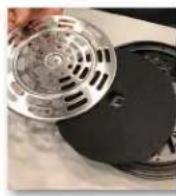
- Remove the wingnut.
- Pull the slotted metal plate from under the lid.
- Remove the filter and discard.
To install: - Fit the filter in the slotted metal plate.
- Place both under the lid.
- Use the wingnut to tighten both to the bucket lid.
PARTS
Contact Vitamix Customer Service or order replacement parts for your Food Cycler, including:
- Filters (sold in sets of 2)
- Foodilizer Tablets (not included in the first purchase of the unit, sold separately)
• Collection Lid Filter
CONTROL PANEL OVERLAY
This sticker is provided in the FoodCycler packaging for use by our Canadian customers, if you choose. To apply, remove the backing and simply put the overlay over the English text next to the cycle indicator lights.
Vita-Mix Corporation ("Vitamix") strongly encourages you to register your purchase by calling our Customer Service Department at 1.800.848.2649 or 1.440.235.4840. Failure to register your product purchase will not diminish your warranty rights; however, registering your purchase will allow Vitamix to better serve you with any of your customer service needs.
2. WHO CAN SEEK WARRANTY COVERAGE?
This Warranty is extended by Vitamix to the owner of this Food Recycler for personal household use only. This Warranty does not apply to products used for commercial, rental or re-sale purposes
3. WHAT IS COVERED?
Vitamix warrants to the registered owner that if this "Food Recycler" ("Food Recycler" consists of a motor base, bucket, and lid purchased together) fails within 3 years from the date of purchase due to a defect in material or workmanship or as a result of normal wear and tear from ordinary household use, Vitamix will, within 30 days of receipt of the returned Food Recycler or component(s) of the Food Recycler, repair the failed Food Recycler or component part of the Food Recycler free of charge. If, in Vitamix's sole discretion, the failed Food Recycler or component part of the Food Recycler cannot be repaired, Vitamix will elect to either (A) replace the Food Recycler free of charge or (B) refund the full purchase price to the owner, unless Food Recycler receives prior written notice of the owner's preference.
4. WHAT IS NOT COVERED?
This Warranty does not apply to Food Recyclers used commercially or in non-household applications. This Warranty does not cover cosmetic changes that do not affect performance, such as discoloration or the effects of the use of abrasives or cleaners or food build up. The Warranty does not cover worn or chipped coating on the inner wall or floor of the bucket. This Warranty is only valid if the Food Recycler is used and maintained in accordance with the instructions, warnings and safeguards contained in the owner's manual.
Filters: This Warranty does not cover the activated carbon filters, which are a wear-item and should be replaced regularly in order to prevent odor (as provided in the owners' manual).
Vitamix will not be responsible for the cost of any unauthorized warranty repairs.
REPAIR, REPLACEMENT OR REFUND OF THE PURCHASE PRICE ARE THE EXCLUSIVE REMEDIES OF PURCHASER AND THE SOLE LIABILITY OF VITAMIX UNDER THIS WARRANTY. NO EMPLOYEE OR REPRESENTATIVE OF VITAMIX IS AUTHORIZED TO MAKE ANY ADDITIONAL WARRANTY OR ANY MODIFICATION TO THIS WARRANTY WHICH MAY BE BINDING UPON VITAMIX. ACCORDINGLY, PURCHASER SHOULD NOT RELY UPON ANY ADDITIONAL STATEMENTS MADE BY ANY EMPLOYEE OR REPRESENTATIVE OF VITAMIX. IN NO EVENT, WHETHER BASED ON CONTRACT, INDEMNITY, WARRANTY, TORT (INCLUDING NEGLIGENCE), STRICT LIABILITY OR OTHERWISE, SHALL VITAMIX BE LIABLE FOR ANY SPECIAL, INDIRECT, INCIDENTAL OR CONSEQUENTIAL DAMAGES, INCLUDING, WITHOUT LIMITATION, LOSS OF PROFIT OR REVENUE.
Some states do not allow limits on warranties. In such states, the above limitations may not apply to you. Outside the U.S.A. and Canada, other warranties may apply.
5. WHAT VOIDS THIS WARRANTY?
Abuse, misuse, negligent use, alteration of the Food Recycler, exposure to abnormal or extreme conditions, or failure to follow the operating instructions in this manual will void this Warranty.
The Warranty is also void if repairs to the Food Recycler or any component part of the Food Recycler are performed by someone other than either Vitamix or an authorized Vitamix Service Provider or if any component part of a Food Recycler subject to this Warranty is used in combination with a motor base or container that is not expressly authorized by Vitamix.
6. HOW TO OBTAIN RETURN AUTHORIZATION UNDER THIS WARRANTY?
In the event that you need service or repair, please call Vitamix Customer Service at 1.800.848.2649 or 1.440.235.4840. You will be asked to provide a date of purchase and proof of purchase for your Food Recycler. For Food Recyclers subject to this Warranty you may be provided with a return authorization number, up-to-date shipping instructions and a pre-paid return pick up label. Vitamix may choose, at our discretion, to send replacement components that do not require installation by Vitamix. Vitamix will pay standard shipping costs on the return of a Food Recycler for warranty service or for replacement parts for warranty service. Vitamix will pay for repair and for return shipment of the Food Recycler to you after the warranty repair or replacement. Purchaser is responsible for the costs of special shipping requests.
Within the U.S.A. and Canada, this Warranty is honored directly through the Vita-Mix Corporation.
United States Canada
Vita-Mix Corporation Vita-Mix Corporation
8615 Usher Road 200-1701 Shepherd Street East
Cleveland, Ohio 44138-2199 Windsor, Ontario N8Y 4Y5
1-800-848-2649 1-800-848-2649
service@vitamix.com service@vitamix.com
You will be deemed to have accepted the returned product “as is” upon delivery unless you notify Vitamix of any problem, including shipment damage, within 48 hours of delivery.
FOOD CYCLER FC50 SPECIFICATIONS
| Electrical Specifications 120V, 60 Hz, 500 W | |
| Processing Cycles Dry, Grind, Cool | |
| Processing Time 4 to 8 hours | |
| Capacity approximately 10.5 cups/2.5 litres | |
| Filter Activated Carbon | |
| Weight: out of box approximately 20 lbs (9.0 kg) | |
| Dimensions: out of box 11" W x 12.6" D x 14.2" H (28 cm x 32 cm x 36 cm) | |
To see the complete line of Vitamix' products, visit vitamix.com

Vitamix.
Vita-Mix ^® Corporation
8615 Usher Road, Cleveland, Ohio 44138 U.S.A.
134748 Rev B 07/20 MULTI
FOODCYCLER™ FC50 DE VITAMIX®
SYMBOLES
8615 Usher Road, Cleveland, Ohio 44138 É.-U.
1800 848-2649

JOIN TODAY
at Vitamix.com/Rewards
TABLE DES MATIÈRES
CONSIGNES DE SÉCURITÉ IMPORTANTES....18
PIÈCES ET CARACTERISTIQUES....20
TÉMOINS LUMINEUX ET FONCTION MARCHE/ARRÊT....22
CONFIGURATION....23
DÉROULEMENT D'UN CYCLE 24
USAGES DES COMPOSE ALIMENTAIRE RECYCLÉ....25
NETTOYAGE 25
DÉPANNAGE....26
FILTRES 28
PIECES 29
AUTOCOLLANT DU PANNEAU DE COMMANDE 29
GARANTIE 30
SPÉCIFICATIONS DU FOODCYCLER FC50 32
CONSIGNES DE SÉCURITÉ IMPORTANTES
REMARQUES IMPORTANTES!
LES INSTRUCTIONS CONTENUES DANS CE GUIDE D'UTILISATION ET D'ENTRETIEN NE COUVRENT PAS TOUTES LES CONDITIONS ET LES SITUATIONS POUVANT SURVENIR. LE BON SENS ET LA PRUDENCE SONT DE MISE LORS DE L'UTILISATION ET DE L'ENTRETIEN DE TOUT APPAREIL.
PIÈCES ET CARACTÉRISTIQUES
natural_image
Sequence of hand-drawn photos showing a device's open lid, battery casing, and cleaning steps (no text or symbols)natural_image
Close-up of a black electronic device with visible internal components and mounting holes (no text or symbols)natural_image
Close-up of a hand inserting a battery into a device casing, showing internal components and mounting points (no text or symbols visible)8615 Usher Road, Cleveland, Ohio 44138 É.-U.
134748 Rev B 07/20 MULTI

- Vitamix.
- CONTENTS
- IMPORTANT SAFEGUARDS
- READ ALL INSTRUCTIONS, SAFEGUARDS, AND WARNINGS BEFORE OPERATION.
- SAVE THESE INSTRUCTIONS
- IMPORTANT INSTRUCTIONS FOR SAFE USE
- IMPORTANT NOTES!
- PARTS AND FEATURES
- INDICATOR LIGHTS AND ON/OFF
- SETUP
- RUNNING A CYCLE
- WARNINGS! TO AVOID DAMAGE AND INJURY
- WHAT TO DO WITH RECYCLED FOOD COMPOUND
- CLEANING
- WARNING
- Electrical Shock Hazard.
- TROUBLESHOOTING
- IF YOUR MACHINE IS OVERLOADED (DRYING INDICATOR LIGHT IS FLASHING)
- MANUAL RESET INSTRUCTIONS
- FILTERS
- COLLECTION LID FILTER
- PARTS
- CONTROL PANEL OVERLAY
- WHO CAN SEEK WARRANTY COVERAGE?
- WHAT IS COVERED?
- WHAT IS NOT COVERED?
- WHAT VOIDS THIS WARRANTY?
- HOW TO OBTAIN RETURN AUTHORIZATION UNDER THIS WARRANTY?
- United States Canada
- FOOD CYCLER FC50 SPECIFICATIONS
- Vita-Mix ® Corporation
- FOODCYCLER™ FC50 DE VITAMIX®
- JOIN TODAY
- TABLE DES MATIÈRES
- CONSIGNES DE SÉCURITÉ IMPORTANTES
- REMARQUES IMPORTANTES!
- PIÈCES ET CARACTÉRISTIQUES
Brand : Vitamix
Model : FoodCyCler FC50
Category : Food waste disposer