KM0553 - Speaker Krüger&Matz - Free user manual and instructions
Find the device manual for free KM0553 Krüger&Matz in PDF.



| Brand | Krüger&Matz |
| Model | KM0553 |
| Category | Portable Bluetooth speaker |
| Type | Portable speaker with hands-free function |
| Output power | 2×15W + 40W (total 70W) |
| Impedance | 2×8Ω + 4Ω |
| Speakers | 3 speakers: 2×92 mm (tweeter) + 1 unspecified |
| Protection rating | IPX7 (resistant to immersion up to 1 meter for 30 minutes) |
| Built-in microphone | Yes, for hands-free calls |
| Bluetooth | Yes, version unspecified |
| TWS function | Yes, allows connecting two speakers of the same model |
| Equalizer | Yes |
| Inputs | 1×USB (playback), 1×MicroSD (up to 64 GB), 1×AUX 3.5 mm |
| USB output | 5V/1A for charging external devices |
| Battery | Lithium-ion 7.4 V, 6000 mAh |
| Battery life | Up to 8 hours (at maximum volume) |
| Power adapter | Input 100-240 V, output 10 V / 1.3 A |
| Included accessories | Power adapter, 3.5 mm jack cable, strap, user manual |
| Care and cleaning | Clean with a soft, damp cloth; do not use chemicals. Always unplug before cleaning. |
| Safety | Do not expose to excessive moisture (despite IPX7), do not open, do not use at maximum volume for long periods. |
| Repairability | Do not repair yourself; contact an authorized service center. |
| Manufacturer | Lechpol Electronics Sp. z o.o. Sp. k. |
| Origin | Made in People's Republic of China |
Frequently Asked Questions - KM0553 Krüger&Matz
User questions about KM0553 Krüger&Matz
0 question about this device. Answer the ones you know or ask your own.
Ask a new question about this device
Download the instructions for your Speaker in PDF format for free! Find your manual KM0553 - Krüger&Matz and take your electronic device back in hand. On this page are published all the documents necessary for the use of your device. KM0553 by Krüger&Matz.
USER MANUAL KM0553 Krüger&Matz
Portable wireless speaker
KM0553
BEDIENUNGSANLEITUNG
OWNER'S MANUAL
MODE D'EMPLOI
GEBRUKSAANWIJZING
INSTRUKCJA OBSLUGI
MANUAL DE UTILIZARE
Bluetooth Profile: HFP v1.7, AVRCP v1.6, A2DP v1.2
Read the instruction manual carefully before first use and keep it for future reference. Producer is not responsible for damages caused by inappropriate handling and use of the device.
- Protect this product from moisture, humidity, water and any other liquid. Avoid using/storing it in extreme temperatures. Do not expose it to direct sunlight and sources of heat.
- Product for indoor and outdoor use.
- Keep the volume at a reasonable level throughout entire time of using the speakers. To prevent damage to your hearing, do not raise the volume too high.
- Stop using the speakers if you feel a tinnitus, hearing discomfort, irritation or have other adverse reactions.
- Disconnect the device from the power supply if it is not going to be used for a long time.
- Use only authorized accessories.
- Do not place heavy objects on the device.
- Do not attempt to repair this device yourself. In case of damage, contact with an authorized service point for check-up/repair.
- ALWAYS disconnect this device from power supply mains before cleaning.
- Clean this device with soft, slightly damp cloth. Do not use any abrasives or chemical agents to clean this product.
This product is water-resistant based on IPX7 rating, which tests submersion up to 1 meter for up to 30 minutes.
Note: Despite this classification, your device is not impervious to water damage in any situation. Ensure the rubber plug is perfectly closed while using near water or in a humid environment to ensure the speaker remains water-resistant.

PRODUCT DESCRIPTION
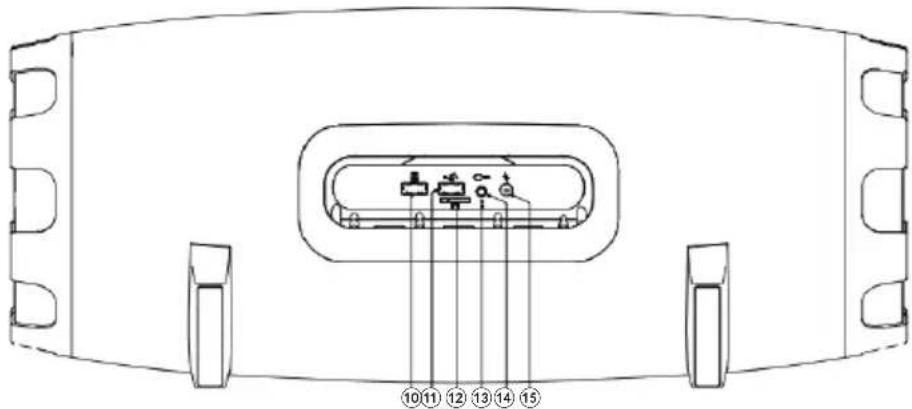
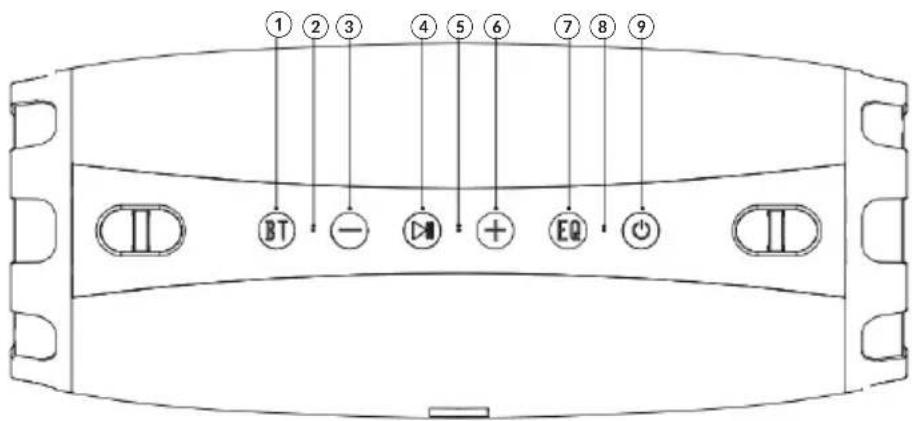
Z
- BT button
- TWS mode indicator
- Previous track/ decrease volume
- Play/ pause/ call management
- Microphone
- Next track/ increase volume
- Equalizer
-
Mode indicator
-
Power/ mode button
- USB input
- USB output (charging external devices)
- microSD card slot
- Reset socket/ charging indicator
- AUX input
- Charging socket
OPERATION
Turn on/off
Press and hold the power button for about 2 seconds to turn on the device (mode indicator lights up blue). The device will issue a voice prompt and automatically enter Bluetooth pairing mode.
Press and hold the power button again to turn off the device (mode indicator goes off).
If after pressing the power button, the device is not turning on, it may be due to low battery. Please charge the battery and try again.
Play/ pause music
Press the play/ pause button.
Previous/ next track
Press the - button to go to previous track. Press the + button to go to next track.
Decrease/ increase volume
Press and hold the - button to decrease volume. Press and hold the + button to increase volume.
Answer/ end/ reject call
Press the play/pause button to answer/end call. Press and hold this button to reject call.
Note: Remain within 1 meter from the speaker's microphone for the best call quality.
PAIRING
- Press and hold the power button for about 2 seconds to turn on the speaker. It will automatically enter Bluetooth mode* (mode indicator blinks blue quickly).
- Please keep the speaker and external device close to each other when pairing.
- Enable Bluetooth function on the external device and search for new Bluetooth devices.
- Select and connect with this device (KM Explorer+). Enter password "0000" if necessary.
- The speaker will issue a voice prompt signifying a successful pairing; mode indicator stops blinking.
-
When playing music, mode indicator blinks blue slowly. When music is paused, mode indicator stops blinking.
-
If the device will not enter Bluetooth mode automatically after power on or if you
want to switch to Bluetooth mode, press the BT button to manually enter pairing mode.
Press and hold the BT button for about 2 seconds to disconnect with current external device and reenter pairing mode.
Notes:
- Every time the speaker is switched on, it will connect to last connected device automatically. Please note, your device must be on with Bluetooth function turned on.
- The device will turn off automatically after about 10 minutes of no operation.
AUX MODE
- Use the 3,5mm jack cable and connect one plug of the cable to the speaker's AUX input.
- Connect the other plug into the 3,5mm output of the external device you wish to play music from.
- The device should automatically enter AUX mode. If jack cable has been connected to the speaker before power on, press the power button to enter AUX mode (mode indicator should change from blue to white).
- Start playing music from your device.
- During music playback, mode indicator blinks white. When music is paused, mode indicator is on.
- Control music playback and volume from the speaker. Use connected external device to select desired track.
USB MODE
- Connect the USB drive to the USB input of the speaker.
- The device should automatically enter USB mode. If USB drive has been connected to the speaker before power on, press the power button to enter USB mode (mode indicator should change from blue to white).
- Start playing music from your device.
- During music playback, mode indicator blinks white. When music is paused, mode indicator is on.
- Control music playback, volume and track selection from the speaker.
MICROSD CARD MODE
- Insert the microSD card into the appropriate slot of the speaker.
- The device should automatically enter microSD mode. If microSD card has been inserted into the slot before power on, press the power button to enter microSD card mode (mode indicator should change from blue to white).
- Start playing music from your device.
- During music playback, mode indicator blinks white. When music is paused, mode indicator is on.
- Control music playback, volume and track selection from the speaker.
CHARGING
- Connect plug of the included AC charger to the charging socket of the speaker.
- Connect the AC charger to power supply.
- When the battery is charging, red charging indicator is on.
- When the battery is fully charged, red charging indicator turns blue.
- Disconnect the AC charger from the speaker and power source.
CHARGING EXTERNAL DEVICE
- Make sure the speaker is turned on.
- Connect the external device with the USB cable (not included in the set) to the USB output of the speaker.
- Charging should start automatically.
TWS MODE
You can connect only the speakers of the same model.
You can connect speakers only when in Bluetooth mode.
Make sure non of the speakers is connected to the external device before enabling TWS mode.
- Turn on speaker A and speaker B one by one.
- Press the BT button of the speaker A twice. TWS mode indicator blinks white.
- After successful connection between the speakers, TWS mode indicator is on.
- Pair speaker A with external device.
- Once paired successfully, both speakers should simultaneously play music.
- You can disconnect the speakers by pressing and holding the BT button on either speaker for about 3 seconds.
- Manage all functions using buttons on either speaker.

RESET
If abnormal condition occurs to the device during use, insert hard and slim object (for example a toothpick or a clip) inside the reset socket until the button is pressed. The speaker should reset.
SPECIFICATION
IPX7 waterproof
Built-in microphone
Hands-free function
Call management
Charging external devices
TWS function (connect two speakers)
Equalizer
Output power: 2 × 15 ~W + 40 ~W
Impedance: 2 × 8 Ohm + 4 Ohm
3 speakers:
2 × 92 ~mm (tweeter)
Bluetooth profile: HFP v1.7, AVRCP v1.6, A2DP v1.2
Bluetooth range: up to 10 m
I/O:
1x charging socket
1x USB input
1x USB output (charging at 5 V / 1 A)
1x microSD card slot (up to 64 GB)
1x AUX input (3,5 mm)
Playback time: up to 8 h (full volume)
Battery: 7,4 V; 6000 mAh
AC charger:
Input: 100 - 240 V; 50/60 Hz
Output: 10V / 1,3A
In set: AC charger, 3,5 mm jack cable, strap, user's manual
LEARN MORE
For more information on this product, go to www.krugermatz.com.
Visit www.krugermatz.com website for more products and accessories.
In case of any doubts or questions reach out to our Frequently Asked Questions section.
Lechpol Electronics Sp. z o.o. Sp.k. hereby declares that Portable Bluetooth speaker KM0553 is consistent with directive 2014/53/UE.
Full text of the EU Declaration of Conformity is available at following Internet address: www.lechpol.eu.

English Correct Disposal of This Product (Waste Electrical & Electronic Equipment)

(Applicable in the European Union and other European countries with separate collection systems) This marking shown on the product or its literature, indicates that It should not be disposed with other household wastes at the end of its working life. To prevent possible harm to the environment or human health from uncontrolled waste disposal, please separate this from other types of wastes and recycle it responsibly to promote the sustainable reuse of material resources. Household users should contact either the retailer where they purchased this product, or their local government office, for details of where and how they can take this item for environmentally safe recycling. Business users should contact their supplier and check the terms and conditions of the purchase contract. This product should not be mixed with other commercial wastes for disposal.
Made in China for LECHPOL ELECTRONICS Sp. z o.o. Sp.k., ul. Garwolinska 1, 08-400 Mietne.
QUESTIONS DE SECURITE
1x 133,5 mm (woofer)
Bande passante: 60Hz 18kHz
THD: <10%
Rapport S/N: >70 dB
Bluetooth 5.0
Profiles Bluetooth: HFP v1.7, AVRCP v1.6, A2DP v1.2
EXTERNE APPARATEN OPLADEN
Reducere/crestere volum
Krüger&Matz is a registered trademark.