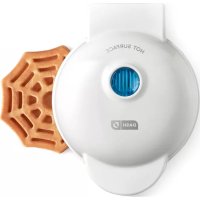
Spider Web Mini DMWW001SW - Waffle Maker Dash - Free user manual and instructions
Find the device manual for free Spider Web Mini DMWW001SW Dash in PDF.


| Product Type | Waffle Maker |
| Brand | Dash |
| Model | Spider Web Mini DMWW001SW |
| Dimensions (approx.) | 15 x 15 x 10 cm |
| Weight (approx.) | 0.5 kg |
| Power Supply | 120 V ~ 60 Hz |
| Power | 700 W |
| Capacity | 1 mini waffle |
| Cooking Surface Material | Non-stick |
| Exterior Coating | Plastic |
| Color | White / Black (depending on variant) |
| Power Cord | Short, with polarized plug |
| Main Functions | Baking mini waffles shaped like a spider web |
| Indicator Light | Yes, indicates power on |
| Care and Cleaning | Wipe with a damp cloth; do not immerse; do not use abrasive products |
| Safety | Hot surfaces; do not use near water; supervision required for children |
| Spare Parts and Repairability | Contact StoreBound support at 1-800-898-6970 |
| Usage | Indoor, household only |
| Warranty | Consult the retailer |
Frequently Asked Questions - Spider Web Mini DMWW001SW Dash
User questions about Spider Web Mini DMWW001SW Dash
0 question about this device. Answer the ones you know or ask your own.
Ask a new question about this device
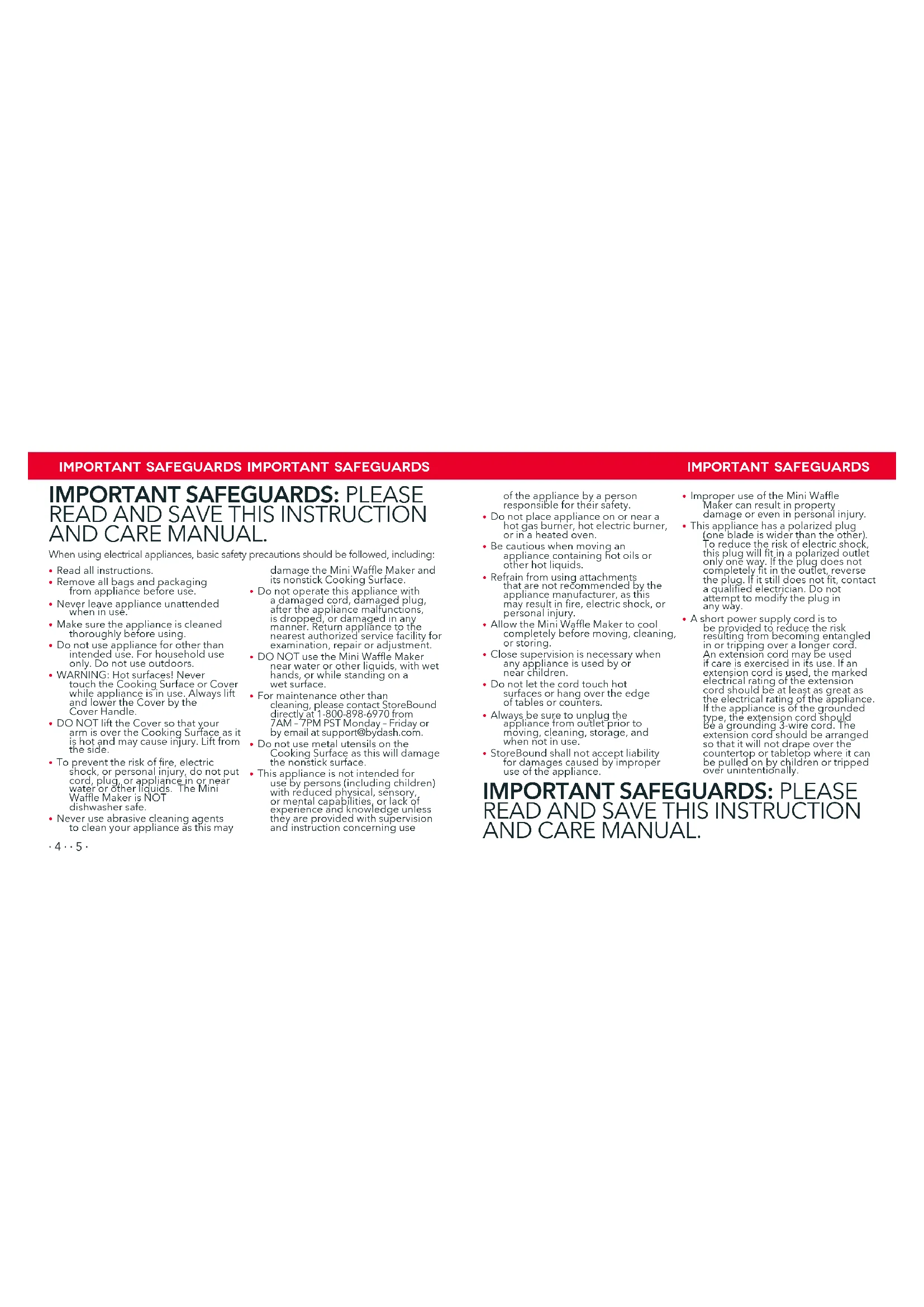
Download the instructions for your Waffle Maker in PDF format for free! Find your manual Spider Web Mini DMWW001SW - Dash and take your electronic device back in hand. On this page are published all the documents necessary for the use of your device. Spider Web Mini DMWW001SW by Dash.
USER MANUAL Spider Web Mini DMWW001SW Dash
Instruction Manual | Recipe Guide


SPIDERWEB MINI WAFFLE MAKER
Important Safeguards. 4-7
Parts & Features 8
Using Your Mini Waffle Maker 9-12
Cleaning & Maintenance 13
Troubleshooting. 14-15
Recipes 17-26
Notes. 28-29
Customer Support 30
Warranty. 31

IMPORTANT SAFEGUARDS IMPORTANT SAFEGUARDS
IMPORTANT SAFEGUARDS
IMPORTANT SAFEGUARDS: PLEASE READ AND SAVE THIS INSTRUCTION AND CARE MANUAL.
When using electrical appliances, basic safety precautions should be followed, including:
- Read all instructions.
- Remove all bags and packaging from appliance before use.
- Never leave appliance unattended when in use.
Make sure the appliance is cleaned thoroughly before using. - Do not use appliance for other than intended use. For household use only. Do not use outdoors.
WARNING: Hot surfaces! Never touch the Cooking Surface or Cover while appliance is in use. Always lift and lower the Cover by the Cover Handle. - DO NOT lift the Cover so that your arm is over the Cooking Surface as it is hot and may cause injury. Lift from the side.
To prevent the risk of fire, electric shock, or personal injury, do not put cord, plug, or appliance in or near water or other liquids. The Mini Waffle Maker is NOT dishwasher sale. - Never use abrasive cleaning agents to clean your appliance as this may
4·5
damage the Mini Waffle Maker and its nonstick Cooking Surface.
- Do not operate this appliance with a damaged cord, damaged plug, after the appliance malfunctions, is dropped, or damaged in any manner. Return appliance to the nearest authorized service facility for examination, repair or adjustment.
DO NOT use the Mini Waffle Maker near water or other liquids, with wet hands, or while standing on a wet surface.
For maintenance other than cleaning, please contact StoreBound directly at 1-800-898-6970 from 7AM - 7PM PST Monday - Friday or by email at support@bydash.com.
- Do not use metal utensils on the Cooking Surface as this will damage the nonstick surface.
This appliance is not intended for use by persons (including children) with reduced physical, sensory, or mental capabilities, or lack of experience and knowledge unless they are provided with supervision and instruction concerning use
of the appliance by a person responsible for their safety.
- Do not place appliance on or near a hot gas burner, hot electric burner, or in a heated oven.
- Be cautious when moving an appliance containing hot oils or other hot liquids.
- Refrain from using attachments that are not recommended by the appliance manufacturer, as this may result in fire, electric shock, or personal injury.
- Allow the Mini Waffle Maker to cool completely before moving, cleaning, or storing.
- Close supervision is necessary when any appliance is used by or near children.
- Do not let the cord touch hot surfaces or hang over the edge of tables or counters.
Always be sure to unplug the appliance from outlet prior to moving, cleaning, storage, and when not in use. -
StoreBound shall not accept liability for damages caused by improper use of the appliance.
-
Improper use of the Mini Waffle Maker can result in property
damage or even in personal injury.
This appliance has a polarized plug (one blade is wider than the other). To reduce the risk of electric shock, this plug will fit in a polarized outlet only one way. If the plug does not completely fit in the outlet, reverse the plug. If it still does not fit, contact a qualified electrician. Do not attempt to modify the plug in any way.
A short power supply cord is to be provided to reduce the risk resulting from becoming entangled in or tripping over a longer cord. An extension cord may be used if care is exercised in its use. If an extension cord is used, the marked electrical rating of the extension cord should be at least as great as the electrical rating of the appliance. If the appliance is of the grounded type, the extension cord should be a grounding 3-wire cord. The extension cord should be arranged so that it will not drape over the countertop or tabletop where it can be pulled on by children or tripped over unintentionally.
IMPORTANT SAFEGUARDS: PLEASE READ AND SAVE THIS INSTRUCTION AND CARE MANUAL.
AEGEL
GARANTIES IMPORTANTES
GARANTIES IMPORTANTES
GARANTIES IMPORTANTES: VEUILLEZ LIRE ET CONSERVER CE MODE D'EMPLOI ET D'ENTRETION
USING YOUR MINI WAFFLE MAKER
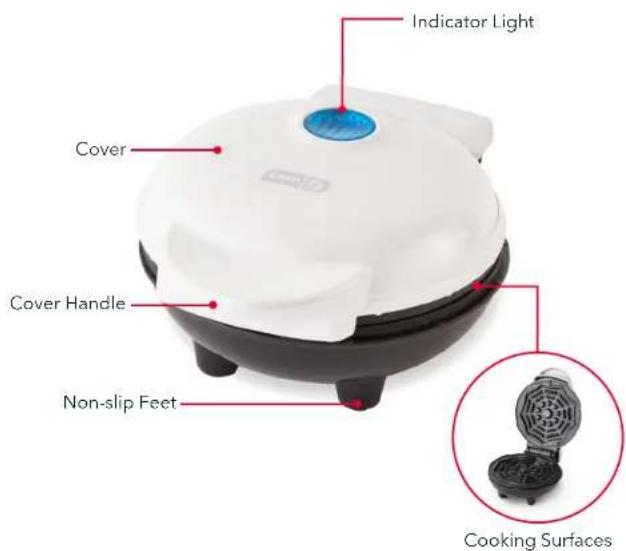
Before first use, remove all packaging material and thoroughly clean your Spiderweb Mini Waffle Maker.
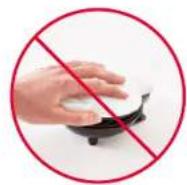
Never touch the Cooking Surface or Cover while appliance is in use.
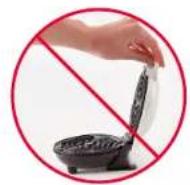
DO NOT lift the Cover so that your arm is over the Cooking Surface as it is hot and may cause injury.
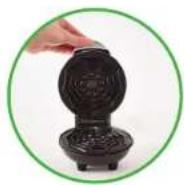
Always lift and lower the Cover by the Cover Handle. Lift from the side.
USING YOUR MINI WAFFLE MAKER USING YOUR MINI WAFFLE MAKER
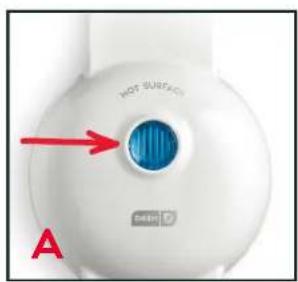
1 Place the appliance on a stable and dry surface. Plug the cord into a power outlet. The Indicator Light (photo A) will illuminate, signaling that the Mini Waffle Maker is heating up.
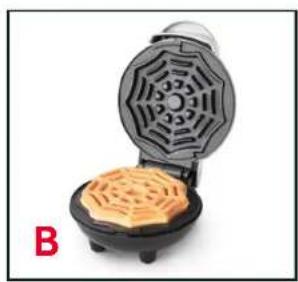
2 Once the Cooking Surface reaches the optimal cooking temperature, the Indicator Light will automatically shut off. Now, you're ready to get cooking (photo B)!
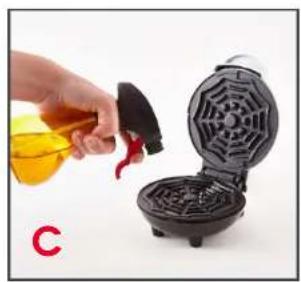
3 Carefully lift the Cover by the Cover Handle and spray both Cooking Surfaces with a small amount of cooking spray (photo C).
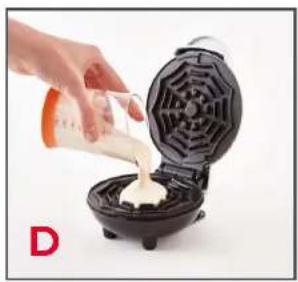
Place or pour batter onto the Cooking Surface (photo D) and close the Cover. For best results, use 3 tablespoons of batter.
USING YOUR MINI WAFFLE MAKER CLEANING & MAINTENANCE
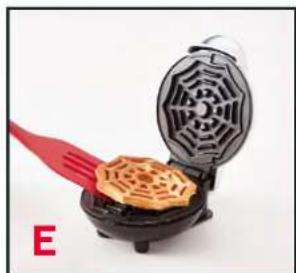
5 Once waffle is cooked to your preference, carefully remove it from the Cooking Surface with a heat-resistant nylon or silicone cooking utensil (photo E).
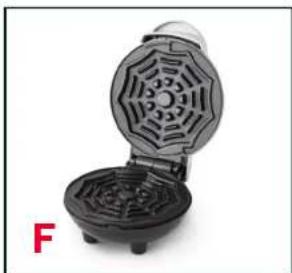
6 When you have finished cooking, unplug your Mini Waffle Maker and allow it to cool before moving or cleaning (photo F).

NOTE: Do not use metal utensils to remove or place food on the Cooking Surface as this will damage the nonstick surface.
Always unplug the appliance and allow it to cool completely before moving, cleaning or storing.
In order to keep your Spiderweb Mini Waffle Maker in pristine working order, thoroughly clean the appliance after each use. This will prevent the build-up of food or oil.
- Unplug your Mini Waffle Maker and allow it to cool completely.
- Using a damp, soapy cloth, wipe down the Cooking Surface and Cover. Thoroughly rinse the cloth and wipe again.
Thoroughly dry the Mini Waffle Maker before storing. - If there is food burned onto the Cooking Surface, pour on a little cooking oil and let sit for 5 to 10 minutes. Scrub the Cooking Surface with a sponge or soft bristled brush to dislodge food. Use a damp, soapy cloth to wipe down the Cooking Surface. Thoroughly rinse the cloth and wipe again. If any food remains, pour on cooking oil and let sit for a few hours, then scrub and wipe clean.
- Do not submerge appliance in water or any other liquids.
- Never use abrasive cleaning agents to clean your appliance as this may damage the Mini Waffle Maker and its nonstick Cooking Surface.
TROUBLESHOOTING TROUBLESHOOTING
While Dash products are durable, you may encounter one or more of the problems listed below. If the issue is either not solved by the solutions recommended below or not included on this page, please contact our Customer Support Team at 1-800-898-6970 or support@bydash.com.
| ISSUE SOLUTION | |
| The light on the Mini Waffle Maker keeps shutting off. | This is normal. During the cooking process, the heating element will automatically turn on and off to regulate the temperature and ensure that the Cooking Surface does not get too hot or cold. When this occurs, the Indicator Light turns on and off. |
| How do I know when the Mini Waffle Maker is heated and ready to use? | When the Waffle Maker reaches the optimal temperature, the Indicator Light shuts off and that means you're ready to get cooking! |
| There is no On/Off Button. How do I turn the Mini Waffle Maker off and on? | To turn on, simply plug in the power cord. When you're done cooking, turn off the Mini Waffle Maker by unplugging it. |
| ISSUE SOLUTION | |
| When using my Mini Waffle Maker, the Cover gets very hot. Is this normal? | Yes, this is completely normal. When using your Waffle Maker, always lift and lower the Cover by the Cover Handle. To prevent personal injury, DO NOT lift the Cover so that your arm is over the Cooking Surface as it is hot and may cause injury. Lift from the side. |
| After using my Mini Waffle Maker a few times, food is starting to stick to the surface. What is happening? | There is probably a build-up of burnt food residue on the Cooking Surface. This is normal, especially when cooking with sugar. Allow the appliance to cool fully, pour on a little cooking oil and let sit for 5-10 minutes. Scrub Surface with a sponge or soft bristled brush to dislodge food. Use a damp, soapy cloth to wipe down the Cooking Surface. Rinse the cloth and wipe again. If food remains, pour on cooking oil and let sit for a few hours, then scrub and wipe clean. |
| The Indicator Light will not turn on and the Cooking Surface is failing to heat. | 1. Ensure that the power cord is plugged into the power outlet. 2. Check to make sure the power outlet is operating correctly. 3. Determine if a power failure has occurred in your home, apartment or building. |
RECIPEGUIDE

Follow us!
@bydash | recipes, videos, & inspiration
@unprocessyourfood | veg & vegan-friendly meals

CLASSIC WAFFLES
Yield: 8-10 waffles
Ingredients:
1 cup flour
1 tbsp sugar
2 tsp baking powder
14 tsp salt
1 egg
1 cup milk
2 tbsp melted butter or vegetable oil
Directions:
- In a medium bowl, sift the flour, sugar, baking powder, and salt. Whisk the egg, milk, and melted butter in a separate bowl. Add the wet ingredients to the dry and mix until just incorporated.
- Grease the Mini Waffle Maker with butter or coat with a light coat of cooking spray. Pour 3 tbsp of the batter into the Mini Waffle Maker and cook until golden brown. Repeat with the remaining batter.
- Serve with a drizzle of maple syrup and fresh berries.

APPLE CINNAMON WAFFLES
Yield: 10-12 waffles
Ingredients:
3 large apples, grated and squeezed dry
1 tbsp lemon juice
1/2 cup whole wheat flour
1 tsp baking powder
1 tbsp brown sugar 1/2 tsp cinnamon 1/4 tsp salt
2 large eggs
Directions:
- Toss grated apple with lemon juice and set aside.
- Stir flour, baking powder, sugar, cinnamon and salt together. Sprinkle over the apples, tossing to coat.
- Whisk eggs together and add them to apple mixture, mixing to coat evenly.
- Add 3 tbsp of batter to your Mini Waffle Maker and cook until golden brown on both sides.

PIZZA CHAFFLE
Ingredients:
1 large egg
1/2 cupric cauliflower
½ cup shredded mozzarella cheese
1/2 tsp dried oregano
y_8 tsp garlic powder
12 cup shredded Parmesan cheese
4 tbsp pizza sauce
4 tbsp shredded mozzarella
(for pizza topping)
Directions:
- In a mini food processor, pulse the egg, cauliflower, mozzarella, oregano, and garlic powder until the mixture is very finely chopped.
- Spread 1 tbsp of the Parmesan cheese on the bottom of the Mini Waffle Maker. Add 2 heaping tbsp of the cauliflower mixture, spreading it evenly. Sprinkle 1 tbsp more of the Parmesan cheese on top of the cauliflower mixture.
- Cook the chaffie until well-browned and crisp, 6 mins. Set chaffle aside to cool. Repeat 3 more times making 4 chaffles.
- Top each chaffle with 1.5 tbsp of the pizza sauce. Sprinkle on 1 tbsp mozzarella. Place the chaffles under the broiler until the cheese melts, 1-2 mins. Watch carefully so they don't burn and serve immediately.


SNICKERDOODLE WAFFLES
Yield: 10-12 waffles
Ingredients:
2 cups all-purpose flour
2 tsp kosher salt
4 tsp baking powder
12 cup sugar
4 tsp cinnamon
3 tsp cream of tartar
2 large eggs
1 ½ cups milk
12 cup unsalted butter
2 tsp vanilla extract
For Cinnamon Sugar Garnish
1/4 cup granulated white sugar
1 tbsp ground cinnamon
Directions:
- In a small pan over low heat, combine milk and butter. Stir until milk is warm and butter is melted.
- Mix together flour, salt, baking powder, sugar, cinnamon and cream of tartar in a large bowl.
- Whisk together eggs and vanilla. Slowly pour in the warmed milk and butter.
- Pour dry ingredients into the wet in three stages, incorporating all dry ingredients before adding the next.
- Add 3 tbsp of waffle mix to your Mini Waffle Maker and cook until golden brown on both sides.
- Remove waffle and set on a wire rack and sprinkle with cinnamon sugar garnish.
BANANA BREAD WAFFLES
Yield: 8-10 waffles
Ingredients:
1 ½ cups all-purpose flour
34 cup buttermilk
1 tsp baking powder
1 cup light brown sugar
1 / 4 tsp baking soda
2 large eggs
14 tsp kosher salt
3 tbsp canola oil
1 cup mashed bananas
(roughly 2 bananas)
①Directions:
- Whisk together flour, baking powder, baking soda and salt in a medium bowl.
- Mash bananas with a fork or place in stand mixer with paddle attachment until no large chunks remain. Add buttermilk, brown sugar, eggs and oil. Whisk until well-combined. Add dry ingredients and mix until no clumps remain.
- Add 3 tbsp of batter to your Mini Waffle Maker and cook until golden brown on both sides. Serve with additional bananas, honey and powdered sugar, if desired.

MORE RECIPE IDEAS
| RECIPE IDEAING | REDIENTS COOKING TIME | |
| Protein Waffle | Classic Waffle Recipe (pg 18) 1 scoop protein powder | 4-6 min |
| Cornbread Waffle ¼ cup cornbread batter 6-8 min | ||
| Mashed Potato Bite 3 tbsp mashed potatoes 5 min | ||
| S'more Biscuit | 1 refrigerated biscuit dough, sliced lengthwise 2 squares milk chocolate 5 mini marshmallows | 5-7 min |
| Grilled Cheese | 2 slices white or wheat bread, buttered 2 slices American Cheese | 5 min |
| Chocolate Chip Cookie | 2 tbsp cookie dough 5-7 min | |
| Waffle Omelette | 1 egg beaten 2 tbsp chopped veggies 1 tbsp grated Swiss cheese | 5 min |

NOTES
NOTES
CUSTOMER SUPPORT
WARRANTY
FEEL GOOD
GUARANTEE
Dash values quality and workmanship and stands behind this product with our Feel Good Guarantee". To learn more about our commitment to quality, visit bydash.com/feelgood.
Our customer support teams in the US and Canada are at
your service Monday - Friday during the times below.
Contact us at 1 (800) 898-6970 or support@bydash.com
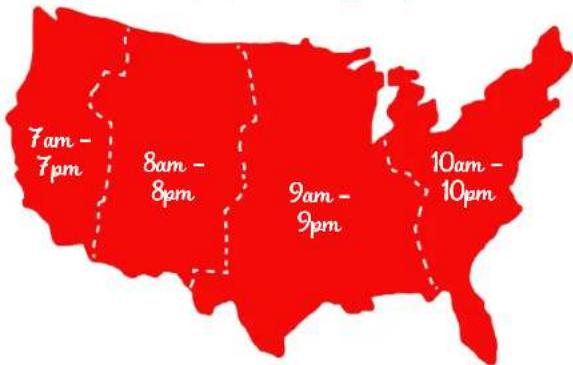
Hey, Hawaii! You can reach our customer service team from 5AM to 5PM.
And also, Alaska, feel free to reach out from 6AM to 6PM.
STOREBOUND, LLC - 1 YEAR LIMITED WARRANTY
Your StoreBound product is warranted to be free from defects in material and workmanship for a period of one (1) year from the date of the original purchase when utilized for normal and intended household use. Should any defect covered by the terms of the limited warranty be discovered within one (1) year, StoreBound, LLC will repair or replace the defective part. To process a warranty claim, contact Customer Support at 1-800-898-6970 for further assistance and instruction. A Customer Support agent will assist you by troubleshooting minor problems. If troubleshooting fails to fix the problem, a return authorization will be issued. Proof of purchase indicating the date and place of purchase is required and should accompany the return. You must also include your full name, shipping address, and telephone number. We are unable to ship returns to a PO box. StoreBound will not be responsible for delays or unprocessed claims resulting from a purchaser's failure to provide any or all of the necessary information. Freight costs must be prepaid by the purchaser.
Send all inquiries to support@bydash.com.
There are no express warranties except as listed above.
REPAIR OR REPLACEMENT AS PROVIDED UNDER THIS WARRANTY IS THE EXCLUSIVE REMEDY OF THE CUSTOMER. STOREBOUND SHALL NOT BE LIABLE FOR ANY INCIDENTAL OR CONSEQUENTIAL DAMAGES OR FOR BREACH OF ANY EXPRESS OR IMPLIED WARRANTY ON THIS PRODUCT EXCEPT TO THE EXTENT REQUIRED BY APPLICABLE LAW. ANY IMPLIED WARRANTY OF MERCHANTABILITY OR FITNESS FOR A PARTICULAR PURPOSE ON THIS PRODUCT IS LIMITED IN DURATION TO THE DURATION OF THIS WARRANTY.
Some states do not allow the exclusion or limitation of incidental or consequential damages, or limitations on how long an implied warranty lasts. Therefore, the above exclusions or limitations may not apply to you. This warranty gives you specific legal rights and you may also have other rights, which vary from state to state.
Refurbished items or items not purchased through an authorized retailer are not eligible for warranty claims.
REPAIRS
DANGER! Risk of electric shock! The Dash Spiderweb Mini Waffle Maker is an electrical appliance.
Do not attempt to repair the appliance yourself under any circumstances.
Contact Customer Support regarding repairs to the appliance.
TECHNICAL SPECIFICATIONS
Voltage 120V\~60Hz
Power Rating 350W
Stock#DMWW0015W_20210415_V2
Made in China

1-800-898-6970 | @bydash | bydash.com