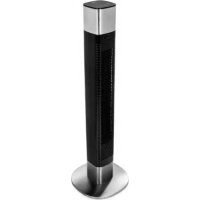
350000 - Fan PRINCESS - Free user manual and instructions
Find the device manual for free 350000 PRINCESS in PDF.



| Brand | Princess |
| Model | 350000 |
| Product type | Column fan |
| Height | 41 inches (approx. 104 cm) |
| Timer range | 1 to 8 hours |
| Number of speeds | 3 |
| Speeds (rpm) | 950, 1150, 1300 rpm |
| Maximum air flow | 1446 m³/h (24.1 m³/min) |
| Ventilation modes | Normal, Natural, Sleep |
| Oscillation | 80° |
| Noise level | 55 dB |
| Power | 50 W |
| Voltage | 220-240 V ~ 50 Hz |
| Connectivity | WiFi 2.4 GHz (compatible with HomeWizard Climate app) |
| Control type | Touch buttons on the device |
| Integrated handle | Yes |
| Overheat protection | Yes |
| Cleaning | Damp cloth, do not immerse |
| Use | Domestic |
| Certifications | CE, conforming to directive 2014/53/EU |
Frequently Asked Questions - 350000 PRINCESS
User questions about 350000 PRINCESS
0 question about this device. Answer the ones you know or ask your own.
Ask a new question about this device
Download the instructions for your Fan in PDF format for free! Find your manual 350000 - PRINCESS and take your electronic device back in hand. On this page are published all the documents necessary for the use of your device. 350000 by PRINCESS.
USER MANUAL 350000 PRINCESS
- This appliance shall not be used by children aged less than 8 years. This appliance can be used by children aged from 8 years and above and persons with reduced physical, sensory or mental capabilities or lack of experience and knowledge if they have been given supervision or instruction concerning use of the appliance in a safe way and understand the hazards involved. Children shall not play with the appliance. Keep the appliance and its cord out of reach of children aged less than 8 years. Cleaning and user maintenance shall not be made by children unless older than 8 and supervised.
- By ignoring the safety instructions the manufacturer cannot be held responsible for the damage.
- If the supply cord is damaged, it must be replaced by the manufacturer, its service agent or similarly qualified persons in order to avoid a hazard.
- Never move the appliance by pulling the cord and make sure the cord cannot become entangled.
-
The appliance must be placed on a stable, level surface.
-
The user must not leave the device unattended while it is connected to the supply.
- This appliance is only to be used for household purposes and only for the purpose it is made for.
- To protect yourself against an electric shock, do not immerse the cord, plug or appliance in the water or any other liquid.
- Never insert your fingers or any other object into the air outlet. Take special care to warn children of these dangers.
-
Do not use the unit:
-
near a source of fire.
- in an area exposed to direct sunlight.
- in an area where water is likely to splash.
-
near a bath, a shower or a swimming pool.
-
WARNING: Do not wrap the cable around the main body of the appliance during or after use.
- WARNING: Misuse of the appliance could cause personal injury.
- This appliance is intended to be used in household and similar applications such as:
③PRINCESS
Instruction manual
- Staff kitchen areas in shops, offices and other working environments.
- By clients in hotels, motels and other residential type environments.
- Bed and breakfast type environments.
- Farm houses.
PARTS DESCRIPTION
- Button panel
- Display
- Fan body
-
Base
-
Place the device on a flat stable surface and ensure a minimum of 10 cm. free space around the device. This device is not suitable for installation in a cabinet or for outside use.
- Note: The appliance is not compatible with 5GHz WiFi, it will only work on 2.4GHz WiFi.
- Plug the power cable into a 13A socket. (Note: Make sure the voltage which is indicated on the device matches the local voltage before connecting the device. Voltage 220V-240V 50Hz).
Assembly instructions
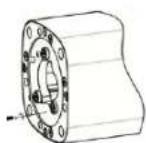
Picture 1
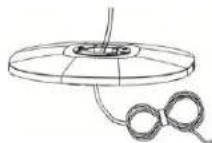
Picture 2
Picture 3

Picture 4
BEFORE THE FIRST USE
- Take the appliance and accessories out the box. Remove the stickers, protective foil or plastic from the device.
-
Before using your appliance for the first time, wipe off all removable parts with a damp cloth. Never use abrasive products.
-
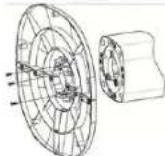
Remove the 3 screws out of the turnplate (Picture 1).
- Pull the power cord through the hole of the base (Picture 2).
- Align the base with the turnplate and use the 3 screws to secure them together (Picture 3).
- Press the power cord into the cable slot.(Picture 4).
USE
USING BUTTONS ON FAN
- Press the on/off button to turn the device on or off.
- Press the speed button to choose the desired speed setting. Press repeatedly to select one of the three different speed settings.
- Mode button: Choose from 3 different breeze patterns: Normal, Natural (randomly cycle through different speed settings to recreate an outdoor natural breeze) and Sleep (slows the fan speed down so you can still feel the air flow but you don't hear the fan as much). The natural and sleep function are shown on the display when they are selected.
- Sleep mode:
Firstly select the fan speed, then select sleep mode. The sleep mode will begin from the selected fan speed and reduce down to low speed where it will remain.
Fan speed High when sleep mode selected:
20 minutes high, then 20 minutes medium, then Low.
Fan speed Medium when sleep mode selected:
20 minutes medium, then Low.
Fan speed low when sleep mode selected:
This mode does not give any additional function and the fan will remain in low speed.
- Press the oscillation button to turn on the swing function, press again to turn off.
- Press the timer button to activate the timer. Push repeatedly to increase the timer. The timer can be set to automatically turn off the fan after 1-8 hours.

USING THE FAN WITH CLIMATE APP
- The fan can be used manually with its built-in controls or you can use a smart phone to control it. Before you begin, ensure the Homewizard Climate app is downloaded. The Homewizard Climate app is available on Android and iOS.
Pair your fan to HomeWizard Climate app
Make sure your fan is powered. - Open HomeWizard Climate APP.
- Create an account or if you already have a HomeWizard account, please log in using those details.
- Click "Add new Climate Device" to add a new device.
- Follow the instructions on the app to connect the fan.
TABLE
| Information requirements for comfort fans P | ||
| Information to identify the model(s) to which the information relates to: | ||
| Description Symbol Value Unit | ||
| Maximum fan flow rate F 24.1 | m3/min | |
| Fan power input P 37.1 W | ||
| Service value Sv 0.7 (m3/min)W | ||
| Standby power consumption Psb 0.7 W | ||
| Off power consumption Poff 0.7 W | ||

Instruction manual
| Fan sound power level Lwa 55 dB(A) | ||
| Maximum air velocity C 2.2 meters/sec | ||
| Season electricity consumption Q 16.8 kWh/a | ||
| Measurement standard for service value | IEC 60879:+(corr.1992) | |
CLEANING AND MAINTENANCE
- Clean the appliance with a damp cloth. Never use harsh and abrasive cleaners, scouring pad or steel wool, which damages the device.
- Never immerse the electrical device in water or any other liquid. The device is not dishwasher proof.
PRODUCT SPECIFICATIONS
| Item Detail | |
| Height 41 inches | |
| Timer function range 1-8 h | |
| Number of speed settings 3 | |
| Speed 950-1150-1300 rpm | |
| Airflow 1446 m3/h | |
| Wind modes 3 different wind modes: | normal, natural, sleep |
| Noise level | 55 dB |
| Oscillating range | 80° |
| Integrated handle(s) | Yes |
| Overheat protection | Yes |
| Power | 50 W |
| Frequency | Only 2.4Ghz, it will not work on 5Ghz WiFi |
| Button type of main body | Touch buttons |
DECLARATION OF CONFORMITY
- Hereby, Smartwares Europe declares that the radio equipment type 350000 is in compliance with Directive 2014/53/EU
- The full text of the EU declaration of conformity is available at the following internet address: www.princesshome.eu/doc
ENVIRONMENT

This appliance should not be put into the domestic garbage at
the end of its durability, but must be offered at a central point for the recycling of electric and electronic domestic appliances. This symbol on the appliance, instruction manual and packaging puts your attention to this important issue. The materials used in this appliance can be recycled. By recycling of used domestic appliances you contribute an important push to the protection of our environment. Ask your local authorities for information regarding the point of recollection.
Support
You can find all available information and spare parts at www.princesshome.eu!
VEILIGHEID
CHARACTERISTIQUES DU PRODUIT
ANVANDA KNAPPARNA PFLAKTEN
ANVANDA FLAKTEN MED KLMATAPPEN
Max. radio-frequency power: 20.5dBm
IN NEED OF ACCESSORIES? VISIT
WWW.PRINCESSHOME.EU/NL-NL/CUSTOMERSERVICE/ACCESSORIES-SPAREPARTS
FOR ACCESSORIES AND SPARE PARTS TO EXTEND YOUR ITEM!

© Princess 2021 | Jules Vermeweg 87
5015 BH Tilburg | The Netherlands | www.princesshome.eu


Brand : PRINCESS
Model : 350000
Category : Fan