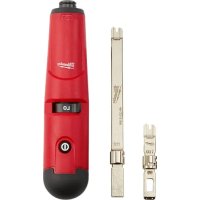
48222165 - Pliers MILWAUKEE - Free user manual and instructions
Find the device manual for free 48222165 MILWAUKEE in PDF.

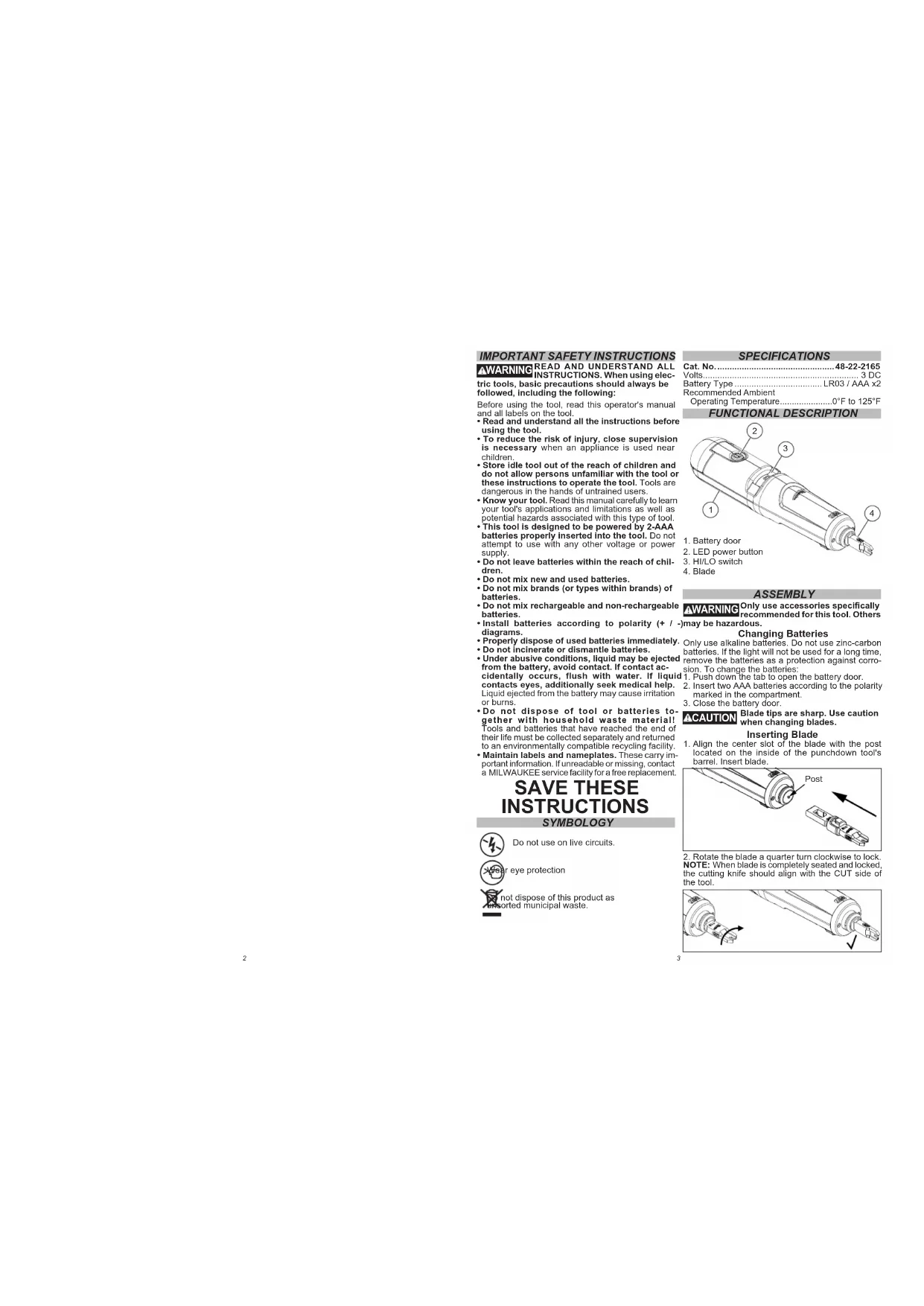

| Product Type | Cutting/impact tool for IDC connectors (crimping tool) |
| Brand | Milwaukee |
| Model | 48-22-2165 (48222165) |
| Power Source | 2 AAA (LR03) alkaline batteries, 3 V DC |
| Battery Type | LR03 (AAA) |
| Rated Voltage | 3 V DC |
| Operating Ambient Temperature | -18°C to 50°C (0°F to 125°F) |
| Main Functions | Cutting and crimping wires on IDC connectors (types 110 and 66), built-in LED lamp with HI/LO adjustment, auto shut-off after 15 min |
| Supported Connector Types | 110 (junction blocks, trapezoidal jacks) and 66 (patching panels) |
| Recommended Wire Gauge (LO mode) | 24 to 26 AWG |
| Recommended Wire Gauge (HI mode) | 23 AWG and larger |
| Included Accessories | Cutting blade type 110 and/or 66 (check packaging) |
| Optional Accessories | Blade 48-22-2166 (110 extended reach), Blade 48-22-2167 (combined 110/66) |
| Body Material | Reinforced Plastic |
| Approximate Dimensions | 20 cm x 5 cm x 3 cm |
| Approximate Weight | 200 g (without batteries) |
| Safety | Do not use on live circuits, wear eye protection, do not look directly at the LED, do not immerse |
| Maintenance and Cleaning | Clean with mild soap and a damp cloth; do not use solvents; remove batteries before any maintenance |
| Repairability and Spare Parts | Contact a Milwaukee service center for repairs; do not disassemble yourself |
| Warranty | Limited warranty; see manual for details |
| Pictograms | Do not use on live circuits, wear eye protection, do not dispose of with household waste |
| Low Battery Indicator | The LED flashes 3 times when the power button is pressed |
Frequently Asked Questions - 48222165 MILWAUKEE
User questions about 48222165 MILWAUKEE
0 question about this device. Answer the ones you know or ask your own.
Ask a new question about this device
Download the instructions for your Pliers in PDF format for free! Find your manual 48222165 - MILWAUKEE and take your electronic device back in hand. On this page are published all the documents necessary for the use of your device. 48222165 by MILWAUKEE.
USER MANUAL 48222165 MILWAUKEE
natural_image
Technical line drawing of a mechanical device with internal components and mounting brackets (no text or symbols)Cat. No. / No de cat.
48-22-2165
PUNCHDOWN TOOL
OUTILS D'INSERTION
WARNING To reduce the risk of injury, user must read and understand operator's manual.
IMPORTANT SAFETY INSTRUCTIONS WARNING READ AND UNDERSTAND ALL INSTRUCTIONS. When using elec- tric tools, basic precautions should always be followed, including the following:
Before using the tool, read this operator's manual and all labels on the tool.
- Read and understand all the instructions before using the tool.
• To reduce the risk of injury, close supervision is necessary when an appliance is used near children.
- Store Idle tool out of the reach of children and do not allow persons unfamiliar with the tool or these instructions to operate the tool. Tools are dangerous in the hands of untrained users.
- Know your tool. Read this manual carefully to learn your tool's applications and limitations as well as potential hazards associated with this type of tool. - This tool is designed to be powered by 2-AAA batteries properly inserted into the tool. Do not attempt to use with any other voltage or power supply.
- Do not leave batteries within the reach of children.
• Do not mix new and used batteries.
- Do not mix brands (or types within brands) of batteries.
- Do not mix rechargeable and non-rechargeable batteries.
• Install batteries according to polarity (+ / - diagrams.
- Properly dispose of used batteries immediately. - Do not incinerate or dismantle batteries.
- Under abusive conditions, liquid may be ejected from the battery, avoid contact. If contact accidentally occurs, flush with water. If liquid contacts eyes, additionally seek medical help. Liquid ejected from the battery may cause irritation or burns.
- Do not dispose of tool or batteries together with household waste material! Tools and batteries that have reached the end of their life must be collected separately and returned to an environmentally compatible recycling facility.
- Maintain labels and nameplates. These carry important information. If unreadable or missing, contact a MILWAUKEE service facility for a free replacement.
SAVE THESE INSTRUCTIONS
SYMBOLOGY

Do not use on live circuits.

eye protection

It dispose of this product as rated municipal waste.
SPECIFICATIONS
Cat. No....48-22-2165
Volts....3 DC Battery Type LB02/AAA x2
Battery Type ....EROS / AAA X2 Recommended Ambient
Operating Temperature....0°F to 125°F
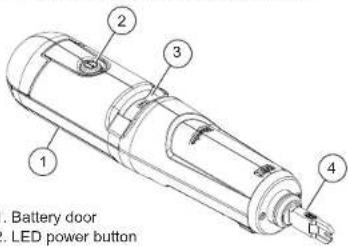
FUNCTIONAL DESCRIPTION
-
Battery door
-
LED power button
-
HI/LO switch
-
Blade
ASSEMBLY
AWARNING Only use accessories specifically recommended for this tool. Others
recommended for this tool. Others may be hazardous.
Changing Batteries
Only use alkaline batteries. Do not use zinc-carbon batteries. If the light will not be used for a long time, remove the batteries as a protection against corrosion. To change the batteries:
- Push down the tab to open the battery door.
-
Insert two AAA batteries according to the polarity marked in the compartment.
-
Close the battery door.
⚠️CAUTION Blade tips are sharp. Use caution when changing blades.
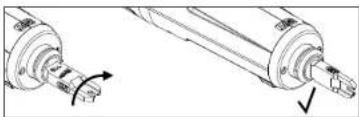
Inserting Blade
- Align the center slot of the blade with the post located on the inside of the punchdown tool's barrel. Insert blade.
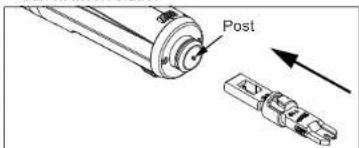
- Rotate the blade a quarter turn clockwise to lock. NOTE: When blade is completely seated and locked, the cutting knife should align with the CUT side of the tool.
natural_image
Technical line drawing of a mechanical component with directional arrows indicating rotation (no text or symbols)Removing Blade
Rotate the blade a quarter turn counter-clockwise and pull blade out to remove.
OPERATION
Using LED Light
⚠ WARNING To reduce the risk of injury, do not look directly into the light when the light is on.
Press the power button ☐ to turn the light on or off. NOTE: After 15 minutes of continuous use, the light will shut off automatically.
NOTE: The LED will flash three (3) times to indicate low batteries. This will continue each time the power button is turned on until the batteries are replaced.
Adjusting Force
- To set the force to LO, push the HI/LO switch to the left.
- To set the force to HI, push the HI/LO switch to the right.
| Force Setting | 66 Panel/Block/Terminal | 110 Cross-Connect Panels/Blocks/Keystone Jacks |
| LO 24-26 | gauge conductors | All |
| HI 23 and larger gauge connectors | NOT RECOMMENDED | |
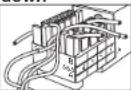
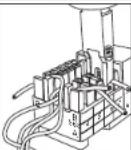
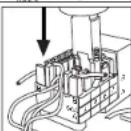
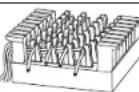
110 Type Punchdown
- Insert the 110 type blade into the tool
- Select the proper force setting by referring to the above table.
- Lay the wires in the wire slots.
- Place the blade into the wire slot. Make sure the CUT side of the blade faces the end of the wire to be cut.
- Push down on the back end of the tool with the palm of your hand until impact.
- Remove the blade from the wire slot. Make sure the wire is properly seated in the bottom of the wire slot between the insulation displacement connector's (IDC) blades.
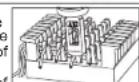
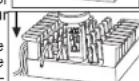
66 Type Punchdown
- Insert the 66 type blade into the tool.
- Select the proper force setting by referring to the above table.
- Lay the wires in the post openings.
- Place the blade into the wire post. Make sure the CUT side of the blade faces the end of the wire to be cut.
- Push down on the back end of the tool with the palm of your hand until impact.
- Remove the blade from the wire post. Make sure the wire is properly seated at the bottom of the post between the
ost between the
placement connector's (IDC) blades.
MAINTENANCE
⚠ WARNING To reduce the risk of injury, always remove the battery before performing any maintenance. Never disassemble the tool. Contact a MILWAUKEE service facility for ALL repairs.
Maintain Tool
Keep your tool in good repair by adopting a regular maintenance program. If the tool does not work properly, return the light to a MILWAUKEE service facility for repairs.
⚠WARNING To reduce the risk of personal injury and damage, never immerse your tool in liquid or allow a liquid to flow inside them.
Cleaning
Keep tool handles clean, dry and free of oil or grease. Use only mild soap and a damp cloth to clean the tool since certain cleaning agents and solvents are harmful to plastics and other insulated parts. Some of these include gasoline, turpentine, lacquer thinner, paint thinner, chlorinated cleaning solvents, ammonia and household detergents containing ammonia. Never use flammable or combustible solvents around tools.
ACCESSORIES
AWARNING Only use accessories specifically recommended for this tool. Others may be hazardous.
| Cat. No. | Description |
| 48-22-2166 | Extended Reach 110 Punchdown Blade |
| 48-22-2167 | 110/66 Combination Punchdown Blade |
For a complete listing of accessories, go online to www.milwaukeeetool.com or contact a local distributor.
SERVICE - UNITED STATES
1-800-SAWDUST (1.800.729.3878)
Monday-Friday, 7:00 AM - 6:30 PM CST
or visit www.milwaukeeetool.com
Contact Corporate After Sales Service Technical Support with technical, service/repair, or warranty questions.
Email: metproductsupport@milwaukeeetool.com
Become a Heavy Duty Club Member at www.milwaukeetool.com to receive important notifications regarding your tool purchases.
SERVICE - CANADA
Milwaukee Tool (Canada) Ltd
1.800.268.4015
Monday-Friday, 7:00 AM - 4:30 PM CST
or visit www.milwaukeeetool.ca
LIMITED WARRANTY
USA & CANADA
Every MILWAUKEE hand tool is warranted to the original purchaser only to be free from defects in material and workmanship. Subject to certain exceptions. MILWAUKEE will repair or replace any hand tool which, after examination, is determined by MILWAUKEE to be defective. The purchase of the hand tool product and a copy of proof of purchase to a MILWAUKEE factory Service Center location freight prepaid and insured, is required are requested. A copy of the proof of purchase should be included with the return product. This warranty does not apply to damage that MILWAUKEE determines to be from, misuse, alterations, abuse, or damage. This warranty is not intended to be made in accordance with the acceptance of THE EXCLUSIVE REPAIR AND REPLACEMENT REMEDIES DESCRIBED HEREIN IS A CONDITION OF THE CONTRACT FOR THE PURCHASE OF EVERY MILWAUKEE PRODUCT. IF YOU DO NOT AGREE TO THIS CONDITION, YOU SHOULD NOT BE USED IN ANY INFORMATION TO THE PREVENTION OF ANY WARRANTY. IF YOU ARE LIABLE FOR ANY INCIDENTAL, SPECIAL, CONSEQUENTIAL OR PUNITIVE DAMAGES, OR FOR ANY COSTS, ATTORNEY FEES, EXPENSES, LOSSES OR DELAYS ALLEGED TO BE AS A CONSEQUENCE OF ANY DAMAGE TO FAILURE OF, OR DEFECT IN ANY PRODUCT INCLUDING BUT NOT LIMITED TO ANY CLAIMS FOR LOSS OF ANY COMESTANCE. SOME STATES WILL NOT ALLOW THE EXCLUSIVE OR LIMITATION OF INDICENT TAX CONSENSUAL DAMAGES, SO THE ABOVE LIMITATION OR EXCLUSION MAY NOT APPLY TO YOU. THIS WARRANTY IS EXCLUSIVE AND IN LIEU OF ALL OTHER EXPRESS WARRANTIES, WRITTEN OR ORAL, TO THE EXTENT PERMITTED BY LAW, MILWAUKEE DISCLAIMS ARE LIMITED WITHOUT LIMITATION. ANY WARRANTY IS NOT PERMITTED BY LAW, SUCH IMPLIED WARRANTIES ARE LIMITED TO THE DURATION OF THE APPLICABLE EXPRESS WARRANTY AS DESCRIBED ABOVE. SOME STATES WILL NOT ALLOW THE WARRANTY. ANY WARRANTY IS NOT PERMITTED BY LAW, SUCH IMPLIED WARRANTIES EXISTS TO THE ABOVE LIMITATION MAY NOT APPLY TO YOU. THIS WARRANTY GIVES YOU SPECIFIC LEGAL RIGHTS, AND YOU MAY ALSO HAVE OTHER RIGHTS WHICH VARY FROM STATE TO STATE. This warranty applies to product sold in the U.S.A. and Canada only. Please consult the Service Center Search in their parts & Service sets for MILWAUKEE clockwise Microsoft Outlook or call 1.800. SAWDUST (1.800.729.3875) to locate your nearest: MILWAUKEE factory Service Center location.
LIMITED WARRANTY - MEXICO,
CENTRAL AMERICA & CARIBBEAN
TECHTRONIC INDUSTRIES' warranty is for 5 years since the original purchase date.
This warranty card covers any defect in material and workmanship on this Product.
To make this warranty valid, present this warranty card, sealed/stamped by the distributor or store where you purchased the product to the Authorized Service Center (ASC). Or, if this card has not been sealed/stamped, present the original proof of purchase to the ASC. Call toll-free1 01 (800) 030-7777 to find the nearest ASC, for service parts, accessories or components.
Procedure to make this warranty valid
Take the product to the ASC, along with the warranty card sealed, stamped by the distributor or store where you purchased the product, and any faulty piece or component will be replaced without cost for you. We will cover all freight costs relative with this warranty process. Exceptions
This warranty is not valid in the following situations
a) When the product is used in a different manner from the end-user guide or instruction manual.
b) When the conditions of use are not normal.
c) When the product was modified or repaired by people not authorized by TECHTRONIC INDUSTRIES.
Note: If cord set is damaged, it should be replaced by an Authorized Service Center to avoid electric risks.
SERVICE AND ATTENTION CENTER
Call to 01 (800) 030-7777
IMPORTED AND COMMERCIALIZED BY
TECHTRONIC INDUSTRIES MEXICO, SA DE CV
Av President Masarik #29 piso 7, Col. Polanco V Sección
CP 11560, Deleg. Miguel Hidalgo, CDMX
Model:
Date of Purchase:
Distributor or Store Stamp:
RÈGLES DE SÉCURITÉ GÉNÉRALES
▲AVERTISSEMENT LIRE ET COMPRENDRE TOUTES LES INSTRUC-
natural_image
Technical illustration of a mechanical shaft assembly with directional arrows indicating motion (no text or symbols)Insertion de type 66
Milwaukee Tool (Canada) Ltd
1.800.268.4015
Monday-Friday, 7:00 AM - 4:30 PM CST www.milwaukeeotel.ca
ARANTIE LIMITÉE-
AUX ÉTATS-UNIS ET AU CANADA
natural_image
Technical line drawing of two mechanical components with directional arrows indicating rotation (no text or symbols)Lunes a Viernes (9am a 6pm)
13135 West Lisbon Road
Brookfield, WI 53005 USA
- IMPORTANT SAFETY INSTRUCTIONS WARNING READ AND UNDERSTAND ALL INSTRUCTIONS. When using elec- tric tools, basic precautions should always be followed, including the following:
- SAVE THESE INSTRUCTIONS
- SPECIFICATIONS
- ASSEMBLY
- Changing Batteries
- Inserting Blade
- Removing Blade
- OPERATION
- Using LED Light
- Adjusting Force
- Type Punchdown
- Type Punchdown
- MAINTENANCE
- Maintain Tool
- Cleaning
- ACCESSORIES
- SERVICE - UNITED STATES
- 1-800-SAWDUST (1.800.729.3878)
- SERVICE - CANADA
- Milwaukee Tool (Canada) Ltd
- 1.800.268.4015
- LIMITED WARRANTY
- USA & CANADA
- LIMITED WARRANTY - MEXICO,
- CENTRAL AMERICA & CARIBBEAN
- RÈGLES DE SÉCURITÉ GÉNÉRALES
- ▲AVERTISSEMENT LIRE ET COMPRENDRE TOUTES LES INSTRUC-
- Insertion de type 66
- ARANTIE LIMITÉE-
- AUX ÉTATS-UNIS ET AU CANADA
Brand : MILWAUKEE
Model : 48222165
Category : Pliers