ManualGo.com
24LQ520S - Monitor LG - Free user manual and instructions
Find the device manual for free 24LQ520S LG in PDF.


Download the instructions for your Monitor in PDF format for free! Find your manual 24LQ520S - LG and take your electronic device back in hand. On this page are published all the documents necessary for the use of your device. 24LQ520S by LG.
USER MANUAL 24LQ520S LG
DC-IN 1DC-IN 2 1 2 3 X 2 (M4 X L12) LED TV
TELEVISOR LED English Read Safety and Reference.Easy Setup Guide Please read this manual carefully before operating your set and retain it for future reference.ARBITRATION NOTICE (USA) / États-Unis seulement By using this product, you agree that all disputes between you and LG arising out of or relating in any way to this product (including but not limited to warranty disputes) shall be resolved through binding arbitration on an individual basis, unless the laws of your state or territory do not permit that, or, in other jurisdictions, if you choose to opt out. Additional information regarding the terms of the arbitration agreement (including details on the procedure for resolving disputes) is available
22.1 x 5.9 x 14.4 (inches)
22.1 x 2.2 x 13.4 (inches)
Weight With stand 3.3 kg (7.2 lbs) Without stand 3.25 kg (7.1 lbs) Français
- LG LED TV applies LCD screen with LED backlights. Please read this manual carefully before operating your TV and retain it for future reference.
Safety and Reference (LED TV*)2 ENGLISH
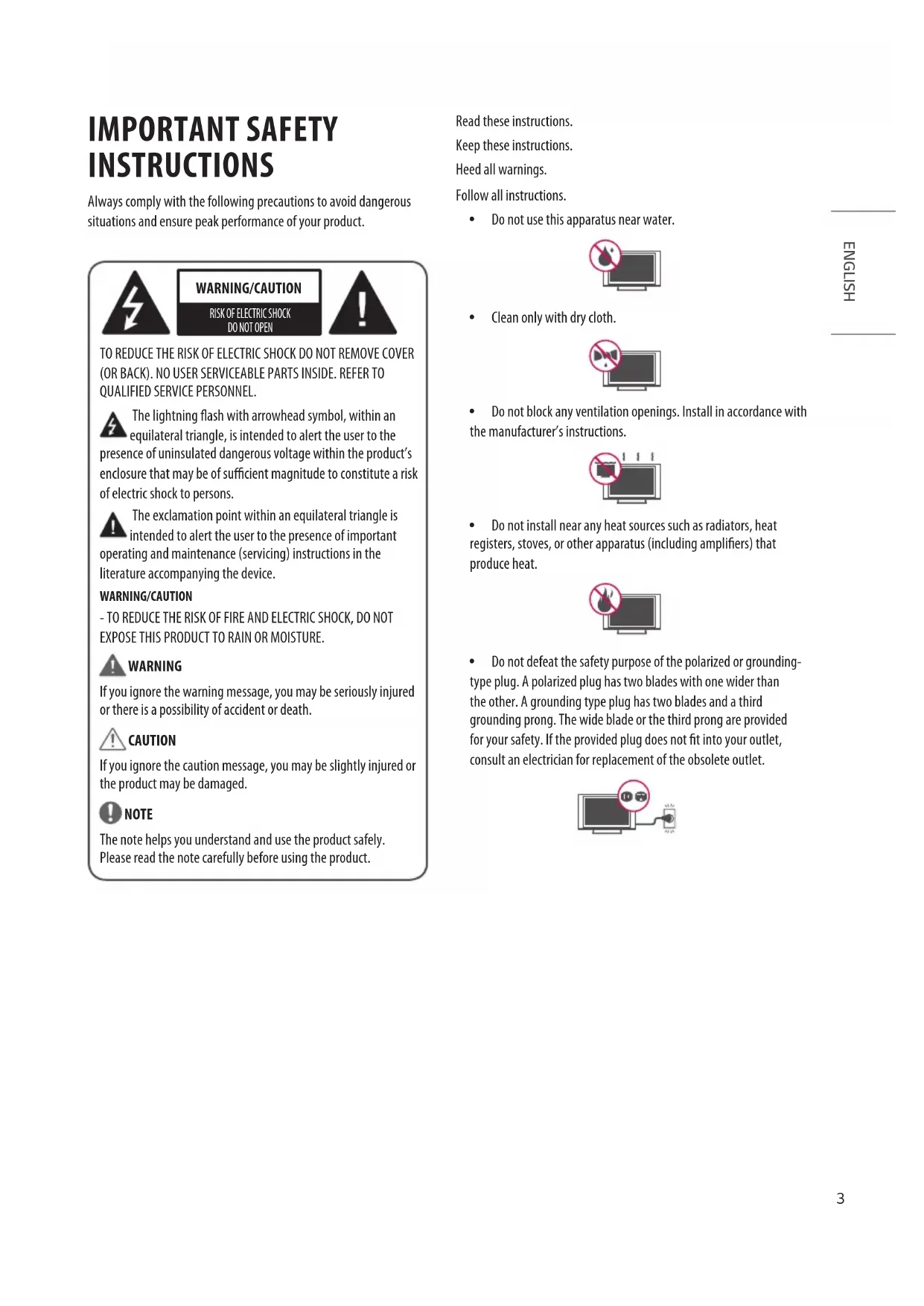
INSTRUCTIONS Always comply with the following precautions to avoid dangerous situations and ensure peak performance of your product. WARNING/CAUTION
TO REDUCE THE RISK OF ELECTRIC SHOCK DO NOT REMOVE COVER (OR BACK). NO USER SERVICEABLE PARTS INSIDE. REFER TO QUALIFIED SERVICE PERSONNEL. The lightning ash with arrowhead symbol, within an equilateral triangle, is intended to alert the user to the presence of uninsulated dangerous voltage within the product’s enclosure that may be of sucient magnitude to constitute a risk of electric shock to persons. The exclamation point within an equilateral triangle is intended to alert the user to the presence of important operating and maintenance (servicing) instructions in the literature accompanying the device. WARNING/CAUTION - TO REDUCE THE RISK OF FIRE AND ELECTRIC SHOCK, DO NOT EXPOSE THIS PRODUCT TO RAIN OR MOISTURE. WARNING If you ignore the warning message, you may be seriously injured or there is a possibility of accident or death. CAUTION If you ignore the caution message, you may be slightly injured or the product may be damaged. NOTE The note helps you understand and use the product safely. Please read the note carefully before using the product. Read these instructions. Keep these instructions. Heed all warnings. Follow all instructions. y Do not use this apparatus near water. y Clean only with dry cloth. y Do not block any ventilation openings. Install in accordance with the manufacturer’s instructions. y Do not install near any heat sources such as radiators, heat registers, stoves, or other apparatus (including ampliers) that produce heat. y Do not defeat the safety purpose of the polarized or grounding- type plug. A polarized plug has two blades with one wider than the other. A grounding type plug has two blades and a third grounding prong. The wide blade or the third prong are provided for your safety. If the provided plug does not t into your outlet, consult an electrician for replacement of the obsolete outlet.
ENGLISHy Protect the power cord from being walked on or pinched particularly at plugs, convenience receptacles, and the point where they exit from the apparatus. y Only use attachments/accessories specied by the manufacturer. y Use only with the cart, stand, tripod, bracket, or table specied by the manufacturer, or sold with the apparatus. When a cart is used, use caution when moving the cart/apparatus combination to avoid injury from tip-over. y Unplug this apparatus during lightning storms or when unused for long periods of time. y Refer all servicing to qualied service personnel. Servicing is required when the apparatus has been damaged in any way, such as power-supply cord or plug is damaged, liquid has been spilled or objects have fallen into the apparatus, the apparatus has been exposed to rain or moisture, does not operate normally, or has been dropped. y Do not press strongly upon the panel with a hand or a sharp object such as a nail, pencil, or pen, or make a scratch on it. y Do not stick metal objects or any other conductive material into the power cord. Do not touch the end of the power cord while it is plugged in. y Keep the packing anti-moisture material or vinyl packing out of the reach of children. Anti-moisture material is harmful if swallowed. If swallowed, induce vomiting and go to the nearest hospital. Additionally, vinyl packing can cause suocation. Keep it out of the reach of children. y CAUTION concerning the Power Cord (Can dier by country): Check the specication page of this owner’s manual to be certain concerning current requirements. Do not connect too many devices to the same AC power outlet as this could result in re or electric shock. Do not overload wall outlets. Overloaded wall outlets, loose or damaged wall outlets, extension cords, frayed power cords, or damaged or cracked wire insulation are dangerous. Any of these conditions could result in electric shock or re. Periodically examine the cord of your device, and if its appearance indicates damage or deterioration, unplug it, discontinue use of the device, and have the cord replaced with an exact replacement part by an authorized servicer. Protect the power cord from physical or mechanical abuse, such as being twisted, kinked, pinched, closed in a door, or walked upon. Pay particular attention to plugs, wall outlets, and the point where the cord exits the device. Do not move the TV with the power cord plugged in. Do not use a damaged or loose power cord. Be sure to grasp the plug when unplugging the power cord. Do not pull on the power cord to unplug the TV. y Warning - To reduce the risk of re or electrical shock, do not expose this product to rain, moisture or other liquids. Do not touch the TV with wet hands. Do not install this product near ammable objects such as gasoline or candles, or expose the TV to direct air conditioning. y Do not expose to dripping or splashing and do not place objects lled with liquids, such as vases, cups, etc. on or over the apparatus (e.g., on shelves above the unit).
ENGLISHy Grounding (Except for devices which are not grounded.) - Ensure that you connect the earth ground wire to prevent possible electric shock (i.e., a TV with a three-prong grounded AC plug must be connected to a three-prong grounded AC outlet). If grounding methods are not possible, have a qualied electrician install a separate circuit breaker. Do not try to ground the unit by connecting it to telephone wires, lightning rods, or gas pipes. Circuit Breaker Power Supply - As long as this unit is connected to the AC wall outlet, it is not disconnected from the AC power source even if the unit is turned o. - Do not attempt to modify this product in any way without written authorization from LG Electronics. Unauthorized modication could void the user’s authority to operate this product. y Outdoor Antenna Grounding (Can dier by country): - If an outdoor antenna is installed, follow the precautions below. An outdoor antenna system should not be located in the vicinity of overhead power lines or other electric light or power circuits, or where it can come in contact with such power lines or circuits as death or serious injury can occur. Be sure the antenna system is grounded to provide some protection against voltage surges and built-up static charges. Section 810 of the National Electrical Code (NEC) in the U.S.A. provides information with respect to proper grounding of the mast and supporting structure, grounding of the lead-in wire to an antenna discharge unit, size of grounding conductors, location of antenna discharge unit, connection to grounding electrodes, and requirements for the grounding electrode. y Antenna grounding according to the National Electrical Code, ANSI/NFPA 70 Ground Clamp Grounding Conductor (NEC Section 810-21) Antenna Lead in Wire Electric Service Equipment Antenna Discharge Unit (NEC Section 810-20) Power Service Grounding Electrode System (NEC Art 250, Part H) NEC: National Electrical Code Ground Clamp y Cleaning - When cleaning, unplug the power cord and wipe gently with a soft cloth to prevent scratching. Do not spray water or other liquids directly on the TV as electric shock may occur. Do not clean with chemicals such as alcohol, thinners, or benzene. y Moving - Make sure the product is turned o, unplugged, and all cables have been removed. It may take 2 or more people to carry larger TVs. Do not press or put stress on the front panel of the TV. y Ventilation - Install your TV where there is proper ventilation. Do not install in a conned space such as a bookcase. Do not cover the product with cloth or other materials while plugged in. Do not install in excessively dusty places. y If you smell smoke or other odors coming from the TV, unplug the power cord and contact an authorized service center. y If water or another substance enters the product (like an AC adapter, power cord, or TV), disconnect the power cord and contact the service center immediately. Otherwise, this may result in re or electric shock. y Use only an authorized AC adapter and power cord approved by LG Electronics. Otherwise, this may result in re, electric shock, malfunction, or product deformation. y Never disassemble the AC adapter or power cord. This may result in re or electric shock.
ENGLISHy Handle the adapter carefully to avoid dropping or striking it. An impact could damage the adapter. y Keep the product away from direct sunlight. y Never touch this apparatus or antenna during a lightning storm. y When mounting a TV on the wall, make sure not to install the TV by hanging the power and signal cables on the back of the TV. y Do not allow an impact shock or any objects to fall into the product, and do not drop anything onto the screen. y Disconnecting the Device from the Main Power - The power plug is the disconnecting device. In case of an emergency, the power plug must remain readily accessible. y Make sure the power cord is connected securely to the power plug on the TV. y Batteries - Store the accessories (battery, etc.) in a safe location out of the reach of children. - This apparatus uses batteries. In your community there might be regulations that require you to dispose of these batteries properly due to environmental considerations. Please contact your local authorities for disposal or recycling information. - Do not dispose of batteries in a re. - Do not short circuit, disassemble, or allow the batteries to overheat. - Do not use high voltage electrical equipment near the TV, (e.g., a bug zapper). This may result in product malfunction. - For models using a battery, This device is equipped with a portable battery or accumulator. Risk of re or explosion if the battery is replaced by an incorrect type. y Dot Defect - The panel is a high technology product with resolution of two million to six million pixels. In a very few cases, you could see ne dots on the screen while you’re viewing the TV. Those dots are deactivated pixels and do not aect the performance and reliability of the TV. y Generated Sound - Cracking noise A cracking noise that occurs when watching or turning o the TV is generated by plastic thermal contraction due to temperature and humidity. This noise is common for products where thermal deformation is required. - Electrical circuit humming/panel buzzing A low level noise is generated from a high-speed switching circuit, which supplies a large amount of current to operate a product. It varies depending upon the product. This generated sound does not aect the performance and reliability of the product. y Take care not to touch the ventilation openings. When watching the TV for a long period, the ventilation openings may become hot. This does not aect the performance of the product or cause defects in the product. y Do not install this product on a wall if it could be exposed to oil or oil mist. This may damage the product and cause it to fall. y If the TV feels cold to the touch, there may be a small icker when it is turned on. This is normal; there is nothing wrong with TV. Some minute dot defects may be visible on the screen, appearing as tiny red, green, or blue spots. However, they have no adverse eect on the TV’s performance. Avoid touching the LCD screen or holding your nger(s) against it for long periods of time. Doing so may produce some temporary distortion eects on the screen. y Displaying a still image for a prolonged time may cause image sticking. Avoid displaying a xed image on the TV screen for a long period of time.
ENGLISHLICENSES Supported licenses may dier by model. For more information about licenses, visit www.lg.com.
OPEN SOURCE SOFTWARE
NOTICE INFORMATION To obtain the source code under GPL, LGPL, MPL, and other open source licenses that have the obligations to disclose source code, that is contained in this product, and to access all referred license terms, copyright notices and other relevant documents please visit https:// opensource.lge.com. LG Electronics will also provide open source code to you on CD-ROM for a charge covering the cost of performing such distribution (such as the cost of media, shipping, and handling) upon email request to opensource@lge.com. This oer is valid to anyone in receipt of this information for a period of three years after our last shipment of this product. PREPARING NOTE (Depending upon model) y Image shown may dier from your TV. y Your TV’s OSD (On Screen Display) may dier slightly from that shown in this manual. y The available menus and options may dier from the input source or product model that you are using. y New features may be added to this TV in the future. y The items supplied with your product may vary depending upon the model. y Product specications or contents of this manual may be changed without prior notice due to upgrade of product functions. y For an optimal connection, HDMI cables and USB devices should have bezels less than 10 mm (0.3 inches) thick and 18 mm (0.7 inches) width. Use an extension cable that supports USB 2.0 if the USB cable or USB ash drive does not t into your TV’s USB port.
/™ cable (3 m (9.8 ft) or less) CAUTION y Do not use any unapproved items to ensure the safety and product’s lifespan. y Any damages or injuries by using unapproved items are not covered by the warranty.
ENGLISHSEPARATE PURCHASE Separate purchase items can be changed or modied for quality improvement without any notication. Contact your dealer to buy these items. These devices only work with certain models. The model name or design may be changed depending on the upgrade of product functions, manufacturer’s circumstances or policies. Magic Remote Control Check whether your TV model supports Bluetooth in the Wireless Module Specication to verify whether it can be used with the Magic Remote.
LIFTING AND MOVING THE
When moving or lifting the TV, read the following to prevent the TV from being scratched or damaged and for safe transportation regardless of its type and size. y It is recommended to move the TV in the box or packing material that the TV originally came in. y Before moving or lifting the TV, disconnect the power cord and all cables. y When holding the TV, the screen should face away from you to avoid damage. y Hold the top and bottom of the TV frame rmly. Make sure not to hold the transparent part, speaker, or speaker grille area. y When transporting the TV, do not expose the TV to jolts or excessive vibration. y When transporting the TV, keep the TV upright; never turn the TV on its side or tilt towards the left or right. y Do not apply excessive pressure to cause exing /bending of frame chassis as it may damage screen.
ENGLISHCAUTION y Avoid touching the screen at all times, as this may result in damage to the screen. y Do not carry the TV upside-down by holding the stand body (or stand base) as this may cause it to fall o, resulting in damage or injury. y Do not place the product on the oor with its front facing down without padding. Failure to do so may result in damage to the screen. y When handling the TV, be careful not to damage the protruding button. (Depending upon model)
CAUTION y When attaching the stand to the TV set, place the screen facing down on a cushioned table or at surface to protect the screen from scratches. y Do not apply foreign substances (oils, lubricants, etc.) to the screw parts when assembling the product. (Doing so may damage the product.) NOTE y Remove the stand before installing the TV on a wall mount by performing the stand attachment in reverse. y 27LQ600S model does not require the additional assembly.
y You can operate your TV by pressing the button. y Image shown may dier from your TV. <24LQ510S/24LQ520S/27LQ615S/27LQ625S> <27LQ600S> y The button is located on the back of your TV. Basic Functions Power On (Press) Power O
(Press and Hold) Menu Control (Press
Menu Selection (Press and Hold
1 All running apps will close. 2 You can access and adjust the menu by pressing the button when TV is on. 3 You can use the function when you access menu control. Adjusting the menu When the TV is turned on, press the button one time. You can adjust the Menu items using the button. Turns the power o. Changes the input source. Adjusts the volume level. Scrolls through the saved channels.
ENGLISHMOUNTING ON A TABLE
1 Lift and tilt the TV into its upright position on a table. - Leave a 100 mm (3.9 inches) (minimum) space from the wall for proper ventilation. 100 mm 100 mm 100 mm (3.9 inches) 100 mm 2 Connect the AC-DC Adapter and Power Cord to a wall outlet. CAUTION y Do not place the TV near or on sources of heat, as this may result in re or other damage. y Please be sure to connect the TV to the AC/DC power adapter before connecting the TV’s power plug to a wall power outlet. Using the Kensington security system (optional) (This is not available for all models.) y Image shown may dier from your TV. The Kensington security system connector is located at the rear of the TV. For more information of installation and using, refer to the manual provided with the Kensington security system or visit http:// ww w.kensington.com. Connect the Kensington security system cable between the TV and a table. NOTE y The Kensington security system is optional. You can obtain additional accessories from your local dealer.
ENGLISHMOUNTING ON A WALL
An optional wall mount can be used with your LG Television. Consult with your local dealer for a wall mount that supports the VESA standard used by your TV model. Carefully attach the wall mount bracket at the rear of the TV. Install the wall mount bracket on a solid wall perpendicular to the oor. If you are attaching the TV to other building materials, please contact qualied personnel to install the wall mount. Detailed instructions will be included with the wall mount. We recommend that you use an LG brand wall mount. The LG wall mount is easy to adjust or to connect the cables. When you do not use LG’s wall mount bracket, use a wall mount bracket where the device is adequately secured to the wall with enough space to allow connectivity to external devices. If you are using a non-adjustable mount, attach the mount to the wall. Attach the cables to the TV rst, then attach the TV to the mount. 100 mm (3.9 inches) 100 mm 100 mm 100 mm 100 mm Make sure to use screws and wall mounts that meet the VESA standard. Standard dimensions for the wall mount kits are described in the following table. Model 24LQ510S 24LQ520S 27LQ615S 27LQ625S 27LQ600S Wall mount (A x B) 75 x 75 (mm)
Standard screw M4 x L10 Number of screws
Wall mount bracket (optional) LSW149 CAUTION y Must use the enclosed screw in the box. (Depending upon model) y Disconnect the power before moving or installing the TV. Otherwise electric shock may occur. y Remove the stand before installing the TV on a wall mount by performing the stand attachment in reverse. y If you install the TV on a ceiling or slanted wall, it may fall and result in severe injury. Use an authorized LG wall mount and contact the local dealer or qualied personnel. When using a third- party wall mount, it is not covered by the warranty. y Do not overtighten the screws as this may cause damage to the TV and void your warranty. y Use the screws and wall mounts that meet the VESA standard. Any damages or injuries by misuse or using an improper accessory are not covered by the warranty. y Screw length from outer surface of back cover should be less than 8 mm (0.3 inches). Wall mount Pad Back Cover Standard screw: M4 x L10 Wall mount Pad Back Cover Max.8 mm (0.3 inches) NOTE y Use the screws that are listed on the VESA standard screw specications. y The wall mount kit includes an installation manual and necessary parts. y The wall mount bracket is optional. You can obtain additional accessories from your local dealer. y The length of screws may dier depending upon the wall mount. Make sure to use the proper length. y For more information, refer to the manual supplied with the wall mount.
ENGLISHCONNECTIONS You can connect various external devices to the TV. Supported external devices are: HD receivers, DVD players, VCRs, audio systems, USB storage devices, PC, gaming devices, and other external devices. For more information on an external device’s connection, refer to the manual provided with each device. NOTE y The external device connections shown may dier slightly from illustrations in a manual. y Connect external devices to the TV regardless about the order of the TV port. y If you record a TV program on a DVD recorder or VCR, make sure to connect the TV signal input cable to the TV through a DVD recorder or VCR. For more information about recording, refer to the manual provided with the connected device. y If you connect a gaming device to the TV, use the cable supplied with the gaming device. y Refer to the external equipment’s manual for operating instructions. y In PC mode, there may be noise associated with the resolution, vertical pattern, contrast, or brightness. If noise is present, change the PC output to another resolution, change the refresh rate to another rate, or adjust the brightness and contrast on the [Picture] menu until the picture is clear. Depending upon the graphics card, some resolution settings may not allow the image to be positioned on the screen properly. y When connecting via a wired LAN, it is recommended to use a CAT 7 cable. (Only when port is provided.) y Ethernet only supports 100 Base-T. Connecting to an antenna or cable Connect an antenna, cable, or cable box to watch TV. The illustrations may dier from the actual items and an RF cable is optional. CAUTION y Make sure not to bend the copper wire of the RF cable. Copper wire y Complete all connections between devices, and then connect the power cord to the power outlet to prevent damage to your TV. NOTE y Use a signal splitter to use 2 TVs or more. y DTV Audio Supported Codec: MPEG, Dolby Digital. Other connections Connect your TV to external devices. For the best picture and audio quality, connect the external device and the TV with the HDMI cable. Depending upon the model, a cable may not be provided. NOTE y USB port supports 0.5 A electric current. If you need more electric current in case of HDD, use the separate power adaptor. y Supported HDMI Audio format: Dolby Digital / Dolby Digital Plus (32 kHz, 44.1 kHz, 48 kHz), PCM (32 kHz, 44.1 kHz, 48 kHz, 96 kHz, 192 kHz) (Depending upon model)
ENGLISHREMOTE CONTROL The descriptions in this manual are based on the buttons on the remote control. Please read this manual carefully and use the TV correctly. To install batteries, open the battery cover, replace batteries (1.5 V AAA) matching the and ends to the label inside the compartment, and close the battery cover. To remove the batteries, perform the installation actions in reverse. This remote uses infrared light. Make sure to point the remote control toward the remote control sensor on the TV.
(Some buttons and services may not be provided depending on models or regions.) (Power) Turns the TV on or o. (Input) Changes the input source. Shows information on the current program. (CC/SUB) Recalls your preferred subtitle in digital mode. Enables SAP (Secondary Audio Program) Feature. (Q. Settings) Accesses the Quick Settings. Number buttons Enters numbers.
Accesses the [Quick Help]. Displays the program event according to time scheduler. (Dash) Inserts a dash between numbers such as 2-1 and 2-2. (More actions) Displays more remote control functions.
Edits QUICK ACCESS. - QUICK ACCESS is a feature that allows you to enter a specied app or Live TV directly by pressing and holding the number buttons. Adjusts the volume level. Scrolls through the saved channels. (Mute) Mutes all sounds. (Mute)
Accesses the [Accessibility] menu. (Search) Check for recommended content. (Some recommended services may not be available in some countries.) Shows the search mode. You can watch TV or LG Channels.
Launches the last used apps. Navigation buttons (up/down/left/right) Scrolls through menus or options. (OK) Selects menus or options and conrms your input. (OK)
Accesses the [Magic Explorer]. When using [TV Guide], [Settings], [Sports Alert], or [Art Gallery], press and hold down on the text. (Back) Returns to the previous level. (Exit) Clears on-screen displays and returns to TV viewing. , , , , Control buttons for media contents. Accesses the saved channel list. (REC) Starts to record and displays record menu. This TV does not support recording function. , , , These access special functions in some menus. 1 To use the button, press and hold for more than 3 seconds. USER GUIDE For more information about this TV, read the USER GUIDE embedded in the product. (Depending on model) y To open the USER GUIDE [Support] [User Guide] TROUBLESHOOTING Cannot control the TV with the remote control. y Check if anything such as tape has been placed over the receiver. y Check if there is any obstacle between the product and the remote control. y Replace the batteries with new ones. No image display and no sound is produced. y Check if the product is turned on. y Check if the power cord is connected to a wall outlet. y Check if there is a problem in the wall outlet by connecting other products. The TV turns off suddenly. y Check the power control settings. The power supply may be interrupted. y Check if the auto-o function is activated on the settings related time. y If there is no signal while the TV is on, the TV will turn o automatically after 15 minutes of inactivity. When connecting to the PC (HDMI), no signal is detected. y Turn the TV o/on using the remote control. y Reconnect the HDMI cable. y Restart the PC with the TV on.
ENGLISHSPECIFICATIONS Product specications may be changed without prior notice due to upgrade of product functions. Models Dimensions (W x D x H) Weight Power consumption (Outgoing condition) (Typical) Power requirement With stand Without stand With stand Without stand 24LQ510S
22.1 x 5.8 x 15.5 (inches) 22.1 x 2.2 x 13.4 (inches) 7.9 (lbs) 7.1 (lbs)
22.1 x 5.9 x 14.4 (inches) 22.1 x 2.2 x 13.4 (inches) 7.2 (lbs) 7.1 (lbs)
27LQ625S 612 x 150 x 394.8 (mm) 612 x 73.9 x 368.5 (mm) 3.55 (kg) 3.5 (kg) 32 W 19 V 2.0 A
24.0 x 5.9 x 15.5 (inches) 24.0 x 2.9 x 14.5 (inches) 7.8 (lbs) 7.7 (lbs)
27LQ615S 612 x 152.5 x 423.1 (mm) 612 x 73.9 x 368.5 (mm) 3.75 (kg) 3.5 (kg) 32 W 19 V 2.0 A
24.0 x 6.0 x 16.6 (inches) 24.0 x 2.9 x 14.5 (inches) 8.2 (lbs) 7.7 (lbs)
24.9 x 3.6 x 15.6 (inches) 13.0 (lbs)
18 dBm Bluetooth Frequency Range Output Power (Max.) 2,400 to 2,483.5MHz 9 dBm As band channels can vary per country, the user cannot change or adjust the operating frequency. This product is congured for the regional frequency table. For consideration of the user, this device should be installed and operated with a minimum distance of 20cm (7.8 inches) between the device and the body.
Transmitters in the 5.925-7.125 GHz band are prohibited from operating to control or communicate with unmanned aircraft systems.
[For product having the wireless function using 6 GHz frequency bands] (1) Devices shall not be used for control of or communications with unmanned aircraft systems. (2) Devices shall not be used on oil platforms. (3) Devices shall not be used on aircraft, except for the low-power indoor access points, indoor subordinate devices, low-power client devices, and very low-power devices operating in the 5925-6425 MHz band, that may be used on large aircraft as dened in the Canadian Aviation Regulations, while ying above 3,048 meters (10,000 feet). (4) Devices shall not be used on automobiles. (5) Devices shall not be used on trains. (6) Devices shall not be used on maritime vessels.
NOTE TO CABLE/TV INSTALLER
(For USA and Canada) This reminder is provided to call the CATV system installer’s attention to Article 820-40 of the National Electric Code (U.S.A.). The code provides guidelines for proper grounding and, in particular, species that the cable ground shall be connected to the grounding system of the building, as close to the point of the cable entry as practical.
ENGLISHWARNING! (STABILITY HAZARD) A television set may fall, causing serious personal injury or death. Many injuries, particularly to children, can be avoided by taking simple precautions such as: - ALWAYS use cabinets or stands or mounting methods recommended by the manufacturer of the television set. - ALWAYS use furniture that can safely support the television set. - ALWAYS ensure the television set is not overhanging the edge of the supporting furniture. - ALWAYS educate children about the dangers of climbing on furniture to reach the television set or its controls. - ALWAYS route cords and cables connected to your television so they cannot be tripped over, pulled or grabbed. - NEVER place a television set in an unstable location. - NEVER place the television set on tall furniture (for example, cupboards or bookcases) without anchoring both the furniture and the television set to a suitable support. - NEVER place the television set on cloth or other materials that may be located between the television set and supporting furniture. - NEVER place items that might tempt children to climb, such as toys and remote controls, on the top of the television or furniture on which the television is placed. If the existing television set is going to be retained and relocated, the same considerations as above should be applied. Symbols Refers to alternating current (AC). Refers to direct current (DC). Refers to class II equipment. Refers to stand-by. Refers to “ON” (power). Refers to dangerous voltage. Service Unplug the monitor from the wall outlet and refer servicing to qualied service personnel when: y The power cord or plug is damaged or frayed. y Liquid has been spilled into the monitor. y The monitor has been exposed to rain or water. y The monitor does not operate normally following the operating instructions. Adjust only those controls that are covered in the operating instructions. An improper adjustment of other controls may result in damage and often requires extensive work by a qualied technician to restore the monitor to normal operation. y The monitor has been dropped or the cabinet has been damaged. y The monitor exhibits a distinct change in performance. y Snapping or popping from the monitor is continuous or frequent while the monitor is operating. It is normal for some monitors to make occasional sounds when being turned on or o, or when changing video modes. Do not attempt to service the monitor yourself, as opening or removing covers may expose you to dangerous voltage or other hazards. Refer all servicing to qualied service personnel.
ENGLISH20 ENGLISH LIMITED WARRANTY (USA) THE PRODUCT’S FULL LIMITED WARRANTY TERMS AND CONDITIONS ARE AVAILABLE AT https://www.lg.com/us AND/OR YOUR WARRANTY. ARBITRATION NOTICE: THIS LIMITED WARRANTY CONTAINS AN ARBITRATION PROVISION THAT REQUIRES YOU AND LG ELECTRONICS (“LG”) TO RESOLVE DISPUTES BY BINDING ARBITRATION INSTEAD OF IN COURT, UNLESS YOU CHOOSE TO OPT OUT. IN ARBITRATION, CLASS ACTIONS AND JURY TRIALS ARE NOT PERMITTED. PLEASE SEE THE SECTION TITLED “PROCEDURE FOR RESOLVING DISPUTES” BELOW. PROCEDURE FOR RESOLVING DISPUTES: ALL DISPUTES BETWEEN YOU AND LG ARISING OUT OF OR RELATING IN ANY WAY TO THIS LIMITED WARRANTY OR THE PRODUCT SHALL BE RESOLVED EXCLUSIVELY THROUGH BINDING ARBITRATION, AND NOT IN A COURT OF GENERAL JURISDICTION. BINDING ARBITRATION MEANS THAT YOU AND LG ARE EACH WAIVING THE RIGHT TO A JURY TRIAL AND TO BRING OR PARTICIPATE IN A CLASS ACTION. Definitions. For the purposes of this section, references to “LG” mean LG Electronics U.S.A., Inc., its parents, subsidiaries and aliates, and each of their ocers, directors, employees, agents, beneciaries, predecessors in interest, successors, assigns and suppliers; references to “dispute” or “claim” shall include any dispute, claim or controversy of any kind whatsoever (whether based in contract, tort, statute, regulation, ordinance, fraud, misrepresentation or any other legal or equitable theory) arising out of or relating in any way to the sale, condition or performance of the product or this Limited Warranty. Notice of Dispute. In the event you intend to commence an arbitration proceeding, you must rst notify LG in writing at least 30 days in advance of initiating the arbitration by sending a letter to LG at LG Electronics, USA, Inc. Attn: Legal Department- Arbitration 111 Sylvan Avenue, Englewood Clis, NJ 07632. You and LG agree to engage in good faith discussions in an attempt to amicably resolve your claim. The notice must provide your name, address, and telephone number; identify the product that is the subject of the claim; and describe the nature of the claim and the relief being sought. If you and LG are unable to resolve the dispute within 30 days, either party may proceed to le a claim for arbitration. Agreement to Binding Arbitration and Class Action Waiver. Upon failure to resolve the dispute during the 30 day period after sending written notice to LG, you and LG agree to resolve any claims between us only by binding arbitration on an individual basis, unless you opt out as provided below. Any dispute between you and LG shall not be combined or consolidated with a dispute involving any other person’s or entity’s product or claim. More specically, without limitation of the foregoing, any dispute between you and LG shall not under any circumstances proceed as part of a class or representative action. Instead of arbitration, either party may bring an individual action in small claims court, but that small claims court action may not be brought on a class or representative basis. Arbitration Rules and Procedures. To begin arbitration of a claim, either you or LG must make a written demand for arbitration. The arbitration will be administered by the American Arbitration Association (“AAA”) and will be conducted before a single arbitrator under the AAA’s Consumer Arbitration Rules that are in eect at the time the arbitration is initiated (referred to as the “AAA Rules”) and under the procedures set forth in this section. The AAA Rules are available online at www.adr.org/consumer . Send a copy of your written demand for arbitration, as well as a copy of this provision, to the AAA in the manner described in the AAA Rules. You must also send a copy of your written demand to LG at LG Electronics, USA, Inc. Attn: Legal Department- Arbitration 111 Sylvan Avenue, Englewood Clis, NJ 07632. If there is a conict between the AAA Rules and the rules set forth in this section, the rules set forth in this section will govern. This arbitration provision is governed by the Federal Arbitration Act. Judgment may be entered on the arbitrator’s award in any court of competent jurisdiction. All issues are for the arbitrator to decide, except that issues relating to the scope and enforceability of the arbitration provision and to the arbitrability of the dispute are for the court to decide. The arbitrator is bound by the terms of this provision.21 ENGLISH Governing Law. The law of the state of your residence shall govern this Limited Warranty and any disputes between us except to the extent that such law is preempted by or inconsistent with applicable federal law. Fees/Costs. You do not need to pay any fee to begin an arbitration. Upon receipt of your written demand for arbitration, LG will promptly pay all arbitration ling fees to the AAA unless you seek more than $25,000 in damages, in which case the payment of these fees will be governed by the AAA Rules. Except as otherwise provided for herein, LG will pay all AAA ling, administration and arbitrator fees for any arbitration initiated in accordance with the AAA Rules and this arbitration provision. If you prevail in the arbitration, LG will pay your attorneys’ fees and expenses as long as they are reasonable, by considering factors including, but not limited to, the purchase amount and claim amount. Notwithstanding the foregoing, if applicable law allows for an award of reasonable attorneys’ fees and expenses, an arbitrator can award them to the same extent that a court would. If the arbitrator nds either the substance of your claim or the relief sought in the demand is frivolous or brought for an improper purpose (as measured by the standards set forth in Federal Rule of Civil Procedure 11(b)), then the payment of all arbitration fees will be governed by the AAA Rules. In such a situation, you agree to reimburse LG for all monies previously disbursed by it that are otherwise your obligation to pay under the AAA Rules. Except as otherwise provided for, LG waives any rights it may have to seek attorneys’ fees and expenses from you if LG prevails in the arbitration. Hearings and Location. If your claim is for $25,000 or less, you may choose to have the arbitration conducted solely on the basis of (1) documents submitted to the arbitrator, (2) through a telephonic hearing, or (3) by an in-person hearing as established by the AAA Rules. If your claim exceeds $25,000, the right to a hearing will be determined by the AAA Rules. Any in-person arbitration hearings will be held at a location within the federal judicial district in which you reside unless we both agree to another location or we agree to a telephonic arbitration. Opt Out. You may opt out of this dispute resolution procedure. If you opt out, neither you nor LG can require the other to participate in an arbitration proceeding. To opt out, you must send notice to LG no later than 30 calendar days from the date of the rst consumer purchaser’s purchase of the product by either: (i) sending an e-mail to optout@lge.com, with the subject line: “Arbitration Opt Out” or (ii) calling 1- 800- 980-2973. You must include in the opt out e-mail or provide by telephone: (a) your name and address; (b) the date on which the product was purchased; (c) the product model name or model number; and (d) the serial number (the serial number can be found (i) on the product; or (ii) online by accessing https://www.lg.com/us/support and clicking on “How do I nd my model number?”). You may only opt out of the dispute resolution procedure in the manner described above (that is, by e-mail or telephone); no other form of notice will be eective to opt out of this dispute resolution procedure. Opting out of this dispute resolution procedure will not aect the coverage of the Limited Warranty in any way, and you will continue to enjoy the full benets of the Limited Warranty. If you keep this product and do not opt out, then you accept all terms and conditions of the arbitration provision described above.22 ENGLISH LIMITED WARRANTY (CANADA) THE PRODUCT’S FULL LIMITED WARRANTY TERMS AND CONDITIONS ARE AVAILABLE AT https://www.lg.com/ca_en/ AND/OR YOUR WARRANTY. ARBITRATION NOTICE: THIS LIMITED WARRANTY CONTAINS AN ARBITRATION PROVISION THAT REQUIRES YOU AND LG TO RESOLVE DISPUTES BY BINDING ARBITRATION INSTEAD OF IN COURT, UNLESS THE LAWS OF YOUR PROVINCE OR TERRITORY DO NOT PERMIT THAT, OR, IN OTHER JURISDICTIONS, IF YOU CHOOSE TO OPT OUT. FOR FURTHER CLARITY, THIS ARBITRATION PROVISION IS NOT APPLICABLE TO CONSUMERS RESIDING IN ONTARIO AND QUÉBEC. IN ARBITRATION, CLASS ACTIONS AND JURY TRIALS ARE NOT PERMITTED. PLEASE SEE THE SECTION TITLED “PROCEDURE FOR RESOLVING DISPUTES” BELOW.
- DISCLAIMER: IF YOU ARE A CONSUMER SUBJECT TO QUÉBEC AND ONTARIO’S CONSUMER PROTECTION ACT, THE EXCLUSION OF WARRANTIES CONTAINED IN THIS SECTION DO NOT EXCLUDE OR LIMIT THE RIGHTS AND REMEDIES THAT YOU MAY HAVE UNDER SUCH ACT, INCLUDING THE RIGHT TO MAKE A CLAIM UNDER ANY OF THE STATUTORY WARRANTIES PROVIDED THEREUNDER. PROCEDURE FOR RESOLVING DISPUTES: EXCEPT WHERE PROHIBITED AT LAW (INCLUDING WITH RESPECT TO QUÉBEC AND ONTARIO CONSUMERS), ALL DISPUTES BETWEEN YOU AND LG ARISING OUT OF OR RELATING IN ANY WAY TO THIS LIMITED WARRANTY OR THE PRODUCT SHALL BE RESOLVED EXCLUSIVELY THROUGH BINDING ARBITRATION, AND NOT IN A COURT OF GENERAL JURISDICTION. EXCEPT WHERE PROHIBITED AT LAW (INCLUDING WITH RESPECT TO QUÉBEC AND ONTARIO CONSUMERS), YOU AND LG BOTH IRREVOCABLY AGREE TO WAIVE THE RIGHT TO A JURY TRIAL AND TO BRING OR PARTICIPATE IN A CLASS ACTION. Definitions. For the purposes of this section, references to “LG” mean LG Electronics Canada, Inc., its parents, subsidiaries and aliates, and each of their ocers, directors, employees, agents, beneciaries, predecessors in interest, successors, assigns and suppliers; references to “dispute” or “claim” shall include any dispute, claim or controversy of any kind whatsoever (whether based in contract, tort, statute, regulation, ordinance, fraud, misrepresentation or any other legal or equitable theory) arising out of or relating in any way to the sale, condition or performance of the product or this Limited Warranty. Notice of Dispute. In the event you intend to commence an arbitration proceeding, you must rst notify LG in writing at least 30 days in advance of initiating the arbitration by sending a letter to LGECI Legal Team at 20 Norelco Drive, North York, Ontario, Canada M9L 2X6 (the “Notice of Dispute”). You and LG agree to engage in good faith discussions in an attempt to amicably resolve your claim. The notice must provide your name, address, and telephone number; identify the product that is the subject of the claim; and describe the nature of the claim and the relief being sought. If you and LG are unable to resolve the dispute within 30 days of LG’s receipt of the Notice of Dispute, the dispute shall be resolved by binding arbitration in accordance with the procedure set out herein. You and LG both agree that, during the arbitration proceeding, the terms (including any amount) of any settlement oer made by either you or LG will not be disclosed to the arbitrator until the arbitrator determines the dispute. Agreement to Binding Arbitration and Class Action Waiver. Upon failure to resolve the dispute during the 30 day period after LG’s receipt of the Notice of Dispute, you and LG agree to resolve any claims between you and LG only by binding arbitration on an individual basis, unless you opt out as provided below, or you reside in a jurisdiction that prevents full application of this clause in the circumstances of the claims at issue (in which case if you are a consumer, this clause will only apply if you expressly agree to the arbitration). To the extent permitted by applicable law, any dispute between you and LG shall not be combined or consolidated with a dispute involving any other person’s or entity’s product or claim. More specically, without limitation of the foregoing, except to the extent such a prohibition is not permitted at law, any dispute between you and LG shall not under any circumstances proceed as part of a class or representative action. Instead of arbitration, either party may bring an individual action in small claims court, but that small claims court action may not be brought on a class or representative basis except to the extent this prohibition is not permitted at law in your province or territory of jurisdiction as it relates to the claims at issue between you and LG. This does not apply to consumers in Ontario and Québec. In accordance with provincial legislation, the consumer and LG may agree to resolve the dispute using any procedure available, including commencing the action before the competent courts of those provinces. Arbitration Rules and Procedures. To begin arbitration of a claim, either you or LG must make a written demand for arbitration. The arbitration will be private and condential, and conducted on a simplied and expedited basis before a single arbitrator chosen by the parties under the provincial or territorial commercial arbitration law and rules of the province or territory of your residence. You must also send a copy of your written demand to LG at LG Electronics, Canada, Inc., Attn: Legal Department- Arbitration, 20 Norelco Drive, North York, Ontario M9L 2X6. This arbitration provision is governed by your applicable provincial or territorial commercial arbitration legislation. For consumers in Ontario and Québec, the applicable arbitration legislation only applies if consumers agree to submit the dispute to arbitration. Judgment may be entered on the arbitrator’s award in any court of competent jurisdiction. All issues are for the arbitrator to decide, except that, issues relating to the scope and enforceability of the arbitration provision and to the arbitrability of the dispute are for the court to decide. The arbitrator is bound by the terms of this provision.23 ENGLISH Governing Law. The law of the province or territory of your purchase shall govern this Limited Warranty and any disputes between you and LG except to the extent that such law is preempted by or inconsistent with applicable federal or provincial/territorial law. Should arbitration not be permitted for any claim, action, dispute or controversy between you and LG, you and LG attorn to the exclusive jurisdiction of the courts of the province or territory of your purchase for the resolution of the claim, action, dispute or controversy between you and LG. Fees/Costs. You do not need to pay any fee to begin an arbitration. Upon receipt of your written demand for arbitration, LG will promptly pay all arbitration ling fees unless you seek more than $25,000 in damages, in which case the payment of these fees will be governed by the applicable arbitration rules. Except as otherwise provided for herein, LG will pay all ling, administration and arbitrator fees for any arbitration initiated in accordance with the applicable arbitration rules and this arbitration provision. If you prevail in the arbitration, LG will pay your attorneys’ fees and expenses as long as they are reasonable, by considering factors including, but not limited to, the purchase amount and claim amount. Notwithstanding the foregoing, if applicable law allows for an award of reasonable attorneys’ fees and expenses, an arbitrator can award them to the same extent that a court would. If the arbitrator nds either the substance of your claim or the relief sought in the demand is frivolous or brought for an improper purpose (as measured by the applicable laws), then the payment of all arbitration fees will be governed by the applicable arbitration rules. In such a situation, you agree to reimburse LG for all monies previously disbursed by it that are otherwise your obligation to pay under the applicable arbitration rules. Except as otherwise provided for, LG waives any rights it may have to seek attorneys’ fees and expenses from you if LG prevails in the arbitration. Hearings and Location. If your claim is for $25,000 or less, you may choose to have the arbitration conducted solely (1) on the basis of documents submitted to the arbitrator, (2) through a telephonic hearing, or (3) by an in-person hearing as established by the applicable arbitration rules. If your claim exceeds $25,000, the right to a hearing will be determined by the applicable arbitration rules. Any in-person arbitration hearings will be held at the nearest, most mutually-convenient arbitration location available within the province or territory in which you reside unless you and LG both agree to another location or agree to a telephonic arbitration. Severability and Waiver. If any portion of this Limited Warranty (including these arbitration procedures) is unenforceable, the remaining provisions will continue in full force and eect to the maximum extent permitted by applicable law. Should LG fail to enforce strict performance of any provision of this Limited Warranty (including these arbitration procedures), it does not mean that LG intends to waive or has waived any provision or part of this Limited Warranty. Opt Out. The arbitration provision requires you and LG to resolve disputes by binding arbitration instead of court, unless the laws of your province or territory do not permit that, or, in other jurisdictions, if you choose to opt out. The arbitration provision does not apply to consumers in Ontario and Québec. For individuals that fall within the binding arbitration provisions, you may opt out of this dispute resolution procedure. If you opt out, neither you nor LG can require the other to participate in an arbitration proceeding. To opt out, you must send notice to LG no later than 30 calendar days from the date of the rst consumer purchaser’s purchase of the product by either (i) sending an e-mail to optout@lge.com, with the subject line: “Arbitration Opt Out;” or (ii) calling 1-800-980-2973. You must include in the opt out e-mail or provide by telephone: (a) your name and address; (b) the date on which the product was purchased; (c) the product model name or model number; and (d) the serial number (the serial number can be found (i) on the product; or (ii) online by accessing https://www.lg.com/ca_en/ndmodel_serial/
In the event that you “Opt Out”, the law of the province or territory of your residence shall govern this Limited Warranty and any disputes between you and LG except to the extent that such law is preempted by or inconsistent with applicable federal or provincial/territorial law. Should arbitration not be permitted for any claim, action, dispute or controversy between you and LG, you and LG agree to attorn to the exclusive jurisdiction of the courts of the province or territory of your residence for the resolution of the claim, action, dispute or controversy between you and LG. You may only opt out of the dispute resolution procedure in the manner described above (that is, by e-mail or telephone); no other form of notice will be eective to opt out of this dispute resolution procedure. Opting out of this dispute resolution procedure will not aect the coverage of the Limited Warranty in any way, and you will continue to enjoy the full benets of the Limited Warranty. If you keep this product and do not opt out, then you accept all terms and conditions of the arbitration provision described above. Conflict of Terms. In the event of a conict or inconsistency between the terms of this Limited Warranty and the End User License Agreement (“EULA”) in regards to dispute resolution, the terms of this Limited Warranty shall control and govern the rights and obligations of the parties and shall take precedence over the EULA.24
ENGLISHTHE CONSUMER TECHNOLOGY INDUSTRY CARES
Manufacturers, retailers and the rest of the consumer technology industry are committed to making products safe and enjoyable. As you enjoy your television, please note that all televisions – new and old- must be supported on proper stands or installed according to the manufacturer’s recommendations. Televisions that are inappropriately situated on dressers, bookcases, shelves, desks, speakers, chests, carts, etc., may fall over, resulting in injury. CHILD SAFETY: CTA.tech
- NEVER allow children to climb on or play on the television or the furniture on which the television is placed.
- NEVER place the television on furniture that can easily be used as steps, such as a chest of drawers.
- ALWAYS follow the manufacturer’s recommendations for the safe installation of your television.
- ALWAYS read and follow all instructions for proper use of your television.
- ALWAYS install the television where it cannot be pushed, pulled over or knocked down.
- ALWAYS route cords and cables connected to the television so that they cannot be tripped over, pulled or grabbed.
WALL OR CEILING MOUNT YOUR TELEVISION
- ALWAYS contact your retailer about professional installation if you have any doubts about your ability to safely mount your television.
- ALWAYS use a mount that has been recommended by the television manufacturer and has a safety certification by a Nationally Recognized Testing Laboratory (NRTL).
- ALWAYS follow all instructions supplied by the television and mount manufacturers.
- ALWAYS make sure that the wall or ceiling where you are mounting the television is appropriate. Use proper anchoring systems for different wall or ceiling types (e.g. wood, concrete, metal, etc.). If you are unsure, contact a professional installer.
- Televisions can be heavy. A minimum of two people is required for a wall or ceiling mount installation. MOVING AN OLDER TELEVISION TO A NEW PLACE IN YOUR HOME
- REMEMBER Special care should be made in the placement of older CRT/flat-panel televisions. Many new television buyers move their older CRT/flat-panel televisions into a secondary room after the purchase of a flat-panel television.
- NEVER place your older CRT/flat-panel television on a dresser where children may be tempted to use the drawers to climb.
- ALWAYS place your older CRT/flat-panel television on furniture that is sturdy and appropriate for its size and weight.
- ALWAYS make sure your older CRT/flat-panel television does not hang over the edge of your furniture.LG Customer Information Center For inquires or comments, visit www.lg.com or call;