CACI0510FW - Other household appliances Cuckoo - Free user manual and instructions
Find the device manual for free CACI0510FW Cuckoo in PDF.


User questions about CACI0510FW Cuckoo
0 question about this device. Answer the ones you know or ask your own.
Ask a new question about this device
Download the instructions for your Other household appliances in PDF format for free! Find your manual CACI0510FW - Cuckoo and take your electronic device back in hand. On this page are published all the documents necessary for the use of your device. CACI0510FW by Cuckoo.
USER MANUAL CACI0510FW Cuckoo
natural_image
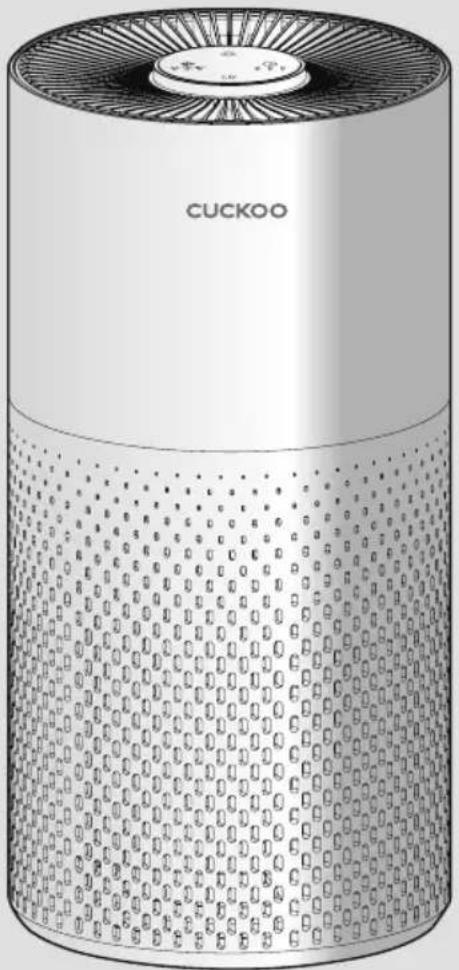
Illustration of a Cuckoo air purifier with perforated design (no text or symbols on body)CUCKOO
Dear customers, Thank you for purchasing CUCKOO Air Purifier.
Please keep this User Manual for your reference. This manual will guide you if you have any questions or troubleshooting problems.
natural_image
Exterior view of a modern cylindrical device with textured surface and ventilation grille (no visible text or symbols)Top Features of CUCKOO Air Purifier
Air Purification
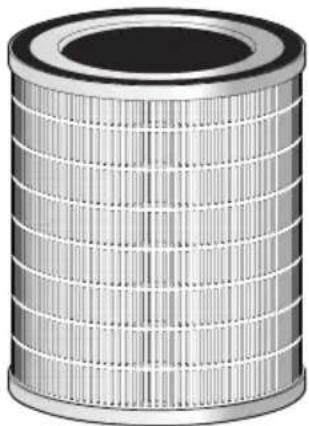
This product filters out fine dust, allergens, and more that is airborne using a True HEPA 3-Stage Filter mounted in the base of the product.
Timer Setting
You can set the timer from 2 to 8 hours depending on preference.
● Automatic Operation function through Dust Sensor
The product detects the pollution status of the air indoors in real time through the dust sensor. When automatic operation setting is selected, the product automatically adjust the fan speed according to the surrounding pollution degree to make the indoor environment pleasant.
3 Color LED Air Quality Display
The product automatically detects the cleanliness of the indoor air through the dust sensor and displays the cleanliness. The air quality display screen represents the pollution degree of solid contaminants in the air with 3 colors.
Filter Replacement Indicator
Built-in replacement indicator reminds user when the filter is needed to be replaced.
- Compact Size
Light and portable design, perfect size for small room and office.
True HEPA 3-Stage Filter
Collect pet dander, ultrafine dust, harmful gases and much more with this 3 in 1 True HEPA Filter.
Please read the instructions carefully before using the product and keep them properly.
CONTENTS
Before Use Top Features of CUCKOO Air Purifier 2
Description of Parts 4
During Use ● How to Replace Filter 5\~6
Names and Functions of Control / Display Panel 7\~8
About the Filter 9\~10
Caution 11\~12
Before Asking for ● Troubleshooting 13\~14
Support
Service Information ● Product Specifications and Inquiry about Malfunction 15
Description of Parts
Unboxing
To unbox the air purifier, open the box, take out the foam lining, and take out the internal accessories and user manual. Pull the air purifier out of the box and pull down the plastic covering surrounding it. Keep the product box in a safe location for future use.
After clearing the inner packaging of the air purifier, open the base of the air purifier, take out the True HEPA filter and remove plastic packaging.
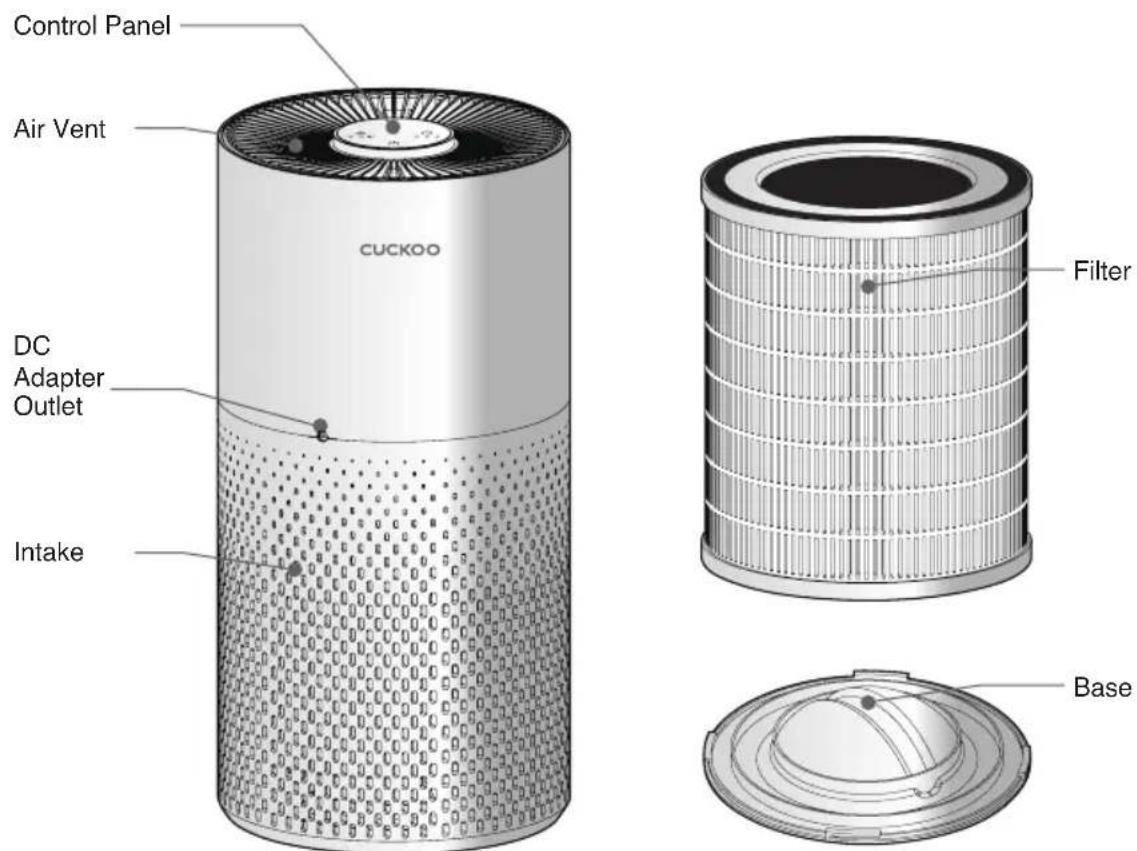
Description of Parts
Accessories
User Manual
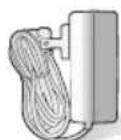
DC Adapter
*The picture may differ from the actual product.
How to Replace Filter
* Note :
- Please remove the packaging from the filter before using it.
- Ensure the product is unplugged before removing or installing the filter.
- Please wipe the dust on the filter regularly, do not wash or use it repeatedly.
- Please do not use other filters that are not designed for this air purifier.
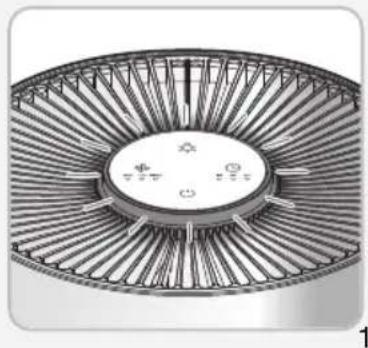
When the red rings of light around the control panel blink repeatedly, it means the filter needs to be changed.
natural_image
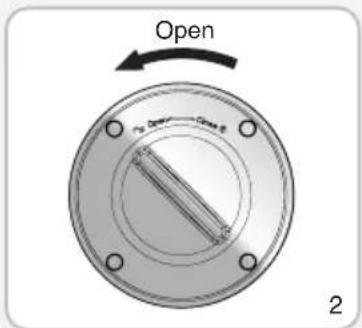
Technical illustration of a circular fan or turbine blade assembly with radial blades and central hub (no text or symbols)2 To change the filter, invert the air purifier and twist the base cover to the direction marked "OPEN".
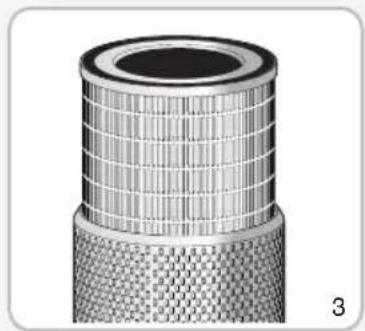
3 Take out the old filter from the air purifier.
natural_image
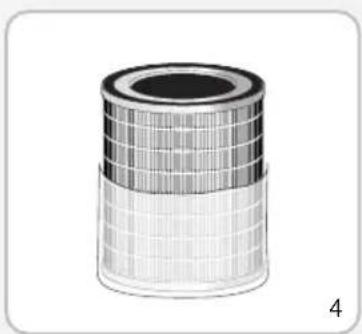
Close-up of a cylindrical mechanical component with textured surface and mesh pattern (no visible text or symbols)4 Remove the packaging around the new filter.
natural_image
Illustration of a cylindrical filter or filter component with grid pattern (no text or symbols)How to Replace Filter
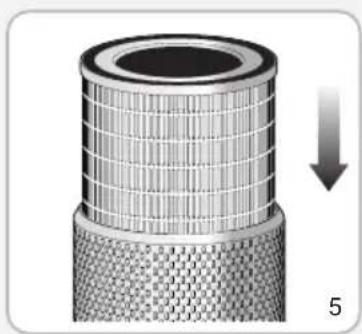
5 Place the new filter into the base of the air purifier.
natural_image
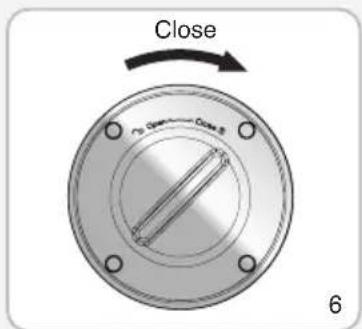
Cross-sectional view of a cylindrical mechanical component with internal grid structure and a downward arrow indicating force or movement (no text or symbols)6 Put the base cover back on the bottom and twist to the direction marked "CLOSE". *Please make sure cover is securely fastened.
* Note
The air purifier works without tightening the base. However, this may cause damage to the filter, so make sure that the base is closed properly.
Resetting the filter replacement alert
Please press the power button for 7 seconds to reset the filter replacement alert after installing a new filter.
If it is the first time using the product, do not reset the product.

Maximum Purification Efficiency
In order to keep the best purification effect, it is recommended to keep the air purifier standing on the floor and keep it at least 1 ft (30cm) away from the wall.
Names and Functions of Control / Display Panel
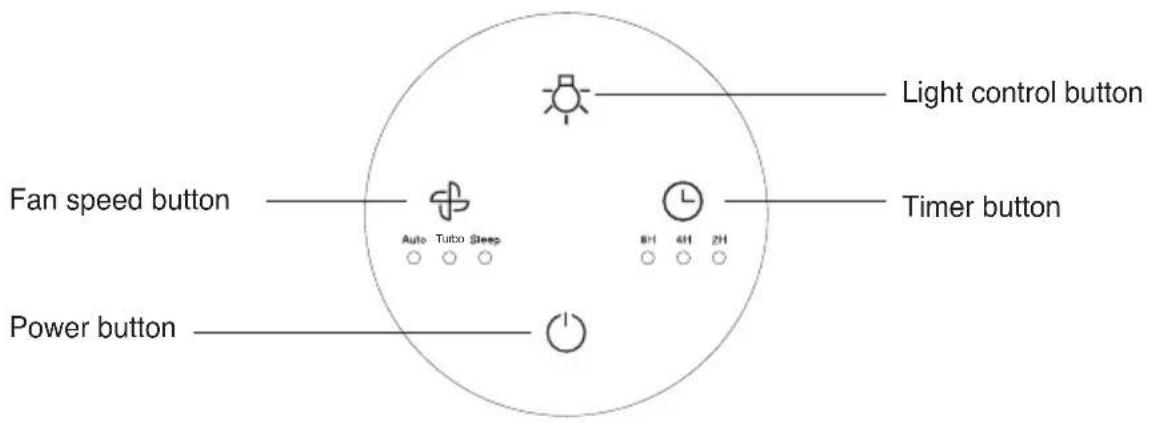
\* Note
When the product connects to the power outlet, the buzzer will ring for 1 second. The product enters the pre-processing mode (the light ring will change in blue, cyan, green, yellow, red, purple, and after 30 seconds of pre-processing, the color corresponding to the current air quality will be displayed.
Button Description
 Power Button Power Button | 1. Touch the power button to turn on the product, the buzzer will sound one time and turbo fan speed will start.2. Touch the button again, the buzzer will ring for one time and the product will turn off with all lights turn off. |
 Timer Button Timer Button | 1. While the air purifier is on, keep pressing the timer button to select desired time setting. 2 hours, 4 hours, and 8 hours are the only available options.2. To turn off the timer, press the timer button until the timer indicator light below the times does not appear.3. In the status of timing, the product begins to count down.When the timer is up the fan will stop working and all lights will be off. |
Names and Functions of Control / Display Panel
 Auto Turbo Sleep○ ○ ○Fan Speed Button Auto Turbo Sleep○ ○ ○Fan Speed Button | 1. To change the fan speed, press the fan speed button.The fan speed will cycle between SLEEP, TURBO, and AUTO and will be indicated by a white light below the name.2. SLEEP will have the fan on the lowest speed.TURBO will have the fan on the highest speed.AUTO will adjust the speed according to the current air quality.Note: When the sleep mode is activated, LED turns off.3. When the air quality is poor, the fan speed is automatically adjusted to TURBO, and the light ring will display red. When the air quality is moderate, the fan speed is automatically adjusted to MEDIUM, and the light ring will display yellow. When the air quality is excellent, the fan speed is automatically adjusted to LOW, and the light ring will display blue. | |||
| Air Pollution Level Poor Moderate Excellent | ||||
| Color Red Yellow Blue | ||||
 Light Control Button Light Control Button | 1. To adjust the lighting, touch the light control button repeatedly to dim the light to desired preference.2. To turn off the light, touch the light control button repeatedly until LED turns off.Note: The light control button couldn't operate in the status of shutdown.If the light ring keeps blinking red, the filter needs to be replaced. | |||
Connect the power
Please confirm that the input voltage is 100-240V, 50Hz/60Hz, and ensure that the power plug and your hands are dry before you insert the power cord plug into the outlet.
Note: Contact Customer Service when the power cord or plug is damaged or the power outlet is loose.
We strongly recommend that the damaged parts be repaired or replaced.
To replace the damaged power cord or plug, please visit Cuckoo's website and contact Customer Service.
About the Filter
Air Purification
natural_image
Cylindrical metallic filter or filler component with uniform grid pattern (no text or symbols)* The picture may differ from the actual product.
| True HEPA 3-Stage Filter | |
| Stage 1 Pre Filter | |
| Stage 2 True HEPA | |
| Stage 3 Active Carbon Filter | |
About the Filter
| True HEPA3-Stage Filter | Pre-Filter | It removes large dust, hair, fur which maximizes the filter's life. |
| True HEPA | It removes at least 99.97% of particles as small as 0.3 microns such as smoke, dust pollen, dander and mites. | |
| Active Carbon Filter | It absorbs unpleasant odors, harmful gases, food smell, cigarette smoke, fur, and VOCs. |
About the Filter
Filter Replacement Cycle
| Filter | Room size When to Replace | |
| True HEPA3-Stage Filter | Up to 228 sqft | On average, every 6 months |
* The expected filter replacement cycle is estimated by a close review of the filters to display its proper performance. This is determined based on the product usage time (12 hours) per day and indoor pollution index of 150 g/m^3 . Thus the cycle may shorten as the usage time or indoor pollution index goes up. (Based on GB/T 18801-2015 standard)
Maintenance
- Ensure the product is unplugged before maintenance.
- Do not immerse the air purifier into water or any liquid.
- Do not use abrasive, corrosive or flammable cleansers (such as bleach or alcohol) to clean any part of the unit.
- Do not wash the filter.
- Do not use a vacuum cleaner to clean the filter.
Cleaning and Storage
- Ensure the product is powered-off and unplugged.
- Use a soft cloth with neutral cleanser to clean away any dust or debris from the surface of the product and air intake/vent.
- If you do not use it for a long time, please turn on the product for a few minutes from time to time to ensure a good performance.
- Please do not drop any water into the product when cleaning the air outlet.
Caution
Safety Instructions

natural_image
Simple line icon of an open book with an information symbol (no text or numbers present)Introduction
Thank you for choosing a device from Cuckoo.
Intended use
- The device is used exclusively for cleaning the ambient air indoors.
- Please read these operating instructions before using the machine and please follow the safety instructions.
The operating instructions must be kept available at all times.

Safety instructions
- Keep packing material, such as plastic wrapping, away from children! (Risk of suffocation)
- Please follow the safety instructions to prevent fire or electric shock. Only use the device indoors.
- Only use a socket that supplies the correct voltage (see rating plate).
- Do not modify or repair the device.
- Do not use the device if the power cable or mains plug is damaged or if the connection at the socket is not stable.
- Make sure that the power cable does not get crushed while you are using the device and that it cannot be damaged in any other way. Place the cable so that no one will trip over it. Do not pull the power cable tight.
- Disconnect the plug from the socket for cleaning purposes and whenever the device is not in use for a significant period of time.
- Do not touch the plug or the device if you have wet hands.
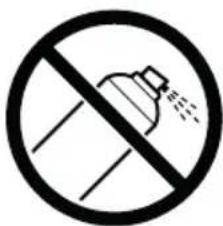
- Do not spray any insect repellent.
- Do not use in rooms where the device may come into contact with fuel vapour, oil vapour or metal dust.
- Do not use any volatile liquids, petroleum, kerosene, paint thinner or polishing paste to clean the device. Such liquids may damage the surface of the device.
- Do not expose the device to rain, water, moisture or high humidity, and do not set it up in a bathroom or kitchen next to a sink.
- Make sure that no foreign objects get into the outlet grilles.
- Do not use near a naked flame or sparks.
- The device is not suitable for removing harmful gases (carbon monoxide, e.g. from heating appliances).
- Unless they are supervised, the device must not be used by those(including children) with reduced, physical, sensory and mental abilities or who do not have the required experience and knowledge.
Caution
Safety Instructions

Safety instructions
- Do not block the air intake or outlet.
- Do not expose the air purifier to direct sunlight, a naked flame or heat.
- Only use the air purifier in living quarters and within the specified technical parameters. Improper usage may pose a threat to life and health.
- Do not use the device near a smoke detector. Air blowing towards a smoke detector could delay the alarm or not trigger at all.
natural_image
Warning sign depicting a lightning bolt symbol (no text or numbers present)Caution
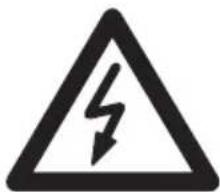
Risk of injury due to electric shock.
Always disconnect the mains plug prior to :
- Maintenance and cleaning
- Moving the device
- Changing the filter
Caution
- Do not use any spray cans with flammable contents near to the air purifier!

natural_image
Warning symbol of a flame inside a diamond shape (no text or numbers)Caution
- Do not use any flammable cleaning agents
Troubleshooting
▼ Not following this user manual may result in your device not working. Please read the following measures accordingly if you are having problems with your device. If you are still having problems, please contact our Customer Service Centers.
| Problem RecommendationChecklist | ||
| The product won't work even if I press the Power button. | Are you in a black out? Check the power supply. | |
| Is the power cord plugged into the power outlet? | Put the power plug in a power outlet. | |
| No air is blowing out. | Is there material blocking the intake or air vent? | Remove material from vent/intake.Check if plastic packaging has been removed from filter. |
| Is the air purifier placed where the intake or blocked preventing air from moving freely? | Remove objects blocking the air purifier or place it elsewhere. | |
| Air purifier is on by fan does not work. | Unplug from the wall and contact Cuckoo customer service.USA : www.cuckooamerica.comIndia : www.cuckooindia.inVietnam : www.cuckoovina.comIndonesia : www.cuckoo.co.idMalaysia : www.cuckoo.com.my | |
| Loud Noises | Is there anything stuck in the fan or air intake/vent? | Please remove any objects you see from the fan intake/vent. |
| Is the air purifier tilted on its side? | Make sure the base is level on a flat surface. | |
| Is the fan really loud? Set your air purifier to a lower fan speed to reduce the noise. | ||
| Coming out nasty smell | Is the air purifier in a place with a lot of smoke and odor? | The performance of the air purifier may decrease over time if there is excessive smoke and odor in the area. To remedy this, please air out the room before using the air purifier. |
| Should I clean or replace my filter? | Check the filter replacement indicator and clean or replace the filter if necessary. | |
| Do you smell plastic? | It is common that in the first uses the smell of plastic will be emitted. It will eventually go away. If not, please call our customer service centers. | |
| Is there a burning smell? Turn off your air purifier, unplug it from the wall and call our customer service center. | ||
| The air purifier is not purifying the area well. | The air purifier may be placed in an area with no ventilation, or there is an obstacle near it. | Ventilate the room and then use the product. Use the product in an area not exceeding its coverage limit.(Avoid placing the device where it is well ventilated like a door or window.) |
| Is there any dust in the pre-filter? Wipe the Pre-Filter | ||
| Are there any objects blocking the air intake/vent? | Please remove any objects from the intake/vent. | |
| Have you removed the filter from it's packaging? | The plastic bag of the filter may not have been removed, so please open the cover and check if the plastic bag is removed. | |
| Is the filter dusty? Maybe it is time to replace the filter. | Change the filter if it looks like it needs to be replaced. | |
| Is intake/vent dusty? Clean the air vent/intake. | ||
| The filter replacement alert is still blinking after I changed the filter. | Have you reset the filter change button? | Press and hold the filter button for 7 seconds to reset the filter replacement alert. |
Note : If these suggestions do not work accordingly, please contact CUCKOO customer service and await instructions. Do not disassemble, repair or fix anything by yourself.
| Category Air Purifier | |
| Model | CAC-I0510FW |
| Power Supply | Input: 100-240V, 50Hz/60HzOutput: 24V / 1.2A |
| Rated Power Input | 23W |
| CADR(Clean Air Delivery Rate)* | 103.2 m3/h |
| Noise | under 55dB (A) |
| Coverage Area** | Replaces the air 2x per hour in 228 sqft (21.1m2)Replaces the air 4x per hour in 114 sqft (10.6m2) |
| Dust Collecting Method | Mechanical dust collecting method |
| Product Size | 7.7 x 7.7 x 15.3 (inch) |
| Product Weight | 4.4 lbs |
| Place for Use | For indoors |
- The information (exterior, design, and specifications) provided in this User Manual is subject to change without prior notice to improve the quality of the device.
- CADR (Clean Air Delivery Rate) ^* is tested based on GB/T 18801-2015 Standard.
- Room Coverage** is based on the Air Change Per Hour or ACPH which is how many times per hour the air in your room will be fully purified.
The air purifier will clean the air 2 times per hour in a 228 sq. ft. Room and 4 times per hour in 114 sq. ft. room.
Inquiry about Malfunction
Product parts may wear out due to heat, moisture, dust and other causes over time, which in turn may cause malfunction of the product.
In the case that
Something other than the symptoms coming under "Troubleshooting" in page 15\~16 occurs;
② You can feel electricity when you touch the product with your hands;
③ The power is supplied, but the motor does not work
④ Other malfunctions occur

Please stop using the product.
Please unplug the product and contact our Customer Service Center.
Warranty
For questions about our warranty or to look at our other products, please visit our website.
USA : www.cuckooamerica.com India : www.cuckooindia.in
Vietnam : www.cuckoovina.com Indonesia : www.cuckoo.co.id
Malaysia: www.cuckoo.com.my
CUCKOO
USA : www.cuckooamerica.com India : www.cuckooindia.in
Vietnam: www.cuckoovina.com Indonesia: www.cuckoo.co.id
Malaysia : www.cuckoo.com.my
We provide satisfying consultation and services concerning your complaints, suggestions, and recommendations upon receiving your troubled product model name, status, and contact information.
♣ After reading this manual, keep it in a place easily accessible to the user for future reference.
♣ Caution : Please read this manual carefully to ensure safety and a longer product lifespan.
PURIFICATEUR D'AIR
MANUEL DE L'UTILISATEUR
CAC-I0510FW
CUCKOO
natural_image
Illustration of a Cuckoo air purifier with perforated base and top panel (no text or symbols on the device itself)CUCKOO
natural_image
Exterior view of a modern cylindrical device with textured surface and top panel (no visible text or symbols)natural_image
Technical illustration of a circular fan or turbine blade assembly with radial blades and central hub (no text or symbols)natural_image
Close-up of a cylindrical mechanical component with textured surface and mesh pattern (no visible text or symbols)natural_image
Illustration of a cylindrical filter or filter component with grid pattern (no text or symbols)natural_image
Cross-sectional view of a cylindrical mechanical component with internal grid structure and a downward arrow indicating force or movement (no text or symbols)natural_image
Cylindrical metallic filter or filler component with uniform internal structure (no text or symbols visible)natural_image
Simple line icon of an open book with an information symbol (no text or numbers present)Préface
natural_image
Warning symbol of a lightning bolt inside a triangle (no text or numbers)Attention
Attention
natural_image
Warning symbol of a flame inside a diamond frame (no text or numbers)Attention
natural_image
Illustration of a Cuckoo air purifier with perforated design (no text or symbols on body)CUCKOO