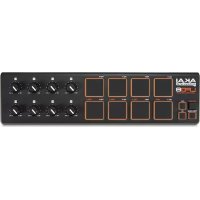
LPD8 MKII - DJ Equipment AKAI - Free user manual and instructions
Find the device manual for free LPD8 MKII AKAI in PDF.


| Brand | AKAI Professional |
| Model | LPD8 MKII |
| Category | DJ Equipment / MIDI Controller |
| Type | Portable Pad Controller |
| Connectivity | USB 2.0 (type B) |
| Power Supply | USB bus (5V, 500mA) |
| Pads | 8 RGB backlit velocity-sensitive pads |
| Buttons | 8 assignable rotary knobs (K1-K8) |
| Internal Memory | 4 user programs |
| Included Software | Software editor for configuration (downloadable) |
| Compatibility | Windows, macOS (standard MIDI driver) |
| Dimensions (approx.) | 200 x 150 x 30 mm |
| Weight (approx.) | 0.5 kg |
| Materials | ABS plastic, rubber (pads) |
| Pad Colors | Customizable RGB via software |
| Main Functions | Triggering MIDI notes, parameter control, program change |
| Safety | Do not expose to water or moisture; use on a stable surface |
| Maintenance and Cleaning | Clean with a soft dry cloth; avoid solvents |
| Included Accessories | USB cable, user guide, software download card |
Frequently Asked Questions - LPD8 MKII AKAI
User questions about LPD8 MKII AKAI
0 question about this device. Answer the ones you know or ask your own.
Ask a new question about this device
Download the instructions for your DJ Equipment in PDF format for free! Find your manual LPD8 MKII - AKAI and take your electronic device back in hand. On this page are published all the documents necessary for the use of your device. LPD8 MKII by AKAI.
USER MANUAL LPD8 MKII AKAI
User Guide (English)
Introduction
Thank you for purchasing the LPD8 mk2. At Akai Professional, we know how serious music is to you. That's why we design our equipment with only one thing in mind—to make your performance the best it can be.
Box Contents
LPD8 mk2
USB Cable
Software Download Card
User Guide
Safety & Warranty Manual
Important: Visit akaipro.com and find the webpage for LPD8 mk2 to download the free editor software.
Support
For the latest information about this product (documentation, technical specifications, system requirements, compatibility information, etc.) and product registration, visit akaipro.com.
For additional product support, visit akaipro.com/support.
Features
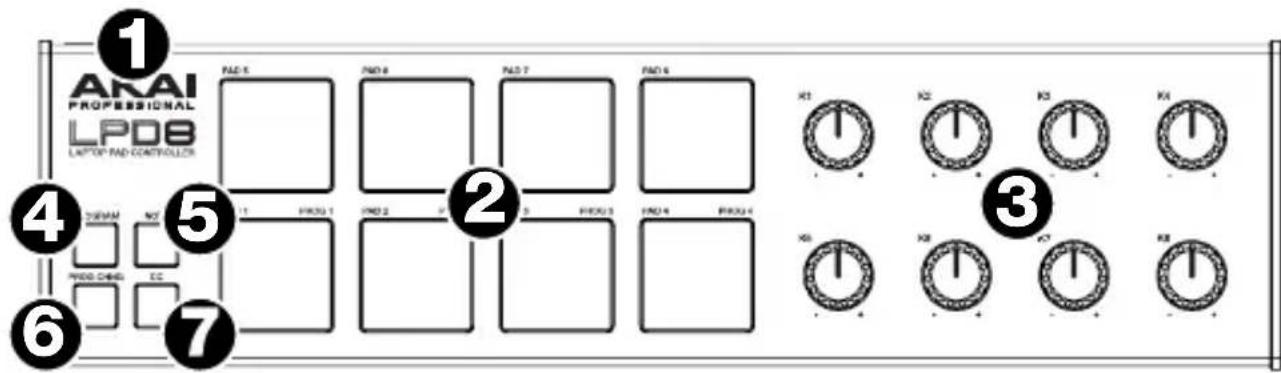
- USB Port: Use a standard USB cable to connect this USB port to your computer to power LDP8 and send and receive MIDI data to and from your computer.
- Pads (1-8): Press these pads to send MIDI Note On messages to your software, triggering drum hits or other samples. The pads are velocity- and pressure-sensitive, which makes them very responsive and intuitive to play.
- Knobs (K1-8): Turn these knobs to send continuous control data to your software, adjusting parameter values or other settings.
- Program: Press and hold this button and then press any one of Pads 1-4 to recall the preset of the same number (its LED will light). Release this button to use the pads again as normal.
Each of these buttons determines the kind of MIDI message the LPD8 mk2's pads will send.
- Note: When this button is active, the LPD8 mk2's pads will send MIDI Note messages. These messages, as well as the pads' RGB colors, are customizable in the included software editor.
- Prog Chng (Program Change): When this button is active, the LPD8 mk2's pads will send Program Change messages. These messages are assignable in the included software editor.
- CC: When this button is active, the LPD8 mk2's pads will send out MIDI Control Change messages. These messages are assignable in the included software editor.
Operation
Programs
You can store up to 4 programs in LPD8 mk2's internal memory. Each program includes:
- all pad assignments (MIDI note numbers, CC numbers, program change numbers, press behavior, and pad on/off colors)
- all knob assignments (MIDI CC numbers and range)
To select a program, press and hold Program, and press one of Pads 1-4 (Prog 1-4).
To manage your programs, use the LPD8 mk2 editor software. Visit akaipro.com and find the webpage for LPD8 mk2 to download it.
Technical Specifications
| Controls | (8) velocity-sensitive, RGB-lit pads (8) 270° knobs (4) UI buttons |
| Programs | 4 stored programs, configurable via free downloadable editor software |
| Connections | (1) USB port |
| Power | Via USB |
| Dimensions (width x depth x height) | 12.1” x 3.2” x 1.3” 306 x 81 x 34 mm |
| Weight | 0.86 lbs. 0.39 kg |
Specifications are subject to change without notice.
Trademarks & Licenses
Akai Professional is a trademark of inMusic Brands, Inc., registered in the U.S. and other countries. All other product or company names are trademarks or registered trademarks of their respective owners.
AKAI
PROFESSIONAL
akaipro.com
Manual Version 1.2


Brand : AKAI
Model : LPD8 MKII
Category : DJ Equipment