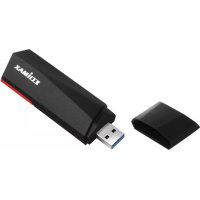
EW7822UMX - Network card / adapter Edimax - Free user manual and instructions
Find the device manual for free EW7822UMX Edimax in PDF.


User questions about EW7822UMX Edimax
0 question about this device. Answer the ones you know or ask your own.
Ask a new question about this device
Download the instructions for your Network card / adapter in PDF format for free! Find your manual EW7822UMX - Edimax and take your electronic device back in hand. On this page are published all the documents necessary for the use of your device. EW7822UMX by Edimax.
USER MANUAL EW7822UMX Edimax
No. 278, Xinhu 1st Rd., Neihu Dist., Taipei City, Taiwan
Email: support@edimax.com.tw
Edimax Technology Europe B.V.
Fijenhof 2, 5652 AE Eindhoven, The Netherlands
Email: support@edimax.nl
Edimax Computer Company
530 Technology Drive Suite 100, Irvine, CA 92618, USA
Email: support@edimax.us
Table des matières
natural_image
Technical line drawings of a USB flash drive and its corresponding Q&A translation guide (no text or symbols on components)text_image
4:26 AM 12/31/2021text_image
Edimax Secured Enter the network security key Share network with my cont Next Wi-Fi Airplane mode Mobile hotspot 4:26 AM 12/31/2021text_image
Diagram showing three connected devices: server, USB port, and network device with wireless signal.https://www.edimax.com/download

To select your product and find related download materials, enter the model number into the search box on the right side or follow the simple steps below:
text_image
Model no. How do I find the model number?text_image
User Account Control Do you want to allow this app to make changes to your device? Contact: Your local administrator Verified publisher: Realtek Semiconductor Corp. File origin: Hard drive on this computer Show more details Yes Notext_image
Edimax EW-7822UMX Wi-Fi USB Adapter Driver InstallShield Wizard Complete The InstallShield Wizard has successfully installed Wireless LAN Driver. Before you can use the program, you must restart your computer. ● Yes, I want to restart my computer now. ○ No, I will restart my computer later. Remove any disks from their drives, and then click Finish to complete setup. < Back Finish Canceltext_image
4:26 AM 12/31/2021text_image
Edimax 2 Edimax 1 Edimax Network & Internet settings Change settings, such as making a cor Wi-Fi Airplane mode 79°F Cloudytext_image
Edimax Secured Enter the network security key You can also connect by pushing the button on the router. Next Cancel Network & Internet settings Change settings, such as making a connection metered. Wi-Fi Airplane mode (q) Mobile hotspot 9°F Cloudy ENG 8:15 PM 5/15/2022text_image
Bouton WPShttps://www.edimax.com/download

text_image
QR code image containing encoded data, no visible human-readable textTo select your product and find related download materials, enter the model number into the search box on the right side or follow the simple steps below:
*Feel free to contact us anytime if you need help or if you can't find your product.

text_image
QR code image containing encoded data, no visible human-readable textCOPYRIGHT
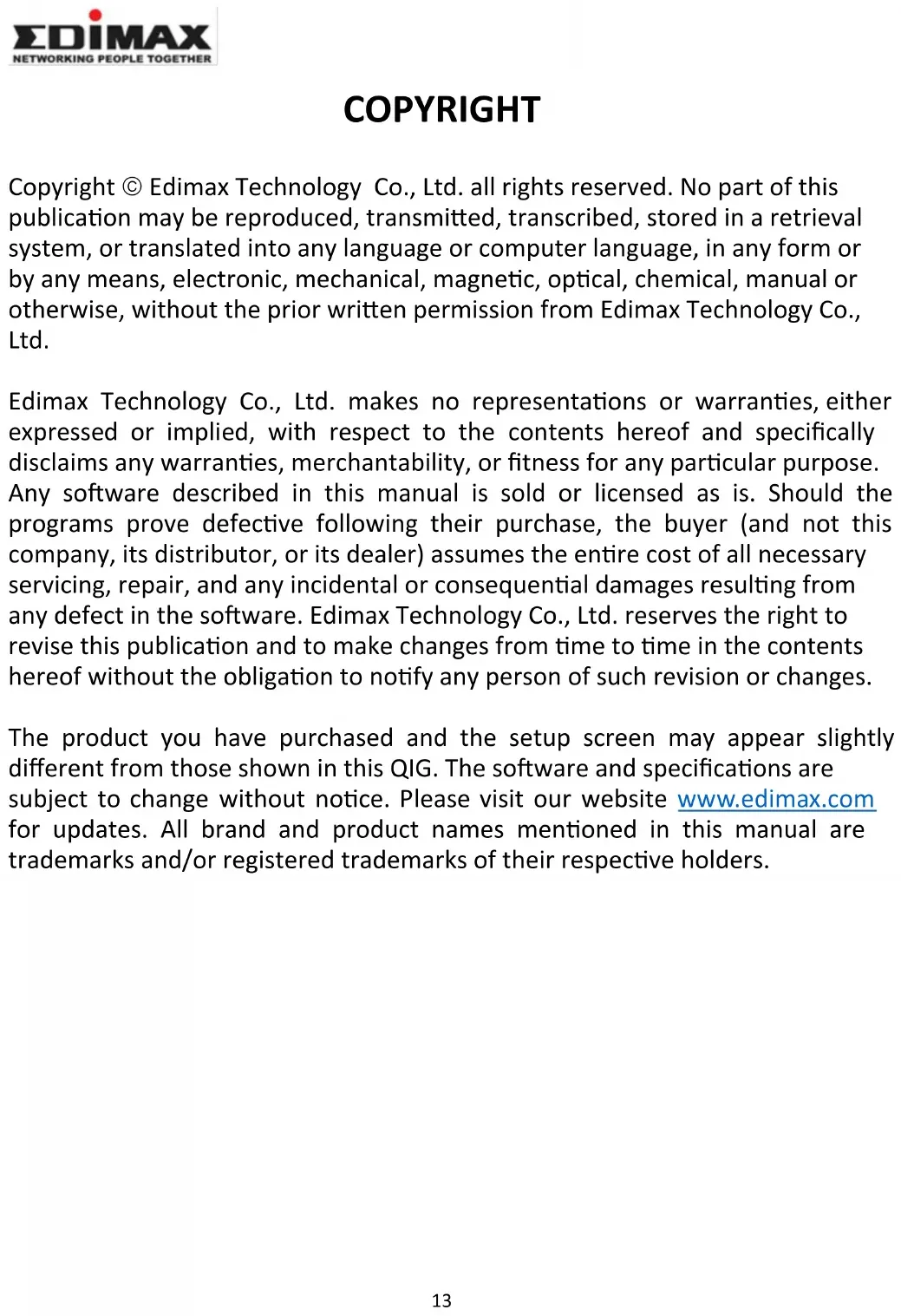
Copyright © Edimax Technology Co., Ltd. all rights reserved. No part of this publication may be reproduced, transmitted, transcribed, stored in a retrieval system, or translated into any language or computer language, in any form or by any means, electronic, mechanical, magnetic, optical, chemical, manual or otherwise, without the prior written permission from Edimax Technology Co., Ltd.
Edimax Technology Co., Ltd. makes no representations or warranties, either expressed or implied, with respect to the contents hereof and specifically disclaims any warranties, merchantability, or fitness for any particular purpose. Any software described in this manual is sold or licensed as is. Should the programs prove defective following their purchase, the buyer (and not this company, its distributor, or its dealer) assumes the entire cost of all necessary servicing, repair, and any incidental or consequential damages resulting from any defect in the software. Edimax Technology Co., Ltd. reserves the right to revise this publication and to make changes from time to time in the contents hereof without the obligation to notify any person of such revision or changes.
The product you have purchased and the setup screen may appear slightly different from those shown in this QIG. The software and specifications are subject to change without notice. Please visit our website www.edimax.com for updates. All brand and product names mentioned in this manual are trademarks and/or registered trademarks of their respective holders.
Federal Communication Commission Interference Statement
This equipment has been tested and found to comply with the limits for a Class B digital device, pursuant to Part 15 of FCC Rules. These limits are designed to provide reasonable protection against harmful interference in a residential installation. This equipment generates, uses, and can radiate radio frequency energy and, if not installed and used in accordance with the instructions, may cause harmful interference to radio communications. However, there is no guarantee that interference will not occur in a particular installation. If this equipment does cause harmful interference to radio or television reception, which can be determined by turning the equipment off and on, the user is encouraged to try to correct the interference by one or more of the following measures:
- Reorient or relocate the receiving antenna.
- Increase the separation between the equipment and receiver.
- Connect the equipment into an outlet on a circuit different from that to which the receiver is connected.
- Consult the dealer or an experienced radio technician for help.
FCC Caution
This device and its antenna must not be co-located or operating in conjunction with any other antenna or transmitter. This device complies with Part 15 of the FCC Rules. Operation is subject to the following two conditions:
(1) this device may not cause harmful interference, and
(2) this device must accept any interference received, including interference that may cause undesired operation. Any changes or modifications not expressly approved by the party responsible for compliance could void the authority to operate equipment.
Federal Communication Commission (FCC) Radiation Exposure Statement
This equipment complies with FCC RF radiation exposure limits set forth for an uncontrolled environment. This device was tested for typical lap held operations with the device contacted directly to the human body to the back side of the notebook computer. To maintain compliance with FCC RF exposure compliance requirements, avoid direct contact to the transmitting antenna during transmitting.
Body SAR
This product meets applicable national SAR limits of 1.6W/kg.
This specific maximum SAR values can be found in the section of this user guide. When carrying the product or using it while worn on your body, maintain a distance of 0.5cm from the body to ensure compliance with RF exposure requirements.
We, Edimax, are responsible for ensuring frequency stability such that an emission is maintained within the band of operation under all conditions of normal operation.
For product available in the USA/Canada market, only channel 1\~11 can be operated. Selection of other channels is not possible.
ISED Statement:
This device contains licence-exempt transmitter(s) that comply with Innovation, Science and Economic Development Canada's licence-exempt RSS(s). Operation is subject to the following two conditions:
(1) this device may not cause interference,
(2) this device must accept any interference, including interference that may cause undesired operation of the device.
These requirements set a SAR limit of 1.6 W/kg averaged over one gram of tissue. The highest SAR value reported under this standard during product certification is 1.6 W/kg.
Radiation Exposure Statement
This transmitter must not be co-located or operating in conjunction with any other antenna or transmitter. This equipment should be installed and operated with a minimum distance of 0.5 centimeters between the radiator and your body.
RED Compliance Statement
Compliance with 2014/53/EU Radio Equipment Directive (RED)
In accordance with Article 10.8(a) and 10.8(b) of the RED, the following table provides information on the frequency bands used and the maximum RF transmit power of the product for sale in the EU:
| Frequency range (MHz) | Max. Transmit Power (dBm) |
| 2412 - 2472 | 19.15 |
| 5180 - 5240 | 19.56 |
| 5260 - 5320 | 19.16 |
A simplified DoC shall be provided as follows: Article 10(9)
Hereby, Edimax Technology Co., Ltd. declares that the radio equipment is in compliance with Directive 2014/53/EU The full text of the EU declaration of conformity is available at the following internet
address: http://www.edimax.com/edimax/global/
This device meets the EU RED requirements on the limitation of exposure of the general public to electromagnetic fields by way of health protection. This device has been tested and meets the ICNIRP exposure guidelines and the European SAR is measured with this device at a separation of 0.5cm to the body, while transmitting at the highest certified output power level in all frequency bands of this device. Carry this device at least 0.5cm away from your body to ensure exposure levels remain at or below the as-tested levels.
For class 2 device (supporting WLAN 5GHz: 5150-5350 MHz)
The device is restricted to indoor use only when operating in the 5150 to 5350 MHz frequency range.
| AT | BE | BG | HR | CY | CZ | DK | |
| EE | FI | FR | DE | EL | HU | IE | |
| IT | LV | LT | LU | MT | NL | PL | |
| PT | RO | SK | SI | ES | SE | UK |
Safety
This equipment is designed with the utmost care for the safety of those who install and use it. However, special attention must be paid to the dangers of electric shock and static electricity when working with electrical equipment. All guidelines of this and of the computer manufacture must therefore be allowed at all times to ensure the safe use of the equipment.
EU Countries Intended for Use
The ETSI version of this device is intended for home and office use in Austria, Belgium, Bulgaria, Croatia, Cyprus, Czech, Denmark, Estonia, Finland, France, Germany, Greece, Hungary, Ireland, Italy, Latvia, Lithuania, Luxembourg, Malta, Netherlands, Poland, Portugal, Romania, Slovakia, Slovenia, Spain, Sweden, Turkey, and United Kingdom. The ETSI version of this device is also authorized for use in EFTA member states: Iceland, Liechtenstein, Norway, and Switzerland.
EU Countries Not Intended for Use
None
EU Declaration of Conformity
English: This equipment is in compliance with the essential requirements and other relevant provisions of Directive 2014/53/EU, 2014/35/EU.
WEEE Directive & Product Disposal
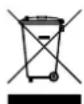
At the end of its serviceable life, this product should not be treated as household or general waste. It should be handed over to the applicable collection point for the recycling of electrical and electronic equipment, or returned to the supplier for disposal.
Declaration of Conformity
We, Edimax Technology Co., Ltd., declare under our sole responsibility, that the equipment described below complies with the requirements of the European Radio Equipment directives.
Equipment: AX1800 Dual-Band USB 3.0 Adapter
The following European standards for essential requirements have been followed:
Directives 2014/53/EU
Spectrum : EN 300 328 V2.2.2 (2019-07)
EN 301 893 V2.1.1 (2017-05)
EMC : EN 301 489-1 V2.2.3 (2019-11)
EN 301 489-17 V3.2.4 (2020-09)
EMF : EN 55032:2015+A11:2020 Class B
EN 55035:2017+A11:2020
Safety (LVD) : IEC 62368-1:2014 (2 ^nd Edition) and/or EN 62368-1:2014+A11:2017
Edimax Technology Europe B.V.
Fijenhof 2,
5652 AE Eindhoven,
The Netherlands
Date & Place of Issue: 31/August/2022, Eindhoven
Signature:
Printed Name: David Huang
Title: Director
a company of:
Edimax Technology Co., Ltd.
No. 278, Xinhu 1st Rd., Neihu Dist.,
Taipei City, Taiwan
Date & Place of Issue: 31/August/2022, Taipei
Signature:
Printed Name: Hunter Chen
Title: Director

Declaration of Conformity
We, Edimax Technology Co., Ltd., declare under our sole responsibility, that the equipment described below complies with the requirements of the United Kingdom Radio Equipment directives.
Equipment: AX1800 Dual-Band USB 3.0 Adapter
The following European standards for essential requirements have been followed:
Radio Equipment Regulations 2017 (S.I. 2017/1206)
Spectrum : EN 300 328 V2.2.2 (2019-07)
EN 301 893 V2.1.1 (2017-05)
EMC : EN 301 489-1 V2.2.3 (2019-11)
EN 301 489-17 V3.2.4 (2020-09)
EMF : EN 55032:2015+A11:2020 Class B
EN 55035:2017+A11:2020
Safety (LVD) : IEC 62368-1:2014 (2 ^nd Edition) and/or EN 62368-1:2014+A11:2017
Edimax Technology Europe B.V.
Fijenhof 2,
5652 AE Eindhoven,
The Netherlands
Date & Place of Issue: 31/August/2022, Eindhoven
Signature:

Printed Name: David Huang
Title: Director
a company of:
Edimax Technology Co., Ltd.
No. 278, Xinhu 1st Rd., Neihu Dist.,
Taipei City, Taiwan
Date & Place of Issue: 31/August/2022, Taipei
Signature:

Printed Name: Hunter Chen
Title: Director