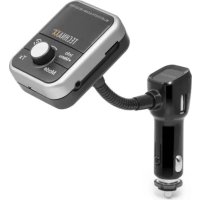
FMT1000BT - FM Transmitter TECHNAXX - Free user manual and instructions
Find the device manual for free FMT1000BT TECHNAXX in PDF.



User questions about FMT1000BT TECHNAXX
0 question about this device. Answer the ones you know or ask your own.
Ask a new question about this device
Download the instructions for your FM Transmitter in PDF format for free! Find your manual FMT1000BT - TECHNAXX and take your electronic device back in hand. On this page are published all the documents necessary for the use of your device. FMT1000BT by TECHNAXX.
USER MANUAL FMT1000BT TECHNAXX
text_image
(1) Yo/Yao YDS TireXChill! (2) (3)text_image
Charging contact Charging contact Micro SD Slot Aux-in/Out Jack Micro USB Charging port ON/OFF Switch Antenal Jacktext_image
Technical diagram showing three connected devices with directional arrows indicating movement or assembly.text_image
Technical diagram of a mechanical assembly with numbered parts for identificationThe manufacturer Technaxx Deutschland GmbH & Co.KG hereby declares that this device, to which this user manual belongs, complies with the essential requirements of the standards referred to the Directive R&TTE 2014/53/EU. The Declaration of Conformity you find here: www.technaxx.de/ (in bar at the bottom "Konformitätserklärung"). Before using the device the first time, read the user manual carefully. Turn OFF nearby Bluetooth devices to avoid signal interference! Service phone No. for technical support: 01805 012643 (14 cent/minute from German fixed-line and 42 cent/minute from mobile networks). Free Email: support@technaxx.de
Features
- 4-in-1 Function: DAB+ receiver, portable DAB+ radio/MP3 player, Bluetooth Car Kit, FM transmitter - Wireless transfer for DAB+/DAB radio frequencies by FM transmission technology - Portable FM unit is usable as DAB+ radio & MP3 player - Bluetooth function for streaming music from mobile phones to the vehicle's radio - Handsfree function via Bluetooth - 2.1A output supports charging of almost all Smartphones and other mobile devices - AUX jack for stereo sound via AUX-IN of your vehicle - Line-IN function supports other external devices - Quick Scan to search the available free FM frequency - Supports music playing from MicroSD card - Built-in 800mAh rechargeable battery (charging the battery directly: put the FM unit to the charging dock in the car - Flexible goose neck easy to adjust the angle of the devices - Easy handling and installation
Technical specifications
| Power Input 12V–24V (cigarette lighter socket of a vehicle) | |
| Bluetooth module Actions 4.2 | |
| Frequency range DAB+/DAB Band III 174-240MHz | |
| FM frequency range 87.6–107.9MHz | |
| Transmitter charging output 5V/2.1A | |
| Transmittig distance | ~3m maximum (depending on the electromagnetic shielding of your car antenna) |
| LCD display 3.84 x 1.44cm (1.61") | |
| Input / Output connectors AUX-IN / AUX-OUT 3.5mm | |
| Earphone impedance | 32 Ω |
| Storage MicroSD card up to 32GB | |
| Power supply Built-in rechargeable 800mAh lithium battery 3.7V | |
| Charging time | ~2 hours |
| Playing time | ~10 hours (medium volume) |
| Playing time (portable use) | ~7 hours |
| Weight / Dimensions FM unit | 57g / (L) 5.0 x (W) 2.5 x (H) 6.5cm |
| Weight / Dimensions holder 59g | /(L) 11.5cm; flexible.goose neck 4cm |
| Package Contents | FMT1000BT DAB+ Transmitter, Micro USB cable, Audio cable, Antenna, Earphone, User Manual |
Charging (there are 2 ways)
(1) Charging the battery of the FM unit: In the car put the FM unit into the docking station (look for correct placement of the contacts, it easily clicks into the docking station of the holder by a magnet). Insert the power supply plug into the cigarette lighter socket of a vehicle. The battery will be charged automatically, no matter if the FM unit is switched ON or OFF. At home, plug the Micro USB cable* (*included) into the FM unit and connect it to a power adaptor** (**not included). The battery is charged regardless of whether the FM unit is on or off. The output of adapter must be 5V 500mAh. Note: To check the charging status of the battery when it is switched off, remove the charging cable and switch the device on. The battery indicator at the top right of the screen shows the status: 3 bars 100%-70%, 2 bars 70%-40%, 1 bar 40%-10%, no bar 10%-0%.
(2) Charging other devices on the way in a car with charger unit: When the Docking Station is powered from cigarette lighter socket of a vehicle, connect your mobile phone with a USB cable ^ ( not included) to the Docking Station. This unit will serve as mobile phone charger. The output is 5V/2.1A with 10W.
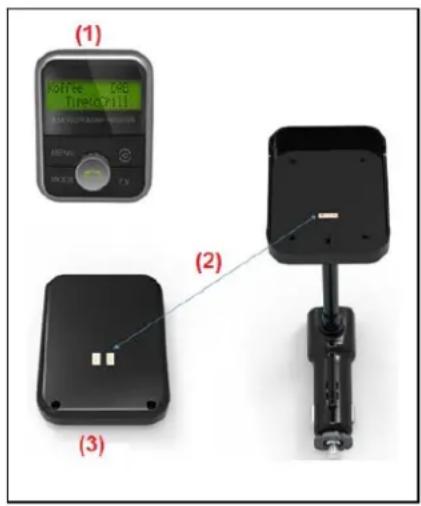
View of the device
text_image
(1) Koffe IAG Tirekopril (2) (3)| (1) Front view (FM unit) |
| (2) Metall contact(docking station, fixed on holder) |
| (3) Rear view (FM unit) |
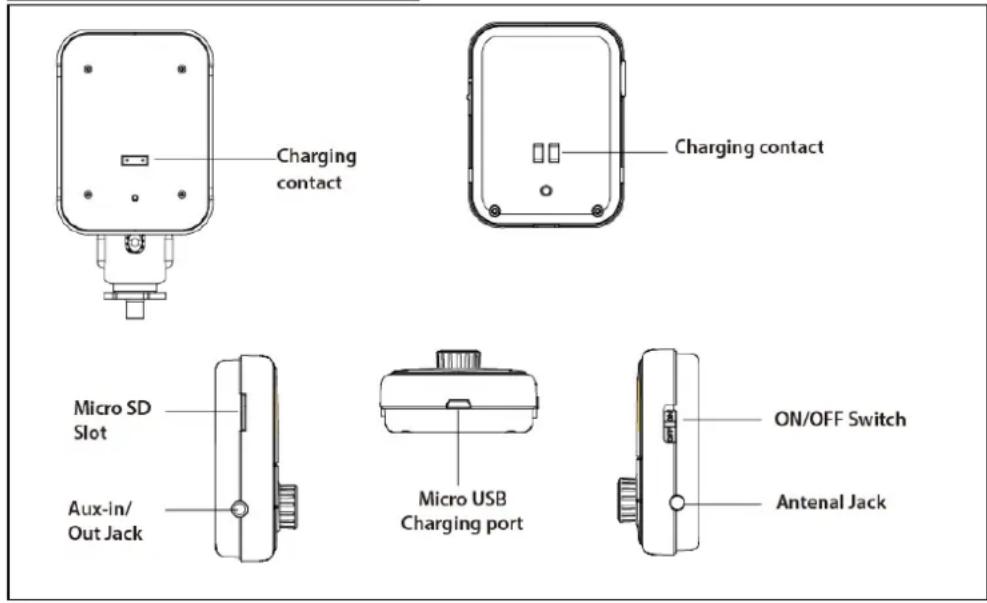
| Charging contact |
| MicroSD Slot |
| Aux-in/Out Jack |
| Micro USB Charging port |
| ON/OFF Switch |
| Antenal Jack |
text_image
Charging contact Charging contact Micro SD Slot Aux-In/Out Jack Micro USB Charging port ON/OFF Switch Antenal JackButtons of the panel (FM unit)
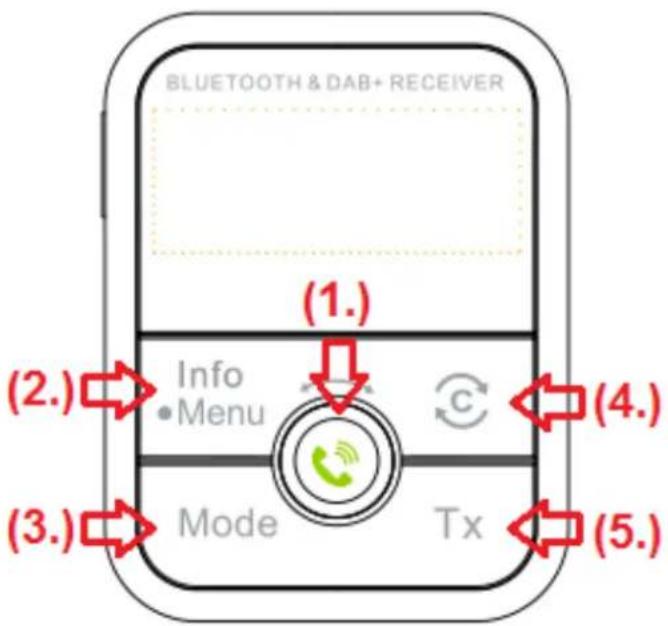
text_image
BLUETOOTH & DAB+ RECEIVER (1.) Info • Menu C (2.) Mode Tx (3.) (4.) (5.)| 1. Spin Button Control |  | Press to Play/Pause under music mode, confirm the selected sub-menu or pick up/hang off the phone calls when get phone calls |
  | Rotate clockwise or anticlockwise to go forwards or backwards to a music title. | |
| 2. Info / Menu Button | Info: Under DAB mode, short press this button to see the DAB+ radio info: DAB+ Channel name, Channels, Format, Bit rate, type, date, SNR and signal strengthMenu: Press and hold this button to enter into the sub-menu below. Rotate and short press the “Spin Button Control” to choose and confirm the sub-menu. Press the Info/Menu button once to exit the selected.DAB Menu: Scan the DAB+ channel manually, Volume, Language (English/German), System reset, Version | |
| 3. Mode Button | Switch modes between DAB+/BT/MicroSD card and AUX-IN/AUX-OUT | |
| [xwwx]4. Button | Auto scan the DAB+ radioAuto scan the clear FM frequency after press the TX button | |
| 5. Tx Button | Set FM frequency for transmitting to the radio | |
Mounting
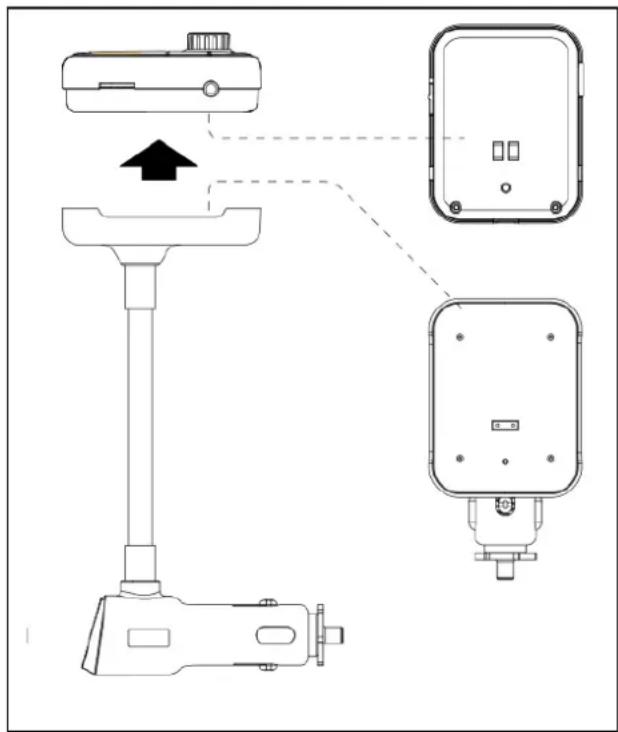
text_image
Technical diagram showing three connected devices with directional arrows indicating movement or assembly.This devices contain two parts: The docking station (fixed on the holder) and FM unit (you can remove from the docking station easily).
When you put the FM unit into the Docking Station the device will be charged. Then it becomes a In-Car DAB+ receiver.
Installation
-
Put the FM unit into the docking, insert the Power supply Plug into the car cigarette lighter socket of a vehicle. Switch on the FM unit with "ON/OFF" switch
-
Install the external antenna as seen in the picture below.
-
Press TX button the screen will show the current FM transmitting frequency. Press Ⓐ to scan the clear and unoccupied frequency. By pressing again and again the device will show you more clear and unoccupied frequencies. Turn the spin button control to adjust the frequencies manually.
- Switch the car radio's FM frequency to match the frequency you just set on the device. All the sound will transmit to the car's radio and come out from the car Stereo.
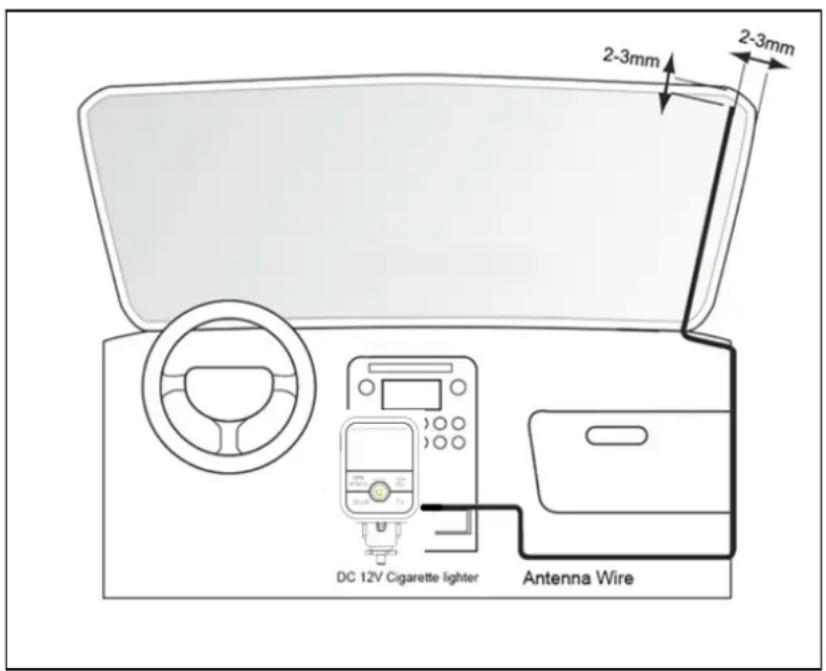
text_image
2-3mm 2-3mm DC 12V Cigarette lighter Antenna WireDAB+ Receiver
- Press the Mode button to switch to the DAB mode
- Press Ⓐ button to perform a full scan of DAB stations since showing “scanning..” on the screen. Once finished the totally DAB+ channel scanned will be displayed on the top right corner, and then play the first DAB+ channel automatically. Start to enjoy the DAB+ radio on the way.
- Rotate the "Spin Button Control" to choose you desired DAB+ channels.
- Use the Info/Menu button to check the DAB+ info or adjust the menu.
Bluetooth
- Press the Mode button to switch to BT (Bluetooth) mode.
- The first time the devices display "unconnected". Activate your mobile phone's Bluetooth function, then search new device. When the mobile phone detects this unit, which is named "FMT1000BT DAB+", then press this name to connect.
- After successful connection the screen of the mobile phone and the FMT1000BT DAB+ will display "connected". Now can stream the music from the mobile phone.
- Operate the Spin Button Control to play/pause or adjust previous/next songs.
- In any mode, as long as the mobile phone is connected via Bluetooth with the FM unit and there is an incoming call, this unit will automatically switch to telephone mode. The screen displays "Calling". Press the Spin Button Control to pick up the call, then screen display "In Call" (not in the Bluetooth mode).
MicroSD Card
Note: Format the MicroSD card in FAT32
- Press the Mode button to switch the mode to SD (MicroSD).
- Plug in the MicroSD card which contain MP3 files into the card slot, then enjoy the music
- Operate the Spin Button Control to play/pause or adjust previous/next songs.
AUX-IN
This device supports other external devices. Use the provided audio cable to connect another external device to the AUX input of this unit. Press the Mode button to switch to the Aux mode.
AUX-OUT
To get better sound quality, you can connect this device to car audio via the provided audio cable directly. Connect the AUX cable from the AUX-IN/AUX-OUT jack to the AUX input jack of your car (if available). Then the good quality sound would be come out from the car stereo directly.
How to use portable device: This device has a built-in battery so it can be used away from docking (if charged). Plug the provided earphone to the AUX–IN port of this devices. The earphone will be treat as antennal under DAB+ mode. All the function and operation are exactly same as mentioned above.
Replacing the fuse: As shown below, unscrew the screw cap, replace the fuse and then reassemble the parts in the correct order.
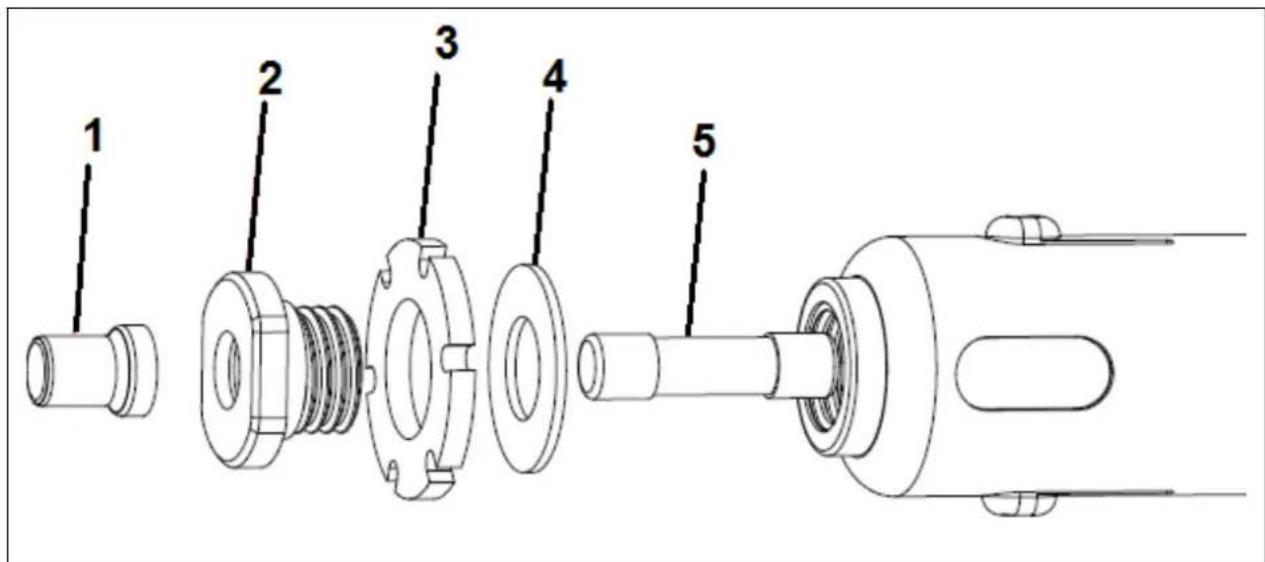
text_image
Technical diagram of a mechanical assembly with numbered parts for identification- Tip, 2. Screw Cap, 3. Silicon Ring, 4. Seal, 5. Fuse
Warnings
- To prolong the life of this device, pull it out when starting the engine of the car. - Do not remove any cover to avoid the risk of an electric shock or other damages. - Do not attempt to disassemble the device, it may result in short-circuit or even damage. - Do not drop or shake the device, it may break internal circuit boards or mechanics. - Keep the device in dry and ventilated environment. - Avoid high humidity and high temperature. - Do not expose this unit to rain or moisture to reduce the risk of fire or electrical shock. The device should not be exposed to dripping or splashing. - Do not place any objects filled with liquids (such as vases) shall be placed on or near by the device. - Do not install the device near any heat source, such as radiators, or other equipment that produces heat. - Keep the device away from little children.

Security and Disposal Hints for Batteries: Hold children off batteries. When a child swallowed a battery go to a doctors place or bring the child into a hospital promptly! Look for the right polarity (+) and (−) of batteries! Always change all batteries. Never use old and new batteries or batteries of different types together. Never short, open, deform or load up batteries! Risk of injury! Never throw batteries into fire! Risk of explosion!
Hints for Environment Protection: Packages materials are raw materials and can be recycled. Do not disposal old devices or batteries into the domestic waste. Cleaning: Protect the device from contamination and pollution. Avoid using rough, coarse-grained materials or solvents/aggressive cleaner. Wipe the cleaned device accurately. Important Notice: Should battery fluid leak from a battery, wipe the battery case with a soft cloth dry. Distributor: Technaxx Deutschland GmbH & Co.KG, Kruppstr. 105, 60388 Frankfurt a.M., Germany
text_image
Charging contact Charging contact Micro SD Slot Aux-in/ Out Jack Micro USB Charging port ON/OFF Switch Antenal Jacktext_image
Technical diagram showing a device with labeled components including a sensor, control panel, and-mounted device.text_image
Technical diagram of a mechanical assembly with numbered parts for identification- Top, 2. Vis de blocage, 3. Anneau de silicone, 4. Sceau, 5. Fusible