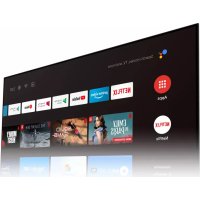
S55U - Monitor GIGABYTE - Free user manual and instructions
Find the device manual for free S55U GIGABYTE in PDF.


| Product Type | LED Monitor 4K UHD Smart TV |
| Brand | Gigabyte |
| Model | S55U |
| Screen Size | 55 inches (139.7 cm) |
| Resolution | 3840 x 2160 pixels (4K UHD) |
| Refresh Rate | Up to 120 Hz (HDMI 2.1) |
| Connectivity | HDMI 2.1 (x4), USB 2.0/3.0, Ethernet, Wi-Fi, Bluetooth 5.0 |
| Smart Features | Google Assistant, Google Play, Built-in Chromecast, AirPlay 2 |
| Image Technologies | HDR10, HLG, Dolby Vision, FreeSync Premium, Game Mode |
| Audio | 20W Stereo Speakers, Dolby Atmos, eARC |
| Dimensions (without stand) | 123.2 x 71.1 x 6.9 cm (approx.) |
| Weight (without stand) | 18.5 kg (approx.) |
| Power Supply | AC 100-240V, 50/60Hz, typical consumption 150W |
| Maintenance and Cleaning | Clean with a soft, dry cloth. Do not use chemical products. |
| Security | Kensington Security Lock, Parental Controls, Automatic Software Updates |
| Spare Parts and Repairability | Parts availability via Gigabyte support. Repair possible by an authorized technician. |
| General Information | User manual in French (48 pages). 2-year warranty. |
Frequently Asked Questions - S55U GIGABYTE
User questions about S55U GIGABYTE
0 question about this device. Answer the ones you know or ask your own.
Ask a new question about this device
Download the instructions for your Monitor in PDF format for free! Find your manual S55U - GIGABYTE and take your electronic device back in hand. On this page are published all the documents necessary for the use of your device. S55U by GIGABYTE.
USER MANUAL S55U GIGABYTE
- Android TV Home / Android TV core services
Chromecast Android Shell (Chromecast built-in)
United States of America, Federal Communications Commission Statement
Supplier's Declaration of Conformity 47 CFR § 2.1077 Compliance Information
Product Name: LCD monitor
Trade Name: GIGABYTE
Model Number: S55U
Responsible Party - U.S. Contact Information: G.B.T. Inc.
Address: 17358 Railroad street, City Of Industry, CA91748
Tel.: 1-626-854-9338
Internet contact information: https://www.gigabyte.com
FCC Compliance Statement:
This device complies with Part 15 of the FCC Rules, Subpart B, Unintentional Radiators.
Operation is subject to the following two conditions: (1) This device may not cause harmful interference, and (2) this device must accept any interference received, including interference that may cause undesired operation.
This equipment has been tested and found to comply with the limits for a Class B digital device, pursuant to Part 15 of the FCC Rules. These limits are designed to provide reasonable protection against harmful interference in a residential installation. This equipment generates, uses and can radiate radio frequency energy and, if not installed and used in accordance with manufacturer's instructions, may cause harmful interference to radio communications. However, there is no guarantee that interference will not occur in a particular installation. If this equipment does cause harmful interference to radio or television reception, which can be determined by turning the equipment off and on, the user is encouraged to try to correct the interference by one or more of the following measures:
- Reorient or relocate the receiving antenna.
- Increase the separation between the equipment and receiver.
- Connect the equipment to an outlet on a circuit different from that to which the receiver is connected.
- Consult the dealer or an experienced radio/TV technician for help.
Radiation Exposure Statement
This equipment complies with FCC radiation exposure limits set forth for an uncontrolled environment and it also complies with Part 15 of FCC RF Rules. This equipment should be installed and operated with minimum distance of 20 in. (50cm) between the radiator and your body. This transmitter must not be co-located or operated in conjunction with any other antenna or transmitter.
FCC ID.: SARMW510
Canada, Canada-Industry Notice:
i. the device for operation in the band 5150-5250 MHz is only for indoor use to reduce the potential for harmful interference to co-channel mobile satellite systems;
ii. for devices with detachable antenna(s), the maximum antenna gain permitted for devices in the bands 5250-5350MHz and 5470-5725 MHz shall be such that the equipment still complies with the e.i.r.p. limit;
iii. for devices with detachable antenna(s), the maximum antenna gain permitted for devices in the band 5725-5850MHz shall be such that the equipment still complies with the e.i.r.p. limits as appropriate; and
iv. for devices with detachable antenna(s), the maximum antenna gain permitted for devices in the band 5725-5850MHz shall be such that the equipment still complies with the e.i.r.p. limits as appropriate; and
V. where applicable, antenna type(s), antenna models(s), and worst-case tilt angle(s) necessary to remain compliant with the e.i.r.p. elevation mask requirement set forth in section 6.2.2.3 shall be clearly indicated.
This device complies with Industry Canada's licence-exempt RSSs. Operation is subject to the following two conditions:
(1) this device may not cause interference, and
(2) this device must accept any interference, including interference that may cause undesired operation of the device.
Canada, Canadian Department of Communications Statement
This digital apparatus does not exceed the Class B limits for radio noise emissions from digital apparatus set out in the Radio Interference Regulations of the Canadian Department of Communications. This class B digital apparatus complies with Canadian ICES-003.
European Union (EU) CE Declaration of Conformity
This device complies with the following directives: Electromagnetic Compatibility Directive 2014/30/EU, Low-voltage Directive 2014/35/EU, Radio Equipment Directive 2014/53/EU, ErP Directive 2009/125/EC, RoHS directive (recast) 2011/65/EU & the 2015/863 Statement.
This product has been tested and found to comply with all essential requirements of the Directives.
European Union (EU) RoHS (recast) Directive 2011/65/EU & the European Commission Delegated Directive (EU) 2015/863 Statement
GIGABYTE products have not intended to add and safe from hazardous substances (Cd, Pb, Hg, Cr+6, PBDE, PBB, DEHP, BBP, DBP and DIBP). The parts and components have been carefully selected to meet RoHS requirement. Moreover, we at GIGABYTE are continuing our efforts to develop products that do not use internationally banned toxic chemicals.
European Union (EU) Community Waste Electrical & Electronic Equipment (WEEE) Directive Statement
GIGABYTE will fulfill the national laws as interpreted from the 2012/19/EU WEEE (Waste Electrical and Electronic Equipment) (recast) directive. The WEEE Directive specifies the treatment, collection, recycling and disposal of electric and electronic devices and their components. Under the Directive, used equipment must be marked, collected separately, and disposed of properly.
End of Life Directives-Recycling

The symbol shown below is on the product or on its packaging, which indicates that this product must not be disposed of with other waste. Instead, the device should be taken to the waste collection centers for activation of the treatment, collection, recycling and disposal procedure.
WEEE Symbol Statement
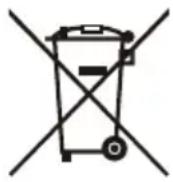
The symbol shown below is on the product or on its packaging, which indicates that this product must not be disposed of with other waste. Instead, the device should be taken to the waste collection centers for activation of the treatment, collection, recycling and disposal procedure.
For more information about where you can drop off your waste equipment for recycling, please contact your local government office, your household waste disposal service or where you purchased the product for details of environmentally safe recycling.
Commission Delegated Regulation (EU) 2019/2013 with regard to energy labelling of electronic displays - Compliance Information
The information registered in the European Product Registry for Energy Labelling (EPREL) product database is accessible by scanning the below QR-Code:
European Community Directive R&TTE Directive Compliance Statement:
This equipment complies with all the requirements and other relevant provisions of Radio Equipment Directive 2014/53/EU.
This equipment is suitable for home and office use in all the European Community Member States and EFTA Member States. The low band 5.15 -5.35 GHz is for indoor use only.
| AT BE BG CH CY CZ DE | ||||||
| DK EE EL ES FI FR HR | ||||||
| HU IE IS IT LI LT LU | ||||||
| LV MT NL PL PT RO SE | ||||||
| SI SK TR UK | ||||||
Wireless module manufacturer: Qingdao Hisense Communications Co., Ltd.
Wireless module model name: MW510
Taiwan NCC Wireless Statements / 無線設備警告聲明:
低功率電波輻射性電機管理辦法
Declaration of the Presence Condition of the Restricted Substances Marking
| 設備名稱:液晶顯示器 型號(型式):S55U Equipment name Type designation (Type) | ||||||
| 單元 Unit | 限用物質及其化學符號 Restricted substances and its chemical symbols | |||||
| 鉛 Lead (Pb) | 汞 Mercury (Hg) | 鎘 Cadmium (Cd) | 六價鉻 Hexavalent chromium (Cr+6) | 多溴聯苯 Polybrominated biphenyls (PBB) | 多溴二苯醚 Polybrominated diphenyl ethers (PBDE) | |
| 金屬外框 | ○ | ○ | ○ | ○ | ○ | ○ |
| 後殼 | ○ | ○ | ○ | ○ | ○ | ○ |
| 液晶面板 | - | ○ | ○ | ○ | ○ | ○ |
| 電路板組件 | - | ○ | ○ | ○ | ○ | ○ |
| 底座 | ○ | ○ | ○ | ○ | ○ | ○ |
| 電源線 | ○ | ○ | ○ | ○ | ○ | ○ |
| 其他線材 | ○ | ○ | ○ | ○ | ○ | ○ |
| 揚聲器 | ○ | ○ | ○ | ○ | ○ | ○ |
| 配件(遙控器等) | ○ | ○ | ○ | ○ | ○ | ○ |
| 備考1. “超出0.1wt%”及“超出0.01wt%”係指限用物質之百分比含量超出百分比含量基準值。 Note1: “Exceeding 0.1 wt%” and “exceeding 0.01 wt%” indicate that the percentage content of the restricted substance exceeds the reference percentage value of presence condition. 備考2. “○”係指該項限用物質之百分比含量未超出百分比含量基準值。 Note2: “○” indicates that the percentage content of the restricted substance does not exceed the percentage of reference value of presence. 備考3. “-”係指該項限用物質為排除項目。 Note3: The “-” indicates that the restricted substance corresponds to the exemption. | ||||||
Safety Precautions
Read through the following Safety Precautions before using the monitor.
- Only use the accessories that are provided with the monitor or that which are recommended by the manufacturer.
- Keep the plastic packaging bag for the product in a place that cannot be reached by children.
- Before connecting the monitor to the power outlet, make sure that the voltage rating of the power cable is compatible with the power specification in the country where you are located.
- The power cord plug must be connected to a properly wired power outlet.
- Do not touch the plug with wet hands, otherwise easily cause electric shock.
- Place the monitor in a stable and well-ventilated place.
- Do not place the monitor near any heat sources such as electric radiators or direct sunlight.
- The holes or openings on the monitor are for ventilation. Do not cover or block the ventilation holes with any objects.
- Do not use the monitor near water, drinks, or all types of liquids. Failure to do so may result in electric shock or damage to the monitor.
- Make sure to unplug the monitor from the power outlet before cleaning.
- As the screen surface is easy to be scratched, avoid touching the surface with any hard or sharp object.
- Use a soft lint-free cloth instead of a tissue to wipe the screen. You may use a glass cleaner to clean the monitor if required. However, never spray the cleaner directly onto the screen.
- Disconnect the power cable if the monitor is not being used for a long period of time.
- Do not attempt to disassemble or repair the monitor yourself.
- The plug on the power supply cord is used as the disconnect device, the socket-outlet shall be installed near the equipment and easily accessible.
Stability Hazard Precautions
The product may fall, causing serious personal injury or death. To prevent injury, this product must be securely attached to the floor/wall in accordance with the installation instructions.
Many injuries, particularly to children, can be avoided by taking simple precautions such as:
- ALWAYS use stands or installation methods recommended by the manufacturer of the product set.
- ALWAYS use furniture that can safely support the product.
- ALWAYS ensure the product is not overhanging the edge of the supporting furniture.
- ALWAYS educate children about the dangers of climbing on furniture to reach the product or its controls.
- ALWAYS route cords and cables connected to your product so they cannot be tripped over, pulled or grabbed.
- NEVER place the product on tall furniture (for example, cupboards or bookcases) without anchoring both the furniture and the product to a suitable support.
- NEVER place the product on cloth or other materials that may be located between the product and supporting furniture.
- NEVER place items that might tempt children to climb, such as toys and remote controls, on the top of the product or furniture on which the product is placed.
- If the existing product is going to be retained and relocated, the same considerations as above should be applied.
- To prevent personal injury or damage to the product caused by tipping over due to earthquakes or other shocks, make sure to install the product in a stable location and take measures to prevent falling.

- Chromecast Android Shell (Chromecast built-in)
- United States of America, Federal Communications Commission Statement
- Supplier's Declaration of Conformity 47 CFR § 2.1077 Compliance Information
- FCC Compliance Statement:
- Radiation Exposure Statement
- Canada, Canada-Industry Notice:
- Canada, Canadian Department of Communications Statement
- European Union (EU) CE Declaration of Conformity
- European Union (EU) RoHS (recast) Directive 2011/65/EU & the European Commission Delegated Directive (EU) 2015/863 Statement
- European Union (EU) Community Waste Electrical & Electronic Equipment (WEEE) Directive Statement
- End of Life Directives-Recycling
- WEEE Symbol Statement
- Commission Delegated Regulation (EU) 2019/2013 with regard to energy labelling of electronic displays - Compliance Information
- European Community Directive R&TTE Directive Compliance Statement:
- Taiwan NCC Wireless Statements / 無線設備警告聲明:
- Declaration of the Presence Condition of the Restricted Substances Marking
- Safety Precautions
- Stability Hazard Precautions
Brand : GIGABYTE
Model : S55U
Category : Monitor