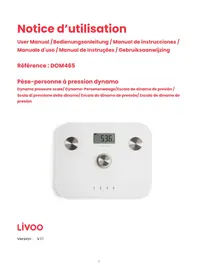
DOM465 - Kitchen scale LIVOO - Free user manual and instructions
Find the device manual for free DOM465 LIVOO in PDF.



| Product type | Kitchen scale with impedance meter |
| Maximum weight | 150 kg (330 lbs) |
| Minimum weight | 8 kg (17.6 lbs) |
| Measurement units | kg / lb |
| Analysis functions | Body fat, muscle percentage, water content, bone mass, BMI |
| Body fat measurement range | 5-50 % |
| Muscle percentage measurement range | 13-100 % |
| Water content measurement range | 35-75 % |
| Bone mass measurement range | 0-15 kg |
| Height measurement range | 100-220 cm (3 ft 3 in - 7 ft 3 in) |
| Age range | 10-80 years |
| Number of memory profiles | 4 |
| Auto-off | Yes |
| Low battery and overload indicator | Yes |
| Power supply | Dynamo (no battery required) |
| Care and cleaning | Clean with a soft damp cloth. Do not immerse in water. |
| Safety | Do not use with a pacemaker or medical implant. Non-slip surface. |
Frequently Asked Questions - DOM465 LIVOO
User questions about DOM465 LIVOO
0 question about this device. Answer the ones you know or ask your own.
Ask a new question about this device
Download the instructions for your Kitchen scale in PDF format for free! Find your manual DOM465 - LIVOO and take your electronic device back in hand. On this page are published all the documents necessary for the use of your device. DOM465 by LIVOO.
USER MANUAL DOM465 LIVOO
Figure 2
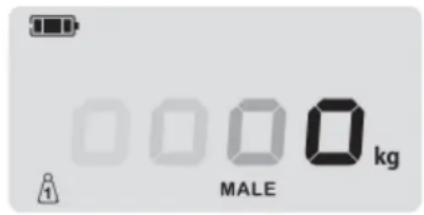
Figure 3
Tableau 1
 |  |  |  | |
| BMI | <16.5 | 16.5-25 | 25-30 | >30 |
Tableau 2
| Age | [IMAGE] | [IMAGE] | ||||||||
| [MWBC] | [XCSO] | [TBX2] | [DDTX] | [WSDA] | [ZBWH] | [SC24] | [HXB4] | |||
| 10-20 | ≤19.5% | 19.6-33.5% | 33.6-38.5% | ≥38.6% | ≤9.5% | 9.6-20.5% | 20.6-25.5% | ≥25.6% | ||
| 21-30 | ≤20.0% | 20.1-34.0% | 34.1-39.0% | ≥39.1% | ≤10.0% | 10.1-21.0% | 21.1-26.0% | ≥26.1% | ||
| 31-40 | ≤20.5% | 20.6-34.5% | 34.6-39.5% | ≥39.6% | ≤10.5% | 10.6-21.5% | 21.6-26.5% | ≥26.6% | ||
| 41-50 | ≤21.0% | 21.1-35.0% | 35.1-40.0% | ≥40.1% | ≤11.0% | 11.1-22.0% | 22.1-27.0% | ≥27.1% | ||
| 51-60 | ≤21.5% | 21.6-35.5% | 35.6-40.5% | ≥40.6% | ≤12.0% | 12.1-23.0% | 23.1-28.0% | ≥28.1% | ||
| 61-70 | ≤22.0% | 22.1-36.0% | 36.1-41.0% | ≥41.1% | ≤13.0% | 13.1-24.0% | 24.1-29.0% | ≥29.1% | ||
| 71-80 | ≤22.5% | 22.6-36.5% | 36.6-41.5% | ≥41.6% | ≤14.0% | 14.1-25.0% | 25.1-30.0% | ≥30.1% | ||
Tableau 3
| [YASK] | [077Y] | |||||||
| - | 0 | + | ++ | - | 0 | + | ++ | |
| 10-20 | ≤56.0% | 56.1-62.0% | 62.1-68.0% | ≥68.1% | ≤58.0% | 58.1-65.0% | 65.1-72.0% | ≥72.1% |
| 21-30 | ≤54.0% | 54.1-60.0% | 60.1-66.0% | ≥66.1% | ≤56.0% | 56.1-63.0% | 63.1-70.0% | ≥70.1% |
| 31-40 | ≤51.0% | 51.1-57.0% | 57.1-63.0% | ≥63.1% | ≤54.0% | 54.1-61.0% | 61.1-68.0% | ≥68.1% |
| 41-50 | ≤48.0% | 48.1-54.0% | 54.1-60.0% | ≥60.1% | ≤51.0% | 51.1-58.0% | 58.1-65.0% | ≥65.1% |
| 51-60 | ≤45.0% | 45.1-51.0% | 51.1-57.0% | ≥57.1% | ≤48.0% | 48.1-55.0% | 55.1-62.0% | ≥62.1% |
| 61-70 | ≤42.0% | 42.1-48.0% | 48.1-54.0% | ≥54.1% | ≤45.0% | 45.1-52.0% | 52.1-59.0% | ≥59.1% |
| 71-80 | ≤38.0% | 38.1-44.0 | 44.1-50.0% | ≥50.1% | ≤42.0% | 42.1-49.0% | 49.1-56.0% | ≥56.1% |
Tableau 4
| [WYZ] |  |
| >30% | >35% |
Tableau 5
Thank you for choosing a Livoo product!
EN
Your blender, your barbecue, and your headphones are not just objects, they are extensions of yourself, allowing you to get closer to your friends and family, to bring them together, to laugh and to share experiences. Livoo's aim is to help you live your life to the fullest, whatever wishes you have throughout the year. Winter raclette, summer barbecue. Or the other way around. It's up to you. Take advantage of this freedom for feel good moments every day.
That's why we're constantly innovating and creating clever products full of zest, but most of all, accessible. Find our entire collection on our website www.livoo.en.
Livoo, your daily companion till social networks

@Livoo

@livoo_officiel

@Livoo
Safety Instructions
- This appliance is intended for domestic use only. Any other use (medical, professional, commercial, etc.) is excluded.
- Children should be supervised to ensure that they do not play with the appliance.
- Keep this appliance indoors and in a dry place.
- Do not immerse the unit in water or any other liquid.
- Do not store any objects on the scale.
- To avoid risk of injury, do not stand on the edges of the scale.
- To prevent slipping, make sure that your feet and the scale are dry and free of dust before getting on the scale.
- Do not disassemble the scale.
- Avoid strong vibrations or shocks, such as dropping the scale on the floor.
- Always place your scale on a hard, level surface. Avoid carpets and rugs.
- Do not use the scale on a slippery surface or on a wet floor.
- Keep the scale away from heat sources (radiators, etc.) to avoid deformation of plastic parts.
- Do not disassemble the scale as improper handling may result in injury to persons or damage to the scale.
- The scale should not be used for anyone who has a pacemaker, or with any other medical transplanting. The impedance passed through our body will have disturbance of the normal working of medical equipment
Technical Specifications
| Max. Weight | 150kgs/330lbs |
| Min. Effective | 8kg/17.6lb |
| Units | KG/LB |
| Body fat/Muscle/Water division | 0.1% |
| Body bone division | 0.1kg |
| BMI | 0.1 |
| Age range for body fat | 10-80 years |
| Height range | 100-220cm/3ft-3in-7ft-3in |
| Body bone range | 0-15kg |
| Muscle range | 13.0-100.0% |
| Fat range | 5-50% |
| Water range | 35-75% |
| Height unit | cm/ft |
| Memory | 4 persons |
| Auto Stop function | yes |
| Low battery and overload indicator | yes |
Use of the device
Recommendations:
This appliance is intended to be used for determined body weight and analyze the proportion of water and body fat as well as muscle and bones mass in the body. It can also calculate the body mass index. (BMI).
Except for determining body weight, the other functions of the device may not be used by persons under 10 years of age or over 80 years of age.
The BMI function is only suitable for calculating the ideal weight for adults aged 18 and above. The app is unable to display this function for those who are under 18 years old.
Please note that the results which are calculated are only reference values and act as a guideline. Moreover, different values may occur in the case of performance athletes or people who are being treated with medicines. You are explicitly advised against using the results as the basis for any form of medical treatment or diet! You must consult your doctor if you have any questions about your weight.
The use of functions other than weighing is not recommended for the following:
- People with a pacemaker or another medical implant with electronic components. The correct functioning of the implant could be impaired or endangered.
• People with symptoms of fever, edema or osteoporosis
• People undergoing dialysis treatment
• People who are taking cardio-vascular medication
Weight yourself without clothing and barefoot. To make it easier to compare results it's advisable to always weight yourself at the same time (preferably in the evening, before eating). And under the same circumstances.
Place yourself correctly on the contact areas.
Measurement of the body fat and water content as well as muscle and bone mass is only possible with bare feet.
The scale can contain 4 profiles in memory.
There may be measurement errors in the event that:
- are involved in professional or intensive high level sports.
- are over 80 years old
- are less than 10 years old
However, the so-called "normal" weight function remains effective.
General operation of the keys.
| Press 1 (+) to increase the data or switch the gender | See Figure 1 |
| Press 2 (−) to reduce the data or switch the gender | |
| Press 3 (=) to confirm the data input | |
| Press 4 ( ) to go back to the last step. Hold down the button if you want to adjust the settings. |

This button cannot change the units, please check mode 2 unit setting.
Starting up the scale
Place the scale on a flat, stable and dry surface.
Press the dynamo button at least twice and wait until 0.0 appears (Fig. 2).
Do not step on the scale until "0.0" appears.
When the scale is started, no profile is selected. You can step on the scale to take a weight directly. In this configuration, the device will only give the weight.
Setting up the balance
With the scale turned on, press and hold either of the 1/2/3 or 4 keys to define and enter your personal data into the unit's memory. Each key from 1 to 4 stores a different profile.
After a long press on one of the buttons, you can select your gender when "MALE" is flashing. Press "1" or "2" to select male or female, press "3" to confirm.
Then set the weight measurement unit. Press "1" or "2" to change the unit and press "3" to confirm.
Next, enter your height. Press "1" or "2" to change the height and press "3" to confirm.
Then enter your age. Press "1" or "2" to change the age. Press "3" to confirm.
Press and hold either button if you want to adjust the setting more quickly.
When the profile is complete, you can select it by short pressing the number corresponding to the profile you have set up. A symbol at the bottom of the screen indicates the selected profile (see figure 3).
Determine the measures
Start the scale and select your profile. When "0.0" appears, stand on the scale. Your bare feet should rest evenly on the electrodes. When "0..." is displayed from left to right, the analysis is in progress. Do not leave the scale until your weight is fixed on
the display (Fig. 3).
Once the weight is fixed, you can step off the scale. The scale will then display successively:
- BMI: your weight in kg divided by your height in cm squared - see table 1.
- FAT: your percentage of fat - see table 2
- WATER: your percentage of water in your body - see table 3
- MUSCLE: your percentage of muscle in your body - see table 4
Error indication
| Error indication | Explication |
| Err | The scale is overload (more than 150 kg) |
| Err2 | An operation has been performed incorrectly. Repeat the setting. |
Cleaning and maintenance
- Do not immerse the appliance into the water.
- Do not use any detergents or abrasive objects to clean the scale as this will damage the surface
- Clean the surface of the scale with a soft damp cloth.
- If you do not use the scale for a long period, remove the batteries and store it in a dry place, out of direct sunlight and out of the reach of children.
Problems and solutions
| displayed "----" on the screen | a. The scale is auto zero setting, please wait for a second,"0"will be displayed.b. No parameter was found in scale, please input your personal parameter |
| The scale only displayed weight, and not any body fat percentage is found | When measuring the body fat, shaking will disturb the body fat percentage measuring. Please keep your body straight when weighing, and be sure that your foot is bare and keep in contact with metal sheet on the scale |
| The body fat percentage is much higher than normal | Check your personal parameters (gender, height, age). Make sure you are barefoot, clean and dry during the measurement. Remain still while you take your measurement. |
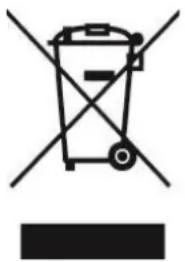
Correct Disposal of this product (Waste Electrical & Electronic Equipment)
(Applicable in the European Union and other European countries with separate collection systems)
The European Directive 2012/19/EU on Waste Facilities Electrical and Electronic (WEEE)
This marking shown on the productor its literature, indicates that it should not be disposed with other household wastes at the end of its working life. To prevent possible harm to the environment or human health from uncontrolled waste disposal, please separate this from other types of wastes and recycle it responsibly to promote the sustainable reuse of material resources.
Household users should contact either the retailer where they purchased this product or their local authority office, for details of where and how they can take this item for environmentally safe recycling.
Determinar as medidas
- THANK YOU FOR CHOOSING A LIVOO PRODUCT
- LIVOO, YOUR DAILY COMPANION TILL SOCIAL NETWORKS
- SAFETY INSTRUCTIONS
- USE OF THE DEVICE
- RECOMMENDATIONS
- STARTING UP THE SCALE
- SETTING UP THE BALANCE
- DETERMINE THE MEASURES
- CLEANING AND MAINTENANCE
- CORRECT DISPOSAL OF THIS PRODUCT (WASTE ELECTRICAL & ELECTRONIC EQUIPMENT)
- (APPLICABLE IN THE EUROPEAN UNION AND OTHER EUROPEAN COUNTRIES WITH SEPARATE COLLECTION SYSTEMS)
- DETERMINAR AS MEDIDAS
Brand : LIVOO
Model : DOM465
Category : Kitchen scale