F3 - Scooter Joyor - Free user manual and instructions
Find the device manual for free F3 Joyor in PDF.



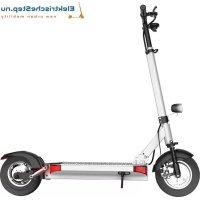
| Product Type | Foldable Electric Scooter |
| Brand | Joyor |
| Model | F3 |
| Dimensions (unfolded) | 980 x 540 x 1140 mm |
| Dimensions (folded) | 880 x 180 x 360 mm |
| Weight | 13 kg |
| Maximum Load | 120 kg |
| Material | Aluminum Alloy |
| Motor Power | 350 W (Brushless DC Motor) |
| Maximum Speed | 35 km/h |
| Range | 40 km |
| Battery | Lithium 36V / 13Ah |
| Charging Time | 6-7 hours |
| Tire Type | Front inflatable 8 inches, rear hard rubber 8 inches |
| Brake | Rear Drum Brake |
| Display | Multifunction Color LCD with USB Port |
| Lighting | Front and Rear LED |
| Suspension | Front Suspension |
| Cruise Control | Yes (cruise control) |
| Start | Non-zero start (push before accelerating) |
| Maximum Slope | 15° |
| Warranty | 24 months (non-electrical parts), 6 months battery |
Frequently Asked Questions - F3 Joyor
User questions about F3 Joyor
0 question about this device. Answer the ones you know or ask your own.
Ask a new question about this device
Download the instructions for your Scooter in PDF format for free! Find your manual F3 - Joyor and take your electronic device back in hand. On this page are published all the documents necessary for the use of your device. F3 by Joyor.
USER MANUAL F3 Joyor
natural_image
White electric scooter with black suspension bar and wheels (no text or symbols visible)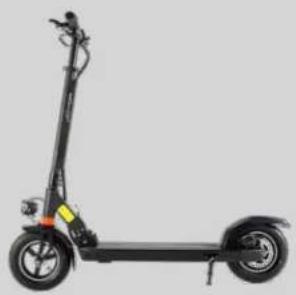
natural_image
Side view of a black electric scooter with two wheels and a handle (no visible text or symbols)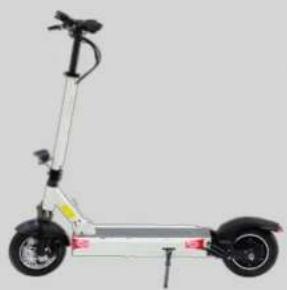
natural_image
Side view of a modern electric scooter with two wheels and a mounted antenna (no visible text or symbols)Joyor User Manual
CONTENTS

1 The Main Parts & Technical Specifications
1.1 The Main Parts Series A/F
1.2 Technical Specifications Series A/F
1.3 The Main Parts Series X
1.4 Technical Specifications Series X
1.5 The Main Parts Series Y
1.6 Technical Specifications Series Y
-
Important Safety Instructions
-
Operational Instructions
3.1 Folding & Unfolding
3.2 Display
3.3 Riding Operations Instructions
3.3.1 Before Riding
3.3.2 Riding
3.3.3 Braking
- Maintenance
4.1 Tires
4.2 Battery
4.3 Charger
- Warranty Policy
5.1 Warranty Scope
5.2 Warranty Limitations
5.3 Warranty Application Process
- Contact Us
Joyor User Manual
1 THE MAIN PARTS & TECHNICAL SPECIFICATIONS
1.1 The Main Parts Series A/F
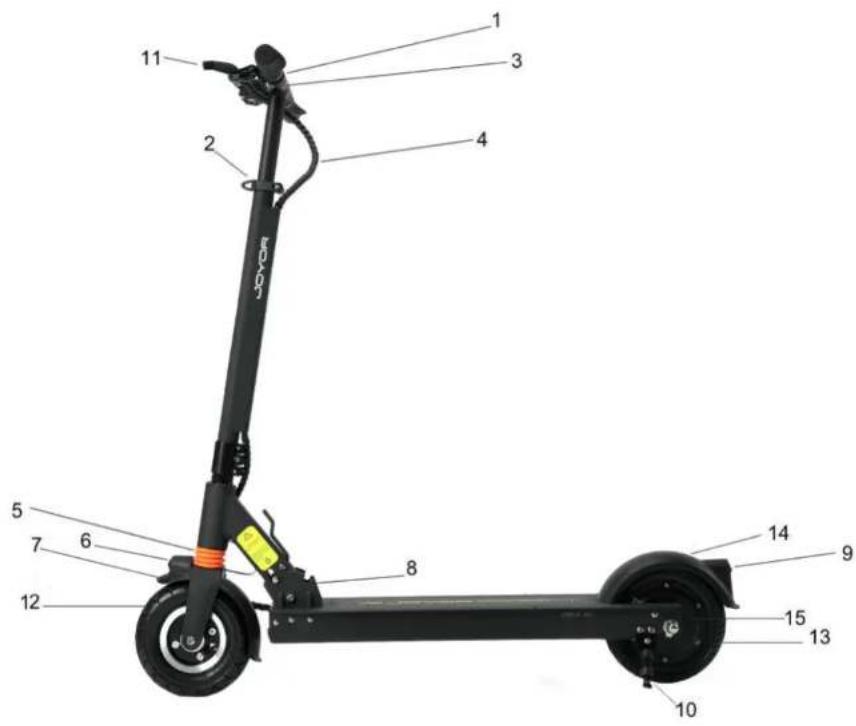

1) LCD display
2) Lever lock for handlebar height adjustment
3) Handlebar folding sleeve
4) Brake wire
5) Front suspension
6) Front light
7) Front mudguard
8) Folding system
9) Rear light
10) Parking stand
11) Brake handle
12) Front air tire
13) Rear solid tire
14) Rear mudguard
15) Rear drum brake
Joyor User Manual

1.2 Technical Specifications Series A/F
| Model | A1 | F3 | F5 | F5S |
| Motor Power | 250W | 350W | 350W | 500W |
| Motor Type | DC brushless motor | |||
| Maximum Load | 120kg | |||
| Material | Aluminum alloy | |||
| Speed | 25km/h | 35km/h | ||
| Dimensions When Unfolded | 980x540x1140mm | |||
| Dimensions When Folded | 880x180x360mm | |||
| Weight | 11.5kg | 13kg | 15.5kg | |
| Distance Range | 25km | 40km | 55-60km | 50km |
| Brake | Rear drum brake | |||
| Frame Width | 16cm | |||
| Battery Voltage | 24V | 36V | 36V | 48V |
| Battery Capacity | 8.0Ah | 13.0Ah | 18.0Ah | 13.0Ah |
| Battery Type | Environmental lithium battery | |||
| Input Voltage | AC100-240V | |||
| Output Current | 2A | |||
| Charging Time | 4-5h | 6-7h | 9-10h | 6-7h |
| Color | Black/White/Pink/Green | |||
| Gradeability | 15° | |||
| Tires Size | 8 inches | |||
| Tire Type | Front air tire, rear solid tire | |||
| Display | Multifunctional color LCD display with USB charging port | |||
| Cruise Control Mode | Available | |||
Joyor User Manual

1.1 The Main Parts Series X
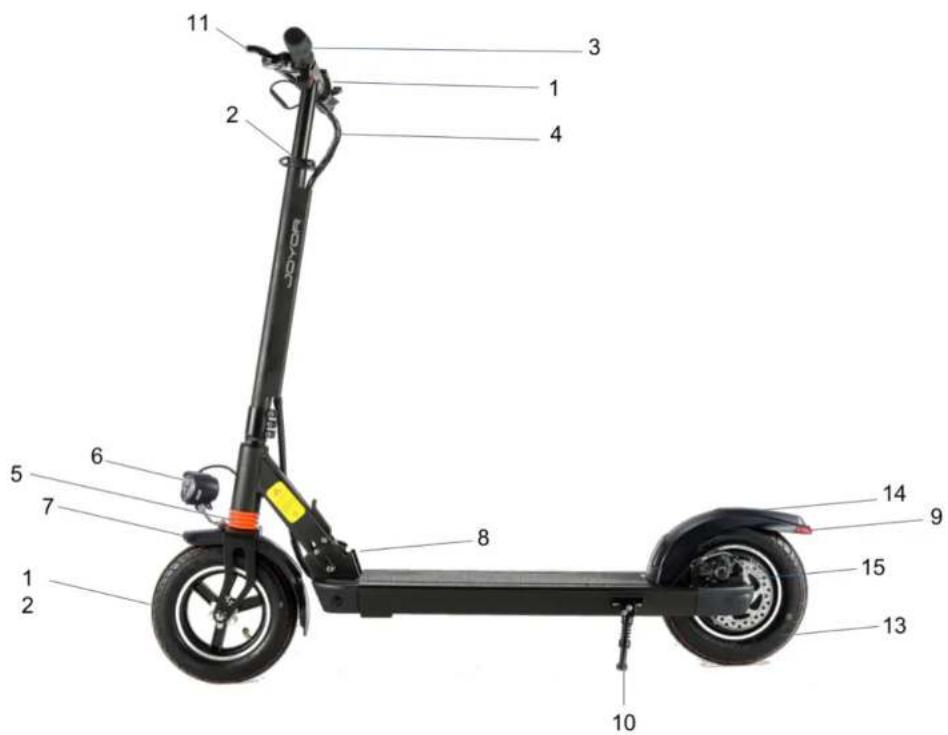
1) LCD display
2) Lever lock for handlebar height adjustment
3) Handlebar folding sleeve
4) Brake wire
5) Front suspension
6) Front light
7) Front mudguard
8) Folding system
9) Rear light
10) Parking stand
11) Brake handle
12) Front air tire
13) Rear air tire
14) Rear mudguard
15) Rear disk brake
Joyor User Manual

| Model | X1 | X5S |
| Motor Power | 400W | 500W |
| Motor Type | DC brushless motor | |
| Maximum Load | 120kg | |
| Material | Magnesium alloy | |
| Speed | 35km/h | |
| Dimensions When Unfolded | 1150x540x1180mm | |
| Dimensions When Folded | 1060x190x380mm | |
| Weight | 13kg | 15kg |
| Distance Range | 30-35km | 40-50km |
| Brake | Rear disk brake | |
| Frame Width | 19cm | |
| Battery Voltage | 36V | 48V |
| Battery Capacity | 10Ah | 13Ah |
| Battery Type | Environmental lithium battery | |
| Input Voltage | AC100-240V | |
| Output Current | 2A | |
| Charging Time | 5h | 7h |
| Color | Black/White | |
| Gradeability | 15° | |
| Tires Size | 10 inches | |
| Tire Type | Front and rear air tires | |
| Display | Multifunctional color LCD display with USB charging port | |
| Cruise Control Mode | Available | |
Joyor User Manual
1.3 The Main Parts Series Y
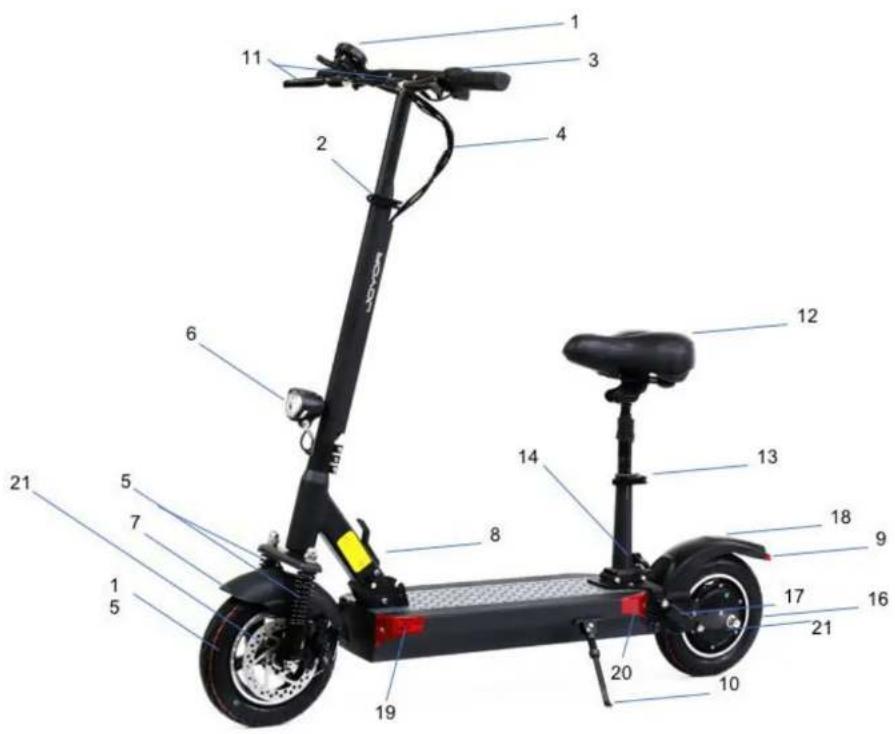

1) LCD display
2) Lever lock for handlebar height adjustment
3) Handlebar folding sleeve
4) Brake wire
5) Double front suspension
6) Front light
7) Front mudguard
8) Folding system
9) Rear light
10) Parking stand
11) Brake handle
12) Seat (optional)
13) Lever lock for the seat tube height adjustment
14) Seat folding system
15) Front air tire
16) Rear air tire
17) Double rear suspension
18) Rear mudguard
19) Front turning signal
20) Rear turning signal
21) Front and rear disk brake
Joyor User Manual

1.4 Technical Specifications Series Y
| Model | Y5S | Y10 |
| Motor Power | 500W | |
| Motor Type | DC brushless motor | |
| Maximum Load | 120kg | |
| Material | Aluminum alloy | |
| Speed | 35km/h | |
| Dimensions When Unfolded | 1200x570x1190mm | |
| Dimensions When Folded | 1150x210x430mm | |
| Weight | 20.5kg | 23kg |
| Distance Range | 40-50km | 90-100km |
| Brake | Front and rear disk brake | |
| Frame Width | 21cm | |
| Battery Voltage | 48V | |
| Battery Capacity | 13Ah | 26Ah |
| Battery Type | Environmental lithium battery | |
| Input Voltage | AC100-240V | |
| Output Current | 2A | |
| Charging Time | 5-8h | 10-15h |
| Color | Black/White | |
| Gradeability | 15° | |
| Tires Size | 10 inches | |
| Tire Type | Front and rear air tires | |
| Display | Multifunctional color LCD display with USB charging port | |
| Cruise Control Mode | Available | |
Joyor User Manual

2 IMPORTANT SAFETY INSTRUCTIONS
- Joyor electric scooter is a personal transport vehicle and it is designed for one person use only. Please do not carry a passenger on this electric scooter.
- Joyor electric scooter is designed for adult use only. Persons under the age of 16 should not use this vehicle.
- Please wear the safety helmet when riding the electric scooter.
- Do not ride the electric scooter on the unsafe surface or off road.
- Please practice on an open traffic-free space on gear level 1 before riding on the bicycle lane.
- Please during the riding operations always keep both hands on the handlebar and both feet on the standing board. Please do not jump on the standing board.
- Do not turn off the motor power while riding the scooter.
- Do not try to ride over a gap of more than 3 cm. This may cause injury to the rider or damage the vehicle.
- When riding on the rough or bumpy road, please slow down the electric scooter or stop riding the vehicle
- A user must adjust the height of the handlebar tube according to their height to ensure a safe, stable and comfortable ride.
- Do not ride Joyor electric scooter on slippery surfaces such as oil or ice.
- Do not use Joyor electric scooter in the weather conditions with the temperature below -5.
- Do not leave the product immersed in a water depth of more than 3 cm to avoid damage to the electrical parts of the vehicle.
- Avoid riding the Joyor electric scooter in adverse weather conditions like rain, snow or wind storm to prevent an accident. If riding in these conditions, never exceed the speed of 10 km/h.
• If the electric scooter is not used for a period of longer than 30 days, regularly charge it at least every 30 days. - When unfolding the vehicle, please press the folding system handle till it clicks and make sure that it is in place
Joyor User Manual
3 OPERATIONAL INSTRUCTIONS
3.1 Folding/Unfolding

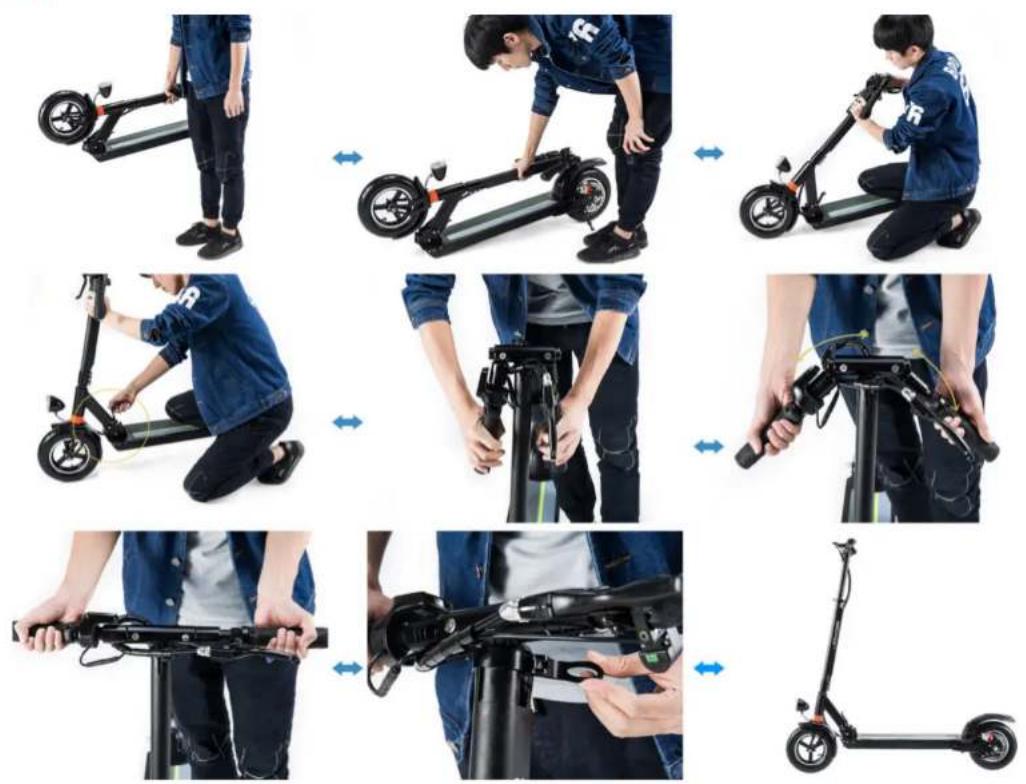
natural_image
Sequence of nine photos showing a person assembling or adjusting an electric scooter, demonstrating the motion and usage (no text or symbols visible)JOYOR
Joyor User Manual
3.2 Display

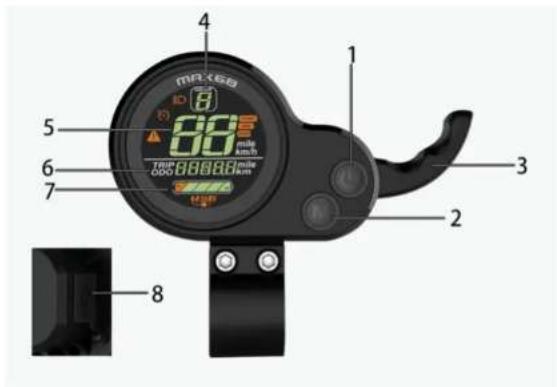
Model: 882
Working Voltage: DC24V/36Vcompatible, 36V/48Vcompatible
Communication protocol: UART
Wire Connections
- Red Wire (D+): Positive pole input
- Black Wire (GND): Negative pole
- Blue Wire (DS): Controller electric door lock
- Green Wire (RX): Communication reception
- White Wire (TX): Communication launch
1) On/Off Switch
2) Gear switch
3) Acceleration handle
4) Gear indicator
5) Speed indicator
6) Multi-indication area/mileage indicator
7) Battery charge level indicator
8) USB charging port
Joyor User Manual

The Buttons
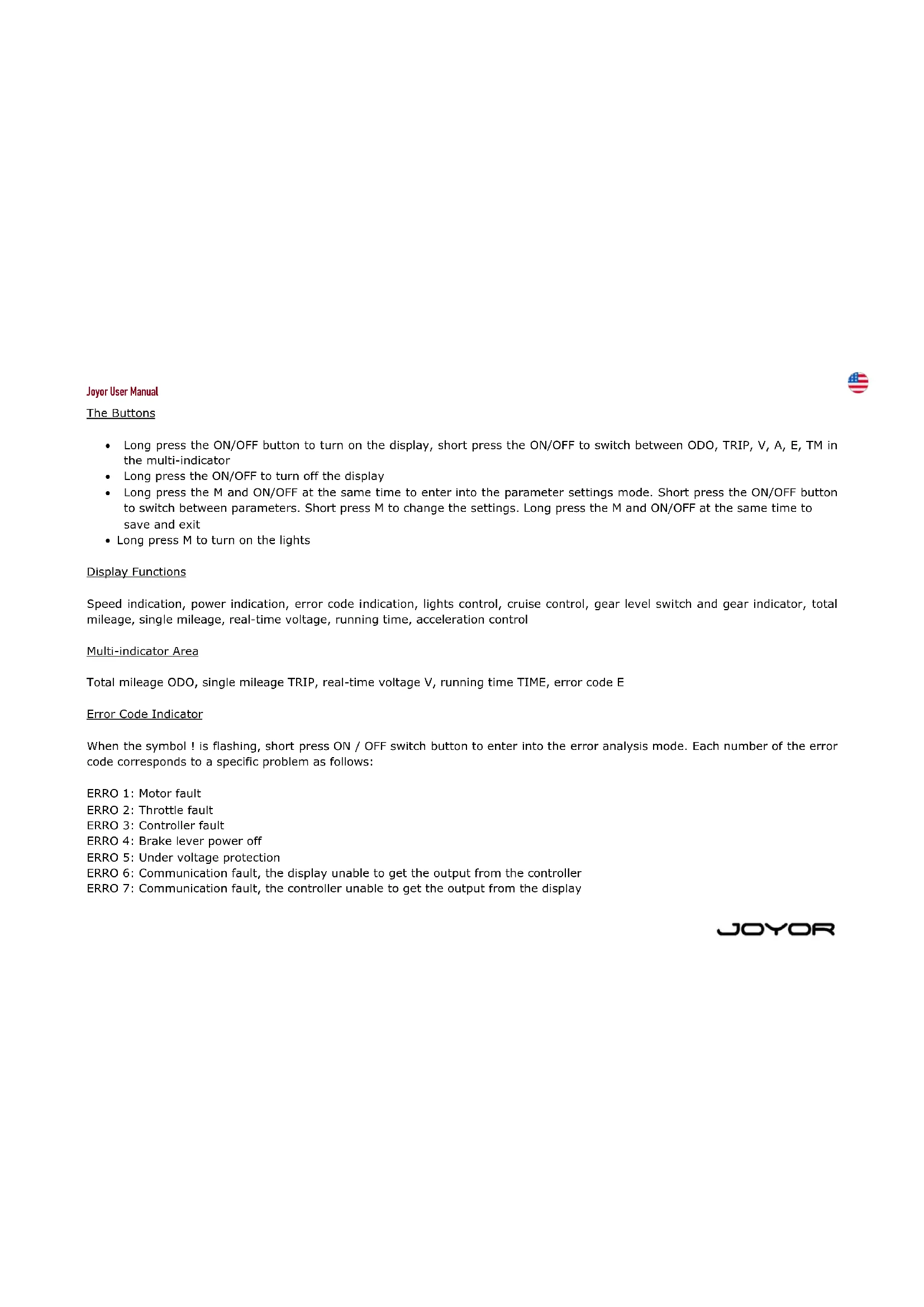
- Long press the ON/OFF button to turn on the display, short press the ON/OFF to switch between ODO, TRIP, V, A, E, TM in the multi-indicator
- Long press the ON/OFF to turn off the display
- Long press the M and ON/OFF at the same time to enter into the parameter settings mode. Short press the ON/OFF button to switch between parameters. Short press M to change the settings. Long press the M and ON/OFF at the same time to save and exit
- Long press M to turn on the lights
Display Functions
Speed indication, power indication, error code indication, lights control, cruise control, gear level switch and gear indicator, total mileage, single mileage, real-time voltage, running time, acceleration control
Multi-indicator Area
Total mileage ODO, single mileage TRIP, real-time voltage V, running time TIME, error code E
Error Code Indicator
When the symbol ! is flashing, short press ON / OFF switch button to enter into the error analysis mode. Each number of the error code corresponds to a specific problem as follows:
ERRO 1: Motor fault
ERRO 2: Throttle fault
ERRO 3: Controller fault
ERRO 4: Brake lever power off
ERRO 5: Under voltage protection
ERRO 6: Communication fault, the display unable to get the output from the controller
ERRO 7: Communication fault, the controller unable to get the output from the display
JOYOR
Joyor User Manual

Speed Indicator
Unit: MPH, KM/H
Speed signal comes from the motor via controller to the display.
The indicated speed depends on the motor signal and the wheel diameter.
Gear Switch
Short press the MODE button to switch the gear: 1 - slow, 2 - medium, 3 - fast. The higher the gear, the faster the speed. Gear 0 means the motor is not powered.
Lights Control
Long press the MODE key to switch on/off the front and rear lights. Rear lights are also lit automatically when braking.
Cruise Control Function
When riding the scooter, keep the acceleration handle pressed with the same pressure for 5 seconds to activate the cruise control mode. Use the brake handle to deactivate the cruise control mode.
Start mode selection
For safety purposes all Joyor models except Mbike model are set by default to non-zero start mode which means the motor will not get started until you start kick the scooter first so that the speed is above zero:
NON - Non-zero start mode
ZERO - zero start mode
JOYOR
Joyor User Manual

USB Charging Indicator
The display is equipped with a USB port for you to be able to charge your electronic devices. When the device is connected, the USB indicator is lit. In case of problem the indicator starts to flash, and a safety mode will be automatically activated.
Parameter Settings
Long press the M and ON/OFF at the same time to enter into the parameter settings mode. Short press the ON/OFF button to switch between parameters. Short press M to change the settings. Long press the M and ON/OFF at the same time to save and exit
P01: rear light brightness: 1 - the darkest, 3 - the lightest;
P02: mileage unit, 0: km; 1: mile;
P04: sleep mode time: 0 - no sleep mode; 1-60 - sleep mode, minutes;
P06: wheel diameter: unit - inch; precision: 0.1;
P07: number of measuring magnets: range 1-100;
P09: zero start, non-zero start setting: 0 - zero start; 1 - nonzero start;
P12: starting torque: range 0-5, 0 - the weakest, 5 - strongest;
P15: motor drive signal percentage settings: (connected to PO8 speed limit function) full speed is set to 100
P16: cruise control function: 1 - activated, 0 - deactivated
P17: light settings: the lights are not lit automatically when the vehicle is on, 0 - the lights are lit automatically when the vehicle is on
P99: settings reset (when in P99 settings, press and hold the MODE button for 5-6 seconds to reset all the parameters back to the initial settings)
Joyor User Manual
3 OPERATIONAL INSTRUCTIONS
3.3 Riding Operations Instructions
3.3.1 Before Riding
- Choose a suitable venue for riding.
- Unfold the electric scooter according to the instructions.
- Adjust the height of the handlebar tube according to your height.
3.3.2 Riding
- Press the power button to turn on the power. The speed is set by default to gear level 1.
- For safety purposes, Joyor electric scooter has a safe start design which means the motor can start only when the speed of the vehicle is above 0. It prevents motor start when the acceleration handle is pressed by mistake. To start the riding operations, put one foot on the standing board and the other foot on the ground and kick scoot it like a classic kick scooter. When the scooter is in motion and its speed is above 0, smoothly use the acceleration handle to start the motor. Once the motor starts, put the other foot on the standing board and continue riding.
- When riding, adjust the gear level from 1 to 3, use lights and horn according to the road conditions and according to the situation.
- Be aware of the cruise control function. Cruise control function is activated when the acceleration handle is pressed with the same pressure for 3 seconds.
- Be aware of the possibility of unpredictable sudden obstacles on your way and control the speed level.
3.3.3 Braking
- Use the rear brakes handle for braking under normal circumstances. Use front brake handle (for models series Y and M) for braking in emergency situations.
- The greater pressure you put, the greater braking force will be applied. Be aware that hard braking may result in an accident due to slipping of the wheels, lost of balance and fall of the vehicle. Hard braking might also cause damage to the tire.

Joyor User Manual
4 MAINTENANCE

4.1 Tires
- Joyor electric scooter uses rubber elastic tires. When the tires are worn out or have a puncture, they need to be replaced timely.
- Contact the official distributor to replace the original tires.
- Inspect your scooter and its tires every month, check if the screws are tightened enough. If they are loose, tighten them.
4.3 Battery
- Joyor electric scooter is equipped with a lithium polymer battery. The average lifespan of the battery is 1000 cycles. Under normal use and maintenance, the battery lifespan can generally reach more than 1000 cycles.
- Before using the scooter for the first time, please charge the battery to the full charge.
- Avoid totally depleting your scooter's battery before charging. Always make sure it is minimum 10 % charged. For satisfactory vehicle performance, the battery has to be charged minimum 50 %
- Do not leave your electric scooter with a significantly discharged battery for a few hours. Charge it promptly.
- When storing the electric scooter for a long period, make sure the battery is at least 40-50 % charged. It is advisable to charge your scooter minimum once per 30 days.
• Always use only the original Joyor charger that corresponds to the model of the scooter. - Do not leave your electric scooter in the cold temperature below 0 or under the direct sun. Keep the battery dry. Negative environmental conditions can damage the battery.
- Polymer lithium batteries have to be treated with extreme caution. Unappropriated charging, damage or overheating can result in a fire. Do not leave your electric scooter to charge without supervision. Do not leave the electric scooter to charge overnight. Always supervise the electric scooter while it is charging and avoid battery over-charge. Do not use, charge or leave a damaged battery unattended and follow the disposal protocols immediately.
4.4 Charger
The dedicated charger provided by Joyor has a charging protection timing function.
Joyor User Manual

Charging instructions
- Open the charging port cover on the electric scooter and insert the charger output connector into the charging port.
- Insert the charger input power plug into the power socket (AC110V-220V)
- Charger light is red to indicate that charging is in progress; when the charger light turns green, it indicates that the battery is fully charged.
- When charging the battery, place it in a dry, ventilated environment.
5 WARRANTY POLICY
5.1 Warranty Scope
- This limited warranty covers any defects in material or workmanship in the new Joyor devices accompanied by this limited warranty statement for a period of 24 months after the first retail purchase for the non-electric parts and for the electric scooter and for a period of 12 months for the battery, under normal installation, use, service and maintenance
- Only consumers purchasing this device from an authorized Joyor retailer or reseller may obtain coverage under this limited warranty.
- This warranty extends to the original purchaser only and is non-transferable.
5.2 Warranty Limitations
This limited warranty does not cover any problem that is caused by:
- Commercial use, accident, abuse, neglect, shock, heat or humidity beyond product specifications, improper installation, operation, maintenance or modification
• Any misuse contrary to the instructions in the User Manual
• Malfunctions caused by other equipment - This limited warranty is void if a product is returned with removed, damaged or tampered labels of any alterations (including the unauthorized removal of any component or external cover)
- Joyor does not cover the cost of international warranty shipping at any time
JOYOR
Joyor User Manual

5.3 Warranty Application Process
- Joyor will not provide any warranty coverage unless your claim it in compliance with all terms of this limited warranty statement and you follow the proper return procedure.
• To request warranty service, you may contact us or contact an authorized Joyor distributor.
JOYOR
Joyor User Manual
6 CONTACT US
Joyor E-Moving S.L.
Address
Please contact the official Joyor distributor where you purchased your electric scooter
Website
https://www.joyorscooter.com


JOYOR
https://www.joyorscooter.com


JOYOR
Joyor Mode d'emploi
CONTENU


https://www.joyorscooter.com

JOYOR