W10791229 - Oven MAYTAG - Free user manual and instructions
Find the device manual for free W10791229 MAYTAG in PDF.


| Product Type | Built-in Oven |
| Brand | Maytag |
| Model | W10791229 |
| Category | Oven |
| Dimensions (27" Model) | Width: 68.4 cm, Height: ~75.4 cm, Depth: 63.5 cm |
| Dimensions (30" Model) | Width: 76 cm, Height: ~75.4 cm, Depth: 63.5 cm |
| Weight (Single 27") | 59 kg |
| Weight (Single 30") | 70 kg |
| Weight (Double 27") | 114 kg |
| Weight (Double 30") | 131 kg |
| Power Supply | Electric (240 V, confirm according to installation) |
| Main Functions | Broil, traditional cooking, clock, programming |
| Safety | Door hinge locks, locking, safety instructions |
| Maintenance and Cleaning | Refer to the Use and Care Guide |
| Supplied Parts | Screws, legs, spacer shims, deflector support, lower vent |
| Repairability | Assistance via the guide or the dealer |
| Installation | Built-in, requires at least 2 people, comply with opening dimensions |
Frequently Asked Questions - W10791229 MAYTAG
User questions about W10791229 MAYTAG
0 question about this device. Answer the ones you know or ask your own.
Ask a new question about this device
Download the instructions for your Oven in PDF format for free! Find your manual W10791229 - MAYTAG and take your electronic device back in hand. On this page are published all the documents necessary for the use of your device. W10791229 by MAYTAG.
USER MANUAL W10791229 MAYTAG
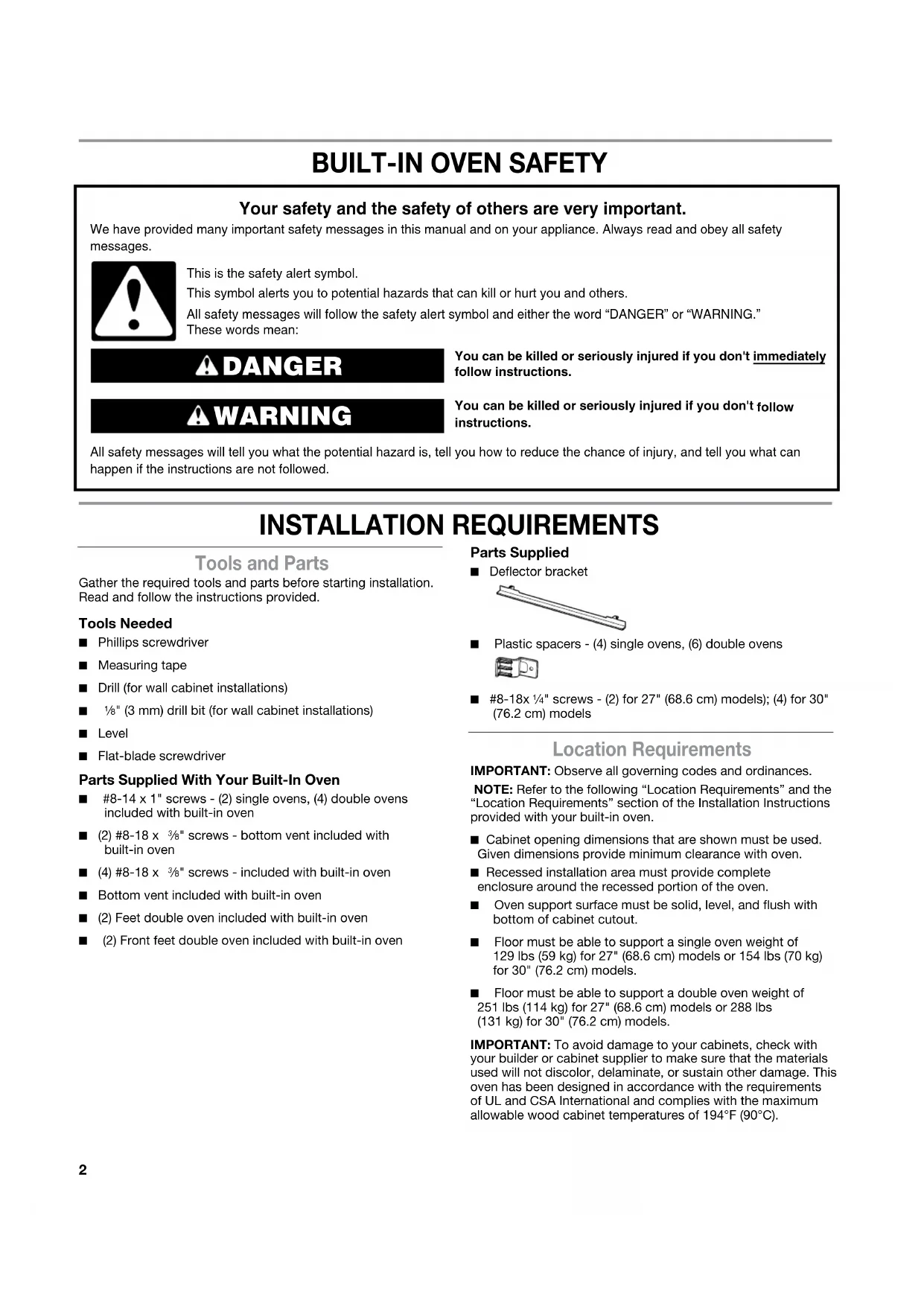
INSTALLATION INSTRUCTIONS 27" (68.6 CM) AND 30" (76.2 CM) ELECTRIC SINGLE AND DOUBLE BUILT-IN OVEN FLUSH INSTALLATION KIT
INSTRUCTIONS D'INSTALLATION D'INSTALLATION ENSEMBLE D'INSTALLATION EN AFFLEUREMENT POUR FOUR ÉLECTRIQUE ENCASTRÉ SIMPLE ET DOUBLE DE 27" (68,6 CM) ET 30" (76,2 CM)
| Flush Installation Kit Part NumberEnsemble d'installation enaffleurement référence | Size and ColorDimensions et couleur | UL Listed for Model NumbersHomologation UL pour lesmodèles numéro |
| W10791232 27" (68.6 cm), black27" (66,6 cm), noir | black | JJW2427DB, JJW2827DB |
| W10791228 27" (68.6 cm), stainless steel27" (68,6 cm), acier inoxydable | black | JJW2427DS, JJW2827DS,JJW2727DS |
| W10791233 30" (76.2 cm), black30" (76,2 cm), noir | black | JJW2430DB, JJW2830DB |
| W10791229 30" (76.2 cm), stainless steel30" (76,2 cm), acier inoxydable | black | JJW2430DS, JJW2430DP,JJW2830DS, JJW2830DP,JJW2730DS, JJW2430DS |
| W10837578 30" (76.2 cm), black30" (76,2 cm), noir | black | JJW3430DB, JJW3830DB |
| W10837579 30" (76.2 cm), stainless steel30" (76,2 cm), acier inoxydable | black | JJW3430DS, JJW3430DP,JJW3830DS, JJW3830DP |
Table of Contents/Table des matières
| BUILT-IN OVEN SAFETY | 2 |
| INSTALLATION REQUIREMENTS | 2 |
| Tools and Parts | 2 |
| Location Requirements | 2 |
| INSTALLATION INSTRUCTIONS | 5 |
| Prepare Built-In Oven | 5 |
| Remove Oven Door(s) | 5 |
| Replace Oven Door(s) | 6 |
| Positioning Oven Feet | 7 |
| Replace Plastic Spacers | 8 |
| Install Oven | 9 |
| Install Deflector Kit Bracket | 9 |
| Complete Installation | 10 |
BUILT-IN OVEN SAFETY
Your safety and the safety of others are very important.
We have provided many important safety messages in this manual and on your appliance. Always read and obey all safety messages.

This is the safety alert symbol.
This symbol alerts you to potential hazards that can kill or hurt you and others.
All safety messages will follow the safety alert symbol and either the word "DANGER" or "WARNING."
These words mean:
DANGER
You can be killed or seriously injured if you don't immediately follow instructions.
WARNING
You can be killed or seriously injured if you don't follow instructions.
All safety messages will tell you what the potential hazard is, tell you how to reduce the chance of injury, and tell you what can happen if the instructions are not followed.
INSTALLATION REQUIREMENTS
Tools and Parts
Gather the required tools and parts before starting installation. Read and follow the instructions provided.
Tools Needed
■ Phillips screwdriver
■ Measuring tape
■ Drill (for wall cabinet installations)
■ 1/8" (3 mm) drill bit (for wall cabinet installations)
Level
■ Flat-blade screwdriver
Parts Supplied With Your Built-In Oven
■ #8-14 x 1" screws - (2) single ovens, (4) double ovens included with built-in oven
■ (2) #8-18 x 38 " screws - bottom vent included with built-in oven
■ (4) #8-18 x 38 " screws - included with built-in oven
■ Bottom vent included with built-in oven
■ (2) Feet double oven included with built-in oven
■ (2) Front feet double oven included with built-in oven
Parts Supplied
■ Deflector bracket
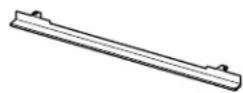
■ Plastic spacers - (4) single ovens, (6) double ovens

■ #8-18x 14 " screws - (2) for 27" (68.6 cm) models); (4) for 30" (76.2 cm) models
Location Requirements
IMPORTANT: Observe all governing codes and ordinances.
NOTE: Refer to the following "Location Requirements" and the "Location Requirements" section of the Installation Instructions provided with your built-in oven.
■ Cabinet opening dimensions that are shown must be used. Given dimensions provide minimum clearance with oven.
■ Recessed installation area must provide complete enclosure around the recessed portion of the oven.
■ Oven support surface must be solid, level, and flush with bottom of cabinet cutout.
■ Floor must be able to support a single oven weight of 129 lbs (59 kg) for 27" (68.6 cm) models or 154 lbs (70 kg) for 30" (76.2 cm) models.
■ Floor must be able to support a double oven weight of 251 lbs (114 kg) for 27" (68.6 cm) models or 288 lbs (131 kg) for 30" (76.2 cm) models.
IMPORTANT: To avoid damage to your cabinets, check with your builder or cabinet supplier to make sure that the materials used will not discolor, delaminate, or sustain other damage. This oven has been designed in accordance with the requirements of UL and CSA International and complies with the maximum allowable wood cabinet temperatures of 194°F (90°C).
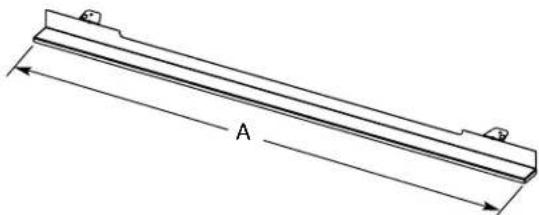
Deflector Bracket Dimensions
natural_image
Technical line drawing of a metal beam with labeled dimension A (no text or symbols beyond label)27" (68.6 cm) Models
A.26 15/16" (68.4 cm) overall width
A. 29 ^15/16 (76.0 cm) overall width
30" (76.2 cm) Models
Cabinet Dimensions - Single Ovens, Flush Installations
A 25" (63.5 cm) minimum cutout depth is required.
These dimensions will result in a 14 " (6 mm) reveal on the top, a 14 " (6 mm) reveal on the sides, and a 18 " (3 mm) reveal on the bottom of the wall oven.
The front face of the cleats and platform will be visible and should be treated as a finished surface.
Single Ovens Installed in Cabinet - Flush Installation
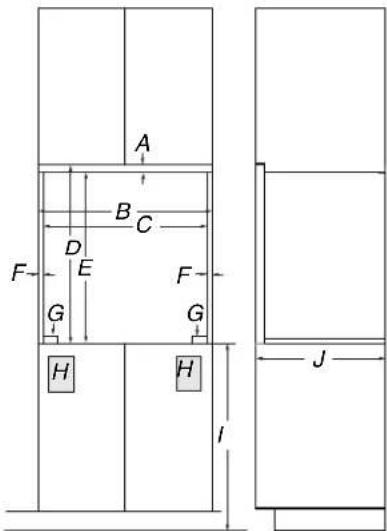
Front View
Side View
27" (68.6 cm) Models
A. 3/4" (19 mm) top cleat*
B.27 1/4" (69.2 cm) minimum width of flush inset cutout
C.25 78 " (65.7 cm) minimum width of opening
D. 30 7/16" (77.3 cm) minimum height of flush inset cutout
E. 29 ^11/16 " (75.4 cm) recommended cutout height
F. 11/16" (17 mm) side cleat*
G. 12 " x 2" (13 mm x 5.1cm) spacer the entire depth of the cutout*
H. Recommended junction box location
- 4 18 " - 32" (11.7 - 81.3 cm) bottom of cutout to floor
J. 25" (63.5 cm) minimum depth of cutout
30" (76.2 cm) Models
A. 3/4" (19 mm) top cleat*
B.30 1/4" (76.8 cm) minimum width of flush inset cutout
C.28 18 " (73.3 cm) minimum width of opening
D. 30 7/16" (77.3 cm) minimum height of flush inset cutout
E. 29 "1/16" (75.4 cm) recommended cutout height
F. ^11/_16 " (17 mm) side cleat*
G. 12 " x 2" (13 mm x 5.1cm) spacer the entire depth of the cutout*
H. Recommended junction box location
- 4 38 " - 32" (11.7 - 81.3 cm) bottom of cutout to floor
J. 25" (63.5 cm) minimum depth of cutout
* Cleats and spacers must be recessed 1 ^3/8 " (3.5 cm) from the front of the cabinet.
Single Ovens Undercounter - Flush Installations (without cooktop installed above)
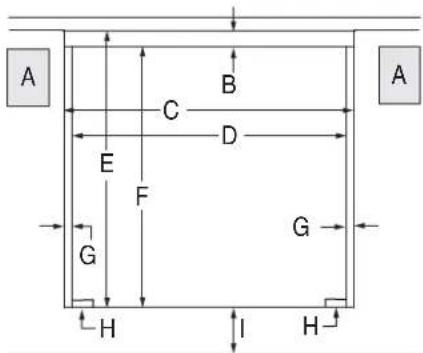
Front View
27" (68.6 cm) Models
A. Recommended junction box location
B. 3/4" (19 mm) top cleat"
C.27 1/4" (69.2 cm) minimum width of flush inset cutout
D. 25 ^7/8 " (65.7 cm) minimum width of opening
E. 30 116 " (77.3 cm) minimum height of flush inset cutout
F. 29 ^11 /16" (75.4 cm) recommended cutout height
G. ^11 / _16 " (17 mm) side cleat*
H. 12 " x 2" (13 mm x 5.1 cm) spacer the entire depth of the cabinet*
I. 4^1/_16 " (10.3 cm) bottom of cutout to floor
30" (76.2 cm) Models
A. Recommended junction box location
B. 3/4" (19 mm) top cleat*
C. 30 1/4" (76.8 cm) minimum width of flush inset cutout
D. 28 18 " (73.3 cm) minimum width of opening
E. 30 7/16" (77.3 cm) minimum height of flush inset cutout
F. 29 ^11 /16" (75.4 cm) recommended cutout height
G. 11/16" (17 mm) side cleat*
H. 12 " x 2" (13 mm x 5.1 cm) spacer the entire depth of the cabinet*
- 4 116 " (10.3 cm) bottom of cutout to floor
* Cleats and spacers must be recessed 1 ^3/8 " (3.5 cm) from the front of the cabinet.
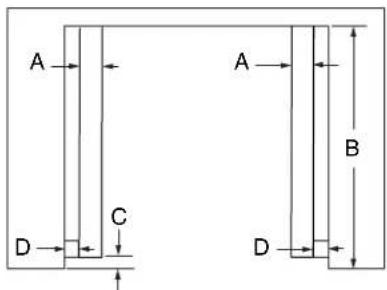
Top View
27" (68.6 cm) Models
A. 12 " x 2" (13 mm x 5.1 cm) spacer the entire depth of the cutout*
B. 25" (63.5 cm) depth of cutout
C.1 38 " (3.5 cm) recess from front of cabinet
D. 11/16" (17 mm) side cleat*
30" (76.2 cm) Models
A. 12 " x 2" (13 mm x 5.1 cm) spacer the entire depth of the cutout*
B. 25" (63.5 cm) depth of cutout
C. 1 ^3/8 " (3.5 cm) recess from front of cabinet
D. 11/16" (17 mm) side cleat*
* Cleats and spacers must be recessed 1 ^3/8 " (3.5 cm) from the front of the cabinet.
Cabinet Dimensions - Double Ovens, Flush Installations
A 25" (63.5 cm) minimum cutout depth is required.
These dimensions will result in a 14 " (6 mm) reveal on the top, a 14 " (6 mm) reveal on the sides, and a 18 " (3 mm) reveal on the bottom of the wall oven.
The front face of the cleats and platform will be visible and should be treated as a finished surface.
Double Ovens Installed in Cabinet - Flush Installations
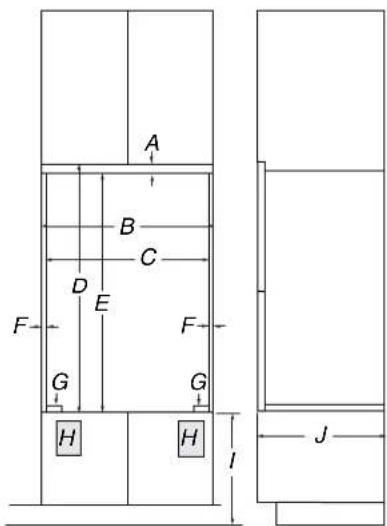
Front View
Side View
27" (68.6 cm) Models
A. 9/16" (14 mm) top cleat*
B.27 1/4" (69.2 cm) minimum width of flush inset cutout
C. 25 7/8" (65.7 cm) minimum width of opening
D. 53 ^3/16 " (135.1 cm) minimum height of flush inset cutout
E. 52 ^5/8 " (133.6 cm) recommended cutout height
F. 11/16" (17 mm) side cleat*
G. 12 " x 2" (1.3 cm x 5.1 cm) spacer the entire depth of the cutout*
H. Recommended junction box location
- 4 5/8" - 14 3/4" (11.7 - 37.5 cm) bottom of cutout to floor
J. 25" (63.5 cm) minimum depth of cutout
30" (76.2 cm) Models
A. 9/16" (14 mm) top cleat*
B.30 1/4" (76.8 cm) minimum width of flush inset cutout
C.28 18 " (73.3 cm) minimum width of opening
D. 53 316 " (135.1 cm) minimum height of flush inset cutout
E. 52 58 " (133.6 cm) recommended cutout height
F. 11/16" (17 mm) side cleat*
G. 12 " x 2" (1.3 cm x 5.1 cm) spacer the entire depth of the cutout*
H. Recommended junction box location
- 4 5/8" - 14 3/4" (11.7 - 37.5 cm) bottom of cutout to floor
J. 25" (63.5 cm) minimum depth of cutout
* Cleats and spacers must be recessed 1 ^3/8 " (3.5 cm) from the front of the cabinet.
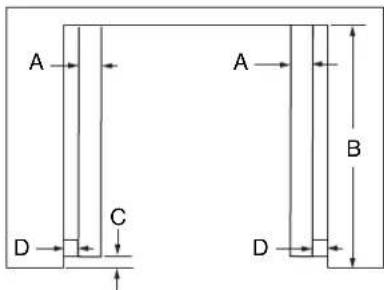
Top View
27" (68.6 cm) Models
A. 12 " x 2" (13 mm x 5.1 cm) spacer the entire depth of the cutout*
B. 25" (63.5 cm) depth of cutout
C. 1 ^3/8 " (3.5 cm) recess from front of cabinet
D. 11/16" (17 mm) side cleat*
30" (76.2 cm) Models
A. 12 " x 2" (13 mm x 5.1 cm) spacer the entire depth of the cutout*
B. 25" (63.5 cm) depth of cutout
C.1 38 " (3.5 cm) recess from front of cabinet
D. 11/16" (17 mm) side cleat*
* Cleats and spacers must be recessed 1 ^3/8 " (3.5 cm) from the front of the cabinet.
INSTALLATION INSTRUCTIONS
Prepare Built-In Oven
NOTES:
■ Use these Installation Instructions in conjunction with the Installation Instructions provided with your built-in oven.
■ Refer and adhere to the "Electrical Requirements" section and complete the instructions in the "Make Electrical Connection" section of the Installation Instructions provided with your built-in oven.
1. Decide on the final location for the oven. Avoid drilling or cutting into house wiring during installation.
WARNING
Excessive Weight Hazard
Use two or more people to move and install oven.
Failure to do so can result in back or other injury.
- To avoid floor damage, set the oven onto cardboard prior to installation. Do not use handle or any portion of the front frame for lifting.
- Remove the shipping materials and tape from the oven. Remember to keep the corner posts and other materials that may be needed for installation.
- Remove the hardware package from inside the bag containing literature.
- Move oven and cardboard close to the oven's final location.
Remove Oven Door(s)
IMPORTANT: Use 2 hands to remove oven door(s).
- Prior to removing the oven door, prepare a surface where you will place it. This surface should be flat and covered with a soft blanket or use the corner posts from your packaging material.
- Fully open the oven door.
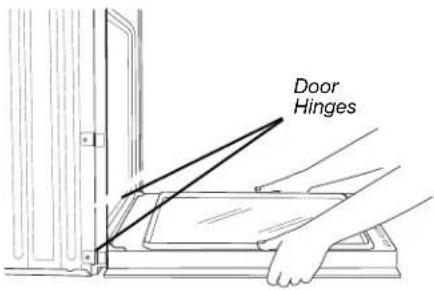
- Locate the oven door hinge locks in both corners of the oven door and rotate the hinge locks toward the oven door to the unlocked position. If the door hinge lock is not rotated fully (see illustration B), the door will not remove properly.
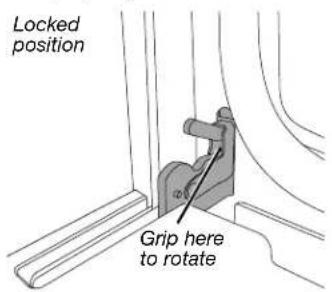
A. Oven door hinge lock in locked position
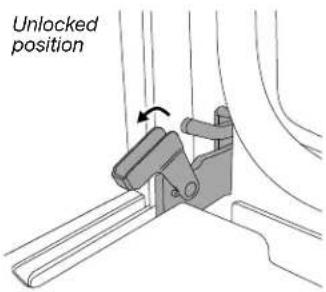
B. Oven door hinge lock in partially unlocked position
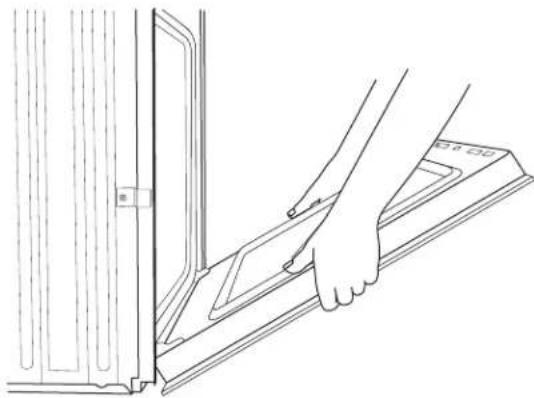
- Gently start to close the door. The door will stop at a partially closed position.
natural_image
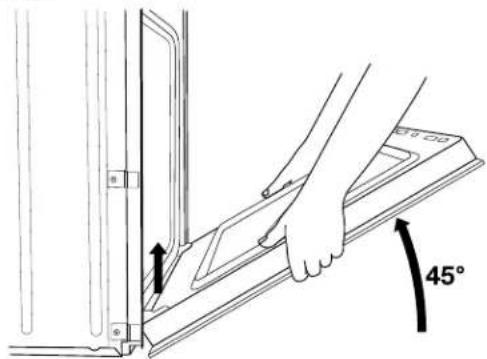
Line drawing of a hand pressing down on a metal bracket (no text or symbols)- Using 2 hands, grasp the edges of the oven door. Close the oven door slightly past the stop position to take the weight off of the door hinges, and then pull the oven door up.
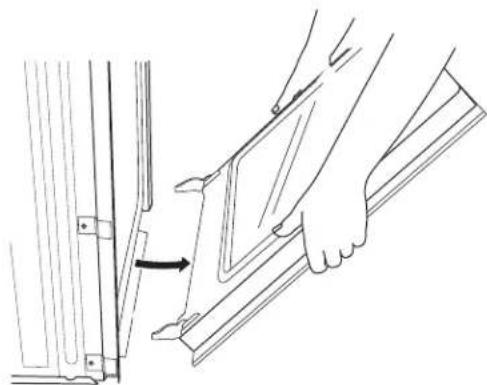
- Pull the oven door toward you and then remove. You may need to gently shift door from side to side as you pull.
natural_image
Line drawing of a hand holding a panel or bracket, with an arrow indicating direction (no text or symbols present)-
Set the oven door aside on the prepared covered work surface with the oven door resting on its handle.
-
To continue with the oven installation, go to the "Positioning Oven Feet" section.
Replace Oven Door(s)
-
Using two hands, grasp side edges of door at the midpoint. Face the oven cavity.
-
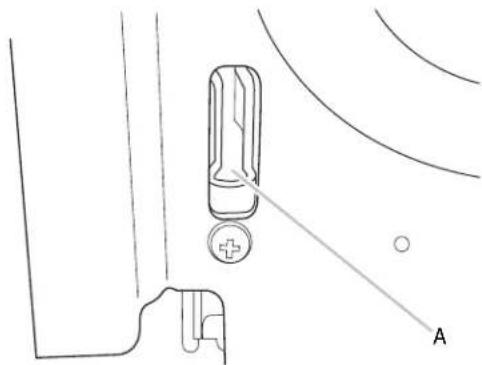
Locate the slots on each side of the oven front frame for the door hinge locks.
natural_image
Technical line drawing of a mechanical component with labeled point A (no text or symbols beyond label)A. Slot in the oven cavity for door hinge lock
- Using 2 hands, grasp the edges of the oven door. At a 45^ angle, insert the hinges at the same time and push the oven door into the oven cavity slot to replace. You may need to gently shift the door from side to side as you push.
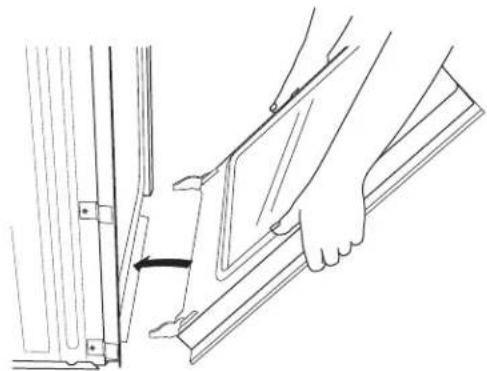
natural_image
Line drawing of a hand inserting a component into a wall, showing a curved arrow indicating rotation (no text or symbols)- Make sure the door hinge notch is engaged on the bottom of the oven cavity slot.
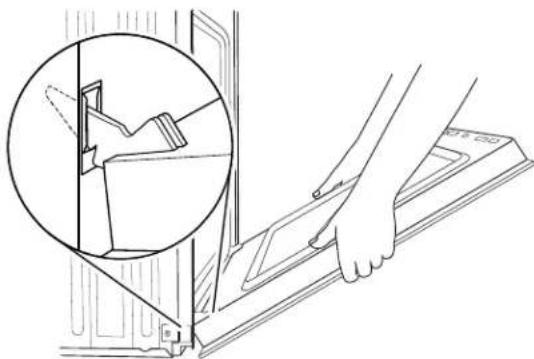
natural_image
Line drawing of a hand using a tool to adjust or install a component, with an inset showing a close-up of the component (no text or symbols present)IMPORTANT: Do not close the door at this step or damage may occur to the door hinge.
- Lower the oven door to the fully open position. If the oven door does not open to a full 90°, repeat steps 1 through 3.
- Locate the oven door hinge locks in the corners of the oven door, and rotate the hinge locks toward the oven cavity to the locked position.
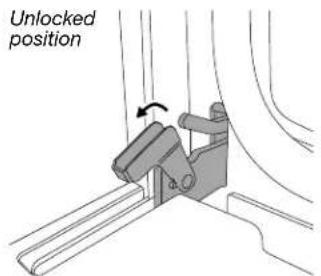
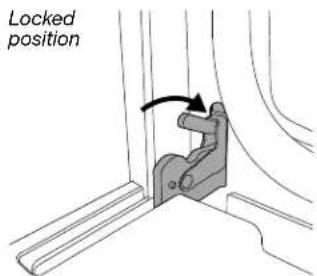
- After the door hinges have been locked, gently swing the door upward to close. The door should not be forced closed.
- When the hinges are properly installed and the door is closed, there should be an even gap between the door and the control panel. If one side of the oven door is lower than the other, the hinge on that side is not properly installed.
See "Remove Oven Door" and "Replace Oven Door."
Positioning Oven Feet
Single Ovens
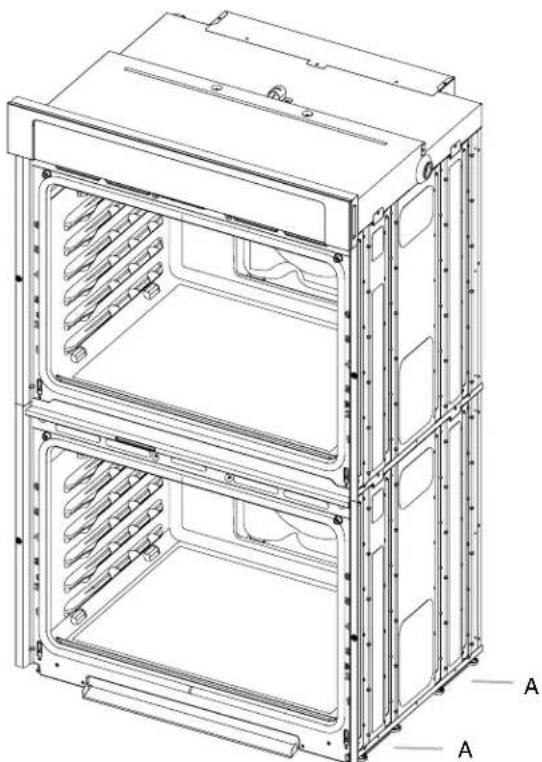
The positioning of the oven feet allow a single oven to be installed in a recommended cutout height of 28½" (72.4 cm). Refer and adhere to the "Make Electrical Connection" section in the Installation Instructions provided with your built-in oven.
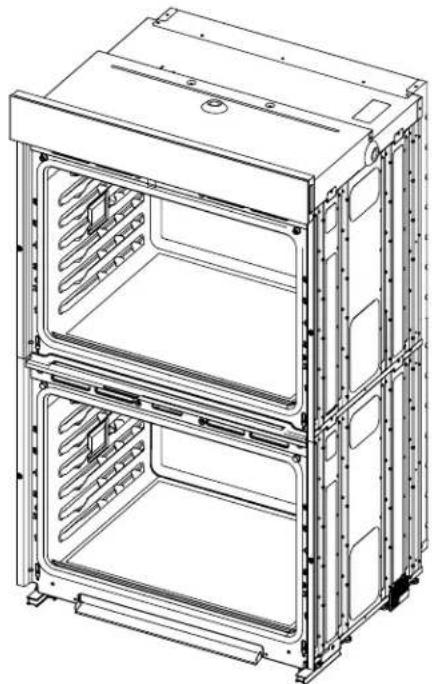
Double Ovens
The oven feet allow a double oven to be installed in a recommended cutout height of 51 ^7/16 " (130.6 cm).
NOTE: Do not remove the spacers.
natural_image
Technical line drawing of a multi-tiered stainless steel oven or rack unit with labeled components (A), showing internal compartments and mounting brackets (no text or symbols beyond labels)A. Spacers
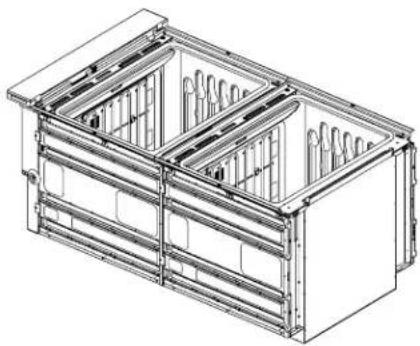
- Using 2 or more people, place the oven on its back on a covered surface.
natural_image
Technical line drawing of a multi-level industrial container or storage unit (no text or symbols visible)- Install a foot on the left rear spacer using a #8-18 x 38 " screw.
NOTE: Position the foot so the long side of the foot is facing toward the top of the oven.
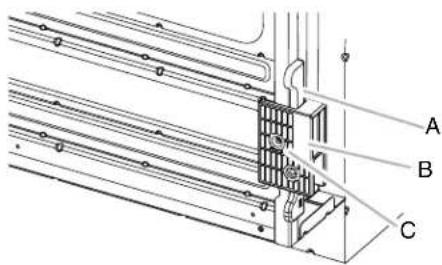
A. Spacer
B. Foot
C. #8-18 x 3/8" screw
- In the same manner, install a foot on the right rear of the oven.
- Install a front foot on the left front spacer using a #8-18 x 3/8" screw.
NOTE: Position the foot so the long side of the foot is facing toward the inside of the oven.
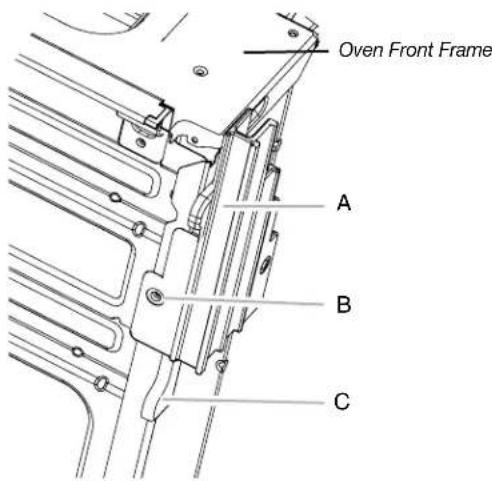
A. Front foot
B. #8-18 x 3/8" screw
C. Spacer
- In the same manner, install a front foot on the right front of the oven.
- Using 2 or more people, place the oven in its upright position.
natural_image
Technical line drawing of a multi-tiered storage cabinet with visible internal compartments and mounting brackets (no text or symbols)- Go to the "Make Electrical Connection" section in the Installation Instructions provided with your built-in oven.
Replace Plastic Spacers
Replace Plastic Spacers on Single Ovens
- Remove the 2 screws, 1 in each spacer, attaching the 2 plastic spacers (A) to the right side of the oven.
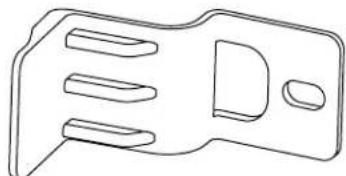
- Using the 2 screws removed, install 2 new plastic spacers (B) provided with this kit.
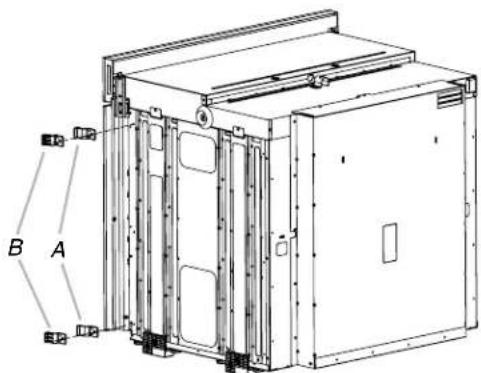
A. Plastic spacer
B. New plastic spacer
- In the same manner, remove and replace the 2 plastic spacers on the left side of the oven.
natural_image
Pure technical line drawing of a mechanical bracket or housing (no text or symbols)B. New plastic spacer
Replace Plastic Spacers on Double Ovens
- Remove the 3 screws, 1 in each spacer, attaching the 3 plastic spacers (A) to the right side of the oven.
- Using the 3 screws removed, install 3 new plastic spacers (B) provided with this kit.
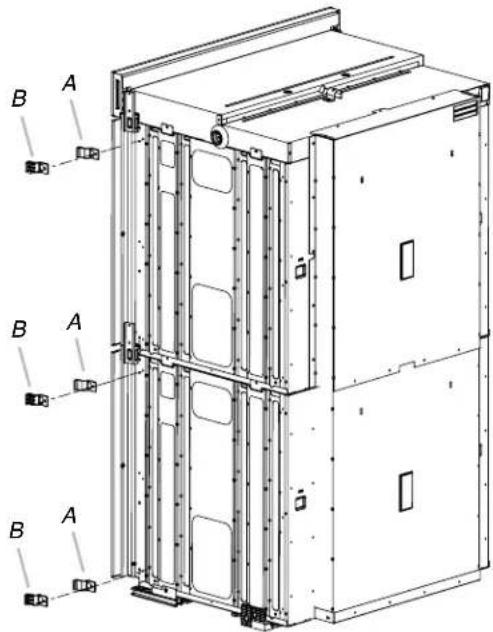
A. Plastic spacer
B. New plastic spacer
- In the same manner, remove and replace the 3 plastic spacers on the left side of the oven.
Install Oven
- Using 2 or more people, lift the oven partially into the cabinet cutout. Use the oven opening as an area to grip.
NOTE: When pushing the microwave oven into the cabinet, open the microwave oven door and push against the seal area on the front frame. Do not push against the outside edges.
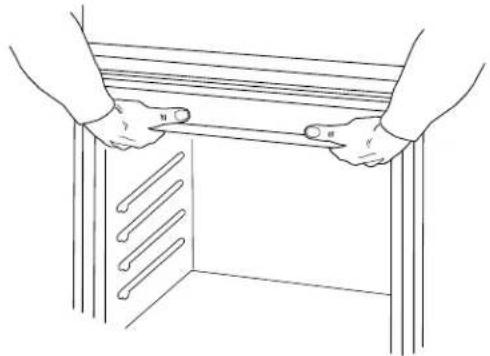
natural_image
Line drawing of two hands holding a wooden table with three parallel bars inside (no text or symbols)- Push against the front frame of the microwave oven to push oven into cabinet.
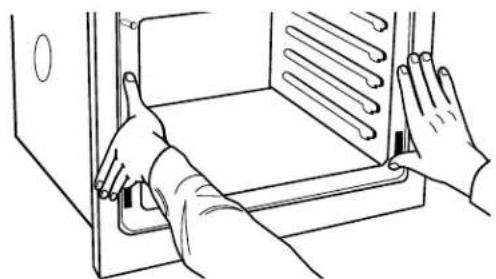
natural_image
Line drawing of hands installing or adjusting a door panel inside a cabinet (no text or symbols)- Push oven completely into the cabinet and center the oven into the cabinet cutout.
-
Remove the tape from the black front trims and remove the zip tie from the mounting spacer.
-
Securely fasten the oven to the cabinet using the #8-14 x 34 " screws provided.
■ Insert the screws through holes in black trim aligning with holes in oven frame and mounting spacer already in place.
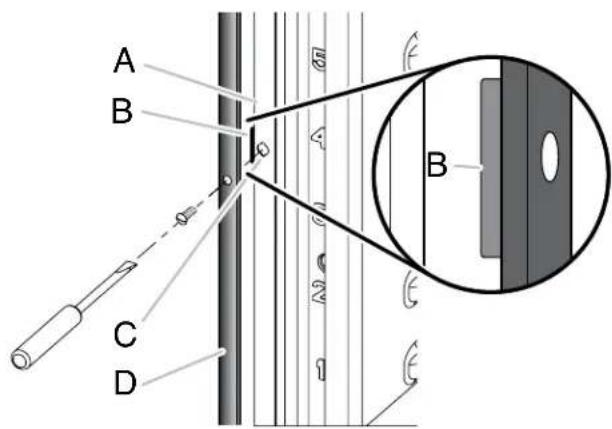
A. Oven Frame
B. Mounting spacer
C. Oven frame hole
D. Black trim piece
Install Deflector Kit Bracket
This assembly is required for use when a single or double built-in oven is installed in a flush installation.
- Flex the upper vent piece (C) away from the lower vent piece (D) to slide the deflector bracket (B) between them. Some force may be required to flex the upper vent trim (C) away from the lower vent trim (D). Some force may also be required to flex the deflector bracket (B) and slide it into position. Make sure screw holes are properly aligned between the 2 pieces. See the following illustration.
- Install the deflector bracket (B) to the lower vent piece (D) using two #8-18 x 14 " screws on each side.
NOTE: On 27" (68.6 cm) models, only one #8-18 x 14 " screw is used on each side.
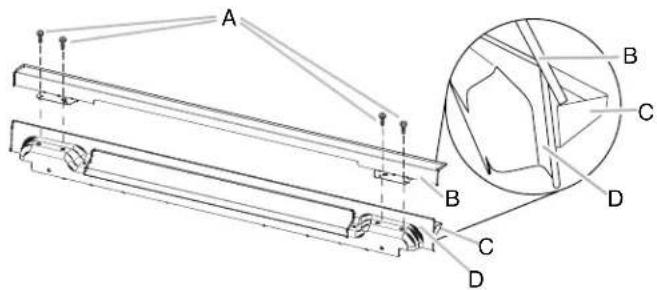
A. #8-18 x 1/4" screws
B. Deflector bracket
C. Upper vent piece (supplied with oven)
D. Lower vent piece (supplied with oven)
- Align vent tab (B) with oven frame (A) as shown in the following illustration.
- Using one #8-18 x 38 " screw (E) on each side of the vent tab (B), fasten the vent securely to the oven.
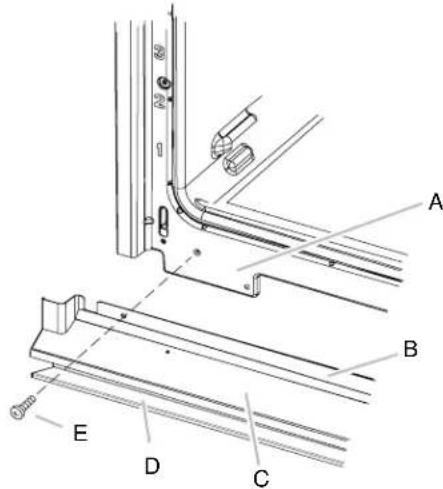
A. Oven frame
B. Vent tab
C. Oven vent
D. Deflector bracket
E. #8-18 x 3/8" screw
- Replace the oven racks.
- Replace the oven door. See the "Replace Oven Door(s)" section.
- Check that the door is free to open and close. If it is not, repeat the removal and installation procedures. See the "Prepare Built-In Oven" section.
- Repeat for lower oven door.
- Reconnect power.
- The display panel will light briefly and "PF" should appear in the display.
- If the display panel does not light, refer to the "Assistance on Service" section of the Use and Care Guide provided with your built-in oven or contact the dealer from whom you purchased your oven.
Complete Installation
- Check that all parts are now installed. If there is an extra part, go back through the steps to see which step was skipped.
- Check that you have all of your tools.
- Dispose of/recycle all packaging materials.
- For oven use and cleaning, read the Use and Care Guide.
Check Operation of Single and Double Ovens
- Turn on power.
- At first use, set up the clock and any other preferences if available. For more information, read the Use and Care Guide.
- Press BROIL on single oven models. NOTE: Press UPPER BROIL or LOWER BROIL on double oven models.
- Set the temperature.
- Press START.
If oven(s) does not operate, check the following:
■ Household fuse is intact and tight or circuit breaker. has not tripped.
■ Electrical supply is connected.
■ See “Troubleshooting” section in the Use and Care Guide.
- When oven has been on for 5 minutes, feel for heat.
If you do not feel heat or if an error message appears in the display, turn off the oven and contact a qualified technician.
- Press UPPER CANCEL/LOWER CANCEL on double ovens, or press CANCEL on single ovens.
If you need Assistance or Service:
Please reference the "Assistance or Service" section of the Use and Care Guide or contact the dealer from whom you purchased your built-in oven.
SÉCURITÉ DU FOUR ENCASTRÉ
natural_image
Technical line drawing of a metal beam with labeled dimension A (no text or symbols beyond label)Vue de face
natural_image
Line drawing of a hand using a tool to lift a metal bracket (no text or symbols)natural_image
Line drawing of a hand inserting a component into a bracket (no text or symbols)natural_image
Technical line drawing of a mechanical component with labeled point A (no text or symbols beyond label)natural_image
Line drawing of a hand holding a panel with an arrow indicating a step, no text or symbols presentnatural_image
Line drawing of a hand holding a device with an inset showing a close-up of a mechanical component (no text or symbols)natural_image
Technical line drawing of a multi-tiered stainless steel oven or rack unit with labeled components (A), showing internal compartments and mounting brackets (no text or symbols beyond labels)A. Cales d'espacement
natural_image
Technical line drawing of a multi-level industrial container or storage unit (no text or symbols visible)A. Cale d'espacement
B. Pied
C. Vis n° 8-18 x 3/8"
natural_image
Technical line drawing of a multi-tiered industrial oven or rack unit (no text or symbols)natural_image
Line drawing of a mechanical component with three slots and a handle (no text or symbols)natural_image
Line drawing of two hands holding a wooden table with three metal bars inside (no text or symbols)natural_image
Line drawing of hands installing or adjusting a door panel inside a cabinet (no text or symbols)
- INSTALLATION INSTRUCTIONS 27" (68.6 CM) AND 30" (76.2 CM) ELECTRIC SINGLE AND DOUBLE BUILT-IN OVEN FLUSH INSTALLATION KIT
- INSTRUCTIONS D'INSTALLATION D'INSTALLATION ENSEMBLE D'INSTALLATION EN AFFLEUREMENT POUR FOUR ÉLECTRIQUE ENCASTRÉ SIMPLE ET DOUBLE DE 27" (68,6 CM) ET 30" (76,2 CM)
- BUILT-IN OVEN SAFETY
- Your safety and the safety of others are very important.
- DANGER
- WARNING
- INSTALLATION REQUIREMENTS
- Tools and Parts
- Tools Needed
- Parts Supplied With Your Built-In Oven
- Parts Supplied
- Location Requirements
- Deflector Bracket Dimensions
- Cabinet Dimensions - Single Ovens, Flush Installations
- Single Ovens Installed in Cabinet - Flush Installation
- 27" (68.6 cm) Models
- 30" (76.2 cm) Models
- Single Ovens Undercounter - Flush Installations (without cooktop installed above)
- Cabinet Dimensions - Double Ovens, Flush Installations
- INSTALLATION INSTRUCTIONS
- Prepare Built-In Oven
- NOTES:
- Remove Oven Door(s)
- Replace Oven Door(s)
- Positioning Oven Feet
- Single Ovens
- Double Ovens
- Replace Plastic Spacers
- Replace Plastic Spacers on Single Ovens
- Replace Plastic Spacers on Double Ovens
- Install Oven
- Install Deflector Kit Bracket
- Complete Installation
- Check Operation of Single and Double Ovens
- If oven(s) does not operate, check the following:
- If you need Assistance or Service:
- SÉCURITÉ DU FOUR ENCASTRÉ
Brand : MAYTAG
Model : W10791229
Category : Oven