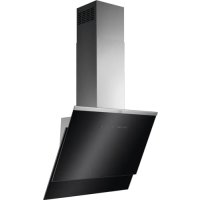
USER MANUAL DVE5671HG ELECTROLUX
DVE5971HG
DVE5971HB
GD5961V
DD5961V
DVE5671HG
GD5661V
DD5661V
PËRMBAJTJA
- INFORMACIONI I SIGURISË DHE INSTALIMI....2
- PËRSHKRIM I PRODUKTIT....3
- PËRDORIMI I PËRDITSHËM.... 3
- KUJDESI DHE PASTRIMI.... 4
PËR REZULTATE TË SHKËLQYERA
www.aeg.com/webselfservice

2. PËRSHKRIM I PRODUKTIT
3.2 Funksioni "Hob to Hood"

www.aeg.com/webselfservice

www.aeg.com/webselfservice

Registriranje vašeg proizvoda za bolji servis:
www.registeraeg.com

Kupujte dodatnu opremu, potrošni materijal i originalne rezervne dijele za svoj uređaj:
www.aeg.com/shop
BRIGA O KUPCIMA I SERVIS
1 Uklj./isklj.
2 Prva brzina motora
3 Druga brzina motora
4 Treća brzina motora
5 Maksimalna brzina motora
6 Funkcija Breeze
7 Podsjetnik za filtar
8 Funkcija za prebacivanje iz ploče za kuhanje u napu
9 Žarulja
3. SVAKODNEVNA UPORABA
3.1 Uporaba nape
- Pritisnite ručku montažne kopče na ploči filtra ispod nape (1).

- Lagano magnite prednji dio filtra prema dolje (2), a zatim ga povucite. Ponovite prva dva koraka za sve filtre.
- Očistite filtre pomoću spužve s deterdžentima koji nisu abrazivni ili u stroju za pranje posuđa.

www.aeg.com/webselfservice

www.aeg.com/webselfservice

Registrere dit produkt for bedre service:
www.registeraeg.com

- Tryk på grebet til monteringsclipsen på filterpanelet under emhætten (1).

www.aeg.com/webselfservice
- SAFETY INFORMATION AND INSTALLATION....31
- PRODUCT DESCRIPTION....32
- DAILY USE....32
- CARE AND CLEANING....33
FOR PERFECT RESULTS
Thank you for choosing this AEG product. We have created it to give you impeccable performance for many years, with innovative technologies that help make life simpler - features you might not find on ordinary appliances. Please spend a few minutes reading to get the very best from it.
Visit our website for:

Get usage advice, brochures, trouble shooter, service information:
www.aeg.com/webselfservice

Register your product for better service:
www.registeraeg.com

Buy Accessories, Consumables and Original spare parts for your appliance:
www.aeg.com/shop
CUSTOMER CARE AND SERVICE
Always use original spare parts.
When contacting our Authorised Service Centre, ensure that you have the following data available: Model, PNC, Serial Number.
The information can be found on the rating plate.
⚠ Warning / Caution-Safety information
i General information and tips
Environmental information
Subject to change without notice.

WARNING!
Refer to the separate Installation Instructions booklet for Safety
Information and Installation. Read carefully the Safety chapters before any use or maintenance of the appliance.
2. PRODUCT DESCRIPTION
2.1 Control panel overview

1 On / Off
2 First motor speed
3 Second motor speed
4 Third motor speed
5 Maximum motor speed
6 Breeze function
7 Filter reminder
8 Hob to Hood function
9 Lamp
3. DAILY USE
3.1 Using the hood
Check the recommended speed according to the table below.
| Y1 | While heating up food, cooking with covered pots. |
| Y2 | While cooking with covered pots on multiple cooking zones or burners, gentle frying. |
| Y3 | While boiling, frying big quantities of food without a lid, cooking on multiple cooking zones or burners. |
| While boiling, frying big quantities of food without a lid, big humidity. The hood operates on maximum speed. After 8 minutes the appliance returns to previous setting. |
| While delicate cooking, to vent the kitchen. The hood operates on the lowest speed. After 60 minutes the appliance turns off. |

It is recommended to leave the hood operating for approximately 15 minutes after cooking.

The control Panel is a sensor field. Touch the symbols to activate the functions.
To operate the hood:
- Turn on the appliance by pressing the Ⓐ symbol.
You can now activate the functions.
-
To activate the function touch the symbol.
-
If needed, touch the light symbol to illuminate the cooking surface. To change the light intensity touch and hold the symbol again.

To turn off the appliance press the ① symbol again.
3.2 Hob to Hood function
It is an automatic function which connects the hob with a hood. Both the hob and the hood have an infrared signal communicator. Speed of the fan is defined automatically on basis of mode setting and temperature of the hottest cookware on the hob. You can also operate the fan using the hob manually. The function can be activated from panel of the hob.
i
For more information how to use the function refer to the hob user manual.
3.3 Activating Maximum Motor Speed
When you press the button 🚗 the Maximum Motor Speed starts to operate for 6 minutes. After that time, the appliance returns to its previous speed settings.
i
When the function is turned on, additional touch on the button ✏ does not have any effects.
4. CARE AND CLEANING
4.1 Cleaning the grease filter
Each filter must be cleaned at least once a month. Filters are mounted with the use of clips and pins on the opposite side.
To clean the filter:
- Pull the cover to open it.

3.4 Activating and deactivating the filter notification
Filter alarm reminds to change or clean the charcoal filter and clean the grease filter. The filter indicator is turned on (red) for 30 seconds if the grease filter must be cleaned. The filter indicator flashes (red) for 30 seconds if the charcoal filter must be replaced or cleaned.
i
Refer to filter alarm in care and cleaning chapter.
- Switch on the control panel.
- Make sure that the icons are turned off.
- To activate or deactivate the charcoal filter notification touch 🎨 for 3 seconds.
i
If the charcoal filter notification is activated, the filter icon ● flashes (red) five times.
i
If the charcoal filter notification is deactivated, the filter icon ● flashes (red) three times.
- Press the handle of the mounting clip on the filter panel underneath the hood (1).

-
Slightly tilt the front of the filter downwards (2), then pull.
Repeat the first two steps for all filters.
-
Clean the filters using a sponge with non abrasive detergents or in a dishwasher.

The dishwasher must be set to a low temperature and a short cycle. The grease filter may discolour, it has no influence on the performance of the appliance.
- To mount the filters back follow the first two steps in reverse order. Repeat the steps for all filters if applicable.
4.2 Replacing the charcoal filter
The charcoal filter must be replaced if the filter alarm is on.

Refer to the filter alarm in this chapter.
The time of saturation of the charcoal filter varies depending on the type of cooking and the regularity of cleaning the grease filter.

WARNING!
The charcoal filter is NON-washable! The filter cannot be regenerated!
To replace the charcoal filter:
- Remove the grease filters from the appliance.
Refer to "Cleaning the grease filter" in this chapter.
- Turn the filter counterclockwise (1) and then pull (2).

To mount the filters back follow the steps in reverse order.
4.3 Filter alarm

Refer to activating and deactivating the filter alarm in daily use chapter.

Refer to cleaning the grease filter in this chapter.

Refer to cleaning the charcoal filter or replacing the charcoal filter (depends on filter type).
To reset the alarm:
Touch the Ⓗ for 3 seconds.
4.4 Replacing the lamp
This appliance is supplied with a LED lamp. This part can be replaced by a technician only. In case of any malfunction refer to "Service" in the "Safety Instructions" chapter.
5. ENVIRONMENTAL CONCERNS
Recycle materials with the symbol Put the packaging in relevant containers to recycle it. Help protect the environment and human health by recycling waste of electrical and electronic appliances. Do not dispose of
appliances marked with the symbol 📁 with the household waste. Return the product to your local recycling facility or contact your municipal office.
SISUKORD
- OHUTUSINFO JA PAIGALDAMINE....35
- TOOTE KIRJELDUS....36
- IGAPÄEVANE KASUTAMINE....36
- PUHASTUS JA HOOLDUS....37
PARIMATE TULEMUSTE SAAVUTAMISEKS
www.aeg.com/webselfservice

www.aeg.com/webselfservice

www.aeg.com/webselfservice

www.aeg.com/webselfservice
www.aeg.com/webselfservice

www.aeg.com/webselfservice

www.aeg.com/webselfservice
www.aeg.com/webselfservice
www.aeg.com/webselfservice

www.aeg.com/webselfservice
www.aeg.com/webselfservice

www.aeg.com/webselfservice

www.aeg.com/webselfservice

www.aeg.com/webselfservice
3.2 Função "Hob to Hood"
www.aeg.com/webselfservice
www.aeg.com/webselfservice
www.aeg.com/webselfservice

- Притисните ручку затеге за монтажу на панелу филтера испод аспиратора (1).

www.aeg.com/webselfservice
www.aeg.com/webselfservice

3.4 Vklop in izklop opozorila za filter
www.aeg.com/webselfservice

www.aeg.com/webselfservice

www.aeg.com/webselfservice
www.aeg.com/webselfservice

5. المخاوف البئية
www.aeg.com/webselfservice