ManualGo.com
W7X 83T KS - Fridge WHIRLPOOL - Free user manual and instructions
Find the device manual for free W7X 83T KS WHIRLPOOL in PDF.



Download the instructions for your Fridge in PDF format for free! Find your manual W7X 83T KS - WHIRLPOOL and take your electronic device back in hand. On this page are published all the documents necessary for the use of your device. W7X 83T KS by WHIRLPOOL.
USER MANUAL W7X 83T KS WHIRLPOOL
- Available only on certain models THANK YOU FOR BUYING A WHIRLPOOL PRODUCT In order to receive a more complete assistance, please register your product on www . whirlpool . eu/ register Before using the appliance carefully read the Safety Instruction.
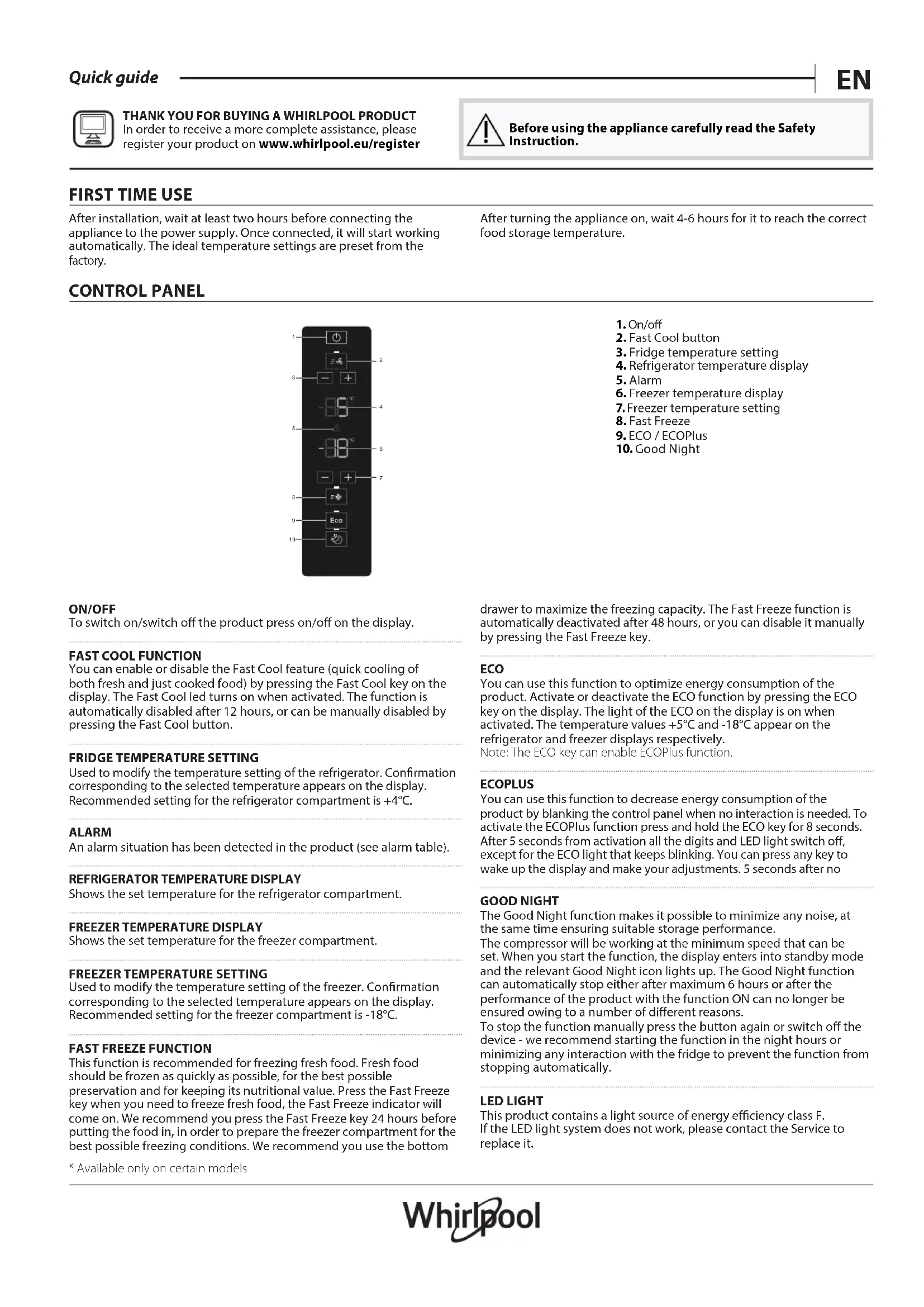
After installation, wait at least two hours before connecting the appliance to the power supply. Once connected, it will start working automatically. The ideal temperature settings are preset from the factory. After turning the appliance on, wait 4-6 hours for it to reach the correct food storage temperature. CONTROL PANEL
3. Fridge temperature setting
7. Freezer temperature setting
ON/OFF To switch on/switch o the product press on/o on the display.
You can enable or disable the Fast Cool feature (quick cooling of both fresh and just cooked food) by pressing the Fast Cool key on the display. The Fast Cool led turns on when activated. The function is automatically disabled after 12 hours, or can be manually disabled by pressing the Fast Cool button.
FRIDGE TEMPERATURE SETTING
Used to modify the temperature setting of the refrigerator. Conrmation corresponding to the selected temperature appears on the display. Recommended setting for the refrigerator compartment is +4°C. ALARM An alarm situation has been detected in the product (see alarm table).
REFRIGERATOR TEMPERATURE DISPLAY
Shows the set temperature for the refrigerator compartment.
FREEZER TEMPERATURE DISPLAY
Shows the set temperature for the freezer compartment.
FREEZER TEMPERATURE SETTING
Used to modify the temperature setting of the freezer. Conrmation corresponding to the selected temperature appears on the display. Recommended setting for the freezer compartment is -18°C.
FAST FREEZE FUNCTION
This function is recommended for freezing fresh food. Fresh food should be frozen as quickly as possible, for the best possible preservation and for keeping its nutritional value. Press the Fast Freeze key when you need to freeze fresh food, the Fast Freeze indicator will come on. We recommend you press the Fast Freeze key 24 hours before putting the food in, in order to prepare the freezer compartment for the best possible freezing conditions. We recommend you use the bottom drawer to maximize the freezing capacity. The Fast Freeze function is automatically deactivated after 48 hours, or you can disable it manually by pressing the Fast Freeze key. ECO You can use this function to optimize energy consumption of the product. Activate or deactivate the ECO function by pressing the ECO key on the display. The light of the ECO on the display is on when activated. The temperature values +5°C and -18°C appear on the refrigerator and freezer displays respectively. Note: The ECO key can enable ECOPlus function. ECOPLUS You can use this function to decrease energy consumption of the product by blanking the control panel when no interaction is needed. To activate the ECOPlus function press and hold the ECO key for 8 seconds. After 5 seconds from activation all the digits and LED light switch o, except for the ECO light that keeps blinking. You can press any key to wake up the display and make your adjustments. 5 seconds after no GOOD NIGHT The Good Night function makes it possible to minimize any noise, at the same time ensuring suitable storage performance. The compressor will be working at the minimum speed that can be set. When you start the function, the display enters into standby mode and the relevant Good Night icon lights up. The Good Night function can automatically stop either after maximum 6 hours or after the performance of the product with the function ON can no longer be ensured owing to a number of dierent reasons. To stop the function manually press the button again or switch o the device - we recommend starting the function in the night hours or minimizing any interaction with the fridge to prevent the function from stopping automatically. LED LIGHT This product contains a light source of energy eciency class F. If the LED light system does not work, please contact the Service to replace it.HOW TO STORE FRESH FOOD AND BEVERAGES
- The number and type of door balconies depends on the model Legend TEMPERATE ZONE Suggested for storage of tropical fruit, cans, drinks, eggs, sauces, pickles, butter, jam COOL ZONE Suggested for the storage of cheese, milk, daily food, delicatessen, yogurt COOLEST AREA a) Suggested for storage of cold cuts, desserts, meat and sh b) Suggested for storage of meat and sh. The drawer available only on certain model
FRUIT & VEGETABLE DRAWER
FREEZER DRAWERS (One drawer in models lower than 1,7m)
FREEZING ZONE DRAWER
(Max cool zone) Suggested to freeze fresh / cooked food REFRIGERATION COMPARTMENT Refrigerator compartment defrosting is completely automatic. Droplets of water on the rear wall inside the refrigerator compartment indicate that the automatic defrost phase is in progress. The defrost water is automatically run into a drain hole and collected in a container, where it evaporates. Fresh Box 0°C drawer * The Fresh Box 0°C it is a drawer (b) ideal to store meat and sh. By decreasing/increasing the fridge temperature, you impact the Fresh Box 0°C compartment temperature as well. Keep in mind that this compartment is a mechanical feature operating all the time and it cannot be switched o. Humidity Control* Turn on the humidity regulator (position B) if you want to store food in a less humid environment, like fruit, or turn it o (position A) if you want to store food in a more humid environment, like vegetables.
Foldable shelf* This shelf can be used in three dierent ways:
1. Full-depth, to use the entire surface.
Half-depth, to use the rear part and at the same time create space for taller items (like bottles and jugs) on the shelf below. To adjust the shelf to half-depth, slightly raise the front part then pull it in.
Flipped up if you need to make space for tall or bulky items on the shelf below. To ip the shelf up, rst adjust it to the halfway position from half-depth. Flip the shelf down to go back to using it in half-depth and full-depth.
- Available only on certain models Important: The refrigerator compartment light switches on when the refrigerator door is opened. If the door is kept open for more than 8 minutes the light will be automatically switched o. 6th SENSE This function automatically works to ensure the optimal conditions to preserve the stored food. The “6th Sense” function is automatically activated when:
- a large amount of food is loaded into the refrigerator
- the refrigerator door is left open for a long time
- a prolonged power failure takes place, causing the internal temperature of the appliance to increase to values that cannot guarantee safe storage of food.FREEZER COMPARTMENT Total No Frost freezers provide chilled air circulation around the storage areas, and prevent the formation of ice, thereby completely eliminating the need for defrosting. Frozen items don’t stick to the walls, labeling stays legible and storage space remains neat and clear. The freezer compartment allows for the storage of frozen food and the freezing of fresh food. The quantity of fresh food that can be frozen in a specic time period is indicated on the rating plate. Arrange the fresh food in the freezing area inside the freezer compartment, leaving enough space around it to allow air to circulate freely. Avoid allowing fresh food to come into direct contact with frozen food. Load limits are determined by baskets, aps, drawers, shelves etc.. Make sure that these components can still close easily after loading. The freezing zone's drawer/compartment is shown in the picture above. To optimize freezing speed and get more storage space, the freezer compartment can be used without the freezer drawers and the food can be placed directly on the bottom of the compartment. To avoid food waste, please refer to the recommended setting and storage found in the online user manual. Ice cubes Fill 2/3 of the ice tray with water and place it back in the freezer compartment. Do not use sharp or pointed objects to remove the ice. ACCESSORIES* EGG TRAY ICE TRAY BOTTLE RACK FOLDABLE SHELF GENERAL INFORMATION The drawers, baskets, and shelves should be kept in their current position unless otherwise specied in this quick guide. The light system inside the refrigerator compartment uses LED lights, which provide better lighting and use less energy than traditional bulbs. Doors and lids of the refrigerator should be removed before disposal, to avoid children or animals getting trapped inside. TROUBLESHOOTING What to do if... Possible reasons Solutions The appliance is not working. There may be an appliance power supply problem.
- Check if power cable plugged into a live socket with the proper voltage.
- Check if the protection devices and fuses of the electrical system in your home There is water in the defrost pan. This is normal in hot, damp weather. The pan can even be half full.
- Make sure the appliance is level so that the water does not overow. The edges of the appliance cabinet, which come in contact with the door seal, are warm to the touch. This is not a defect. This is normal in hot weather and when the compressor is running. The light does not work. The light may need replacing. The appliance may be in On/ Stand-by model.
- Make sure if the protection devices and fuses of the electrical system in your home work well.
- Check if the power cable is plugged into a live socket with the proper voltage
- In case the LEDs are broken the user must call the Service for exchange of the same type available only at our Aftersales Service Centers or authorized dealers. The motor seems to run too much. Motor running time depends on dierent things: number of door openings, amount of food stored, temperature of the room, setting of the temperature controls.
- Make sure that the appliance controls are correctly set.
- Check if there is not a large amount of food been added to the appliance.
- Check that the door is not opened too often.
- Check that the door close properly. The appliance temperature is too high. There could be various causes (see “Solutions”).
- Make sure that the condenser (back the appliance) is free of dust and u.
- Make sure that the door properly closed.
- Make sure that the door seals properly tted.
- On hot days or if the room is warm, the motor naturally runs longer.
- If the appliance door has been left open for a while or if large amounts of food have been stored, the motor will run longer in order to cool down the interior of the appliance. The doors do not open and close properly. There could be various causes (see “Solutions”).
- Check that food packages are not blocking the door.
- Check that the internal parts or automatic ice maker are not out of position.
- Check that the door seals are not dirty or sticky.
- Ensure the appliance is level.* Available only on certain models ALARM TABLE Alarm type Signal Cause Cure Door open alarm. The acoustical alarm is activated. Alarm icon on the display blinks fast and the internal lamp blinks slowly. The refrigerator door has remained open for more than two minutes. The buzzer will stop sounding when you shut the door. Temperature alarm. The acoustical alarm is activated. Alarm icon on the display blinks fast. “A1” is displayed instead of the freezer temperature. The doors do not close properly or the seals are damaged. The doors are open too frequently. The refrigerator or the freezer have been over-lled. The temperature inside the freezer is too high. The freezer will maintain a temperature of around 0°C so that the food will not refreeze, allowing you to eat it within 24 hours or to refreeze it after it has been cooked. To switch o the buzzer, open and close the appliance door or press the + and – freezer temperature adjustment buttons once. Press these buttons a second time to switch o the Alarm icon on the display and set the value on the Freezer display. Temperature alarm. The acoustical alarm is activated. Alarm icon on the display blinks fast. “A2” is displayed instead of the freezer temperature. The doors do not close properly or the seals are damaged. The doors are open too frequently. The refrigerator or the freezer have been over-lled. The temperature of the freezer is dangerously high: the food inside must not be eaten. To switch o the buzzer, open and close the appliance door or press the + and – freezer temperature adjustment buttons once. Press these buttons a second time to switch o the Alarm icon on the display and set the value on the Freezer display. Policies, standard documentation, ordering of spare parts and additional product information can be found by:
- Visiting our website docs . whirlpool . eu / docs and parts - selfservice . europeanappliances .com
- Alternatively, contact our After-sales Service (See phone number in the warranty booklet). When contacting our After-sales Service, please state the codes provided on your product's identication plate. You can nd more information about your model online at https://eprel.ec.europa.eu/ which is the ocial EU EPREL product database. After selecting the product category, search for the model using the Model identier of the product. The Model identier is made up of letters and numbers and can be found on its rating plate, as Mod. (see image on the right). ®/TM/© 2024 Whirlpool. Produced under license. ART 3642 220-240 V R600a 58 g